
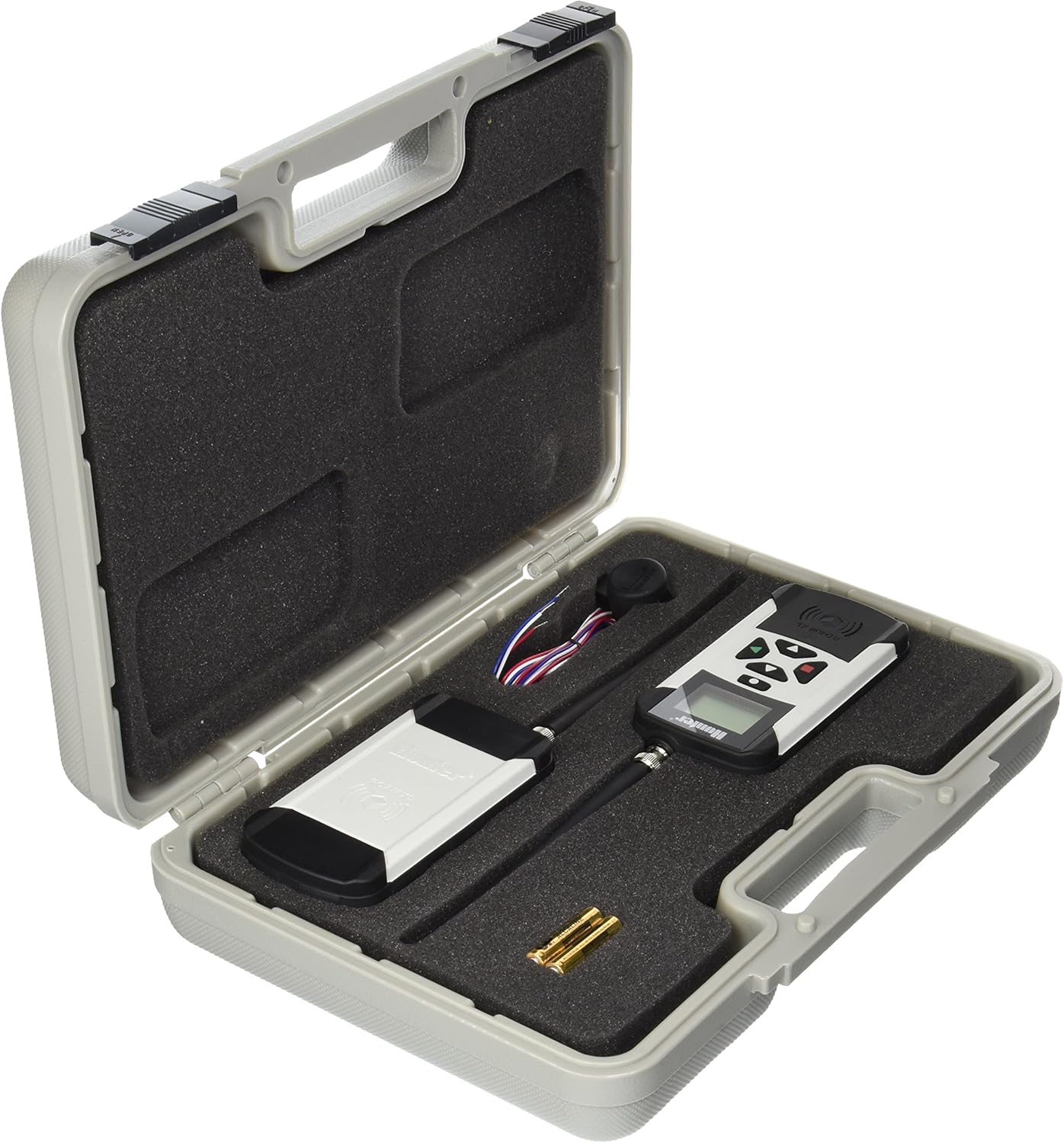
?Are you considering the Hunter Sprinkler ROAMXLKIT Roam XL Irrigation Controller Transmitter and Receiver for your irrigation setup and want a thorough, user-friendly review before you commit?

Buy Hunter ROAMXLKIT Roam XL Transmitter Receiver On Amazon
Overview
You’ll find the Hunter Sprinkler ROAMXLKIT Roam XL Irrigation Controller Transmitter and Receiver is positioned as a high-powered, compact remote solution for irrigation controllers. It’s designed to let you operate a compatible Hunter controller remotely, providing convenience whether you manage a residential yard or a larger commercial landscape.
You should know the Roam XL supports up to 128 different programmable addresses and, in line-of-sight conditions, can operate up to two miles from the controller. The unit is a single compact transmitter/receiver pair intended to plug into and communicate with any Hunter controller that includes a SmartPort connector, giving you flexible remote access without additional bulky hardware.
Hunter Sprinkler ROAMXLKIT Roam XL Irrigation Controller Transmitter and Receiver
Key Features
This section highlights the headline capabilities you’ll care about when deciding whether the Roam XL fits your needs. Each feature combines to deliver remote access, address flexibility, and a user-oriented interface.
Range and Signal Strength
You’ll get up to two miles of operation in clear line-of-sight conditions, which is one of the Roam XL’s standout features. In built environments, trees, buildings, and terrain can reduce that distance significantly, so expect shorter effective range in obstructed situations.
Addressing and Capacity
The Roam XL supports 128 programmable addresses, allowing you to control many controllers or multiple stations on separate addresses. That address capacity makes it practical for property managers, irrigation contractors, and multi-controller installations where you want a single remote to cover many devices.
Interface and Usability
You’ll appreciate the simple user interface that Hunter designed for common irrigation tasks like starting zones or running programs manually. The control layout is compact and direct, minimizing the learning curve so you can operate the system without scrolling through complex menus.
Form Factor and Build
You’ll notice the Roam XL is a compact, single-unit remote; the transmitter and receiver are integrated in a way that’s meant to be convenient for field use. The build is robust for outdoor handling, but you should still protect it from extreme weather and prolonged exposure to moisture.
Compatibility and Connectivity
You’ll plug the Roam XL into any Hunter controller that includes a SmartPort connector, which is a common feature on many Hunter models. If your controller lacks a SmartPort or is from another brand, you’ll need to verify compatibility or consider adapters and alternative remote options.
Technical Specifications (At-a-glance)
You’ll find this table handy for a quick reference to the Roam XL’s main specifications. It condenses the key points so you can compare features or check fit for your application quickly.
| Specification | Detail |
|---|---|
| Product Name | Hunter Sprinkler ROAMXLKIT Roam XL Irrigation Controller Transmitter and Receiver |
| Programmable Addresses | Up to 128 addresses |
| Maximum Range (line-of-sight) | Up to 2 miles |
| Interface | Simple, compact user interface |
| Compatibility | Any Hunter controller with SmartPort connector |
| Unit Type | Single compact transmitter/receiver unit |
| Typical Uses | Residential, commercial, landscape maintenance, irrigation contract work |
| Included Items | Roam XL transmitter/receiver kit (check packaging for exact contents) |
| Durability | Designed for field use; protect from harsh weather conditions |
You’ll want to check the packaging or product listing for the exact items included in the kit as shipments sometimes list accessories or cables that vary by retailer.
Purchase Hunter Roam XL Transmitter & Receiver
Performance in Real-World Conditions
You’ll likely judge the Roam XL primarily on how reliably it communicates under typical site conditions, and on its responsiveness when you send commands. In many situations, users report stable performance within expected ranges, but your environment will determine the real-world experience.
You’ll see the best results in open environments where line-of-sight is maintained between the remote and controller. In suburban yards, golf course settings, or sites with heavy foliage and structures, you’ll want to plan for reduced range and may need to position the controller or remote to maximize signal line-of-sight.
Installation and Setup
You’ll find installation straightforward if you’re accustomed to working with irrigation controllers, but even if you’re new to this, the steps are manageable with a little patience. The Roam XL plugs into the SmartPort connector on compatible Hunter controllers, and programming addresses takes just a few menu steps.
You’ll start by assigning addresses to the remote and matching those addresses on the controller, ensuring the transmitter and receiver “see” each other. If you’re deploying multiple addresses or using the unit across several controllers, keep a simple address log so you don’t accidentally reassign or overlap addresses during setup.
Step-by-step Setup Tips
You’ll appreciate having a concise sequence when you set up the Roam XL: 1) Locate the SmartPort on your Hunter controller; 2) Power down the controller per the manual’s safety instructions; 3) Insert the Roam XL receiver into the SmartPort; 4) Power up the controller and follow the address programming prompts; 5) Program the transmitter to match the chosen address. Take your time to verify each step and consult the Hunter manual if something looks different on your controller model.
You’ll want to test basic commands before you finalize installation to confirm remote starts, stops, and zone advances work as expected. Performing a walk-test with the transmitter will let you identify signal dead zones and plan for physical adjustments or placement changes.
Programming and Daily Operation
You’ll likely interact with the Roam XL by selecting addresses, starting stations, and running manual programs during routine maintenance or troubleshooting. The simple display and controls are designed so these actions are quick and repeatable, saving you time in the field.
You’ll program addresses in a way that fits your workflow—assign one address per controller or multiple addresses for grouped control. Make a habit of labeling addresses clearly on a central log or map so you and other users can avoid confusion when multiple people manage irrigation schedules across a property.
Common Commands You’ll Use
You’ll frequently use commands for manual station start, program start, stop, and master valve control (if configured). You’ll also appreciate the ability to run specific runtimes for stations directly from the transmitter rather than altering the controller’s scheduled programs.
You’ll benefit from learning how to quickly navigate the interface during rain checks or when you need to pause irrigation for property maintenance. A little practice with the layout will make these operations second nature.

Compatibility with Controllers and Accessories
You’ll expect the Roam XL to integrate smoothly with Hunter controllers that offer a SmartPort connector, which includes many Hunter models. If your system is older or from a different manufacturer, you’ll need to confirm whether you can add a compatible SmartPort or use an alternate remote system.
You’ll also want to verify accessory compatibility such as expansion modules, master valve wiring, and any local control panels. When in doubt, contact Hunter support or consult the controller’s manual to ensure the Roam XL will communicate correctly with your existing setup.
Pros and Cons
You’ll appreciate a straightforward pros-and-cons breakdown when making a purchase decision. This helps you weigh the Roam XL’s strengths against potential limitations in a realistic way.
Pros
You’ll enjoy the long line-of-sight range for broad coverage, the ability to program up to 128 addresses, and its compact, single-unit design that keeps things simple. You’ll also find the interface user-friendly, making routine tasks faster and easier to perform on site.
Cons
You’ll need to accept that range is highly dependent on line-of-sight and environmental interference, so you may not consistently reach two miles in obstructed areas. You’ll also be limited to controllers with SmartPort compatibility, and the unit may cost more than simpler, short-range remotes.
You’ll want to compare these trade-offs against your site requirements and budget before committing, especially if you manage a range of landscapes with varying obstructions.
Comparison with Alternatives
You’ll consider alternatives like simpler short-range remotes, smartphone-enabled Wi-Fi/Bluetooth controllers, or other Hunter remote models when choosing the Roam XL. Each alternative offers different strengths, such as lower price, app integration, or a focus on long-range commercial use.
You’ll find the Roam XL sits between basic handheld remotes and full telemetry systems: it provides field-proven remote control without the need for cellular or complex networked infrastructure. If you prefer smartphone control and push notifications, you’ll want to evaluate Hunter’s Wi-Fi or cloud integrations as a complementary or alternative option.
How It Stacks Up Against Short-Range Remotes
You’ll notice short-range remotes are often cheaper and suffice for small properties, but they don’t offer the broadened address capacity or extended range the Roam XL provides. If your need is to manage many controllers across a larger site, the Roam XL will usually be more efficient than a short-range alternative.
How It Compares to Networked Solutions
You’ll find networked or cellular irrigation solutions offer remote programming and alerts with more modern UX, but they rely on Wi-Fi or cellular service and can involve recurring fees. You’ll value the Roam XL if you want reliable field control that’s independent of network availability, especially in remote or rural areas.
Typical Use Cases
You’ll see the Roam XL excel in professional irrigation maintenance, property management, golf courses, and any multi-controller sites where you want a single handheld to address many controllers. You’ll also find it useful for troubleshooting and testing irrigation zones without walking back and forth to the controller.
You’ll use it during seasonal audits, winterization checks, or when doing lawn repairs that require temporary manual control of zones. For contractors, the address capacity means you can carry one Roam XL and service many different controllers across job sites.
Troubleshooting Common Issues
You’ll encounter a few recurring issues in the field like limited range, intermittent communication, or address mismatches, but most are solvable with methodical checks. Start with simple steps: confirm batteries, verify SmartPort connection, and ensure the transmitter/receiver addresses match.
You’ll also want to check for local interference from other equipment, dense foliage, or metal obstructions that could block signals. If you’ve verified basic items and still have issues, resetting addresses or power cycling the controller often resolves transient communication faults.
Steps to Fix No-Communication Problems
You’ll follow a checklist when the remote won’t communicate: 1) Confirm the controller is powered; 2) Re-seat the Roam XL receiver in the SmartPort; 3) Check the transmitter battery and antenna; 4) Ensure both units share the same programmed address; 5) Test within a short distance to isolate range issues; 6) Consult the manual for diagnostic LEDs or error codes. These steps usually reveal whether the issue is hardware, address configuration, or environmental.
You’ll keep documentation of address assignments and any changes you make to simplify diagnosis if issues recur later.
Practical Tips for Best Performance
You’ll get the most reliable operation by maintaining line-of-sight when possible, avoiding dense cover, and positioning the controller in a higher or unobstructed location. You’ll also benefit from carrying spare batteries and a protective case to limit wear from field use.
You’ll plan your address scheme before programming to avoid conflicts, and you’ll label each controller or site with the assigned address so other team members can operate without guesswork. Routine field tests before peak irrigation seasons will also help catch problems early.
Maintenance and Longevity
You’ll want to keep the Roam XL clean, dry, and protected from prolonged exposure to harsh weather conditions to extend its service life. Regularly inspect connectors, the SmartPort plug area, and the transmitter antennas for wear and corrosion and address any issues promptly.
You’ll also replace batteries on a regular schedule or keep a battery-monitoring routine to avoid downtime during critical irrigation cycles. Keeping the contacts clean and storing the unit in a controlled environment when not in use will maximize longevity.
Security and Interference Considerations
You’ll be aware that radio remotes operate in shared spaces and can be affected by electronic interference or other devices transmitting on similar frequencies. You’ll reduce potential problems by ensuring address settings are unique and by staying mindful of heavy machinery or electrical equipment that can create noise in the signal path.
You’ll also protect your remote from unauthorized use by limiting who has access to the transmitter and by logging addresses and users where possible. For high-security sites, consider combining the Roam XL with procedural controls such as sign-out checklists for the transmitter.
Warranty, Support, and Documentation
You’ll want to verify warranty terms at the time of purchase and keep the original receipt and product registration information handy for service claims. Hunter provides documentation and technical support for their products, and contacting their support team or authorized dealers will help you navigate any unusual setup or operational issues.
You’ll also find helpful resources in the user manual for address programming, troubleshooting steps, and specifications if you need to confirm details in the field.
Cost and Value Considerations
You’ll weigh the Roam XL’s higher upfront cost against the time savings and operational flexibility it brings to routine irrigation work. For professionals or managers who handle multiple controllers or large sites, you’ll quickly recover value through reduced walking time, faster troubleshooting, and consolidated remote management.
You’ll compare this to the lower cost of basic remotes or the ongoing costs of cellular telemetry solutions and choose the option that best matches your operational needs and budget reality.
Who Should Buy the Roam XL
You’ll consider the Roam XL if you manage multiple controllers, handle large properties, or need dependable remote control independent of network connectivity. You’ll also find it attractive if you’re an irrigation contractor who services many client sites and wants a single remote that can communicate with numerous controllers.
You’ll probably skip this model if you only have a single small residential controller or if you require smartphone-based programming and remote access through Wi-Fi or cloud services.
Final Recommendation
You’ll find the Hunter Sprinkler ROAMXLKIT Roam XL Irrigation Controller Transmitter and Receiver to be a powerful, practical tool for professional and serious residential irrigation management. It offers extended line-of-sight range, a large address capacity, and a straightforward interface that will save you time and add flexibility when managing multiple controllers.
You’ll decide to buy the Roam XL if you value robust field control, need to manage multiple sites, or prefer a reliable radio-based solution independent of network infrastructure. If your needs are simpler or you rely heavily on smartphone integration, you’ll weigh other Hunter or third-party options before committing.
Frequently Asked Questions (Short Answers)
You’ll find quick answers here to common questions you may have as you evaluate the Roam XL.
Will the Roam XL work with any Hunter controller?
You’ll use it with any Hunter controller that has a SmartPort connector; check your controller’s manual or labeling to confirm the presence of the SmartPort.
How far does it really reach in everyday use?
You’ll typically see less than the advertised two-mile maximum when obstructions exist; expect shorter distances in residential or wooded areas.
Can multiple remotes be used with one controller?
You’ll usually be able to program multiple transmitters to the same controller by assigning them different or matching addresses, depending on your intended control scheme.
What should you do if the transmitter stops working?
You’ll first check batteries, ensure correct addressing, reseat the receiver, and test at short range; if problems persist, consult Hunter support.
You’ll have a solid basis for deciding whether the Roam XL fits your workflow after reading this review and asking any follow-up questions regarding your specific setup.
Shop The Hunter ROAMXLKIT Roam XL Kit On Amazon
Disclosure: As an Amazon Associate, I earn from qualifying purchases.