
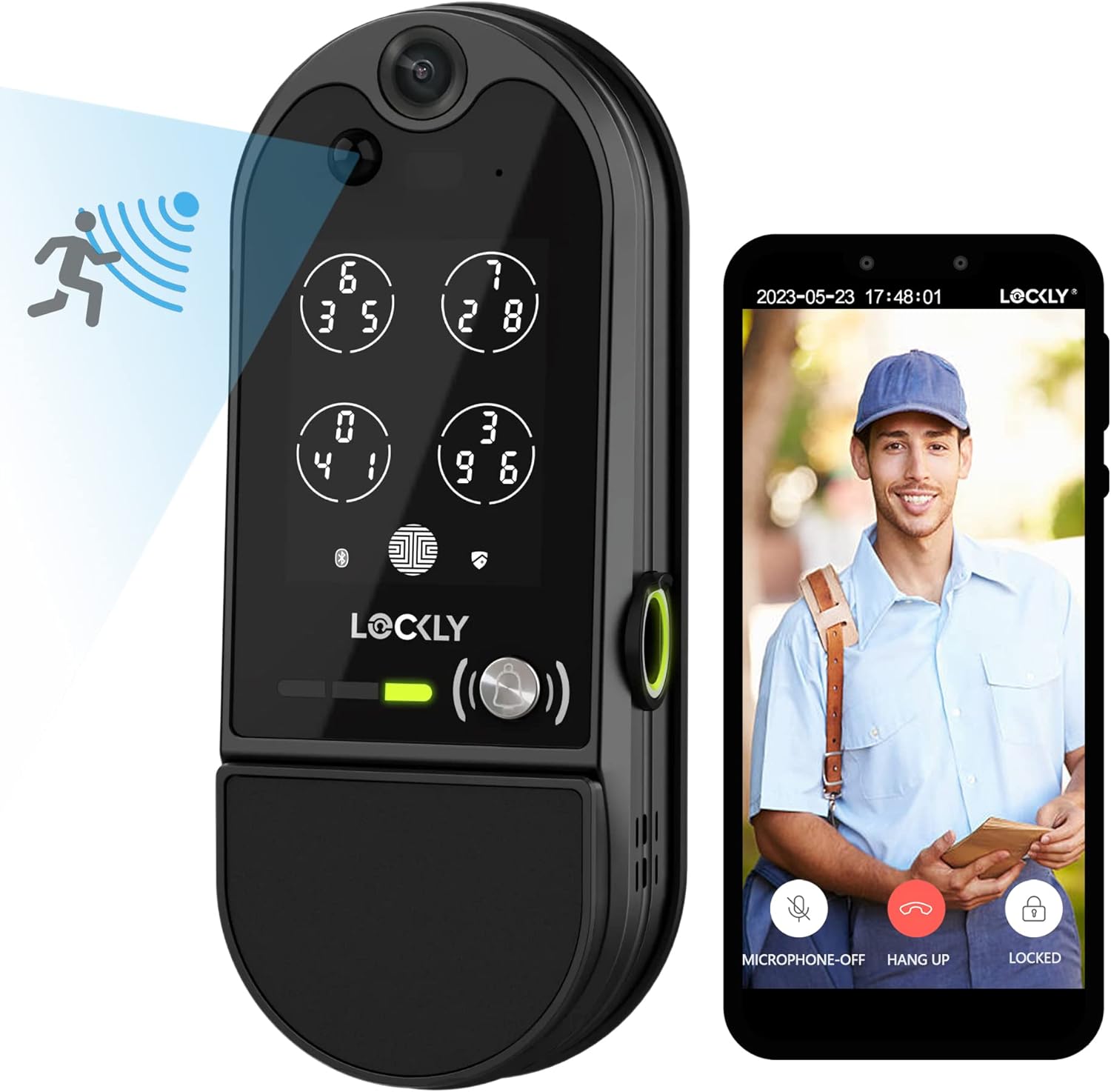
Looking for a smart lock that gives you video, fingerprint access, a solar panel, and multiple convenient ways to open your door?
Buy Lockly Vision Elite On Amazon
Overview of the Lockly Vision Elite – WiFi Video Smart Lock
You’re looking at a hybrid device that combines a smart deadbolt with a built-in Full HD camera and a host of access methods. The Lockly Vision Elite – WiFi Video Smart Lock with Night Vision Camera, Motion Sensor, Biometric Fingerprint, Voice Control, App Remote Control, Doorbell, Solar Panel, Digital Keypad, Matte Black aims to be an all-in-one entry solution for modern homes.
This model is designed to replace a standard deadbolt while adding security, monitoring, and multiple access options. If you value remote control, local storage without subscription fees, and a mix of biometric and traditional entry methods, this is worth a closer look.

Lockly Vision Elite - WiFi Video Smart Lock with Night Vision Camera, Motion Sensor, Biometric Fingerprint, Voice Control, App Remote Control, Doorbell, Solar Panel, Digital Keypad, Matte Black
What’s included in the box
You’ll receive the smart lock hardware, the indoor deadbolt mechanism, mounting hardware, a 32GB microSD card pre-installed for local recording, and a solar panel accessory. Installation tools you already own—like a screwdriver—will usually be enough to get it mounted.
Lockly also includes documentation for setup and a standard rekey kit capability, meaning you can replace the key cylinder without replacing the entire lock if you want to use a new key.
Key specifications at a glance
Below is a simple breakdown to help you scan the core details quickly. This gives you the headline features so you can compare them to other locks.
| Feature | Specification / Detail |
|---|---|
| Camera | Full HD (1080p) with night vision |
| Storage | 32GB microSD card included (local storage, no monthly fee) |
| Audio | 2-way audio (microphone and speaker) + doorbell |
| Fingerprint Sensor | 2nd Gen 3D biometric, 0.3s recognition, unlock 0.5s, stores up to 99 fingerprints |
| Keypad | Patented PIN Genie peek-proof keypad (randomized digits) |
| Access Methods | Fingerprint, digital keypad, mobile app, voice (Alexa & Google Assistant), QR scan-to-open, physical key |
| Motion Detection | Smart sensor with real-time alerts and auto-record |
| Auto Lock | Customizable timing: 5–300 seconds |
| Power | Battery powered with solar panel included |
| Rekeying | Standard rekey kit compatible |
| Warranty | 5-year mechanical & finish; 2-year electronics; lifetime technical support |
| Finish | Matte Black |
Purchase Lockly Vision Elite (Amazon)
Design and build quality
You’re getting a lock that visually reads as modern and substantial. The matte black finish looks intentionally low-profile and should complement most contemporary doors.
The physical components feel solid when you handle them, with a robust deadbolt and an indoor unit that houses electronics securely. The lock’s exterior camera, keypad, and fingerprint reader are integrated in a way that keeps things compact and tidy on your door.
Exterior and finish details
The matte black surface is both aesthetic and practical, resisting fingerprints more than glossy finishes and blending with common hardware themes. The camera lens and keypad are positioned so they’re easy to access without being obtrusive.
You’ll want to take standard precautions for exterior exposure—if your door faces direct harsh weather, make sure the beta location and hardware match local climate needs. The lock is meant for exterior doors, but like any electronic device, long-term exposure to extreme elements can benefit from a little extra protection.
Durability and warranty
Lockly backs the Vision Elite with a 5-year mechanical and finish warranty and a 2-year electronics warranty, which gives you a good level of coverage for manufacturing issues. Lifetime technical support is also included, so you can reach out if you run into questions later.
This coverage suggests the company expects normal wear and tear while providing support for more fragile electronic components within the stated warranty period.

Camera and video features
You’ll be able to see visitors in Full HD and monitor your doorway both day and night. The built-in doorbell and two-way audio let you greet guests, give delivery instructions, or ask who’s there—all from your smartphone or the Lockly app.
The camera’s night vision capability means you won’t lose sight of activity after dark, and the included 32GB microSD card lets you store local footage without relying on a subscription cloud service.
Full HD and night vision performance
Full HD optics provide a clear feed that helps you identify faces and small details, and the night vision helps maintain visibility in low-light conditions. For precise facial recognition at a distance, you’ll want to consider your doorway’s lighting and camera placement to reduce shadows and glare.
Real-world clarity will depend on your broadband upload speed for live streaming, and on the camera’s field of view for how much of the approach to your door you can capture.
Two-way audio and doorbell
Two-way audio lets you have a short conversation with anyone at your door using the app on your phone. The built-in doorbell function can trigger live view and notifications, which is helpful for catching deliveries as they arrive.
Expect slight latency occasionally, as with most Wi‑Fi-connected audio systems, but overall it’s a convenient way to interact with visitors from anywhere.
Storage, privacy, and recording options
A 32GB microSD card is included for local storage so you can save recordings without recurring fees. Local recording reduces ongoing costs and keeps your footage physically under your control.
You should still review the device’s privacy settings and app permissions carefully, and ensure your home Wi‑Fi network is secure with strong credentials and up-to-date firmware. Check whether the app offers optional cloud backup if you want off-site redundancy in addition to local storage.
Multiple ways to unlock and access control
You’ll appreciate flexibility: Lockly Vision Elite supports biometric, keypad, smartphone, voice, QR code, and standard key access. That mix covers nearly every use case from hands-free family access to temporary visitor entry.
If you have guests, contractors, or rental tenants, the ability to issue time-specific access or single-use eKeys & eBadges is particularly useful. Additionally, offline access codes can work without Wi‑Fi during a specific time window, which is handy if your internet goes down.
Patented PIN Genie digital keypad
The PIN Genie keypad randomizes the numeric layout to prevent someone from guessing your code by watching finger smudges or shoulder-surfing. The peek-proof design rotates digits each time you press, so input patterns are harder to memorize from a distance.
This is one of the lock’s standout safety features because it addresses a common real-world vulnerability with numerical keypads.
3D biometric fingerprint reader
The second-generation fingerprint reader unlocks in about 0.5 seconds with recognition in roughly 0.3 seconds. It stores up to 99 fingerprints, so you can provision family members, caregivers, or regular service providers easily.
For best results, enroll fingerprints multiple times from slightly different angles, and keep the sensor clean to reduce false rejections. Fingerprints can be less reliable in wet or dirty conditions, so consider alternate access methods for such scenarios.
Mobile app control, voice assistant, QR codes, and physical key
You’ll manage access through the Lockly app, where you can create eKeys, eBadges, and temporary codes. Voice control works with Amazon Alexa and Google Assistant (via Google Assistant integration), enabling hands-free locking and unlocking if you prefer.
QR scan-to-open codes are revocable and useful for transient guests who need quick entry; the physical key is still there as a mechanical fallback. Offline access codes let trusted users enter without Wi‑Fi during a set time period.
Motion detection and alerting
The smart motion sensor detects movement day or night and can trigger an auto-recording or push an alert to your phone. This lets you keep tabs on activity at the door and review footage when something unusual occurs.
You can also enable tamper notifications to get an alert if someone is attempting to compromise the lock, giving you proactive security awareness.
Sensitivity and false alarms
Motion sensors near high-traffic areas or visible to streets may generate more notifications. You’ll want to adjust sensitivity through the app to balance between useful alerts and nuisance notifications.
Positioning the field of view and tweaking sensitivity will reduce false positives from passing cars or tree branches.
Installation and setup
Installing the Lockly Vision Elite is intended to be straightforward with common household tools and basic DIY skills. Replacement fits most single-cylinder deadbolts, and you can rekey the cylinder without swapping the entire lock if desired.
The company states rekeying capability so you can change keys while keeping the smart unit—a helpful feature if you ever need to rotate physical keys for security.
Tools and time required
You’ll typically need a Philips screwdriver, a drill if holes need resizing, and possibly a measuring tape. Most users report installation taking under an hour if the door already has a compatible deadbolt.
Follow the included instructions closely and test both mechanical and electronic functions before relying on the lock fully.
Power options, batteries, and the solar panel
The unit runs on internal batteries and includes a solar panel accessory to reduce the frequency of manual battery changes. The solar panel can help keep the batteries topped up if it’s positioned where it receives adequate daylight.
Because specific battery life varies by usage patterns (how often the camera streams, frequency of unlocks, motion detection, etc.), monitor battery notifications in the app and use the physical key as a fallback if the battery gets low.
App setup and pairing
You’ll pair the lock with the Lockly app to set up Wi‑Fi connectivity, configure users and access schedules, and manage notifications. The app also lets you view live video, replay recordings, and grant temporary or ongoing access.
Keep your phone’s OS and the Lockly app updated to benefit from feature updates and security patches.
Real-world performance and reliability
You should expect solid overall performance in terms of unlocking speed, camera clarity, and responsiveness of the app. The fingerprint sensor and keypad are geared for quick daily use, while the camera provides useful monitoring with the included local storage.
Performance depends on factors like Wi‑Fi strength at the door, placement of the solar panel, and how often the camera actively streams versus passively records on motion.
Camera quality and night operation
During daylight, Full HD video will generally show clear details such as faces and delivery box labels at typical doorstep distances. Night vision maintains usable visibility, though like all infrared systems it will be monochrome and dependent on range and lighting.
If you expect long-range identification in dim conditions, consider adding external lighting or an auxiliary porch light.
Fingerprint and keypad reliability in daily use
The 3D biometric sensor is fast and accurate when fingerprints are enrolled properly and the finger is clean and dry. The PIN Genie keypad works well to thwart observation-based attacks and is convenient for users who prefer codes.
If you frequently use gloves, heavy objects, or wet hands, supplemental access methods like eKeys or a physical key will be useful.
Motion detection, alerts, and battery drain
Active streaming and frequent motion-triggered recordings increase battery usage, so if you rely heavily on the camera pushed to the cloud, expect more frequent battery top-ups. The solar panel can offset this depending on placement and sunlight exposure.
You’ll want to balance alert sensitivity and auto-record triggers with battery conservation needs.
Smart home integration
You can integrate the Lockly Vision Elite into a voice-controlled home setup using Alexa and Google Assistant. This enables hands-free locking and status checks through compatible smart speakers or displays.
If you use multiple smart home platforms, confirm which integrations are available and how the app handles routines and voice commands for best compatibility.
Voice control with Alexa and Google Assistant
Voice commands through Alexa and Google Assistant let you lock or query the lock without pulling out your phone. For security reasons, many voice systems limit the ability to unlock the door via voice without additional authentication.
Using voice for lock actions can be convenient, but pair it with secure account practices like voice PINs, separate routines, or requiring a mobile confirmation where possible.
Third-party compatibility and automation
If you use automation platforms like IFTTT or other ecosystems, check the Lockly app documentation for current compatibility. Integration possibilities can change over time, so review what automations you want before relying on a specific configuration.
Third-party automation can expand usage scenarios—such as turning on lights when motion is detected—but may add complexity to setup and troubleshooting.
Power and battery management best practices
You’ll want to monitor battery notifications and keep the solar panel optimally placed to reduce manual charging. Regular firmware updates can also help optimize power consumption as the manufacturer releases improvements.
If you expect heavy camera use, consider a proactive battery replacement cadence so you’re never surprised by a power drop.
Solar panel positioning and mounting
Place the solar panel where it receives consistent daylight, avoiding shaded areas caused by eaves or nearby foliage. The panel typically mounts near the lock or on adjacent surfaces—follow manufacturer instructions about cable routing to avoid pinching or rubbing.
Check that sunlight angles in winter still provide adequate exposure for your location.
Low-battery warnings and fallback options
The app will notify you of low battery states, and you should still be able to use the physical key as a fallback in extreme cases. Plan for access contingencies such as a spare key, neighbor access, or an emergency code.
If you manage rental properties or require uninterrupted access, keep spare batteries or a secondary power plan in place.
Security and privacy considerations
The combination of local storage, biometrics, randomized keypad, and tamper alerts addresses many common vulnerabilities. However, you should always secure your home Wi‑Fi, app accounts, and follow best practices for firmware updates.
Local storage reduces recurring cloud fees but consider off-site backups for critical footage if you need long-term evidence retention.
Data handling and privacy
Because the lock records locally to a microSD card by default, your footage is not immediately uploaded to third-party servers unless you enable cloud features (verify in the app). Still, ensure the app and account use strong passwords and two-factor authentication if available.
Check Lockly’s privacy policy and settings to control how and where recordings are stored and whether any optional cloud services are enabled.
Physical security and rekey capability
You can replace the key cylinder using a standard rekey kit without changing the smart lock, so you retain control over the physical key system. The lock’s hardware is designed to meet typical deadbolt security expectations, but a professionally installed strike plate and reinforced door frame will improve overall resistance to physical attack.
Combine the Lockly Vision Elite’s features with good physical door security for the best protection.
Pros and cons
You’ll want to weigh the main benefits and trade-offs before deciding.
Pros:
- Multiple access methods (fingerprint, randomized keypad, app, voice, QR, key) give flexible options for different users.
- Full HD camera with night vision and included 32GB microSD card eliminates mandatory cloud subscriptions for basic recording.
- Fast fingerprint recognition and a peak-proof keypad improve convenience and safety.
- Motion detection with auto-record and tamper alerts adds useful monitoring capabilities.
- Solar panel reduces battery maintenance and extends uptime.
- Rekeying capability lets you change physical keys without replacing the entire lock.
- Solid warranty coverage and lifetime technical support.
Cons:
- Battery life can vary significantly depending on camera usage and motion detection frequency; heavy use demands more frequent recharging or battery swaps.
- Real-world camera clarity and coverage depend on placement; you may need additional lighting or angle adjustments for optimal identification.
- Voice unlocking via assistants is often limited for security, so you may find some voice features restricted.
- If you rely on cloud backups, those may be optional and could involve separate fees (check Lockly’s cloud offerings if you need offsite storage).
- Initial setup and user management require time, especially if you’re provisioning many temporary codes or users.
Who should consider the Lockly Vision Elite
You should consider this lock if you want a comprehensive front-door security package that blends video monitoring, biometric access, and flexible user management. It’s well suited to families, homeowners with frequent deliveries, and hosts who issue temporary access—think vacation rentals or property managers.
If your priority is a low-friction, fully hands-off smart home ecosystem with deep third-party integrations, confirm the precise integrations you need before buying. The Vision Elite balances hardware features and convenience more than offering exhaustive third-party automation out of the box.
Troubleshooting tips and practical advice
If you run into problems, these practical steps often resolve common issues without a service call.
- Fingerprint registration: Enroll each finger multiple times from slightly different angles to improve recognition. Wipe the sensor clean periodically.
- Wi‑Fi weak signal: If your lock is at the edge of Wi‑Fi coverage, consider a Wi‑Fi range extender or a mesh node near the door for stable video streaming and timely alerts.
- Motion sensitivity: If you receive too many false positives, lower the sensitivity or adjust the camera angle. Conversely, increase sensitivity if you’re missing events.
- Battery alerts: Don’t ignore low-battery warnings; replace batteries or adjust camera usage until the solar panel can maintain charge.
- Camera night clarity: Add porch lighting if identification at night is crucial; infrared night vision will work but often benefits from supplemental illumination.
- Firmware updates: Keep firmware and app versions up to date for the best performance and security patches.
- Key cylinder rekey: Use a standard rekey kit when needed to maintain physical key control without swapping the lock.
Final verdict
If you want a smart deadbolt that acts as both a secure entry point and a porch monitoring system, the Lockly Vision Elite delivers a compelling package. You’ll get secure, modern access options, local video storage without monthly fees, and features like a peek-proof keypad and fast fingerprint recognition.
It’s a particularly strong choice when you value flexibility and local control—just be mindful of battery and placement considerations for camera performance and solar efficiency.
FAQ
Q: Can you unlock the door using voice commands alone?
A: You can use voice assistants (Alexa and Google Assistant integration) for convenient locking and status queries, but most voice platforms limit unlocking for security reasons. Expect voice unlocks to require extra confirmation or to be disabled by default.
Q: Is monthly cloud storage required?
A: No—Lockly Vision Elite includes a 32GB microSD card for local storage so you don’t need a subscription for basic recording. If you prefer cloud backup, check the app for optional cloud services and any associated fees.
Q: How many users can you add?
A: The fingerprint sensor stores up to 99 fingerprints. The app lets you create multiple eKeys and codes; the practical limit depends on app management and your preferred organization style.
Q: What happens if the battery dies?
A: You can still use a physical key to open the door. The app will also display low-battery warnings to give you advance notice. The included solar panel helps maintain battery charge if installed in adequate sunlight.
Q: Can you rekey the lock without replacing it?
A: Yes—the lock supports rekeying with a standard rekey kit, allowing you to change the physical key without replacing the entire smart lock.
Q: Will the camera record continuously?
A: Recording behavior is configurable. You can rely on motion-triggered recording to conserve storage and battery, or enable more continuous recording depending on your needs and power setup.
Q: Is the keypad secure from people watching me enter my code?
A: The patented PIN Genie keypad randomizes the number layout each time you press, making it much harder for observers to deduce your code from finger movement or smudges.
Q: How much sunlight does the solar panel need?
A: Solar effectiveness depends on placement and daylight exposure. For best results, mount the solar panel where it receives consistent direct or strong indirect sunlight through the day, avoiding heavy shade.
Q: Does the device work without Wi‑Fi?
A: Basic mechanical functions and offline access codes continue to work without Wi‑Fi. Remote features like live video and push notifications require a Wi‑Fi connection.
Q: How do I secure the system?
A: Use strong, unique passwords for your Lockly app account, enable any available two-factor authentication, keep firmware and the app updated, and secure your home Wi‑Fi network with a strong passphrase.
If you want, I can help you compare this model to a few other smart locks, walk through a step-by-step installation checklist tailored to your door, or draft an ideal user access plan for family members and guests. Which would you like next?
Get The Lockly Vision Elite On Amazon
Disclosure: As an Amazon Associate, I earn from qualifying purchases.