
? Are you looking for a curtain motor that lets you control curtains from your phone, voice assistant, or a schedule without drilling into your walls?


Product overview
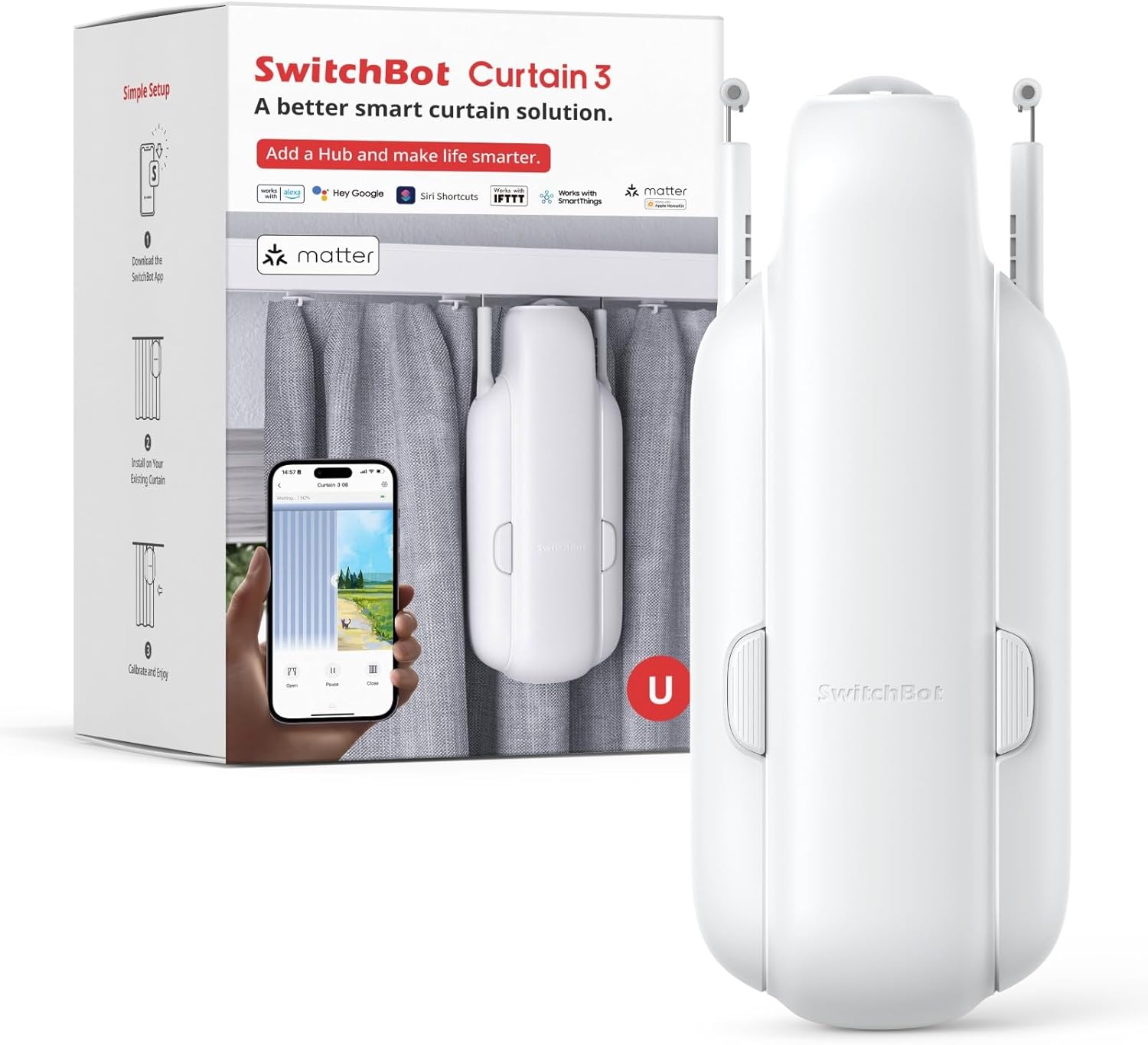
You get a two-pack of the SwitchBot Smart Automatic Curtain Opener plus a Hub 3, which brings Bluetooth control, app scheduling, and Matter/HomeKit support into the mix. This model emphasizes an easier, no-tool installation, a stronger motor than previous versions, quieter operation, and compatibility with the big voice platforms so you can automate curtains as part of your smart home routines.
SwitchBot Smart Automatic Curtain Opener 2 Packs with Hub3 - Bluetooth Remote Control with App/Timer, High-Performance Motor, Unlimited Power, Compatible with Alexa, Google Home, HomeKit
$249.99 In Stock
Key features
This section highlights the core capabilities so you can quickly see what matters for your setup and routine. Each feature aims to solve a common pain point: installation hassle, noisy motors, misaligned curtains, and smart home compatibility.
Effortless no-tool setup
You attach the opener to your existing curtain rod, place the positioning magnets, and connect to the app — no drilling or special tools are required. That means you can try the system in multiple rooms or install it in a rental without permanent modifications.
2025 upgrade: main guide wheel and bump handling
The guide wheel has been enlarged in the 2025 update so the unit can pass over bumps up to 4 mm and feel less obtrusive on the rod. The manufacturer lists an 8 kg load capacity for the upgraded guide wheel design, which helps the mechanism handle common rod irregularities more smoothly.
2x stronger motor & precise control
SwitchBot says the motor is twice as strong as the previous version and can move curtains up to 15 kg (33 lbs) in total weight. New positioning magnets are designed to give you accurate open/close endpoints with minimal calibration and fewer light gaps at the edges.
Quiet Silent Mode (<25 dB)
You can activate a Silent Mode that slows curtain movement and reduces noise to under 25 dB — quieter than a whisper in many environments. That’s particularly useful in bedrooms, nurseries, or any space where you want minimal disturbance.
Matter & Apple HomeKit support (via Hub 3)
The SwitchBot Hub 3 lets the opener join Matter networks and appear in the Apple Home app, enabling native HomeKit control and integration with HomePod and Apple Watch. Once the Hub 3 is set up, you can also link to Alexa and Google Home for broader voice control.
Bluetooth remote control, app, timer
If you prefer local connections, the opener supports Bluetooth control from the SwitchBot app and can be paired with timers and schedules right in the app. This lets you automate daily routines like opening curtains at sunrise or closing them after dark without cloud dependency for simple commands.
Compatibility limits and notes
The unit is not compatible with extendable rods under 5/8″ (16 mm) in diameter, so measuring your rod before purchase is essential. Also check pleat/ring style and rod stability; very uneven tracks or non-rod track systems may require dedicated track-based motors instead.
What’s in the box
You should receive two SwitchBot Smart Automatic Curtain Openers and one SwitchBot Hub 3 as described in the product title. Confirm what accessories (magnets, USB cables, remote, adhesive or clips) come with the pack on the seller page, because included extras sometimes vary by region or seller.

Quick specifications table
This table summarizes the most important specifications to help you match the product to your window and routine needs.
| Specification | Details |
|---|---|
| Product | SwitchBot Smart Automatic Curtain Opener (2-pack) with Hub 3 |
| Motor capability | 2x stronger than previous model; stated capacity to move curtains up to 15 kg (33 lbs) |
| Guide wheel capacity (2025 upgrade) | Enlarged wheel; passes 4 mm bumps; guide wheel load cited as 8 kg |
| Noise | Silent Mode <25 dB |
| Rod compatibility | Not compatible with extendable rods under 5/8″ (16 mm) diameter |
| Connectivity | Bluetooth; Hub 3 enables Matter, Apple HomeKit, cloud features |
| App features | Remote control, scheduling/timers, position settings, firmware updates |
| Voice assistants | Alexa, Google Home, Apple HomeKit (via Hub 3) |
| Installation | No-tool attach to existing rod; positioning magnets; app pairing |
| Package | 2 openers + Hub 3 (verify seller listing for exact contents) |
These specs should guide your purchase decision, but always verify with the seller for any regional differences and the exact accessory list included.
Installation and setup guide
The advertised setup is simple: hang, position magnets, connect via app. Below you get more actionable steps, tips for common curtain styles, and adjustments to avoid light gaps or jamming.
Before you start: measurement checklist
Measure your rod diameter, curtain weight, and curtain style before ordering and before installation. Confirm the rod isn’t an extendable type under 16 mm and weigh the curtains (estimates are fine) so you can check the 15 kg motor capacity and the guide wheel’s 8 kg spec against your situation.
Step 1: attach to the rod
You clip or hang the opener onto the rod — no drilling or screws required — so the physical install is usually fast and renter-friendly. Make sure the opener sits on the rod with the curtain panel in place to check for smooth sliding and alignment before finalizing the magnets.
Step 2: place positioning magnets
Use the included positioning magnets to set the open and closed endpoints and to keep the curtain from drifting and creating light gaps. The magnets are designed to reduce or eliminate the need for manual calibration, but you should still run a few test opens and closes to confirm alignment.
Step 3: connect via app and Hub 3
Open the SwitchBot app, add the device via Bluetooth, and follow pairing instructions; then add the Hub 3 to enable Matter, HomeKit, and cloud features. If you plan to use voice assistants or Home app automations, complete the Hub 3 setup early so you can integrate the opener into routines.
Using the device daily
Once installed and integrated, you’ll use the app, remote, or voice commands to open or close curtains, set schedules, and include the opener in automations. The unit aims to behave like a basic smart appliance: set-and-forget for routines, or manual control for occasional adjustments.
Using Silent Mode
Silent Mode trades speed for near-silent operation, so you avoid waking others during early-morning routines. You should test timing in Silent Mode because the slower motion may shift your schedule slightly compared with normal mode.
Scheduling and timers in the app
You can create daily schedules (e.g., open at sunrise, close at 10:00 PM) and conditional automations if you’re using Hub 3 integrations. The app also usually supports timers, scenes, and combining the curtain opener with other SwitchBot devices like smart plugs or sensors.
Voice control with Alexa, Google Assistant, and HomeKit
Once Hub 3 is configured, you can say commands like “open the living room curtains” through your voice assistant of choice. Use HomeKit automations to trigger curtains based on scenes, time, or other HomeKit-enabled sensors and devices.

Power options & “Unlimited Power”
The product name includes “Unlimited Power,” which suggests support for continuous power sources in addition to any onboard battery function. To be safe, check the seller’s product page for included power cables or adapters; if continuous power is essential for your setup, verify whether a mains adapter or a recommended continuous power accessory is bundled or sold separately.
Curtain compatibility and measuring guide
Success depends heavily on the curtain type, rod diameter, and curtain weight. You should check the following before you order and again before installation to avoid incompatibilities.
- Rod diameter: Ensure the rod is at least 5/8″ (16 mm) and not an unstable, extendable type under that diameter.
- Curtain style: Eyelet/grommet, ringed, or pinch pleat curtains usually work best with rod-mounted motors. Tab-top or heavy pleated styles could need extra adapters or a different motor approach.
- Weight: Weigh or estimate the curtain weight and ensure it does not exceed the 15 kg limit stated for the motor. For very heavy curtains, test a single opener on one side and consider whether two units or a track-based system might be safer.
- Obstructions: Check for obstacles like thick seams, pleat hooks, or irregular rod surfaces that might require the enlarged guide wheel or extra smoothing.
These checks will save time and frustration by matching the device to the physical curtain system you have.
Performance and real-world behavior
In everyday use, you’ll judge this device by how reliably and quietly it moves curtains, how well it avoids light gaps, and whether it handles the physical quirks of your rod. The larger guide wheel and stronger motor are meant to address common friction points and heavier fabrics.
- Smoothness: The enlarged wheel helps pass bumps and irregularities, reducing jerks and hang-ups. Expect improved consistency over older models, especially on rods with minor imperfections.
- Speed and strength: The stronger motor can move heavier curtains up to the stated limit, but you’ll see slower motion in Silent Mode to prioritize noise reduction.
- Alignment: Positioning magnets are designed to minimize light leaks and improve endpoint accuracy, though some fine-tuning may still be needed the first few runs.
- Longevity: A robust motor is important if you schedule frequent automated movements; routine firmware updates (via the app) and occasional cleaning of the wheel and rod contact points will keep operation smooth.

Troubleshooting common issues
If the unit misbehaves, most problems stem from mismatch with rod type, excessive curtain weight, incorrect positioning, or wireless connection issues. Below are common symptoms and practical fixes to try.
Curtain won’t open or closes partially
Check that the curtain weight doesn’t exceed the motor’s effective capability, and confirm the guide wheel is passing smoothly over any bumps. Reposition the opener and reposition the magnets to ensure endpoints aren’t set inside folds or fabric obstructions.
Bluetooth or Hub connectivity issues
If the app can’t see the opener, try placing your phone closer to the device for initial pairing and ensure Hub 3 is powered and on the same network for cloud/Matter functionality. Restarting the Hub, toggling Bluetooth, or reinstalling the SwitchBot app are common fixes.
Light gaps or misalignment
Recheck the magnet positions and run a couple of open/close cycles; magnets generally cut down the need for calibration, but micro-adjustments are sometimes required. For persistent gaps, slightly change the endpoints or test a different magnet position to overlap fabric more at the edges.
Noise or grinding
If you hear unusual noise, check for obstructions on the rod, stray threads, or damage to pleats or hooks. Clean the rod and wheel contact area, and ensure the curtain rings or grommets aren’t catching; if noise persists, contact support for warranty options.
Integration and automation ideas
You can bring curtains into time-based, sensor-based, and presence-based automations to add convenience, save energy, and improve sleep quality. Use Hub 3 and Matter/HomeKit for the deepest integration options.
- Morning routines: Open curtains at sunrise or a fixed time to limit your need for an alarm and to start natural light exposure. Combine with smart lights that come on at a low brightness to create gradual wake-up scenes.
- Sleep routines: Use Silent Mode and scheduled closure at bedtime, or link to a sleep sensor/smart thermostat that detects when you’re asleep and triggers curtains to close. This reduces light and can improve insulation at night.
- Away/energy saving: Link to a temperature sensor or thermostat and close curtains during the hottest part of the day to reduce cooling load. Open them on cold sunny afternoons to capture passive solar heat.
- Security: Randomize schedules when you’re away to simulate presence, or close curtains only if motion sensors detect no movement after a certain period.
These automations let you make the most of voice assistants and sensor networks once Hub 3 is set up.
Maintenance and care
Routine maintenance helps keep the system quiet and reliable: keep the rod free of dust, clean the guide wheel periodically, and check that magnets remain aligned. Update firmware via the app to get stability improvements and new features, and inspect power cables and Hub 3 connections occasionally for wear.
Pros
You’ll appreciate the no-drill installation, stronger motor, quieter operation, and Hub 3’s Matter/HomeKit compatibility. If you value simple setup and integration with voice assistants plus scheduling flexibility, this package targets that sweet spot for renters and homeowners alike.
Cons
You must confirm rod compatibility and curtain weight before buying, since some extendable or thin rods won’t work and very heavy curtains may exceed the practical limits. The product’s two separate load numbers (8 kg for the guide wheel upgrade and 15 kg for motor capacity) mean you’ll want to double-check which physical stresses matter for your rig before committing.
Who should buy this
You should buy this if you want an easy-to-install curtain automation for bedrooms, living rooms, or offices and you use or plan to use HomeKit, Alexa, or Google for voice control. It’s also a good fit if you prefer a quieter motor (Silent Mode) and like the convenience of app-based scheduling and Matter compatibility for future-proofing smart-home setups.
Who should not buy this
You should avoid this if your curtains are extremely heavy beyond the 15 kg motor rating, if your rod is an extendable type under 16 mm, or if you have a dedicated curtain track system (rather than a rod) that requires a track-specific motor. Also skip this if you need fully battery-free operation and the product or seller does not include a mains power solution.
Frequently asked questions (short)
These are brief answers to common buyer concerns so you can make decisions faster and get set up confidently.
- Can you use the openers without the Hub 3? Yes — basic Bluetooth control and app features typically work without the hub, but Matter/HomeKit and cloud-based voice assistant integration require the Hub 3.
- Will it work on left-only or right-only curtain setups? Yes — you can generally install a single unit on one side for single-panel curtains or two units for center-opening curtains, depending on your curtain configuration.
- Do you need to calibrate it? Positioning magnets reduce the need for calibration; you’ll still want to run a few tests to confirm endpoints.
- Is the Hub 3 included? The product title indicates a 2-pack with Hub 3, but confirm contents on the seller’s product listing to be sure accessories match your expectations.
Final verdict
If you want a user-friendly, better-performing curtain opener with modern smart-home compatibility, this SwitchBot two-pack plus Hub 3 delivers a compelling balance of convenience, quiet operation, and integration. Just measure your rod and curtain weight carefully, and plan for Hub 3 setup if you want full HomeKit and Matter features — once set up, the system should fit neatly into daily routines and automations.
If you want specific help measuring your rod or deciding how to integrate the openers into a multi-device automation, tell what type of rod and curtains you have and your voice assistant of choice, and you’ll get targeted recommendations.

Disclosure: As an Amazon Associate, I earn from qualifying purchases.