
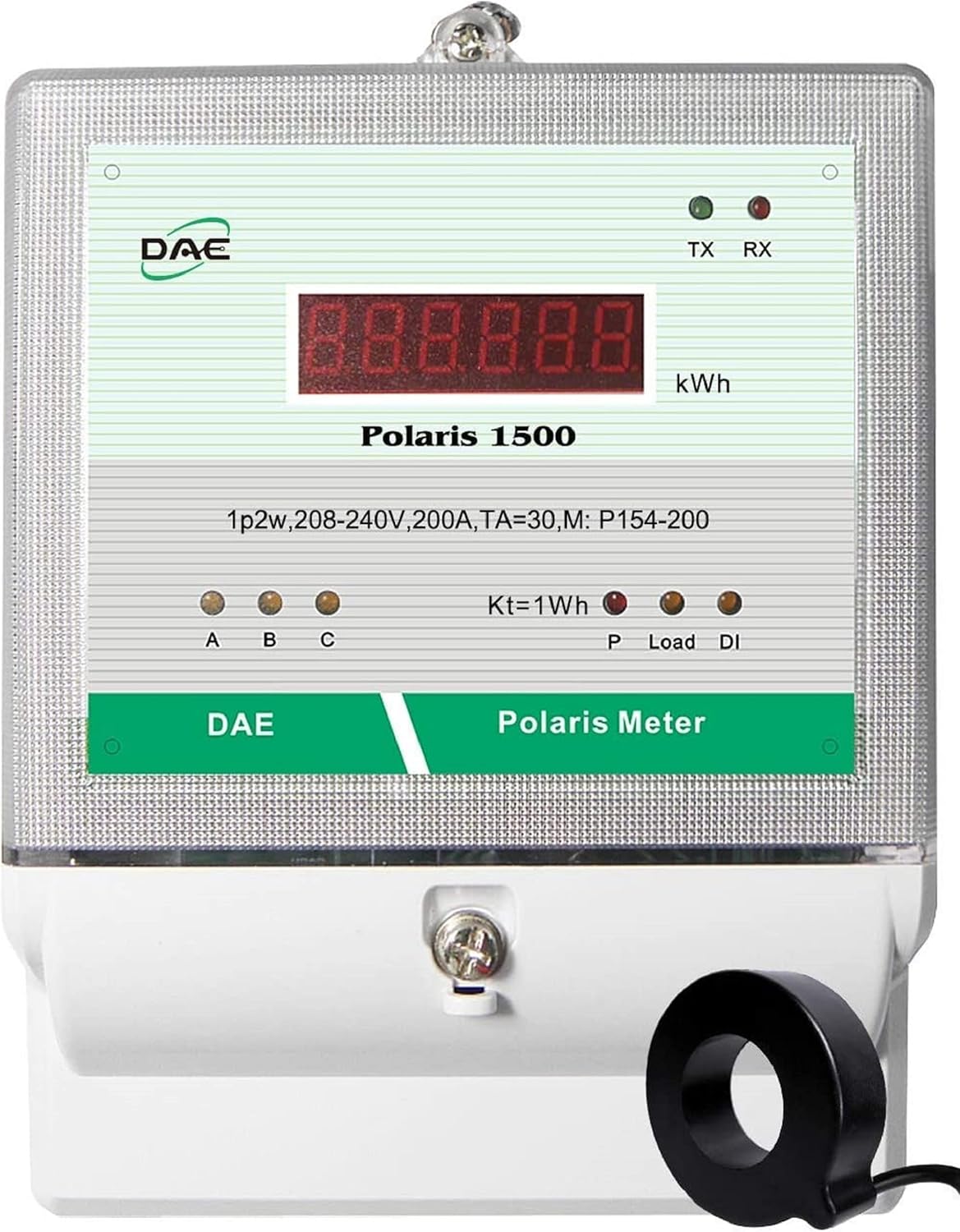
?Are you trying to find a revenue-grade submeter that makes tenant billing, energy monitoring, and cloud reporting simple and reliable?

Buy DAE P154-200-S KIT On Amazon
Product Overview
You’re looking at the DAE P154-200-S KIT, RS485, 208/240V, 200A, 1P2W(2 hot wire), UL CTEP kWh Smart Submeter, 1 CT (dia. 1.02″). This meter is built for single-phase, two-wire systems and targets landlords, property managers, and facilities teams who need accurate, revenue-grade metering in multi-tenant or submetered installations. You’ll appreciate that it’s UL/cUL listed, California CTEP approved, and conforms to national accuracy standards.
What this product is best for
You’ll use this meter when you need a compact, accurate, and networkable submeter for tenant billing, TOU billing, or real-time energy management. It’s suited for indoor panel installations and for retrofits where Ethernet connectivity and wireless bridging options make linking to a cloud gateway practical.
Key Features
You’ll find a set of features designed to make installation and operation straightforward while meeting strict accuracy and compliance requirements. The meter is revenue-grade with 0.5% accuracy according to ANSI C12.1 and C12.20, and it includes both physical and connectivity features to integrate into your existing systems.
- UL/cUL Listed and California CTEP approved for revenue applications.
- RS485 communication for Modbus RTU or similar protocols.
- Can use DAE CC2030 Gateway for cloud connectivity, with optional RF converters for difficult cable runs.
- Includes a lower cover with two 3/4″ knockouts for conduit access.
- One in-line fuse with holder attached for the VA connection; VA and VN power the meter.
- VB and VC are voltage reference points and do not require fusing.
- Compatible with multiple CTs (split-core and solid-core options) for a wide range of current measurements.
Specification Table
You’ll find this table useful when comparing core specs side-by-side. It breaks down what matters most at a glance.
| Specification | Details |
|---|---|
| Model | DAE P154-200-S KIT (1 CT included, dia. 1.02″) |
| Voltage | 208/240V (1P2W – two hot wires) |
| Max Current | 200A (meter kit) |
| CT Options | Multiple split-core and solid-core CTs available (see CT table) |
| Accuracy | Revenue-grade 0.5% (ANSI C12.1, C12.20) |
| Approvals | UL/cUL Listed, California CTEP approved |
| Communication | RS485 (Modbus RTU), compatible with DAE CC2030 Gateway |
| Power Supply | Meter powered by VA and VN; VB/VC are references |
| Enclosure | Indoor use; optional watertight DAE B1725 for outdoor |
| Additional | Inline fuse for hot wire A to VA, lower cover with two 3/4″ knockouts |
CT Options Summary
You’ll want to match your CT capacity to the panel load. Below is a quick table of CT models that pair with this meter so you can choose the right range.
| CT Type | Model | Rating |
|---|---|---|
| Split Core | CT-5000SB | 5000A |
| Split Core | CT-3000SB | 3000A |
| Split Core | CT-2000SB | 2000A |
| Split Core | CT-1500SB | 1500A |
| Split Core | CT-1000SB | 1000A |
| Split Core | CT-600S | 600A |
| Split Core | CT-400S | 400A |
| Split Core | CT-200SB | 200A |
| Split Core | CT-100S | 100A |
| Solid Core | CT-600D9 | 600A |
| Solid Core | CT-400D6 | 400A |
| Solid Core | CT-200D3 | 200A |
Accuracy and Compliance
You’ll benefit from a meter designed to meet revenue-quality measurement standards. The P154-200-S conforms to ANSI C12.1 and C12.20 and is calibrated to 0.5% accuracy, which is suitable for billing applications and regulatory acceptance.
Why accuracy matters
When you’re billing tenants or reconciling utility charges, small measurement errors can add up over time and create disputes. With 0.5% accuracy and factory calibration certificates available, you’ll have confidence in billing and reporting results. The California CTEP approval further ensures the meter meets local utility and regulatory expectations in that jurisdiction.

Get The DAE P154-200-S KIT Now
Connectivity and Cloud Integration
You’ll find flexible options for getting meter data to your desk or phone. The meter provides RS485 for local communications and integrates with the DAE CC2030 Gateway to send data to the DAE Cloud platform over Ethernet.
RS485 and local integration
If you prefer local Modbus RTU or need to tie into a building management system, RS485 gives you standard industrial connectivity. You’ll typically wire RS485 to your BMS or data logger to pull registers for energy, instantaneous power, voltage, and more.
DAE CC2030 Gateway and Cloud Metering
If you want cloud access, the CC2030 Gateway collects data from DAE meters and forwards it to the DAE Cloud Server via Ethernet. You’ll then access real-time energy data, monthly kWh, and billing reports from your PC, phone, or tablet without needing an IT specialist. TOU billing reports are available if you use time-of-use tariff configurations for tenant billing.
Wireless option for hard-to-wire installations
If you can’t run cable between the meter location and your router, choose 1 CC2030 KIT plus 2 WSC500A RF Converters to create a wireless bridge. You’ll connect each meter to an RF converter and the CC2030 will receive data wirelessly, letting you avoid expensive conduit and cable runs.
Hardware and Physical Design
You’ll notice the design focuses on straightforward field installation and serviceability. The meter comes with a lower cover that houses two 3/4″ knockouts to ease conduit connections and an inline fuse for the VA feed.
Lower cover and wiring access
The lower cover’s two 3/4″ knockouts give you flexibility for conduit entry and cable routing. You’ll appreciate the physical provisions when you’re working in tight panel spaces or coordinating conduit paths.
Inline fuse and power wiring
One inline fuse with holder is attached specifically to connect hot wire A to the VA terminal of the meter. You’ll power the meter via VA and VN; VB and VC are voltage references and do not need inline fuses. This design reduces wiring complexity while ensuring the meter is safely powered.
Physical size and mounting
You’ll mount the meter inside an indoor electrical panel or meter box. If you need an outdoor option, DAE offers a watertight B1725 enclosure as an accessory. You’ll choose the enclosure if the meter must live in a semi-exposed location near service entrances or outside meter banks.
Installation and Wiring
You’ll find the wiring straightforward if you follow the instructions and labels. The meter is a single-phase two-wire device: it measures two hot wires and uses one current transformer (1 CT) for current sensing.
Step-by-step wiring guidance
- Turn off power and follow all safety procedures for working in live panels. You’ll reduce the risk of injury by isolating circuits before touching conductors.
- Install the CT around the conductor you’re measuring; ensure arrow/marking is oriented to follow the defined current direction. You’ll ensure accuracy and proper sign of energy measurement by observing CT polarity.
- Connect hot wire A through the inline fuse to VA; wire VN to neutral/return. You’ll supply meter power via VA and VN.
- Connect hot wire B to VB and hot wire C to VC as voltage reference points if present; these are not fused. You’ll ensure the meter reads correct voltages by referencing these points.
- Connect RS485 A/B to your BMS or CC2030 Gateway for communications. You’ll want to check termination and biasing if you have network issues.
- Verify the meter powers on and shows expected readings, then start data collection or cloud gateway pairing.
Common wiring pitfalls
You’ll want to avoid common installation mistakes: reversing CT orientation, failing to power the VA circuit through the inline fuse, and confusing the reference voltage terminals with fused inputs. If you skip proper CT polarity or fuse installation you’ll get incorrect sign or no power to the meter.
Performance and Reliability
You’ll rely on this meter for billing-grade measurements and consistent performance over time. Field-proven components, factory calibration options, and compliance with national standards make it suitable for mission-critical tenant billing and energy accountability.
Long-term stability and calibration
The meter’s factory calibration certificate option means you’ll get traceable calibration data for regulatory or auditing needs. You’ll periodically verify performance via on-site testing or request recalibration as needed, especially when used for revenue billing.
Environmental considerations
This meter is intended for indoor use unless you specify the watertight B1725 enclosure. You’ll ensure it’s mounted away from excessive heat, moisture, or vibration to preserve electronics and measurement accuracy.

Software, Reporting, and User Experience
You’ll find the DAE Cloud system and CC2030 Gateway designed for simple setup and usable reporting. The vendor emphasizes a non-IT approach: simple wiring and quick access to dashboards on PC, phone, or tablet.
What the cloud gives you
When you connect the CC2030 Gateway, you’ll get real-time data, month-by-month kWh consumption, and tenant billing reports. TOU (Time of Use) billing is available if your rate structures require time-based differentiation. You’ll also access downloadable reports for accounting or dispute resolution.
Ease of use and setup
You’ll appreciate that the documentation includes simple wiring pictures and a video to guide setup. The platform aims to let you get running without complex network configuration or on-site IT personnel. If you want wireless meter-to-gateway links, the WSC500A RF converters make remote installations feasible without pulling long RS485 cables.
Use Cases and Applications
You’ll use this meter in a variety of contexts where accurate submetering and simple reporting matter. Typical applications include multi-tenant buildings, laundry or EV charging submetering, leased spaces, and retrofit projects where running new communication cable is challenging.
Ideal scenarios
- You’ll bill tenants individually in strip malls, apartments, or mixed-use buildings.
- You’ll install submeters for amenity rooms or common areas to allocate consumption fairly.
- You’ll monitor circuit-level consumption on individual panels in retrofits or new builds.
Less suitable scenarios
You’ll avoid using this specific single-phase 1P2W meter for three-phase delta or wye systems that require multiple CTs per meter unless you select a different model. You’ll also not use the standard indoor meter in exposed outdoor or wet environments without the optional watertight enclosure.
Pros and Cons
You’ll want to weigh benefits and limitations before purchasing. Below you’ll find a balanced assessment to help with that decision.
Pros
- You’ll get revenue-grade 0.5% accuracy and ANSI-compliant metrology.
- You’ll get simple connectivity via RS485 and a straightforward cloud gateway option.
- You’ll benefit from California CTEP and UL/cUL approvals for regulatory acceptance.
- You’ll have multiple CT options to match many current ranges.
- You’ll be able to use RF converters when wiring is impractical.
Cons
- You’ll need the watertight enclosure for outdoor placement, which is an extra purchase.
- You’ll be limited to single-phase 1P2W environments; multi-phase installations require other models or additional meters.
- You’ll depend on DAE’s cloud ecosystem for turnkey cloud reporting; integrating into alternate cloud platforms may require additional effort.
Kits and Expansion Options
You’ll choose from a few kit configurations to match installation complexity. The base product is the meter kit with one CT, but DAE offers gateway, RF converters, and multi-meter kits for expanded control.
Recommended kit configurations
- For single-meter cloud access: DAE P154-200-S KIT + CC2030 KIT. You’ll get Ethernet cloud connectivity and cloud reporting.
- For hard-to-wire installations: 1 CC2030 KIT + 2 WSC500A RF Converters. You’ll bridge meters wirelessly to the gateway.
- For multi-panel remote billing up to 8 panels: 1 SMB350-UL-8-B KIT + 1 CC2030 KIT. You’ll monitor multiple panels and generate tenant billing reports from one cloud platform.
Troubleshooting and Maintenance
You’ll encounter a few common issues in the field, but most are straightforward to resolve with the right checks and procedures.
Common troubleshooting steps
- No power to the meter: Confirm the inline fuse on the VA connection is intact and properly seated. You’ll replace the fuse if it’s blown and verify upstream breakers.
- Wrong sign or negative readings: Confirm CT orientation and CT wiring polarity. You’ll flip CT orientation or swap the CT secondary leads if necessary.
- Communication issues: Check RS485 wiring, termination resistors, and biasing. You’ll ensure correct A/B polarity and no multiple masters on the bus. For cloud issues, verify CC2030 Ethernet connection and that the CC2030 is receiving meter data.
- Inconsistent readings: Verify CT model and ratio settings in the meter configuration if applicable, and confirm the meter calibration certificate if you suspect drift. You’ll arrange recalibration if the meter is out of tolerance.
Maintenance tips
You’ll periodically verify meter readings against a calibrated reference or the utility meter to detect drift. Keep the enclosure clean and ensure wiring remains secure. If the meter is used in a billing capacity, maintain calibration records and consider multi-year recalibration per local rules.
Compliance, Calibration, and Documentation
You’ll need documentation for revenue metering and utility audits, and DAE provides necessary certifications and calibration support.
Certifications and standards
The meter is UL/cUL Listed and California CTEP approved, and conforms to ANSI C12.1 and C12.20. You’ll rely on these credentials when you submit metering results for billing, audits, or utility acceptance.
Factory calibration certificates
You’ll be able to request factory calibration certificates when you purchase the meter. These documents give you traceable proof of calibration and help satisfy regulatory requirements for revenue metering.
Buying Guide: How to Choose the Right Configuration
You’ll make a better purchase decision if you evaluate load range, installation environment, and connectivity needs before ordering.
Steps to choose correctly
- Confirm system type: Make sure your system is single-phase 1P2W at 208/240V. You’ll need a different meter for three-phase systems.
- Select CT rating: Pick a CT with a primary rating comfortably above the expected maximum current to avoid saturation. You’ll choose a split-core CT if you require easy retrofits, or a solid-core CT for new installations with adequate space.
- Consider communication: Decide whether RS485 integration to an existing BMS is enough, or if you want cloud reporting via CC2030. You’ll pick RF converters if running a cable is impractical.
- Confirm enclosure needs: If the meter will be exposed to moisture or weather, you’ll add the DAE B1725 watertight enclosure.
- Request calibration certificates if you plan to use the meter for billing or regulatory submissions. You’ll keep the certificates on file for audit trails.
Frequently Asked Questions (FAQ)
You’ll likely have practical questions before buying or installing. Below are concise answers to common queries.
Can the meter be used outdoors?
The meter is rated for indoor use. You’ll need the optional DAE B1725 watertight enclosure to deploy it outdoors.
Do VB and VC need fuses?
No. VB and VC act as voltage references for hot wires B and C and do not require inline fuses. You’ll only fuse VA via the provided inline fuse holder.
Is the CC2030 Gateway required?
No. The meter will function with RS485 communications to a local BMS or data logger. You’ll use the CC2030 if you want cloud access, reporting, and an easy tenant billing platform without IT support.
What does 1P2W mean?
1P2W stands for single-phase, two-wire. You’ll use the meter in systems that have two hot conductors without a three-phase or neutral configuration for phase-to-phase measurement (common in 208/240V single-phase supplies).
How do I choose the correct CT?
Match the CT primary rating to be above your maximum expected load to prevent saturation and maintain accuracy. You’ll choose split-core for easy retrofits and solid-core for new installations where you can thread the conductor through the CT.
Final Recommendation
You’ll find the DAE P154-200-S KIT to be a strong choice when you need a compact, revenue-grade submeter for single-phase 208/240V installations. It balances high accuracy, regulatory approvals, and flexible connectivity options (RS485, CC2030 cloud gateway, RF converters) to support tenant billing and energy management without extensive IT involvement. If you want straightforward installation, proven metrology, and cloud-based reporting with TOU billing capabilities, this meter will meet your needs—especially when you pair the right CT and choose appropriate enclosure and gateway options for your installation.
If you’d like, you can tell me about your specific installation (load amps, indoor/outdoor, number of panels, whether you need cloud or BMS integration), and I’ll recommend the exact CT and kit configuration that fits your needs.
Purchase DAE P154-200-S KIT — Amazon
Disclosure: As an Amazon Associate, I earn from qualifying purchases.