
?Are you trying to decide if the Linksys Velop Tri-Band AC2200 Whole Home WiFi Mesh System 3-Pack (Coverage up to 6000 sq. ft) – WHW0303-CA is the right solution for your home network needs?

Buy Linksys Velop Tri-Band AC2200 Mesh System 3-Pack On Amazon
First impressions
You’ll notice the Linksys Velop’s clean, minimalist look before anything else. The nodes are compact and unobtrusive, designed to sit on a shelf or counter without drawing attention, which helps the system blend into living spaces.
You get a 3-pack aimed at covering up to 6,000 square feet, and the setup promises a single unified network rather than multiple SSIDs. That single-network approach simplifies device roaming and everyday use.
What’s inside the box
The box contains three nodes, power adapters for each node, a short Ethernet cable to get started, and a quick start guide. Each node is designed to be plug-and-play with the Linksys app, so the early moments of setup are focused on placement and getting your modem linked.
You won’t find a printed manual with advanced networking tips, so you’ll rely on the app and Linksys support site for deeper configuration or troubleshooting.
Linksys Velop Tri-Band AC2200 Whole Home WiFi Mesh System 3-Pack (Coverage up to 6000 sq. ft) - WHW0303-CA
Design and build
The Velop nodes use a tall, cylindrical form factor with an antenna at the top, which Linksys says improves coverage. The footprint is small, and the nodes are lightweight, making it easy to reposition them as you test signal strength across your home.
Because the footprint is small, you’ll likely place the nodes in visible areas. The design intentionally keeps cables minimal, but every node needs power, so think about availability of outlets when planning placement.
Setup and installation
The setup experience is largely app-driven and aimed at non-technical users. You’ll need to use the Linksys app on a mobile device running Android 4.4 or iOS 9 or higher; Bluetooth is preferred for initial pairing.
Required items for setup:
- An active internet connection with a modem
- A smartphone or tablet (Android 4.4+ or iOS 9+)
- The Linksys app (free from the App Store or Google Play)
The app walks you through creating a Velop network name and password, connecting the first node to your modem, and adding additional nodes one by one.
Step-by-step setup experience
You’ll power the primary node, connect it to your modem with the included Ethernet cable, and follow prompts in the Linksys app. When adding the second and third nodes, the app uses Bluetooth to detect and configure them, which cuts down on typing and manual network switching.
If one node is moved or loses connection, the system is designed to reconfigure automatically to maintain connectivity across the remaining nodes.
Tips for placement while setting up
Place your primary node near the modem in an open area. Secondary nodes should be positioned halfway between the primary node and the parts of the home where you want strong WiFi. Avoid hiding nodes inside cabinets, near microwaves, or behind large metal objects.
You’ll get instant feedback in the app on node status and suggested placement, which helps you fine-tune positions for the best coverage.
Get The Linksys Velop AC2200 3-Pack — Amazon
Hardware and specifications
Below is a compact breakdown of key specifications so you can quickly compare features and capabilities.
| Category | Specification |
|---|---|
| Product name | Linksys Velop Tri-Band AC2200 Whole Home WiFi Mesh System 3-Pack (Coverage up to 6000 sq. ft) – WHW0303-CA |
| Wi‑Fi type | Tri-band (AC2200 class) |
| Coverage | Up to 6,000 sq. ft (3-pack) |
| Processor | 716 MHz quad-core |
| Antenna design | Top-mounted antenna per node |
| Beamforming | For 2.4 GHz and 5 GHz bands |
| Dimensions (per node) | 7.874 cm x 7.874 cm x 18.542 cm |
| Footprint | 88% smaller than competition (as advertised) |
| Setup requirements | Internet connection with modem; mobile device Android 4.4 or iOS 9+; Bluetooth preferred |
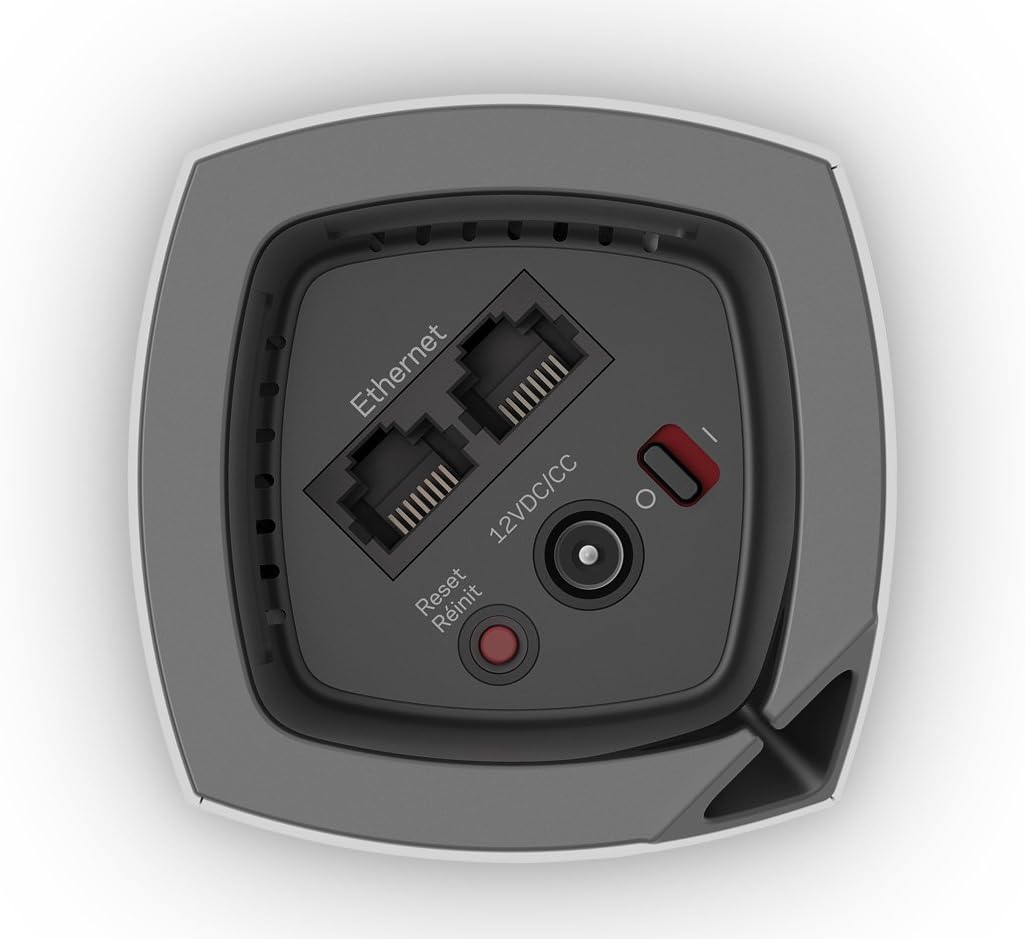
| Ports | Gigabit Ethernet (primary node connects to modem; other nodes may have ports depending on SKU) |
| App | Linksys App for setup, management, updates |
| Alerts | Instant alerts on Wi‑Fi status |
| Model number | WHW0303-CA |
You’ll find that the hardware spec sheet focuses on user-friendly features like small size and app integration, while also offering a modern quad-core processor to handle multiple clients and routing tasks.
Network performance and speed
You’re getting a tri-band system intended to support simultaneous device use without traffic contention. The AC2200 rating generally means 400 Mbps on 2.4 GHz and 866 Mbps on each 5 GHz band (approximate per-band theoretical link rates), which is suitable for high-definition streaming, gaming, and video conferencing.
In real-world scenarios, expect to see speeds that depend heavily on your ISP plan, node placement, and device capabilities. If your internet plan is sub-Gigabit, the Velop will typically push your connection to the edge of the home network more efficiently than a single router.
How tri-band helps you
With three separate wireless bands (one 2.4 GHz and two 5 GHz bands), the system can balance traffic: one band is often used as a dedicated backhaul between nodes while the others carry client traffic. This arrangement reduces interference and preserves throughput as you move around the home.
You’ll notice smoother experiences on multiple devices when heavy activities happen simultaneously—think 4K streaming, video chats, and online gaming happening at once.
Real-world speed expectations
Your test results will vary, but here’s a conservative expectation for a typical home:
- Near node (same room): Close to the maximum your device supports and the ISP provides.
- One room away: Significant speed retained, often 60–90% of direct speeds.
- Farther rooms / different floors: Speed drops, but mesh handoffs should maintain usability for streaming and browsing.
If you’re paying for gigabit internet, expect the mesh system to move a lot of that bandwidth around effectively, but internal Wi‑Fi limitations and client hardware will determine final speeds.
Coverage and range
Linksys markets this 3-pack for up to 6,000 square feet of coverage. That range assumes open floor plans and optimal placement; real-world results will vary with walls, building materials, and interference sources.
You’ll typically achieve robust coverage in average two-story homes or larger single-floor layouts if you place the nodes strategically. For very dense or multi-story homes with lots of concrete or metal, you may need more nodes or supplemental wired backhaul.
Node placement best practices
Position nodes in central, elevated locations with clear line of sight where possible. Avoid corners, basements behind large appliances, or behind mirrors which can reflect signals. If you can, place nodes on different floors staggered vertically to maintain vertical coverage.
Always test node positions over several days, because initial impressions don’t always map to the busiest hours of your household usage.

Mesh behavior and reliability
The Velop system is engineered to operate as a single mesh network so devices roam with one SSID and minimal interruptions. If a node loses internet access, the other nodes attempt to maintain and re-establish connections automatically.
You’ll appreciate the self-healing qualities when a node fails or is intentionally moved; the network will reroute traffic through remaining nodes, though speeds might be affected depending on the topology.
Handoff and roaming
You’ll rarely have to force a disconnect to switch nodes. The Velop supports intelligent roaming so your client devices should attach to the best node as you move around. However, roaming performance can vary between client devices—some older devices hold onto a connection longer than they should.
If you have devices that struggle with switching, consider temporarily moving them or updating device Wi‑Fi drivers where possible.
Backhaul options
By default, the system uses wireless backhaul between nodes. If you have Ethernet cabling available, you can use wired backhaul for better stability and maximum throughput. Wired backhaul is ideal for carrying heavy traffic or for nodes that must handle many devices.
You’ll see substantial improvements in latency and consistent throughput when using wired backhaul.
The Linksys app and management
You’ll manage your Velop through the Linksys app that provides guided setup, network monitoring, firmware updates, and basic configuration. The app is designed for ease of use, with a clear dashboard showing online status and connected devices.
You can manage guest access, enable parental controls, and set device prioritization from the app. Advanced users may feel limited compared to full-featured router web interfaces, but the app covers most use cases for home users.
Monitoring and alerts
The app pushes instant alerts so you can know the status of your home Wi-Fi at all times. You’ll receive notifications for firmware updates and critical network issues.
This continuous monitoring makes it easier to respond to outages or broken nodes quickly, without needing to dig into technical menus.
Security and privacy
Linksys supports WPA2 encryption and periodically updates firmware to address vulnerabilities. The system’s security features are friendly for regular consumers, and the company has a track record of issuing firmware updates for security patches.
You’ll want to enable automatic updates where possible, and use a strong, unique password for your network and the Linksys account.
Parental controls and device management
The app offers parental controls such as scheduling internet access and blocking specific websites or devices. You’ll find these features useful if you want to limit screen time or restrict access for particular devices.
Device prioritization (QoS-like features) allows you to prioritize gaming consoles, streaming boxes, or other important devices so that critical traffic gets precedence.
Compatibility and integrations
The Velop system works with major smart home assistants and supports a wide range of devices including phones, tablets, smart TVs, game consoles, and IoT devices. It’s compatible with Amazon Alexa in some listings, but the core management remains in the Linksys app.
You’ll be able to connect nearly any Wi-Fi device, but remember that older devices may only support older Wi-Fi standards and therefore won’t hit top speeds.
Pros and cons
You’ll find many benefits in the Velop system, but it’s good to balance them against some limitations.
Pros:
- Clean, unobtrusive design that fits into home decor
- Tri-band architecture helps retain speeds across multiple devices
- Simple, guided app setup suitable for non-technical users
- Self-healing mesh that reconfigures if a node loses connection
- Compact size with smaller footprint than many competitors
- Good coverage estimate (up to 6,000 sq. ft for three nodes)
Cons:
- App-focused management may feel limited for advanced users who want granular control
- Real-world speeds are influenced by placement and client device capabilities
- Some listings and spec references vary (AC2200 vs AC6600 reporting confusion)
- No exhaustive printed documentation; online support required for deeper tweaks
You’ll want to weigh the ease-of-use and aesthetics against whether you need highly advanced router features and deep configurability.
Common issues and troubleshooting
If you experience dropouts, mismatched speeds, or roaming hiccups, these steps typically help:
- Reboot your modem and primary Velop node.
- Move nodes to more central or elevated positions.
- Ensure firmware is up to date via the Linksys app.
- Consider wired Ethernet backhaul to stabilize node-to-node links.
- Factory reset and set up again if you run into persistent configuration issues.
You’ll find that most issues resolve with placement tweaks or a firmware update, but persistent problems sometimes benefit from a quick call to Linksys support.
Comparison with alternatives
If you’re comparing this 3-pack to other mesh systems, here are quick notes to help you decide:
- Compared to dual-band routers, the Velop’s tri-band setup better handles many devices at once.
- Compared to higher-end mesh systems with more advanced web interfaces, Velop is simpler but less customizable.
- Compared to systems that include more Ethernet ports per unit, the Velop focuses on neat form factor and wireless performance.
You’ll want to compare price, ease-of-use, and how much control you need over networking features when choosing among mesh options.
Who should buy this
If you want a simple, attractive mesh system that covers a mid-to-large home and you prefer app-driven management, this Linksys Velop 3-pack is a solid choice. It’s particularly well-suited if you:
- Have multiple devices across a 2–3 story home
- Want to eliminate Wi-Fi dead zones with minimal technical fuss
- Value a discreet design that fits living spaces
You should reconsider if you require enterprise-grade routing features, highly granular VLANs, or very specific QoS configurations—those use cases are better served by more advanced routers or mesh systems aimed at power users.
Practical tips to get the most from your Velop
You’ll get the best performance by following a few practical tips:
- Place the primary node centrally near your modem and at least one secondary node on the same floor but halfway to distant rooms.
- If possible, use wired Ethernet backhaul for at least one of the additional nodes.
- Use the Linksys app to monitor device connections and reposition nodes based on signal reports.
- Keep firmware updates turned on to benefit from security patches and performance improvements.
- Use a strong Wi-Fi password and disable features you don’t need to minimize exposure.
Apply these steps and you’ll likely see improved stability and consistent bandwidth across your household.
Troubleshooting deeper problems
If you hit persistent problems, here’s a short checklist:
- Confirm your ISP speed (test directly connected to modem).
- Reboot or power-cycle nodes in sequence.
- Check for interference (microwaves, baby monitors, dense walls).
- Enable wired backhaul and retest.
- Factory reset and reconfigure from scratch if necessary.
If none of these work, contact Linksys support with logs and app screenshots to expedite problem resolution.
Final verdict
You’ll find the Linksys Velop Tri-Band AC2200 Whole Home WiFi Mesh System 3-Pack (Coverage up to 6000 sq. ft) – WHW0303-CA to be a well-rounded mesh solution for most households. It balances aesthetics, ease-of-use, and tri-band performance to deliver a seamless single-network experience.
If your priority is an out-of-the-box, low-hassle way to get consistent Wi‑Fi across a large home, this system will likely meet your needs. If you need deep custom network controls or maximum raw throughput for professional setups, you might want to compare with more advanced mesh options.
If you want, I can give a personalized placement plan based on your floor plan or help troubleshoot a specific problem if you’ve already started using the system.
Shop Linksys Velop Mesh System (3-Pack) On Amazon
Disclosure: As an Amazon Associate, I earn from qualifying purchases.