
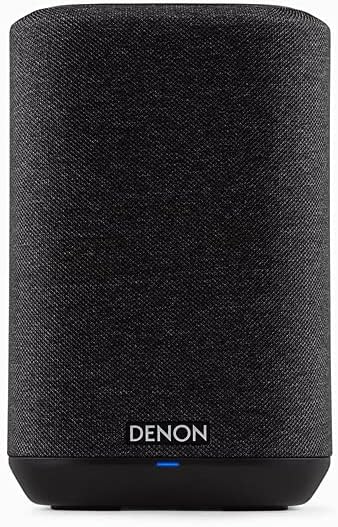
Looking for a compact smart speaker that gives you serious Denon sound without taking up much space?

Product at a glance
You’ll get powerful audio and a surprisingly full sound from the Denon Home 150 Wireless Smart Speaker – Compact Design, Wi-Fi & Bluetooth, HEOS Built-in, Alexa Built-in, Siri & AirPlay 2, Spotify Connect, Multi-Room Support, Black. It’s designed to sit neatly on a bookshelf, nightstand, or countertop while acting as a hub for streaming, voice control, and multi-room audio.
Below is a quick breakdown of the key specs and features so you can see what matters most at a glance.
| Feature | Details |
|---|---|
| Drivers | 1″ Tweeter, 3.5″ Woofer |
| Amplification | Two Class D amplifiers |
| Connectivity | Wi‑Fi, Bluetooth, AirPlay 2, HEOS, Spotify Connect |
| Voice Assistants | Alexa built-in; Siri via AirPlay 2 |
| Multi‑room | HEOS built-in for synchronized or independent rooms |
| Local playback | USB port for media libraries |
| Formats Supported | MP3, WAV, AAC, WMA, and more |
| Stereo pairing | Yes — pair two Home 150s for true stereo |
| Home theater use | Can act as rear surrounds with Denon Home Soundbar 550 and subwoofer |
| Color | Black |
| Ideal use | Small to medium rooms, bedrooms, kitchens, desktops |

Denon Home 150 Wireless Smart Speaker – Compact Design, Wi-Fi & Bluetooth, HEOS Built-in, Alexa Built-in, Siri & AirPlay 2, Spotify Connect, Multi-Room Support, Black
Design and build
You’ll notice the Denon Home 150 favors a minimalist, compact look that fits into most modern homes. The black finish is unobtrusive and classy, and the speaker’s proportions are small enough to be placed almost anywhere without dominating the room.
The build quality feels reassuringly solid when you handle the unit, and the grille and housing convey a premium feel despite the speaker’s small footprint. The controls are subtle and easy to reach, and the overall aesthetic will work well with both contemporary and more traditional décor.
Size and aesthetics
Because the Home 150 is compact, you don’t have to sacrifice style for space-saving. You can tuck it on a bookshelf, place it next to a monitor, or use it as a bedside companion without losing surface area.
The black color keeps things discreet, and the curved edges give a softer look compared with boxier designs. If you care about matching finishes, Denon tends to keep a restrained palette, so the Home 150 blends in rather than trying to be the focal point.
Portability and placement
The speaker is meant for stationary use, not for carrying around outdoors — you’ll plug it into AC power to use it. Because it’s compact and light enough to move from room to room, you can reposition it confidently to find the best acoustic spot in your living room or bedroom.
When placing the unit, give it a little breathing room from walls and corners to reduce bass boom and let the speaker breathe, especially if you want the most neutral sound. On a desk or shelf, slightly elevating it can improve imaging and help vocals stand out.

Sound performance
You’ll be impressed at how much detail and body the Home 150 can produce for its size, thanks to Denon’s tuning and the combination of a tweeter and woofer driven by Class D amplifiers. The speaker aims to deliver balanced sound — clear highs, present mids, and surprisingly punchy lows — so music sounds lively rather than thin.
Denon’s DSP tuning helps control distortion and keep the tonal balance when you crank the volume. While a compact speaker can’t reproduce the lowest sub-bass the way a full-size floorstander or dedicated woofer can, the Home 150 offers satisfying low-end weight for everyday listening and most music genres.
Drivers and amplification
The Home 150 ships with a dedicated 1″ tweeter for highs and a 3.5″ woofer for midbass, each powered by efficient Class D amplification. That combination gives you defined treble and controlled midrange performance, which makes vocals and acoustic instruments sound natural and immediate.
The DSP tuning complements the drivers and amplifiers by shaping frequency response and managing excursion limits. What you’ll hear is less about raw power and more about clarity and musicality, which is what you want from a compact smart speaker.
Sound signature and listening impressions
If you favor detailed vocals and crisp high frequencies, the Denon Home 150 will serve you well. Vocals and acoustic guitars come forward with clarity, and the treble remains controlled rather than brittle. You’ll notice the soundstage is wider than you might expect given the single-speaker design, and imaging is competent for casual listening.
Bass is tighter than it is thunderous — it’s accurate and punchy for pop, indie, and rhythmic music, but if you’re chasing chest-thumping sub-bass for EDM or hip-hop, you’ll want to add a separate subwoofer or choose larger speakers. Overall, it’s a balanced, enjoyable sound that works across genres.
Use cases: music, movies, podcasts
For music, the Home 150 excels with singer-songwriter, jazz, acoustic, and vocal-forward tracks where detail matters. For movies and TV, it offers improved dialogue clarity compared with typical TV speakers, and it becomes more immersive when paired as surrounds with a Denon soundbar and subwoofer. For podcasts and audiobooks, the clarity and midrange focus make voices sound natural and fatigue-free.
If you host casual listening sessions or use the speaker for daily background music, you’ll appreciate that the Denon remains engaging even at low volumes — the tonal balance is retained and nothing gets lost when you turn the dial down.
Connectivity and streaming
You’ll have plenty of streaming options: Wi‑Fi, Bluetooth, AirPlay 2, HEOS built-in, and Spotify Connect are all supported so you can stream from nearly any device or service. That flexibility means you can wirelessly cast from phones, tablets, computers, and supported streaming apps with minimal fuss.
The HEOS integration is especially useful if you plan to build a multi-room system or mix Denon components. Bluetooth is there for quick pairing when you don’t want to connect to Wi‑Fi, and AirPlay 2 ensures smooth multi-room streaming for Apple users.
Wireless options: Wi‑Fi, Bluetooth, AirPlay 2, HEOS
Wi‑Fi gives you the highest-quality streaming options and multi-room stability, while Bluetooth offers quick direct connections. AirPlay 2 brings low-latency, high-quality streaming from Apple devices and enables multi-room grouping from iPhones and Macs. HEOS handles multi-room configurations and integrates with many streaming services directly within the HEOS app.
This suite of wireless protocols means you won’t be locked into a single ecosystem; you can choose the streaming path that best fits your gadgets and habits.
Wired and local playback: USB and formats
If you keep a local music library, the Home 150 supports playback from a USB drive, and it’s compatible with common formats like MP3, WAV, AAC, and WMA. This is handy if you have high-resolution files or a collection that isn’t cloud-based.
Local playback can be great for parties or when you want to guarantee playback regardless of internet issues. Just plug your USB drive in and access your library through the HEOS interface.
Multi-room and stereo pair functionality
With HEOS built in, you can group multiple Denon Home speakers to play the same song in every room or play different tracks in each room. You can also pair two Home 150 speakers as a true left/right stereo pair for a more immersive and wider soundstage.
Multi-room setups are straightforward in the HEOS app, and once configured, you can control playback from your phone or with voice commands, depending on your setup.

Voice assistants and smart features
You can talk directly to the Denon Home 150 thanks to Alexa built-in, and you’ll be able to use voice control for playback, smart home actions, and information queries. If you’re in the Apple ecosystem, Siri works through AirPlay 2 — you can stream audio and control playback from Apple devices using Siri.
Voice control makes it easy to manage music, set timers, or control lights if your smart home gear is compatible. Microphone and privacy settings are accessible so you can mute the microphone when you don’t want voice activation.
How Alexa works on the Denon Home 150
Alexa is baked into the speaker, so you can use voice commands to play music from supported services, ask questions, control smart home devices, and more. Alexa’s skill ecosystem extends functionality if you rely on voice-driven automation and streaming.
Alexa uses cloud processing for complex requests, and for playback actions the Denon responds quickly, though features and supported streaming services can change over time depending on integrations.
Siri & AirPlay 2 integration
Siri functions through Apple’s AirPlay 2, which lets you stream audio from your iPhone, iPad, or Mac and use Siri to control playback. AirPlay 2 also supports multi-room sync across compatible speakers, so you can use Siri to manage music throughout your home.
Because Siri works via your Apple device, some Siri features depend on your phone or iPad rather than being wholly handled by the speaker itself.
Privacy and microphone controls
Denon includes physical controls for muting the microphone, so you can disable voice activation instantly. If privacy is a priority, you’ll appreciate that you can cut off voice input without unplugging the speaker.
You should also check the app settings to see what data is shared and how the cloud services are used, and keep firmware and app updates current to ensure the latest security and privacy patches.
Setup and app experience
Setting up the Denon Home 150 is straightforward if you follow the prompts in the HEOS app or the setup flow for Alexa, and you’ll be streaming within minutes. The app guides you through Wi‑Fi connection, account logins for streaming services, and grouping or pairing devices.
HEOS provides a single place to manage multi-room playback, streaming services, and device firmware. If you’re new to HEOS, there’s a small learning curve, but once you’re familiar with the app’s flow it becomes intuitive.
Step-by-step setup
- Unbox and plug in the Home 150 using the included power cable.
- Download and open the HEOS app on your phone or tablet.
- Follow the app prompts to add a new device, connect to your Wi‑Fi network, and sign in to streaming services.
- Enable Alexa features by linking your Amazon account in the app and following the Alexa setup steps.
- If you want stereo pairing or multi-room configurations, add additional Home speakers and group them in the HEOS app.
These steps assume you have a reliable Wi‑Fi network and your streaming service accounts ready. If you prefer Bluetooth, you can also pair directly from your device’s Bluetooth settings.
Troubleshooting common setup issues
If the speaker won’t appear in the app, try rebooting your router and the speaker, then reattempt setup. If Wi‑Fi is unstable, move the speaker closer to the router during configuration or use a temporary mobile hotspot to confirm the device can register.
For Bluetooth pairing issues, clear previous pairings on your phone and reset the speaker’s Bluetooth state if possible. For streaming service login problems, verify credentials and try reauthorizing the app and services.

Integration with home audio systems
You’ll be able to use the Home 150 in more complex setups, not just as a standalone speaker. It can be paired as rear surrounds with Denon Home Soundbar 550 and Subwoofer for a full 5.1 configuration, and HEOS compatibility means it plays nicely with other Denon wireless products and certain AVRs.
This flexibility turns the Home 150 into a multi-role device: main speaker in a small room, surround channel in a home theater, or an element in a whole-home audio system.
Using Home 150 as rear surrounds
If you want a complete cinematic experience, two Home 150 units can act as the rear surround speakers when paired with the Denon Home Soundbar 550 and a compatible subwoofer. That setup improves surround imaging and makes movie soundtracks feel more enveloping.
This configuration is ideal for rooms where you want a compact surround solution without running speaker wires through the entire space.
Integration with AVRs and other Denon devices
When paired with Denon AVRs and HEOS-enabled components, the Home 150 can join multi-room groups or be routed as part of a more advanced audio chain. The HEOS ecosystem simplifies cross-device playback management and synchronization.
If you already own Denon or Marantz gear, adding Home 150 speakers will often be straightforward and provide consistent performance and control across devices.
Power and battery
The Denon Home 150 is a plug-in speaker and does not include an internal battery, so you’ll need a nearby power outlet to use it. Because it’s mains-powered, you don’t need to worry about battery life, charging cycles, or runtime — it’s ready whenever you are.
The reliance on AC power keeps the unit compact and allows Denon to focus on audio hardware and DSP rather than battery constraints. For rooms without convenient outlets, consider the placement or simple extension cables rather than looking for a battery model.
Placement and power considerations
Position the speaker near an outlet or plan for cable routing so the power cord isn’t a tripping hazard or an eye-sore. If you use it in a temporary setup, keep a power strip handy to give flexibility for placement and to accommodate other devices.
Try not to place the speaker directly on top of heat-generating electronics or block ventilation areas, although the Home 150’s compact design doesn’t produce excessive heat in normal use.
Pros and cons
You’ll find several strengths that make the Home 150 an appealing buy, but there are trade-offs to consider if you’re comparing it to larger or more specialized speakers. Below is a clear look at what you gain and what you might miss.
Overall, the speaker is a strong contender in the compact smart speaker space, especially if you value sound quality, HEOS multi-room support, and built-in Alexa.
Pros:
- Excellent sound quality for its size with clear mids and controlled highs.
- HEOS multi-room for flexible whole-home setups.
- Multiple streaming options: Wi‑Fi, Bluetooth, Spotify Connect, AirPlay 2.
- Alexa built-in for voice control and smart home integration.
- Stereo pairing and use as surround channels with Denon soundbar and subwoofer.
- USB playback and broad format support for local media.
Cons:
- Bass is limited compared with larger speakers; you may want a subwoofer for deep low end.
- No battery — it requires AC power at all times, reducing portability.
- HEOS app has occasional quirks that some users find less polished than competing apps.
- Siri support is dependent on AirPlay rather than a native Siri integration.
Comparison with competitors
When you compare the Denon Home 150 to other compact smart speakers, you’ll notice strengths and differences that might sway your choice depending on what you prioritize: ecosystem, voice assistant, sound signature, or extra features. Below are three common direct comparisons to help you decide.
You should weigh the audio performance and multi-room flexibility against other factors like app experience and ecosystem lock-in when picking the right speaker for your home.
Denon Home 150 vs Sonos One
Sonos One offers deep integration with the Sonos ecosystem, seamless multi-room support, and generally a polished app experience. The Denon Home 150, on the other hand, may offer a slightly warmer and more detailed sound in some cases and supports HEOS for multi-room, but app preferences and service compatibility can be subjective.
If you’re already deep in Sonos, sticking with One makes sense. If you want a sound that emphasizes clarity and prefer Denon’s tuning or need specific HEOS features, the Home 150 is a strong alternative.
Denon Home 150 vs Bose Home Speaker 300
Bose generally emphasizes clean sound and spatial processing tuned for everyday listeners, with a distinct voice assistant experience depending on the model. The Denon Home 150 tends to present a fuller midrange and more precise driver pairing for detail, while Bose may have more pronounced room-filling tendencies at moderate volumes.
Your choice will depend on whether you prefer Denon’s tighter, accurate presentation or Bose’s slightly more colored and consumer-focused tuning.
Denon Home 150 vs Google Nest Audio
Google Nest Audio shines in integration with Google Assistant and is often priced very competitively. The Denon Home 150 provides a stronger audiophile tilt with HEOS and Alexa built in, offering more options for multi-room and pairing with high-quality Denon audio gear.
If Google Assistant is a priority and budget is tight, Nest Audio is a solid pick; if you want richer sound and Denon’s ecosystem features, the Home 150 is attractive.
Who should buy the Denon Home 150?
If you care about sound quality but have limited space, you’ll appreciate the Home 150’s balance of size and performance. It’s a great pick for someone who wants better audio than typical smart speakers while still enjoying voice control and multi-room capabilities.
You should consider this speaker if you already use or plan to use other Denon/HEOS devices, want Alexa on-board, or value flexible streaming options across platforms.
Best for audiophiles on a budget
You’ll get more musical detail and a cleaner presentation than many budget smart speakers without spending a fortune. For listeners who prefer clarity and musicality over emphasized bass, the Home 150 offers a very attractive value.
Adding a subwoofer later is an easy upgrade path if you crave deeper low end without replacing the speaker.
Best for smart home users and HEOS fans
If you use Alexa or plan to build a HEOS-based multi-room system, the Home 150 integrates smoothly and gives you a compact but capable option for many rooms. It’s a practical choice for smart home setups where voice control and room grouping matter.
HEOS compatibility also makes it simple to expand your system with soundbars, subwoofers, and other Denon speakers.
Practical tips for getting the most from your Home 150
You’ll get better performance by taking a few simple steps during placement and setup. Small adjustments in positioning and EQ can yield noticeable improvements in bass presence, imaging, and clarity.
Following a few practical tips will help the Home 150 sound its best in your living space without complicated tweaks.
Placement advice
Place the speaker away from corners and the floor to reduce boom and muddiness. Ideally, set it at ear level for the best imaging and clarity, especially if you listen from a fixed seating position.
If you pair two for stereo, keep them equidistant from your primary listening position and avoid putting them too far apart — a three to six foot separation often works well in small to medium rooms.
EQ and room correction
Use the HEOS app or your source device to adjust EQ if a track sounds too bass-heavy or too bright; modest cuts or boosts can dial in a sound you prefer. If your app or streaming service offers room correction or auto-EQ features, try them to see if they improve the overall balance in your room.
Remember that small changes can have big impacts: even slight toe-in of speakers can improve imaging and vocal presence.
Care, maintenance, and updates
You’ll want to keep the firmware and app updated to get the best performance and access the latest features. Denon periodically releases updates that can improve stability, add supported services, or refine voice assistant behavior.
Physically, keep the grille and exterior dust-free and avoid spills; the Home 150 isn’t rated for outdoor exposure or water resistance, so indoor placement is recommended.
Firmware and app updates
Check the HEOS app occasionally for firmware updates and apply them when available. Updates often improve compatibility with new streaming services and can fix connectivity issues or enhance performance.
If you run into problems after an update, restarting the speaker and router can resolve transient glitches, and Denon’s support resources are useful for more persistent issues.
Cleaning and physical care
Dust the grille lightly with a soft cloth and avoid liquids near the speaker. If you use cleaning sprays, apply them to the cloth and never spray directly onto the unit.
Keep the speaker away from direct sunlight for long periods and avoid exposing it to extreme humidity or heat to preserve both electronics and cabinet finish.
Final verdict and buying tips
If you want a compact, well-built smart speaker that emphasizes musical detail, multi-room flexibility, and built-in Alexa, the Denon Home 150 is a compelling choice. It balances sound, smart features, and ecosystem integration in a way that will please many listeners who don’t want to compromise on audio quality.
Before you buy, consider whether you’ll need deeper bass (in which case pair it with a subwoofer) and whether HEOS/Alexa fit your smart home preferences. If you’re upgrading from small budget speakers, you’ll notice a meaningful jump in clarity and overall enjoyment.
Quick buying tips
- If you want stereo sound, buy two units at once to pair them for left/right channels.
- If you prioritize deep bass, budget for a subwoofer or choose a larger speaker.
- Make sure your Wi‑Fi is stable to avoid dropouts in multi‑room groups.
- Confirm compatibility with your streaming services and voice assistant preferences before purchasing.
Final maintenance tips
Keep firmware up to date and the HEOS app configured for your services. Regularly dust the unit and avoid close placement to heat sources to extend the speaker’s lifetime and maintain performance.
If you follow these tips and consider how the Home 150 fits into your home and listening habits, you’ll get a lot of value from a compact speaker that genuinely aims to deliver Denon’s audio DNA in a small package.

Disclosure: As an Amazon Associate, I earn from qualifying purchases.