
Want a reliable way to shut off your water automatically when something goes wrong?
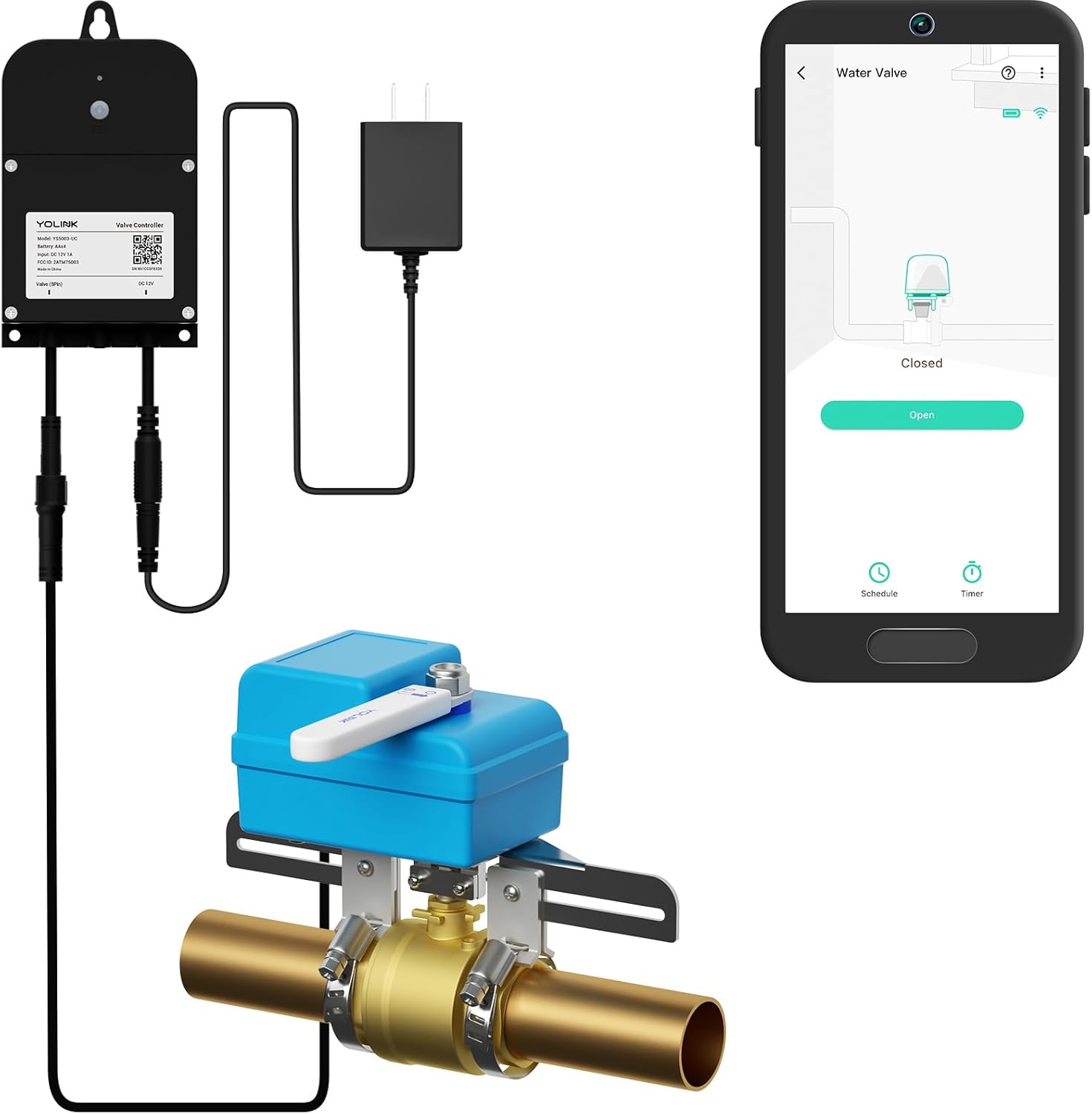

What is the YoLink Smart Water Valve Controller, with Valve Operator?
This bundle combines a YoLink Smart Valve Controller with an EVO Valve Manipulator/Operator to give you a complete, no-plumber-required automatic water shutoff solution. You get smart control of an existing shutoff valve without cutting pipes or replacing plumbing parts, making it a practical choice for many homes and businesses.
Why this product might matter to you
If you worry about leaks, frozen pipes, or accidental water use while you’re away, this product lets you stop the flow remotely or automatically when a trigger occurs. It’s designed to work both with other YoLink devices directly and with the YoLink Hub for full remote control and integrations.
YoLink Smart Water Valve Controller, with Valve Operator, Easy No-Plumber DIY Installation, Remote Control, Compatible with Alexa/Google Assistant, IFTTT - YoLink Hub Required
Key features at a glance
Below is a compact table that breaks down the main specs and benefits so you can scan what matters most quickly. The table helps you see the system’s components, communications, power options, integrations, and special behaviors.
| Feature | Details | Why it matters |
|---|---|---|
| Kit contents | 1 YoLink Smart Valve Controller + 1 EVO Valve Manipulator/Operator | Complete bundle for converting an existing valve into a motorized smart valve without plumbing changes |
| D2D functionality | Device-to-device control works directly between YoLink devices | Keeps automatic shutoff working during internet or hub outages |
| Communication tech | LoRa long-range RF to YoLink Hub (hub required for app/web features) | Much longer range than WiFi, useful for basements, detached areas, or large properties |
| Hub requirement | YoLink Hub is required for app control, notifications, and third-party integrations | Hub is necessary if you want remote access and integrations like Alexa or IFTTT |
| Battery life | Built-in batteries can last up to 2 years (depending on usage) | Low-maintenance operation for typical household use |
| Power options | Operates on internal batteries or external power; internal battery acts as backup | Keeps the controller working during a power outage if external power is used |
| Notifications | App alerts, email, SMS (5 free SMS per YoLink account monthly; +5 free SMS per additional YoLink device) | Timely alerts help you respond quickly to valve state changes or leak triggers |
| Integrations | Alexa, Google Assistant, IFTTT, Home Assistant | Enables voice control, routines, and broader home automation |
| Installation | EVO operator mounts to existing valve without pipe cutting | No plumber required for most ball-valve style shutoffs |
Device-to-Device (D2D) functionality
YoLink’s D2D feature allows the valve controller to act when a paired YoLink sensor or fob triggers, even without a hub or internet connection. That means critical actions like closing the valve after a leak are more resilient because local device communication won’t necessarily fail when the cloud or WiFi fails.
How D2D changes reliability
When you set up D2D rules, the valve and sensors communicate directly using YoLink’s radio protocol, so you get automatic shutoff even during power loss or network interruptions. This reduces your dependence on external infrastructure for the most important, time-sensitive functions.

Long range LoRa connectivity
The system uses LoRa-based communications to link devices to a YoLink Hub, letting you place the hub far from the valve controller without signal issues. LoRa’s range can reach up to about a quarter mile in open conditions, which is useful if your hub is in a different building or on another floor.
Real-life benefits of long range
You can install devices in basements, detached garages, or utility closets that are normally outside reliable WiFi coverage and still maintain good connectivity when a hub is nearby. That flexibility means fewer workarounds and deeper coverage for property-wide leak protection.
Installation and setup
The EVO Valve Operator is built to attach directly to an existing valve handle so you won’t have to cut pipes, replace fittings, or hire a plumber in most cases. You still need to plan mounting location, check valve compatibility, and decide whether to use internal batteries or external power for the controller.
Step-by-step setup overview
- Mount the EVO operator over the valve handle and secure it per the instructions. This mechanical step converts the manual valve into a motor-driven actuator.
- Mount the YoLink Valve Controller nearby and power it with batteries or external power as you prefer. The internal battery provides backup if you use external supply.
- Pair the controller with the EVO operator and test manual open/close operations before tying automation to sensors. Verifying mechanical operation first helps avoid surprises.
- If you want app control and third-party integrations, set up a YoLink Hub and add the valve controller to your YoLink account. The hub enables remote access, notifications, and voice/IFTTT integrations.
- Create triggers and D2D rules to close the valve on leak detection or other events. Save test automations and test them with a controlled trigger.
No-plumber DIY considerations
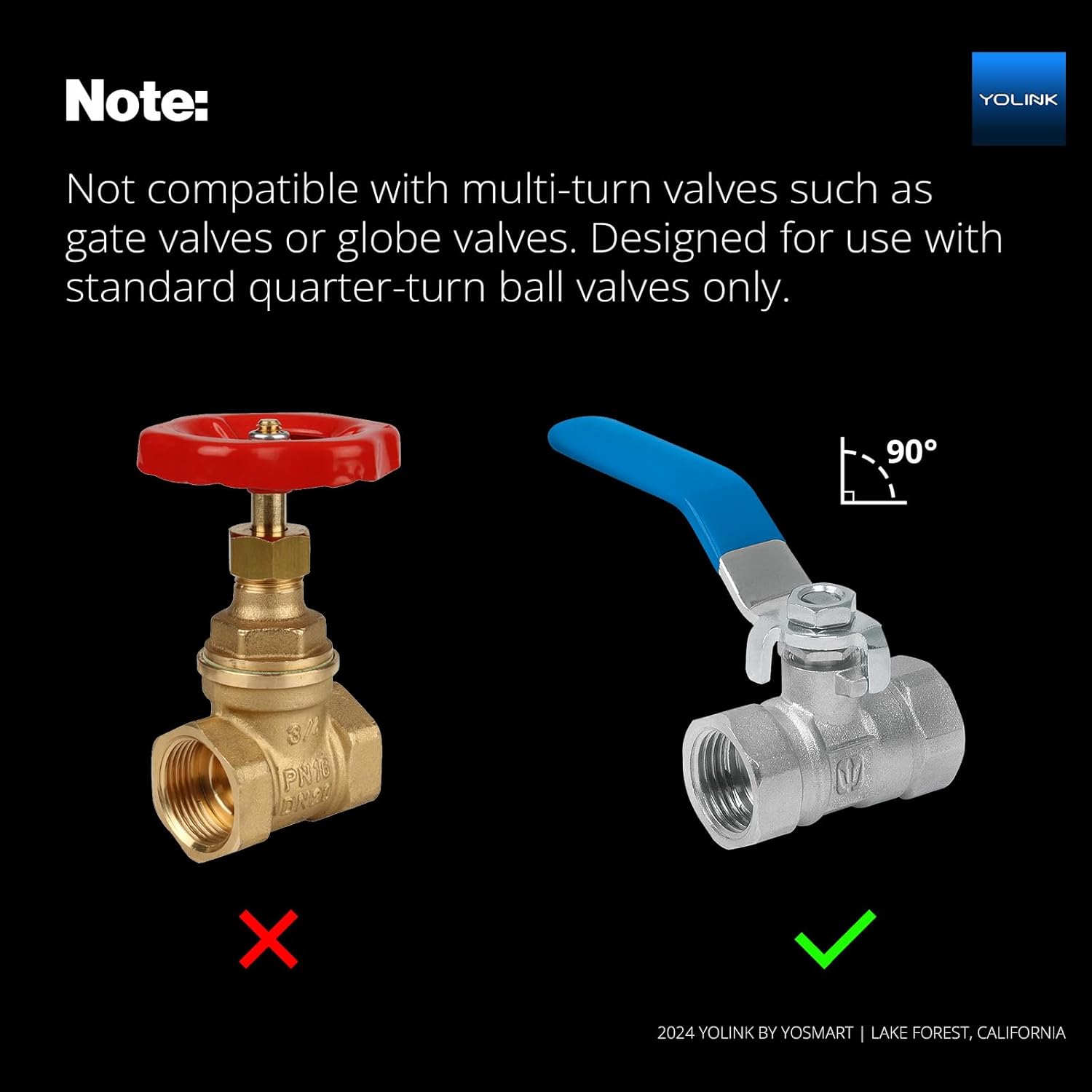
While the kit avoids cutting into plumbing, you still need to ensure the valve is accessible and compatible with the EVO operator. Not every valve type or orientation will allow straightforward mounting, so you should visually inspect the valve and plan the mounting path before starting.
Hub requirement and app features
If you want to control the valve from your phone, receive email/SMS alerts, or tie the valve into Alexa/Google Assistant or IFTTT routines, the YoLink Hub is required. Without a hub, D2D features still let the valve respond to local YoLink triggers, but remote features and cloud integrations will not be available.
What the YoLink Hub adds
The Hub bridges LoRa devices to your home network and YoLink cloud so you can manage devices through the app and leverage voice assistants and web integrations. It’s the central piece that gives the system full smart-home functionality while preserving local D2D actions for resiliency.

Notifications and alert options
YoLink provides app push notifications, email alerts, and SMS for valve state changes and device triggers. Your account includes 5 free SMS per month to start, and each additional YoLink device adds 5 more free SMS credits monthly, which helps with basic notification needs without extra costs.
Customizing alerts and automation
You control which events generate alerts and who receives them, so you can get immediate notice for critical events and fewer notifications for routine changes. The system supports flexible rules so you can pair leak sensors, motion events, or time-based conditions with valve actions.
Power options and battery life
The controller can run on its built-in batteries for up to two years in typical use, though actual life will depend on usage frequency and environmental factors. If you prefer continuous power, the controller accepts external power while keeping the internal batteries as a backup in case of outage.
Practical advice on power setup
If your valve is in a place prone to power loss or you want immediate responsiveness without worrying about battery replacement, use external power and rely on the internal battery only as a backup. If you want minimal wiring, the long battery life makes a battery-only installation practical, but plan periodic checks to avoid unexpected battery depletion.
Physical design and compatibility
The EVO Valve Manipulator is designed to clamp onto an existing manual valve handle and turn it using a motorized mechanism, avoiding pipe work. This approach works well for many common shutoff valves, especially round or lever-style ball valves, though you should confirm fit before purchasing.
Fitment and mounting tips
Take photos and measure your valve handle and surrounding space before installation to ensure the EVO operator has room to mount and rotate. If the valve is recessed, obstructed, or of an unusual type (e.g., gate valves or certain specialty valves), you may need an alternative mounting approach or a different device.
Integrations: voice assistants and home automation
YoLink is compatible with Alexa and Google Assistant for voice control, and it supports IFTTT and Home Assistant for more complex automations. With the hub on your network, you can ask your voice assistant to open or close the valve and build automations that tie the valve to other smart devices.
How this benefits everyday use
You can add the valve to “away” or “night” routines that automatically close water when you’re not home, or pair it with motion or leak sensors so the valve reacts instantly to conditions you define. That gives you hands-free control and reduces the chance of water damage while you’re busy or away.
Performance and reliability
Because critical actions can be executed locally via D2D, the most important function—closing the valve when a leak is detected—doesn’t have to wait for cloud communication. The LoRa link to the hub is also generally robust across floors and through some walls, so you’ll usually see good performance even where WiFi is weak.
What to expect in normal use
Valve actuation is slightly slower than a manual flick, since the mechanism must complete a rotation, but it’s fast enough to prevent significant flooding when paired with a reliable leak trigger. Routine testing is recommended to ensure the mechanical operation remains smooth and the batteries are in good condition.
Safety, privacy, and firmware updates
YoLink’s architecture separates local D2D functions from cloud-enabled features that require the hub, which is helpful for safety-critical operations. For privacy and security, you should keep your YoLink Hub firmware and device firmware up to date, and enable strong account credentials.
Recommendations to keep your system secure
Use a unique password for your YoLink account, enable any available two-factor authentication, and apply firmware updates when they appear in the app. If you integrate Alexa, Google, or IFTTT, review the permissions you grant and audit them periodically.
Pros and cons
You’ll want to weigh the positives against a few limitations to decide if this system suits your needs. Below are straightforward pros and cons to guide a buying decision.
Pros
- You can convert an existing valve to a smart valve without cutting pipes or hiring a plumber, which saves cost and hassle.
- Local D2D control ensures automatic shutoff works even during internet outages or hub failures, which is crucial for safety.
- LoRa support provides long-range connectivity, making the solution viable for detached buildings or deep basements.
- Long battery life with optional external power gives flexibility based on your installation preferences.
Cons
- The YoLink Hub is required for remote app control, voice assistants, and third-party integrations, which means an extra device purchase if you don’t already have one.
- Compatibility with some valve types or tight mounting spaces may require extra planning or alternative solutions.
- The EVO operator adds mechanical bulk around the valve handle that might be visually obtrusive in certain locations.
Real-world use cases
This system is particularly useful if you have a vacation home, rental property, or a basement that’s hard to reach, because you can automate water shutoff to avoid damage while you’re away. It’s also a good fit for homeowners who want an extra layer of protection without major plumbing alterations.
Examples of practical deployments
- If a leak sensor detects water under a water heater, the valve can close automatically, preventing a small leak from becoming a major flood.
- For seasonal properties, you can close the main water remotely when the property is empty, minimizing the risk from frozen pipes or unattended leaks.
- In a rental property, you can tie the valve to tenant move-in and move-out routines, or remotely shut off water in an emergency while arranging a repair.
Troubleshooting and maintenance tips
A few simple checks will keep your system reliable: verify battery level periodically, test D2D triggers, and keep the valve area clean and unobstructed. If the EVO operator struggles to turn a stuck valve, don’t force it; inspect for debris or corrosion and consider professional assistance if necessary.
Common issues and their fixes
- Valve won’t respond: Check battery level, confirm D2D pairing, and ensure the EVO operator is properly seated on the valve handle.
- Intermittent connectivity: Reposition the YoLink Hub for better line-of-sight, or add a repeater device if the hub is too far.
- Slow actuation: Inspect for obstructions in the valve path and confirm the actuator hardware is not binding or misaligned.
Comparison with other smart water shutoff options
Compared with in-line devices that replace a section of pipe, the EVO operator’s clamp-on approach is less invasive and often simpler to install yourself. Compared with WiFi-only smart valves, YoLink’s LoRa-based system provides much greater range and reliability in areas with poor WiFi, and the D2D capability gives stronger resilience during network outages.
When another option might be better
If you prefer a solution that replaces the valve internals (for example, devices that directly throttle or cut the water in-line) you might consider other brands that integrate sensors and flow analytics in one product. Those systems can provide different analytics and might be preferred if you want flow-based leak detection rather than sensor-triggered shutoff.
Who should buy the YoLink Smart Water Valve Controller kit?
You should consider this kit if you want a non-invasive way to add automatic shutoff to your existing valve and you value local fail-safe behavior during outages. It’s also a strong choice if you need long radio range between the hub and valve location, or if you want voice and third-party integrations for convenience.
Who might want a different solution
If you have an inaccessible valve, a non-compatible valve type, or need in-line flow sensors and analytics, another product that replaces pipe sections might be more suitable. Also, if you want cloud-only control without a hub, look for smart valves specifically designed for WiFi-only deployments.
Buying and installation checklist
Before you buy, measure your valve handle and surrounding clearance, decide on battery vs. external power, and factor in the YoLink Hub if you want remote access. Planning these items upfront helps prevent delays and ensures a smoother install process.
Quick pre-purchase steps
- Photograph and measure the valve and space around it to check EVO operator fit.
- Decide whether you will power the controller externally or rely on batteries for convenience.
- Plan for a YoLink Hub location with good network access and proximity to the valve controller for reliable LoRa link.
Final verdict
The YoLink Smart Water Valve Controller and EVO Valve Operator bundle is a practical, resilient, and flexible way to add automatic shutoff to an existing valve without plumbing work. If you prioritize long-range connectivity, offline device-to-device failover, and the ability to integrate with voice assistants or home automation platforms, this product is worth strong consideration.
Condensed recommendation
If you want effective, low-invasion water protection with strong local redundancy and flexible integrations, this YoLink kit offers a compelling mix of features and reliability. Just plan for the YoLink Hub if you need remote control and ensure your valve is compatible for a smooth, no-plumber install.
Frequently asked questions (short answers)
Q: Do I need a YoLink Hub to use the valve at all?
A: No — basic D2D automatic shutoff can work without a hub when paired with other YoLink triggers, but the Hub is required for app control, remote access, notifications, and third-party integrations.
Q: How long do the batteries last?
A: Typical battery life is up to around two years, but actual life depends on usage frequency and environmental conditions. Using external power will extend operation while leaving the internal batteries as backup.
Q: Will the EVO operator fit my valve?
A: The EVO operator fits many common shutoff valves without cutting pipes, but you should measure your valve handle and space beforehand to confirm compatibility.
Q: Can this work with Alexa or Google Assistant?
A: Yes — with a YoLink Hub, you can integrate the valve controller with Alexa, Google Assistant, IFTTT, and Home Assistant for voice commands and automation routines.
Q: What happens during a power or internet outage?
A: If you’ve set up D2D rules, devices can still communicate and close the valve locally even when the internet or hub is down. If you rely on the hub or cloud-only automations, those features will not be available until connectivity is restored.
Q: Is the system suitable for large properties?
A: Yes — LoRa-based communications provide long-range connectivity, often reaching up to about a quarter mile in open conditions, which helps on large or spread-out properties.
If you want, I can help you walk through valve compatibility checks, provide a step-by-step pre-install checklist tailored to your specific valve photos, or draft the installation steps you’ll want to follow on install day.

Disclosure: As an Amazon Associate, I earn from qualifying purchases.