
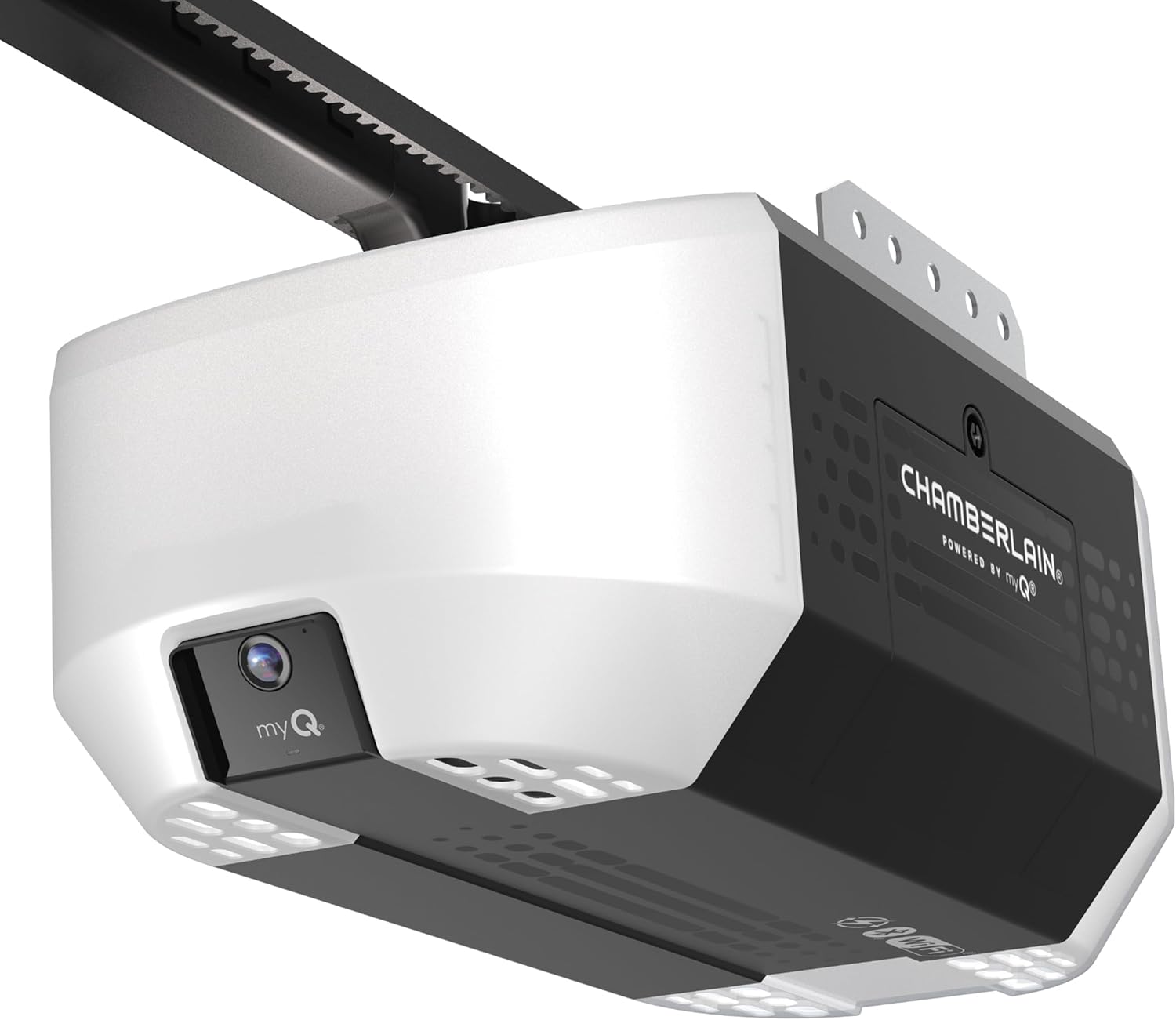
Thinking about replacing your garage door opener with something smarter and quieter that you can control from your phone?

Product overview
You’ll find the Chamberlain B2405 Quiet Wi‑Fi Garage Door Opener, Wireless Keypad – Quantity 1 is designed for homeowners who want quiet operation plus smartphone control. It pairs a belt drive and an AC motor with built‑in myQ connectivity so you can open, close, and monitor your garage from anywhere.
What you get in the box
When you unpack the unit, you’ll typically get the opener head, rail, belt drive assembly, remote or keypad components (depending on the package), and mounting hardware. Exact contents can vary by retailer, so you should check the included items list before you buy or install.

Key specifications
This model combines traditional lifting power with modern smart features to support routine garage use and connected home setups. Below is a compact breakdown of the most important technical details to help you compare at a glance.
| Specification | Detail |
|---|---|
| Model | Chamberlain B2405 Quiet Wi‑Fi Garage Door Opener |
| Motor type | Quiet AC motor |
| Drive system | Belt drive (strong, quiet) |
| Lifting force | Advertised as 1/2 HP (lifting force for standard aluminum doors; provided for comparison) |
| Lighting | (2) 100 Watt max bulbs (bulbs sold separately) |
| Connectivity | Wi‑Fi (improved connectivity), Integrated Bluetooth |
| App control | myQ app (control, secure, monitor remotely) |
| Security | Security+ 2.0 rolling codes (about 100 billion code combinations) |
| Smart home | Works with myQ ecosystem and many smart home solutions (check compatibility) |
| Memory/firmware | Enhanced memory to support new myQ features |
Design and build quality
You’ll notice a streamlined design that’s focused on function and quiet performance rather than flashy aesthetics. The chassis and rail system are solid and meant to be installed on typical residential garage doors; Chamberlain products generally aim for long‑term reliability.
Motor and drive system
The B2405 uses a quiet AC motor coupled to a belt drive, which is the configuration most people choose when they have living spaces near or above the garage. You’ll get smoother motion and less vibration than a chain drive, and regular maintenance is usually straightforward.
Lighting and power
The unit supports two light bulbs up to 100 watts each, giving you bright illumination when you enter the garage. Since bulbs are sold separately, you’ll want to pick bulbs that match your preferred brightness and energy profile (LED bulbs are a good energy‑saving choice if compatible).

Smart features and connectivity
If you like the convenience of controlling your home from your phone, this opener is built to support it through the myQ app and integrated Bluetooth. The device also includes improved Wi‑Fi connectivity and enhanced memory, which should help with reliable app interactions and future firmware updates.
myQ app control
With the myQ app, you’ll be able to open and close the door, check door status, and receive notifications if the door is left open. The app also allows you to manage user access and integrates with other myQ devices for a more cohesive smart home setup.
Bluetooth setup and benefits
Integrated Bluetooth reduces setup time by simplifying the initial pairing process between the opener and your phone or other myQ devices. You’ll find Bluetooth handy during installation or when you need a quick local connection without relying on home Wi‑Fi.
Wi‑Fi performance and memory improvements
Chamberlain states improved Wi‑Fi connectivity and enhanced memory to support new myQ features, so you should expect fewer connection drops and better support for future app capabilities. That said, the actual performance will still depend on your home network strength and router placement.
Security and privacy
Security is a big concern with connected devices, and this unit uses Security+ 2.0 to protect access to your garage. You’ll want to combine built‑in protections with your own network security practices (strong Wi‑Fi passwords, up‑to‑date router firmware, two‑factor authentication on accounts where available).
Security+ 2.0 encryption
Security+ 2.0 uses rolling codes to ensure that each remote or keypad transmission is unique, which greatly reduces the risk of code grabbing. Chamberlain advertises a very large number of code combinations (on the order of 100 billion), so casual attackers are unlikely to crack access by replaying signals.
Account and network security tips
You should enable strong, unique passwords for your myQ account and keep the app updated. Place your router where the garage gets decent Wi‑Fi coverage or use a Wi‑Fi extender; also make sure your home network uses WPA2/WPA3 encryption to minimize unauthorized access.
Installation and setup
You’ll find installation manageable if you’re comfortable with basic tools and following manufacturer instructions, or you can opt for professional installation if you prefer. The integrated Bluetooth and improved Wi‑Fi aim to simplify setup and app pairing.
Tools and prep
Before you start, prepare a ladder, basic hand tools (wrenches, drill, screwdriver), a tape measure, level, and safety glasses. You’ll also want to verify door dimensions, check for balance, inspect springs, and ensure the door operates smoothly by hand—if the door is off balance, fix that before installing a new opener.
Step-by-step installation overview
You’ll follow a sequence similar to this when installing the opener (this is a high‑level summary—always follow the full manufacturer instructions included with the product):
- Mount the rail and attach it to the motor head while the unit is still on the floor. This helps with handling and alignment.
- Secure the motor head to a ceiling bracket and fasten the rail to the header bracket above the door using the provided hardware.
- Install the belt drive and ensure proper tension; the correct tension reduces noise and extends component life.
- Attach the trolley to the door arm and connect the door bracket to the top section of the door.
- Wire the safety sensors near the bottom of the door tracks so the opener will reverse if something blocks the door.
- Power up the opener and set up limits and force settings according to the instructions to ensure proper opening/closing travel.
- Pair remotes, keypad, and then use the myQ app with Bluetooth to complete the Wi‑Fi setup and account registration.

Performance: noise, speed, reliability
In everyday use, this model focuses on quiet, consistent operation suitable for attached garages or those with rooms above the garage. The belt drive and quiet AC motor reduce the kind of clanking and vibration you’d associate with chain‑drive openers.
Quiet operation in daily use
You’ll notice significantly less noise than most chain‑drive openers, and the belt reduces transmitted vibrations into ceiling joists. That makes this model a good fit if you have bedrooms, living spaces, or an office above or adjacent to the garage.
Lifting power and compatibility with door types
Chamberlain lists a lifting force equivalent to 1/2 HP and clarifies the statement is for comparison—performance is tuned to support standard aluminum doors and many common residential door types. If you have an especially heavy or insulated door, check the door weight rating and, if necessary, consult a pro to ensure the opener matches your door’s demands.
myQ integrations and smart home compatibility
You’ll be able to integrate this opener into broader smart home setups through the myQ ecosystem and supported third‑party integrations. Keep in mind that exact compatibility can vary, and new integrations may be added through firmware updates, so check current Chamberlain documentation for details.
Native and third‑party integrations
myQ often integrates with popular smart home platforms and voice assistants, enabling voice commands and routines in many cases. If you plan to use the opener with a specific smart home system, verify the integration path (native skill, third‑party bridge, or additional accessory) before purchase.
Using automations and sharing access
The myQ app allows you to share access with family members or temporary users, and you can use automations (like schedule‑based closing) to make your routine more convenient. Remember that some advanced features may require enabling notifications and granting app permissions on your phone.
Pros and cons
You’ll want to weigh the benefits and compromises to see if this opener fits your priorities and budget. Below are the main advantages and limitations to consider.
Pros:
- Quiet belt drive and AC motor reduce noise and vibration. You’ll appreciate this if you have bedrooms or living spaces near the garage.
- myQ smartphone control and integrated Bluetooth simplify remote access and setup. You can monitor the door from anywhere and get notifications.
- Security+ 2.0 rolling codes provide strong protection against remote code grabbing. That helps keep your garage secure from casual attacks.
- Supports two bright lights and has improved Wi‑Fi connectivity and memory for future feature support.
Cons:
- Bulbs are not included, so you’ll need to buy compatible bulbs separately. That’s a small extra cost and decision to make.
- If you have an unusually heavy or oversized door, you’ll need to double‑check lift capacity and compatibility. Some heavy doors may require a higher capacity opener.
- Smart home integrations vary and can require additional accessories for full compatibility with some ecosystems. Confirm the exact integration route before committing.

Troubleshooting common issues
You’ll likely run into only a few common issues, most of which can be resolved quickly with routine checks and adjustments. The following tips cover frequent problems and practical fixes.
Remote or keypad won’t work
If your remote or keypad doesn’t operate the door, check battery levels and confirm the unit is paired. Also verify the safety sensors and wiring are intact; a misaligned sensor can prevent the system from responding to commands.
myQ app can’t connect
If you can’t connect the opener to the myQ app, verify Bluetooth was used successfully for initial pairing and that your Wi‑Fi password and network settings are correct. Move your router closer or use a Wi‑Fi extender if the garage has weak signal, and restart your router and the opener if necessary.
Door reverses or won’t close fully
If the door reverses during closing, check for obstructions and confirm the safety sensor alignment. You may also need to adjust the travel limits and force settings per the manual so the opener correctly senses when the door should stop.
Maintenance and care
You’ll want to perform a few simple maintenance tasks periodically to keep the opener working smoothly and safely. A little attention annually (or more often if used heavily) will extend the life of the system.
Regular checks and lubrication
Inspect the belt, rail, and mounting hardware for signs of wear or looseness at least once or twice a year. Lubricate moving parts as recommended in the manual—note that belt drives often require less lubrication than chain drives, but the door’s rollers and hinges still benefit from maintenance.
Software updates and account hygiene
Keep the myQ app and opener firmware updated whenever updates are available so you get new features and security patches. Also review the users who have access to your myQ account periodically and remove anyone who no longer needs entry.
Comparison with similar models
When you’re comparing openers, you’ll look at drive type, motor, smart features, and price. The B2405 sits in the midrange of Chamberlain’s lineup with a focus on quiet performance and smart connectivity, making it a common choice for homeowners who want modern conveniences without stepping up to the premium models.
How it stacks up against chain or screw drives
Compared to chain drives, you’ll get quieter operation and less vibration with the belt drive in the B2405. Screw drives are somewhere in between for noise but can be faster; the B2405 prioritizes quiet and reliable daily use over maximum opening speed.
How it compares to higher‑end Chamberlain models
Higher‑end models may offer stronger motors, additional horsepower ratings, more frequent commercial usage ratings, or extra convenience features like battery backup. You’ll want to choose based on the weight and frequency of use of your door—if you have a very heavy door or need frequent cycles, a more powerful model might be better.
Who should buy this
You should consider this opener if you want quieter operation, smartphone control, and a reliable, user‑friendly setup. It’s especially appropriate for you if you have living spaces adjacent to or above the garage and you value app control for security and convenience.
When to choose a different option
If your door is unusually heavy, oversized, or you require high cycle ratings (frequent industrial or commercial use), you might need a more powerful unit. Also, if you rely on a smart home ecosystem that myQ doesn’t natively support without extra hardware, you should check integration options carefully.
Accessories and add‑ons to consider
You’ll likely want a few complementary items to get the most from your opener and ensure compatibility with your routines. Think about quality LED bulbs, an extra remote or keypad, a Wi‑Fi extender for better coverage, and smart home bridges if needed.
Battery backup and lighting choices
Battery backup is a convenient accessory if you want door operation during power outages; not all models include that feature, so confirm if you need it. For lighting, choose bulbs that fit your brightness and energy preferences—LED bulbs save energy and last longer than incandescent bulbs.
Additional remotes and keypads
You can add remotes and wireless keypads so family members have easy access without needing a phone. Wireless keypads are handy if you want to grant temporary access to neighbors, contractors, or delivery drivers without sharing login credentials.
Final recommendation
If you want a quiet, smart, and reliable garage door opener for a residential setting, you’ll find the Chamberlain B2405 a strong contender. It balances modern connectivity (myQ, Bluetooth, improved Wi‑Fi) with a quiet belt drive and proven security features, making it a solid everyday choice for most homes.
FAQ
Q: Will this opener work with my existing remotes?
A: You should check the compatibility of your remotes, as most Chamberlain openers support standard Chamberlain/LiftMaster remote frequencies. If your remote is from a different brand or is very old, you may need a replacement remote that matches this model.
Q: Do you need a myQ subscription to use the app features?
A: Basic myQ control and notifications are typically available without a paid subscription, but certain advanced features, integrations, or extended notifications might require an account or subscription—verify the current myQ feature list and terms before relying on any subscription‑based features.
Q: Can you control the door with voice assistants?
A: Many myQ devices support integrations with voice assistants and smart home platforms, but availability can change. Check Chamberlain’s compatibility list and any required bridge devices to be sure the voice assistant you use will work with this opener.
Q: Is professional installation required?
A: You don’t have to have professional installation if you’re handy and follow the instructions, but if you’re uncomfortable working with overhead hardware, balancing torsion springs, or wiring, hiring a professional is a safe choice.
Q: How long do belt drives last compared to chain drives?
A: Belt drives typically need less maintenance and can be quieter for longer, though actual lifespan depends on usage and maintenance. Regular inspections and keeping components properly tensioned will help maximize longevity.
Q: What should you do if the door doesn’t reverse on contact?
A: First, check the safety sensors and adjust their alignment if necessary. If sensors are fine, you may need to adjust limit and force settings per the manual or consult a technician to ensure safe operation.
Closing notes
You’ll appreciate the quiet belt drive, the convenience of myQ smartphone control, and the built‑in Bluetooth for easier setup. If you want a balance of quiet performance, smart features, and reliable security in a residential opener, the Chamberlain B2405 Quiet Wi‑Fi Garage Door Opener, Wireless Keypad – Quantity 1 is worth serious consideration—just confirm compatibility with your door weight, desired smart integrations, and any additional accessories you might need.

Disclosure: As an Amazon Associate, I earn from qualifying purchases.