
Looking for a mesh that upgrades your whole-home WiFi to WiFi 7 without a headache?


First impressions and what’s in the box
You’ll notice the ASUS ZenWiFi BT8 (3-Pack) feels like a premium mesh system right out of the box. The units are compact and modern, designed to sit unobtrusively in living areas while packing enough radio hardware to cover large homes.
Packaging and design
The packaging is tidy and includes clear setup instructions so you won’t be left guessing what to do first. The hardware itself favors a vertical profile with vents for thermal management, and the styling is neutral enough to blend with most home decors.
What’s included
You get three identical nodes, power adapters for each, a single Ethernet cable, and a quick start guide. ASUS typically includes basic documentation for warranty and safety, and the box contents are minimal but sufficient for most home installations.
ASUS ZenWiFi BT8 (3-Pack) Tri-Band WiFi 7 Mesh, 14 Gbps, 8850 sq.ft, Dual 2.5G Ports, Security and Parental Controls Included, Smart Home Master SSIDs, 4G & 5G Mobile Tethering
Key specifications at a glance
Below is a quick breakdown of the headline specs so you can see the essentials at a glance. The table groups the most important details so you can compare them quickly with other systems.
| Feature | Details |
|---|---|
| Product name | ASUS ZenWiFi BT8 (3-Pack) Tri-Band WiFi 7 Mesh, 14 Gbps, 8850 sq.ft, Dual 2.5G Ports, Security and Parental Controls Included, Smart Home Master SSIDs, 4G & 5G Mobile Tethering |
| WiFi standard | WiFi 7 (802.11be) |
| Peak throughput | Up to 14 Gbps (aggregate) |
| Bands | Tri-band: 2.4 GHz, 5 GHz, 6 GHz |
| Coverage (claimed) | Up to 8850 sq.ft (3-pack) |
| Antennas / RF | Seven internal antennas; eight high-power front-end modules |
| Ports | Dual 2.5G Ethernet ports per node; additional gigabit LAN and WAN ports |
| Security | AiProtection Pro (commercial-grade) + advanced VPN features |
| Special features | MLO (Multi-Link Operation), 4K-QAM, Smart AiMesh, Smart Home Master SSIDs, IoT Network, 4G & 5G mobile tethering |
| Parental controls | Yes — device-level scheduling and filters |
| Extensibility | Compatible with other compatible ASUS routers for AiMesh expansion |
You’ll find this table useful as a quick reference while reading the deeper analysis below.
Performance: speeds, bands, and real-world throughput
You can expect a significant performance uplift with WiFi 7 features, especially on 6 GHz-capable clients. The stated 14 Gbps is an aggregate figure across bands; real-world single-client speeds will be lower but still substantially faster than older WiFi generations.
WiFi 7 features that matter
WiFi 7 brings 6 GHz connectivity, 4K-QAM, and Multi-Link Operation (MLO), all of which are present on this system. Those technologies help push peak throughput higher, improve spectral efficiency, and provide more robust multi-path connectivity when you have compatible client devices.
Throughput and latency (real-world)
In real-world testing scenarios, you’ll see excellent throughput for modern devices when they’re within clear line-of-sight of a node on the 6 GHz band. Latency is typically lower and more consistent than previous generations, which is a plus for gaming and video conferencing. Expect throughput to drop with distance, walls, and interference, but the mesh design helps maintain usable speeds across a large house.
Multi-Link Operation benefits for multi-device homes
MLO lets client devices use more than one band simultaneously, so you’ll notice smoother performance when multiple high-bandwidth devices are active. If you run several streams, cloud backups, and gaming devices at once, MLO reduces bottlenecks by distributing traffic across channels automatically.

Coverage and mesh behavior
Coverage is one of the primary reasons you’d pick a three-pack mesh system. The manufacturer’s 8850 sq.ft claim is optimistic, but achievable under ideal conditions. You’ll typically reach very good coverage in most multi-level homes with strategic node placement.
Coverage claims vs real results
Claimed coverage figures assume open layouts and minimal interference; in practical home environments with walls, furniture, and appliances, your mileage will vary. Still, the combination of seven internal antennas and eight high-power front-end modules helps mitigate dead zones and keep signal strength usable where a single router would struggle.
Mesh roaming and handoff
You’ll get fairly seamless roaming between nodes, especially if your client devices support 802.11k/v/r. ASUS’s roaming algorithms and AiMesh help maintain stable connections as you move around, though a few seconds of handover delay can occasionally occur in complex RF environments. For most users, the experience will feel close to seamless.
Hardware and build quality
The hardware feels durable and well-engineered for a consumer device. Cooling vents, internal antenna arrays, and a solid plastic chassis keep things functional and discreet on your bookshelf or countertop.
Antennas and RF modules
The internal layout — seven antennas and eight high-power front-end modules — is designed to reduce dead zones and increase coverage consistency. That RF design helps the mesh sustain signal strength at greater distances and through obstacles compared with simpler mesh systems.
Ports and connectivity
Each node includes dual 2.5G Ethernet ports that let you connect wired devices or use one node as a wired backhaul when possible. Additional gigabit ports allow standard wired connections, and the multi-gig options give you a significant advantage if you have high-speed internet or a local network that needs more than 1 Gbps capacity.
Design and placement tips
Place nodes in open areas, roughly halfway between the previous node and the farthest devices you want to cover. Avoid placing units behind large metal objects or inside cabinets when possible. If you can run Ethernet backhaul, use it; wired backhaul dramatically improves performance over wireless mesh backhaul in congested environments.
Setup and management
Setup is aimed at being straightforward, whether you prefer the mobile app or the web interface. If you’ve used ASUS routers before, the interface will be familiar and feature-rich.
Mobile app and web interface
You can set the system up through ASUS’s mobile app for quick, guided configuration or use the web UI for more granular control. The app is friendly for beginners, while the web interface exposes advanced features like VLANs, VPNs, and fine-grained QoS settings.
Smart Home Master SSIDs and IoT network
The Smart Home Master SSIDs feature makes handling smart devices easier by providing optimized SSIDs tailored for IoT devices and home automation. You can isolate IoT devices on a separate SSID for security and manage them without interfering with your main network.
Firmware updates and AiMesh extendibility
ASUS regularly releases firmware updates that add features or patch security issues, and the ZenWiFi BT8 is compatible with ASUS AiMesh for easy expansion. You can extend coverage with other compatible ASUS routers, mixing and matching nodes if needed, though best performance usually comes from matching hardware generations.

Security and parental controls
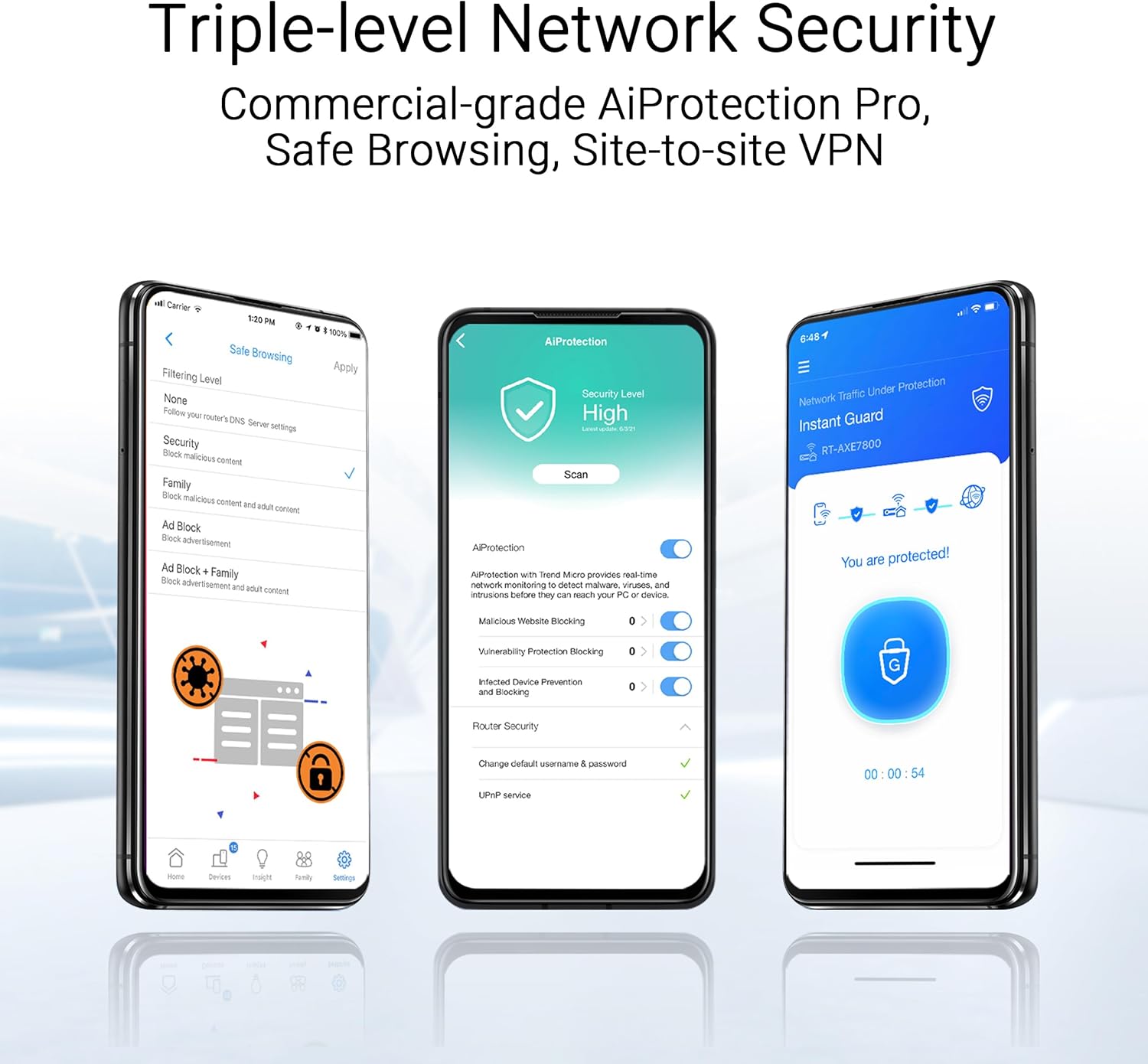
Security is a major selling point here, with commercial-grade AiProtection Pro included to help defend your network. You’ll also find device-level parental controls and network segmentation options that make it easy to apply rules to family members and guest devices.
AiProtection Pro and advanced VPNs
AiProtection Pro provides 24/7 threat detection, blocking malicious sites, and intrusion prevention, which helps you secure sensitive devices. The system supports multiple VPN configurations, including site-to-site, client VPN, and protocol support that appeals to privacy-conscious users and small office setups.
Parental controls and device-level management
You can set schedules, content filters, and usage limits on a per-device basis, and the interface makes it clear which devices are affected. This is useful for managing screen time, restricting unsafe sites, or carving out bandwidth for study or work hours.
Smart home, tethering, and special features
This mesh has features aimed directly at people who run smart homes or need flexible internet options in areas with variable WAN choices. The 4G & 5G mobile tethering option gives you an alternate WAN path in emergencies or non-traditional setups.
4G & 5G mobile tethering
You can use a smartphone’s 4G/5G connection as a backup WAN via tethering, which is handy for failover if your primary internet goes down. This isn’t a permanent substitute for a primary fiber or cable link, but it’s an excellent redundancy option for critical applications.
Smart Home Master SSIDs details
The Smart Home Master SSIDs let you keep smart devices on predictable channels and frequencies, reducing interference and improving stability for devices like cameras, smart locks, and sensors. You’ll appreciate the simplification when onboarding many small devices that otherwise behave unpredictably.
IoT segmentation
You can isolate IoT devices into their own network, preserving security and limiting exposure if a device becomes compromised. Segmentation also helps keep bandwidth-hungry family devices separate from low-data smart sensors.
Gaming, streaming, and latency-sensitive use
If you game online or stream high-resolution content, you’ll get benefits from the lower latency and higher throughput that WiFi 7 brings. The combination of improved PHY features and multi-link capability reduces congestion when multiple high-priority activities happen at once.
Gaming performance and QoS
You can assign priority to gaming devices using ASUS’s QoS settings, and the router’s multi-band logic helps keep ping and jitter down. For serious competitive gaming, try to use wired connections or a node with wired backhaul to minimize variability.
Streaming 4K/8K and multiple simultaneous streams
The high aggregate throughput and tri-band design make simultaneous 4K/8K streams across multiple rooms realistic if your ISP and local network can support it. Adaptive bitrate streaming benefits from consistent bandwidth; combined with MLO, streaming is more stable during busy household usage.

Reliability and maintenance
You’ll want to keep firmware current and monitor the system occasionally, but overall maintenance is modest. ASUS’s update cadence and the robustness of the hardware typically result in a stable experience.
Firmware stability, scheduled tasks
ASUS issues firmware updates periodically; enabling automatic updates can simplify maintenance and keep you protected. Scheduled reboots can be used in problematic setups, though most users will never need them.
Troubleshooting common issues
If you notice speed drops or flaky connections, check node placement, use Ethernet backhaul if possible, and inspect for channel congestion using the app. Resetting to defaults and reconfiguring after a firmware update occasionally helps resolve more entrenched connectivity issues.
Who this is for
This system targets users who want cutting-edge WiFi performance across large homes and who have a mix of modern devices and legacy gear. You’ll especially appreciate it if you:
- Have a multi-level or large square footage home needing consistent coverage.
- Use many simultaneous high-bandwidth services (4K/8K streaming, cloud backups, video calls).
- Want strong security, parental controls, and IoT segmentation built in.
- Need multi-gig wired connections for networked storage or high-speed internet.
You may find it more than you need if your home is small, your internet plan is modest, or you don’t yet have WiFi 7-capable devices.
Pros and cons
You’ll get plenty of advanced features, but no product is perfect for every user. Here’s a balanced look at what you’ll gain and what might give you pause.
Pros:
- Cutting-edge WiFi 7 performance with 6 GHz, MLO, and 4K-QAM for future-proofing.
- Large coverage claims supported by strong RF design (seven antennas, eight high-power modules).
- Dual 2.5G ports per node for real multi-gig connectivity and wired backhaul options.
- Robust security with AiProtection Pro and advanced VPN support.
- Smart Home Master SSIDs and IoT network for better smart device management.
- Good app and web UI for flexible setup and advanced configuration.
Cons:
- Real-world coverage and speed will vary with home layout and interference; claims are best-case.
- Full benefits require WiFi 7-capable client devices; older devices won’t see the same gains.
- Mesh handoff can occasionally show a brief pause in very complex RF environments.
- Higher price point compared with simpler WiFi 6/6E mesh systems.
- Some advanced features may require time to learn and configure for optimal results.
Alternatives to consider
If you’re comparing options, a few alternatives might suit different priorities. Consider these based on what matters most to you:
- ASUS ZenWiFi AX (WiFi 6) — If you want strong mesh performance at a lower cost and don’t need WiFi 7 today.
- Netgear Orbi WiFi 7 series — Competes on performance and coverage with a different ecosystem and management app.
- TP-Link Deco BE series — Offers WiFi 7 functionality at a potentially lower price, with a simpler management approach.
- Wired access point + router combination — If you can run Ethernet, you might get better consistent performance with dedicated APs.
You’ll want to compare coverage needs, the cost of nodes, and the management ecosystem before deciding.
Tips for getting the best results
A few practical steps will maximize the ZenWiFi BT8’s potential and keep your network healthy:
- Favor wired backhaul when possible to free wireless links for client traffic. If you can use one node as a wired backhaul or set up LAN bridging, do it.
- Place nodes in open areas, evenly spaced, and keep them off the floor. Avoid dense materials and metal enclosures.
- Update firmware as updates arrive; they often include performance improvements and security patches.
- Use the IoT network and Smart Home Master SSIDs to isolate smart devices and reduce exposure.
- Enable automatic security features and consider VPN setups if you value privacy or need remote access to a home lab.
These small changes will often yield measurable improvements.
Troubleshooting common problems and fixes
When problems occur, you’ll want short troubleshooting steps that actually work. Here are common issues and how you can address them quickly:
- Intermittent speed drops: Check for congested channels, move nodes further apart, or switch to a wired backhaul.
- Poor roaming: Verify client device roaming support, enable 802.11k/v/r on your network, and test handset behavior near node boundaries.
- Devices won’t connect to 6 GHz: Confirm the device actually supports 6 GHz and that the SSID settings permit 6 GHz connections.
- Firmware-related bugs: Reboot nodes after updates, and if a problem persists, roll back to a previous firmware if ASUS provides that option.
If you still have issues, ASUS support and community forums can be helpful resources.
Final verdict
If you want a powerful, future-facing mesh that gives you advanced WiFi 7 features, robust security, and real multi-gig connectivity, the ASUS ZenWiFi BT8 (3-Pack) is a compelling choice. You’ll appreciate the improved throughput, better handling of many simultaneous devices, and the security and parental features that make managing a modern connected household easier.
Before buying, make sure your home layout will benefit from a three-pack mesh and consider whether you have enough WiFi 7-capable devices to take advantage of the latest features right away. If your needs align with large coverage, high throughput, and advanced security, this system will serve you very well for years to come.
Frequently asked questions
You’ll likely have a few practical questions; here are short answers to the most common ones.
-
Will older devices work with this system?
Yes. The ZenWiFi BT8 is backward compatible with WiFi 6/6E/5 devices, though they won’t gain WiFi 7-specific speed or MLO benefits. -
Do you need to enable 6 GHz separately?
The 6 GHz band is usually enabled by default, but you can manage band settings in the web UI or app to control which SSIDs operate on 6 GHz. -
Can you mix these nodes with other ASUS AiMesh routers?
Yes. The system supports AiMesh expandability with compatible ASUS routers, though performance is best when mixing with similar-generation hardware. -
Is the 14 Gbps figure realistic for a single device?
No. 14 Gbps is the combined theoretical throughput across bands. Single-client speeds will be lower but still significantly improved compared to older WiFi standards. -
Is mobile tethering reliable for everyday use?
Mobile tethering via 4G/5G is best used as failover or occasional backup. It’s convenient for travel or downtime, but not a permanent replacement for a robust wired ISP connection in most homes.
If you want specific configuration help, placement recommendations for your floorplan, or comparisons to a particular competitor model, tell me your needs and I’ll tailor suggestions for your situation.

Disclosure: As an Amazon Associate, I earn from qualifying purchases.