
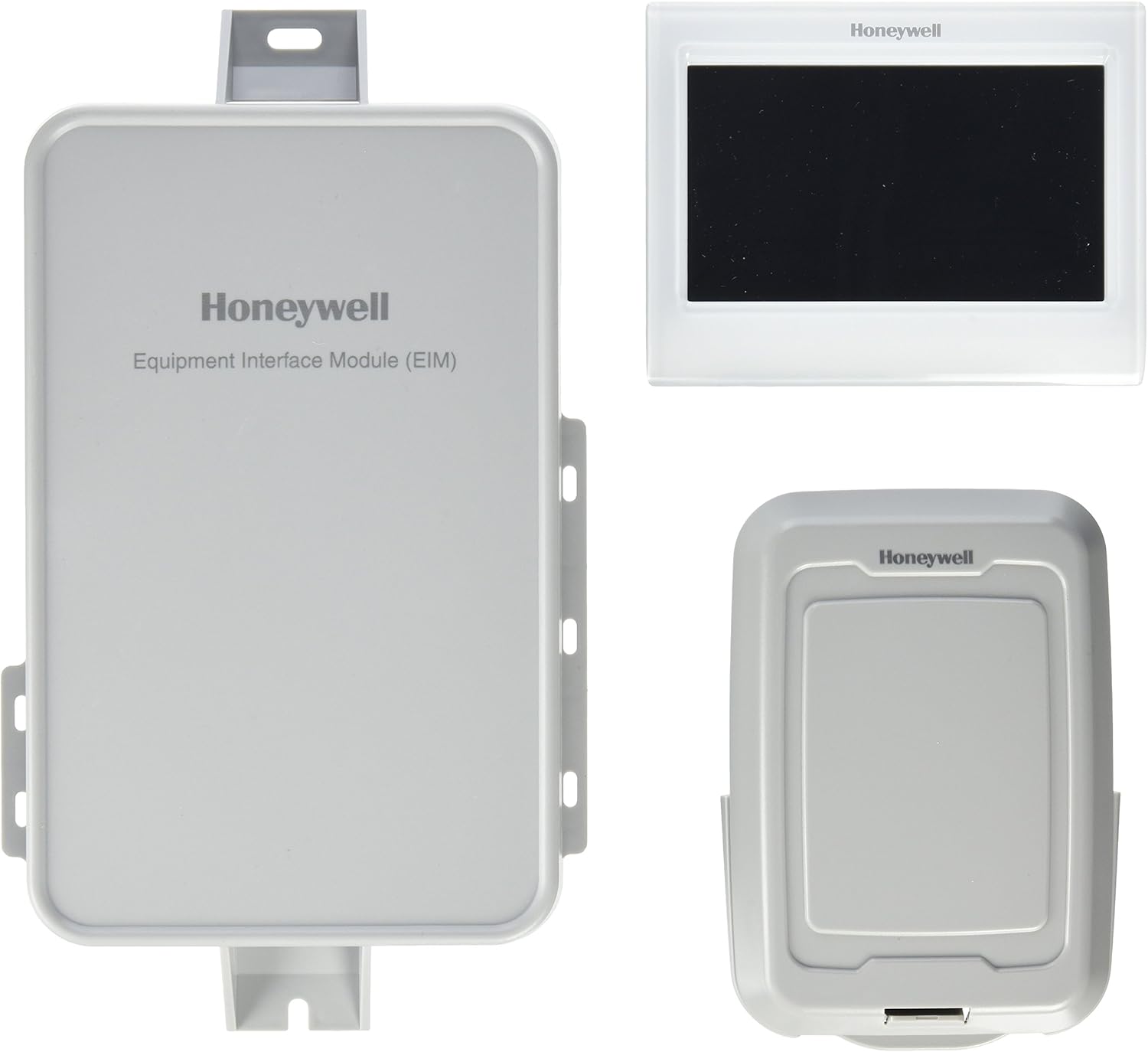
Are you considering the Honeywell YTHX9421R5101WW/U Prestige IAQ Kit with Redlink technology for your home or business?

Overview of the Honeywell YTHX9421R5101WW/U Prestige IAQ Kit with Redlink technology
This kit positions itself as a feature-rich thermostat solution for both residential and commercial use, offering seven-day programmability and multi-stage heating and cooling support. You’ll find it aimed at users who want advanced control over indoor air quality and HVAC staging without giving up professional-grade compatibility.

Honeywell YTHX9421R5101WW/U Prestige IAQ Kit with Redlink technology
What this product is designed to do
The Prestige IAQ Kit is built to manage complex HVAC systems, supporting up to 4 heat / 2 cool in heat pump configurations or up to 3 heat / 2 cool for conventional systems. You can use it to schedule weekly temperature changes, manage humidity and ventilation with compatible accessories, and integrate wireless sensors via RedLINK technology.
Key features at a glance
Below you’ll see the main selling points summarized so you can decide quickly whether the thermostat fits your needs. Each feature supports everyday comfort, energy management, and flexible control of more elaborate HVAC setups.
Seven-day programmability
You can set different schedules for each day of the week, which helps you tune temperature control to your lifestyle or business hours. This level of customization lets you reduce energy use when spaces are unoccupied while maintaining comfort when needed.
Multi-stage heating and cooling support
The unit supports complex systems: up to 4 stages of heat and 2 stages of cooling when configured as a heat pump, or up to 3 heat and 2 cool stages for conventional systems. That means if you have multi-stage furnaces, zoned systems, or multi-stage compressors, the thermostat can handle the control logic.
RedLINK wireless technology
RedLINK enables wireless communication with Honeywell’s remote sensors, ventilation controllers, and compatible gateways. If you add a RedLINK Gateway, remote monitoring and certain app-based controls are available, giving you flexibility beyond the thermostat’s wall interface.
Residential or commercial applications
Honeywell markets this kit for both homes and commercial installations, which makes it suitable if you run a small office, retail space, or multi-use building. The design and feature set are built to handle heavier HVAC loads and more complicated setups than a basic consumer thermostat.
Design and display
The Prestige IAQ has a professional look with a clear display meant to show temperature, mode, and system status at a glance. You’ll find the user interface designed for in-field technicians and homeowners alike, with straightforward menus and physical buttons for many functions.
Physical layout and build
The kit typically includes a thermostat module, sub-base or backplate for wiring connections, and any included RedLINK receiver or sensor elements depending on the exact bundle. The build quality is solid and intended for frequent use in everyday environments.
Display and feedback
The screen provides clear readouts of temperature, humidity (if sensors are added), and system status; the UI is aimed at being readable from a short distance. Backlighting and contrast help with visibility in dimly lit areas.
Installation and setup
Installation is moderately involved and may be beyond simple DIY for non-technical users, especially for multi-stage systems or when integrating RedLINK components. You’ll want to verify wiring, zone control compatibility, and whether your system requires a common (C) wire before you begin.
What’s typically included in the kit
Contents generally include the thermostat head, a mounting plate or base with screw terminals, and instructions; specific kits may include a RedLINK receiver or sensor. Always confirm the exact package contents before starting so you don’t miss necessary parts.
Wiring and compatibility checks
Before installation you should confirm compatibility with your HVAC system — the thermostat handles up to the stage counts noted earlier, but proper wiring for multi-stage heat pumps or conventional systems is crucial. If you’re unsure about matching terminals (for example O/B reversal on heat pump systems), consult your HVAC technician or the product manual.
Step-by-step setup highlights
You’ll mount the base, connect the wires to the labeled terminals, attach the thermostat head, and configure system type and stage counts from the setup menus. If you add RedLINK sensors or a gateway, you’ll pair those wirelessly following the kit-specific sequence.

RedLINK ecosystem and connectivity
RedLINK is Honeywell’s proprietary wireless protocol that enables devices to talk to compatible sensors and gateways without relying on Wi‑Fi. You’ll gain flexibility in placing remote temperature sensors, whole-home humidifiers, and ventilation controls where wiring would be difficult.
What RedLINK can let you do
Using RedLINK accessories, you can monitor multiple rooms, control ventilation or IAQ systems, and, in some setups, enable remote access through Honeywell gateways and cloud services. This is especially helpful if you want zoned sensing and control without running new thermostat wires.
Remote access and app control
If you pair the thermostat with Honeywell’s compatible gateway and service, you can use Honeywell’s app ecosystem for remote monitoring and scheduling. Keep in mind that how much functionality is available remotely depends on the exact gateway and service package you use.
Usability and interface experience
The interface mixes touchscreen elements with physical buttons, so you won’t lose tactile control even if you prefer pressing buttons. You’ll find menus for schedule programming, system settings, and accessory configuration that are designed to be logical and approachable.
Programming and daily use
Programming a weekly schedule is straightforward, although initial setup of multi-stage parameters and accessory options takes time. Once configured, the thermostat cycles automatically according to your schedule, and you can override settings manually when needed.
Alerts and diagnostics
The thermostat provides status messages and basic diagnostics to help identify wiring issues or system faults. This can be handy for quickly communicating with an HVAC technician if you see a fault code or unusual behavior.
Performance, accuracy, and comfort
The Prestige IAQ is tuned for accurate temperature control and responsive staging management, which should translate to balanced comfort and fewer temperature swings. Proper sensor placement and system calibration matter a lot, so you’ll want to place sensors where they reflect occupied space conditions.
Precision and staging control
Precision in sensing and the thermostat’s ability to manage multiple stages helps reduce short cycling and improves efficiency. The thermostat’s logic handles transitions between stages in a way that typically reduces wear on compressors and burners.
Indoor air quality features
When paired with IAQ accessories, the kit can manage ventilation, humidification, and filtration systems to help you maintain healthier indoor air conditions. You’ll have the ability to prioritize comfort, fresh air, or energy savings depending on your needs.
Energy savings and scheduling
Using seven-day programming and intelligent staging, you can realize energy savings by reducing run time during unoccupied periods. The exact savings depend on your HVAC system, local climate, and how aggressively you program setbacks.
How scheduling affects bills
Weekly programming lets you create different temperature profiles for weekdays and weekends, so you can avoid heating or cooling empty spaces. If you pair the thermostat with occupancy sensors or RedLINK remote sensors, you can further fine-tune control to occupied zones for additional savings.
Reporting and usage feedback
Some integrations with Honeywell gateways and apps can provide usage trends and run time reports, helping you understand how thermostat settings impact energy consumption. You’ll use that data to refine schedules and identify inefficient habits.
Setup tips and best practices
Plan ahead: determine system type, confirm wiring, and consider whether you’ll use wired sensors, wireless RedLINK sensors, or both. If your system is multi-stage or you have zoning, document existing wiring and labels before disconnecting anything.
Power and wiring considerations
Confirm if a common C wire is available for powering the thermostat, especially if you plan to use remote connectivity or Wi-Fi-enabled gateways. If you don’t have a C wire, you may need a power adapter or professional assistance to avoid intermittent power issues.
Sensor placement guidance
Place remote sensors away from direct sunlight, drafts, and heat sources; aim for representative locations within living or working spaces. If you use multiple sensors through RedLINK, set your thermostat’s sensor averaging or prioritization options according to rooms that matter most.
Troubleshooting and support
Common issues include incorrect wiring, missing C wire, or improper system type configuration — these are fixable with step-by-step verification. Honeywell’s support resources and HVAC technicians can help you diagnose complex staging or RedLINK pairing problems.
Common error cases
If the thermostat displays a wiring or system error, power down, recheck connections, and confirm that the wiring matches the system type you set in the menus. For RedLINK pairing problems, ensure the gateway and thermostat are within range and that batteries in wireless sensors (if any) are fresh.
When to call a professional
If you’re uncertain about multi-stage wiring, reversing O/B for heat pump systems, or integrating with forced-air humidifiers and ventilation systems, professional assistance is recommended. You’ll save time and avoid equipment damage by having an HVAC technician handle complex configurations.
Pros and cons
Below are the main advantages and disadvantages you’ll likely encounter when deciding whether this kit is right for you.
Pros
- Flexible staging and compatibility with complex HVAC systems.
- Seven-day programmability for granular scheduling.
- RedLINK wireless accessory support for remote sensors and IAQ devices.
- Suitable for both residential and select commercial installations.
Cons
- Installation can be technical for non-professionals, especially for multi-stage systems.
- Remote access and app control depend on extra gateways or services.
- Proprietary RedLINK ecosystem might limit cross-brand accessory choices.
Comparison with common competitors
Compared to mainstream consumer smart thermostats like Nest and Ecobee, the Prestige IAQ focuses more on professional HVAC support and multi-stage systems. You’ll find Nest and Ecobee excel in simple consumer Wi‑Fi setups and voice assistant integrations, while Honeywell’s Prestige IAQ supports heavier-duty HVAC applications and Honeywell’s RedLINK accessories.
Key differences to consider
If you prioritize easy app-driven setup and broad third-party integrations, some consumer Wi-Fi thermostats might be simpler to use. If you need complex stage control, IAQ management, or commercial robustness, the Prestige IAQ is a stronger fit for those technical requirements.
Who this product is best for
The kit most benefits homeowners or small business operators with multi-stage HVAC systems, zoned environments, or who want to manage indoor air quality with Honeywell accessories. You’ll especially appreciate it if you value professional-grade control over convenience-first consumer features.
Scenarios where it shines
If you have a 2- or 3-stage furnace, a multi-stage heat pump, or multiple zones that need coordinated control, the thermostat’s staging and RedLINK support will be valuable. You’ll also get the best value if you plan to use RedLINK sensors or ventilation/humidification controls.
Scenarios to reconsider
If you want a plug-and-play Wi-Fi thermostat with native Alexa/Google Home integration out of the box, or you prefer a fully app-first experience, a consumer smart thermostat may be easier to start with. You’ll also want to avoid this if you have a very simple single-stage system and won’t use IAQ accessories.
Pricing and value
Pricing varies by retailer and whether the kit includes a RedLINK Gateway, sensors, or professional installation. You’ll want to compare the total cost including any gateways or sensors you need to achieve your desired functionality.
Cost considerations
Factor in potential installation fees if you’re not comfortable with HVAC wiring, plus any additional RedLINK accessories you want (sensors, humidifiers, ventilation controllers). Over time, energy savings from proper staging and scheduling can offset upfront costs, but the payback depends on usage and local energy prices.
Specifications table
This table breaks down the essential technical information so you can compare the kit quickly and clearly.
| Feature | Details |
|---|---|
| Product Name | Honeywell YTHX9421R5101WW/U Prestige IAQ Kit with Redlink technology |
| Model Number | YTHX9421R5101WW/U |
| Application | Residential or commercial use |
| Programmability | Seven day programmable |
| Heat pump support | Up to 4 heat / 2 cool (heat pump) |
| Conventional support | Up to 3 heat / 2 cool (conventional) |
| Wireless protocol | Honeywell RedLINK (proprietary) |
| Remote sensors | Supported via RedLINK |
| Remote access | Possible with RedLINK Gateway and compatible service |
| Display | Backlit display with system status indicators |
| Power requirements | Typically requires 24 VAC power (C-wire recommended) |
| Installation | Wired to HVAC control wiring; optional RedLINK wireless accessories |
| Typical uses | Zoned HVAC, multi-stage systems, IAQ control |
| Compatibility note | Confirm with system wiring/mode prior to installation |
Frequently asked questions (FAQ)
This FAQ addresses common questions you’ll likely have when considering the Prestige IAQ kit.
Do I need a C wire for this thermostat?
You should plan for a C wire, especially if you intend to use remote access features or gateways. Some installations without a C wire can use power extenders or adapters, but a true C wire is more reliable.
Can the thermostat work with smart home assistants?
Direct integration depends on your accessory setup and which Honeywell services or gateways you use. If you require seamless voice control and cloud integrations, check the gateway and app compatibility for the specific Honeywell ecosystem you intend to use.
Will it work with my multi-zone system?
Yes, the thermostat is designed to support multi-stage systems; for multi-zone applications you may need additional thermostats or zone control interfaces. You’ll want to coordinate with your HVAC technician to ensure proper zone controller compatibility.
What if I have a heat pump with O/B reversing valve?
The Prestige IAQ supports heat pump configurations and allows O/B reversing valve settings in the setup menus. Make sure wiring matches the thermostat terminals and verify the reversing valve orientation during installation.
Troubleshooting quick guide
If you run into issues, follow these basic steps before contacting support or a technician.
Power and display problems
If the screen is blank, verify that breaker/fuse is active and that the thermostat’s 24 VAC supply is present. Re-check the C-wire and R terminal connection and confirm voltage with a multimeter if you’re comfortable doing so.
System doesn’t respond
If HVAC equipment doesn’t respond to thermostat commands, confirm wiring labels and system type settings in the thermostat menu. For heat pump systems, ensure correct O/B reversing valve configuration and stage counts.
RedLINK pairing failure
For RedLINK pairing issues, ensure devices are in range, batteries are functional, and antennas or receivers (if included) are properly connected. Rebooting the gateway and thermostat and retrying the pairing sequence often helps.
Final verdict
If you need a thermostat that handles complex HVAC staging and integrates with Honeywell’s RedLINK IAQ accessories, this kit is a strong candidate. You’ll gain professional-level control and flexibility, especially for multi-stage and zoned systems, but you should be prepared for somewhat more involved installation and potential extra costs for gateways or sensors.
Summary recommendation
Choose the Honeywell YTHX9421R5101WW/U Prestige IAQ Kit with Redlink technology if you want robust HVAC control, multi-day scheduling, and optional wireless IAQ accessories for both residential and small commercial settings. If you prefer a purely consumer-oriented, app-first smart thermostat with simplified setup, compare consumer Wi‑Fi options and determine whether their feature set better matches your priorities.
Additional resources and next steps
Before buying, verify the exact kit contents and compatibility with your specific HVAC model, and consider whether you’ll add RedLINK accessories or a gateway. You’ll avoid surprises by checking wiring, confirming C-wire presence, and deciding if professional installation is worth the investment for your system complexity.
If you want, I can help you:
- Review your current thermostat wiring to check compatibility.
- Compare this Honeywell kit with specific alternatives like Ecobee or Nest based on your system type.
- Create a pre-installation checklist so you know what parts and wiring to confirm before starting installation.

Disclosure: As an Amazon Associate, I earn from qualifying purchases.