
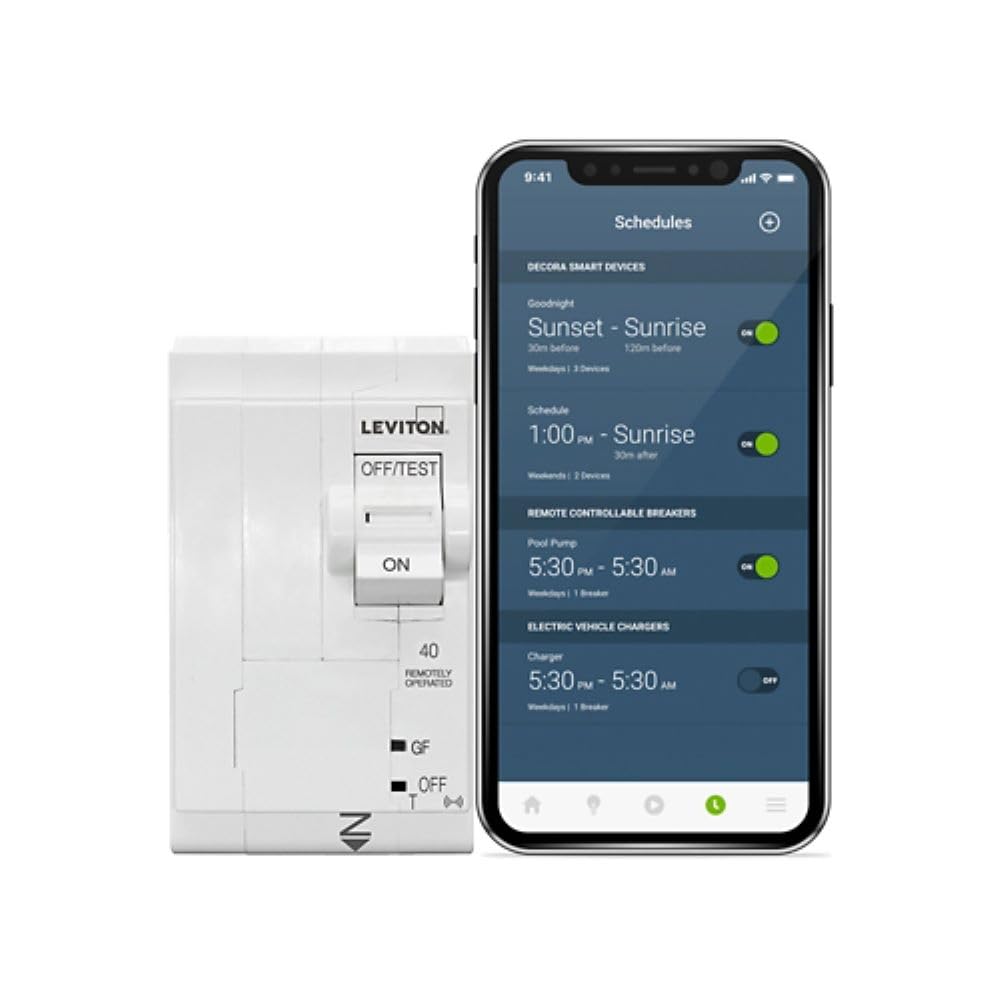
Do you want a smart, remotely controllable 2-pole breaker that brings app-based control and whole-home visibility to your load center?

Buy Leviton LB250-EST On Amazon
Product overview: Leviton 2nd Gen Smart Circuit Breaker with Remote Control, GFPE, 2-Pole 50 Amp, LB250-EST
You’ll find that this Leviton breaker blends traditional circuit protection with modern smart features through the My Leviton app. It’s a 2nd generation smart breaker designed to work specifically with the Leviton Load Center and requires Leviton’s Whole Home Energy Monitor (LWHEM) to unlock full functionality.
What this device is designed to do
This breaker gives you remote ON/OFF control and scheduling, plus ground fault protection for equipment (GFPE) built into a 2-pole, 50 A unit for 120/240 V and 120/208 V circuits. The goal is to add convenience, improve energy management, and increase safety for designated circuits in your home when installed in a compatible Leviton Load Center.
Leviton 2nd Gen Smart Circuit Breaker with Remote Control, GFPE, 2-Pole 50 Amp, 120/240-Volt and 120/208-Volt, 10kA Interrupt Rating, LB250-EST
Key specifications and features
You’ll want a clear list of specs so you can quickly confirm compatibility with your panel and intended loads. Below you’ll find the core technical details and smart capabilities that matter for installation and everyday use.
Quick technical snapshot
This section gives you the bare facts about the breaker’s electrical ratings and smart requirements. These details help you decide whether this breaker is suitable for your intended circuit and local code requirements.
| Feature | Specification |
|---|---|
| Product name | Leviton 2nd Gen Smart Circuit Breaker with Remote Control, GFPE, 2-Pole 50 Amp, 120/240-Volt and 120/208-Volt, 10kA Interrupt Rating, LB250-EST |
| Breaker type | Smart, Remote Control, 2-Pole |
| Amperage | 50 Amps |
| Voltage | 120/240 V & 120/208 V |
| Interrupt rating | 10 kA |
| Ground fault protection | GFPE (Ground Fault Protection for Equipment) |
| App integration | My Leviton app |
| Required accessories | Leviton Load Center; Whole Home Energy Monitor (LWHEM) required for breaker operation |
| Compatibility | Designed to be used in Leviton Load Centers only |
| Control features | Remote ON/OFF, scheduling, status monitoring |
| Installation | Panel-mounted (requires compatible Leviton Load Center) |
| Typical use cases | Large appliances, subpanels, EV chargers (consult electrician & local code) |
| Manufacturer | Leviton |
What’s included and what you’ll need
This helps you prepare before you buy or attempt installation so you won’t be surprised by missing parts or required hardware.
In the box and required purchases
What arrives in the package is usually the breaker unit itself and standard manufacturer documentation. You must plan to have a compatible Leviton Load Center and the Leviton Whole Home Energy Monitor (LWHEM), since these breakers won’t function as smart devices without the LWHEM. If your existing load center isn’t a Leviton unit, you’ll need to replace the panel or use Leviton’s supported load center to use smart functionality.
Tools and professional help you should plan for
You’ll need basic electrician tools and, more importantly, a qualified electrician to install the breaker and configure the load center and Whole Home Energy Monitor. You should not attempt to install or wire breakers unless you’re a licensed electrician or under one’s supervision, both for your safety and code compliance.
Installation overview and wiring considerations
You’ll want to understand the high-level installation flow and the wiring decisions that affect compatibility, safety, and functionality. Below are the main points to be aware of.
High-level installation steps
A professional will typically power down the panel, install the breaker into the compatible Leviton Load Center, wire the circuit conductors and neutral/ground per code, and then connect the LWHEM to complete smart integration. After hardware installation, the tech will use the My Leviton app to commission and configure the breaker and energy monitoring.
Important wiring and code notes
You must confirm that a 50 A, 2-pole breaker is appropriate for the connected load (range, EV charger, or other 240V equipment). The 10 kA interrupt rating is adequate for many residential setups, but local utility or code may require different ratings in some situations. Always follow local electrical codes and manufacturer installation instructions, and have a licensed electrician perform the work.
Purchase Leviton 2nd Gen Smart Circuit Breaker LB250-EST
App integration and smart control
You’ll likely use the My Leviton app as your primary interface for remote control and monitoring, so it’s good to know how that experience looks.
My Leviton app capabilities
The My Leviton app lets you remotely turn breakers ON or OFF, set time-based schedules for circuits, and view status or alerts. The app also ties into other Leviton smart devices so you can create whole-house solutions for energy management and safety. You’ll need the LWHEM in place to enable per-breaker or whole-home energy data.
What the LWHEM does for you
The Whole Home Energy Monitor is required for 2nd Gen breaker operation and provides real-time energy usage data across the home. With the LWHEM installed, the app can report circuit-level usage and enable smart scheduling that’s aware of your home’s energy profile. You’ll get more actionable data and control when you pair breakers to the LWHEM.
Performance, reliability, and safety features
You’ll want to understand not just how it controls power, but how it helps protect circuits and reduce risk.
Electrical protection basics
This Leviton breaker performs standard overcurrent protection at its rated amperage and provides GFPE for equipment. GFPE detects low-level ground faults in equipment circuits that standard breakers might miss, which can help prevent damage to sensitive equipment and reduce the risk of failure modes that could lead to fires or equipment malfunction.
Durability and interrupt rating
The 10 kA interrupt rating is common for residential breakers and is adequate for many homes. You should verify that 10 kA meets your local utility and panel requirements—some installations require higher interrupt ratings. The 2nd Gen improvements are aimed at greater reliability over earlier iterations, but adherence to proper installation and load sizing is critical for long-term reliability.
Use cases and where this breaker shines
You’ll be making decisions based on how you plan to use smart breakers in your home. These are typical scenarios where the LB250-EST provides tangible benefits.
Scheduled loads and convenience
If you have circuits that you want turned off during certain hours (pool pump, water heater, workshop tools, or holiday decorations), you can set schedules from the app so you don’t have to rely on remembering to switch them off. This is especially helpful for circuits that are hard to reach or if you manage multiple properties.
Safety and emergency control
Remote ON/OFF control can be a lifesaver if you detect a fault or need to quickly de-energize a circuit when you’re away. For renters or property managers, being able to disable a circuit remotely can be useful in preventing unauthorized use of high-draw equipment.
Energy visibility and cost management
When paired with the LWHEM, you’ll see usage trends that help you identify high-energy circuits and optimize schedules to trim your bills. You can prioritize which circuits to smart-enable based on measured consumption rather than guesswork.
Compatibility, limitations, and required ecosystem
You’ll need to be realistic about what this breaker requires and what it doesn’t support.
Panel and accessory requirements
This breaker is proprietary to Leviton Load Centers—so if your panel isn’t a Leviton unit, you’ll either need to convert to a Leviton Load Center or use non-smart breakers. The breaker also requires the Whole Home Energy Monitor (LWHEM) to operate as a smart device. Without the LWHEM, it will not provide remote or scheduled functionality as intended.
What it won’t do for you
It will not magically convert any panel into a smart system, and it will not function as a standalone IoT device outside the Leviton ecosystem. Integration into third-party smart platforms (voice assistants, home automation hubs) may be possible through My Leviton, but check current compatibility with Alexa, Google Assistant, or HomeKit as integrations change over time. Also, for high-inrush or specialty loads (some EV chargers or motors), check manufacturer guidance and local code before use.

Real-world setup and commissioning notes
This section helps you anticipate practical steps and typical issues during setup and initial use. You’ll be better prepared for the first few days of operation.
Commissioning hints
Have your electrician install the LWHEM first, confirm panel wiring, and then add the 2nd Gen breakers. Use the My Leviton app to discover devices and assign breakers to circuits. If you want to monitor specific loads by breaker, label circuits clearly at the panel to make configuration easier.
Common troubleshooting items
If a breaker doesn’t show up in the app, confirm the LWHEM is online and commissioned. Ensure you’ve got the latest firmware in the My Leviton app and that network connectivity to the panel/LWHEM is stable. For persistent hardware issues or tripping behavior, consult Leviton support or your electrician.
Pros and cons
You’ll appreciate a concise view of strengths and trade-offs so you can decide quickly if this product fits your needs.
Pros
- Remote ON/OFF control and scheduling through My Leviton app gives you convenience and energy management capabilities.
- GFPE adds a layer of safety for equipment circuits that standard breakers might not cover.
- 2-pole 50 A rating suits many 240 V appliance applications when installed correctly.
- Designed to be wired during rough-in without breakers present, simplifying some installations.
- Integrates into a whole-home Leviton ecosystem for centralized monitoring and control.
Cons
- Requires Leviton Load Center and Whole Home Energy Monitor (LWHEM) — adds cost and limits compatibility with other panels.
- 10 kA interrupt rating may be lower than required in some applications; verify local requirements.
- You’ll need a licensed electrician for installation, which adds to total project cost.
- Third-party smart-home integration may require additional setup or be limited compared to other smart circuit solutions.
Comparison with alternatives
You’ll want to see how Leviton’s 2nd Gen breaker stacks up against other smart breaker options on the market.
How it differs from non-proprietary smart breakers
Some smart breakers from other manufacturers are designed to work in a wider range of load centers or with different monitoring solutions. Leviton’s product trades universal panel compatibility for tighter integration and potentially deeper feature parity within its own ecosystem. If you want a turnkey Leviton smart-home solution, this fits well; if you prefer an ecosystem-agnostic approach, you may lean toward other manufacturers.
Typical competitor points of comparison
Competitors may offer higher interrupt ratings, different amp options, or broader third-party integrations. You’ll need to weigh whether panel compatibility and proprietary LWHEM requirement are worth the benefits of the Leviton ecosystem for your home.
Safety and code considerations
Electrical work has risks and regulatory requirements, and you’ll want to be sure you’re covered.
Compliance and professional installation
You must follow NEC (National Electrical Code) requirements and local jurisdiction rules for panel upgrades, breaker replacements, and meter-side connections. Use a licensed electrician for installation and inspection. Improper installation can endanger people and property and may void warranties or violate code.
Use with EV chargers and high-draw equipment
Because this is a 50 A, 2-pole breaker, you may consider it for EV chargers or heavy appliances. However, local code and the EV charger manufacturer’s instructions may restrict the type of breaker used. Confirm compatibility and derating rules, and consult your electrician before assigning the breaker to such loads.
Pricing and total cost of ownership
You’ll factor in not only the breaker cost but also the panel and LWHEM, electrician fees, and any potential panel upgrade.
What to budget for
Expect to pay more than a basic non-smart 2-pole breaker because of smart functionality and brand. Add the LWHEM purchase (required), potential Load Center replacement if your panel isn’t Leviton, and electrician labor for installation and commissioning. Over time, energy savings from scheduling and improved visibility might offset some upfront costs, but realistic ROI depends on your usage patterns.
Maintenance, firmware, and updates
You’ll want to know how to keep the device current and secure over time.
Firmware and app updates
Leviton may release firmware updates for breakers or enhancements to the My Leviton app. Keep the app updated and periodically check for breaker firmware when prompted. Your electrician or installer can assist if a firmware update requires local presence or panel access.
Ongoing maintenance
Functionally, the breaker is low-maintenance—like any breaker, it should be inspected during routine electrical system checks. Report irregular tripping, odd noises, or overheating to your electrician immediately.
Troubleshooting and support
You’ll inevitably run into questions; here’s how to approach them and where to get help.
First steps if something goes wrong
If the breaker trips repeatedly or won’t reconnect remotely, turn off and inspect the connected load and wiring. If the problem persists, isolate the circuit and call a licensed electrician. For app connectivity issues, verify LWHEM network connection and app account settings.
Contact points for help
Leviton customer support and your installing electrician are your primary resources. Keep purchase documentation, model and serial numbers, and installation records to speed troubleshooting and warranty claims.
Who should buy this breaker
You’ll decide based on your home setup and goals. Below are the user profiles that benefit most.
Ideal candidates
- Homeowners already invested in or planning a Leviton Load Center and smart ecosystem.
- People who want remote control and scheduled circuits for convenience or energy savings.
- Property managers who need remote circuit management across rentals or vacation homes.
- Those who value GFPE to add equipment-level ground-fault protection.
Not the best fit for
- You, if your panel is not a Leviton Load Center and you don’t want to replace the entire load center.
- You, if you need a universal smart breaker that works across multiple panel brands without additional equipment.
- You, if a higher interrupt rating is mandatory for your installation.
Final verdict and recommendation
You’ll get a clear recommendation so you can act with confidence.
Summary judgment
The “Leviton 2nd Gen Smart Circuit Breaker with Remote Control, GFPE, 2-Pole 50 Amp, 120/240-Volt and 120/208-Volt, 10kA Interrupt Rating, LB250-EST” is a compelling choice if you’re committed to the Leviton ecosystem and want robust app-based control and scheduling with integrated GFPE. Its requirement for a Leviton Load Center and the LWHEM is a double-edged sword: it locks you into the Leviton platform but delivers cohesive whole-home monitoring and control when fully implemented.
Your next step
If you’re considering this product, talk with a licensed electrician about panel compatibility and local code for interrupt rating and EV charger use. Factor in the LWHEM and possible panel upgrade into your budget and timeline. If you value integrated, centralized control and safety features and are ready to commit to Leviton’s ecosystem, this breaker will likely meet your needs.
Additional tips and practical considerations
You’ll find these small points helpful when planning to buy and use this breaker.
Label and document everything
When the electrician installs the breaker and configures the app, make sure circuits are labeled both in the panel and in the My Leviton app. You’ll thank yourself later when scheduling and troubleshooting.
Start small if you’re unsure
If you’re hesitant about upgrading your whole panel to Leviton, start with a few smart circuits and the LWHEM to measure the benefits before deciding on a full panel migration. This approach helps you gauge actual energy savings and convenience.
Check firmware and app integration regularly
Keep the My Leviton app and any connected devices updated, and periodically check Leviton’s website for firmware advisories that may improve performance or add features.
If you want, I can create a checklist for discussing this product with your electrician or a short script of questions to ask your installer to ensure you get the right configuration. Which would help you more?
Get The Leviton LB250-EST (2nd Gen) On Amazon
Disclosure: As an Amazon Associate, I earn from qualifying purchases.