
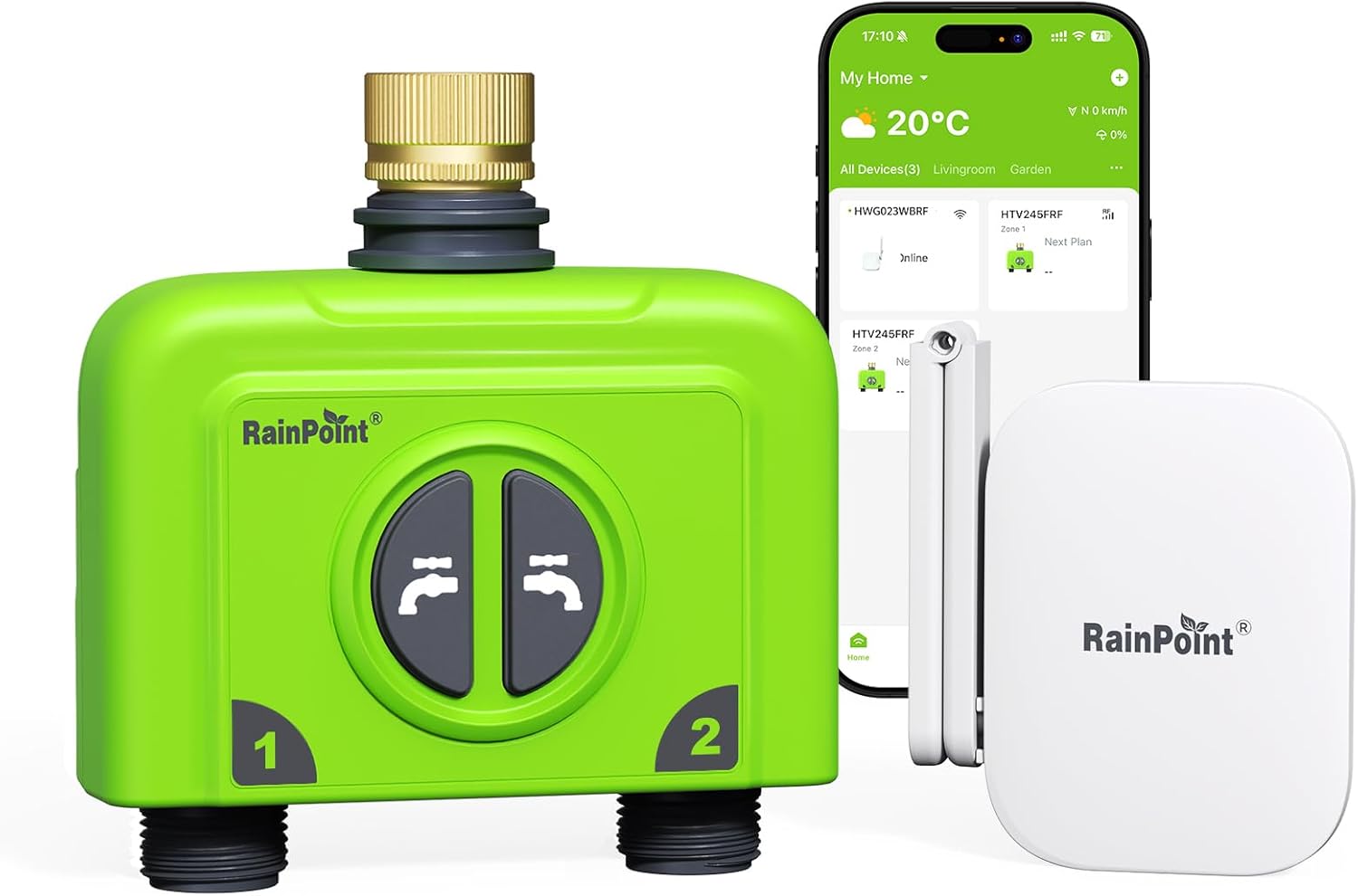
Want a smarter, more reliable way to automate watering for your garden or lawn?

Buy RAINPOINT 2 Zone WiFi Sprinkler Controller On Amazon
Quick summary
You’ll find that the RAINPOINT WiFi Water Timer for Garden Hose, 2 Zone WiFi Sprinkler Controller, Smart Hose Timer Valve, Automatic Drip Irrigation System/Rain Delay for Garden/Lawn/Yard (Brass Inlet, WiFi Gateway) is designed to put precise control in your hands. It aims to combine easy scheduling, weather-aware adjustments, and robust hardware to make regular watering almost effortless.
RAINPOINT WiFi Water Timer for Garden Hose, 2 Zone WiFi Sprinkler Controller, Smart Hose Timer Valve, Automatic Drip Irrigation System/Rain Delay for Garden/Lawn/Yard (Brass Inlet, WiFi Gateway)
$89.98 In Stock
Key specifications
Here’s a straightforward breakdown so you can scan the most important specs quickly. This will help you compare features and decide if it fits your setup.
| Feature | Specification |
|---|---|
| Product | RAINPOINT WiFi Water Timer for Garden Hose (2-zone) |
| Gateway | HWG023 antenna gateway, up to ~250 m signal range, 2.4 GHz only |
| Zones | 2 independent zones |
| Watering Plans | Up to 6 plans per zone; 3 watering modes |
| Frequency Options | Every day / Odd / Even / Interval (2–30 days) / Custom weekly |
| Weather-based controls | Rain delay (1–30 days), soil moisture & temperature integration, seasonal adjustment 10%–200% |
| Flow metering | Built-in per-zone flow meter, ±5% accuracy |
| Inlet | Brass inlet, built-in metal filter |
| Valve pressure tolerance | Up to 116 PSI |
| Protection | IP65-rated battery cover and sealing |
| Connectivity | RAINPOINT HOME app, Alexa and Google Assistant support |
| Expandability | One gateway pairs with up to 8 RAINPOINT devices (sensors, other controllers) |
| Power | Battery powered (user-replaceable batteries) |
| App requirement | Only 2.4 GHz Wi-Fi supported |
What’s included and what to expect in the box
You’ll typically find the water valve, the HWG023 antenna gateway, mounting hardware, and basic instruction materials in the package. Expect the gateway to be a separate small device that you plug near your router, and the water valve to be ready to attach to a standard garden hose with the brass inlet already fitted.
Design and build quality
You’ll notice the brass inlet immediately — it feels substantial and built to withstand sun and heat better than plastic fittings. The body and battery housing use materials and seals aimed at IP65 protection; that doesn’t make it indestructible but it does mean the unit can handle normal outdoor conditions without you fussing over every storm.
Antenna gateway and connectivity
The HWG023 antenna gateway is the standout connectivity feature because it’s designed to transmit up to around 250 meters with the ability to penetrate 3–4 walls. You’ll need to use 2.4 GHz Wi-Fi only and the proprietary RAINPOINT HOME app, but one gateway can link up to eight RAINPOINT devices so you can build a smart network in larger yards or multi-zone setups.
Shop The RAINPOINT 2-Zone WiFi Sprinkler Controller
Setup and installation
You’ll be able to attach the unit to your hose in minutes — screw the brass inlet to your spigot and tighten hand-tight with the included gasket. Pairing with the gateway and the RAINPOINT HOME app is straightforward: power the gateway, connect it to your router, add the device in the app, and follow guided prompts to register each zone. If your router is 5 GHz or you have strict network security settings, plan to adjust or temporarily allow 2.4 GHz access for the gateway.
App and voice control
The RAINPOINT HOME app is the central hub for all control and setup tasks; you’ll create schedules, view flow data, and receive alerts there. Voice control with Alexa and Google Assistant is supported, so you can use simple commands like “turn on zone 1 for 10 minutes,” but app control gives fuller scheduling and sensor integration.
RAINPOINT HOME app experience
You’ll find setup flows and schedule builders that guide you step-by-step, with options for custom frequency and advanced modes. The interface focuses on clarity — creating up to six plans per zone is intuitive and the app surfaces weather and flow notifications promptly.
Watering modes and scheduling flexibility
The unit supports three main watering modes: Normal Irrigation for straightforward on/off cycles, Cycle & Soak for breaking a long run into shorter cycles to improve absorption, and Misting Irrigation for fine watering needs. You’ll also get five frequency options (every day, odd, even, interval, weekly custom), which gives you enough control for most landscapes and container gardens.
Examples of practical schedules
You can set a lawn to run Normal Irrigation on even days for 12 minutes per zone, while setting a flower bed to Cycle & Soak with three cycles of 5 minutes each to prevent runoff. If you have a greenhouse with delicate seedlings, use Misting Irrigation in the morning plus soil moisture sensor triggers to avoid overwatering.
Weather-based watering and seasonal adjustment
When you enable weather-based watering, the controller will consider rainfall, soil moisture (if you pair a sensor), and local temperature to modify schedules automatically. You’ll also be able to set a seasonal adjustment percentage (10%–200%) that changes monthly, so you don’t have to manually tweak durations as outdoor conditions shift.
How the rain delay and seasonal adjustment help
The built-in rain delay allows the system to pause watering for 1–30 days when local forecasts show rain, so you won’t waste water. Seasonal adjustment applies a multiplier to your schedule each month so watering is increased in summer months and decreased in cooler seasons without manual edits.
Water usage tracking and flow monitoring
Each zone includes a high-precision flow meter capable of recording usage for the last day, last 30 days, and 12 months with an accuracy of about ±5%. You’ll appreciate 24-hour flow monitoring because it will alert you if the valve fails to open or close or if an unexpected leak causes abnormal flow.
Using flow data to save water and money
You can create or tweak watering schedules based on actual water consumed; for example, if a zone uses 20% more water than expected, you can shorten run times or switch to Cycle & Soak. The leak and flow alerts provide practical protection — you’ll be notified quickly if a hose disconnects or a valve sticks open.
Durability: brass inlet, metal filter, and sealing
You’ll benefit from the brass inlet because it resists UV degradation and heat warping better than plastic, reducing the chance of leaks at the spigot connection. The built-in metal filter helps keep debris from clogging the valve, and the upgraded coil valve is built to deliver smoother flows and withstand pressures up to about 116 PSI.
IP65 rating and outdoor endurance
The battery cover uses IP65 sealing material and gaskets so the electronics remain protected from splashes and dust; you should still avoid submerging the unit or leaving it exposed under extreme weather for long durations. Routine maintenance like checking seals and the metal filter will help prolong life.
Performance in real-world conditions
In typical suburban yards you’ll find the RAINPOINT system responsive and consistent, especially when the gateway is within range and unobstructed. The extended gateway range is helpful for larger properties, and pairing sensors means the system can react to real soil conditions rather than just time-based schedules.
Range considerations and placement tips
You’ll want to place the gateway where it has a clear line to both the router and the devices it’s controlling; mounting it higher and away from metal obstructions improves signal stability. If you have thick walls or separate outbuildings, test the gateway placement first because 3–4 wall penetration is a guideline and actual range varies by environment.
Battery life and power considerations
The unit is battery-powered (user-replaceable), which makes it convenient to install without wiring but means you’ll monitor battery levels periodically. You’ll receive notifications when battery is low in the app, and swapping batteries is intended to be a simple task — keep spares on hand for uninterrupted watering.
Compatibility and integration
You’ll need a 2.4 GHz Wi-Fi network and the RAINPOINT HOME app to get the most from this system; it doesn’t support 5 GHz-only configurations. If you use smart home ecosystems, you’ll appreciate Alexa and Google Assistant support for basic voice controls, though advanced scheduling and sensor integrations remain in the app.
Expandability and sensors
One gateway can pair with up to eight RAINPOINT devices such as soil moisture sensors and additional controllers, so you can scale your system to cover multiple zones or specialized irrigation needs. You’ll be able to use sensors to trigger watering only when the soil is below your set threshold, which helps prevent overwatering.

Installation pitfalls and common troubleshooting
You’ll rarely face complex issues during installation, but the most common snags are 2.4 GHz-only network problems, weak gateway placement, or debris in the inlet that prevents sealing. If the app can’t detect the gateway, check your router’s settings and ensure any guest networks or mesh configurations aren’t blocking communication.
Quick troubleshooting checklist
- Confirm your phone is on the 2.4 GHz network during setup.
- Place the gateway closer to the router temporarily to complete pairing.
- Check the brass inlet gasket and metal filter for debris if you notice a leak.
- Replace batteries if you get low-power messages preventing operation.
Pros
You’ll enjoy several strong benefits from this system:
- Reliable brass inlet and metal filter reduce leaks and clogging.
- HWG023 gateway extends wireless range and supports multiple devices.
- Weather-based adjustments and seasonal scaling reduce manual tweaking.
- Built-in flow metering and leak alerts improve water management.
- Voice control and app-based scheduling make daily use convenient.
Cons
You should also consider a few limitations:
- Requires a 2.4 GHz Wi-Fi network only, which may mean reconfiguring some routers.
- Battery power means occasional replacements and monitoring.
- App and gateway are proprietary, so you’re tied into RAINPOINT’s ecosystem for sensor integrations.
- While IP65 is water-resistant, prolonged exposure or submersion could still damage the unit.
Who should consider the RAINPOINT WiFi Water Timer
If you want automated watering with good hardware and advanced scheduling without running conduit or wiring, this will likely fit your needs. You’ll especially benefit if you have a medium to large yard where the extended gateway range and multi-device pairing will let you connect multiple sensors and controllers.
Who might want a different solution
If you already have a wired irrigation system or require integration with professional landscape controllers (e.g., certain commercial-grade controllers), you might prefer a hardwired controller. If your home network is strictly 5 GHz or restricted and you can’t enable 2.4 GHz, this product won’t function without network changes.
Practical tips to get the most from your RAINPOINT system
- Install the gateway at a midpoint between your router and the farthest controller for best coverage.
- Use Cycle & Soak for slopes and sandy soils where runoff is common.
- Pair soil moisture sensors for the most precise watering and water savings.
- Keep spare batteries handy and check the metal filter monthly during heavy debris seasons.
- Use the seasonal adjustment feature to automate monthly changes instead of manual editing.
Comparison with similar products
Compared to many plastic-bodied timers, the brass inlet and metal filter put this unit a step up for durability. The HWG023 gateway’s extended range differentiates it from cheaper Wi-Fi hubs, and the built-in flow metering is more advanced than basic timers that only offer run time scheduling. On the other hand, some competitors offer powered or wired versions that integrate with broader smart-home systems or enterprise controllers if that’s a priority for you.
Maintenance checklist
You should perform a simple routine to keep things running smoothly: check gaskets and inlet for leaks, clear the metal filter if flow seems restricted, verify battery levels before the start of high-demand watering seasons, and check the app for firmware updates or alerts. This minimal care will extend the lifespan of the unit and ensure consistent performance through the seasons.
Real scenarios and sample setups
- Small urban garden: Attach to a single spigot and schedule two short misting or low-flow cycles per day; pair a soil moisture sensor for container plants to avoid overwatering.
- Suburban lawn + flower beds: Use Zone 1 for lawn with longer Normal Irrigation runs on even days and Zone 2 for flower beds on Cycle & Soak twice per week; set seasonal adjustment up for summer.
- Greenhouse: Use Misting Irrigation in mornings with a humidistat or soil sensor linked to the gateway so you only water when conditions fall below thresholds.
Troubleshooting deeper issues
If a zone won’t open at the scheduled time, check the app’s event log for an error message and verify the flow meter reading. If the gateway keeps going offline, make sure your ISP hasn’t changed the router password and check for interference sources like large metal appliances between devices. For persistent mechanical faults, inspect the coil valve for debris or contact RAINPOINT support; the brass inlet and filter usually make mechanical failures less common.
Firmware and software updates
You’ll want to keep the RAINPOINT HOME app and the gateway firmware current for best performance and security. The app typically notifies you of updates, which can improve device stability, add new features, or sharpen sensor integrations.
Security and privacy considerations
Because the system uses a gateway and cloud-linked app, you should secure your home Wi-Fi with a strong password and keep firmware updated. If you share access with family members, you’ll manage permissions through the app; avoid leaving device credentials on shared, insecure networks.
Final verdict
You’ll get a well-rounded smart watering solution if you choose the RAINPOINT WiFi Water Timer for Garden Hose, 2 Zone WiFi Sprinkler Controller, Smart Hose Timer Valve, Automatic Drip Irrigation System/Rain Delay for Garden/Lawn/Yard (Brass Inlet, WiFi Gateway). It balances strong hardware like a brass inlet and metal filter with intelligent software features such as weather-based watering, seasonal adjustments, and accurate flow metering. If you use 2.4 GHz Wi-Fi and want to scale up with sensors and additional devices, this system will likely save you water and time while protecting plants more effectively than manual schedules.
If you want, I can walk you through a step-by-step setup plan tailored to your yard size and plant types, or help draft sample schedules for different zones based on soil type and sun exposure.
Get The RAINPOINT 2 Zone WiFi Sprinkler Controller Now
Disclosure: As an Amazon Associate, I earn from qualifying purchases.