
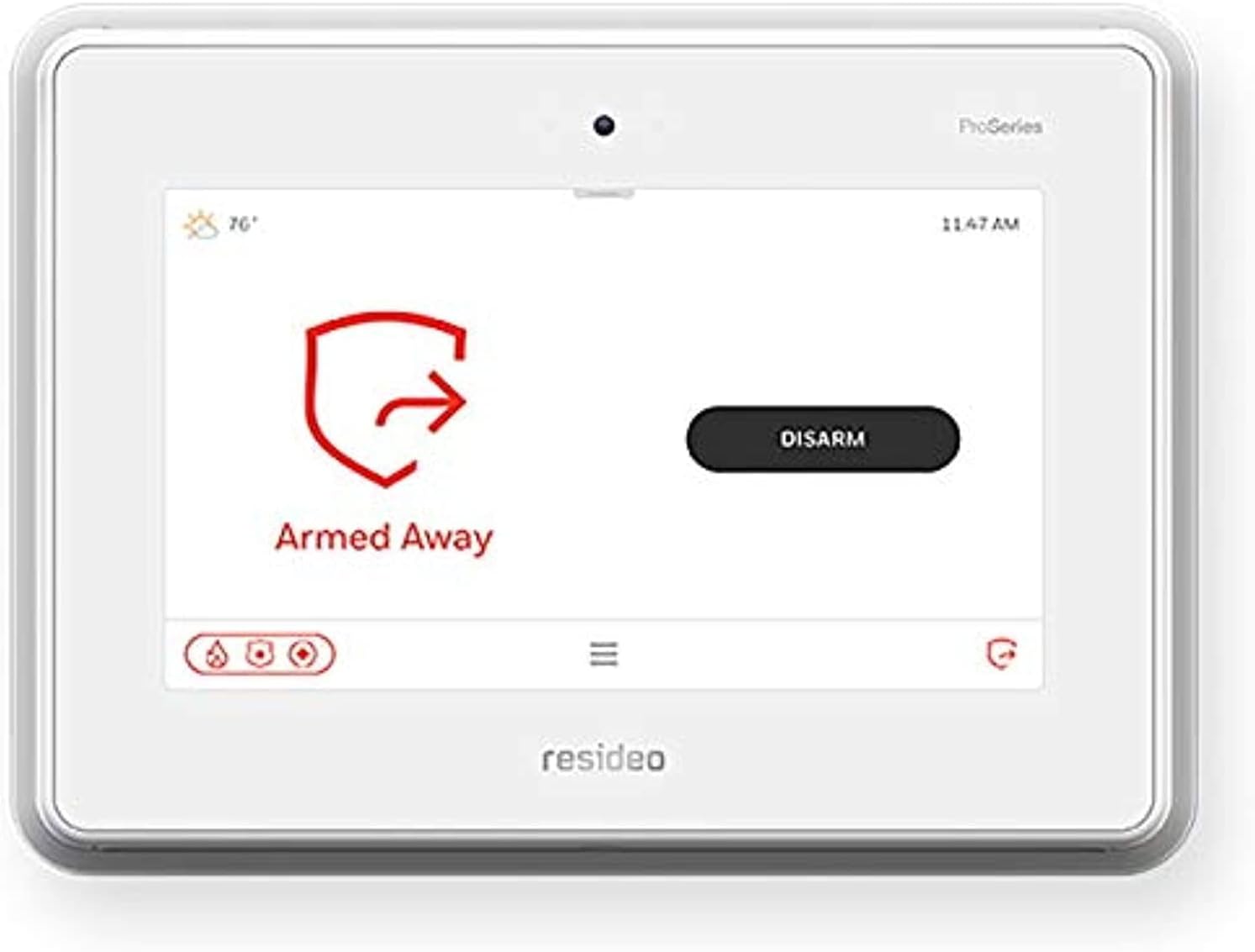
Are you thinking about upgrading to the Honeywell Home Resideo PROA7PLUS 7 INCH All-in-ONE Touchscreen PROSERIES Panel for your home security and automation needs?
Buy The Honeywell Home Resideo PROA7PLUS On Amazon
First impressions and design
When you first see the PROA7PLUS, the 7-inch touchscreen is the obvious focal point. The panel looks modern and clean, and it’s built to sit on a wall prominently without dominating the room. You’ll notice the panel’s low-profile bezel and the way the screen layout prioritizes clarity and quick access.
The enclosure is made to fit typical home aesthetics, and the physical footprint is compact enough for most entryway or utility-room installations. The design choices make it easy for guests and family members to understand basic functions at a glance.

Screen and user interface
The 7-inch touchscreen provides large buttons and readable text, making day-to-day operation straightforward. Menus are laid out in a tile format that reduces clutter and helps you find common tasks—arming, disarming, viewing recent events—quickly.
The color and contrast make alerts easy to spot, and the UI includes helpful icons to indicate system status. If you value a readable, touch-first interface that family members can use without training, this panel delivers.
Touchscreen responsiveness
You’ll find the touch response generally smooth for routine actions like entering codes, swiping through screens, or tapping quick controls. Typical delays are short, and gestures are recognized reliably during normal use.
There can be moments during system operations (such as firmware updates or processing an automation scene) where you notice a brief lag, but those moments are infrequent and usually short-lived.
Navigation and menus
Navigating the menus is intuitive: primary functions are a single tap away, and deeper settings are tucked under clearly labeled menus. You won’t need to memorize complicated sequences to change user codes, view event history, or enable/disable sensors.
If you like having shortcuts, the system allows quick-access tiles for common actions so you can minimize taps for daily routines.
Hardware and build quality
The PROA7PLUS feels solid on the wall. The case and touchscreen have a durable feel that suggests everyday use won’t wear it down quickly. The internal speaker is clear enough for voice prompts and chimes, and LED indicators are discreet but informative.
Internally, the panel supports commonly needed communications modules and interfaces for sensors and peripherals. Build quality is consistent with other ProSeries equipment and intended for long-term home use.
Installation and setup
Installing the PROA7PLUS is straightforward if you’re comfortable with basic electrical wiring and mounting hardware. The panel is designed to replace many older control panels, and mounting holes align with typical industry standards.
You’ll need to consider where to mount it for optimal Wi‑Fi and Z‑Wave coverage, and whether you’ll add a cellular module for professional monitoring. The package usually includes a mounting plate and power requirements are typical for alarm control panels.
Pre-installation checklist
Before you put a hole in the wall, make a checklist:
- Choose a location with good Wi‑Fi signal and central line-of-sight for sensors.
- Verify local power source and circuit breaker access.
- Gather existing sensor wiring or plan for wireless sensor pairing.
- Confirm whether you’ll use professional monitoring (cellular module) or local Wi‑Fi-only monitoring.
Having these items ready will make your setup smoother and reduce back-and-forth.
DIY vs professional installation
If you’re comfortable with home wiring and alarm panel basics, you can perform a DIY install. The panel includes basic wiring diagrams and the user interface walks you through initial configuration.
If you prefer hands-off setup or require compliance with local alarm permitting/monitoring regulations, professional installation is recommended. Professionals can also optimize sensor placement and integration with home automation devices.
Wiring and power options
The PROA7PLUS accepts standard control-panel power wiring. If you have an existing panel, repurposing the transformer and backup battery is often possible, but check compatibility. A backup battery is necessary to ensure continued operation during a power outage.
For monitoring redundancy, consider pairing the panel with a cellular communicator (usually offered as an add-on) in addition to Wi‑Fi. That configuration gives you a reliable path for emergency signals if your internet goes down.
Connectivity and communication
Connectivity is a major selling point for this panel: it’s built to handle local automation and remote monitoring via multiple pathways. You’ll make use of Wi‑Fi for app control and Z‑Wave for connecting lights, locks, and thermostats.
The panel can be configured with a cellular module for professional monitoring, improving reliability for alarm reporting. Ethernet is commonly supported for a hardwired network connection when maximum stability is required.
Wi‑Fi, Ethernet, and cellular
Wi‑Fi gives you wireless access from your mobile device through the companion app, which is sufficient for most households. If you want extra reliability, Ethernet provides a stable, always-connected option, while cellular service adds a failover method for alarm transmission.
If you’re planning to have monitored service, check which cellular bands and service providers are supported in your region and whether the cellular module is included or optional.
Z‑Wave and home automation
Z-Wave integration allows you to add smart-home devices—switches, bulbs, locks, thermostats—and control them from the PROA7PLUS panel or the mobile app. The panel’s built-in Z‑Wave (generally Z‑Wave Plus) supports common devices and scenes, letting you automate actions like “arm away → turn off lights and lock doors.”
You’ll appreciate having local automation handled by the panel for faster response times than cloud-only systems, particularly for time-sensitive automations or local voice control.
Voice assistants and mobile app
The panel integrates with major home automation ecosystems, and many users set up voice assistant control (e.g., Amazon Alexa or Google Assistant) through linked apps or cloud services. This lets you arm/disarm or operate scenes using voice, though disarming usually requires a secure code for safety.
The companion mobile app typically provides push notifications, remote arming/disarming, event history, and device control. The experience depends on app updates and your service plan.
Security features
The PROA7PLUS is built primarily as a security control panel, and it supports a full set of alarm capabilities: multi-level user codes, emergency buttons, tamper detection, and event logging. Those features give you control over who can do what and when.
The panel supports alarm types like intrusion, fire, and environmental sensors (flood, CO) depending on which sensors you connect. It’s designed to handle a comprehensive home security setup.
Sensors and zones
The system supports a mix of wireless and wired sensors. Wireless sensors pair directly to the panel and can include door/window contacts, motion detectors, glass-break sensors, and environmental units. Zones are configurable so you can define entry/exit delays, instant triggers, or withhold certain sensors from particular arming modes.
If you have an existing sensor ecosystem, compatibility varies—some legacy Honeywell sensors can be paired, while others may require wireless converters or replacements.
Alarm reporting and monitoring
If you choose professional monitoring, the panel reports alarm conditions to a central station using your selected communication path (cellular/Wi‑Fi/Ethernet). You’ll get alerts via the mobile app and, depending on your monitoring package, the central station will contact emergency services for life-safety events.
For local-only setups, the panel still logs events and notifies you via push alerts, but it won’t dispatch emergency responders without a monitoring agreement.
Local access control and user codes
You can create multiple user codes with different privilege levels, assign temporary codes for guests or service personnel, and review code usage history. This is useful when you need to give contractors limited access or want to track who disarmed the system at a given time.
For extra control, some configurations allow RFID tags or keypad-only codes for faster entry without compromising security.
Purchase The PROA7PLUS Touchscreen PROSERIES On Amazon
Smart home integration
Because you can run Z‑Wave devices off the panel, this unit becomes a hub for automations that tie security and convenience together. Automations might include locking doors at night when you arm the system, or turning lights on when a motion sensor detects activity.
The system supports scenes and schedules, so you can automate daily routines based on time, alarm state, or triggered events.
Z‑Wave devices supported
You’ll find good compatibility with most Z‑Wave-certified devices: smart deadbolts, dimmers, switches, thermostats, and plugs. Device performance varies by brand, but core functionality—on/off, dimming, lock/unlock—works reliably when paired correctly.
If you plan to use many Z‑Wave devices, think about Z‑Wave network topology (how devices relay signals) and place the main panel centrally or use repeaters for reliable communications.
Scenes and automation
You can create multi-device scenes such as “Goodnight” that arms the system, locks the doors, and sets the thermostat. Rules can be triggered by panel events, sensor triggers, or schedules. The convenience of linking security events to home automation is one of the PROA7PLUS’s strong suits.
For heavy automation users, advanced rules may require some learning, but the interface guides you through common scenarios.
Mobile app and remote control
The mobile app is central to remote control: it lets you arm/disarm, view event history, receive push alerts, and control smart devices. The UX is generally user-friendly, and push notifications are timely.
Remember that some remote operations (like disarming) are restricted by security features, so you’ll often need a code or authenticated app session to perform them. This helps protect against unauthorized remote access.
Reliability and performance
In daily use, the PROA7PLUS is reliable. The panel processes alarms, automation, and user input without frequent crashes. Firmware updates address bugs and add features, and Resideo’s support network provides documentation and software updates.
Like any connected device, occasional patches are necessary, but routine operations remain consistent.
Battery backup and power failure handling
Battery backup is standard for maintaining functionality during power outages. The battery keeps the panel and sensors active for a reasonable period, and it alerts you when battery levels are low. If you rely on remote monitoring, having a cellular backup is smart so your alarm can still reach a central station even if internet or power fail.
Firmware updates and support
Resideo periodically releases firmware updates to add functionality or tighten security. The panel can receive OTA (over-the-air) updates, which streamline maintenance. Support resources include online knowledge bases and dealer networks; if you opt for professional monitoring, your dealer may also handle firmware and configuration updates.
Compatibility with existing systems
If you’re replacing an older Honeywell or ProSeries panel, compatibility is often good, but not guaranteed. Some older wireless sensors may not be supported directly; in those cases, you’ll need either converters or new sensors. For wired sensors, compatibility often depends on wiring and signal voltages, so you should verify on a case-by-case basis.
When in doubt, consult a dealer or the product documentation before committing to a full retrofit.
Backward compatibility with older Honeywell sensors
Older sensor compatibility varies: many modern panels retain some backward compatibility, but proprietary older protocols may not fully pair. If you have a large installed base of legacy sensors, plan to check compatibility and budget for replacements where necessary.
Accessories and add-ons
You can expand the system with accessories like additional keypads, external sirens, cellular communicators, and cameras. Cameras usually integrate via the companion app, offering video clips and live view when motion or an alarm occurs.
If you want remote panic buttons, smoke/CO monitoring, or glass-break detectors, the PROA7PLUS supports industry-standard devices in most configurations.
Monitoring and subscription costs
Using professional central-station monitoring requires a subscription, and costs vary based on the provider and level of service (self-monitoring, professional monitoring with emergency dispatch, video monitoring, etc.). The base cost is typically monthly, and add-on services (like video storage or advanced automation features) can increase the cost.
If you’re sensitive to ongoing fees, plan your budget accordingly and compare monitoring providers and plans. Self-monitoring via app notifications is an alternative that cuts recurring fees but does not replace emergency dispatch.
Pros and cons
You’ll want to weigh advantages and trade-offs before choosing this panel.
Pros:
- Clean, responsive 7-inch touchscreen makes daily use easy.
- Built-in home automation via Z‑Wave for smart-device control.
- Multiple communication paths (Wi‑Fi, Ethernet, optional cellular) for flexible monitoring.
- Modern UI and event logging that helps you understand activity.
- Expandable with sensors and accessories.
Cons:
- Some legacy sensors may not be compatible without replacements or adapters.
- Professional monitoring adds recurring costs.
- Advanced automations and integrations can require a learning curve.
- Depending on firmware and region, certain integrations (voice assistants or third-party platforms) may vary.
Table — Quick feature breakdown
| Feature | What you can expect |
|---|---|
| Display | 7-inch touchscreen with large, readable tiles and color alerts |
| Connectivity | Wi‑Fi and Ethernet; optional cellular module for monitoring redundancy |
| Home automation | Built-in Z‑Wave support for lights, locks, thermostats, and scenes |
| Sensor types | Wireless and wired: door/window, motion, smoke/CO (depends on sensors used) |
| Monitoring | Local push alerts; optional professional central-station monitoring (subscription) |
| Installation | DIY-capable for experienced users; pro install available/recommended for complex setups |
| Firmware | OTA updates supported; periodic releases add features and fixes |
| User control | Multiple user codes, temporary codes, and access logs |
| Voice control | Integrations commonly available with voice assistants via apps and cloud services |
| Accessories | External sirens, cameras, additional keypads, extra sensors, cellular modules |
Setup tips and best practices
If you’re installing the PROA7PLUS, a few practical tips will save you time and frustration:
- Place the panel centrally in the home for better Z‑Wave and sensor coverage.
- Test Wi‑Fi signal strength before finishing installation; if weak, move router or add an access point.
- Label sensors and zones clearly during setup so you recognize events later in the app.
- Create at least one secondary user code for a trusted family member in case you forget yours.
- Schedule a time to update firmware after installation so you start on the latest software.
Following these steps will make your first weeks with the system much smoother.
Troubleshooting common issues
You may run into a few common hiccups: missing sensors, app connectivity drops, or automation rules not firing. For each:
- Missing sensors: re-pair them following the panel’s pairing steps and ensure batteries are fresh.
- App connectivity drops: check Wi‑Fi/Ethernet status and ensure the panel’s firmware is current.
- Automation not firing: verify the Z‑Wave device is online and included in the correct group or scene.
If problems persist, consult the support documentation or contact your installer/monitoring provider.
Who is this panel best for?
You’ll appreciate this panel if you want a modern touchscreen control center that bridges security and smart-home features. It’s great for:
- Homeowners who want local automation with a centralized control point.
- Families who need easy daily operation and multiple user codes.
- Users who want optional professional monitoring with cellular backup.
- DIYers comfortable with basic wiring and smart-device pairing.
If you’re leaning toward a pure cloud-based smart home with no central hub, this panel may offer features you don’t need. Conversely, if you require a robust local hub with security-first design, this is a compelling choice.
Comparison to other control panels
Compared to older keypad-only panels, the PROA7PLUS brings a far superior user experience with a full touchscreen and built-in automation. Versus cloud-first smart-home hubs, its advantage is the tight integration of security with automation and professional monitoring pathways.
If you’re trying to choose between panels, weigh touchscreen convenience, Z‑Wave hub capabilities, and long-term monitoring costs as primary decision factors.
Privacy and security considerations
Because the panel connects to the internet and controls door locks and cameras, you should treat it as a secure device:
- Use strong, unique passwords for the companion app and any associated accounts.
- Keep firmware up to date to mitigate vulnerabilities.
- Limit administrative access to trusted users and enable app-level authentication like biometrics if supported.
Taking these steps will help keep your system secure from casual tampering or unauthorized access.
Cost considerations and value
The up-front cost of the PROA7PLUS is typically higher than basic keypad panels, but you get a richer feature set: a touchscreen UX, Z‑Wave hub, and multiple communication options. Add professional monitoring fees if you want central-station emergency dispatch.
For many homeowners, the convenience and local automation capabilities justify the expense. If you plan to build a smart home around Z‑Wave devices and want integrated security, the value proposition is strong.
Final verdict
If you want a modern, touchscreen-centric control panel that combines security and smart-home automation, the Honeywell Home Resideo PROA7PLUS 7 INCH All-in-ONE Touchscreen PROSERIES Panel is a strong option. You’ll get a user-friendly interface, Z‑Wave integration for home automation, and flexible communication options for monitoring.
It’s particularly well-suited to homeowners who want a central hub for both safety and convenience, and who appreciate a product that supports professional monitoring when needed. Consider compatibility with your existing sensors and the potential monitoring costs, but if those align with your needs, this panel delivers a robust, long-term solution.
FAQ
Can you use the panel without a monitoring subscription?
Yes. You can use the PROA7PLUS as a local control and automation hub with app notifications, but without professional monitoring you won’t have a central station dispatching emergency services automatically.
Will my old sensors work with the panel?
Some older sensors may be compatible, but compatibility depends on protocols and models. Expect to test each sensor and budget for replacements where necessary.
Is professional installation required?
No—if you’re comfortable with basic wiring and smart-device pairing you can install it yourself. Professional installation is recommended for complex systems or to ensure compliance with monitoring requirements.
How many user codes can you create?
The panel supports multiple user codes so you can give family members, guests, or contractors different access levels. Check documentation for the maximum number supported on your firmware version.
Can you add cameras to the system?
Yes. Cameras typically integrate via the companion app for live view and recorded clips. Video storage options often depend on subscription levels and local storage availability.
If you have specific questions about sensor compatibility, monitoring plans, or advanced automations, tell me what you want to do with the panel and I’ll help you map out a plan.
Get The Honeywell PROA7PLUS On Amazon
Disclosure: As an Amazon Associate, I earn from qualifying purchases.