
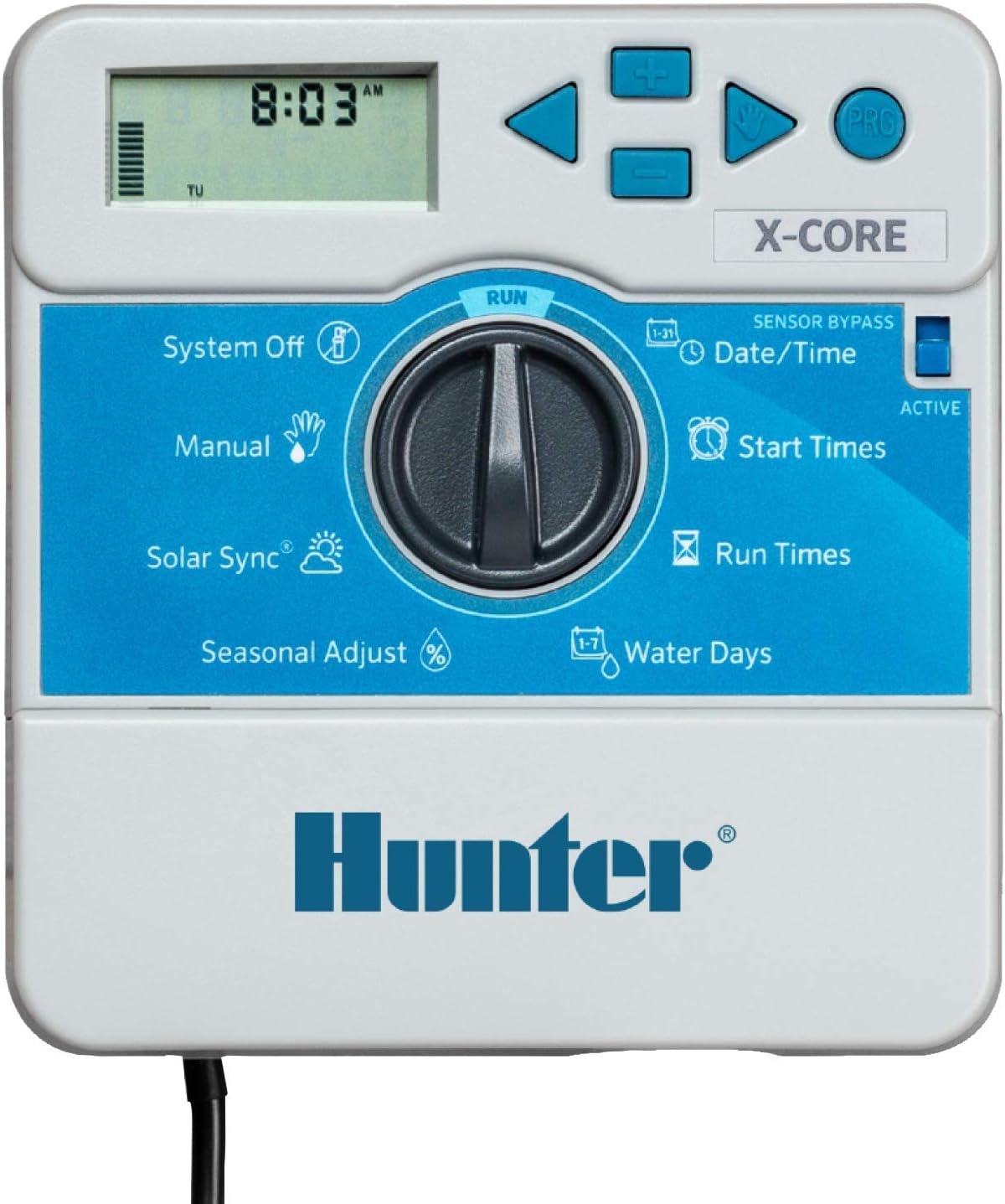
Want a sprinkler timer that’s simple to set up, works offline, and reliably runs your irrigation for up to eight zones?

Buy Hunter X-Core XC800i On Amazon
Overview of the Hunter X-Core XC800i Indoor Sprinkler Timer
This Hunter X-Core XC800i Indoor Sprinkler Timer controls up to eight zones and is built for homeowners who prefer straightforward, dependable irrigation without the need for Wi‑Fi or an app. You’ll find it especially useful if you manage a larger lawn, separate flower beds, shrubs, and drip lines that need individual schedules.
The unit focuses on ease of use: a tactile dial, clear display, and straightforward programming. It’s meant to get water to the right places without constant fiddling or worries about signal drops.
Hunter X-Core XC800i Indoor Sprinkler Timer, 8 Zone Irrigation Controller for Lawn and Garden, Easy to Program, Automatic Watering Schedule, Seasonal Adjust, No Wi-Fi Required
$112.61 In Stock
What’s included in the box
You’ll get the indoor controller, a printed quick-start guide, and mounting hardware, depending on the retailer or package. The basic items are designed to let you get started quickly with wiring and program setup.
If you ordered additional accessories like a Hunter remote or surge protection add-ons, those may arrive separately. Make sure you check packaging for any optional parts and read the quick guide before installation.
Key features and specifications
This section summarizes the core specs that impact daily use and planning. You’ll see at-a-glance details so you can match the controller to your landscape needs.
| Feature | What it means for you |
|---|---|
| Zones | 8 zones — control separate areas like lawn, beds, shrubs, and drip lines individually. |
| Programs | 3 independent programs (A, B, C) with up to 4 start times each — up to 12 start times total. |
| Seasonal Adjust | Percentage-based adjustment — change run times for all zones to match seasonal needs without reprogramming each zone. |
| Smart Port | Optional remote/expansion compatibility via Smart Port — integrate remotes or add accessories. |
| No Wi‑Fi Required | Simple dial control — no app or cloud needed, avoids connectivity issues and security concerns. |
| Power | Typically 120V AC with battery backup for clock/memory — runs without constant power for schedule retention, but valves need controller power to run. |
| Diagnostics | Quick Check diagnostics and built-in surge protection — helps identify wiring/valve issues and protects electronics. |
| Mounting | Indoor mounting recommended — protects electronics from weather and extreme temps. |
This table gives you a compact view; you can use it when comparing controllers or planning which zones to connect.
Purchase The Hunter X-Core XC800i Indoor Sprinkler Timer
Design and build quality
The Hunter X-Core XC800i has a compact, functional design meant for indoor installation. You’ll notice a sturdy plastic enclosure and a rotary dial that’s intuitive to use.
The display and dial provide tactile feedback, and the buttons are well spaced for simple navigation. Because it’s built for indoor use, you should avoid mounting it in a garage corner that experiences freezing temperatures or excessive humidity.
Installation and setup
Installing the controller is a process you can do yourself if you’re comfortable with basic wiring and turning off power at the breaker. You’ll wire valve leads and the common wire into labeled screw terminals, secure the controller to the wall, plug it in, and set the clock.
Take your time matching valve wires to the proper zone terminals and label each zone before finalizing mounting. If you’re unfamiliar with electrical work or irrigation wiring, consider hiring a licensed irrigation pro to avoid issues.
Wiring and compatibility
You’ll typically use 18/2 or 18/3 irrigation wire (one common and individual zone wires). The XC800i expects a transformer-supplied power connection (standard for irrigation controllers) and a single common wire shared by all valve solenoids.
Make sure your valves are compatible with standard 24VAC controllers. If you have master valves or rain sensors, check the XC800i manual to confirm proper terminal connections and whether you need additional wiring. You might need a separate transformer if your wiring runs are long and voltage drop becomes a concern.
Mounting and indoor placement
You should mount this controller indoors in a dry, temperature-controlled space such as a garage or utility room. Keep it away from direct sun, freezing temperatures, and excessive humidity.
Mount the controller at a convenient height for programming, and route wires through a protective conduit where needed. Indoor placement prolongs the controller’s life and reduces the chance of moisture-related issues.
Programming and user interface
The programming is performed using a large central dial and a clear LCD. You’ll set the clock, choose programs A/B/C, assign start times, and set run times per zone. The dial simplifies navigation, and the interface provides clear prompts.
Because there’s no app, you won’t be distracted by firmware updates or connectivity troubleshooting. That makes routine changes — like adjusting a watering time or adding a seasonal tweak — quicker and more straightforward.
Programs and scheduling details
You can create up to three independent programs (A, B, C), with each program allowing up to four start times. This setup is ideal if you want different watering cadences for lawn zones, garden beds, and drip lines.
For instance, you might set Program A for your lawn with early morning start times, Program B for drip irrigation in the afternoon when pressure is lower, and Program C for a high-traffic area that needs more frequent short cycles. The flexibility helps you manage varied water needs without complex configurations.
Seasonal Adjust and water savings
The Seasonal Adjust feature lets you scale all zone run times by a percentage. You’ll use this to increase watering during heat waves or reduce it during cooler months without changing each zone’s settings individually.
This is a major time saver and helps prevent overwatering — especially useful if your municipality enforces seasonal restrictions or you want to reduce water bills.

Performance and reliability
Because the XC800i doesn’t rely on Wi‑Fi, you won’t have gaps due to network outages or app updates. The dial-based control remains accessible during power outages for programming retention (clock memory uses battery backup), and the controller’s Quick Check diagnostics help you identify valve or wiring faults.
You’ll likely appreciate the consistent, predictable operation. The built-in surge protection reduces risk from electrical spikes, increasing longevity compared to controllers without protection.
Smart Port and optional accessories
The Smart Port allows connection of optional Hunter remotes and accessories. You’ll be able to expand control to remote stations or add a wireless rain sensor, depending on the accessory.
If you plan to use a remote or add a sensor later, the Smart Port’s presence saves you from purchasing a new controller. Keep in mind you’ll still manage schedules locally at the controller rather than through a cloud service.
Practical setup example: configuring a 6-zone yard
If you manage a typical 6-zone yard with a front lawn, back lawn, two flower beds, shrubs, and drip irrigation, here’s a sample setup you can follow.
- Program A (Lawn): Zones 1 and 2. Set run times: Zone 1 (25 minutes), Zone 2 (25 minutes). Start times: 5:00 AM, 5:10 AM, 5:20 AM. Repeat every other day or as needed.
- Program B (Drip & Beds): Zones 3, 4, 6. Set run times: Zone 3 (45 minutes drip), Zone 4 (35 minutes), Zone 6 (30 minutes). Start times: 6:00 AM, 6:30 AM, 7:00 AM.
- Program C (Shrubs): Zone 5. Set run times: 20 minutes. Start time: 4:30 AM every 3 days.
Use Seasonal Adjust to reduce run times by 60% during rainy months and increase by 20–40% during peak summer. This approach optimizes water delivery based on irrigation type and plant needs.
Using Quick Check diagnostics
Quick Check is a built‑in diagnostic routine that helps you confirm wiring and valve function. You’ll be able to test each station manually and see feedback if a short or open circuit is detected.
When you suspect an issue with a zone, use Quick Check to isolate whether it’s a valve, a wire, or the controller itself. This reduces guesswork and speeds up repairs.
Surge protection and longevity
The onboard surge protection guards the electronics from transient voltage spikes that can otherwise damage circuitry. You’ll benefit from fewer failures and longer service life, particularly in areas with unstable power.
Still, consider installing whole-home surge protection if your region experiences frequent lightning or power surges; it provides an additional layer of defense.
Pros and cons
Below are practical positives and negatives to help you decide whether this controller fits your needs. You’ll find these points reflect real-life use rather than marketing promises.
Pros:
- Simple dial-based programming that’s fast and predictable.
- No Wi‑Fi needed — reliable regardless of network or app changes.
- 8-zone capacity ideal for larger residential properties.
- Three programs with four start times each for flexible scheduling.
- Seasonal Adjust reduces the need to reprogram individual zones.
- Smart Port for optional accessories and remotes.
- Built-in surge protection and Quick Check diagnostics.
Cons:
- Indoor mounting only — if you need an outdoor model, this won’t work.
- No app or cloud control — you lose remote access from your phone.
- Limited advanced features compared with smart, Wi‑Fi-enabled controllers (weather-based adjustments via cloud-based weather services are not built-in).
- If you want push notifications, remote firmware updates, or historical watering data, you’ll need a Wi‑Fi controller.
Troubleshooting and common issues
When you run into problems, these are the common areas to check first. You’ll likely solve most issues without calling a technician.
- No power or blank screen: Confirm the outlet is live and the transformer is connected. Check the controller fuse (if present) and replace batteries for clock memory.
- One zone not turning on: Use Quick Check to test the station. Check the valve solenoid connections and confirm the valve opens when powered directly.
- Short in wiring: Look for frayed insulation or water intrusion at splice points. Replace damaged wire sections and re-test.
- System runs at odd times: Check clock/time settings and AM/PM selections. Confirm programs and start time assignments for each program.
If an issue persists after these steps, document what you tried and contact Hunter support with details; they can guide you through advanced diagnostics.
Example troubleshooting scenario
If Zone 3 won’t run but other zones work, follow these steps:
- Use the manual station function to activate Zone 3 from the controller. If it doesn’t activate, go to step 2.
- Check the valve solenoid wiring at the valve and controller for loose connections or corrosion. Clean and tighten as needed.
- Disconnect the valve solenoid and apply 24VAC directly to it (if you’re comfortable) to confirm valve operation. If the valve still doesn’t open, replace the solenoid.
- If the solenoid opens when directly powered, but not from the controller, test the controller’s station output terminal for voltage during activation. Replace or repair controller if the station terminal fails to deliver voltage.
Maintenance and long-term care
Keep the controller clean, dry, and at a moderate temperature to maximize life. Check wiring connections annually and replace any corroded screws or terminals. Replace the clock battery if memory retention becomes unreliable.
Seasonally test each zone before peak watering months to confirm valve performance and catch leaks early. Regular checks reduce water waste and prevent landscape damage due to failed valves.
When the Hunter X-Core XC800i is right for you
You should choose this controller if you want reliable, dependable irrigation without cloud dependency, and you manage multiple zones that need independent scheduling. It’s ideal when you prefer tactile controls and a straightforward programming experience.
If you frequently travel and need to remotely adjust schedules from a smartphone, this controller might not match your preference. But if local reliability, surge protection, and easy, offline control are priorities, this unit is an excellent match.
Comparison with similar controllers
Below is a plain-language comparison of the XC800i with two common alternatives you might consider when shopping.
- Hunter X-Core XC800i: Best for non-tech users who want reliable local control, 8 zones, Seasonal Adjust, and Smart Port but no Wi‑Fi.
- Hunter Pro-HC (Wi‑Fi model): Offers Wi‑Fi and app control, weather-based adjustments, and remote access. Good if you want app notifications and remote changes. Requires account and network.
- Rain Bird ESP (non‑Wi‑Fi models like ESP‑8M or ESP‑TM2): Comparable features (multiple programs, seasonal adjust in some models), reliable for offline programming. You’ll need to compare specific feature sets to match your needs.
You’ll pick based on whether remote/cloud features matter. If not, the XC800i gives robust local functionality at a reasonable price.
Frequently asked questions (FAQ)
You’ll find answers here to common buyer and user questions to help you decide and use the unit effectively.
Q: Can I use this outside?
A: This model is intended for indoor mounting only. If you need an outdoor unit, select the outdoor-rated version or enclose it in a weatherproof cabinet.
Q: Does it work with drip irrigation?
A: Yes. You can configure drip zones with appropriate run times and cycle lengths. Using multiple start times or soaking cycles can help apply water slowly to sensitive irrigation.
Q: Will it handle a master valve and rain sensor?
A: Yes. The XC800i supports a master valve and rain sensor connection. Check the wiring diagram in the manual for the correct terminals.
Q: What if I want remote control later?
A: The Smart Port allows connection of compatible Hunter remotes or accessories. If you want full app control later, you’d need to upgrade to a Wi‑Fi-enabled controller.
Q: How does Seasonal Adjust affect watering?
A: Seasonal Adjust scales all programmed run times by a chosen percentage. It’s a quick way to reduce or increase total watering without changing individual zone settings.
Q: Is there a warranty?
A: Hunter typically offers a warranty on their controllers — check the product documentation or retailer listing for current warranty length and registration requirements.
Tips for optimizing water use and plant health
You’ll get better results when you match run times to plant needs and soil type. Here are practical tips:
- Water lawns deeply and infrequently to promote deep root growth — aim for 1 inch per week combined from irrigation and rainfall.
- Use shorter, more frequent cycles on slope or clay soils to avoid runoff; repeat cycles with soak intervals between them.
- Group similar plant types (lawns, shrubs, drip lines) on the same program to avoid over- or under-watering.
- Use the Seasonal Adjust feature rather than reprogramming each zone for short-term weather swings.
- Consider a local rain sensor to pause irrigation during rainfall and reduce waste.
Following these tips saves water and keeps plants healthier with less manual oversight.
Buying and installation checklist
Before you purchase or start an installation, confirm these items so the process goes smoothly:
- Confirm you need up to 8 zones; if you need more, compare 12- or 16‑station models.
- Ensure indoor placement is available and convenient.
- Verify valve solenoid voltage is 24VAC and you have the correct wiring (common + zone wires).
- Have basic tools and wire nuts/terminal screws ready.
- Consider purchasing optional accessories: remote, rain sensor, whole-home surge protectors if your area is prone to electrical storms.
Preparing ahead avoids delays and reduces the chance of wiring mistakes.
Final verdict
You’ll appreciate the Hunter X-Core XC800i if you value simplicity, reliability, and control without depending on Wi‑Fi. The 8-zone capacity, flexible scheduling with three programs and four start times each, Seasonal Adjust, and Smart Port compatibility make it a solid choice for larger residential landscapes.
If remote access and weather-based cloud features are critical to you, look at a Wi‑Fi-enabled Hunter or other smart controllers. But if you want an easy-to-program, durable indoor controller that simply gets water to your plants when you ask it to, this unit is hard to beat for the price and reliability.
If you want, I can help you plan a specific zone schedule for your yard or walk you through a step-by-step wiring diagram tailored to your valve layout.
Get The Hunter XC800i Sprinkler Timer — Amazon
Disclosure: As an Amazon Associate, I earn from qualifying purchases.