
Have you ever wanted a compact, professional-looking scene controller that gives you quick access to multiple lighting scenes without complicated programming?

Product overview
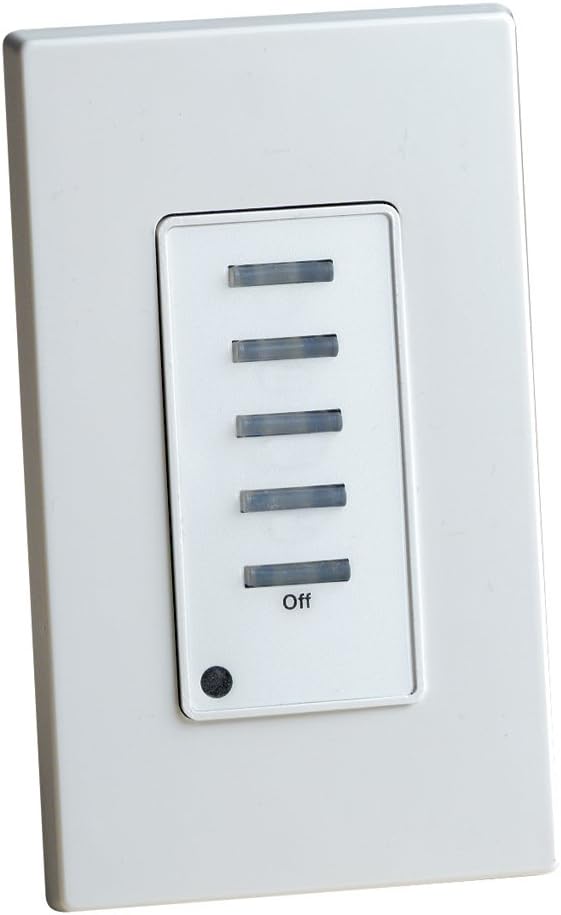
You’ll find the Leviton NE505-C Dimensions Multizone System, Single Zone Scene Controller with 5 Buttons, White/Ivory is designed to be a simple, tactile way to control lighting scenes in a single zone while fitting into larger multizone systems. It gives you scene recall, an illuminated Off button for easy location in the dark, and a control-station design that aims for a high-tech look and feel.
What this unit does
You can recall groups of lighting scenes using the five front-panel buttons: typically four scene buttons plus an Off button. The NE505-C is built so it can operate by itself for a single zone or be ganged with up to seven additional units to give you access to many more scenes. The ergonomics and illumination choices make it easy for anyone in the room to make adjustments without opening an app or a control panel.
Leviton NE505-C Dimensions Multizone System, Single Zone Scene Controller with 5 Buttons, White/Ivory
$325 Only 1 left in stock - order soon.
Key features
You’ll want to focus on the NE505-C’s scene recall flexibility, gangability, illuminated Off function, and streamlined design. These features are especially useful if you want fast, tactile control for a specific room or as part of a larger system.
Quick summary of capabilities
- Recalls four consecutive scenes per controller, helping you step through presets quickly.
- Supports different consecutive scenes for different configurations, letting you change the mapping as your system scales.
- Gangable with up to seven additional NE505 units to allow selection of up to 32 scenes.
- Illuminated Off button that lights when lights are off, so you can find it in the dark.
- Control-station design intended for a high-tech aesthetic.
Detailed breakdown
You’ll find this table helpful for a quick, side-by-side look at the main features and what they mean for your setup.
| Feature | Details | Benefit for you |
|---|---|---|
| Scene recall | Each NE505 can recall four consecutive scenes (for example scenes 1–4, 5–8, …, 29–32). | Lets you step through multiple presets without needing a mobile device or central console. |
| Configurations | Up to 256 configurations supported (via system programming). | Offers flexibility for commercial or complex residential setups where scenes vary by event, daypart, or user preference. |
| Gangability | Can be ganged with up to 7 additional NE505 units for selection of up to 32 scenes. | Scales easily as your project grows: add more keypads to provide instant access to more scenes. |
| Off button illumination | Off button illuminates when lights are off. | Makes the controller easy to find at night or in low light, reducing fumbles and improving usability. |
| Design | Control-station look with clean lines and tactile buttons; available in White/Ivory. | Blends with typical modern interiors and gives a polished, professional appearance. |
| Physical layout | 5 buttons: typically 4 scene buttons + 1 Off/button. | Straightforward layout that’s easy to teach to guests or staff. |
| Use case | Single zone scene controller, but designed for multizone systems. | Good for dedicated rooms (conference rooms, living rooms, home theaters) where local control is important. |
How it works
You’ll use the NE505-C primarily to step between scenes or to turn a zone off quickly. The keypad sends scene commands to the lighting control system it’s connected to, which then adjusts the assigned loads to the predefined levels for that scene.
Scene mapping and selection
Programming assigns scene numbers and levels in the lighting control system so each of the four scene buttons on the NE505 corresponds to a consecutive block of scenes. You can change which consecutive block those four buttons call up depending on the configuration, so the same NE505 can function differently in different system states. This flexibility lets you choose which four-scene window the controller offers access to without changing wiring or faceplates.
Gangable operation
When you gang multiple NE505 units together, each unit’s buttons represent different segments of the overall scene bank. If you use all eight controllers in a gang, you can step through up to 32 scenes directly from the wall. You’ll appreciate this when you want local, direct access to many scene options without bringing up a central touchscreen.
Design and build
You’ll notice the NE505-C is compact and intended for in-wall mounting, matching other wall controllers for a neat, finished look. The faceplate and button feel aim to be both tactile and durable.
Faceplate and button feel
The buttons are slightly raised with firm actuation so you can tell when you’ve pressed a scene without needing to look. The off-button illumination is practical: it lights up when the zone is off so you can quickly locate the control in the dark. The white/ivory finish helps the unit blend into most interiors while maintaining a professional aesthetic.
Physical durability and finish
You’ll find the controller is constructed to meet commercial-grade expectations for in-wall devices. The materials are chosen for longevity and daily use; the tactile feedback from the buttons is designed to last through frequent presses. If you plan to install in higher-traffic spaces, the finish and build quality are adequate for long-term use.
Installation
You’ll want to follow wiring and mounting instructions carefully to avoid programming headaches, especially when mixing multiple controllers or integrating into an existing control system.
Wiring and compatibility
The NE505-C is designed to connect into Leviton Dimensions or similar compatible lighting control systems. You’ll need to ensure the system controller or processor supports scene commands and that you wire the keypad to the system’s input network per Leviton’s wiring diagrams. Confirm voltage, communication bus type, and grounding practices before you start.
Mounting and physical setup
You’ll mount the unit into a standard single-gang electrical box. The faceplate aligns to standard dimensions, and the wiring terminates behind the plate. Make sure the box is flush and that you have enough space for the wiring harness. Tighten mounting screws evenly so the faceplate sits flat and the buttons maintain their intended feel.
Programming the controller
You’ll typically program scenes and configure which consecutive scene block the NE505 will access via the main lighting control processor or system software. Programming steps may include assigning the keypad to a node, mapping its physical buttons to scene numbers, and saving configurations to memory. If you’re adding the NE505 to an existing system with other controllers, confirm there are no conflicting scene assignments.
Performance and usability
You’ll find the NE505-C fast and intuitive during normal use. The tactile buttons are responsive and the illuminated Off key adds a thoughtful touch for nighttime operation.
Everyday operation
Using the five buttons is straightforward: the four scene buttons let you step among preset lighting looks, and the Off button cuts the zone lighting while lighting itself up for location. You’ll appreciate not having to open an app or learn gestures—pressing a physical button is both immediate and satisfying.
Speed and responsiveness
Latency between pressing a button and seeing the lights change depends on your lighting control system and network. In most installations, response is near-instantaneous. You’ll notice consistent behavior once scenes are properly programmed and the system communication is stable.
Pros and cons
You’ll want to weigh the practical benefits against some limitations depending on your needs and system complexity.
Pros
- Physical, tactile controls that are easy to use for guests and non-technical users.
- Illuminated Off button for easy location in the dark.
- Gangable design allows scalable scene access (up to 32 scenes with 8 units).
- Compact single-gang footprint that fits standard electrical boxes.
- Professional aesthetic that suits many residential and commercial applications.
Cons
- Only four consecutive scenes per unit are available without ganging multiple controllers, which can be limiting if you want a large number of local presets from a single controller.
- Programming is done from the system controller or software; there’s no on-device touchscreen for advanced configuration. You’ll need access to the central system or a qualified installer for setup.
- Compatibility depends on system architecture; it works best in environments already using Leviton Dimensions or similarly compatible control systems.
Who this is for
You’ll find this controller useful if you manage spaces where local, straightforward access to a handful of scenes is important. It’s aimed at people who value tactile control and quick scene recall without relying on mobile apps.
Residential scenarios
If you want simple scene control in a living room, dining room, home theater, or master bedroom, this controller gives you quick access to a few frequently used presets. You’ll like the illuminated Off button for nighttime convenience.
Commercial scenarios
In meeting rooms, lobbies, classrooms, and hospitality zones, the NE505-C is effective as a local control station. You’ll appreciate how easy it is for staff and visitors to change lighting scenes without training.
Integrators and installers
If you’re an installer or an AV integrator, you’ll use the NE505-C as a building block for a larger multizone system. Its gangability and straightforward mapping make it a flexible option for scaled deployments.
Troubleshooting and tips
You’ll face occasional issues during installation or use, but most have straightforward fixes. These tips are aimed at reducing common headaches and improving reliability.
Common issues and solutions
-
Problem: Controller buttons don’t change lights.
Solution: Verify the keypad is addressed and mapped in the system controller software. Check wiring for loose connections and confirm the control bus is live. -
Problem: Off button doesn’t light up when lights are off.
Solution: Confirm the Off illumination is enabled in system settings and that the lighting control system is reporting the zone status correctly. If the system uses occupancy sensors or automated schedules, override states may affect illumination. -
Problem: Scenes respond slowly.
Solution: Inspect network or bus communication; high traffic or wiring issues can cause latency. Also confirm the system’s controller CPU or processor isn’t overloaded with other tasks.
Installation best practices
- Pre-label wiring, run a system check before final faceplate mounting, and use a temporary cover to test scene recall without leaving the wall open.
- Keep programming notes that map physical buttons to scene numbers and document any changes; this prevents confusion years later when someone else needs to reconfigure.
- Avoid mixing incompatible system hardware on the same communication bus; stick to recommended Leviton system components where possible.
User tips for daily use
- Teach common users which button does what with a small label or by training; the tactile interface is designed for simplicity, but clear labels reduce accidental scene changes.
- Use the illuminated Off button as a practical locator: show family members or staff that it lights when the lights are off so they can find it at night.
- If you expect frequent changes to scene assignments, keep a copy of your system configuration and a list of typical changes so reprogramming is quick.
Alternatives and comparisons
You’ll want to compare the NE505-C with other Leviton and third-party controllers to make an informed purchase decision. Below are some considerations and comparable product types.
Compared with other Leviton controllers
Leviton’s range includes models with more buttons, different faceplate sizes, or integrated dimmer mechanisms. If you need local dimming control in addition to scene recall, look at units that offer combined dimmer and scene control functions. The NE505-C is strong as a pure scene controller with a clean, simple interface.
Compared with Lutron or other brands
Other manufacturers might offer wireless scene keypads, tactile keypads with backlit labels, or programmable capacitive touch panels. If you require wireless connectivity or integration with a broader smart-home ecosystem (Zigbee, Z-Wave, proprietary wireless), compare the NE505-C’s wired integration model with those wireless options. You’ll find the NE505-C tends to be more reliable in professional environments where wired control is preferred.
When to choose something else
If you want an on-wall touchscreen, mobile app-first control, or wireless-only devices, there are alternatives better suited to those needs. Choose the NE505-C when you prioritize tactile feedback, simplicity, and dependable wired integration with a centralized lighting control system.
Programming examples
You’ll find example mappings useful for visualizing how the NE505-C can be set up in real environments. Below are a few simple configurations you can adopt.
Example: Living room presets
- Button 1 — Scene 1: All lights bright for cleaning and chores.
- Button 2 — Scene 2: General daytime lighting for daily activities.
- Button 3 — Scene 3: Movie mode (dimmers down, accent lighting on).
- Button 4 — Scene 4: Dinner/entertaining (accent up, overhead low).
- Button 5 — Off: Turns all zone loads off and lights the Off key.
You’ll like how easy it is to teach these to family and guests.
Example: Conference room
- Button 1 — Scene 5–8 mapping: Presentation (front lights bright, house dim).
- Button 2 — Scene 6: Video conferencing (even lighting, minimized contrast).
- Button 3 — Scene 7: Collaboration (overhead bright, task lighting on).
- Button 4 — Scene 8: Welcome/meeting end (soft lighting).
- Off — Quick all-off after meetings.
You’ll be able to scale this by adding more NE505 units if you need more scenes directly accessible.
FAQ
You’ll likely have a few common questions before buying and installing. These answers clarify key points.
Can I use this with other brands?
You’ll have the best results using the NE505-C with Leviton Dimensions or compatible Leviton lighting control systems. Interoperability with other brands depends on the control protocol and whether the central controller can accept the NE505’s scene command format.
How many scenes can one button access?
You’ll typically assign one scene per button for direct recall. Each NE505 button corresponds to one scene number within a consecutive block of four scenes assigned to that unit. To access more scenes from the wall, you’ll add additional NE505 units and configure each to a different consecutive block.
Do I need a dedicated installer?
If you’re comfortable with low-voltage wiring and lighting control software, you can install and program the NE505-C yourself. However, for commercial installations or complex multi-zone programming, you’ll want a trained integrator to ensure proper mapping and system stability.
What happens to the Off illumination if I switch scenes?
You’ll notice the Off button is intended to indicate an off state for the zone. In normal scene recalls that leave the zone on at any level, the Off button won’t be illuminated. When the zone is off, the button lights, making it clear to anyone in the space.
Is it compatible with dimmers and relays?
You’ll be able to use the NE505-C with dimmers, relay packs, or electronic drivers controlled by the central system, provided they are supported by the lighting control processor. The keypad itself sends commands; the actual control device must be compatible with the system’s outputs.
Final verdict
You’ll find the Leviton NE505-C Dimensions Multizone System, Single Zone Scene Controller with 5 Buttons, White/Ivory is a practical, well-built option for tactile scene control in both homes and commercial spaces. It’s especially useful if you want quick, reliable, physical access to a handful of scenes with the option to scale up by ganging additional units.
You’ll appreciate the illuminated Off button, the sturdy feel of the buttons, and the professional aesthetic that fits a range of interiors. If your project relies on a centralized lighting control system and you want simple, dependable wall control for a zone, this keypad is a solid choice.
If you’d like, you can tell me what room or system you’re planning to use it with and I’ll suggest an optimal scene mapping and installation checklist tailored to your setup.
Disclosure: As an Amazon Associate, I earn from qualifying purchases.