
?Thinking about upgrading your home network to the TP-Link Deco 7 Elite BE95 BE33000 Quad-Band WiFi 7 Whole Home Mesh System (2-Pack) and wondering if it’s worth it for your space and devices?
Buy TP-Link Deco 7 Elite BE95 On Amazon
Overview
You’re looking at a mesh system built around the newest Wi‑Fi 7 standards, designed to replace both your router and extenders. This 2-pack TP‑Link Deco 7 Elite BE95 BE33000 aims to give you multi-gig wired connections, massive bandwidth on multiple bands, and mesh coverage up to 7,800 sq. ft., so you can keep dozens or even hundreds of devices happy.
Product positioning
This Deco model targets homes and small offices with heavy traffic, smart home ecosystems, and users ready for the multi‑gig era. You’ll see it pitched as a future-proof system for streaming 8K content, cloud gaming, and supporting large numbers of simultaneous connections without performance collapse.
What you get in the box
You’ll get two Deco BE95 nodes, power adapters, and a quick-start guide; typical mesh accessory assortment. Each node replaces a router and extender in your network design, letting you place them where they’ll cover the most area and provide wired connectivity to key devices.
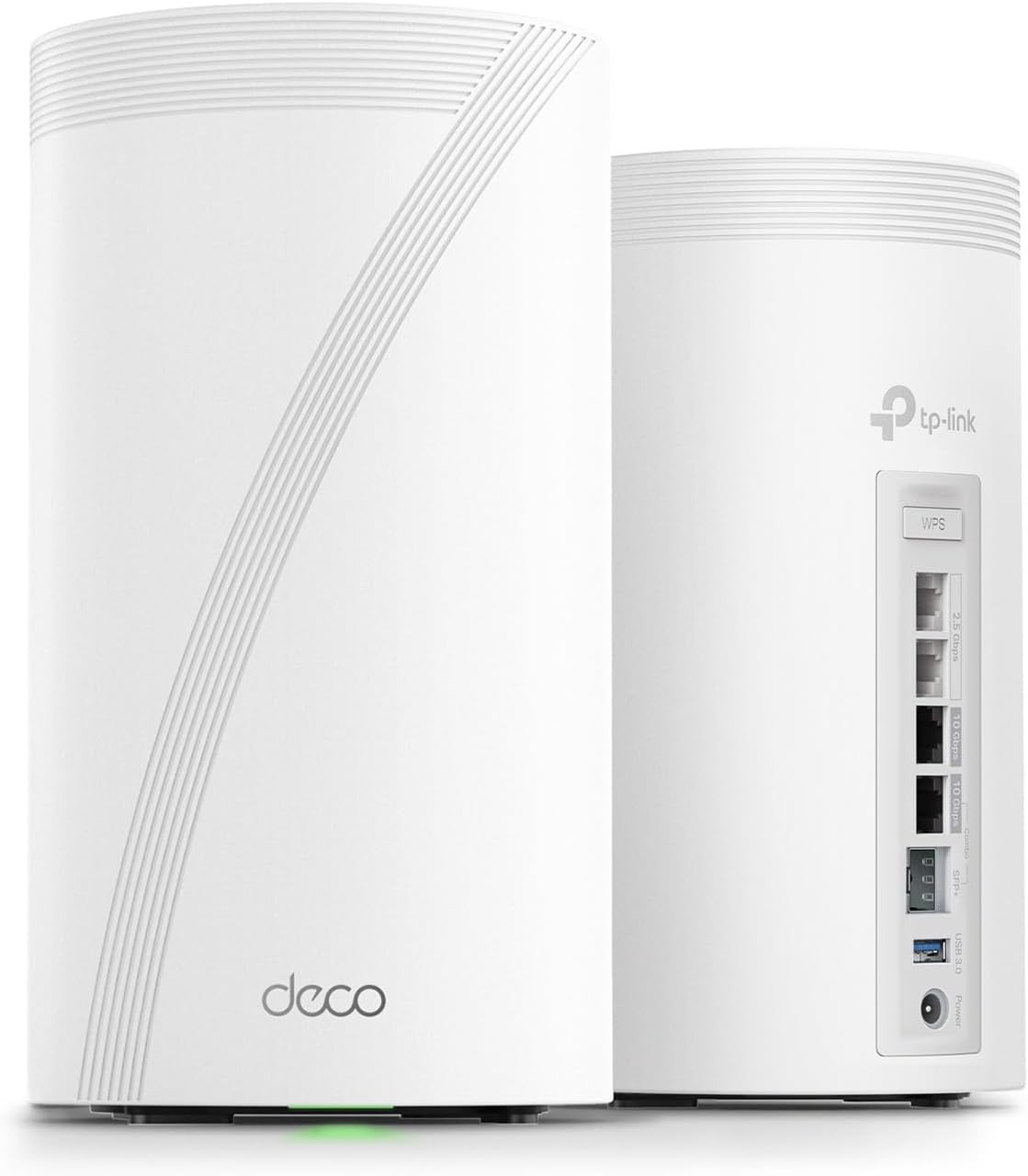
TP-Link Deco 7 Elite BE95 BE33000 Quad-Band WiFi 7 Whole Home Mesh System - Up to 7800 Sq.Ft w/AI-Driven Smart Antennas, 10G Multi-Gig Ethernet Ports, Replaces Router and Extender (2-Pack)
$799.99 In Stock
Key specifications
You’ll want a clear snapshot of the hardware and capabilities before deciding. This table breaks down the most relevant specs so you can compare at a glance.
| Item | Specification |
|---|---|
| Product name | TP-Link Deco 7 Elite BE95 BE33000 Quad-Band WiFi 7 Whole Home Mesh System (2-Pack) |
| Wi‑Fi standard | Wi‑Fi 7 (802.11be) |
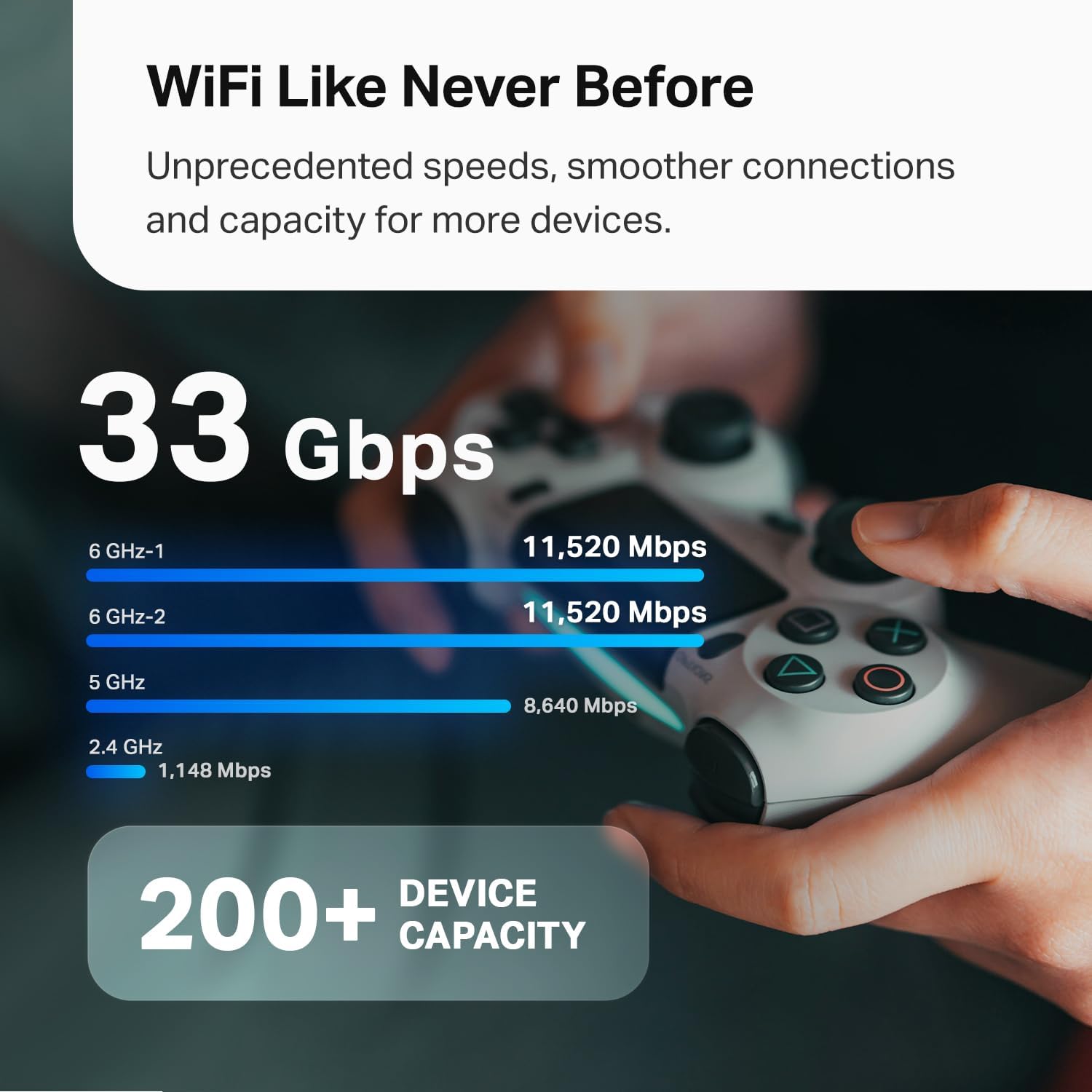
| Bands & peak speeds | 6GHz band 1: 11520 Mbps; 6GHz band 2: 11520 Mbps; 5GHz: 8640 Mbps; 2.4GHz: 1148 Mbps |
| Coverage (2-pack) | Up to 7,800 sq. ft. |
| Max connected devices | 200+ devices (practical depends on use) |
| Ethernet ports per node | 4 (2 × 10G, 2 × 2.5G) |
| Antenna tech | AI‑Driven Smart Antennas |
| Mesh features | Multi-Link Operation, Multi-RUs, 320 MHz channels |
| Security | TP‑Link HomeShield (basic features free; premium available) |
| App | Deco App (iOS/Android) |
| Compatibility | Works with major ISPs; modem usually required |
| Pack options | 2‑pack (this review) |
Design and hardware
You’ll notice a modern, minimal look with white finishes that blends into most home decor. The units are small enough to place on shelves or counters without dominating the room.
Physical build and footprint
Each Deco BE95 has a compact vertical design that favors placement on flat surfaces and improves antenna performance by elevating the hardware. You’ll appreciate that they aren’t heavy, so moving them to test coverage is easy.
Ports and wired connections
Every node gives you four Ethernet ports — two 10G and two 2.5G — which is rare for consumer mesh units and really useful if you have high‑speed wired needs. You can connect an 8K TV, gaming console, NAS, or a multi‑gig modem and avoid creating a bottleneck at the router.
Cooling and durability
The system is designed for continuous operation and tends to run cool in normal home use, but you should still avoid closed cabinets to maintain airflow. You’ll find these units capable of handling long streaming or gaming sessions without thermal throttling in typical environments.
Shop TP-Link Deco 7 Elite BE95 On Amazon
Performance: raw throughput
You expect speed from a Wi‑Fi 7 system, and these specs promise a lot of raw throughput. With wide 320 MHz channels and 4K‑QAM, this Deco can reach extremely high theoretical maxima on the two 6GHz bands and the 5GHz band.
Speed across bands
You’ll see theoretical peak speeds of 11,520 Mbps on both 6GHz bands, 8,640 Mbps on 5GHz, and 1,148 Mbps on 2.4GHz. Those numbers are impressive on paper and signal how TP‑Link built this for high‑capacity scenarios and future ISP plans.
Real-world expectations
In realistic home conditions you won’t hit the theoretical peaks, but you will get dramatically better throughput compared to Wi‑Fi 6 or older systems — especially for devices that support Wi‑Fi 7 and 6GHz. You’ll notice lower latency and higher sustained rates in short-range line‑of‑sight situations.
Multi-device handling
The Deco 7 Elite emphasizes multi‑device performance and claims support for 200+ devices. You’ll find that when devices are mostly light clients (sensors, smart bulbs, phones doing background sync), the mesh manages load well. Heavy simultaneous streams across dozens of devices will still stress any home network, but this system scales much better than older mesh setups.
Coverage and mesh behavior
You want whole‑home coverage without dead zones, and this system promises up to 7,800 sq. ft. with two nodes. That’s a large area and should cover most multi‑story homes when you place nodes strategically.
How the mesh behaves
You’ll have one coherent network name and automatic handoffs as you move around, with the Deco app managing node placement suggestions and band steering. The mesh uses Multi-Link Operation to route traffic efficiently between nodes and client devices, helping maintain throughput even when devices roam.
Real placement tips
Place one node near your modem or main wired hub and the second roughly halfway to the area you want to cover most. You’ll get better results by avoiding thick walls or appliances that interfere with 6GHz signals, since 6GHz offers wide bandwidth but shorter range.
Setup and management
You don’t need to be a network pro to get this running, and the Deco App guides you through steps with clear prompts. You’ll appreciate both mobile setup and ongoing management options.
Using the Deco mobile app
The Deco App walks you through physical placement, firmware updates, and basic network configuration in minutes, and it’s where you’ll manage guest networks, QoS, and parental controls. You’ll find the app’s UX intuitive and helpful for monitoring device connections and running basic diagnostics.
Advanced settings and web access
If you prefer more granular control, the app still covers many advanced features like port assignments and wired backhaul settings, though some power‑user settings are more limited than on enterprise gear. You’ll be able to configure VLANs and multi‑gig port priorities in many setups, but the fastest route for complex enterprise needs is a dedicated router or UTM.

Security and software features
You want your network to be secure and manageable, and TP‑Link includes HomeShield for that purpose. Basic protection is free and covers the essentials; you can opt into paid features for more in‑depth protection.
TP‑Link HomeShield
HomeShield provides basic security scans, IoT device identification, parental controls, and QoS reporting at no cost, and you’ll see network health summaries in the app. If you need advanced intrusion prevention, deep packet inspection, or advanced parental controls, you’ll find premium tiers available.
Parental controls and QoS
You’ll be able to restrict content and schedule access per device, prioritize gaming or streaming traffic, and view basic weekly or monthly reports. These features are friendly for parents or households that need to manage evening screen time or prioritize bandwidth for work calls.
Use cases and performance scenarios
You’ll want to match this system to your actual needs to determine value. It’s best suited for high-density device environments, homes with multi‑gig ISP plans, and media‑heavy households.
For streaming and gaming
If you stream 8K or multi‑room 4K content and want minimal buffering, this system supports those workflows with wide channels and high throughput. You’ll also benefit from the 10G ports if you connect local media servers or NAS devices for buttery smooth local streaming.
For smart home and IoT
The Deco can handle many IoT devices while isolating them via network segmentation and basic device identification. You’ll be able to keep latency-sensitive devices on faster bands and put lower priority IoT gear on 2.4GHz or a guest SSID.
For multi‑gig ISPs
If you’re moving into 2.5G, 5G, or 10G internet plans, the Deco BE95 provides ports that match those speeds so your internal network doesn’t choke on an otherwise fast WAN connection. You’ll only get truly maximized internet speeds if your ISP plan and wired modem support multi‑gig throughput, but the hardware is ready.
Comparison with older Wi‑Fi standards and systems
You might be wondering how much of an upgrade this is compared with Wi‑Fi 6 setups or older Deco models. In short, the gains are most noticeable in bandwidth-hungry scenarios and when clients support Wi‑Fi 7 and 6GHz.
Wi‑Fi 7 vs Wi‑Fi 6/6E
Wi‑Fi 7 introduces Multi-Link Operation, Multi‑RUs, and 320 MHz channels, which improve throughput, reduce latency, and enhance spectrum efficiency for capable devices. You’ll see more dramatic benefits as your client devices adopt Wi‑Fi 7; older devices will still work but won’t get full feature benefits.
Against other mesh systems
Compared to many Wi‑Fi 6 mesh routers, the Deco BE95 adds extra bands and more multi‑gig ports, which translate to better throughput and future-proofing. You’ll see higher MSRP in many cases, but you’re paying for the latest standard and advanced wired connectivity.

Pros and cons
You should weigh the strengths and limitations before buying. This list helps you quickly see where the Deco shines and where it might not match your needs.
Pros
- You’ll get very high theoretical bandwidth across multiple bands for future‑proof performance.
- The 10G and 2.5G ports per node enable true multi‑gig wired devices without external adapters.
- Coverage up to 7,800 sq. ft. is strong for a 2‑pack mesh, reducing the need for more nodes in many homes.
- TP‑Link HomeShield offers built‑in security and parental controls for everyday protection and management.
- The Deco App simplifies setup and day‑to‑day administration for non‑technical users.
Cons
- Practical performance depends on your devices — only Wi‑Fi 7 capable clients will reap full benefits.
- 6GHz propagation is shorter and more easily blocked, so placement matters more than with older bands.
- Some advanced power‑user features may be limited compared with enterprise gear or custom firmware.
- Premium security features require a subscription if you want IDS/IPS and advanced protections.
Setup checklist (step‑by‑step)
You’ll appreciate a clear list to get started quickly and correctly. Follow these steps for best initial setup and pain‑free deployment.
- Position your primary node near the modem and a central wired hub or switch. Make sure it’s not in a closed cabinet and has good airflow.
- Connect the primary node to your modem with the fastest available cable (preferably 10G if your modem and ISP support it).
- Power on both nodes and install the Deco App on your Android or iOS device. The app will detect and guide you through the rest of the setup.
- Update firmware immediately when prompted to ensure you have the latest improvements and security patches.
- Place the second node roughly halfway between the primary node and the area you need coverage, adjusting slightly for walls or obstructions.
- Use wired backhaul where possible for best performance; connect Ethernet between nodes and configure wired backhaul in the app.
- Configure SSID, password, guest network, QoS priorities, and parental control schedules according to your household needs.
Tips for getting the best performance
You’ll get the most from the Deco BE95 with a few practical tweaks and good habits. These tips are based on typical mesh behavior and Wi‑Fi 7 characteristics.
Placement and band management
Place nodes in open spaces and avoid metal or thick masonry between them; you’ll maximize 6GHz utility by keeping clear sightlines. You’ll also see better performance using band steering to move capable devices to 6GHz when close to nodes and keep more distant devices on 5GHz or 2.4GHz.
Use wired backhaul when possible
If you have Ethernet running through your home, use it for backhaul to link nodes and reduce wireless overhead. You’ll dramatically improve throughput and stability for the whole mesh by reducing inter-node radio traffic.
Keep firmware current
Update firmware through the Deco App as soon as updates are available to ensure you have bug fixes and feature improvements. You’ll also want to monitor HomeShield notifications for anything the system flags as suspicious.
Optimize for multi‑gig WAN
If your ISP provides multi‑gig service and your modem/router combo supports it, connect your Deco to the modem via 10G and ensure your internal cabling (Cat6A or Cat7) supports these speeds. You’ll avoid internal bottlenecks and experience actual multi‑gig internet performance on wired clients.
Common troubleshooting and fixes
You’ll sometimes run into minor issues; here are practical fixes you can try before calling support.
If devices drop or can’t connect
Reboot the node closest to the affected device and check for firmware updates via the app. If the problem persists, forget the network on the device and reconnect; also test moving the device closer to confirm it’s a coverage issue.
If you see slow speeds
Check whether the client is associated with the intended band and whether multiple heavy streams are saturating bandwidth. Use wired backhaul to relieve network congestion between nodes and plug latency‑sensitive devices into the 10G ports when possible.
Mesh handoff issues
If roaming feels choppy, enable or adjust band steering and roaming aggressiveness if those options are available. You’ll also want to check that each node is placed to create appropriate overlap without being too close.
WAN problems or modem compatibility
Ensure your modem is in bridge mode or compatible with the Deco if you’re using the Deco as your main router. If your ISP provides a gateway, you may need to disable its Wi‑Fi or set up the Deco in access point mode depending on your network plan.
Pricing and value
You’re paying for the latest wireless standard, advanced wired ports, and broader coverage in a two‑node package. Depending on how much multi‑gig capability and future readiness matters to you, this system can be a good long‑term investment even if not every device currently supports Wi‑Fi 7.
Is it worth the cost?
If you plan to upgrade devices over the next few years and want a multi‑gig ready home network today, you’ll likely find the price reasonable for the hardware and capability set. If you only use basic internet browsing and streaming on a few devices, a lower‑cost Wi‑Fi 6 mesh might give you more bang for your buck right now.
Who should buy this
You’ll benefit most from this mesh system if you have multi‑gig internet or plan to upgrade devices to Wi‑Fi 7 soon, and if you have a larger home that needs substantial coverage. You’ll also appreciate the multiple 10G and 2.5G ports if you host local NAS, media servers, or frequently move large files over your LAN.
Who might want to look elsewhere
If you have a small apartment with only a few devices or you’re constrained by a low‑speed ISP plan, the full capability of this mesh may be overkill. You’ll find cheaper Wi‑Fi 6 or 6E systems that deliver excellent day‑to‑day performance at a lower price.
Final verdict
You’ll find the TP‑Link Deco 7 Elite BE95 BE33000 to be a forward‑looking mesh system with real multi‑gig wired support, massive theoretical wireless throughput, and a focus on covering large, device‑heavy homes. If you want a network that’s prepared for an influx of Wi‑Fi 7 devices and multi‑gig internet services, this system is a solid choice that balances usability with advanced hardware.
Summary recommendation
If you want future proofing, broad coverage, and multi‑gig wired ports without jumping into enterprise gear, you’ll likely be very happy with this Deco model. If your needs are modest or budget constrained, consider whether a Wi‑Fi 6 mesh would meet your current requirements before upgrading.
Check Price For TP-Link Deco 7 Elite BE95
Disclosure: As an Amazon Associate, I earn from qualifying purchases.