
? Want a smart thermostat that manages zoning, monitors humidity, and plays nicely with your Trane variable-speed system?

Buy The Trane XL1050 ComfortLink Wi-Fi Smart Thermostat On Amazon
Overview of the Trane XL1050 ComfortLink Wi-Fi Smart Thermostat
You’ll find the Trane XL1050 ComfortLink Wi-Fi Smart Thermostat – Model TZON1050AC52ZC Built-in Humidity Sensor with Zoning Control & 7″ high Definition Color Touchscreen Compatible with Variable Speed Systems is designed for whole-home comfort control and advanced integration. It’s a feature-rich controller intended for homeowners who want centralized control of temperature, humidity, and connected HVAC devices, plus remote access through apps and voice assistants.
Who this thermostat is for
If you own a Trane ComfortLink II communicating or variable speed system, or if you want smart zoning and home automation integration, this thermostat is tailored for you. You’ll appreciate it most if you want touchscreen ease, multi-device control, and automation-ready features like Z-Wave compatibility and Nexia integration.
Trane XL1050 ComfortLink Wi-Fi Smart Thermostat – Model TZON1050AC52ZC Built-in Humidity Sensor with Zoning Control & 7
Key features at a glance
You’ll notice an emphasis on connectivity, control, and convenience. The XL1050 offers a large 7-inch high definition color touchscreen, built-in humidity sensing, zoning control, and compatibility with over 200 Z-Wave devices. It supports both Wi‑Fi and Ethernet connectivity, and provides scheduling, weather tracking, and maintenance reminders.
What sets it apart
The thing that stands out is the integration of Trane’s ComfortLink II communication capabilities with a full-featured home automation hub, allowing both HVAC control and broader smart-home control from a single interface. You’ll also get native support for variable-speed systems, which helps maintain consistent temperatures and efficiency.
Specifications table
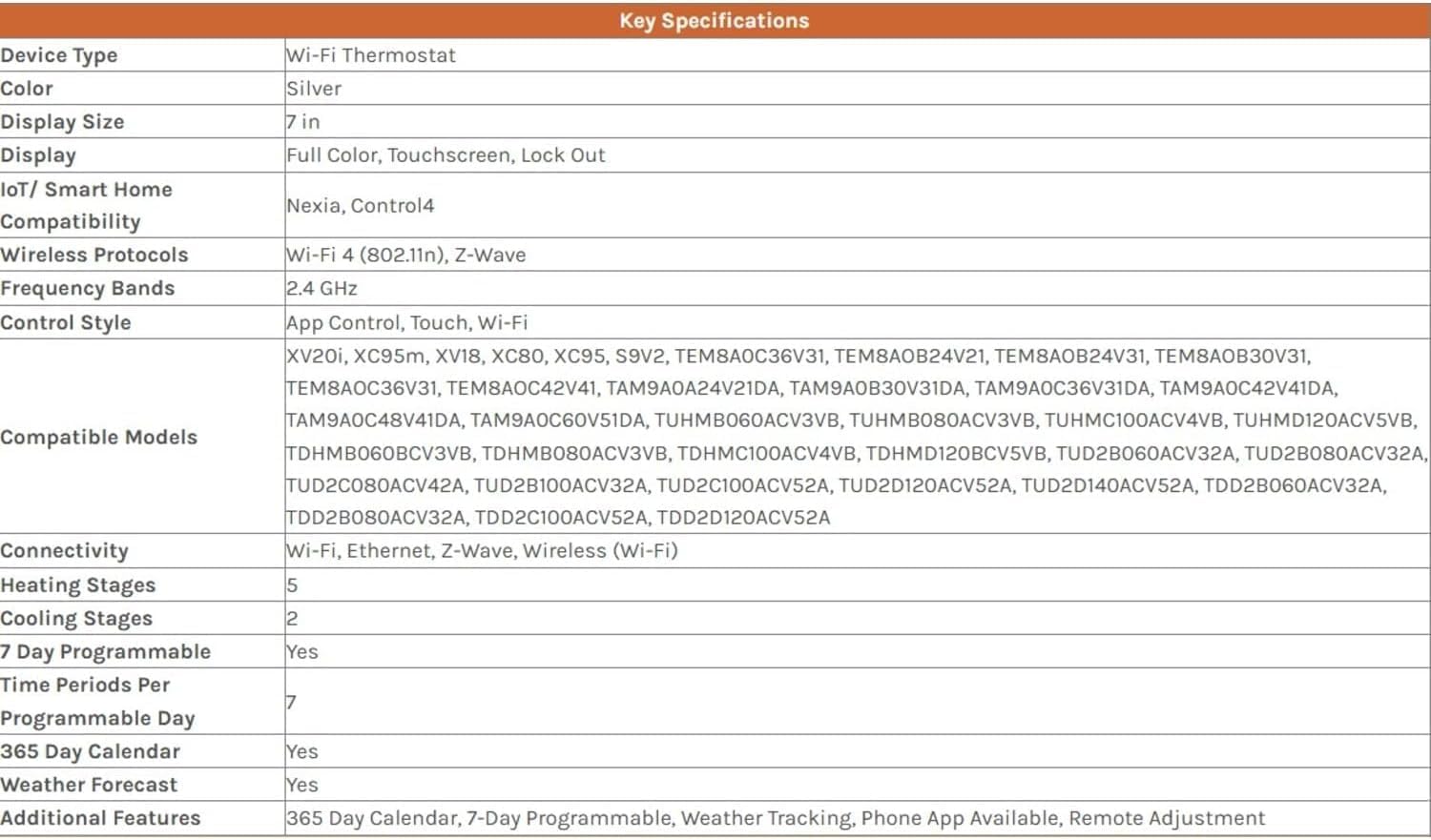
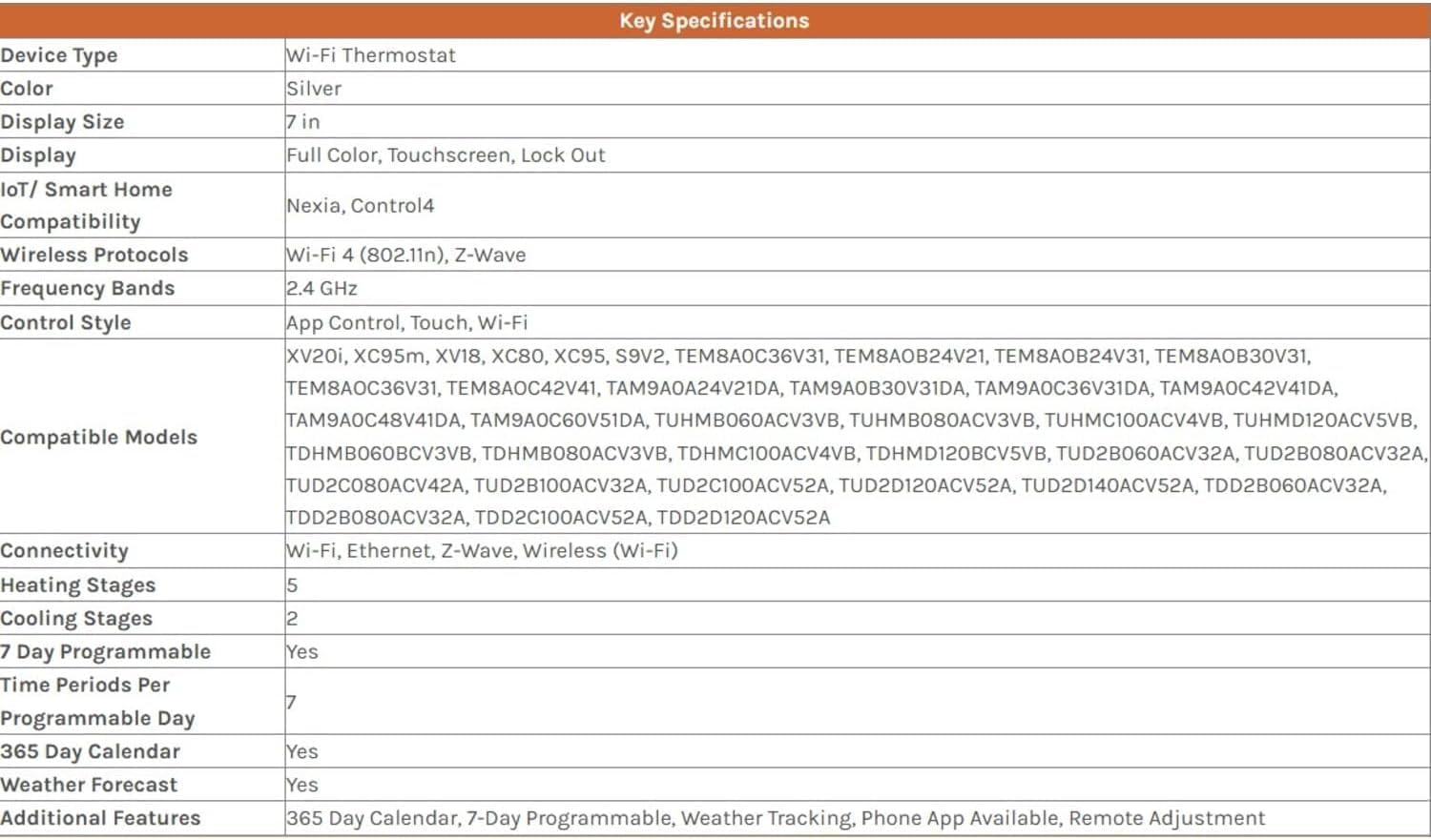
Below is a quick breakdown to help you understand core specs and compatibility at a glance.
| Item | Details |
|---|---|
| Model | TZON1050AC52ZC (Trane XL1050 ComfortLink) |
| Display | 7″ high definition full-color touchscreen |
| Connectivity | Wi‑Fi, Ethernet, Nexia Built-in Bridge, Z‑Wave compatible |
| Compatibility | Trane ComfortLink II communicating and 24V conventional systems; listed Trane models (XV20i, XC95m, XV18, etc.) |
| Controls | Zoning control, up to 3 devices with relay panel (BAY24VRPAC52DB) |
| Sensors | Built-in humidity sensor; supports networked sensors |
| Programmability | 7-day programmable, up to 6 schedules per day |
| Extras | Weather tracking, phone app, remote adjustment, maintenance reminders |
| Voice control | Works with Alexa and Google Assistant |
| Home automation | Integrates with Nexia and other Z‑Wave devices |
| Replacement models | Replaces CNT06391, TZONE1050, TZONE950 series, etc. |
Installation and setup
You’ll want to plan the installation carefully, especially if you’re replacing a conventional thermostat with a communicating Trane thermostat. The unit includes setup wizards that help guide you through initial configuration, but compatibility checks and proper wiring are essential.
Wiring and compatibility considerations
If your Trane system is a ComfortLink II communicating or variable-speed system, the XL1050 can communicate natively. For conventional 24V systems or some heat pump setups, you may need a 24V relay panel (BAY24VRPAC52DB) to enable specific device controls. Confirm your current Trane model is on the compatibility list—this is critical before purchase or installation.
Professional vs DIY installation
You can perform a DIY install if you’re comfortable with HVAC wiring and your system is clearly supported, but many homeowners prefer a licensed HVAC technician for communicating systems. A pro will ensure proper integration with ComfortLink, correct zoning setup, and verify variable-speed system interactions.
User interface and touchscreen
You’ll immediately notice the clear, responsive 7-inch color touchscreen, designed for intuitive navigation and control. The layout is friendly, readable, and supports simple touches for schedules, temperature changes, and system settings.
Display features and customization
The thermostat also functions as a digital photo frame if you want a personal touch. You can customize the home screen to show the controls or a photo, and the touch-based wizards streamline common tasks like setting schedules or connecting to your Wi‑Fi network.
App control and remote access
You’re able to manage your thermostat from anywhere using a smartphone, tablet, or computer. The Nexia-enabled interface or the Trane app (depending on your setup) allows you to change temperatures, adjust schedules, receive alerts, and view system status.
Phone app features
From the app you’ll set up and modify 7-day schedules, receive filter and maintenance reminders, check current humidity and temperature, and manage zones. Remote control is a major convenience if you travel or want to change settings while away from home.

Purchase Trane XL1050 (ComfortLink Wi‑Fi) On Amazon
Zoning control and multi-device management
The XL1050 supports zoning control, which lets you tailor comfort to different parts of your home. When paired with the required relay panel, you can control up to three additional devices (humidifier, dehumidifier, energy/heat recovery ventilator).
How zoning improves comfort and efficiency
You’ll target heating and cooling where it’s needed, avoiding wasted energy in unoccupied areas. That can translate into better comfort—less temperature variance between rooms—and potential energy savings over time.
Built-in humidity control and IAQ management
The thermostat includes a built-in humidity sensor and works with a network of sensors to monitor and optimize humidity and temperature levels. You’ll get more than basic temperature control; the system helps maintain relative humidity for comfort and health.
Why humidity control matters
Humidity impacts perceived comfort, indoor air quality, and HVAC operation. You’ll notice improvements in comfort when humidity is kept within a comfortable range—typically 30–50%—and the XL1050 gives you reminders and controls to maintain those levels, including integrated control of humidifiers and dehumidifiers.
Scheduling, calendar, and weather tracking
You can program up to six schedules per day across seven days, and there’s a 365-day calendar function to handle seasonal variations. Weather tracking helps the thermostat consider outdoor conditions when optimizing performance.
Smart scheduling benefits
You’ll create schedules that adapt to your routine—workdays, weekends, and special exceptions. This keeps temperature control aligned with your life, reducing unnecessary heating or cooling while preserving comfort when you’re home.
Energy savings and performance
The XL1050 aims to balance comfort with energy efficiency, particularly when used with variable-speed Trane systems that can modulate output. You’ll find that more consistent temperature control reduces run times and avoids sudden system strain.
Real-world efficiency notes
Actual energy savings vary by home, climate, and system. But when you leverage zoning, humidification control, scheduling, and variable-speed system compatibility, you can expect more precise control and often reduced cycles—helpful for overall system efficiency.
Integration with home automation and voice assistants
You’ll connect the XL1050 to Nexia and Z‑Wave networks for broader home automation control. It supports Alexa and Google Assistant, letting you use voice commands for basic temperature adjustments or scene control.
Practical integration examples
You can set scenes that coordinate temperature with lighting and security, or use voice commands to set a “comfort” scene before you arrive home. The built-in Nexia bridge removes the need for extra hardware for some smart-home setups.
Maintenance reminders and system alerts
The thermostat provides maintenance and filter service reminders, which helps you keep your HVAC system in top condition. You’ll also receive alerts for system performance issues, allowing you to address problems before they escalate.
Why reminders are helpful
By prompting you about filter changes and maintenance, the thermostat helps maintain air quality and system efficiency. You’ll decrease the likelihood of leaks, clogged filters, or neglected service that can reduce system lifespan.
Installation tips and common pitfalls
Plan wiring checks before you begin, and confirm your Trane model appears on the compatibility list. If you’re connecting to a communicating system, ensure your installer understands ComfortLink integration.
Typical issues you may encounter
Common hiccups include missing C-wire power in older systems, incorrect relay panel installation for device control, or pairing issues with Nexia or Z‑Wave devices. If something feels off, a quick consult with an HVAC tech often resolves setup issues and avoids system errors.
Troubleshooting basics
If your thermostat won’t connect to Wi‑Fi, verify SSID, password, and router compatibility. If zone control isn’t functioning, check relay panel wiring and device compatibility. For variable-speed systems, confirm ComfortLink communication settings.
When to call a technician
Call a professional if you see persistent ComfortLink communication errors, if your system cycles abnormally after installation, or if you need complex zoning adjustments. A trained tech will confirm proper configuration and ensure your Trane equipment is operating safely.
Pros and cons
You’ll want a clear list to weigh advantages and potential trade-offs before buying.
Pros
- Deep Trane integration for ComfortLink II and variable-speed systems.
- Large, intuitive 7-inch HD touchscreen with customizability.
- Built-in humidity sensor and IAQ controls for better comfort.
- Zoning capability and control of additional devices with a relay panel.
- Nexia and Z‑Wave integration for robust home automation.
- Remote access via app and voice assistant compatibility.
- Maintenance reminders and weather tracking.
Cons
- Full functionality requires compatible Trane systems or optional relay hardware.
- Installation complexity can be higher for communicating systems (pro installation often recommended).
- Nexia subscription may be required for some cloud features and remote services.
- Price is higher than basic programmable thermostats.
Comparison with other smart thermostats
You’ll compare the XL1050 mainly with other high-end HVAC-brand thermostats and universal smart thermostats like Nest or Ecobee. The key differentiator is Trane ComfortLink communication and native variable-speed system support.
How it stacks up
Compared to universal smart thermostats, the XL1050 offers deeper manufacturer-specific control for Trane systems (especially variable-speed and communicating models). It’s less a simple consumer thermostat and more a system controller that integrates into Trane’s ecosystem and broader home automation.
Practical scenarios and use cases
Here are a few ways you might use the thermostat for better comfort and control.
Single-family home with multiple zones
If your home has dampers and zone controls, you’ll benefit from precise room-level temperature control and the ability to link humidifiers or ERVs to the system. Scheduling zones independently helps reduce wasted energy.
High-humidity climate
In humid conditions, the built-in humidity sensor and dehumidifier control provide fine control over indoor moisture. You’ll keep comfort high without overcooling, and avoid excessive run times.
Smart home enthusiast
If you’re already invested in Z‑Wave devices or use Nexia, the XL1050 becomes a convenient hub. You’ll orchestrate lights, locks, and HVAC around routines and voice commands.
Security and privacy
You’ll want to consider how remote access and cloud services are handled. Trane and Nexia use standard security protocols, but always use strong passwords and enable two-factor authentication where available.
Data and access control tips
Keep your Nexia and app credentials secure, update firmware when prompted, and monitor connected devices for any unusual activity. If you have privacy concerns, review Nexia’s data policies and disable features you don’t need.
Cost considerations and value
The XL1050 typically costs more than a basic smart thermostat, but it’s priced for homeowners who want full system control and automation. You’ll find value in the device’s ability to optimize variable-speed systems and coordinate multiple HVAC accessories.
Return on investment
You may find ROI through improved comfort, better humidity control, and energy savings from smarter scheduling and zoning. The real value shows if you use the advanced features and proper integration with your Trane system.
Who should buy this thermostat
You should buy the XL1050 if you have a Trane ComfortLink II communicating or variable-speed system and you want advanced, centralized control. It’s also a strong choice if you plan to integrate HVAC with home automation using Nexia or Z‑Wave.
Who should consider alternatives
If you have a basic single-stage HVAC system and only want simple smart scheduling, a lower-cost universal thermostat (e.g., Ecobee or Nest) might meet your needs. If you’re uncomfortable with complicated installs, a pro-installed solution could be a better path.
Final verdict
You’ll get a robust, feature-packed thermostat that’s especially valuable if you’re in the Trane ecosystem. The Trane XL1050 ComfortLink Wi‑Fi Smart Thermostat blends advanced HVAC controls, humidity management, zoning capability, and home automation into one elegant touchscreen interface. For homeowners with compatible systems who want extensive control and integration, it’s a compelling option.
Buying and setup tips
Before you buy, confirm your Trane model is listed in compatibility details. Check whether you need the BAY24VRPAC52DB relay panel for additional device control. If your existing home wiring lacks a C-wire or communicating bus, plan for professional installation.
Quick setup checklist
- Verify system compatibility and review your current thermostat wiring.
- Decide if you’ll install yourself or hire a pro (recommended for communicating systems).
- Ensure you have reliable Wi‑Fi or Ethernet near your thermostat location.
- Create or verify Nexia and app credentials ahead of time for remote access.
- Schedule a system test after installation to confirm ComfortLink communication and zone control.
Frequently asked questions (short)
You’ll likely have some common questions as you consider this device.
Do I need a Nexia subscription?
Some remote features and cloud-enabled services may require a Nexia subscription; check current Trane/Nexia policies for exact details.
Will it work with non-Trane systems?
It supports conventional 24V systems with additional hardware in some cases, but full functionality is optimized for Trane ComfortLink II communicating and variable-speed systems.
Can it control humidifiers and ERVs?
Yes—when paired with the appropriate relay panel and compatible devices, you can control whole-house humidifiers, dehumidifiers, and ERVs.
You now have a detailed walkthrough of what the Trane XL1050 ComfortLink Wi‑Fi Smart Thermostat offers, how it fits into different homes, and the practical considerations before buying and installing. If you’d like, you can tell me about your specific Trane model or home setup and I’ll help confirm compatibility and recommend next steps.
Get The Trane XL1050 Thermostat On Amazon
Disclosure: As an Amazon Associate, I earn from qualifying purchases.