
Thinking about how much time and effort you can save by switching to a robot that both vacuums and mops with heated self-cleaning?
Quick Verdict
You’ll find the DREAME L10s Pro Ultra Heat Robot Vacuum and Mop Combo a strong contender if you want a single device that handles heavy suction, edge mopping, and automated maintenance. It combines 7,000Pa suction with mop extension and 136°F hot water self-cleaning, which makes upkeep easier and cleaning more thorough than many robot combos you may have used before.
Who this is for
If your home has mixed floors (hard floors and occasional rugs), pets that shed hair, or a busy schedule that leaves little time for routine floor care, this unit is designed for you. It’s also well suited if you want the convenience of a self-cleaning dock that washes and dries the mop so you don’t have to touch dirty mop pads frequently.

DREAME L10s Pro Ultra Heat Robot Vacuum and Mop Combo, Mop Extend, 7000Pa Suction, Auto Robot Care and Maintenance, 136°F Hot Water Mop Self-Cleaning, Obstacle Avoidance, Ideal for Hair, Carpets
$349.99 In Stock
What’s in the box
You’ll get the main robot vacuum and mop combo unit, a charging/cleaning base that handles the hot-water mop wash, a set of mop pads, and the necessary adapters and manuals. The package aims to be plug-and-play, but you’ll want to reserve time for app setup and map creation to get peak performance.
Unboxing and first impressions
When you lift the robot out, you’ll immediately notice the mop arm and the docking interface for the heated wash station. The design is modern and purposeful — it doesn’t feel cheap, and the mop extension mechanism looks robust enough for repeated use.
Key specifications at a glance
You should know the numbers before you commit. Below is a compact table that summarizes the most important technical specs you’ll refer to during setup, daily use, and maintenance.
| Feature | Specification |
|---|---|
| Suction Power | 7,000Pa |
| Mop Heat for Self-Cleaning | 136°F (58°C) hot water |
| Mop Functionality | MopExtend technology: extension and retraction for edge cleaning |
| Self-Cleaning | Auto wash, hot air dry, mop rewashing/remopping |
| Obstacle Avoidance | 3D structured light, recognizes 55+ object types |
| Wi‑Fi | 2.4 GHz only |
| Ideal For | Hair, carpets, hard floors |
| Special Modes | Mop rewash, floor remop, automatic care |
| Auto Robot Care | Yes — hot water wash/dry in dock |
| Noise Level | Varies by mode (moderate to high on max suction) |
How the specs matter to you
Those numbers translate into practical capabilities: strong suction for embedded dirt, heated water for sanitizing mop pads, and an intelligent base to keep the robot ready without daily manual washing. The 2.4 GHz-only Wi‑Fi means you’ll need a compatible router for app connectivity.
Design and build
You’ll notice a compact circular chassis designed to reach under furniture and hug walls, paired with a mop arm that telescopes outward for edge-to-edge cleaning. The cleaning base has plumbing for hot water and a drying chamber that uses hot air to limit mildew and odors.
The MopExtend mechanism
The mop plate extends to reach edges and retracts when not needed, so you get improved edge cleaning without constantly dragging the mop across carpeted surfaces. This mechanism helps the robot remove tiny crumbs and pops from corners more reliably than fixed-pad robots.
Suction performance (7,000Pa)
That 7,000Pa figure isn’t just marketing — it gives the robot strong airflow to lift hair, crumbs, and embedded debris from grout and shallow carpet piles. You’ll see a big difference when switching from lower-suction models, especially on stubborn dirt and pet hair.
Real-world cleaning power
In typical home scenarios, the unit will handle daily dust and pet hair well at mid to high power levels, and you can increase suction for deep cleaning sessions. Keep in mind higher suction uses more battery and increases noise.
Mopping performance and hot-water self-cleaning
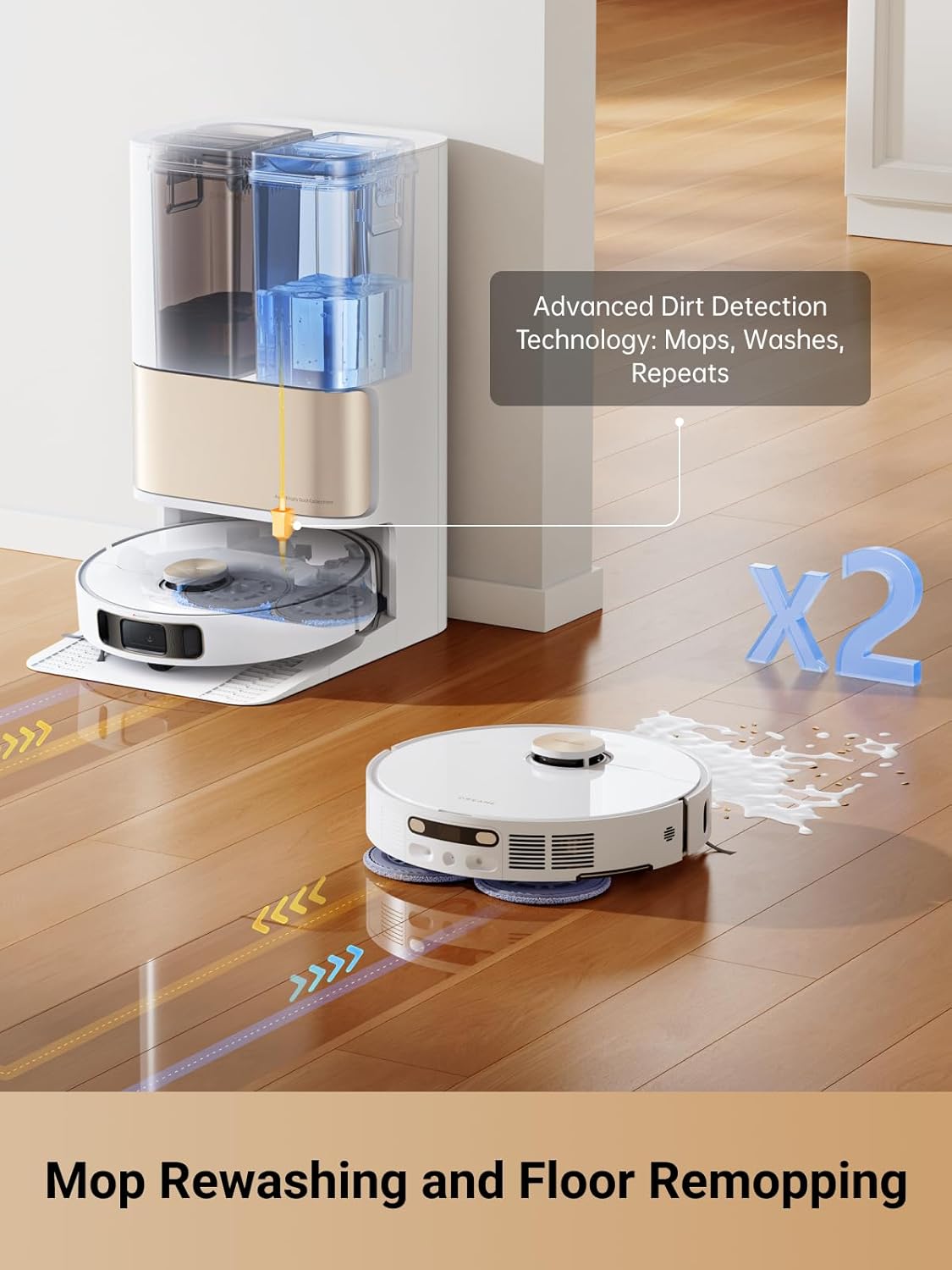
You can expect better-than-average mopping because the robot rewashes the mop and remops when dirt is detected, and the base uses 136°F hot water to sanitize the mop. This reduces the odor and bacteria buildup inside the mop pads and docking station.
Mop rewash and floor remop behavior
If sensors detect heavy soil, the robot will initiate a mop rewash cycle and then remop the affected area, which means floors get extra attention where needed. This approach is particularly helpful near entryways, kitchens, and areas where pets track in dirt.
Auto Robot Care and maintenance features
You’ll appreciate the convenience of letting the dock handle the dirty work: hot-water wash and hot-air drying reduce the manual effort you’d otherwise spend rinsing and hanging mop pads. The automated cycles also make the robot ready more often without your intervention.
What to expect from the self-cleaning dock
The dock stores water and heats it, then uses valves and pumps to wash the mop and a drying system to keep it sanitary. Plan to refill water occasionally and empty the base’s debris chamber per the manufacturer’s schedule to maintain peak performance.
Mapping, navigation, and obstacle avoidance
The robot uses 3D structured light and an advanced recognition system to map rooms and avoid up to 55+ types of common household objects like shoes and cables. You’ll get detailed maps in the app that you can edit, set no-go zones, and label rooms for targeted cleaning.
How precise is the obstacle recognition?
It’s quite accurate for typical objects you leave on floors, reducing the chance of entanglement and improving safety for pet tails and wires. However, extremely low-profile or transparent objects (like clear drop cloths) may still be tricky for any optical system.

App control and smart features
The accompanying app lets you schedule cleans, adjust suction and mop settings, create virtual boundaries, and manage maps. You can also receive maintenance reminders and status notifications so you always know when to refill water, replace pads, or clean filters.
Limitations to watch in the app
The main limitation is Wi‑Fi compatibility: the robot supports only 2.4 GHz networks, so you’ll need to ensure your router or a dual-band setup offers a 2.4 GHz service. Some advanced smart-home integrations may vary by region and firmware version.
Battery life and charging behavior
Battery life varies with suction mode, but you should expect sufficient runtime for most single-level homes; the robot will return to the dock to recharge and resume if it needs to finish a job. For larger homes, multiple recharge-and-resume cycles are normal and handled automatically.
Managing larger spaces
If you have a very large home, plan sessions or launch targeted cleans per room; the mapping and resume features do a good job of picking up where the robot left off. Battery depletion during high-suction deep cleans is the most common reason for mid-job returns to the dock.
Noise and daytime use
While quiet on low and medium modes, the robot gets noticeably louder on max suction, like many high-power models. You’ll want to schedule heavy-duty cleanings when you’re out, or accept moderate background noise if run during the day.
Practical tips for noise control
You can set the robot to a quieter mode for night or daytime background cleaning and reserve max-suction sessions for times you’re not home. Using scheduling features helps you balance noise and cleaning performance based on daily routines.
Carpet and hair handling
This robot handles short- and medium-pile carpets effectively due to its strong suction, and it’s designed to manage pet hair without excessive tangles. The combination of a main brush and powerful airflow pulls hair upward and into the collection bin rather than wrapping it around the brush.
Edge and corner cleaning
The MopExtend technology helps reach edges better than robots that keep the mop fixed, so you’ll see fewer crumbs along baseboards and corners. Despite that, very narrow crevices may still require a manual touch-up with a crevice tool or broom.

Water and safety considerations (136°F hot water)
The base uses 136°F (58°C) hot water to sanitize the mop during the wash cycle. While this temperature helps kill bacteria and reduce odors, it also means you should follow safety guidelines when handling the dock and avoid opening the base during active wash cycles.
Handling hot water and maintenance precautions
Always let the base complete cycles and cool if needed before touching internal components. Follow the user manual for replacing water and cleaning the dock to avoid scald risk and to preserve warranty coverage.
Consumables, replacements, and ongoing costs
You’ll need replacement mop pads, HEPA or equivalent filters, and brushes over time; prices vary by market. Factor these items into long-term costs, especially if you run frequent mop washes and use high-suction modes regularly.
Recommendations for buying spares
Keep a small stock of spare pads and filters for uninterrupted service, and follow the manufacturer’s guidance for replacement intervals to maintain suction and filtration. Using genuine parts usually ensures best performance and cleaner results.
Setup and first-run tips
Set aside 30–60 minutes for the initial setup, app pairing, and map creation so the robot can learn your home. Remove small objects and cables from floors during the first run, so the mapping and obstacle-recognition systems build an accurate, clean map.
Troubleshooting initial mapping issues
If mapping seems off, restart a mapping run after clearing clutter and ensuring consistent lighting (no extremely bright backlighting). Also check Wi‑Fi strength in problem areas, since connectivity matters for app-based map updates and remote control.
Pros and cons summary
You’ll find the following list helpful when deciding if this model fits your needs. It highlights the best aspects and the trade-offs you should weigh before buying.
| Pros | Cons |
|---|---|
| Strong 7,000Pa suction tackles embedded dirt | 2.4 GHz Wi‑Fi only — no 5 GHz support |
| MopExtend for better edge cleaning | Hot-water docking may require extra care and occasional maintenance |
| 136°F auto mop wash and hot-air dry for hygiene | Higher noise on max suction |
| Smart obstacle avoidance with 3D structured light | Consumables add ongoing costs |
| Mop rewash and floor remop for very dirty areas | Larger cleaning base footprint than basic docks |
How to weigh those pros and cons
If you prioritize hygiene, edge cleaning, and powerful suction, the pros likely outweigh the cons for you. If you require 5 GHz Wi‑Fi or want a minimal docking footprint, you should compare alternatives first.
Maintenance checklist (what you’ll do weekly/monthly)
You’ll want a simple routine: empty the dust bin weekly, check and clean brushes and sensors weekly, replace mop pads as needed, and clean or replace filters per the manual’s schedule. Refill the water reservoir and empty the dock’s waste collection according to use frequency to keep the system sanitarily ready.
Deep-clean intervals
Every 1–3 months, inspect the docking seals, water lines, and mop motor for scaling or residue buildup if you use hard water. Descale as recommended, and always use manufacturer-approved cleaning agents or plain water when possible.
Safety and pet-friendly use
The hot-water wash offers better sanitation, which is a plus in homes with pets, but keep pets away from the dock during active wash/dry cycles to avoid accidental contact with hot components. The obstacle avoidance helps protect pet toys and bowls, but you should still pick up fragile or chewable items before cleaning.
Allergy and air-quality notes
If someone in your household has allergies, the robot’s combination of efficient suction and regular mop washing can reduce dust and allergens on floors. Consider using HEPA-rated filters if the model supports them to further improve airborne particle capture.
Comparison to similar models
Compared to lower-suction hybrid robots, this model stands out on raw suction and automated mop hygiene. When compared to top-tier models with 5 GHz connectivity or larger dust collection docks, you’ll trade that specific convenience for the heated wash and mop-extension advantages.
Choosing based on priorities
Pick this robot if you want mop hygiene and strong suction. Look elsewhere if Wi‑Fi compatibility or minimal dock size are higher priorities for your setup.
Common questions you’ll ask
You’ll likely want to know about mop pad lifespan, how noisy the unit is on max, and whether the hot-water cycles require special detergent. In most cases, mop pads last several months depending on frequency; noise is moderate to loud on max suction; and plain water is typically sufficient for the wash cycle unless manufacturer instructions indicate otherwise.
Practical answers to daily concerns
If the base indicates a full waste chamber or water low alert, follow the app prompts for refilling or emptying. Regular firmware updates can improve obstacle recognition and mapping, so keep the app and robot firmware current.
Final verdict and buying advice
If you value a combination of powerful suction, improved edge mopping, and automated hot-water mop care, you’ll find the DREAME L10s Pro Ultra Heat Robot Vacuum and Mop Combo a compelling option. It’s particularly strong for pet owners and busy households where mop hygiene and low-touch maintenance matter most.
Should you buy it?
Buy it if you want better edge cleaning, significant suction for carpets and hair, and automated mop sanitation that reduces manual cleaning chores. Consider other models if you need 5 GHz Wi‑Fi, a smaller docking footprint, or ultra-quiet operation at maximum suction settings.
Frequently asked questions (FAQ)
You’ll probably have specific questions when comparing options; below are some quick answers to common concerns.
- Does the dock really heat water to sanitize the mop? Yes, the dock heats water to about 136°F (58°C) for mop washing, which helps sanitize and reduce odors.
- Can this robot run on 5 GHz Wi‑Fi? No, it only supports 2.4 GHz Wi‑Fi networks, so you’ll need a compatible router or Wi‑Fi setup.
- Is the mop extension safe on carpets? The mop retracts automatically to avoid carpets; it extends only when on hard floors and during mopping cycles.
- How good is the obstacle avoidance? It uses 3D structured light and recognizes 55+ object types, which greatly reduces collisions and entanglement with shoes, cables, and similar items.
- How often do I need replacement pads and filters? Replacement depends on usage, but expect to change pads every few months with regular use and filters per the manufacturer’s schedule.
If you still have questions
If you want a direct comparison to another model you’re considering or need help deciding whether this fits your home layout, tell me your main priorities and I’ll make tailored suggestions.
You now have a thorough, practical review to guide your choice — the DREAME L10s Pro Ultra Heat Robot Vacuum and Mop Combo is built to reduce hands-on maintenance while delivering strong cleaning performance, especially where mop hygiene and edge cleaning matter most.
Purchase The DREAME L10s Pro — Amazon
Disclosure: As an Amazon Associate, I earn from qualifying purchases.