
Are you looking for a smart thermostat that gives you touchscreen convenience, deep integration with Lennox systems, and long-term warranty protection for your investment?
Buy The Lennox S40 Smart Thermostat On Amazon
Quick verdict
You get a visually impressive and feature-rich smart thermostat with the Lennox S40 (22V24) Smart Thermostat, Touchscreen, WiFi, Communicating System Control, Programmable, Geo-Fencing, Remote Access, Alexa Enabled, Easy Installation, Non-Returnable Factory Warranty. It’s designed to be the command center for Lennox equipment and compatible conventional HVAC systems, and it emphasizes installer-driven setup, whole-home zoning control, and accessory integration to improve comfort and indoor air quality.

Lennox S40 (22V24) Smart Thermostat, Touchscreen, WiFi, Communicating System Control, Programmable, Geo-Fencing, Remote Access, Alexa Enabled, Easy Installation, Non-Returnable Factory Warranty
What stands out
You’ll notice the large 7-inch high-definition color touchscreen and the installer-focused setup that simplifies professional configuration. The product is ideal if you want an in-home touchscreen experience plus cloud and voice features, but you must use a certified HVAC installer to keep the warranty and return options intact.
Key features
The Lennox S40 packs smart scheduling, geo-fencing, WiFi, compatibility with most 24VAC systems, Smart Zoning (iHarmony) support, Weather-On-Demand, installer test tools, and live Service Dashboard visibility. You’ll also find support for additional accessories such as Smart Room Sensors and PureAir integration to improve temperature accuracy and air quality control.
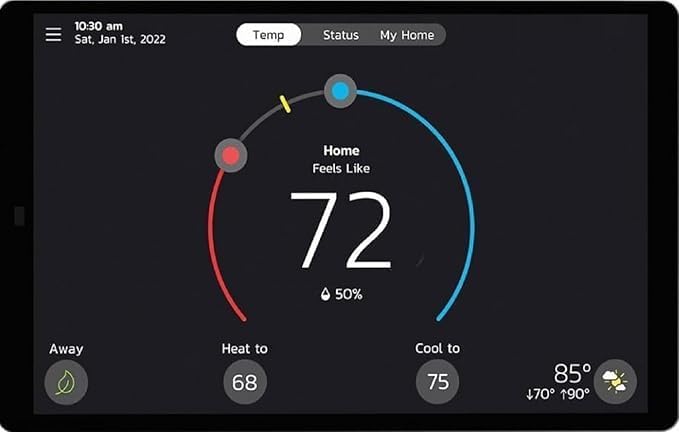
7-inch HD touchscreen and user interface
The large display makes it easy for you to read current conditions, schedules, and alerts at a glance. The touchscreen is intuitive for everyday use, letting you change settings quickly without digging through menus.
Smart scheduling, One-Touch Away, and Geo-Fencing
You can create multiple schedules tailored to your routines, and One-Touch Away mode lets you switch to an energy-saving profile instantly. Geo-Fencing (Smart Away) can adjust the thermostat automatically based on your smartphone’s location so your home is comfortable when you return and efficient while you’re gone.
Compatibility and wiring support
The S40 works with most conventional 24VAC furnaces, air conditioners, air handlers, and heat pumps (up to 3 heat stages and 2 cooling stages) and is compatible with communicating Lennox equipment. For systems that require a different control approach, an optional Equipment Interface Module (EIM) can expand compatibility to conventional equipment. Use 4-wire standard thermostat wiring and shielded thermostat cable to reduce noise interference in certain installations.
Lennox system communication and advanced control
When paired with Lennox communicating components, the S40 receives and manages detailed system data for efficient operation. It integrates with PureAir S Air Purification System and Healthy Climate HRV/ERV units and supports Smart Zoning (iHarmony) so you can control multiple zones from a single touchscreen.
Apps, installer tools, and Service Dashboard
You’ll use the Lennox Smart app for remote control and configuration. Installer setup screens let a professional configure your system quickly without needing to consult a paper manual. The Service Dashboard provides live monitoring and troubleshooting capabilities for installers and service pros.
Voice control and smart-home features
If you use Alexa, you can control basic thermostat functions by voice. Remote access through the Lennox Smart app allows you to manage temperature, schedules, and receive alerts from anywhere you have internet access.
Purchase The Lennox S40 Smart Thermostat
Product specifications (at-a-glance)
The table below summarizes the main technical and warranty details so you can quickly see whether it fits your needs.
| Specification | Details |
|---|---|
| Model | Lennox S40 (22V24) Smart Thermostat |
| Display | 7-inch high-definition color touchscreen |
| Power / Wiring | Compatible with 4-wire standard thermostat wiring; use shielded thermostat cable recommended |
| Compatibility | Most 24VAC furnaces, ACs, air handlers, heat pumps (up to 3H/2C); communicating Lennox equipment supported; non-Lennox communicating equipment not supported |
| Optional Interface | Equipment Interface Module (EIM) for conventional control if needed |
| Zoning | Smart Zoning System (iHarmony) compatible |
| Sensors & Accessories | Smart Room Sensor, Smart Air Quality Monitor, Wireless Extender, PureAir S integration |
| Connectivity | WiFi, Lennox Smart app, Installer setup screens, Service Dashboard |
| Voice | Alexa enabled |
| Smart features | Multiple schedules, One-Touch Away, Smart Away (geo-fencing), Weather-On-Demand |
| Warranty | 10-year limited warranty against manufacturing defects; requires certified HVAC installer for validity; registration instructions included in box |
| Return policy | Non-returnable if not professionally installed; professionally installed items follow other return terms as specified |
Warranty, returns, and installation requirements
You’ll have a hassle-free 10-year warranty that covers manufacturing defects or malfunctions, but only if a certified HVAC installer performs the installation. The warranty requires professional installation to remain valid, and the box includes instructions on how to register for the warranty. If the thermostat is not professionally installed, the item cannot be returned or refunded, so you need to plan ahead and hire a certified installer to keep your options protected.
Why professional installation matters
The thermostat’s communicating features and multi-stage HVAC compatibility are optimized for professional setup. Using a certified installer helps ensure correct wiring, proper system configuration, and access to installer setup screens that speed up commissioning and testing. Installing without a pro risks voiding the warranty and losing your return rights, which is a significant downside if you prefer DIY installs.
Warranty registration
You’ll find warranty registration instructions included in the box. Follow those steps promptly after installation to ensure your 10-year coverage is active. If you don’t register or don’t use a certified installer, you may face limitations or lose the warranty protection.
Installation and setup (what to expect)
You’ll want a certified HVAC installer for the job, and you should prepare basic information about your existing HVAC system before they arrive. The installer will complete wiring, configure the system with installer setup screens, test components, and register the device for warranty.
Pre-install checklist for you and the installer
Make sure you have these items prepared: your current thermostat’s wiring labels or photos, HVAC system model numbers, WiFi credentials, and any existing zoning or accessory details. Sharing this information with the installer speeds up setup and reduces the chance of wiring errors.
Wiring specifics and cable recommendations
The S40 is designed to work with standard 4-wire thermostat wiring. For noise-sensitive environments and to prevent signal interference, use shielded thermostat cable. The installer will verify C-wire power and confirm stage counts for heating and cooling. If your system is communicating but not Lennox-brand, the unit may not support it directly and the EIM may be required for conventional control.
Using the Lennox Smart app and installer setup screens
You’ll pair the thermostat with the Lennox Smart app for remote control and notifications. The installer setup screens on the thermostat allow the professional to configure system components, behavior, and accessory integration without referencing a manual. You should ask the installer to walk you through the app and key touchscreen features before they leave.
Running system tests and Service Dashboard setup
A major benefit for you is that installers can run diagnostic tests on individual components and full system operations directly from the thermostat. The Service Dashboard enables ongoing real-time monitoring and remote diagnostics (if your installer subscribes to or uses that service). Ask your installer how to access the Service Dashboard and what alerts or maintenance notifications you’ll receive.

Accessories and how they enhance performance
You can expand the S40 with several optional accessories to increase comfort precision and indoor air quality control. These accessories integrate closely with the thermostat and Lennox systems.
Smart Room Sensor
You’ll place Smart Room Sensors in different rooms to improve zonal temperature sensing and reduce hot or cold spots. Sensors help the thermostat balance comfort across your home and can be used with Smart Zoning systems.
Smart Air Quality Monitor
You can monitor particulates and other air quality metrics with the Smart Air Quality Monitor. When paired with PureAir systems and the thermostat, the system can adjust air purification run times for better indoor air.
Wireless Extender
If WiFi signal is weak where the thermostat is mounted, a Wireless Extender can enhance connectivity so remote controls, app access, and cloud services remain reliable.
PureAir S and Healthy Climate HRV/ERV
The PureAir S Air Purification System and Healthy Climate HRV/ERV units communicate with the thermostat to report operating parameters, enabling better coordination of filtration and ventilation for optimum indoor air quality and efficiency.
Smart zoning (iHarmony) and whole-home control
If you have a Smart Zoning System (iHarmony), the S40 gives you complete control over multi-zone HVAC systems. You’ll manage zone temperatures, schedules, and priority settings directly from the thermostat.
How zoning improves comfort
Zoning lets you set different temperatures for different parts of your home so you can prioritize comfort and energy savings. The thermostat becomes the central control point that balances zone demand and system efficiency.
Installer role with zoning
Zoning systems are complex and require precise installer configuration. You’ll rely on the certified HVAC professional to wire zone dampers, configure zone priorities in the installer setup screens, and test each zone from the device.
Energy savings and scheduling strategies
You can create multiple schedules and use Smart Away to minimize energy waste while maintaining comfort. The S40 supports efficient routines, automated away detection, and easy manual overrides.
Practical scheduling tips you can use
Set weekday and weekend schedules tailored to occupancy patterns and combine One-Touch Away for quick manual savings. Use Smart Away so the thermostat adjusts automatically based on your phone’s location, and use the app to make temporary changes without disrupting your base schedule.
How much energy can you save?
Actual savings vary with your home, climate, and habits, but properly programmed smart thermostats typically reduce heating and cooling energy consumption by better aligning HVAC runtime with your presence and schedule. The Lennox integrations and zoning capabilities can increase efficiency further when leveraged correctly.

Connectivity, remote access, and voice control
You’ll control the thermostat from the Lennox Smart app and via Alexa voice commands. Remote access lets you adjust settings, monitor status, and receive alerts away from home.
App features you’ll use most
The Lennox Smart app gives you remote temperature control, scheduling, alert notifications, and access to system data. You can also view weather forecasts and historical usage patterns to make smarter schedule choices.
Alexa and other smart-home integrations
With Alexa enabled functionality, you’ll use voice commands for basic controls like changing setpoints or switching to away mode. If you have a larger smart home setup, check compatibility specifics with your chosen ecosystems prior to purchase.
Maintenance and troubleshooting
You’ll receive maintenance alerts and can run tests to diagnose problems. Routine care, firmware updates, and keeping accessories properly positioned ensure ongoing comfort and reliable performance.
Common troubleshooting steps you can try
If the thermostat loses WiFi, verify your router and network password, and try restarting the thermostat from the settings menu. If sensors read oddly, check sensor placement and battery status (if applicable). For wiring-related issues or persistent errors, contact your certified HVAC installer who completed your setup.
Firmware updates and ongoing support
The Lennox Smart app and connected infrastructure will deliver firmware updates to the thermostat. Keep the device online and consult your installer or Lennox support for firmware-related questions or if feature updates change behavior.
Security and privacy considerations
You’ll store account credentials and possibly location data for Geo-Fencing features, so secure your home network and protect your Lennox account with a strong password. Review privacy settings in the app and pay attention to permissions related to location and data sharing.
Best practices for securing your setup
Use a strong, unique WiFi password, enable two-factor authentication if available, and limit account access to trusted individuals. Regularly update your WiFi router firmware and monitor connected devices on your home network to reduce risk.
Comparison to other smart thermostats
Compared to general-purpose smart thermostats like the Nest or Ecobee, the Lennox S40’s strengths are in its large touchscreen, deep integration with Lennox communicating equipment, and professional installer tools. If you want vendor-agnostic compatibility, other thermostats may support broader third-party integrations, but they may lack the same level of system-specific diagnostics and Service Dashboard functionality.
Where the S40 shines for you
You’ll appreciate the installer tools, robust Lennox ecosystem communication, and accessory integration for air quality and zoning. These features are particularly valuable if your home uses multiple Lennox components or you want professional-level diagnostics and maintenance tools.
Where others may be better
If you prefer a completely DIY installation or need out-of-the-box compatibility with non-Lennox communicating equipment, other thermostats might be more flexible. Remember that with the S40, choosing a certified installer is a warranty requirement and is central to its intended user experience.
Who should buy the Lennox S40?
You should consider the S40 if you have Lennox HVAC equipment or want a thermostat that integrates tightly with professional installer services and advanced home air quality systems. It’s also a good fit if you like a large touchscreen and plan to use Smart Zoning or PureAir systems.
Who should consider something else
If you’re determined to install the thermostat yourself and want the option to return or refund without professional installation, you may want a different product. Also consider alternatives if you need guaranteed compatibility with non-Lennox communicating HVAC brands without using an EIM.
Real-world scenarios and use cases
You’ll find the S40 especially useful in these scenarios: a multi-zone home where you want centralized control, a home with PureAir or HRV/ERV systems that you want seamlessly coordinated, or a situation where you prefer hands-off Smart Away scheduling and installer-supported diagnostics.
Example: family with variable schedules
If your household has differing schedules, you can set multiple profiles and use Smart Room Sensors to maintain even comfort throughout the house. Geo-Fencing ensures the system reduces runtime while everyone is away, then returns to comfort as people return.
Example: older home retrofitted with Lennox equipment
When updating an older system to Lennox components, the S40 can act as the modern control center, giving you touchscreen convenience and service-level diagnostics—if installed by a certified pro to protect your warranty.
Frequently asked questions (FAQ)
You’ll find answers to common questions below to help clarify compatibility, installation, and day-to-day operation.
-
Q: Will the S40 work with my existing non-Lennox communicating HVAC equipment?
- A: The S40 does not directly support communicating HVAC equipment other than Lennox-branded communicating units. For many conventional systems, it will work directly; for specific requirements you may need the optional Equipment Interface Module (EIM) to control certain conventional setups.
-
Q: Can you install it yourself?
- A: Technically, you might be able to install it yourself, but doing so will void the warranty and make the item non-returnable and non-refundable. A certified HVAC installer must perform the installation to maintain warranty coverage and return eligibility.
-
Q: How do you register the warranty?
- A: Warranty registration instructions are included in the box. Follow those steps after your certified installer completes the installation to activate your 10-year warranty.
-
Q: What happens if the thermostat loses WiFi?
- A: Core thermostat functions continue to operate locally, but remote access, updates, and cloud features will be temporarily unavailable. Reconnect to WiFi via the Lennox Smart app or the thermostat’s settings. Contact your installer if you need assistance.
-
Q: Can the S40 control multiple zones?
- A: Yes, when used with Lennox Smart Zoning (iHarmony) and properly configured by an installer, you can manage multiple zones from the S40.
-
Q: Is the thermostat compatible with voice assistants other than Alexa?
- A: The S40 is Alexa enabled; confirm current compatibility with other voice platforms in the Lennox Smart app or with Lennox support as integrations evolve.
Pros and cons summary
You’ll get a balanced snapshot below to help guide your decision.
Pros:
- Large 7-inch HD touchscreen with intuitive controls.
- Deep integration with Lennox communicating equipment and PureAir systems.
- Installer-focused setup screens and Service Dashboard for diagnostics.
- Multiple scheduling modes including geo-fencing and One-Touch Away.
- 10-year warranty with professional installation.
Cons:
- Must be installed by a certified HVAC installer to maintain warranty—limits DIY options.
- Non-returnable and non-refundable if not professionally installed.
- Communicating HVAC equipment compatibility is limited to Lennox-only; non-Lennox communicating systems may not be supported.
- Requires shielded cable in some setups, which can add installation complexity.
Tips to get the most from your Lennox S40
- Hire a certified Lennox installer and request that they register your warranty before leaving. This preserves your 10-year coverage and return options.
- Use shielded thermostat cable where recommended to reduce interference and improve stability.
- Add Smart Room Sensors in problem rooms and a Smart Air Quality Monitor if indoor air quality is a priority.
- Use the Lennox Smart app to create and test schedules, and enable Smart Away to maximize savings with minimal daily effort.
- Ask your installer to demonstrate running system tests and how to read alerts from the Service Dashboard.
Final thoughts
You’ll find the Lennox S40 (22V24) Smart Thermostat to be a premium, installer-centric control solution that shines when integrated with Lennox systems and optional accessories. It offers a large, user-friendly touchscreen, robust scheduling, geo-fencing, and detailed diagnostics that professional installers can leverage. Just remember the key caveat: to protect your warranty and return rights, have a certified HVAC installer perform the installation and register the product using the instructions in the box. With that in place, the S40 can deliver reliable comfort, service visibility, and enhanced air-quality coordination for years to come.
Disclosure: As an Amazon Associate, I earn from qualifying purchases.