
? Are you looking for a reliable, Wi‑Fi enabled irrigation controller that gives you remote control, flow monitoring, and easy expansion for a growing system?

Buy SPW Hunter Hydrawise HCC-800-M On Amazon
Product overview
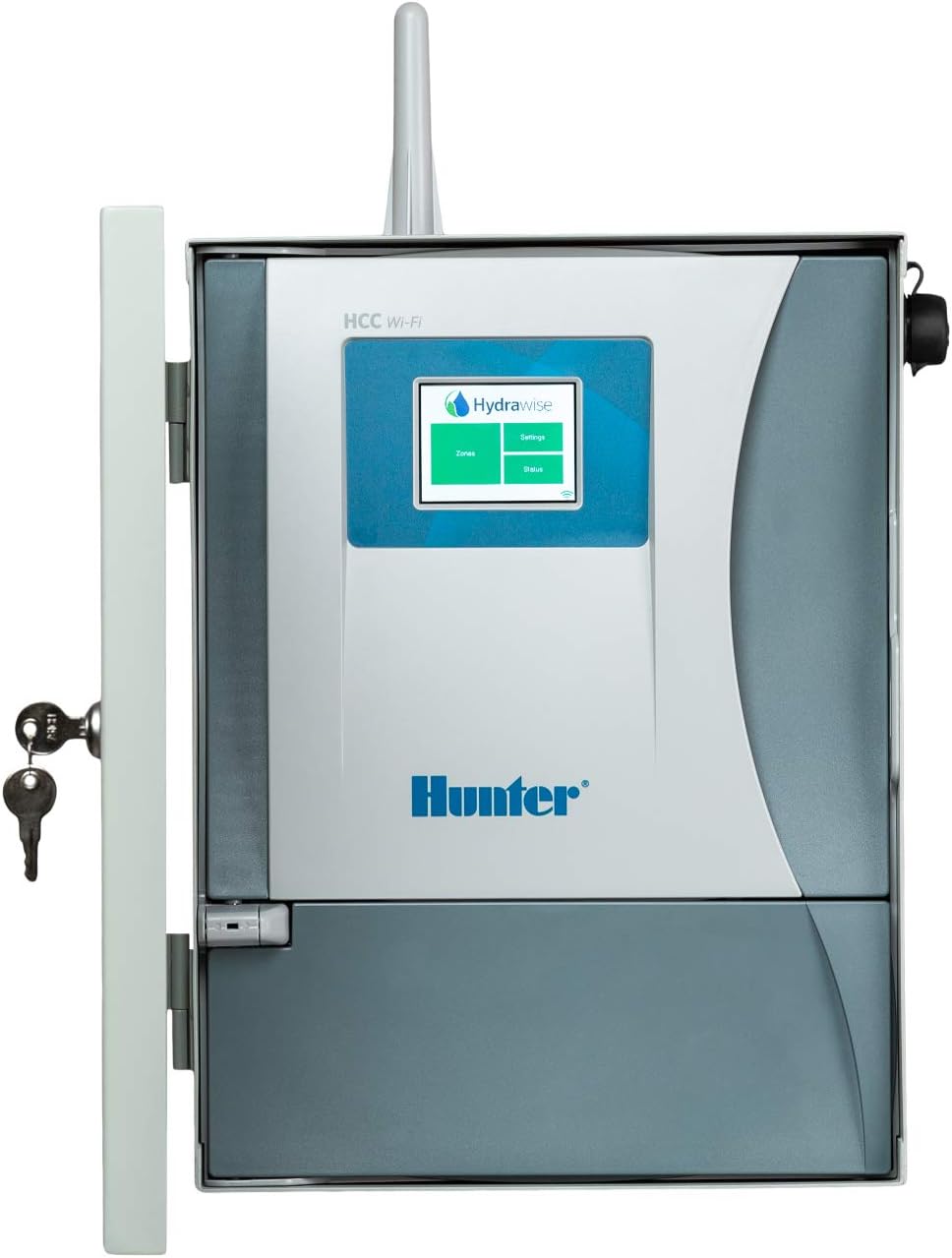
You’ll find the SPW Hunter Hydrawise HCC-800-M Metal Wi-Fi Timer Web iPhone Android App Irrigation Controller is designed for both residential and light commercial use. It combines Hydrawise cloud connectivity with a metal cabinet, flow sensing compatibility, and an expandable station count so you can start small and grow as needed.
What this product is meant to do
This controller is built to automate irrigation schedules and let you manage watering from your smartphone or the Hydrawise web portal. You’ll be able to set smart schedules, receive alerts, and monitor flow and wire faults if you add compatible sensors and meters.
Who it’s for
If you manage a medium-sized landscape, commercial property, or a larger residential lawn with multiple zones, this unit is aimed at you. It fits well when you want remote access, reliable hardware (metal cabinet), and the ability to expand zone capacity in stages.
SPW Hunter Hydrawise HCC-800-M Metal Wi-Fi Timer Web iPhone Android App Irrigation Controller
Key specifications at a glance
Below is a compact table that breaks down important technical specifications so you can quickly see whether the controller meets your core requirements.
| Specification | Detail |
|---|---|
| Product name | SPW Hunter Hydrawise HCC-800-M Metal Wi-Fi Timer Web iPhone Android App Irrigation Controller |
| Stations (standard) | 8 stations built-in |
| Expandability | Up to 54 stations with additional ICM modules (not included) |
| Voltage | Dual: 120V / 230V (domestic and international use) |
| Simultaneous outputs | Up to 2 stations can operate at the same time |
| Connectivity | Wi‑Fi for Hydrawise cloud, Web, iPhone and Android apps |
| Cabinet | Metal |
| SmartPort | Pre-wired SmartPort for ROAM/ROAM XL remotes |
| Flow monitoring | HC Flow Meter compatible |
| Wire fault detection | Built-in milliamp sensor for detection and alerts |
| Remotes | Compatible with ROAM and ROAM XL (remote sold separately) |
| Additional modules | ICM modules for zone expansion (sold separately) |
Why these specs matter
These specs tell you about scalability, reliability, and global compatibility. The dual-voltage design means you don’t have to stress about local mains differences, and the metal cabinet gives more durable protection compared with plastic enclosures.
Hardware and build quality
You’ll notice the metal cabinet right away — it’s a step up from many plastic controllers if you want long-term durability. The HCC-800-M’s build quality feels professional, offering better protection from weather and tampering when installed in an appropriate location.
Metal cabinet advantages
Choosing a metal cabinet reduces the chance of cracking, UV degradation, and warping over time. It also increases security because it’s harder to break into than a thin plastic case, and it gives a more professional presentation if the controller is visible on-site.
Wiring and terminals
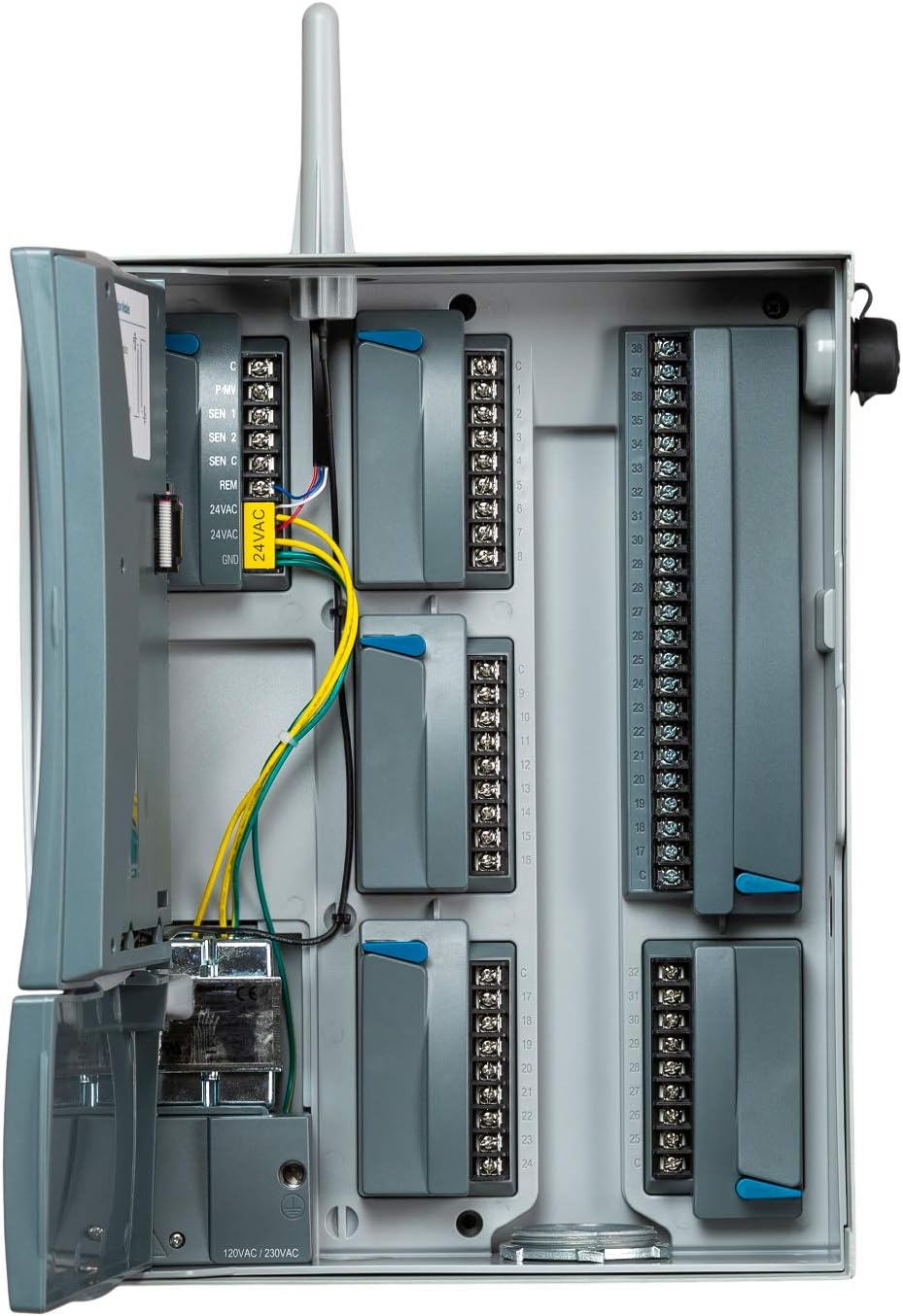
The terminal board is laid out in a logical way that makes hooking up zones, master valve/pump start, and sensors straightforward. You’ll want to take your time during wiring — labeled terminals and sufficient space make it easier and less frustrating to connect everything correctly.
Hydrawise connectivity and app experience
You’ll use Hydrawise software via Wi‑Fi, which simplifies remote management. The app (iPhone and Android) and web interface give you full control over schedules, water budgets, and device alerts no matter where you are.
Setup with Hydrawise
Setting up Hydrawise usually involves connecting the controller to your Wi‑Fi network, creating an account, and registering the device. You’ll follow prompts to add your zones, sensors, and schedule preferences, and in minutes you’ll be managing irrigation remotely.
App features you’ll appreciate
Hydrawise gives you weather‑adjusted watering, custom programs, manual run options, and push/email alerts. If you add flow monitoring or enable the milliamp sensor, you’ll also get alerts for abnormal flow or wiring faults — very handy for early leak detection.
Flow monitoring and alerts
If you add an HC Flow Meter (compatible), you’ll get continuous flow monitoring and alerts when flows exceed set thresholds. This is crucial for spotting broken pipes, leaking valves, or irrigation heads that are spraying incorrectly.
Why flow monitoring matters to you
Flow monitoring helps reduce water waste and can prevent damage or higher utility bills. You’ll be notified of changes that indicate a problem so you can react quickly and avoid prolonged water loss.
Typical alert scenarios
You can expect alerts for sudden spikes (possible line break), steady high flow (stuck valve or stuck solenoid), and low/no flow (obstruction or closed main). These insights let you act faster than traditional systems that run blind.
Purchase SPW Hunter Hydrawise HCC-800-M — Amazon
Wire fault detection and milliamp sensing
You’ll benefit from the built-in milliamp sensor that helps detect irrigation wire faults and sends alerts when unusual current levels are sensed. This tool saves diagnostic time and prevents frustrating circuit issues.
How milliamp sensing helps
The controller measures current through the solenoid circuit to detect shorts, opens, and other anomalies. Instead of guessing which zone has a problem, you’ll get a clear indication that wiring needs attention and often which zone is affected.
Practical outcomes
This feature results in fewer service calls and faster repairs, especially in older systems where rodents, corrosion, or physical damage can create intermittent faults.
Zone expansion and modularity
You get 8 stations out of the box and can expand to 54 stations with optional ICM modules. This modularity means you can phase expansion costs as your irrigation needs grow.
Adding ICM modules
ICM modules clip into the main controller and add sets of zones (usually in blocks of 4 or more depending on module type). When you add an ICM, the Hydrawise software will detect and recognize the extra stations for programming.
Planning your expansion
Think ahead about pump capacity, valve circuits, and simultaneous operation needs so you don’t oversubscribe transformers or cause pressure issues as you expand. You’ll also need to budget for the additional ICM modules because they aren’t included.
Simultaneous station operation
You can operate up to two stations at the same time, which is useful if you need to speed up watering cycles or share a pump start/master valve. Two-station operation helps reduce the overall run-time for large systems without requiring a separate multi-program controller.
When two-station operation is enough
For many residential and light commercial systems, two simultaneous stations provide enough throughput to maintain reasonable cycle times. If you need more simultaneous outputs, plan for zoning strategies or hydraulic solutions.
What to watch for
You should consider water pressure and flow capacity when running two stations simultaneously. If you’re tight on pressure, running more than one station can reduce nozzle performance, so balance station scheduling and irrigation design accordingly.
Remote controls and SmartPort
The unit comes pre-wired with a SmartPort for compatibility with the ROAM and ROAM XL remotes. If you want push-button control on-site without the app, the remote is an easy add-on.
SmartPort convenience
You’ll appreciate being able to plug a ROAM remote into the SmartPort for quick manual control and diagnostics. It eliminates the need to open the cabinet for every manual run, which can be handy for technicians or landscape crews.
Remote features
ROAM/ROAM XL remotes typically allow zone-by-zone manual operation, program changes, and simple diagnostics. They’re not required, but they’re a practical accessory for regular hands-on maintenance.
Power, grounding, and dual-voltage capability
The dual-voltage design (120V/230V) makes the controller usable internationally without needing step-up or step-down transformers. You still must ensure proper grounding and safe wiring practices during installation.
What dual-voltage means for you
You’ll have flexibility if you’re installing in regions with different mains standards or if you manage properties in multiple countries. Just check local codes and wire sizes for compliance.
Important wiring tips
Follow local electrical codes, put the controller on a dedicated circuit if required, and make sure you use a licensed electrician for the AC connection if you’re not comfortable with mains wiring. Proper grounding will protect electronics and reduce interference.
Installation basics
You’ll want to mount the cabinet in a sheltered location or indoors if possible, run irrigation wires neatly, and connect sensors and master valves as required. The wiring layout and label conventions will save you time during future maintenance.
Placement and mounting
Choose a spot that’s accessible, not submerged in direct sun or rain, and near your main valve/pump if possible. Use tamper‑resistant screws if the location is public or at risk for tampering.
Wire management
Use twisted pair irrigation cable for improved noise immunity, and keep power wires separate from low-voltage control wires to avoid interference. Label both ends of every cable so future troubleshooting is quick.
Setting up programs and schedules
Hydrawise makes scheduling flexible — you can define station runtimes, seasonal adjustments, and weather‑based modifications. You’ll configure programs by zone or group depending on plant needs.
Smart scheduling features
The controller leverages local weather forecasts to adjust watering amounts, saving water during rain events and increasing watering during heat waves. You can also set fixed cycle times if you prefer manual control.
Practical scheduling advice
Group plants with similar water needs on the same zone and avoid running all zones in one long block if you’re addressing soil saturation or water‑use restrictions. You’ll get better results with frequent short cycles for clay soils and longer, less frequent cycles for sandy soils.
Troubleshooting common issues
If you run into problems, start with basics: check power, confirm Wi‑Fi connectivity, ensure zone wiring is secure, and verify that devices like the flow meter or remote are configured correctly. The Hydrawise interface often gives clues and error messages to guide you.
Common error sources
Typical trouble spots include weak Wi‑Fi signal, damaged irrigation wiring, blown solenoids, or improper flow meter wiring. A milliamp fault indication will lead you directly to potential wiring issues.
Quick fixes you can try
Reboot the controller (power cycle), re-run Wi‑Fi setup if disconnected, inspect wiring terminals for corrosion, and swap suspected faulty solenoids with a known good one to isolate the issue. If you have flow meter alerts, check for obstructions or closed valves upstream.
Maintenance and firmware updates
You’ll occasionally check settings, inspect wiring and enclosure seals, and apply firmware updates through Hydrawise for feature improvements and security patches. Regular maintenance keeps the system dependable.
Routine checks
Look for water entry in the cabinet, loose terminals, and signs of overheating or corrosion. Confirm that the controller’s internal battery (if present) for the clock backup is functional according to the manual.
Firmware and cloud updates
Hydrawise usually handles firmware patches over the cloud; you’ll be notified via the app or web portal. Keep your account credentials secure and review change logs to understand new features or fixes.
Security and network considerations
Since this controller connects to your network, you’ll want to keep Wi‑Fi credentials secure, use strong passwords, and, if possible, place the device on a segmented network or guest SSID to reduce exposure.
Protecting your network
Use WPA2/WPA3 encryption, avoid default passwords, and consider using a separate Wi‑Fi network for IoT devices. Regularly review connected devices on your router to detect anomalies.
Account security
Enable strong passwords for your Hydrawise account and consider multi-factor authentication if offered. Control user access levels if you share management duties with landscapers or colleagues.
Comparison with similar controllers
When you compare this Hunter Hydrawise controller to other smart controllers, its metal cabinet and HC Flow Meter compatibility stand out alongside Hydrawise’s strong app feature set. Other brands may offer more stations out-of-the-box or different cloud platforms, but this controller balances hardware durability and software capability.
Advantages over entry-level controllers
You’ll get better hardware protection and advanced sensors compatibility versus budget plastic controllers. The milliamp sensing and SmartPort add-ons also provide a more professional feature set.
Where it’s not the top choice
If you need all 54 stations without buying modules, there may be controllers with higher base counts. Also, if you prefer non-cloud local-only controllers for security or privacy reasons, this Wi‑Fi-centric unit might not be ideal.
Pros and cons summary
You’ll get a compact list here to weigh the positives and negatives quickly before deciding.
Pros
- Durable metal cabinet for long-term protection and security.
- Hydrawise Wi‑Fi connectivity with robust app and web features.
- Flow meter compatibility and built-in milliamp sensor for proactive alerts.
- Expandable to 54 stations with additional ICM modules.
- Dual-voltage design for international use.
- SmartPort pre-wired for ROAM/ROAM XL remotes.
Cons
- ICM modules required for expansion are sold separately, adding to cost.
- Two simultaneous stations max — may limit fast-cycle needs on very large systems.
- Cloud dependency might concern users who prefer local-only control.
Cost and value proposition
You’ll pay more than a basic plastic controller, but you’re buying durability, expandability, and smarter diagnostics. The value becomes clearer if you need flow monitoring, wire fault detection, or plan to expand in stages.
Long-term savings
By catching leaks, preventing overwatering, and using weather-based adjustments, you’ll likely save water and reduce utility costs over time. The milliamp diagnostics can also cut service call time and labor costs.
Budget considerations
Plan for optional purchases: ICM modules for extra zones, an HC Flow Meter for flow monitoring, and a ROAM remote if you want on-site manual control. Factor these into the total project budget for a realistic cost comparison.
Ideal use cases
You’ll find the SPW Hunter Hydrawise HCC-800-M most suitable for medium to large residential properties, light commercial landscapes, and multi-site maintenance operations that benefit from remote management.
Examples of good fits
- A homeowner with an expanding irrigation system who wants to add zones over a few seasons.
- A property manager who needs remote alerts and flow monitoring to respond quickly to leaks.
- A landscape contractor who wants professional features like milliamp sensing and SmartPort remote access.
Less suitable scenarios
If you only need a small 4-station controller or prefer no cloud connectivity, a simpler non-Wi‑Fi unit might be a better cost-effective fit.
Final verdict
You’ll find the SPW Hunter Hydrawise HCC-800-M Metal Wi-Fi Timer Web iPhone Android App Irrigation Controller to be a solid, flexible choice if you want robust hardware, cloud-enabled smart features, and the ability to expand as your irrigation needs grow. It balances professional-grade diagnostics with convenient remote management, and it’s especially valuable if you care about water monitoring and early fault detection.
Recommendation
If you’re building or upgrading a system where reliability, monitoring, and scalability matter, this controller is worth serious consideration. Make sure you plan for the cost of expansions and accessories so the final system meets your long-term needs.
Final tip before you buy
You’ll want to map out your zones, estimate future expansion, and decide whether you’ll add flow monitoring and remote hardware. That planning will help you buy the right number of ICM modules and accessories at the outset and avoid surprises during installation.
Get The SPW Hunter Hydrawise HCC-800-M On Amazon
Disclosure: As an Amazon Associate, I earn from qualifying purchases.