
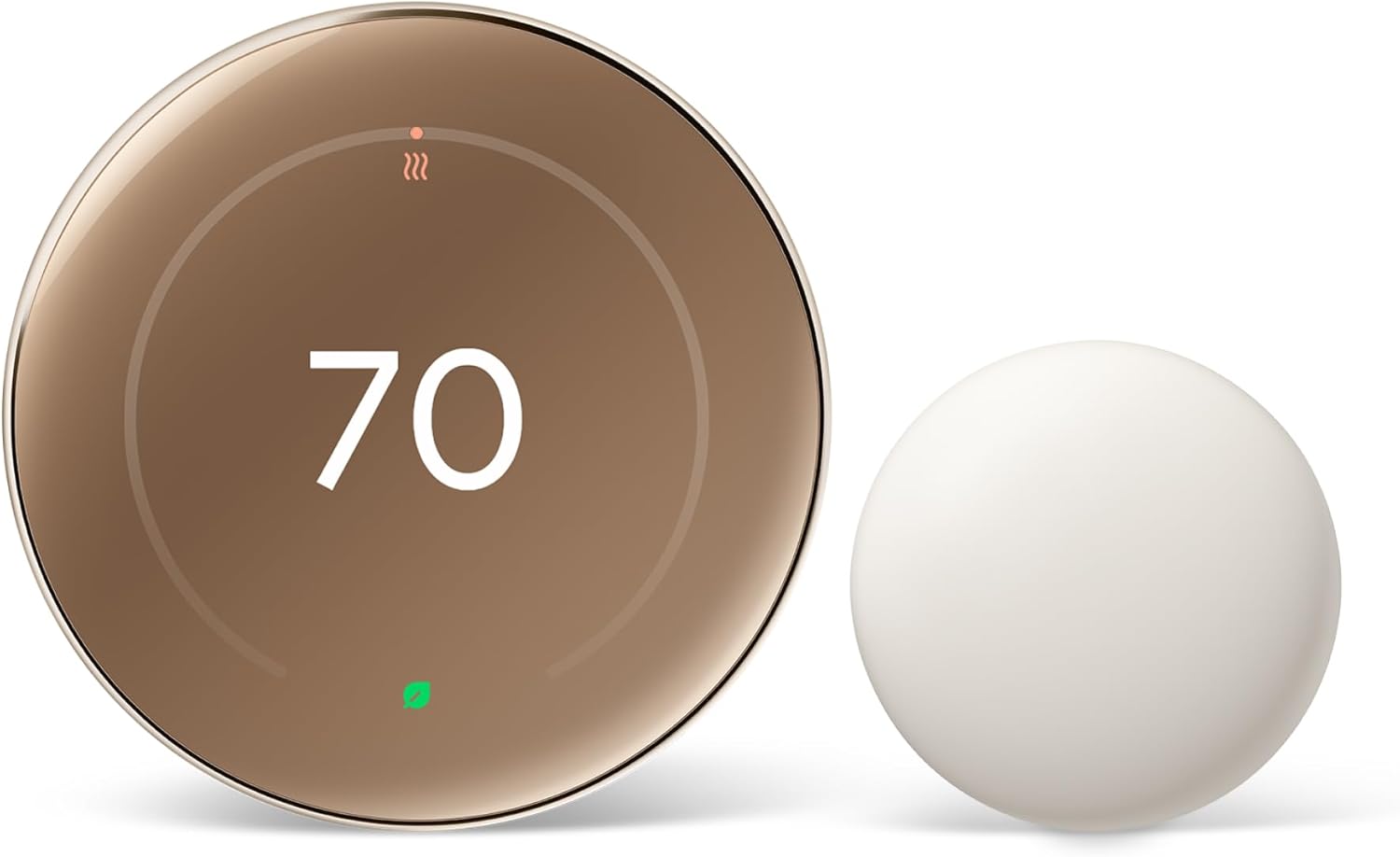
Is the Google Nest Learning Thermostat (4th Gen) with Nest Temperature Sensor (2nd Gen) the right smart thermostat for your home?
Buy Google Nest Learning Thermostat With Temperature Sensor On Amazon
Overview of the Product
You’ll get a clear sense of what this unit does and what’s included right away. The Google Nest Learning Thermostat (4th Gen) with Nest Temperature Sensor (2nd Gen) is a renewed, energy-focused smart thermostat package designed to save energy, manage comfort, and integrate with smart home systems like Alexa and Google Home.
This package contains the thermostat and a Nest Temperature Sensor (2nd Gen), which lets you prioritize a specific room’s temperature. It’s built with premium materials, has a large borderless display, and packs adaptive features to help your heating and cooling systems run efficiently.
What’s included in the box
You’ll receive the Nest Learning Thermostat (4th gen) and a Nest Temperature Sensor (2nd gen) along with the usual installation accessories. The product is listed as “Polished Obsidian (Renewed),” so you’ll want to verify cosmetic condition when it arrives.
You’ll also find mounting hardware, a trim plate, quick start guide, and wiring labels to help with setup. If you need more sensors later, the thermostat works with any Nest Temperature Sensor so you can add coverage to other rooms.

Google Nest Learning Thermostat (4th Gen) with Nest Temperature Sensor (2nd Gen) - Energy Saving Smart Thermostat with Adaptive Eco - Works with Alexa and Google Home App - Polished Obsidian (Renewed)
$224.95 Only 1 left in stock - order soon.
Key Specifications and Compatibility
You’ll want to check compatibility with your heating and cooling system before buying to avoid installation surprises. The Nest Learning Thermostat (4th gen) works with most 24V systems — gas, electric, oil, forced air, heat pump, and radiant systems — and typically doesn’t require a C wire for installation in many homes.
Below is a quick specification table to make it easier to compare the essential details at a glance.
| Feature | Detail |
|---|---|
| Model | Google Nest Learning Thermostat (4th Gen) with Nest Temperature Sensor (2nd Gen) |
| Finish/Condition | Polished Obsidian (Renewed) |
| Display | 60% larger borderless display, Dynamic Farsight |
| Compatibility | Most 24V systems: gas, electric, oil, forced air, heat pump, radiant |
| C-Wire | Not required in most homes, but check compatibility |
| Sensors | Comes with Nest Temperature Sensor (2nd Gen); works with additional Nest sensors |
| Smart Home | Works with Alexa and Google Home App |
| Energy Savings | Average: 12% heating, 15% cooling |
| Special Features | Adaptive Eco, Natural heating/cooling, display auto-brightness |
| Installation | DIY possible; compatibility checker recommended |
| Renewed | Refurbished unit — inspect for condition on arrival |
You’ll find this table helpful when comparing the Nest to other smart thermostats. The product aims to balance design and functionality while offering energy-saving algorithms.
Get The Nest Learning Thermostat + Temperature Sensor On Amazon
Design and Build Quality
You’ll notice the premium feel and modern look as soon as you handle the thermostat. The 4th gen nest is crafted with high-quality materials and finishes, offering a sleek, polished look that fits well on most walls.
The 60% larger borderless display and Dynamic Farsight make it easier for you to see information from across the room. The display also auto-adjusts brightness and can be manually tweaked to suit your preferences.
Display and interface
You’ll appreciate the clarity and responsiveness of the large circular display, which shows temperature, time, weather, or other chosen designs. Dynamic Farsight lights up to show the information you pick when it senses you across the room.
The interface is intuitive and uses a rotating outer ring for control and a clear on-screen menu system. You can choose to show the temperature, a clock, or weather, and the large display makes these choices readable even from a distance.
Materials and finish
You’ll feel the difference in this renewed model compared to cheaper alternatives — the metal-like finish and sturdy build give a premium impression. Polished Obsidian adds a modern, neutral tone that blends with many decors.
Because this is a renewed product, you should inspect the unit upon arrival for cosmetic blemishes and ensure all functionality is intact. Otherwise, the materials and finish are designed to last.
Installation and Setup
You’ll find the installation straightforward if you’re comfortable with basic wiring and following instructions. Most homes won’t require a C wire, but it’s crucial to run the Nest Compatibility Checker before starting.
If you prefer, a professional HVAC technician can handle the install for you. The Google Home app guides you through step-by-step setup and wiring, and the thermostat gives on-device prompts to simplify the process.
Wiring and C-wire considerations
You’ll need to confirm whether your system needs a C wire; many systems won’t require one for the 4th gen Nest, but not all systems are the same. The Nest Compatibility Checker on Google’s site helps you determine if your system is compatible and whether a C wire is required.
If your system does need a C wire, you can either run one, use a common wire adapter, or have a pro install it. Missing the C wire when needed may cause issues like intermittent power or less reliable performance.
Step-by-step setup in the Google Home app
You’ll follow guided steps in the Google Home app to connect the thermostat, add the temperature sensor, and integrate with other services. The app walks you through Wi‑Fi setup, selecting your HVAC system type, and setting initial temperature schedules.
During setup, the thermostat runs checks to ensure wiring is correct and communicates with the Nest Temperature Sensor if it’s powered and in range. The process usually takes under 30 minutes if wiring is straightforward.

Nest Temperature Sensor (2nd Gen)
You’ll gain more precise control over temperature in specific rooms when you use the included Nest Temperature Sensor. This sensor reports the temperature of the room it’s placed in and lets you prioritize that location in the Google Home app.
This is particularly useful for hot or cold spots, or when you want a different schedule for a frequently used room like a bedroom or home office. Additional sensors can be purchased and added for multi-room coverage.
Placement tips
You’ll want to place the sensor in a location that reflects the room’s typical temperature — away from direct sunlight, drafts, or heat sources. Mount it at a common standing or sitting height so it reads temperatures similar to where people are.
If you place it behind furniture or in narrow nooks, the reading might not reflect the actual comfort level in the room. Check readings in the Google Home app after installation and adjust placement if needed.
How the sensor works with the thermostat
You’ll assign the sensor to be the primary temperature source for specific time periods in the Google Home app. For example, you can have the sensor control the thermostat temperature during evenings in the living room and let the thermostat handle daytime settings.
The sensor communicates wirelessly with the Nest thermostat and updates temperature readings regularly. It doesn’t directly control HVAC equipment but informs the thermostat so it can make more accurate decisions.
Energy Savings and Adaptive Eco
You’ll see the Nest’s claims about energy savings backed by automation and learning features designed to lower energy bills. Google states the Nest Learning Thermostat (4th gen) can help save an average of 12% on heating and 15% on cooling.
Adaptive Eco learns how outside weather affects your home and can pause heating or cooling when it determines it’s unnecessary. You can also use built-in energy history and monthly reports in the app to monitor your savings over time.
How Adaptive Eco works
You’ll benefit from Adaptive Eco as it uses local weather and past system behavior to make smarter decisions about when to run HVAC. If external temperatures sufficiently affect indoor temperature, the thermostat may delay or pause cycles to save energy.
This doesn’t mean comfort is ignored — Adaptive Eco aims to maintain acceptable comfort levels while reducing wasted heating or cooling cycles. You can always adjust how aggressive these savings settings are.
Energy reports and monitoring
You’ll get useful energy usage data and simple recommendations via the Google Home app. The thermostat generates an energy history that shows how often your heating or cooling ran and highlights potential savings.
These reports help you pinpoint inefficient habits or system problems and can guide changes to schedules, sensor placement, or HVAC maintenance to improve savings.

Performance and Reliability
You’ll notice responsive temperature control and consistent behavior when the thermostat is set up correctly. The 4th gen has improvements in sensing, learning algorithms, and display responsiveness compared with earlier models.
Reliability is generally strong, but like all smart devices, performance can be affected by Wi‑Fi connectivity, power issues, or compatibility mismatches. Correct installation and occasional firmware updates help maintain smooth performance.
Temperature control accuracy
You’ll see reasonably accurate temperature regulation, especially when using additional temperature sensors for multiple rooms. The thermostat learns your schedule and preference patterns to make gradual adjustments.
It also factors in how quickly your home heats or cools, so it starts systems earlier or later as needed to hit target temperatures at the right time. If you need precise climate control for sensitive equipment or rooms, you may want to supplement with additional sensors or professional HVAC tuning.
Firmware updates and stability
You’ll get automatic firmware updates that add features and security improvements, which helps keep the device stable and feature-rich. Most updates happen quietly in the background and rarely disrupt your daily use.
If you ever run into bugs or unexpected behavior, restarting the thermostat or checking the Nest support pages often resolves most issues. For persistent problems, contacting Google support or replacing the unit through the seller’s renewed warranty process may be necessary.
Smart Home Integration
You’ll be able to add the Nest thermostat to your smart home routines and voice commands easily. It works with both Alexa and Google Home App, making voice control and automation simple.
You can include temperature adjustments in routines, ask for current temperatures, or have the thermostat react to other smart devices like occupancy sensors or smart locks. Integration is one of the thermostat’s big strengths for you.
Voice control and routines
You’ll use voice commands through Google Assistant or Alexa to change temperatures, ask about current settings, or include the thermostat in routines like “Good night” or “Away.” Voice control is handy when your hands are full or when you want a quick adjustment.
The Google Home app also lets you set routines that trigger based on time or other device states — for example, lowering the temperature when you leave using location-based triggers. These automations help you maintain comfort and conserve energy without manual intervention.
Integration with other devices
You’ll link the Nest thermostat with other Nest or compatible devices to build a connected home ecosystem. This can include using occupancy data from Nest cameras or sensors to adjust temperature based on actual presence.
Some advanced integrations allow the thermostat to react to external events, like switching to an energy-saving mode when a smart meter signals high demand. Check the app and third-party integrations for the most up-to-date possibilities.
Privacy and Security
You’ll want reassurance that your data and home controls are protected. Google applies standard security practices like encrypted communications and account protections for Nest devices.
Be mindful of the data you share and review the Google Home privacy settings to control what’s stored and how long. Regularly update passwords, enable two-factor authentication, and monitor account activity for added safety.
Data collected and how it’s used
You’ll find that the thermostat collects usage patterns, temperature settings, and basic device diagnostics to optimize performance and run features like Adaptive Eco. This data helps provide energy reports and improve product behavior over time.
If you have concerns about data retention or targeted features, you can adjust privacy settings within your Google account and the Home app. Understanding what’s shared and how it’s used will help you make informed decisions about your smart home.
Security best practices
You’ll keep your system safer by enabling two-factor authentication on your Google account and using a strong, unique password. Also ensure your home Wi‑Fi network uses WPA2 or WPA3 and a secure router password.
Check firmware updates for the thermostat and other connected devices regularly; many updates include security patches that reduce the risk of unauthorized access.
Troubleshooting and Common Issues
You’ll probably encounter a few minor issues over the lifetime of the device, but most problems have straightforward fixes. Common issues include Wi‑Fi connectivity problems, power interruptions, or sensor misplacement affecting temperature readings.
Following the app’s diagnostic tools and the Nest support guides usually resolves many problems. If issues persist, contacting support or a trusted HVAC technician is a practical next step.
Wi‑Fi and connectivity fixes
You’ll try power-cycling the thermostat and router first if the unit loses connectivity. Ensure the thermostat is within range of your Wi‑Fi and that your network supports the required frequency bands and security settings.
If you continue to have trouble, verify no firewall rules or network isolation settings are blocking device traffic. A mesh network or Wi‑Fi extender can help if signal strength is the issue.
Power and thermostat troubleshooting
You’ll check wiring and C wire connections if the thermostat behaves erratically or loses power. The Google Home app often detects common wiring issues and offers guidance.
For persistent power problems, consult with an HVAC technician who can check your system’s transformer and C wire availability. In some cases, a common wire adapter or minor electrical work will resolve the issue.
Pros and Cons
You’ll want a quick balanced view of strengths and weaknesses before committing.
Pros:
- You’ll get strong energy-saving algorithms and adaptive features.
- You’ll enjoy a premium build and a large, clear display with Dynamic Farsight.
- You’ll benefit from Nest Temperature Sensor compatibility to manage hot/cold spots.
- You’ll be able to integrate easily with Alexa and Google Assistant.
Cons:
- You’ll need to confirm compatibility with your HVAC system and possibly add a C wire.
- You’ll be buying a renewed product, so cosmetic condition may vary.
- You’ll rely on cloud services for updates and advanced features, which may raise privacy concerns for some.
Who this is best for
You’ll appreciate this thermostat if you care about style, convenience, and energy savings in a smart home setup. It suits homeowners who want a learning thermostat that reduces manual scheduling and integrates with voice assistants.
This is also a good pick if you have hot or cold rooms and plan to use additional Nest Temperature Sensors. If you have an older or non-standard HVAC system, you should verify compatibility or plan for professional installation.
Who might want something else
You’ll consider alternatives if you prefer a local-only thermostat that doesn’t require cloud services. Also, if you need very specific industrial HVAC controls or multi-stage systems beyond standard residential setups, a professional-grade controller could be more appropriate.
If you don’t use smart home ecosystems or voice assistants, the advanced features may be less compelling compared to a simpler, cheaper programmable thermostat.
Final Thoughts and Recommendation
You’ll find the Google Nest Learning Thermostat (4th Gen) with Nest Temperature Sensor (2nd Gen) a compelling, stylish way to make your home smarter and more energy efficient. Its learning features, large display, and sensor support blend convenience with real-world energy savings.
If you value integration with Google Home and Alexa, want to prioritize comfort in specific rooms, and prefer a premium-looking device, this renewed package is worth serious consideration. Just verify compatibility with your HVAC system and check the product condition when it arrives to ensure you get the experience you expect.
Quick checklist before you buy
You’ll want to check these items to ensure a smooth experience:
- Run the Nest Compatibility Checker for your HVAC system.
- Confirm whether a C wire is needed for your setup.
- Decide whether you’re comfortable installing it yourself or would rather hire a technician.
- Check the renewed seller’s return policy and warranty coverage.
You’ll be ready to enjoy a smarter, more energy-aware home once you confirm those points and install the thermostat.
Check Price For Google Nest Learning Thermostat With Sensor
Disclosure: As an Amazon Associate, I earn from qualifying purchases.