
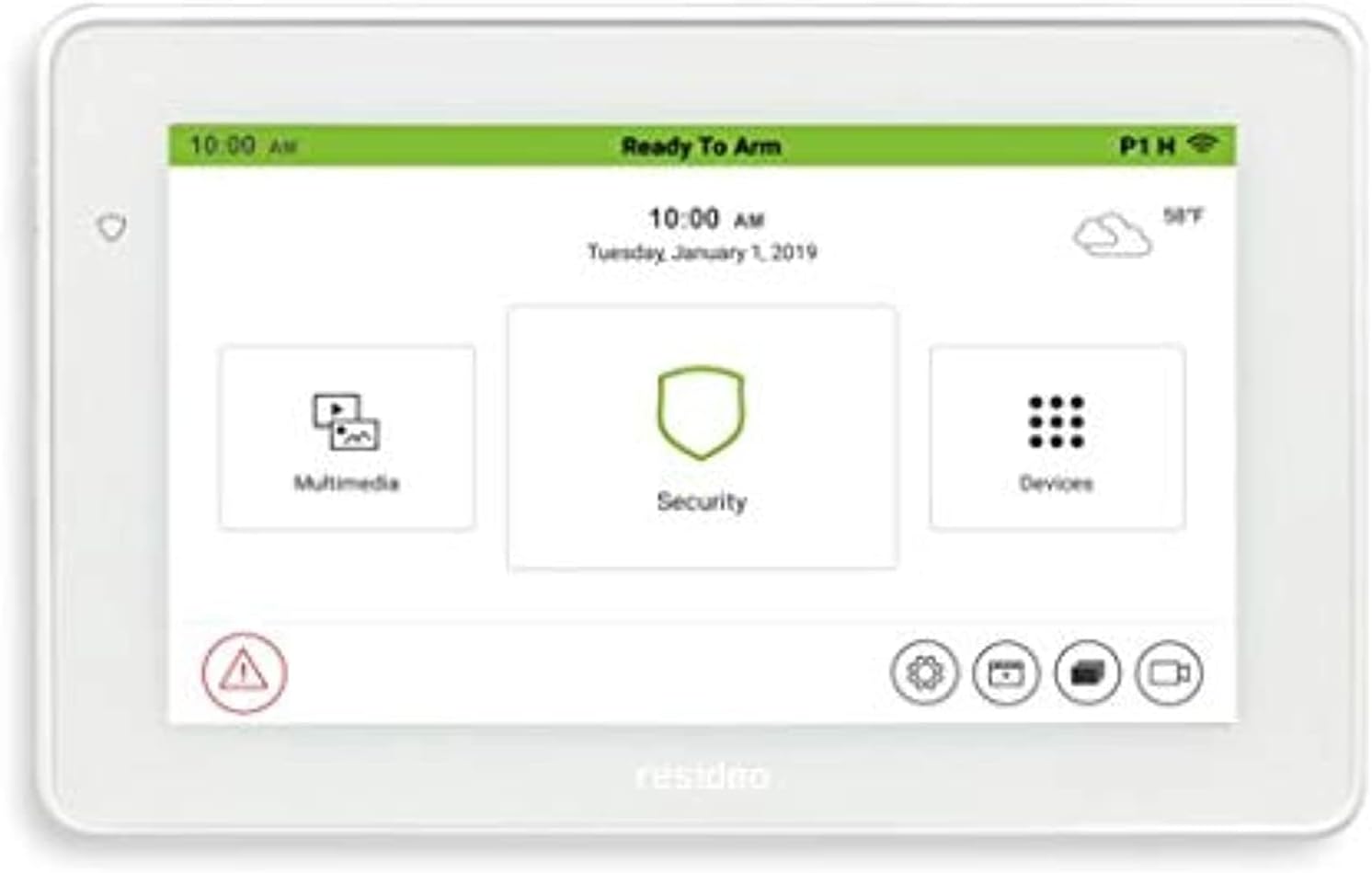
Looking for a touchscreen controller that also handles your security keypad and basic smart home duties?
Buy The Tuxedo 7″ Touchscreen Security & Smart Controller (Resideo) On Amazon
Quick first impressions
This Tuxedo – 7″ Touchscreen Security and Smart Controller (Resideo Branded) feels like a practical hybrid: a wall-mounted security keypad and a central point for basic smart-home control. If you want a single, visible interface on the wall that gives you alarm status, device control, and camera views, it gives you that in a compact package without looking overly techy.
Specification summary
Below is a straightforward breakdown to help you see the core attributes at a glance. You should verify exact compatibility with your specific alarm panel or camera model before buying.
| Item | Notes |
|---|---|
| Screen | 7-inch color touchscreen (wall-mounted) |
| Security functions | Full keypad capability for compatible Resideo/Honeywell alarm panels (arm/disarm, bypass, zone status) |
| Smart home | Built-in Z-Wave controller (for lights, locks, thermostats, scenes) |
| Camera support | Displays compatible IP camera streams (common MJPEG/RTSP formats) |
| Connectivity | Wired connection to alarm panel; Ethernet/Wi-Fi options vary by model/integration |
| Remote access | Works with Resideo/Honeywell cloud services for remote control when supported (may require subscription) |
| Mounting | Flush or surface wall mount; wired power required |
| Use case | Combined alarm keypad + basic smart home hub for Z-Wave devices and camera viewing |

Design and build quality
You’ll notice the Tuxedo’s design aims to be simple and unobtrusive. The bezel and plastic housing are built for indoor use; it’s meant to be a visible control point, not a designer focal point.
You can mount it at eye level to make use of the touchscreen easily. The display and casing are solid enough for typical household use, though this isn’t an industrial device — handle it like you would any household tablet or control panel.
Display and user interface
The 7-inch screen is sized for hallway or foyer placement: big enough to read alerts and view camera thumbnails, but small enough to avoid taking over a wall. The touchscreen interface focuses on straightforward tiles and icons so you can swipe between security status, camera feeds, and smart device control.
You’ll appreciate clear on-screen arming options (Stay, Away, Instant) and quick access to home/away scenes. The user interface is not the most modern tablet-like experience you’ve seen in consumer tech, but it’s functional and tends to be simple to learn for family members.
Security integration
If your alarm system is Resideo/Honeywell VISTA-series or otherwise compatible, the Tuxedo acts as a primary keypad for arming, disarming, and viewing zone status. You’ll be able to input user codes, view the alarm log, and bypass zones from the screen.
You should be aware that the Tuxedo is designed to work best when integrated with supported control panels. That means you won’t get the full alarm-keypad experience if your panel isn’t supported or if the wiring isn’t configured correctly. Always check compatibility before assuming it will replace your existing keypad.
What you can control from the screen
You can expect on-device control of:
- Arming and disarming (with code)
- Bypassing zones
- Viewing zone fault status
- Door/window and motion sensor alerts
- Event logs (recent alarms and user actions)
Purchase Tuxedo 7-inch Touchscreen Controller (Resideo) — Amazon
Smart home control and Z-Wave
One of the biggest draws is the built-in Z-Wave controller. That lets you pair lights, locks, thermostats, and other Z-Wave-compatible devices and control them from the touchscreen. You can create scenes that combine alarm state changes with device actions — for example, arming the system and turning off interior lights when leaving.
You’ll find the interface for adding devices and creating scenes basic but adequate. For routine smart-home tasks — scheduling lights, locking doors remotely, or setting your thermostat — the Tuxedo will handle the essentials. If you’re trying to run very complex automations or integrate lots of non-Z-Wave ecosystems, you might find it limited compared to modern smart hubs.
Z-Wave limitations to keep in mind
- Z-Wave network management is basic compared to dedicated hubs.
- Advanced Z-Wave security (S2) or the latest features may not be fully supported depending on firmware.
- Device count and memory constraints can limit how many devices you can pair — check the device limit for your unit.
Camera support and video monitoring
You’ll be able to view live camera feeds directly on the Tuxedo screen. This is handy for checking the front door or driveway without picking up your phone. The unit is designed to work with common IP camera formats, and many users find camera integration smooth for basic monitoring.
However, camera compatibility can vary. Some high-efficiency codecs or proprietary camera streams may not display, and you may need to adjust camera stream settings to a supported format. If you rely on advanced camera features (face recognition, multi-stream optimization), you’ll still use your dedicated camera apps — the Tuxedo is best for quick live views and snapshots.
Installation and setup
Setting up the Tuxedo requires some wiring knowledge and panel familiarity. Typically, you’ll mount it on the wall and connect it to your alarm panel using the appropriate keypad or integration bus. Power and communication wiring must be done correctly, and you’ll need to configure the panel to recognize the Tuxedo as a keypad.
If you’re comfortable with alarm hardware, you can handle most installations yourself, but many users prefer a professional installer to ensure the keypad and panel are configured properly. The Z-Wave device inclusion and camera setup are done through the on-screen menus after the physical connections are in place.
Step-by-step overview (generalized)
- Power down the alarm panel before wiring.
- Mount the Tuxedo at a convenient height and route the wiring.
- Connect the appropriate data/power wires to the alarm panel’s keypad or bus terminals.
- Re-power the alarm panel and follow the on-screen setup to configure keypad address/ID.
- Add Z-Wave devices through the Tuxedo’s Z-Wave inclusion wizard.
- Configure camera feeds using IP addresses or RTSP/MJPEG settings if required.
- Test arming/disarming, Z-Wave control, and camera views.
Performance and responsiveness
In everyday use, the Tuxedo responds quickly enough for arming/disarming and basic device control. The touchscreen responsiveness is adequate but not as snappy as modern tablets. You’ll notice a slight lag when switching between heavy tasks like camera streaming and device management simultaneously.
Reliability is solid for a stable setup; once configured, it typically runs without frequent reboots or errors. Firmware updates occasionally improve performance and compatibility, so you should keep it updated when updates are available.
Mobile and remote access
For remote control and alerts, you’ll use Resideo/Honeywell cloud services such as Total Connect, depending on your installation and subscription. When integrated, that lets you arm/disarm the panel, view cameras, and control scenes from your smartphone.
Keep in mind that remote features often require a paid subscription for cloud-based push notifications and remote control. If you prefer local-only control without cloud dependence, the Tuxedo provides on-site control of devices, but remote access will be limited or unavailable without the associated cloud service.
User management and security
You’ll set up individual user codes for family members, which is handy for tracking who disarmed the system. The keypad supports multiple codes and the on-screen logs help you see recent activity.
From a security standpoint, the keypad itself is a visible part of your alarm system, so ensure it’s mounted in a guarded location. If your Z-Wave devices include locks, be aware of how Z-Wave security versions are supported and whether that meets your requirements for secure remote lock control.
Firmware and updates
Firmware updates can add features and fix bugs, so you’ll want to apply them when available. Updates may come via SD card, USB, or through cloud/panel-based processes depending on the unit and setup. Follow the manufacturer instructions carefully to avoid interruption of your alarm service.
Compatibility checklist
Before you commit, check the following:
- Is your alarm panel supported? (Resideo/Honeywell VISTA-series often are.)
- Do your preferred Z-Wave devices adhere to standard Z-Wave profiles?
- Are your cameras compatible with MJPEG/RTSP or other supported stream formats?
- Will you rely on cloud services for remote access (and do you want a subscription)?

Troubleshooting common issues
You may run into a few recurring problems during setup or regular use; here are common ones and how you can address them.
Z-Wave pairing fails
If a device won’t pair:
- Move the device closer to the Tuxedo during inclusion.
- Check if the device needs a specific inclusion procedure (battery device wake-up).
- Exclude the device first in case it was previously in another network.
Camera won’t display
If a camera feed won’t show:
- Confirm the camera stream format (try MJPEG/RTSP).
- Test the camera stream in a browser or VLC to ensure the stream is accessible.
- Check network routing and firewall rules if the camera is on a different subnet.
Touchscreen unresponsive or slow
If the screen freezes or lags:
- Reboot the unit (if possible) using the interface or power cycle.
- Check for firmware updates that may address performance.
- If persistent, consult a professional installer or support.
Pros
- Combines security keypad and smart-home control in one wall-mounted device.
- 7-inch screen makes it easy to check status and view camera feeds quickly.
- Built-in Z-Wave support lets you control many common smart-home devices.
- Familiar Resideo/Honeywell compatibility if you already have a supported panel.
- Good for households that want a single centralized wall control.
Cons
- Interface and performance aren’t as modern or fluid as current smart-home hubs or tablets.
- Z-Wave features and security versions may be limited relative to modern hubs.
- Remote functionality often requires a cloud subscription.
- Compatibility with cameras and some devices can require troubleshooting and adjustments.
Comparison with other hubs and controllers
You’ll want to weigh the Tuxedo against other hubs based on your priorities:
- SmartThings / Hubitat: These hubs offer broader device compatibility, larger automation ecosystems, and more advanced local automation rules. They’re better if you prioritize automation flexibility over a built-in keypad.
- Dedicated touchscreen keypads (modern Resideo/Honeywell panels): If your priority is full alarm functionality and a more modern UI tied to the main control panel, newer manufacturer keypads or integrated touchscreen panels might offer tighter integration.
- Dedicated IP intercoms/tablets: If you want a polished tablet-style interface primarily for camera and intercom, a tablet running a camera app may feel more modern but won’t offer alarm keypad functionality out of the box.
If you want a single device on the wall that does both keypad duties and basic smart-home control, the Tuxedo is a strong contender. If you want advanced automations, more device capacity, or the newest Z-Wave features, a separate modern hub alongside a keypad may be preferable.
Who should choose this controller
- You already have a Resideo/Honeywell compatible alarm panel and want to upgrade or add a touchscreen keypad.
- You want a wall-mounted device that shows alarm status and camera feeds while also controlling Z-Wave lights and locks.
- You prefer a straightforward on-wall interface for family members rather than relying only on phones.
- You need a combined solution that reduces the number of separate devices on the wall.
Who should not choose this controller
- You want advanced, complex automations or support for very large Z-Wave networks — modern hubs will serve you better.
- You need the most current Z-Wave security features (S2) across all devices.
- You prefer a highly polished tablet UI and frequent app updates that match consumer tablet experiences.
Practical tips for getting the most out of your Tuxedo
- Plan your Z-Wave layout: place the Tuxedo centrally for best radio coverage or add Z-Wave repeaters for larger homes.
- Set user codes thoughtfully: unique codes help you identify who disarms the system.
- Use scenes to combine actions: create “Good Night” and “Leaving” scenes that handle lights, thermostats, and arming.
- Keep firmware current: check for manufacturer updates periodically to stay compatible and secure.
- Test camera streams before final mounting: confirm the streaming format works on the Tuxedo and adjust camera settings if needed.
Installation tips and safety
- Turn off panel power before wiring: always power down to avoid damaging electronics or accidental alarms.
- Confirm keypad addresses: many panels require a specific keypad address to be set for proper communication.
- Use professional help if unsure: a qualified alarm installer can ensure proper panel configuration and optimal placement.
Cost considerations and subscriptions
You’ll typically pay for the hardware upfront. For remote access, push notifications, and some cloud-based functionality, you’ll likely need a subscription to Resideo/Honeywell services (e.g., Total Connect). Factor that recurring cost into your decision if remote control and notifications are important to you.
Maintenance and longevity
The Tuxedo is built to be a long-term wall controller. It requires occasional firmware updates and should remain functional for years if maintained. If you’re planning home renovations, consider that the device is hardwired and may need to be relocated with wiring changes.
Final verdict
If you want a consolidated wall-mounted device that acts as both a security keypad and a basic smart-home controller, the Tuxedo – 7″ Touchscreen Security and Smart Controller (Resideo Branded) is a practical choice. It gives you a visible, simple-to-use interface for arming/disarming, camera viewing, and Z-Wave device control without adding a separate hub and keypad.
It’s not the most modern smart-home hub in terms of UI polish or advanced automation features, but it’s focused on reliability and practicality for homes that already use or plan to use Resideo/Honeywell-compatible alarm systems. Choose it if integration and a single wall interface are your top goals; look elsewhere if you need cutting-edge automation, broader device compatibility, or the latest Z-Wave security features.
Frequently asked questions (FAQ)
Can the Tuxedo replace my existing keypad?
If your alarm panel is compatible (often Resideo/Honeywell VISTA-series and similar panels), the Tuxedo can function as a keypad. Check compatibility and keypad addressing requirements before removing your existing keypad.
Does it work with non-Z-Wave devices?
The Tuxedo’s native smart-device control is Z-Wave-based. For non-Z-Wave ecosystems (Zigbee, Wi‑Fi-only devices), you’ll typically need an additional hub or integrations that bridge those protocols.
Can I control it remotely from my phone?
Remote control is usually available via Resideo/Honeywell cloud services when the Tuxedo is registered and the cloud service is enabled. Remote features often require a subscription.
How many Z-Wave devices can I add?
Device limits depend on firmware and the unit’s internal memory. While it handles a reasonable number for typical homes (lights, locks, thermostats), very large networks may be better served by a dedicated modern hub.
What if my camera doesn’t show on the screen?
Check the camera stream format (MJPEG or RTSP are commonly supported) and test the stream in another client to ensure it’s accessible. Adjust camera settings or consult documentation for supported codecs and resolutions.
Is professional installation necessary?
If you’re comfortable with alarm panel wiring and network setup, you can install it yourself. If not, professional installation is recommended to ensure correct configuration and reliable alarm operation.
If you want, I can also help you:
- Check compatibility steps for a specific Resideo/Honeywell panel model.
- Provide a wiring checklist for installation.
- Suggest modern hub alternatives if you’re more focused on advanced automations.
Check Latest Price For Tuxedo 7″ Touchscreen Security And Smart Controller On Amazon
Disclosure: As an Amazon Associate, I earn from qualifying purchases.