
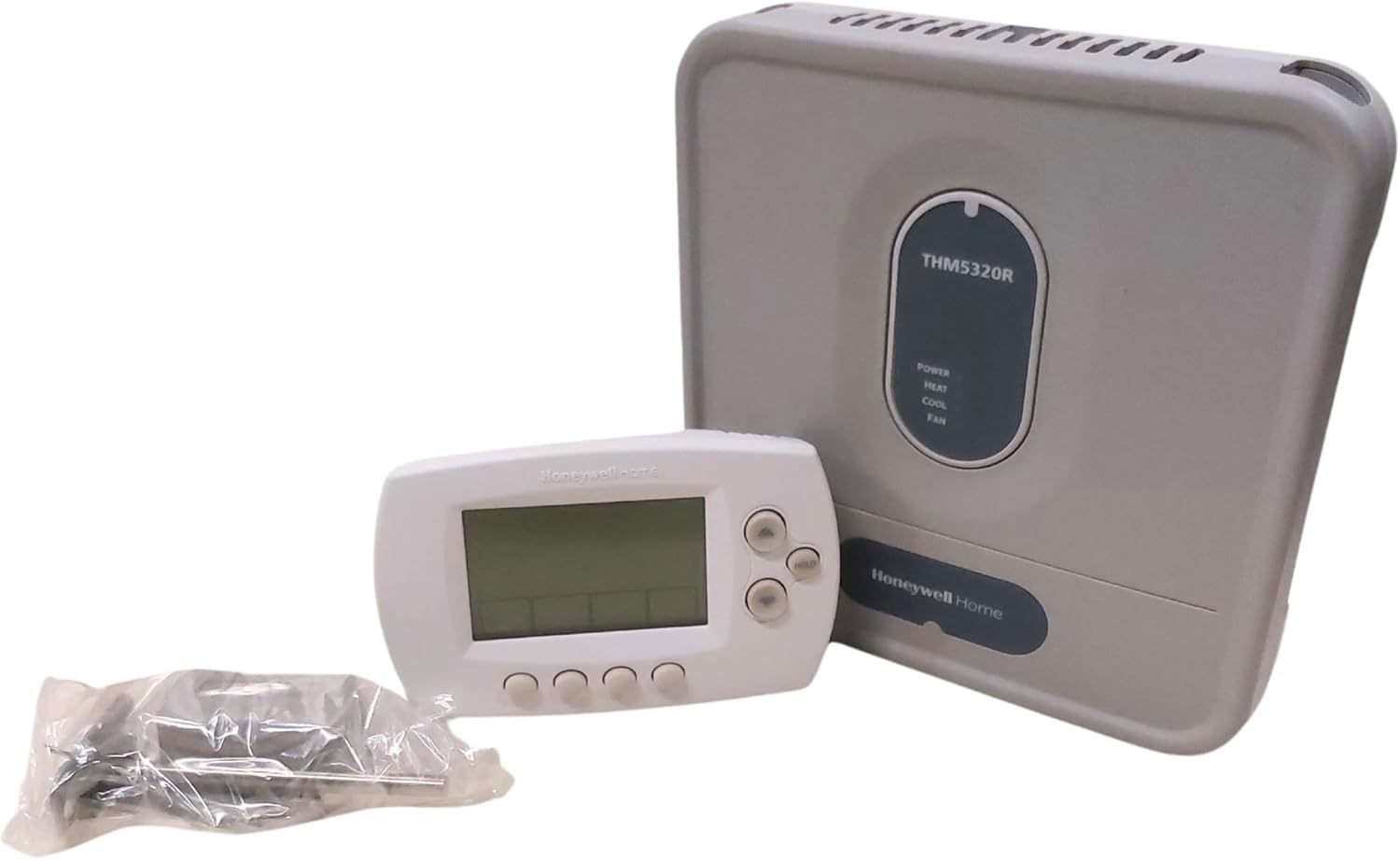
Thinking about upgrading your home’s thermostat with the Honeywell YTH6320R1001 Programmable Redlink Enabled Wireless Focuspro Thermostat Kit?

Buy Honeywell YTH6320R1001 On Amazon
Quick overview
You get a programmable wireless thermostat kit built around Honeywell’s RedLINK wireless platform, designed to simplify installation and communication between the thermostat and your HVAC equipment. The kit includes an Equipment Interface Module (EIM) that centralizes wiring, a return air sensor that keeps safe indoor temperatures if the thermostat loses power, and a thermostat that displays outdoor temperature and humidity.
Honeywell YTH6320R1001, Programmable Redlink Enabled Wireless Focuspro Thermostat Kit, 1, White
What’s included in the kit
You should expect a complete package intended to replace a wired thermostat setup or to add wireless convenience to existing HVAC systems. Everything in the kit is meant to work together so you don’t have multiple incompatible components, and the return air sensor provides a safety fallback that helps maintain a baseline temperature in the event of power loss to the thermostat.
Equipment Interface Module (EIM)
The EIM is where all HVAC equipment is wired, and it serves as the hub that receives communications from the wireless thermostat. You’ll wire your furnace, air handler, heat pump, or other equipment to the EIM so the thermostat can control those systems without direct hardwiring to the thermostat itself. That separation makes the thermostat placement more flexible and reduces the need to run long thermostat wires.
Return Air Sensor
The return air sensor works with the EIM to maintain safe indoor temperatures if power is lost at the thermostat. In practice, that means heating will be maintained at 62°F and cooling will be maintained at 82°F, preventing extreme temperature swings that could damage pipes, plants, electronics, or other sensitive household items. You should install this sensor in a location representative of the return air, not directly in sunlight or right near a vent, so it reports an accurate baseline.
Thermostat unit
The thermostat itself is a programmable, wireless FocusPro unit in white, with a clear display for indoor settings and outdoor temperature/humidity reporting. It gives you scheduling options so you can set different temperature profiles for weekdays, weekends, or custom blocks of time. The unit communicates with the EIM via RedLINK wireless technology, so you can mount it wherever it reads the most accurate indoor conditions and where it’s convenient for your family.
RedLINK wireless technology
RedLINK provides a robust wireless link between the thermostat and the EIM, designed to avoid interference from other household wireless devices. That means your thermostat and EIM should stay connected reliably in most homes; RedLINK aims to provide stable communication for control signals and sensor data without sharing your Wi‑Fi network.
Purchase Honeywell YTH6320R1001
Key specifications (at-a-glance)
Below is a breakdown table to help you quickly scan the most important features and specifications. This will make it easier to understand what you’re getting and how the kit is designed to function together.
| Feature | Detail |
|---|---|
| Model | Honeywell YTH6320R1001 |
| Product type | Programmable wireless thermostat kit (FocusPro) |
| Color | White |
| Included components | Thermostat, Equipment Interface Module (EIM), Return Air Sensor, installation guide |
| Wireless | RedLINK enabled (proprietary Honeywell wireless) |
| Safety fallback | Return air sensor maintains 62°F for heating and 82°F for cooling if thermostat loses power |
| Display features | Indoor setpoint, outdoor temperature and humidity display |
| Compatibility | Works with many 24V HVAC systems; check manual for complex systems |
| Programmability | Multi‑period scheduling (weekday/weekend/custom schedules) |
| Typical uses | Single-family homes, multi‑zone systems with EIM, retrofit installations |
| Remote access | RedLINK ecosystem compatible; internet access may require additional RedLINK gateway (sold separately) |
Installation process overview
You’ll find that installing the kit is intended to be straightforward for someone comfortable working with HVAC wiring and basic tools, but you should always follow safety recommendations and consider hiring a professional if you’re not confident. Typical installation involves wiring the HVAC system to the EIM, mounting the return air sensor in the return duct or grille area, mounting the thermostat, and pairing the thermostat with the EIM.
Tools and time estimate
You should have a screwdriver set, drill (if needed), wire strippers, a voltage tester, and a ladder or stool. Plan for one to three hours for a DIY installation, depending on your system complexity and whether you need to mount the EIM near the equipment or run any wiring. If you want remote access via RedLINK, factor in time for adding the internet gateway and configuring any online accounts.
Wiring considerations
All HVAC equipment is wired to the EIM, so you’ll need to access the furnace, air handler, or control board to connect the right terminals. Label any wires you remove from an old thermostat before moving them to the EIM, and take a picture for reference. If you have multi-stage heat/cool, heat pumps, or unusual control systems, consult the compatibility chart in the manual or a professional HVAC technician.
Mounting the EIM
Mount the EIM close to the HVAC equipment so wiring lengths are minimized and the return sensor can be routed conveniently. Use the mounting screws and follow the instructions for securing the module to a stable surface. Ensure the EIM is located where it won’t get direct water exposure, and keep clearances for airflow and service access.
Pairing the thermostat to the EIM
Once the EIM and thermostat are powered, follow the on-screen prompts or the manual to pair the devices. The RedLINK pairing process typically involves setting both units to a pairing mode and confirming a connection. After pairing, test basic calls for heat and cooling to ensure the EIM is operating the equipment through the commands from the thermostat.
Using the return air sensor
Install the return air sensor in the return duct or in a return air grille where it will measure representative return temperatures. Use caution when routing the sensor wire to avoid sharp edges, and ensure it’s secured and protected from damage. Test the sensor by comparing the reading to the thermostat’s indoor temperature reading; they should be close when installed properly.
Troubleshooting common installation issues
If the EIM doesn’t control equipment after pairing, check wiring terminals, fuses in the furnace control board, and power connections. If the thermostat won’t pair, power-cycle both the thermostat and the EIM and try the pairing again, making sure you followed the instructions exactly. Intermittent signals may indicate placement issues for either the EIM or thermostat; try moving the thermostat a few feet or relocating the EIM within the equipment bay for better reception.

Programming and daily use
Programming the FocusPro thermostat gives you control over when your heating or cooling systems run, and it’s where you’ll see most of the energy-saving benefit. The unit supports scheduling that fits typical daily routines, and learning how to set up those schedules is the key to comfort and efficiency.
Basic programming
You can set temperature setpoints for different times of day—wake, leave, return, and sleep—so your HVAC only works when you want it to. The thermostat’s interface walks you through setting days and time blocks; you should pick setpoints that reflect comfort needs balanced against energy savings. Basic programming is sufficient for most households.
Advanced scheduling
If your schedule varies throughout the week, you can use weekday/weekend or individual day programming to create more tailored routines. The FocusPro interface allows multiple periods per day, so you can, for example, set a cooler night temperature and a slightly higher temperature during the day. Use small step changes to avoid large swings that can trigger extra HVAC cycling.
Vacation and hold features
When you’re away for longer periods, the thermostat’s hold or vacation modes let you set a fixed temperature to run while you’re gone, reducing energy use while still protecting the home. For short absences, temporary holds can override scheduled programming for a set period without erasing the schedule.
Remote monitoring and integration
The RedLINK ecosystem can integrate with Honeywell’s remote gateways (sold separately) so you can monitor and adjust settings over the internet. If you want mobile control or integration with other smart home platforms, you’ll need the appropriate RedLINK internet gateway and accounts; otherwise, you’ll manage the unit locally at the thermostat.
Performance and reliability
In practice, you should expect reliable temperature control and decent programming flexibility from the YTH6320R1001, with the EIM helping to keep HVAC wiring consolidated and the return air sensor providing a safety fallback. Performance will depend on the complexity of your HVAC system and how closely you follow installation best practices.
Temperature accuracy and comfort
The thermostat is engineered to maintain comfortable temperature setpoints and follow your programmed schedule. Proper placement of the thermostat—away from heat sources, direct sunlight, and drafts—will improve accuracy, and using the return air sensor properly ensures more consistent circulated-air measurements.
Wireless reliability
RedLINK is designed to prevent interference with common household wireless devices, so you should see a stable link between thermostat and EIM in most environments. If you encounter dropouts, check for large metal obstructions or electronics that could cause local interference, and consider repositioning the units if needed.
Power outage behavior
If the thermostat loses power, the return air sensor and EIM will work together to maintain a safe baseline temperature—62°F for heating and 82°F for cooling—preventing extreme temperature swings that could harm the home. This behavior is particularly valuable in areas prone to short power interruptions or when battery removal is a concern.
Design and user interface
The FocusPro thermostat has a simple, straightforward aesthetic and a user-friendly interface meant for day-to-day use. You’ll find the display easy to read and the controls approachable even if you’re not tech-savvy.
Display and controls
The thermostat’s screen displays current setpoints and indoor data, and also shows outdoor temperature and humidity when the system is configured to receive that data. Buttons or a simple menu let you navigate scheduling, hold functions, and settings, so you can make quick adjustments without needing a manual for routine changes.
Physical design and installation footprint
The white FocusPro thermostat has a compact profile intended to blend into most home interiors. Because the actual wiring is centralized at the EIM, the thermostat itself can be mounted in a more convenient or visually preferred location without needing to run new wires to the HVAC equipment.
Compatibility and HVAC systems
The kit is designed for broad compatibility with common 24V systems, but you should always confirm that your specific HVAC configuration—especially heat pumps, multi-stage systems, and commercial gear—is supported. The EIM simplifies wiring for many setups, but complex systems may require professional configuration.
Types of systems supported
Most single-stage and many multi-stage forced-air systems, furnaces, and air conditioning systems are compatible, and the EIM makes it easier to adapt the thermostat to those installations. For heat pumps, dual-fuel systems, or systems with advanced staging, consult the manual and compatibility notes to ensure correct wiring and functionality.
When to consult a professional
If you have an unusual control board, multiple zones, or complex equipment like boiler controls or variable-speed drives, it’s wise to consult a licensed HVAC technician. They can verify compatibility, wire the EIM correctly, and program the thermostat to work seamlessly with your system without risking damage or incorrect operation.
Pros and cons
You’ll want a balanced view of the strengths and limitations so you can decide if this kit is a good fit for your home.
Pros:
- Centralized wiring at EIM reduces the need for long thermostat wires and makes placement flexible.
- Return air sensor provides a safety fallback to maintain 62°F (heat) and 82°F (cool) during a thermostat power loss.
- RedLINK wireless technology is designed to be reliable and avoid interference with household wireless devices.
- Programmable scheduling helps you reduce energy use while maintaining comfort.
- Outdoor temperature and humidity displayed for convenience.
Cons:
- Remote internet access requires additional RedLINK gateway hardware (sold separately).
- Some complex HVAC systems may need professional installation to ensure compatibility.
- The thermostat is not a Wi‑Fi native smart thermostat—out-of-the-box cloud features require more components.
- If you expect integrated voice assistant control or broad smart home platform support, you’ll likely need extra gateways or equipment.
Who should buy this thermostat?
You should consider this kit if you want a reliable programmable thermostat and prefer the flexibility of wireless placement without full smart thermostat dependency on your Wi‑Fi. It’s particularly useful for retrofit installations, homes where thermostat wiring to the equipment is challenging, or households that value the safety fallback of a return air sensor. If you need simple, reliable scheduling and robust HVAC control through a dedicated EIM, this kit can be a good fit.
Setup tips for best results
A few practical steps will improve your installation and ongoing experience with the system.
- Place the thermostat away from direct sunlight, drafts, or heat sources so it reads accurate ambient temperatures.
- Install the return air sensor in a representative location within the return duct or grille; this improves both baseline safety control and overall comfort.
- Label and photograph existing thermostat wiring before you remove it so you can make a smooth transition.
- Test the system in each mode (heat, cool, fan) after installation to confirm proper operation and to catch any wiring errors early.
- If you want remote control, add the Honeywell RedLINK internet gateway and follow the vendor instructions for online setup.
Maintenance and long-term care
Keeping the thermostat and EIM in good shape helps ensure longevity and consistent performance. You’ll want to perform a few routine tasks and checks to avoid surprises.
- Inspect the EIM periodically for dust buildup or loose wiring—clean and tighten connections while the system is powered down.
- Replace batteries if the thermostat uses them for backup or if battery indicators appear; consult the manual for recommended battery types.
- Recheck sensor placement if you remodel or change furniture or HVAC grills that could affect airflow or temperature readings.
- Keep the firmware or software updated if Honeywell releases updates for the RedLINK ecosystem and you use internet-connected components.
Common problems and fixes
If something goes wrong, these are the most likely issues and straightforward fixes you can try before calling a technician.
- No communication between thermostat and EIM: Power-cycle both units, confirm they’re in pairing mode, and retry pairing. Check for any blown fuses or tripped breakers at the HVAC control board.
- Temperature readings seem off: Verify thermostat placement and return sensor location; move the thermostat if it’s near a heat source or in direct sunlight.
- HVAC doesn’t respond to calls: Check wiring at the EIM and equipment control board; verify that the EIM is powered and the equipment’s safety interlock switches haven’t tripped.
- Outdoor temperature/humidity not displaying: Confirm the outdoor sensor (if included or required) is installed and communicating; re-pair sensors if needed.
Comparison with typical smart thermostats
If you’re weighing this kit against Wi‑Fi smart thermostats, you should consider your priorities: you’ll get robust HVAC control and reliability with the Honeywell RedLINK kit, but you’ll need additional components for cloud-based control. Smart thermostats often provide native Wi‑Fi, mobile apps, learning algorithms, and integrations with smart home platforms, but they may require rewiring or won’t work as flexibly in retrofit situations without the centralized EIM.
- If your priority is stable HVAC operation, centralized wiring, and a safety fallback, this kit is a strong choice.
- If you want out-of-the-box cloud control, voice assistant support, or elaborate app-based features, plan on purchasing a RedLINK gateway or consider a native Wi‑Fi smart thermostat that matches your system compatibility.
Energy savings potential
You’ll be able to reduce energy use by implementing sensible schedules and using the programmable features. Properly set schedules that lower heating or cooling during the hours you aren’t home and raise or lower setpoints during sleep hours can trim HVAC runtimes. The exact savings depend on your climate, home insulation, and how aggressively you set back temperatures; but programmed thermostats generally pay back their cost over time via reduced energy bills compared to manual thermostat control.
Final verdict
If you want a reliable programmable thermostat kit with flexible placement, centralized equipment wiring, and a safety-focused return air sensor, the Honeywell YTH6320R1001 FocusPro kit is a solid option. The RedLINK wireless communication reduces interference concerns, and the EIM helps make retrofit installations less invasive. You will need additional RedLINK gateway hardware for remote internet access, and complex HVAC systems may require professional setup, but for many homeowners this kit strikes a good balance between practicality, reliability, and safety.
If you decide to buy, make sure you confirm system compatibility, plan your installation location carefully for both the thermostat and the return sensor, and keep the manual handy for pairing and programming steps. With proper installation and programming, you should find the kit improves control, convenience, and baseline protection for your home’s heating and cooling system.
Get The Honeywell YTH6320R1001 Now
Disclosure: As an Amazon Associate, I earn from qualifying purchases.