
Thinking about upgrading your home network with the “TP-Link Deco X60 WiFi 6 AX3000 Whole-Home Mesh Wi-Fi System, 3-Pack”?
Buy TP-Link Deco X60 AX3000 3-Pack On Amazon
Overview of the TP-Link Deco X60 WiFi 6 AX3000 Whole-Home Mesh Wi-Fi System, 3-Pack
You’ll find the Deco X60 is TP-Link’s mid-range Wi‑Fi 6 mesh aimed at covering larger homes with solid throughput and modern wireless features. The 3-pack approach gives you three identical nodes that work together to form a single, seamless network, and the AX3000 designation indicates combined theoretical speeds across 5 GHz and 2.4 GHz bands.
The system is targeted at households with many devices — phones, tablets, smart TVs, streaming boxes, smart home gear — and it’s designed to be easy to set up and manage from a phone app.

What you get in the box
You get three Deco units, three power adapters, one Ethernet cable (usually for the main unit), and a quick start guide. The units are meant to be placed on desktops or shelves around your home to create the mesh network.
Unboxing is straightforward and the quick start guide walks you through the basics, but you’ll use the Deco app for the full guided setup and for ongoing management.
Quick specs breakdown
Here’s a clear table to help you scan the essential specs at a glance:
| Feature | Details |
|---|---|
| Product name | TP-Link Deco X60 WiFi 6 AX3000 Whole-Home Mesh Wi-Fi System, 3-Pack |
| Wi‑Fi standard | Wi‑Fi 6 (802.11ax) |
| Bands | Dual-band: 5 GHz and 2.4 GHz |
| Theoretical combined speed | AX3000 (approx. 2402 Mbps on 5 GHz + 574 Mbps on 2.4 GHz) |
| Antenna/Tech | MIMO (Multi-user MIMO), OFDMA |
| Ethernet ports per unit | 2 x Network (RJ-45) (Gigabit Ethernet) |
| Form factor | Desktop (tower-like) |
| Pack size | 3 Pack |
| Security | WPA2/WPA3 support, TP-Link HomeCare (antivirus, parental controls, QoS) |
| Mesh features | Seamless roaming, automatic band steering, self-healing mesh |
| App | TP-Link Deco app (iOS/Android) |
| Typical coverage (3-pack, claimed) | Up to several thousand square feet (depends on home layout and environment) |
Design and hardware
You’ll notice the Deco X60 units have a minimal, tower-like shape meant to blend into common living spaces. They’re compact enough to sit on a shelf or desk without drawing attention, and the neutral white finish fits most modern home decor.
Each unit has a small LED indicator to show status and activity. The LED is useful during setup and for quick troubleshooting, and it’s unobtrusive during normal operation.
Ports and physical connections
Each Deco X60 unit includes two Gigabit Ethernet ports (RJ-45). You’ll typically use one as the WAN connection on the main unit that connects to your modem, while the second can act as a LAN port for a wired device or for wired backhaul when you want to connect two Decos via Ethernet.
There’s no built-in USB port for network-attached storage or printer sharing, so if you want centralized local storage or printer hosting, you’ll need a separate NAS or a router with USB support.
Build quality and thermal behavior
The units are plastic but feel solid for their price point. They run cool under normal home loads; Wi‑Fi 6 chips can generate heat under sustained heavy traffic, but TP‑Link designs the Deco line for continuous operation without needing active cooling.
Purchase TP-Link Deco X60 AX3000 3-Pack
Wi‑Fi 6 features and what AX3000 means for you
AX3000 refers to the theoretical combined throughput across both bands: typically around 2402 Mbps on 5 GHz and about 574 Mbps on 2.4 GHz. Those figures add up to “3000” in marketing terms. In real-world use you won’t hit those combined numbers on a single client, but the platform does deliver faster and more efficient multi-device performance compared with older Wi‑Fi 5 gear.
You’ll benefit from MU‑MIMO and OFDMA, which help the network serve multiple devices simultaneously. That translates to fewer pauses on video calls, smoother streaming across multiple TVs, and generally more consistent performance when many devices are active.
Range, MIMO, and multi-device handling
The Deco X60 supports MIMO technology to handle simultaneous streams to multiple devices. If your home is full of phones, laptops, cameras, smart speakers, and TVs, you’ll notice fewer bandwidth bottlenecks compared with non-AX routers. The mesh design improves coverage by letting you place nodes strategically to fill dead zones.
Coverage and real-world performance
The 3-pack is designed to cover most medium-to-large homes. Manufacturer claims for the 3-pack often state coverage up to several thousand square feet. Your mileage will vary — factors like wall materials, building layout, interference from neighboring networks, and node placement will change actual coverage.
In practical terms, you can expect strong coverage for a three-story home with well-placed units, or a large single-level residence. If you live in a particularly large house or have a complicated layout (thick concrete walls, metal framing), you may need more nodes or wired backhaul to maintain top-tier performance everywhere.
Throughput expectations
Close to a Deco unit, you’ll see near-Wi‑Fi‑6 performance on compatible clients: improved throughput and lower latency. At longer distances or through multiple walls, speeds will drop as with any wireless system, but the mesh nodes help by shortening each wireless hop. Expect better multi-device performance than a single high-gain router covering the whole house alone.
Setup and management experience
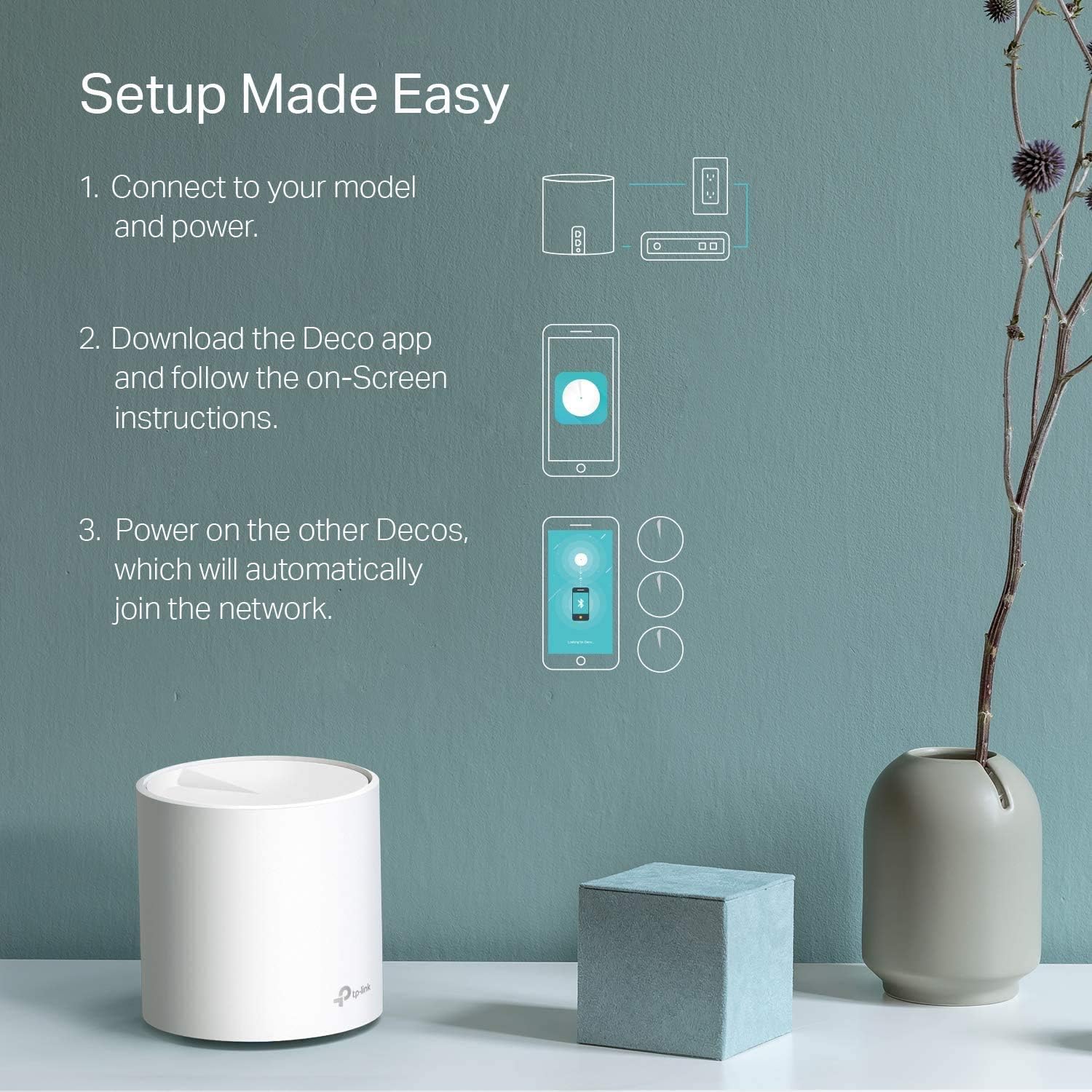
You’ll set up the Deco X60 through the TP‑Link Deco app on iOS or Android. The app walks you step-by-step: create or sign in to a TP‑Link account, connect the primary Deco to your modem, power it up, scan the QR code on the unit, and place the other nodes where the app suggests.
The app is friendly and aimed at users who prefer simplicity over granular control. For most home users, it covers everything you need: guest networks, parental controls, device prioritization, firmware updates, and basic diagnostics.
App features and daily management
The Deco app gives you a visual list of connected devices, allows naming and grouping, and lets you set up schedules or device-level restrictions. You can create a guest network quickly, limit speeds for certain devices, and see which devices are using the most bandwidth.
There’s also automatic firmware update support, which helps keep security tight without much effort from you.
Security and parental controls
Security is a strong point for the Deco line. The X60 supports WPA3 for compatible devices and falls back to WPA2 for older clients. TP‑Link bundles HomeCare in many Deco models — check your purchase for included features — which typically adds an antivirus layer, intrusion prevention, parental controls, and QoS.
With parental controls you’ll be able to set content filters, time limits, and schedules for groups or individual devices, which is useful if you want to enforce bedtime or restrict certain content types for kids.
Automated updates and protections
You can enable automatic updates so the Deco receives firmware patches when released. HomeCare’s antivirus (when included) provides an extra layer of protection by scanning for known threats and blocking malicious content at the router level.
Wired options and backhaul
Each Deco has two Gigabit Ethernet ports, which gives you flexibility. You can use one as WAN on the primary node and the other as LAN for a wired device, or you can create a wired backhaul by connecting nodes with Ethernet. A wired backhaul typically improves overall mesh performance and reduces the latency and throughput penalties of wireless hops.
If you have Ethernet available in the walls or can run cables, wired backhaul is recommended for the best experience in throughput-heavy use cases like 4K streaming or competitive gaming.
Gaming, streaming, and smart home suitability
You’ll like the Deco X60 if your household streams 4K content, does online gaming, and uses many smart home devices. The low-latency improvements of Wi‑Fi 6, combined with OFDMA and MU‑MIMO, help keep streams smooth and give gaming devices a more stable connection.
For competitive gamers seeking the absolute lowest ping and the most control, a dedicated wired connection to a high-end gaming router or a switch might still be preferred. But for most gamers and streamers, the Deco X60 gives an excellent balance of convenience and performance.
Pros and cons
You should consider these points before deciding whether the Deco X60 is right for your setup.
Pros:
- You’ll get modern Wi‑Fi 6 efficiency (OFDMA, MU‑MIMO) for many devices.
- A 3-pack provides broad whole-home coverage for typical large homes.
- Easy, app-driven setup and management makes it kid-and-guest-friendly.
- Built-in security features (WPA3 + HomeCare) simplify protection.
- Two Gigabit ports per unit allow wired backhaul or wired devices.
- Seamless roaming between nodes reduces frustrating disconnects.
Cons:
- No USB port for local NAS or printer hosting.
- Advanced users may miss more granular control available in router-focused firmware.
- Real-world speeds won’t match the AX3000 aggregate number on a single device.
- If you need extremely high throughput across many simultaneous heavy streams, higher-end Wi‑Fi 6E systems or wired solutions may perform better.
Recommended placement and tips for optimal coverage
Place one Deco near where your modem or gateway is located, ideally in a ventilated area and away from thick cabinets or metal objects. The other nodes should be placed roughly halfway between the main unit and the areas where you want better coverage — hallways or open living space often work well.
Avoid placing units on the floor, behind the TV, or inside closed cabinets. Elevated positions (shelves, counters) reduce obstructions. If Wi‑Fi performance is critical in a particular room, consider wired backhaul to that node.

Troubleshooting common issues
If you run into problems, try these simple steps first:
- Restart the primary Deco and your modem. A modem reboot often clears ISP-related issues.
- Check the Deco app for status messages or firmware updates. Update firmware if available.
- Move nodes closer for a test to see if distance or interference is the issue.
- If a device is having persistent trouble, forget the network on that device and reconnect.
- Use wired backhaul if you see repeated throughput drops or high latency across the mesh.
For stubborn or complex problems, TP‑Link support and community forums can be helpful, and the app includes diagnostic tools to share logs if needed.
Comparison table: how the Deco X60 stacks up for common priorities
The following table helps you compare the Deco X60 in practical terms for various use cases:
| Priority | How X60 performs | Notes |
|---|---|---|
| Whole-home coverage | Strong for medium-large homes with 3-pack | Best with well-placed nodes; Ethernet backhaul improves reliability |
| Multi-device households | Excellent | OFDMA and MU‑MIMO help serve many devices concurrently |
| Streaming 4K / multiple streams | Very good | Bandwidth and efficiency support multiple HD/4K streams |
| Competitive gaming | Good | Low latency improvements help, but wired is best for top-tier play |
| Ease of setup | Very easy | Deco app guides you through everything |
| Advanced customization | Limited | App focuses on simplicity rather than granular routing rules |
| Local storage / print sharing | Not supported natively | No USB ports; use separate NAS/router with USB if needed |
Who should choose the Deco X60?
You should choose the Deco X60 if:
- You have a medium-to-large home and want a single, consistent Wi‑Fi network.
- You use many wireless devices and want improved efficiency and stability.
- You prefer an easy-to-manage system with straightforward parental controls and security.
- You might take advantage of Ethernet backhaul or want flexible node placement.
You might look elsewhere if:
- You need advanced network configuration (VPN server/client, VLAN priority granular controls).
- You need built-in USB-based file or printer sharing.
- You require extreme throughput across many simultaneous heavy users and prefer enterprise-grade gear.
Price and value considerations
The Deco X60 offers a compelling value, especially as a 3-pack. You’re paying for a ready-made mesh system with Wi‑Fi 6 features and useful management tools rather than piecing together separate access points. If price is a constraint, lower-cost Wi‑Fi 5 mesh systems may be cheaper but won’t offer the same efficiency under heavy multi-device conditions.
Factor in that the Deco app and HomeCare features reduce the need for third-party security subscriptions for many users, which adds value over time.
Firmware, updates, and long-term support
TP‑Link provides firmware updates for Deco devices through the Deco app. Keeping firmware up to date helps ensure security and improves stability. TP‑Link’s update cadence varies, but the Deco series typically receives security patches and occasional feature enhancements.
You’ll want to enable automatic updates if you prefer a hands-off approach to maintenance.
Advanced features and limitations
The Deco X60 focuses on simplicity with essential advanced features included. You’ll get:
- Guest network support
- Device prioritization / QoS
- Band steering and smart connect
- Basic VPN passthrough (depending on ISP and modem configuration)
You’ll not get:
- Local USB file sharing or printer hosting
- Deep packet inspection settings exposed to the user
- Very granular VLAN or enterprise-level routing controls from the app
If you need advanced enterprise-style controls, you might pair the Deco with a more advanced router/firewall, or pick equipment geared toward prosumers.
FAQs
Q: Can the Deco X60 work with my existing router?
A: Yes. You can configure the Deco to work in Access Point mode to extend an existing router’s network, or put your existing router into bridge mode and let the Deco manage the network. AP mode will keep your original router handling NAT while Decos provide access points and mesh.
Q: Do you need three units?
A: It depends on your home. A single Deco X60 covers a small to medium area, while the 3-pack is intended for whole-home coverage. If your home is large or multi-level, three units are usually recommended for consistent coverage.
Q: Can the Deco X60 use a wired backhaul?
A: Yes. You can connect nodes via Ethernet for a wired backhaul, which improves performance and reduces wireless hop penalties.
Q: Does it support WPA3?
A: Yes, the Deco X60 supports WPA3 on compatible clients and falls back to WPA2 for older devices.
Q: Can you use a different router with the Deco as satellites?
A: In AP mode the Deco can act as access points on a network controlled by another router. If you want Deco to be the router and manage the network features, you’ll typically put your existing router into bridge mode or remove it from the network.
Troubleshooting advanced problems
If nodes won’t connect to each other:
- Check the Deco app for signal strength and placement suggestions.
- Try a temporary wired connection between the units to check if they form a mesh.
- Factory reset a node and re-add it with the app.
If speeds are lower than expected:
- Verify the connection speed from your ISP and modem.
- Test a wired connection to the primary Deco to confirm WAN throughput.
- Check for interference sources like microwave ovens, cordless phones, or dense neighboring networks on the same channel.
If devices frequently drop:
- Verify firmware is up to date on the Deco and the client device.
- Check for IP conflicts if you’re running multiple DHCP servers on the same network.
- Move the Deco away from dense objects or metal appliances.
Real-world use cases and scenarios
Family streaming and remote work:
You’ll appreciate the X60 if your household has parents working remotely, kids streaming lessons, and multiple people streaming entertainment simultaneously. The QoS and device grouping features let you prioritize work devices during important calls.
Smart home heavy:
If you’ve got a large number of IoT devices (lights, cameras, plugs), the Deco X60 is well-suited because Wi‑Fi 6 handles many low‑bandwidth devices more efficiently. The mesh coverage reduces dead zones for cameras and smart thermostats.
Small business or home office:
For small business work-from-home setups, the Deco provides stable coverage and enough features for video conferencing and file transfers. If you need VPN server functionality or VLAN segmentation, you might supplement the Deco with a dedicated firewall device.
Final verdict
You’ll get a strong, user-friendly mesh Wi‑Fi 6 system with the “TP-Link Deco X60 WiFi 6 AX3000 Whole-Home Mesh Wi-Fi System, 3-Pack”. It balances modern wireless features, decent coverage, and simple management, making it an excellent choice for families and households with many devices. If you value easy setup, reliable security features, and the ability to expand with wired backhaul, the Deco X60 is a sensible buy.
If you need advanced customization or built-in USB functionality, or if you require absolute peak performance across dozens of simultaneous heavy streams, consider a more specialized router or a higher-tier mesh system. For most homes looking to upgrade to Wi‑Fi 6 and achieve consistent whole-home coverage, you’ll likely find the Deco X60 to be a practical and satisfying choice.
Order The TP-Link Deco X60 AX3000 3-Pack On Amazon
Disclosure: As an Amazon Associate, I earn from qualifying purchases.