
Are you looking for a reliable, UL-listed 3-phase submeter that makes tenant billing, real-time monitoring, and Time-of-Use reporting easy to set up and manage?

Buy DAE P254-200 KIT Smart Submeter On Amazon
Product overview: DAE P254-200 KIT, UL kWh Smart Submeter
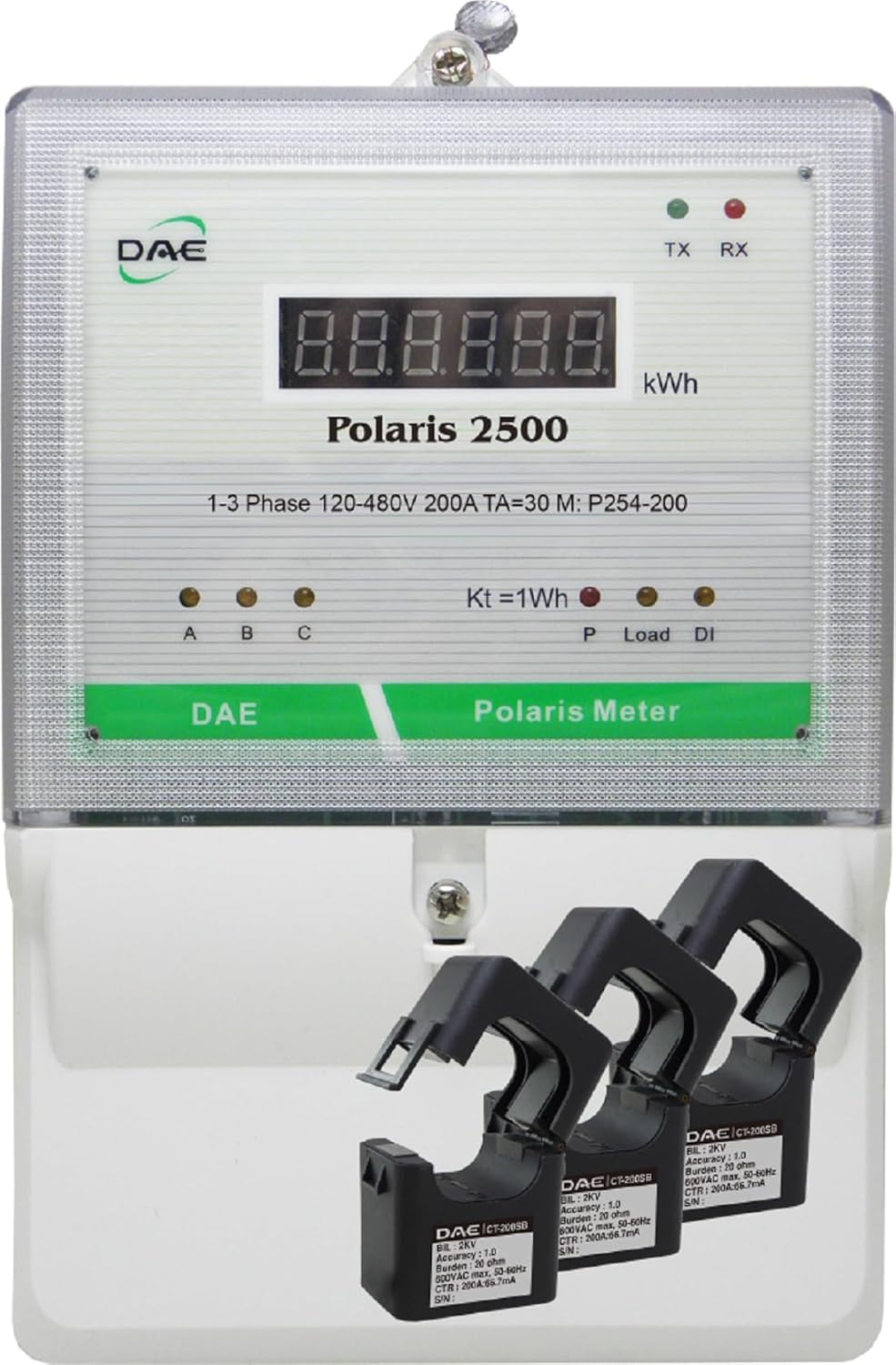
You get a UL/cUL listed, ANSI C12.1 conforming kWh submeter designed for 3-phase service at 120–480V with a 200A rating and three split-core CTs. The DAE P254-200 KIT includes RS485 communications and features that simplify wiring, cloud connectivity options, and calibration documentation for accurate billing.
What this kit is meant to do
This kit is built for landlords, property managers, and facility operators who need accurate submetering to allocate energy costs, monitor consumption, and produce tenant billing reports. You can use the meter locally via RS485 or integrate it into DAE’s cloud metering system using the CC2030 gateway for remote monitoring and reporting.
DAE P254-200 KIT, UL kWh Smart Submeter, 3 Phase, 200A, 120-480V, 3 Split Core CTs,RS485
Key specifications
These are the core technical details you should know at a glance, organized so you can match the meter to your application and electrical infrastructure. The table below provides a clear breakdown of the most relevant specs.
| Parameter | Specification |
|---|---|
| Model | DAE P254-200 KIT |
| Meter Type | UL kWh Smart Submeter (3-phase) |
| Current Rating | 200A (meter nominal) |
| Voltage Range | 120–480V (3-phase) |
| CT Type Included | 3 Split Core CTs (200A versions included in the KIT) |
| Communication | RS485 |
| Listings / Standards | UL / cUL Listed; conforms to ANSI C12.1 |
| Powering | Meter powered by VA and VB; VC is reference only |
| Installation | Indoor use; optional B1725 watertight enclosure for outdoor |
| Cloud Integration | DAE Cloud Metering via CC2030 Gateway |
| Accessories | Lower cover with two 3/4″ knockouts, inline fuse with holder attached |
| Optional Add-ons | CC2030 KIT, WSC500A RF Converters, SMB350-UL-8-B KIT |
| Calibration | Factory calibration certificates available |
You can use this table to quickly verify electrical compatibility and determine which optional accessories you’ll need for your installation.
Design and build quality
The meter has a practical design with features that ease physical installation and wiring. You’ll notice a lower cover with two 3/4″ knockouts for conduit connections and an inline fuse holder already attached to simplify connecting the hot A wire.
Enclosure and installation-friendly features
The lower cover and conduit knockouts let you run wiring cleanly into the meter box, which saves time during installation. The inline fuse holder for hot wire A and the clear guidance that the meter is powered by VA and VB (with VC used only as a reference) reduce ambiguity and help prevent wiring mistakes when you follow the provided wiring picture.
Electrical performance and accuracy
This meter is UL/cUL listed and conforms to ANSI C12.1 national accuracy standards, so you can rely on its kWh readings for tenant billing or energy management. Factory calibration certificates are available if you need documented accuracy for compliance or auditing.
How the meter is powered and wired
You’ll power the meter using VA and VB connections; VC is a reference point and does not require a fuse. The inline fuse and holder are attached for the hot A connection, and the meter’s wiring diagram (see the fifth product picture referenced) must be followed precisely. This wiring method supports 3-phase monitoring across a wide voltage range, 120–480V.
Purchase DAE P254-200 KIT (Smart Submeter) — Amazon
CT options and sizing
The DAE product family offers a wide range of CTs to match different primary currents and installation needs. The P254-200 KIT includes three 200A split-core CTs, but DAE lists many alternatives.
Available CT types and when to use them
You can choose from split-core CTs: CT-5000SB, CT-3000SB, CT-2000SB, CT-1500SB, CT-1000SB, CT-600S, CT-400S, CT-200SB, CT-100S — or solid-core CTs: CT-600D9 (600A), CT-400D6 (400A), CT-200D3 (200A). If you need to retrofit an existing installation without shutting down circuits, split-core CTs let you clamp around conductors easily. For new installations or where space/layout allow, solid-core CTs typically provide slightly better mechanical reliability and sometimes better accuracy.
Metering capabilities and readings
This meter measures kWh and supports time-of-use (TOU) billing and reporting when used with DAE’s cloud system. RS485 communications enable integration with local monitoring systems or connection to the CC2030 gateway for cloud-based reporting.
What data you can expect
You’ll have access to real-time energy consumption, monthly kWh totals, and billing-ready reports. With the cloud gateway, TOU billing reports and tenant billing summaries are available on a PC, phone, or tablet. This makes it straightforward for you to automate tenant billing or analyze usage patterns.
Connectivity and cloud options
If you want remote access to energy data, DAE provides a CC2030 Gateway that collects energy data from DAE meters and sends it to a cloud server over Ethernet. You’ll be able to view data from multiple meters through web or mobile interfaces.
CC2030 Gateway setup and wireless option for retrofit sites
The gateway connects via Ethernet and is intended to be installed near your router; CC2030 will collect data from meters and upload it to the cloud. For buildings where it’s difficult to run a cable from the electric meter (near the panel) to the CC2030 (near the router), you can choose the CC2030 KIT plus two WSC500A RF Converters to wirelessly connect the electric meter to the gateway. This is especially helpful when retrofitting older properties where running new network cabling is expensive or disruptive.
Software and reporting features
DAE’s cloud metering solution gives you user-friendly reports and dashboards so you can produce billing reports without complicated IT setup. The system supports TOU billing and can generate tenant bills and summaries that are easy to interpret.
Who benefits from the reporting features
If you manage multi-tenant units, commercial spaces, or multi-panel installations, you’ll appreciate that landlords and property managers can access real-time usage, monthly totals, and billing reports from a phone or PC. The platform is designed so you don’t need a dedicated IT person to configure the system; you simply connect the wires as shown and proceed according to the setup guide.
Installation walkthrough (high level)
You should follow the wiring picture included with the product and, if available, the setup video. The meter includes an inline fuse for hot A and expects VA and VB to power the meter while VC serves as a voltage reference.
Step-by-step points to follow
- Turn off power and follow lock-out/tag-out procedures before working on the panel.
- Mount the meter and secure conduit through the lower cover knockouts as needed.
- Install the three split-core CTs around the correct phase conductors and route their leads to the meter CT terminals.
- Connect the hot A wire to the inline fuse holder for the VA terminal, and connect VB according to the wiring diagram. VC only needs to sense voltage and does not require a fuse.
- Connect RS485 if you plan to use local data collection or the CC2030 gateway.
- Power up and verify readings for each phase; check phasing and CT orientation.
These steps give you a practical sequence but do not replace the manufacturer’s wiring diagram or a qualified electrician’s judgment.
Wiring details and safety notes
Safety is critical when working with three-phase equipment. The meter’s design reduces wiring ambiguity, but you must still confirm phase orientation, CT polarity, and that protective devices are appropriate for the circuits being measured.
Important safety reminders
Always de-energize circuits when installing CTs (unless using split-core CTs specifically designed for live installation) and follow local electrical codes. The meter is intended for indoor use unless you add the watertight B1725 enclosure for outdoor installations. If you’re not comfortable working around live electrical panels, hire a licensed electrician to handle the wiring and commissioning.
Use cases and who should buy this meter
This meter is ideal for property owners who bill tenants for energy, facility managers monitoring energy consumption across multiple load centers, and energy auditors who need certified, accurate kWh measurements. You can also scale the system by using SMB350-UL-8-B KIT with a CC2030 KIT to monitor up to eight panels remotely.
Typical deployments
- Multi-unit residential buildings where you need to split energy costs by apartment
- Commercial spaces with multiple tenants who require separate billing
- Small industrial sites where you want to track consumption trends and TOU costs
- Retrofitting older buildings with minimal conduit or cable runs (use split-core CTs and wireless converters)
Pros: what you’ll like about the P254-200 KIT
You’ll appreciate multiple practical advantages that make installation and long-term operation easier.
- UL/cUL listing and ANSI C12.1 compliance gives you confidence for billing applications.
- Inline fuse holder and clear wiring guidance simplify installation.
- RS485 communications allow local integration with building management systems.
- CC2030 cloud integration and TOU billing make tenant billing straightforward.
- Split-core CTs are included for non-disruptive retrofits.
- Optional RF converters eliminate the need for running long Ethernet or RS485 cables in some retrofits.
- Factory calibration certificates are available if you need documented measurement accuracy.
These features help you move from installation to usable billing and monitoring quickly.

Cons: potential limitations to be aware of
While the meter is strong in many areas, there are a few points you’ll want to consider based on your needs.
- Indoor-only rating requires an additional watertight enclosure (DAE B1725) for outdoor installation.
- The meter relies on RS485; if you need native Wi-Fi or cellular in the meter itself, you’ll need the CC2030 gateway and possibly wireless converters.
- Depending on the number of panels you want to monitor, you may need additional kits such as SMB350-UL-8-B and the CC2030, which increases overall cost and complexity.
- The wiring still requires careful attention to phasing and CT polarity; incorrect wiring can give inaccurate readings until corrected.
Understanding these trade-offs helps you plan for accessories or additional equipment up front.
Comparison with other metering approaches
If you’re deciding between the DAE P254-200 KIT and other approaches, consider the balance of accuracy, ease of installation, and cloud features. Compared to passive metering, this smart submeter gives you validated accuracy and billing features; compared to full-out advanced metering infrastructure, it provides a cost-effective middle ground with cloud integration via the CC2030 gateway.
How it stands out
You’ll likely find the P254-200 KIT attractive because it’s UL/cUL listed and ANSI-compliant, includes split-core CTs for retrofits, and integrates into a cloud reporting system without deep IT involvement. If your priority is tenant billing and clear reporting rather than advanced networked metering with proprietary protocols, this product hits a useful sweet spot.
Deployment tips and best practices
Plan your CT selection, gateway placement, and conduit runs in advance. Keep RS485 and Ethernet cable lengths and routing in mind, and consider using the RF converters when physical cable runs would be costly or disruptive.
Practical tips for smoother installs
- Confirm the CT rating matches peak load on the circuit; avoid undersizing to keep accuracy.
- Mount the CC2030 gateway near reliable Ethernet and power to prevent communication interruptions.
- Use the watertight enclosure if you expect outdoor exposure to moisture or extreme environmental conditions.
- Document each meter’s serial number and location for cloud mapping and easy troubleshooting later.
- Keep a copy of factory calibration certificates with tenant billing records to demonstrate metering accuracy if required.
Following these steps minimizes the chance of surprises during commissioning and ongoing operation.
Troubleshooting common issues
Even with a well-designed product, you may encounter common problems like missing readings, wrong phase totals, or communication errors. The key is to systematically verify wiring, CT orientation, and gateway connectivity.
Checklist for common problems
- No meter power: Verify VA and VB connections and check the inline fuse in the hot A line.
- Incorrect phase readings: Confirm CTs are placed on the correct conductors and verify CT polarity.
- RS485 communication issues: Check wiring polarity, termination, and correct baud/settings if required by your data collection device.
- Cloud connection problems: Ensure the CC2030 has a stable Ethernet link and that gateway LEDs indicate normal operation. If using RF converters, verify pairing and signal strength.
If issues persist, contact DAE support and provide meter serial numbers, calibration certificate numbers, and any error logs from your gateway for faster assistance.
Certificates and compliance
You’ll appreciate that the meter is UL/cUL listed and conforms to ANSI C12.1 national accuracy standards — both important for billing applications and regulatory acceptance. Factory calibration certificates are available if you need formal documentation for audits or tenant records.
Minority-owned business note
DAE Controls LLC is a minority-owned supplier, and the company makes its NMSDC Minority Supplier Certificate available on its website if you need to document supplier diversity in procurement.
What’s included in the P254-200 KIT
The kit is packaged to give you a near-complete solution for a single three-phase meter install. Expect the following items in your kit.
Typical kit contents
- DAE P254-200 UL kWh Smart Submeter (3-phase)
- 3 split-core CTs (200A each)
- Lower meter cover with two 3/4″ knockouts for conduit entry
- Inline fuse with holder attached for hot A connection
- Basic wiring diagram and quick-start guidance (follow the 5th product picture and setup video for visual wiring)
Note: The CC2030 gateway and RF converters are sold separately; if you want cloud access and wireless conversion, select the CC2030 KIT and WSC500A RF Converters as needed.
Purchasing considerations and accessories
When buying, make sure you select the right CT sizes if your circuits exceed 200A, and decide whether you’ll need the CC2030 gateway or RF converters for cloud access. If the meter will be outdoors, add the B1725 watertight enclosure.
Accessories you may need
- CC2030 KIT for cloud integration and TOU/ billing features
- WSC500A RF Converters for wireless communication between remote meters and the CC2030 gateway on retrofit sites
- Larger or differently rated CTs if your circuits exceed 200A (DAE offers split-core and solid-core options)
- B1725 watertight enclosure for outdoor installation
- SMB350-UL-8-B KIT plus an extra CC2030 KIT to monitor up to 8 panels
Selecting the correct accessories up front makes the installation and expansion process smoother and keeps ongoing costs predictable.
Frequently asked questions (FAQ)
This section answers typical questions you may have and clarifies key points about wiring, communication, and deployment.
Is the meter suitable for tenant billing?
Yes. The meter is UL/cUL listed and conforms to ANSI C12.1, making it suitable for billing and tenant energy allocation. You can request factory calibration certificates for added documentation.
Do I need a separate gateway for cloud reporting?
Yes. To send data to DAE Cloud Metering, you’ll use the CC2030 Gateway. The gateway collects data from the meter via RS485 and uploads it to a cloud server via Ethernet.
Can I use the meter outdoors?
The meter is designed for indoor use, but you can order the DAE B1725 watertight enclosure for outdoor deployments.
What if running cable between the meter and gateway is impractical?
For existing buildings where cable routing is hard, choose the CC2030 KIT combined with two WSC500A RF Converters to create a wireless link between the electric meter and the CC2030 gateway.
What communication protocol does the meter use over RS485?
The meter supports RS485 communications for data collection. Confirm with DAE or your vendor team about specific slave protocols or register maps needed for third-party integration.
Final recommendation
If you manage multi-tenant properties, want accurate tenant billing, or need straightforward cloud-based energy reporting without heavy IT involvement, the DAE P254-200 KIT is a practical and well-documented choice. The UL listing and ANSI compliance give you confidence for billing use, the included split-core CTs simplify retrofits, and the CC2030 gateway option gives you a clear path to cloud reporting and TOU billing.
Who should buy this
You should purchase this kit if you want a reliable, accurate 3-phase submeter that’s easy to install in many retrofit and new-install scenarios, and if you plan to scale monitoring with cloud-based dashboards and billing reports. If you need outdoor mounting, wireless bridging, or higher current CTs, plan for the appropriate accessories at purchase time.
If you want, I can help you prepare a purchase checklist based on your specific installation (panel layout, CT sizing, gateway placement) or walk you through the wiring steps tailored to your panel configuration. Which details would you like to go over next?
Get The DAE P254-200 Smart Submeter On Amazon
Disclosure: As an Amazon Associate, I earn from qualifying purchases.