
Would this controller give you the precision and convenience you need for your CNC projects?
Buy CNCTOPBAOS DDCSV3.1 4-Axis CNC Controller On Amazon
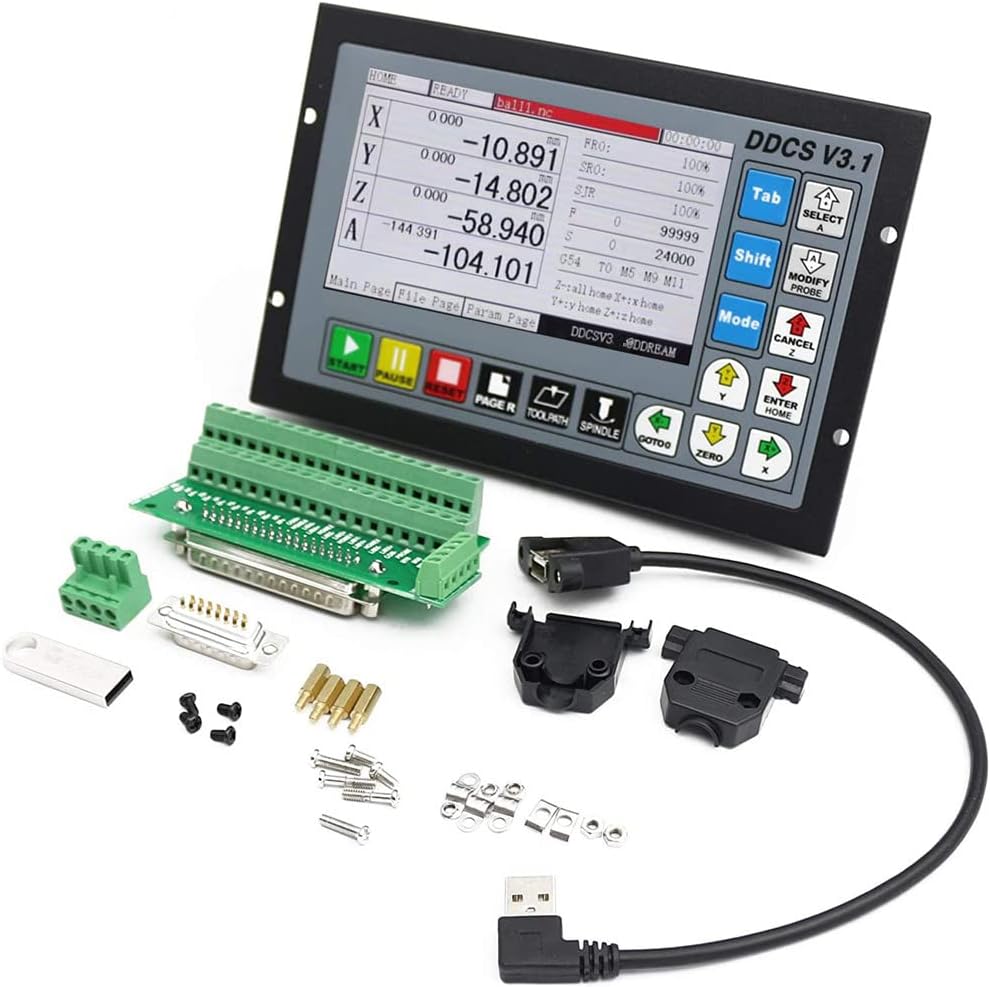
CNCTOPBAOS 4 Axis CNC Motion Controller System,DDCSV3.1 Offline Stand Alone PLC,Servo Stepper Motor Driver Controller for CNC Router Lathe Milling Engraving Machine
You’re looking at a compact, stand-alone 4-axis motion controller designed to run stepper or servo systems without relying on a PC. This controller emphasizes high pulse output (up to 500 kHz per axis), a built-in 5-inch TFT screen, and offline G-code operation from USB, which makes it attractive for small shops and hobbyists who want a dedicated controller.
Key Features
The DDCSV3.1 offers a mix of hardware and firmware features that cover most needs for hobbyist and light industrial CNC machines. You get 16 photoelectric isolated inputs, 3 isolated outputs, ARM9 main control, an FPGA core algorithm chip, and analog spindle control alongside a full keypad for stand-alone operation.
Technical Specifications
Below are the main technical details summarized so you can quickly see whether the controller matches your system requirements. You’ll find power needs, I/O counts, display resolution, and supported functions listed for quick reference.
| Specification | Details |
|---|---|
| Controller Model | DDCSV3.1 (CNCTOPBAOS 4 Axis CNC Motion Controller System) |
| Axes | 4-axis motion control |
| Max output pulse frequency | 500 kHz per axis |
| Display | 5-inch TFT, 480 x 272 resolution |
| I/O | 16 photoelectric isolated digital inputs, 3 photoelectric isolated digital outputs |
| Analog spindle control | 0–10 V (can be modified to PWM) |
| File input | USB flash drive (up to 4 GB supported, no file size limit specified) |
| CPU / Core | ARM9 main control chip, FPGA core algorithm chip |
| Jog functions | Continuous, step, defined distance; custom distance configurable |
| Limit switch type | Supports NPN type limit switch |
| Power | 24 VDC (requires two power supplies: main and IO; total current not less than 1A) |
| Compatibility | FANUC-style G-code compatibility; offline operation without PC |
| Applications | Routers, lathes, milling, engraving, pick & place |
What the numbers mean for you
Those numbers translate into high-resolution control signals and flexible machine integration, which matters if you’re using microstepping drivers or closed-loop servo systems. The 500 kHz pulse rate means you’ll get smoother motion and higher top speeds for a given microstep configuration, assuming your motors and drivers can take advantage of it.

CNCTOPBAOS 4 Axis CNC Motion Controller System,DDCSV3.1 Offline Stand Alone PLC,Servo Stepper Motor Driver Controller for CNC Router Lathe Milling Engraving Machine
Performance and Precision
You’ll notice improved motion smoothness at higher pulse rates, especially when running fine microstepping or closed-loop servo setups. The FPGA-assisted motion control is intended to offload complex calculations and give you stable trajectory generation and interpolation for coordinated 4-axis moves.
Pulse Rate and Motion Control
A 500 kHz pulse capability per axis is useful if you need to drive stepper motors at high microstep resolutions without losing top speed. This is particularly beneficial when you want precision without sacrificing feed rate, and when your mechanical transmission (belts, screws, racks) supports the higher microstepping resolution.
Motors Supported: Steppers and Servos
You can use this controller with stepper drivers or compatible servo drivers, as it outputs step/dir pulses and offers analog spindle control as well. If you plan to run servo motors, confirm your servo drives accept the controller’s pulse/dir or analog signals, or be ready to adapt the analog output for spindle speed control where applicable.
Purchase The DDCSV3.1 4-Axis CNC Controller
Hardware and Build
The controller is built around an ARM9 CPU and an FPGA for motion control tasks, which is a good combination for responsiveness and deterministic behavior. The hardware package includes a 17-key control panel and a 5-inch display so you can operate, jog, and run G-code files without ever connecting a laptop.
Display and Interface
The 5-inch TFT with 480×272 resolution gives you a reasonably clear view of file names, positions, and basic menus while you operate. The physical keypad provides direct access to essential functions; you don’t have to rely on touchscreen gestures or a computer once everything is configured.
I/O and Connectivity
Sixteen isolated digital inputs and three isolated digital outputs give you a solid set of connections for limit switches, probes, E-stops, and accessories. The photoelectric isolation helps protect the controller from noise and ground loop issues that commonly show up on shop-floor wiring.
Power Requirements and Wiring
Powering the DDCSV3.1 correctly is important for stable operation; the controller requires 24 VDC and uses two distinct power sources: one for the main system and another specifically for the I/O. The current requirement is not less than 1A, so make sure your supply can deliver stable voltage and at least that current before powering your system.
Power Supply Setup
You’ll need a 24 VDC supply that can reliably provide the combined draw of the controller and any peripherals it’s powering. The documentation indicates the system can supply power to the I/O ports, so you may not need an additional external supply for sensors and optocouplers, but dimension your supply to include those loads.
IO Power and External Supplies
Because the system supplies IO power internally, wiring is simplified—less need to route extra 24 V lines for switches and sensors. Still, if you plan to drive higher-current coils or external devices from the same supply, give yourself margin or use a separate supply to avoid voltage droop that could cause resets or logic glitches.

Software, Compatibility and G-code Support
This controller aims to be compatible with FANUC-style G-code and provides an offline workflow where you run G-code directly from a USB flash drive. That makes it convenient if you want to prepare NC files on a PC or CAM system, then transfer via USB and run them on the shop floor without an active computer.
Offline Operation and File Handling
Your G-code files can be placed on a 4GB USB flash disk and executed without size limitations in practical terms, so you can safely run longer jobs. The user interface supports selecting files and running them, handling feed rates and spindle commands per the supported G-code set.
Supported G-code and FANUC compatibility
It supports a broad FANUC-compatible G-code subset which is enough for most typical router, lathe, milling, or engraving tasks. Confirm specific advanced G-code commands you need—like canned cycles or special macro features—against the controller’s manual if you run highly specialized routines, since some high-end CAM functions may not be supported.
Setup and Installation Guide
You’ll want to set aside time to plan wiring, choose the correct power supplies, and map IO cleanly before powering the system for the first time. Proper labeling and an incremental testing approach will save you a lot of debugging time later.
Wiring Checklist
Create a checklist of motor driver connections, limit/probe switch wiring, spindle control wiring, and the USB file insertion point. Verify all grounds, shield terminations, and that each input’s isolation is respected to minimize electrical noise and false triggering.
Initial Configuration Steps
On first power-up, set basic parameters: step pulse width, motor pulse mode, microstepping, axis direction, motor steps per unit, and limit switch logic (NPN support is explicitly mentioned). After those basics, perform single-axis jog tests at low speed and a slow homing routine if your machine uses defined limits.

User Experience and Controls
Operating the DDCSV3.1 from its keypad and screen should be straightforward once you’ve learned the layout and menu flow. The controller supports jog in continuous, step, and defined distance modes, letting you fine-tune positioning manually as needed.
Jogging, Manual Control and Keys
With the dedicated keys, you’ll control feed override, spindle on/off, and axis jogs without a computer. The controller allows custom distances for step jogging, which helps when you want to nudge an axis by a specific amount during tool setup.
Screen and Menu Navigation
The 5-inch display presents menus and operational feedback in a compact layout that’s easy to read across the shop bench. You’ll navigate file lists, run screens, and parameter menus; invest time learning where key functions live so you can work efficiently without reaching for the manual often.
Applications and Use Cases
This controller is versatile for routers, small milling machines, lathes, engraving machines, and pick-and-place setups, which makes it well suited to many light industrial and hobbyist tasks. If you need a standalone solution to replace a PC-based control or an older controller lacking features, this unit is worth considering.
Machines it’s best suited for
It’s particularly useful for hobbyist and small-business CNC routers and mills where standalone operation and compact form are priorities. You’ll also find it handy for retrofit projects where you want to remove a computer from the equation and simplify operation.
Small shops vs Industrial settings
For small shops and labs, the unit’s offline capability and built-in display can significantly streamline workflow. In heavy industrial environments with high-duty cycles or complex multi-axis synchronization beyond 4 axes, you might prefer a higher-end controller with industrial networking options and extended coolant/spindle control features.
Pros and Cons
You’ll get a feature-rich, compact controller with strong pulse output, offline G-code operation, and built-in isolation on inputs and outputs. On the other hand, it’s a 4-axis system tailored to certain sizes of projects and may lack some high-end industrial integrations such as Ethernet/IP, Modbus TCP, or advanced spindle drive features built into premium controllers.
Strengths
The controller’s 500 kHz pulse output and FPGA-backed motion calculations help deliver smooth, accurate motion for your motors. The ability to run G-code from USB and operate without a host computer makes it an excellent choice where simplicity and reliability are priorities.
Limitations and Workarounds
You’re limited to 4 axes, so for machines with more axes you’ll need a different solution or an external interpolator. If you require advanced CAM macros or specialized multi-axis kinematics, plan on verifying G-code compatibility or using an external PC-based controller for those specific jobs.
Troubleshooting and Tips
You’ll want to adopt a systematic approach to troubleshooting: check power rails first, verify signal wiring next, and then test firmware settings if motion behavior looks wrong. Keep a log of parameter changes and notes about motor current, microstepping settings, and test moves so you can roll back changes if needed.
Common Issues and Fixes
If an axis won’t move, verify step/dir wiring, check that the pulse polarity and direction settings are correct, and confirm that your motor driver is receiving the expected pulses. For intermittent input triggers, check for loose wiring, avoid running signal cables next to high-current motor cables, and confirm the isolation ground wiring is correct.
Maintenance and Longevity
Keep connections tight and clean, and periodically check for any signs of corrosion or heat damage around terminal blocks. If you operate in a dusty environment, protect the enclosure to prevent debris from degrading connectors or the display.
Comparison with Alternatives
Compared with PC-based controllers, this solution gives you simplicity and an always-available control panel at the cost of some advanced customization flexibility. Compared with premium industrial controllers, it’s more affordable and easier to deploy but lacks some enterprise-level networking and redundancy options.
Who should choose this controller
If you want a reliable, standalone controller for a 4-axis router, mill, or lathe and you value offline operation from USB, this is a strong candidate. It’s also a good retrofit choice if you’re upgrading an older machine and want to remove the PC dependency while gaining modern motion capabilities.
When to choose something else
If you need more than four axes, advanced CNC features like complex macros or high-speed spindle communication via dedicated protocols, or industrial networking and safety integrations, then consider higher-end control systems. Also choose a different controller if you require certified industrial grade hardware for production environments where uptime and service contracts matter.
Setup Examples and Practical Configurations
You’ll want to match the controller’s pulse output rate, motor steps, and driver microstepping to your mechanical hardware to achieve desired feed rates and acceleration. Below are a few example scenarios to help you think through parameter choices.
Example: CNC Router with NEMA 23 Steppers
For a medium router using NEMA 23 steppers with 200 steps/rev and 10 mm pitch lead screws, you’ll typically set motor steps per mm based on microstepping — for example, 200 * 16 microsteps / 10 mm = 320 steps/mm. With 500 kHz pulse capability, you can run high microstep settings while maintaining decent top feed rates without saturating the pulse output.
Example: Small 3-Axis Milling Machine with Servo Drives
If you run closed-loop servos that accept step/dir, the controller’s high pulse output keeps motion smooth and responsive. You’ll configure acceleration, velocity limits, and servo tuning on the servo drive side, while using this controller for trajectory planning and coordination.
Recommended Accessories and Add-ons
You may want to add a decent 24V power supply with a bit of headroom, shielded cables for stepper/servo signals, and an E-stop circuit wired through the isolated inputs. A good-quality USB flash drive and a labeled wiring harness will also make setup and maintenance much faster and less error-prone.
E-stop and Safety Wiring
Wire your E-stop through one of the isolated digital inputs and make sure the outputs that control relays or contactors are placed in series with the spindle and motor power. Test the E-stop functionality thoroughly in various states so you know the machine will stop predictably when needed.
Cables, Shields, and Grounds
Run motor power cables separately from signal and encoder cables, and ground shields at one end only to reduce the chance of ground loops. Use ferrite beads where needed and maintain separation between high-current motor cables and low-voltage logic lines.
FAQ (Frequently Asked Questions)
You’ll likely have specific questions about wiring, limits, or G-code compatibility; below are answers to common questions based on the controller’s features.
Can I use this controller without any PC?
Yes, the DDCSV3.1 is designed for offline, stand-alone use via its keypad and 5-inch display and can run G-code from a USB flash drive. You only need a PC for CAM and G-code preparation if you prefer to prepare files on a computer before transferring them.
Does it support more than 4 axes?
No, this unit is a 4-axis controller. If you need more axes, you will need a different controller or an additional interpolator that’s compatible with your hardware setup.
What type of limit switches are supported?
The controller supports NPN type limit switch wiring as specified, and you should configure limit logic in the parameters during setup. Confirm your switches’ wiring scheme and test homing behavior before putting the machine into production.
Final Thoughts and Buying Advice
If you want a compact, feature-packed 4-axis controller for routers, mills, lathes, or hobbyist CNC machines that runs offline and gives you high pulse rates and isolated I/O, the CNCTOPBAOS DDCSV3.1 is a compelling choice. Before you buy, confirm your motor drivers accept the pulse/dir and/or analog interfaces provided, ensure your power supply meets the 24V/1A minimum with headroom for peripherals, and review the supported G-code set for any advanced features you rely on.
Quick checklist before purchase
Make sure your motors and drivers can use the 500 kHz pulse rate effectively, plan for a suitable 24 VDC power supply with spare capacity, and verify the number of axes and I/O count match your machine’s needs. If all those boxes are checked, you’ll likely be pleased with the convenience and performance this controller brings to your CNC setup.
Shop CNCTOPBAOS DDCSV3.1 4-Axis CNC Controller — Amazon
Disclosure: As an Amazon Associate, I earn from qualifying purchases.