
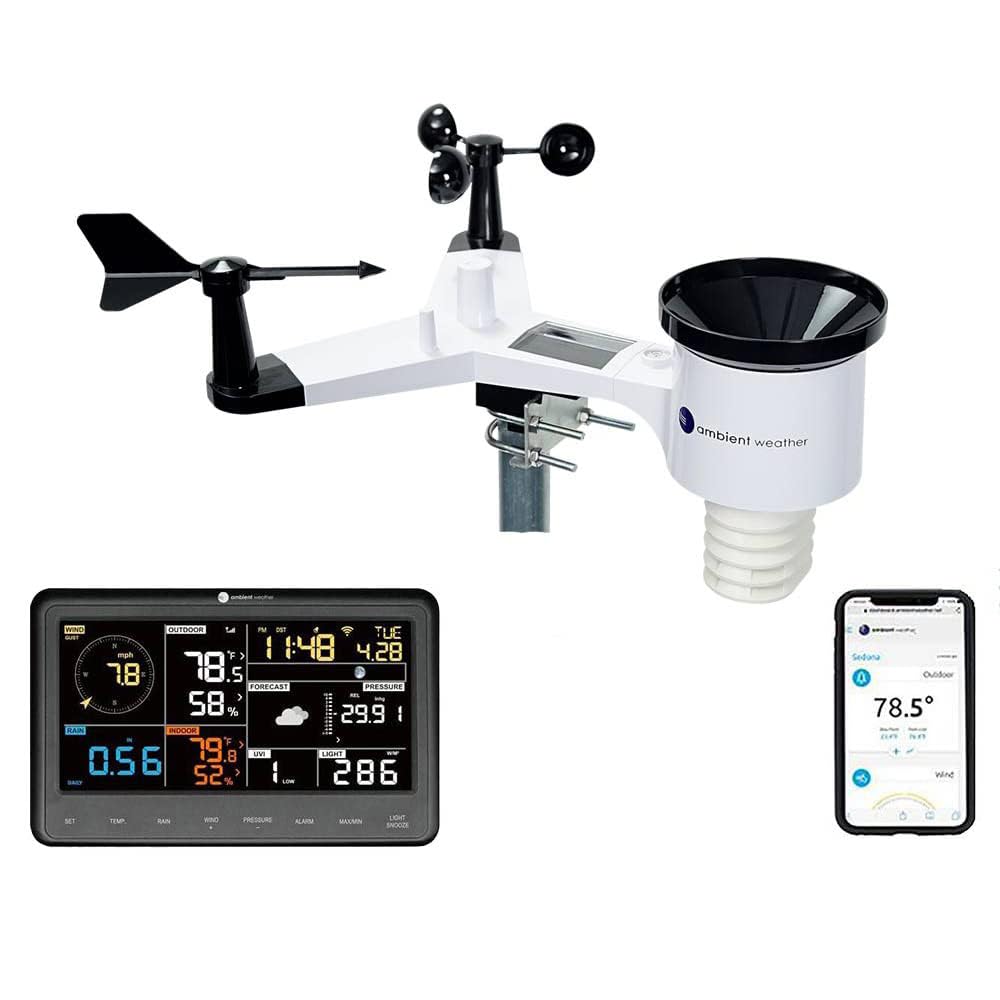
Curious whether the Ambient Weather WS-2000 Smart Weather Station with WiFi Remote Monitoring and Alerts with AWN+ Included will give you the reliable, real-time weather data you want for your home or backyard?
Buy Ambient Weather WS-2000 Smart Weather Station On Amazon
First impressions
When you unpack the Ambient Weather WS-2000, you’ll immediately notice a solid, modern look and a bright TFT color display that’s easy to read from a distance. The integrated sensor array feels well-built and compact compared with multi-piece rigs, and the inclusion of AWN+ for a year adds clear value for anyone who wants advanced online features and alerts.

Ambient Weather WS-2000 Smart Weather Station with WiFi Remote Monitoring and Alerts with AWN+ Included
What’s in the box
You’ll find the station components neatly packaged with a clear parts list and quick-start guide. Below is a breakdown of the typical contents so you can confirm everything is present before you begin installation.
| Item | Purpose |
|---|---|
| Integrated sensor array (anemometer, wind vane, temperature/humidity, rain gauge, UV/solar) | Measures all main meteorological parameters from one mount point |
| TFT color display console | Local readout and configuration hub for viewing data without a phone |
| Mounting hardware (mast clamps, U-bolts, screws) | For installing the sensor array on a pole or mast |
| Power supply / batteries (as applicable) | Powers the console and possibly auxiliary sensors |
| Quick-start guide and warranty card | Setup instructions and warranty information |
| AWN+ activation card / instructions | How to activate your included Advanced Weather Network subscription |
You should check that the mounting hardware, console, and sensors are all included and undamaged before starting installation.
Key features overview
You’ll appreciate a clear list of capabilities when comparing weather stations, and the WS-2000 highlights the features most people care about: multi-parameter sensing, Wi‑Fi connectivity, local display, and service-level features via AWN+.
Integrated sensor array
The WS-2000 uses a wireless all-in-one integrated sensor array that measures wind speed and direction, temperature, humidity, rainfall, UV and solar radiation. You’ll get many readings from a single compact unit, which simplifies mounting and reduces the number of exposed components.
TFT color display
The included TFT color display gives you an immediate visual of current conditions and trends without opening an app. You’ll find it easier to glance at the console for quick checks, and the color interface is friendlier than basic monochrome screens.
AWN+ included
The package includes one year of AWN+—Ambient Weather’s premium online service—giving you advanced graphing, degree day tiles, SMS alerts, premium map layers and layout customization. Your AWN+ subscription starts on the earlier of the date you activate it or one year after purchase, so you won’t lose the subscription time if you register promptly.
Wi‑Fi remote monitoring
The enhanced Wi‑Fi connectivity lets your station transmit data wirelessly to Ambient Weather’s cloud and third-party networks. You’ll be able to monitor real-time and historical data from a phone, tablet, or computer from anywhere.
Imperial and metric units with calibration
You can switch between imperial and metric units for every measurement, and the WS-2000 supports calibration adjustments so you can fine-tune readings based on local references.
Purchase The Ambient Weather WS-2000 On Amazon
Specification breakdown
This table gives you an at-a-glance view of the technical aspects and what they mean for everyday use.
| Specification | Typical Value / Note |
|---|---|
| Sensors | Wind speed, wind direction, temperature, humidity, rain, UV index, solar radiation |
| Transmission | Enhanced Wi‑Fi to Ambient Weather Network and other services |
| Display | TFT color console for local monitoring |
| Units | Imperial and metric selectable; calibration available |
| Alerts | SMS/email/push notifications via AWN+ and app |
| Subscription | AWN+ included for one year; activation timeline explained above |
| Mounting | Pole or mast (hardware included) |
| Weatherproofing | Designed for outdoors; sensors are sealed for typical conditions |
| Integration | Ambient Weather app and cloud; supports third-party uploads (e.g., Weather Underground/CWOP where available) |
Installation and setup
You’ll get the best performance from the WS-2000 when you follow careful installation and setup steps. It’s not complicated, but correct placement matters.
Mounting the sensor
Mount the integrated sensor array on a mast or pole at a standard height (often 10 feet is a reference for wind measurements, though local needs vary). You’ll want the unit clear of obstructions like trees or buildings to avoid skewed wind and temperature readings. The included clamps and hardware make mounting straightforward, but ensure the mast is robust enough to handle sustained winds.
Positioning the console
Place the TFT console indoors where you frequently check it—near an entry, kitchen counter, or home office. You’ll connect the console to your local Wi‑Fi to send data to Ambient Weather’s network.
Connecting to Wi‑Fi and pairing
Follow the console prompts to connect to your Wi‑Fi network. Once connected, the station will begin transmitting to Ambient Weather’s cloud. You’ll then register the station on the Ambient Weather Network (AWN) and activate your AWN+ subscription following the instructions provided.
Activating AWN+
When you register the device on Ambient Weather’s site, redeem the included AWN+ subscription. Remember the subscription will start either at activation or one year after purchase—if you won’t install the station immediately, you can wait to activate to preserve the full year.
Performance and accuracy
You’ll want to know how accurate and reliable the WS-2000 is under real-world conditions. Performance depends on placement, maintenance, and calibration, but the hardware provides strong baseline accuracy for most home and small business uses.
Temperature & humidity
The WS-2000 temperature and humidity sensors typically provide reliable readings when sited away from direct sun and artificial heat sources. You’ll get better results if the sensor is mounted with radiation shielding or in a ventilated, shaded location. Calibration options help you align readings to a known reference if needed.
Wind speed & direction
The integrated anemometer and wind vane are responsive and suitable for backyard wind monitoring. For the most accurate wind data, mount the sensor array unobstructed at an appropriate height—any nearby structures or trees will affect gust and direction readings. The unit averages wind over selectable intervals, so you can see instantaneous gusts and sustained wind.
Rainfall measurement
The WS-2000’s rain gauge captures precipitation effectively for typical residential use. You’ll get accurate daily and cumulative totals if the gauge is level and free of debris. Heavy, driven rain and wind-blown precipitation can create undercatch in any gauge, so location matters.
UV and solar radiation
The UV and solar sensors give you meaningful data for gardening, sun exposure planning, and solar considerations. You’ll see daily totals and peak values that help you understand solar patterns at your site, but positioning to avoid shading during parts of the day is important.

Software, app and cloud experience
A big part of the WS-2000’s value is in its online ecosystem. You’ll use the Ambient Weather app and web dashboard for monitoring, and AWN+ adds analysis and alerting features.
Ambient Weather app and web dashboard
The app presents a clean interface displaying current conditions, historical graphs, and customizable dashboards. You’ll be able to view trend lines, export data, and check live updates. The web dashboard allows deeper customization of layout and graphs if you prefer working on a larger screen.
AWN+ features
With AWN+, you get enhanced graphing, degree day tiles, SMS alerts, premium map layers, and layout customization. You’ll be able to set advanced alerts for thresholds like freeze warnings, high wind, or high UV, and receive SMS or push notifications. Degree day tiles are particularly useful if you’re managing a greenhouse or monitoring heating/cooling needs.
Third-party integrations
You’ll find options to forward data to popular networks like Weather Underground and CWOP (subject to availability and registration). These integrations let you contribute to broader networks and compare your site to nearby stations.
Practical use cases and whom this suits
You’ll find the WS-2000 useful whether you’re a casual hobbyist, a gardener, a serious weather hobbyist, or a small business that benefits from precise local weather data.
- If you garden or manage a small farm, degree days and frost alerts help you make planting decisions.
- If you’re into backyard weather monitoring, the real-time data and app features keep you engaged.
- Schools and educational programs get a hands-on tool for teaching meteorology basics.
- Light commercial uses like small solar installations or construction sites can use alerts and radiation data to plan work.
Maintenance and durability
You’ll want to keep the station in good shape so it continues to produce accurate readings over the years. The WS-2000 is designed for outdoor use, but routine checks help maintain accuracy.
Cleaning and debris removal
Check the rain gauge, anemometer, and solar/UV sensors periodically to remove leaves, spider webs, and dirt. You’ll typically do a visual check every few months and after storms.
Battery and power considerations
The station’s sensors and console rely on the provided power arrangements—follow manual guidance for battery replacement if any auxiliary sensors use batteries. If the console uses an AC adapter, ensure it’s installed in a protected indoor location.
Weatherproofing and wear
The units are sealed against typical weather conditions, but prolonged exposure to salt air or severe storms may accelerate wear. You’ll want to inspect mounts and seals annually.
Recalibration and firmware updates
You can calibrate certain measurements through the console or web interface. Periodically check for firmware updates—Ambient Weather issues updates to improve performance and add features.

Pros and cons
You’ll benefit from a balanced view before buying. This table summarizes the main advantages and potential drawbacks based on typical user experience.
| Pros | Cons |
|---|---|
| All-in-one sensor array reduces complexity and clutter | Integrated design means a single point of failure if the array is damaged |
| Bright TFT color display for easy local reading | Some advanced users prefer separate high-end sensors for maximum accuracy |
| AWN+ included for one year adds significant cloud features | Subscription model means ongoing cost after the included period if you want premium features |
| Strong Wi‑Fi connectivity and third-party integration | Placement sensitivity; performance depends on correct siting |
| Supports imperial and metric units with calibration | May require occasional cleaning and maintenance like any outdoor station |
Comparison with other home weather stations
You’ll often compare the WS-2000 to both cheaper entry-level models and higher-end modular systems. The WS-2000 occupies a middle-to-upper tier for home users: it’s more capable than basic plug-and-play units and more affordable and simpler than high-end modular professional setups.
- Compared to entry-level single-sensor units, the Integrated WS-2000 gives you many parameters in one package with a superior display and online features.
- Compared to modular professional systems, the WS-2000’s integrated design is easier to install but may lack the modular upgrade path some professionals prefer.
Tips for getting the most accurate readings
You’ll improve the station’s accuracy with a few practical steps you can implement right away.
- Mount the station away from reflective surfaces and heat sources (e.g., air conditioners, metal roofs).
- Place the sensor at the recommended height for wind measurement and ensure it’s clear of obstructions in all directions.
- Keep the rain gauge level and free of debris; check it after big storms.
- Shade the temperature sensor from direct sun or use radiation shielding for more precise ambient temperature.
- Regularly clean the solar and UV sensors to avoid dust build-up affecting readings.
- Calibrate using known references if you notice persistent offsets compared to trusted local readings.
Troubleshooting common issues
If you run into problems, these steps should help you diagnose and fix them.
- No data on the app: Check Wi‑Fi credentials in the console, confirm the router is operating, and ensure the console is within range.
- Inaccurate temperature: Confirm sensor shading and check for nearby heat sources; recalibrate if necessary.
- Wind readings inconsistent: Inspect mounting for wobble, make sure the sensor is level, and clear obstructions.
- Rain gauge stuck or not recording: Clean debris, level the gauge, and reset the console if needed.
- Missing AWN+ activation: Verify account registration steps, and use the activation instructions included in the box; contact Ambient Weather support if needed.
Security and privacy considerations
You’ll want to be aware of how your station communicates data and what you share online. Ambient Weather sends data to its cloud when you enable cloud services, and third-party integration requires explicit forwarding. Review privacy and sharing settings in your AWN account and be mindful of publicly sharing the station location if you prefer privacy.
Cost and subscription considerations
The WS-2000’s up-front price covers hardware and one year of AWN+. After the included year, you’ll decide whether to continue AWN+ for advanced features. If you rely on SMS alerts, premium map layers, or advanced graphing, a subscription might be worthwhile. If you only need basic data logging and viewing, the free features may suffice.
Who should buy the WS-2000?
You’ll find this station fits well if you want a balance of simplicity and power:
- You want a single, neat sensor array that measures most key parameters.
- You value a local color display in addition to app/cloud access.
- You want the convenience and extra features of a year of AWN+ without immediate extra cost.
- You appreciate Wi‑Fi connectivity and integration with broader weather networks.
If you need professional-grade sensors with modular upgrades or certified precision for scientific research, you may consider more specialized meteorological equipment.
Final verdict
The Ambient Weather WS-2000 Smart Weather Station with WiFi Remote Monitoring and Alerts with AWN+ Included gives you a powerful, user-friendly package for monitoring your local weather. You’ll like the all-in-one sensor array, the bright TFT display, and the AWN+ subscription that adds useful online features and alerts. With sensible siting and a bit of routine maintenance, this station will serve most home users, gardeners, educators, and small-business owners very well.
Frequently asked questions
Q: How long does the AWN+ subscription last and when does it start?
A: AWN+ is included for one year. The subscription begins on the earlier of (1) the date you activate it, or (2) one year after the date of purchase.
Q: Can I use the station without the AWN+ subscription?
A: Yes. Basic functionality and data reporting to the Ambient Weather network and local console remain available without AWN+. AWN+ adds advanced graphing, SMS alerts, premium map layers, and layout customization.
Q: Does the WS-2000 support Weather Underground and other networks?
A: You can typically forward data to third-party services like Weather Underground and CWOP through the Ambient Weather cloud settings. Check the current integration options during setup.
Q: How accurate is the WS-2000 for temperature and wind?
A: The station gives reliable readings for general home use. Accuracy depends on proper sensor placement, shielding from direct sun, and periodic calibration. For specialized scientific use, consider certified professional sensors.
Q: What maintenance is required?
A: Periodic cleaning of the rain gauge, anemometer, and solar/UV sensors is recommended, along with inspection of mounts and seals. Replace batteries in any auxiliary sensors as needed and check for firmware updates.
Q: Can the station be expanded with additional sensors?
A: The WS-2000 is designed as an integrated station. Some Ambient Weather ecosystems support certain add-ons, but check product documentation or contact Ambient Weather for expansion options compatible with your model.
Q: Is installation difficult?
A: Installation is straightforward if you have basic DIY skills. You’ll mount the sensor on a pole or mast, position the console indoors, connect to Wi‑Fi, and register the station. If you’re uncomfortable with heights or mounting, consider professional installation.
Q: Will it survive extreme weather?
A: The station is built for outdoor use and withstands typical weather conditions. Severe storms, salt exposure, or physical damage may require more frequent inspection and maintenance.
If you want, you can tell me where you plan to site the sensor and I’ll give tailored placement tips and a simple checklist to help you get the most accurate data from your Ambient Weather WS-2000.
Get The WS-2000 Smart Weather Station (Amazon)
Disclosure: As an Amazon Associate, I earn from qualifying purchases.