
Have you been searching for a home weather station that gives you fast, accurate readings and integrates with your smart devices?

Buy The Ambient Weather WS-5000 Ultrasonic Smart Weather Station On Amazon
Product Overview
You’ll find the Ambient Weather WS-5000 Ultrasonic Smart Weather Station positioned as a modern, all-in-one solution for home meteorological monitoring. It combines an ultrasonic sensor array, a rain gauge, a thermo-hygrometer-barometer, and a full-color TFT LCD display into a package designed for frequent updates and easy smart-home integration. If you want real-time, hyperlocal weather data you can act on, this unit is meant to make that simple.
What’s in the box
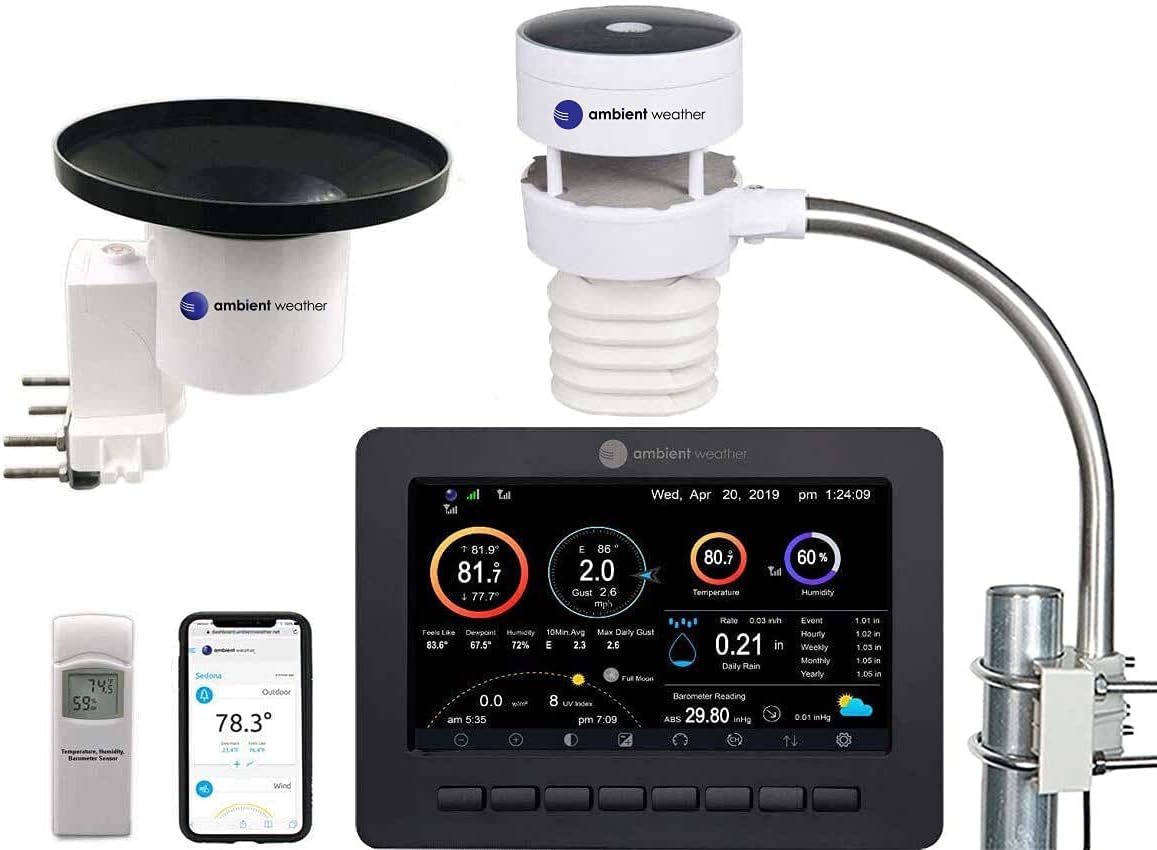
You’ll receive the primary outdoor sensor array, a tipping rain cup, an indoor/outdoor thermo-hygrometer-barometer, and a vibrant TFT full-color LCD display. Everything is packaged to make initial setup straightforward and to put meaningful data at your fingertips quickly. The components are arranged so you can place the sensors in optimal spots and mount the display in a central area inside your home.
Who this is for
If you want more than just basic temperature and humidity — for example, frequent wind readings, smart-home automation triggers, and the ability to share and compare your data — the WS-5000 is aimed at you. You’ll appreciate it whether you’re a hobbyist tracking local storms, a gardener monitoring microclimates, or someone who programs automations based on weather changes.
Design and Build
The design favors modern functionality and durability, with minimal moving parts and weatherproof housings. Your setup will look contemporary on a mast or pole and the display provides a clear visual hub indoors.
Outdoor Sensor Array
The core outdoor unit is an ultrasonic sensor array — meaning there are no moving parts to wear out. You’ll like this if you want low-maintenance hardware and fast response to wind changes. The ultrasonic array measures wind speed and direction by tracking sound waves, which reduces mechanical failure points and increases longevity.
Rain Cup
You get a tipping rain cup that measures rainfall totals and rates. While it’s a traditional design element on many personal weather stations, the cup used here fits with the station’s rapid update cadence to keep your rainfall readings current. You should mount it level and clear of obstructions for the best accuracy.
Indoor/Outdoor Thermo-hygrometer-barometer
This sensor reports temperature, humidity, and barometric pressure, and it’s intended for either indoor mounting or sheltered outdoor placement. You’ll rely on it for baseline atmospheric conditions and trend tracking, particularly for sudden pressure changes that can indicate incoming weather systems.
TFT Full Color LCD Display
The indoor display is a full-color TFT that shows real-time readings and historical trends. You’ll find the visuals intuitive, and the color screen helps differentiate data types at a glance. The display can be wall-mounted or placed on a surface, depending on where you prefer to monitor conditions.
Key Features
The WS-5000 provides frequent updates, reliable data transmission, and smart-home compatibility. These features are designed so you can access and automate based on your station’s data.
Ultrasonic Sensing (No Moving Parts)
Because wind is measured ultrasonically, you’ll avoid many of the mechanical issues that affect traditional cups and vanes. The sensor gives faster and smoother updates after gusts and shifts, and you’ll likely see less drift over time compared with mechanical wind instruments.
Real-Time Updates Every Five Seconds
The station refreshes readings as often as every five seconds, which makes your data feel live and actionable. You’ll notice rapid changes in wind or pressure without long delays, which is useful if you base decisions on short-term weather dynamics.
Smart Home Integrations
You’ll be able to connect the station to IFTTT, Google Home, Alexa, and other automation platforms. That means you can trigger routines — for example, closing vents, sending phone alerts for high winds, or turning on lights when heavy rain starts. If you enjoy automating tasks based on weather, this is a strong selling point.
Enhanced WiFi and Community Network
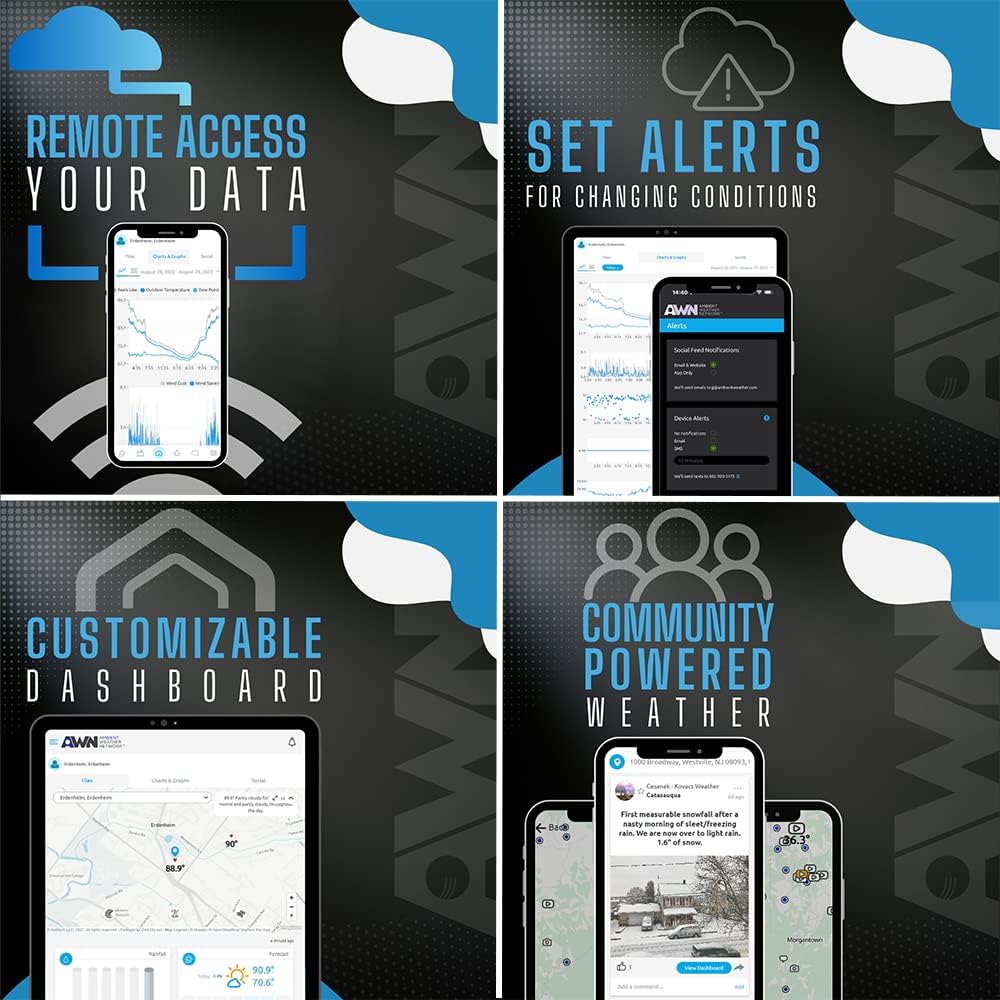
The station includes enhanced WiFi capability to transmit data to online networks, including the Ambient Weather Network. You’ll have optional settings to upload to the world’s largest personal weather station network, allowing you to share your hyperlocal data and customize dashboards. That community aspect can also provide comparative context for your readings.
Purchase Ambient Weather WS-5000 (Ultrasonic Smart Weather Station) On Amazon
Specifications Breakdown
Below is a table to help you quickly understand the main components and capabilities of the Ambient Weather WS-5000 Ultrasonic Smart Weather Station. You’ll find the core specs laid out so you can compare them at a glance.
| Component | What it measures / includes | Why it matters to you |
|---|---|---|
| Ultrasonic Sensor Array | Wind speed, wind direction — no moving parts | Faster updates, lower maintenance, better durability and response to gusts |
| Rain Cup | Rainfall totals and intensity (tipping-cup style) | Essential for precipitation tracking — mount level and clear for accuracy |
| Thermo-hygrometer-barometer | Temperature, humidity, barometric pressure | Core environmental metrics for indoor/outdoor conditions and forecasting |
| TFT Full Color LCD Display | Real-time display of all data, graphs, alerts | Intuitive interface inside your home, configurable readouts |
| Update Frequency | Every 5 seconds (real-time) | Near-live data enables timely decisions and more precise automation |
| Connectivity | Enhanced WiFi; optional upload to Ambient Weather Network | Remote access, sharing, community comparisons, app integrations |
| Smart Home Compatibility | IFTTT, Google Home, Alexa, others | Automate devices and receive voice or push notifications based on conditions |
| Installation | Mounting hardware included (pole/mast recommended) | Flexible placement options, typical for home weather station setups |
| Maintenance | Low (no moving wind parts) | Reduced upkeep, fewer replacement components over time |
Setup and Installation
Setting up the WS-5000 is straightforward, but you’ll get the best data if you follow placement guidelines and take a little extra time for calibration and orientation. You’ll appreciate the quick setup if you’re starting with little technical experience, yet the system is flexible enough for more exacting placements.
Unpacking and Assembly
Open the box and verify each component before starting. You’ll snap parts together for the outdoor sensor array, attach the rain cup, and connect the indoor display. The manual is clear, but you should keep a small toolkit handy for mounting.
Mounting Best Practices
For wind and rain accuracy, mount the sensors on a mast or pole at an appropriate height and away from obstructions. You’ll want:
- Wind sensor at least 10–12 feet above ground and well above any rooftop turbulence.
- Rain cup clear of eaves, trees, and structures that cause splash or shadowing.
- Thermo-hygrometer under a radiation shield or in a ventilated, shaded location if you mount it outdoors.
These placements will reduce microclimate biases and keep your readings consistent.
Connecting to WiFi and Apps
Use the display and Ambient Weather app to connect the station to your home WiFi. You’ll enter your network credentials on the LCD or through the companion app, and then configure any cloud uploads or smart-home integrations. If you use IFTTT or voice assistants, you’ll grant permissions and link accounts through the provider-specific flows.
Calibration and Initial Checks
After mounting and connecting, allow the station to settle for a day or two. You’ll compare readings with a known nearby source or other local stations to validate baseline values, and adjust placement if any parameter seems out of range. Pressure should stabilize quickly; temperature and humidity may vary by placement, guiding you toward refinements.
Performance and Accuracy
You’ll find strong performance across most sensors, particularly due to the ultrasonic wind measurements and the frequent update rate. Practical accuracy will depend on placement and local conditions, but the WS-5000 generally performs well for home and hobbyist use.
Wind Measurements
The ultrasonic array offers fast and reliable wind speed and direction readings, particularly for gusts. You’ll notice smoother transitions and fewer mechanical errors compared with cups and vanes. If you compare it with nearby official stations, you may see good correlation for gusts and sustained wind but some variance due to local sheltering.
Temperature and Humidity
The thermo-hygrometer gives solid temperature and humidity readings when properly shielded from direct sunlight and other heat sources. You’ll want to avoid mounting it where it receives direct afternoon sun or exhaust airflow from buildings. When sited correctly, it tracks local variations well and is suitable for gardening, HVAC considerations, and general comfort monitoring.
Rainfall Readings
The tipping rain cup is a proven method for measuring rainfall accumulation and intensity. You’ll get accurate totals when it’s level and unobstructed. Heavy, wind-driven rain may occasionally cause undercatch in some placements, so you should site the cup in an open area to maximize accuracy.
Barometric Pressure
Barometric readings are accurate and update promptly to show pressure trends that inform short-term weather changes. You’ll use this for forecast signals — falling pressure often indicating incoming fronts and rising pressure suggesting clearing skies.
Smart Home and Software Integration
One of the WS-5000’s strengths is how it integrates with smart-home systems and online networks. You’ll find it powerful for automations and remote monitoring.
IFTTT and Automations
With IFTTT support, you’ll create triggers based on conditions — for example, send a notification when wind exceeds a threshold or switch outdoor lights when rain starts. Automations let you act on weather without constantly checking the display.
Voice Assistants (Google Home, Alexa)
Linking to Google Home or Alexa lets you query conditions by voice and include your station’s conditions in routine actions. You’ll ask for the current wind speed, temperature, or whether rain is expected, and include those checks in multi-step routines.
Ambient Weather Network
Uploading to the Ambient Weather Network gives you a customizable online dashboard and the ability to share your hyperlocal data with a community. You’ll create dashboard tiles, analyze historical trends, and share readings on social feeds. That social and analytic aspect adds a lot of value for those who like to compare and collaborate.
Remote Access and Alerts
You can access your station remotely via the cloud and set alerts for thresholds you care about. You’ll receive push notifications or emails for conditions like frost warnings, high winds, or heavy rainfall, which helps you act immediately when needed.
Data Presentation and App
The display and companion app provide readable, informative layouts with charts and history. You’ll find it easy to monitor live conditions and trends.
TFT Display Features
The color screen is visually helpful in separating data types and highlighting alerts. You’ll customize it to show the most relevant metrics for your daily needs and glance at weather trends without opening an app.
Mobile App and Dashboard
The mobile app and web dashboard present graphs and historic logs to help you analyze patterns. You’ll dig into hourly and daily trends, compare past conditions, and export data if you want deeper analysis in other programs.
Maintenance and Longevity
Because the WS-5000 uses an ultrasonic wind array, maintenance is fairly light. You’ll still do routine checks and seasonal cleaning for optimal operation.
Routine Cleaning
Wipe sensors periodically to remove dust, spider webs, or buildup that could affect accuracy. You’ll also clear debris from the rain cup and check mounts for tightness after storms. Regular inspection helps you catch any problems early.
Battery and Power Considerations
The indoor display typically runs on AC with battery backup in some configurations; the outdoor sensors may be solar-assisted or battery-powered depending on model specifics and settings. You’ll check power status occasionally to avoid interruptions and replace batteries on schedule if used.
Firmware Updates and Support
Firmware updates are provided to add features and fix bugs; you’ll update through the app or the network if available. Ambient Weather has a community and support resources to help with troubleshooting and optimization.
Pros and Cons
You’ll want to weigh the strengths and compromises before purchasing. Below are concise points to guide your decision.
Pros
- Frequent updates (every five seconds) give near-real-time data.
- Ultrasonic wind sensing means no moving parts and lower maintenance.
- Full-color TFT display makes data easy to read at a glance.
- Smart home compatibility (IFTTT, Google Home, Alexa) enables automations.
- Enhanced WiFi and Ambient Weather Network support let you share and compare data.
Cons
- Rain cup requires careful placement to avoid undercatch in windy conditions.
- Proper siting is essential to avoid temperature/humidity biases from nearby structures.
- If you expect professional-grade meteorological precision, some specialized instruments may outperform it in controlled calibration settings.
Field Notes and User Experience
In daily use you’ll appreciate the responsiveness and the convenience of integrating readings into routines. The display is simple to scan each morning, and the frequent updates are particularly useful during quickly changing weather.
Typical Use Cases
You’ll use it to:
- Program alerts for frost or high winds.
- Optimize irrigation or greenhouse environments.
- Track storm events and compare readings with nearby stations.
- Automate home systems based on weather triggers.
Real-World Observations
Users report the ultrasonic wind sensor performs reliably even during gusty conditions, and that online dashboards make it simpler to track longer-term trends. You’ll want to invest time up front in placement to ensure you’re getting the best possible data.
Comparisons and Alternatives
If you’re considering other options, compare the WS-5000 to stations with mechanical anemometers or more specialized rain collectors. You’ll find the WS-5000 balances modern sensing with practical feature sets for most home users.
How it Compares to Mechanical Wind Sensors
Mechanical sensors are cheaper in some cases but require maintenance and can be less responsive. You’ll prefer the ultrasonic method if you want longevity and lower upkeep.
Alternatives to Consider
If you need extremely high-precision rain measurement or professional meteorological equipment, consider higher-end tipping-bucket arrays or specialty sensors. You’ll find that the WS-5000 sits well in the enthusiast and semi-pro market rather than full professional-grade instrumentation.
Troubleshooting Tips
If you encounter issues, these practical steps will usually resolve common problems and get your station back to reliable operation.
Connectivity Issues
If your station isn’t reaching the WiFi network, check signal strength and router compatibility (2.4 GHz vs 5 GHz). You’ll also ensure the SSID/password are entered correctly and consider a WiFi extender if the signal is weak.
Inaccurate Readings
If a parameter seems off, re-check sensor placement and ensure there are no local heat sources or obstructions. You’ll also inspect for debris in the rain cup and clean sensors gently.
Display Problems
If the TFT screen doesn’t boot or is frozen, try power-cycling the display and checking firmware updates. You’ll contact support if problems persist after basic resets.
Warranty and Support
Ambient Weather provides support resources and community forums to help you while setting up and maintaining your station. If hardware defects occur within warranty, you’ll work with the manufacturer or retailer according to their warranty terms. Keep your purchase information and register the product if registration is offered.
Customer Support Options
You’ll find documentation online, FAQs, and community discussions that often answer common questions. For persistent issues, contact Ambient Weather support directly for more targeted troubleshooting and warranty claims.
Final Verdict
If you value near-real-time updates, low-maintenance wind sensing, and smart-home integration, the Ambient Weather WS-5000 Ultrasonic Smart Weather Station is a strong choice. You’ll benefit from the robust feature set, an appealing display, and connectivity options that let you automate and share your local weather data. It’s particularly well-suited for enthusiasts and homeowners who want reliable, actionable meteorological information without frequent hardware upkeep.
Who should buy this
You should buy the WS-5000 if you want rapid updates, minimal mechanical maintenance, and easy smart-home automation. It’s ideal for those who want to monitor microclimates, program weather-triggered actions, or participate in a network of personal weather stations.
Who might look elsewhere
You might look elsewhere if you require laboratory-grade instruments for research or if you prefer an entirely mechanical sensor suite for budget reasons. In those niche cases, specialized equipment might better meet your exact needs.
Frequently Asked Questions
You’ll likely have a few questions before committing — here are answers to common concerns.
How often does the station update?
The WS-5000 can update as frequently as every five seconds, giving you near-real-time readings you can act on.
Does it require a subscription to use cloud features?
No mandatory subscription is required to use basic features; uploading to networks or advanced analytic services may have optional settings or third-party services that have their own terms.
Can it operate without WiFi?
Yes, the station can operate locally and display readings on the TFT screen without WiFi, but you’ll lose remote access, cloud uploads, and smart-home integrations until connectivity is restored.
Is the ultrasonic wind sensor durable in severe weather?
Ultrasonic sensors are robust because they have no moving parts. You’ll still ensure proper mounting and occasional checks after severe storms, but they generally resist wear better than mechanical anemometers.
Installation Checklist
Before you finalize installation, follow this checklist to ensure optimal performance.
- Mount wind sensor at recommended height and clear of obstructions.
- Place rain cup in an open, level location away from overhangs and trees.
- Shield thermo-hygrometer from direct sunlight and artificial heat sources.
- Verify WiFi connectivity and link smart-home integrations.
- Allow the station to stabilize for at least 24–48 hours before relying on long-term averages.
- Register device and check for firmware updates to ensure the latest features and fixes.
If you follow this plan, you’ll maximize the accuracy and utility of your Ambient Weather WS-5000 Ultrasonic Smart Weather Station and enjoy real-time, actionable local weather data for years to come.
Get The WS-5000 Weather Station On Amazon
Disclosure: As an Amazon Associate, I earn from qualifying purchases.