
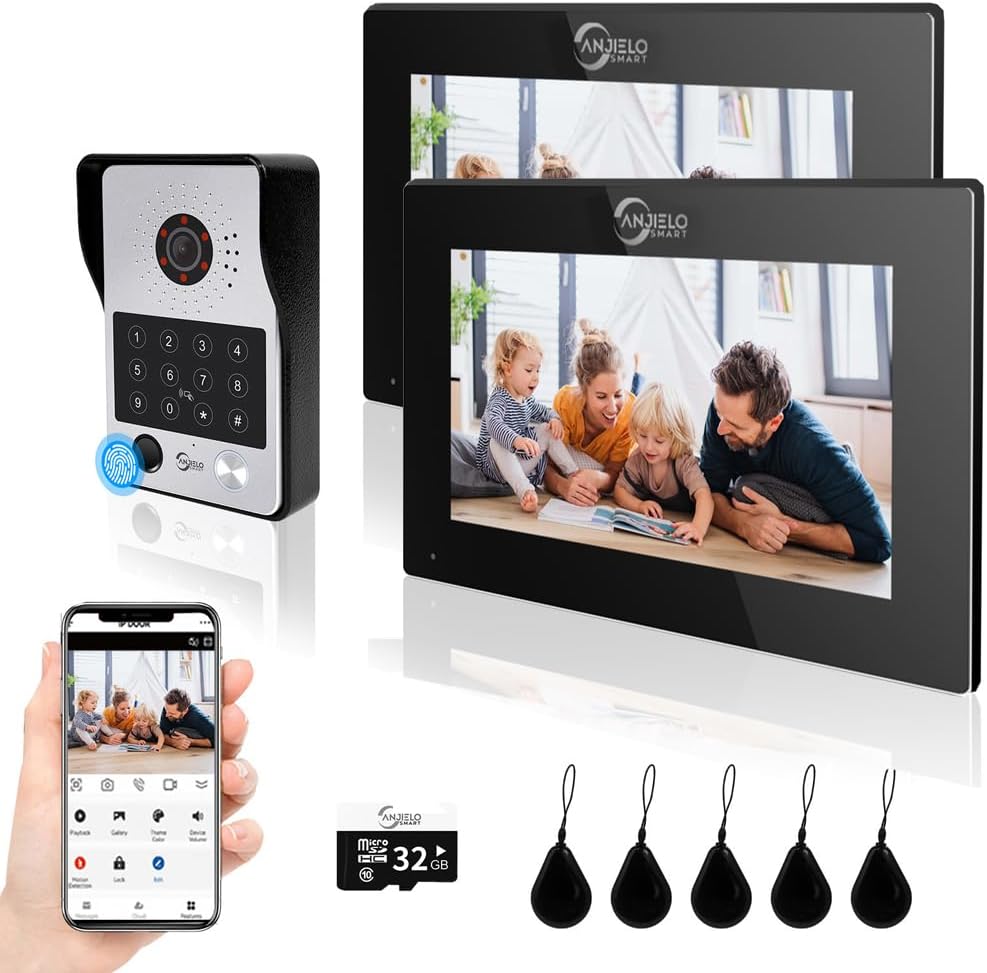
Thinking about upgrading your entryway with a wired video intercom — could the ANJIELO SMART Wired Video Door Phone Apartment Intercom System be the right fit for your home or villa?

Buy ANJIELO SMART Wired Video Door Phone On Amazon
Quick overview of the ANJIELO SMART system
You’ll get a two-monitor package with 7-inch touch screens and a 1080P doorbell camera that supports fingerprint, RFID card, password, app, and monitor unlocking. The system is wired between the monitors and doorbell, but the main monitor connects to your home Wi‑Fi so you can receive alerts and view visitors on your phone or computer.
ANJIELO SMART Wired Video Door Phone Apartment Intercom System,2 Unit 7 Inch Touch Monitor with 1080P HD Camera Doorbell,Supporting Fingerprint,RFID Card,Password Unlocking for Home Villa,Tuya
Key specifications (at a glance)
This table breaks down the main specs so you can quickly see what matters for installation, daily use, and security.
| Item | Specification |
|---|---|
| Monitors | 2 × 7-inch touch screen monitors (hands-free) |
| Doorbell Camera | 1080P HD, 110° wide angle, IR night vision, waterproof/dustproof/vandal-resistant |
| Wiring | Monitor-to-doorbell requires 4-core wired connection (3m cable included per doorbell; extendable) |
| Power | 1.2m external power supply for each monitor included |
| Connectivity | Main monitor connects to home Wi‑Fi; Tuya app support for phone and computer viewing |
| Unlock Methods | 5-in-1: Fingerprint, RFID (IC) card, Password, App, Monitor |
| Included Access Keys | 5 RFID passes/cards included |
| Storage | MicroSD slot, 32GB card included; automatic recording on motion or doorbell press |
| Audio | Two-way audio; inter-monitor internal call forwarding (audio only) |
| Lock Compatibility | Supports 12V electronic locks |
| Viewing Channels | Monitor, smartphone app, computer via Tuya account |
| Extras | Motion detection, automatic snapshot/video, multiple monitors intercom |
What’s in the box
You’ll want to confirm what you receive so you’re ready before installation. Each package typically includes two indoor monitors, one outdoor doorbell camera module, power adapters, a 3m 4-core cable per doorbell for base installation, a 1.2m power cable per monitor, and a 32GB microSD card. Five RFID passes are provided so you can start using card unlocking immediately.
Hardware design and build quality
The monitors use a 7-inch touch screen with a simple, modern look that fits most interiors. Each monitor feels reasonably well-built for a consumer intercom system, with responsive touch controls and clear bezels that minimize accidental presses.
The outdoor doorbell is designed for weather resistance, boasting a waterproof cover and vandal-resistant housing. The 1080P camera and infrared sensor are effectively integrated for day and night visibility. Overall, the hardware is solid for residential and villa setups where you want reliability without overpaying for commercial-grade equipment.
Wiring and installation requirements
You’ll be dealing with a partly wired system: monitor to doorbell requires a 4-core wire connection. The product includes a 3m 4-core cable per doorbell for basic installation and 1.2m power leads for each monitor. If your doorbell location is farther away, you can extend the run using standard 4-core wire.
Installation steps are straightforward but require basic electrical and light carpentry skills. You’ll mount the outdoor camera at the door, run the 4-core cable to the monitor location(s), connect the power supplies for the monitors, and optionally wire a 12V electronic lock if you plan to use remote unlocking. The main monitor then connects to your home Wi‑Fi to enable mobile and remote viewing features.
Wiring tips and best practices
When you handle the wiring, you should route the cables away from high-voltage lines and use appropriate conduit if running outdoors or through walls. Keep the 4-core cable as short as practical to reduce interference, but feel free to extend using consistent gauge wire—match the existing cable gauge to keep signal stability. Label each cable during installation so you can troubleshoot easily later. If you’re uncomfortable with electrical work, hire a qualified installer to ensure the lock and power wiring are safe and code-compliant.
Purchase ANJIELO SMART Wired Video Door Phone
Monitor features and user interface
Each 7-inch monitor offers touch operation and hands-free talking, with a clean interface for viewing live video, playback, and unlocking. The screen displays clear camera feeds and provides quick access to call history, user management (for fingerprints and cards), and settings.
You’ll appreciate that the main monitor serves as the hub for Wi‑Fi and mobile connectivity, while the second monitor can act as an internal extension for answering calls and unlocking doors. Inter-monitor audio call forwarding lets you communicate through the house without needing to go to the door.
Doorbell camera performance
The 1080P camera delivers sharp daytime video with a 110° field of view that covers most porch areas without severe fisheye distortion. Night vision uses infrared to illuminate dark scenes, producing recognizable faces up to a reasonable distance from the door. The camera’s waterproof and dustproof design will handle typical weather conditions, and the vandal-resistant build helps against tampering.
Keep in mind that image quality depends on lighting and placement. Overhead bright lights behind visitors or very wide entrances will still challenge the sensor, but for most front door installations you’ll get a reliable, clear image.
Video quality, latency, and viewing options
Video streams locally to the monitors with very low latency, making real-time conversation feel natural when someone rings the bell. When you connect the main monitor to Wi‑Fi for mobile viewing via the Tuya app, latency increases slightly depending on your network upload speed. You can also view the feed on a computer by logging into your Tuya account.
If you want continuous streaming to the cloud or multiple remote viewers simultaneously, check your home internet upload bandwidth. The included 32GB microSD records events locally, which is useful if you prefer local storage over cloud subscriptions.
Audio quality and two-way communication
Two-way audio is clear enough for normal conversation at the door. The hands-free monitors use a built-in microphone and speaker that pick up voice well without needing to shout. You can answer calls and talk to visitors from any monitor or from your smartphone via the Tuya app. Inside the house, monitors support internal audio-only calls (call forwarding) so you can pass messages between rooms.
If you have a very noisy entryway (windy porch, busy street), you might notice some background noise. In such cases, mounting the camera in a slightly sheltered spot and configuring microphone sensitivity in the settings can improve clarity.
Unlock methods: 5-in-1 flexibility
You’ll have five unlocking options to suit different preferences: fingerprint, IC (RFID) card, password, app control, and unlocking from any monitor. This gives you a lot of flexibility — you can make quick access for family via fingerprints and cards, set temporary passwords for guests, and open the door remotely from your phone when you’re away.
The product comes with five RFID passes, so you can assign them to frequent users quickly. Fingerprint recognition is useful for hands-free entry, but be sure to enroll fingerprints carefully and clean the sensor periodically for reliable reading.
How each unlocking method works
You can register fingerprints and cards on the monitor interface. Passwords are set and managed through the monitor and app, and app unlocking requires your Tuya account and Wi‑Fi connection to the main monitor. Monitor-based unlocking is immediate and requires the 12V electronic lock wiring to be connected.
You’ll want to set up multiple unlock methods for redundancy — for example, have a fingerprint and a card for each family member so access isn’t lost if one method fails.
Storage, recording, and motion detection
The system uses motion detection to trigger automatic recording or snapshots when someone presses the bell or motion is detected in the camera’s field of view. A 32GB microSD card is included, and recordings are stored locally on that card.
You can review footage on the monitor or on your mobile device via the Tuya app. If you need more storage, the system supports larger microSD cards — check the maximum supported capacity in the manual — and you can periodically back up important clips to your computer.
Tuya app integration and remote access
You’ll connect the main monitor to your home Wi‑Fi and link it to the Tuya Smart app to receive calls and view camera feeds remotely. Tuya also lets you log in on a computer to view the surveillance screen, which is handy if you prefer a larger display.
App functionality includes live view, playback of recorded clips, remote unlocking, user management, and device settings. App responsiveness depends on your internet connection; a stable upload speed from your home network helps ensure smooth remote viewing.
Intercom and internal communication features
Inside, monitors support internal audio-only calls for quick communication between rooms. If someone rings the doorbell, all monitors and linked phones will ring, and you can answer from any of them. You can also transfer calls or forward them between monitors to ensure someone inside receives the visitor notification.
This internal calling feature is practical in larger homes where one monitor might be on a different floor, letting you communicate quickly without shouting or walking to the entrance.
Compatibility with electric locks and access control
The system supports 12V electronic locks, so you can wire an electric strike or magnetic lock to the system for remote unlocking. Verify the current draw and lock type before wiring—some high-power locks require a dedicated power supply or relay to prevent overload. If you plan to integrate other access control systems, check compatibility or consult an installer.
Security and privacy considerations
You’ll want to secure the Tuya account with a strong password and enable any available two-factor authentication to prevent unauthorized access. Regularly check the list of paired devices in the app, and remove any unknown devices.
Local recordings on the microSD card are as secure as the physical device; anyone with physical access to the monitor or camera could potentially remove the card. Consider mounting the monitors out of easy reach and securing the doorbell camera with tamper screws where possible.
Setup checklist before you start
Before you begin installation, gather the right tools and materials. You’ll need basic tools for mounting, wire strippers, a multimeter, screws and anchors, and possibly conduit. Confirm you have a suitable 12V electronic lock if you plan to enable remote unlocking, and ensure your Wi‑Fi reaches the main monitor location for reliable app connectivity.
Label your wires and keep the installation manual handy. If you’re uncertain about wiring the lock or power, schedule a professional to handle that part to avoid safety issues.
Common setup issues and quick fixes
If you run into issues, these troubleshooting pointers will help. If the monitor won’t connect to Wi‑Fi, verify you’re on a 2.4GHz network—many devices don’t support 5GHz. If fingerprints fail to register, clean the sensor and re-enroll the fingerprint, ensuring the finger is placed consistently. If the doorbell camera shows a blank screen, check the 4-core connection and power supply, and confirm the camera cable is properly seated.
For audio problems, inspect volume settings on both the monitor and app, and check network latency for remote audio. If recordings aren’t saved, confirm the microSD is properly inserted and formatted via the monitor settings.

Pros of the ANJIELO SMART Wired System
You’ll find several strengths to like about this system. The 7-inch touch monitors are easy to use and intuitive, and the 1080P camera provides reliable video day and night. The 5-in-1 unlocking options give you great flexibility for access control, and Tuya integration makes remote viewing and unlocking convenient. The inclusion of a 32GB card and physical cabling for stability are nice bonuses for a home- or villa-grade system.
Cons and limitations to consider
You should be aware of a few trade-offs. The wired doorbell-to-monitor requirement means more installation work compared to fully wireless doorbells. Remote features depend on your home internet upload speed, and advanced users may miss cloud storage options without an additional subscription. The fingerprint and RFID performance is good for everyday use, but it’s not enterprise-level — keep backups (cards or passwords) for redundancy.
Who this system is best for
You’ll like this system if you want a reliable wired doorphone with modern features, especially in homes or villas where Wi‑Fi is available at the main monitor. If you prefer local storage, multiple monitor support, and varied unlocking methods, this package is a strong value. It’s also a good fit if you want a system that integrates into the Tuya ecosystem for smart home control.
Who might want to consider alternatives
If you need a truly wireless installation with minimal wiring, battery-powered doorbells may be better for you. If you require high-end commercial features like cloud-managed multi-site access control, enterprise-grade encryption, or integration with professional surveillance systems, look for higher-tier commercial solutions. Also consider other products if you need very large multi-unit setups with dozens of indoor monitors.
How it compares to typical competitors
Compared with common consumer intercoms, the ANJIELO SMART system balances features and price well. It offers physical monitor units (often absent in app-only doorbells), multiple local unlocking methods, and Tuya smart integration. Competitors may offer cloud-only storage with subscription fees, or purely wireless setups that sacrifice the reliability of a wired doorbell connection. Evaluate how much you value local storage and touch-screen monitors when comparing.
Maintenance and long-term care
You’ll want to keep the camera lens and fingerprint sensor clean for optimal operation. Periodically check mounting screws and weather seals on the doorbell for signs of wear. Verify firmware updates through the Tuya app occasionally, and back up important recordings from the microSD card if you need them for long-term storage.
Tips to get the best performance
- Mount the camera at around chest- to head-height (about 1.4–1.6m) to get the best face framing for visitors.
- Use a sheltered position if your porch is exposed to heavy rain to reduce glare and water accumulation.
- Enroll multiple fingerprints and carry at least one RFID card as a backup.
- Test your Wi‑Fi speed at the monitor location before relying on remote access—consider a Wi‑Fi extender if the signal is weak.
- Label wiring during install to simplify future troubleshooting.
Troubleshooting checklist
If something feels off, walk through this checklist: confirm power to monitors, verify the 4-core wiring connections, ensure the main monitor is connected to your 2.4GHz Wi‑Fi network, check that the microSD card is formatted and recognized, and re-enroll fingerprints if recognition becomes unreliable. For persistent faults, contact seller support or a qualified technician.
Frequently asked questions (FAQs)
You’ll likely have practical questions about daily use; here are some common ones.
-
Can you extend the 4-core cable distance?
Yes. You can extend the 4-core wired run with compatible gauge wire. Keep runs tidy and avoid interference by routing away from high-voltage cables. -
Will the system work without Wi‑Fi?
Basic local functions (monitor-to-doorbell calling, unlocking from monitors) work without Wi‑Fi. Remote viewing and app control require the main monitor to be on your Wi‑Fi network. -
How many users can you register?
The system supports multiple fingerprints and RFID cards, but check the manual for exact limits. In practice, you can register multiple household members and a few guest credentials. -
What happens if the microSD card fills up?
Most systems overwrite older recordings automatically when storage is full. Verify behavior in the device settings and back up important clips when needed.
Final verdict and buying recommendation
You’ll get a well-rounded wired video intercom with thoughtful features suited for home and villa use. The ANJIELO SMART system combines reliable wired connections for the doorbell with Wi‑Fi-enabled remote access, multiple unlocking methods, and local recording. If you value a physical indoor monitor, varied access methods (fingerprint, card, password), and Tuya app integration, this product is a strong contender for a reasonable price.
If you prefer an entirely wireless installation or require enterprise-level access control, consider alternative solutions. Otherwise, this system gives you a practical, flexible, and friendly-to-use intercom setup that should cover most residential needs effectively.
Alternatives worth considering
If you want options to compare, you might look at these types of products: ring- or nest-style wireless doorbells for minimal wiring and subscription cloud services; Hikvision or Dahua kits for higher-end video and commercial features; or other Tuya-compatible intercoms that offer slightly different monitor sizes or additional camera channels. Each alternative trades off wiring, local storage, and cost in different ways.
Closing tips before you buy
Make sure your planned monitor location has good Wi‑Fi coverage, measure cable runs before ordering extra wiring, and decide in advance whether you’ll add a 12V lock. Think about how many people will need fingerprints or RFID cards and prepare those lists for faster setup. With those steps, you’ll be ready to install and enjoy a more secure and convenient entry system.
If you want, I can help you create a simple wiring diagram tailored to your door and monitor locations, or list recommended 4-core cable gauges and tools for the installation.
Get The ANJIELO SMART Wired Video Door Phone Now
Disclosure: As an Amazon Associate, I earn from qualifying purchases.