
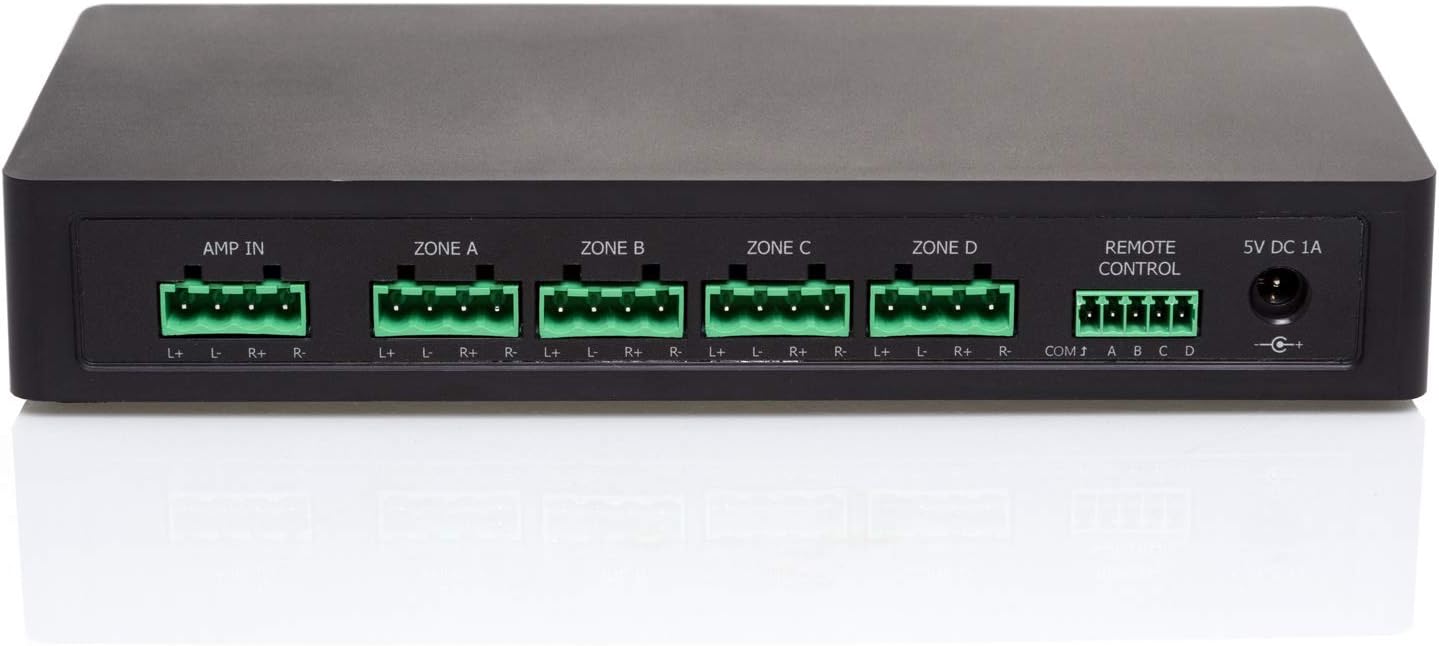
Looking for a way to control multiple speaker pairs from one amplifier without walking back to your stereo every time?
Buy The Audioflow 4-Way Speaker Switch Selector Box On Amazon
Quick overview of Audioflow 4 Way Speaker Switch Selector Box Smart Wi-Fi
You can connect up to four pairs of speakers to a single amplifier and switch between them using the Audioflow app or voice commands. The Audioflow 4 Way Speaker Switch Selector Box Smart Wi-Fi gives you remote control through Wi‑Fi and supports Amazon Alexa integration for hands‑free switching.
What’s included and what to expect
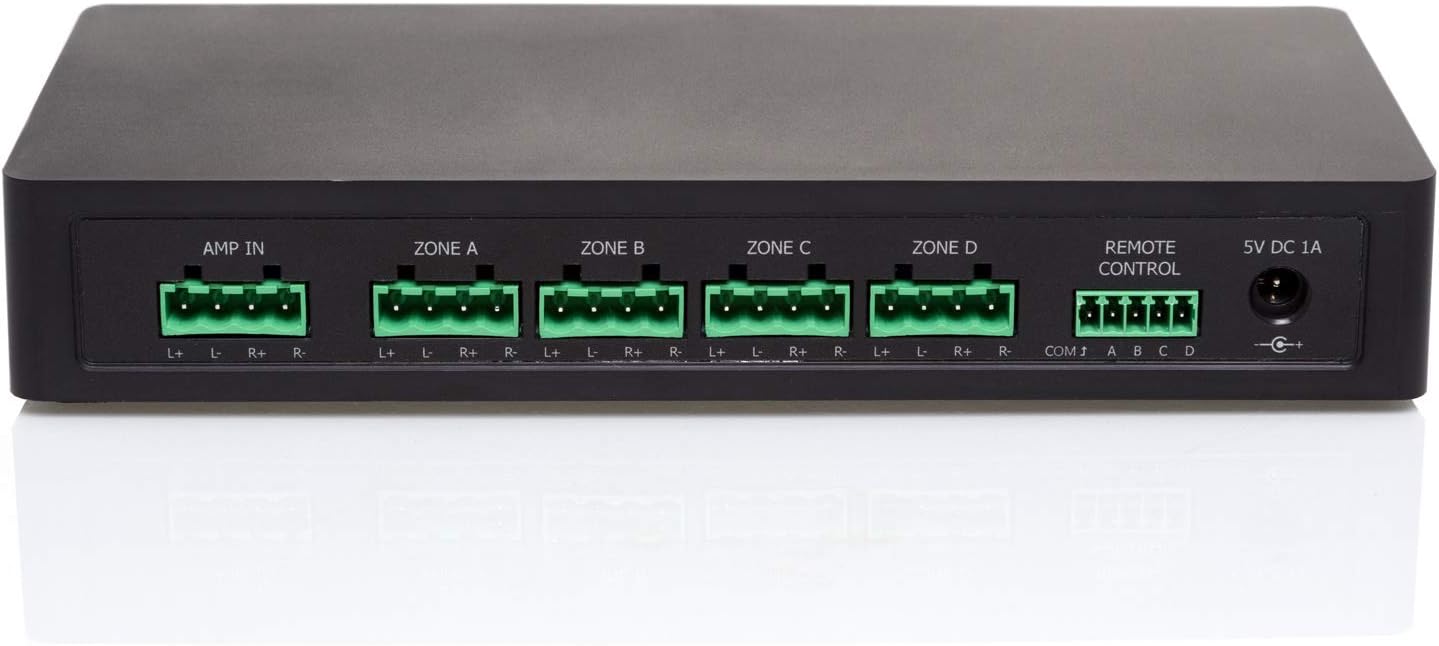
The package typically includes the selector box unit, a basic power supply or adapter (check the product listing for your region), and a quick-start guide to help you pair the unit with the app. You should expect a compact box with binding posts or speaker terminals for four speaker outputs and one stereo input for your amplifier.
Key features at a glance
The main selling points are app control, Alexa compatibility, and the ability to handle amplifier outputs up to 300W at 8Ω. It’s designed for use with 8Ω speakers and amplifiers that can accept a minimum 4Ω load. These features let you switch speaker pairs without manual rewiring and let you include whole-house or multi-room setups under simple control.

Product specifications table
This table breaks down the most important technical and practical details so you can quickly compare what matters to you.
| Feature | Details |
|---|---|
| Product name | Audioflow 4 Way Speaker Switch Selector Box Smart Wi-Fi |
| Speaker outputs | Up to four pairs (4 speaker outputs) |
| Input | Single stereo amplifier input |
| Impedance | For use with 8Ω speakers; amplifier must accept 4Ω minimum |
| Power rating | Up to 300W at 8Ω (check amplifier and speaker ratings) |
| Control methods | Audioflow app (iOS / Android), Amazon Alexa voice assistant |
| Connectivity | Wi‑Fi (for app and Alexa control) |
| Typical connectors | Binding posts / speaker terminals (gold-plated or screw type varies) |
| Use case | Home audio switching, multi-room speaker routing |
| Safety notes | Ensure amplifier can handle 4Ω if using multiple outputs in parallel; avoid overheating and overloading the amp |
Purchase Audioflow 4-Way Speaker Switch On Amazon
Setting up your Audioflow 4 Way Speaker Switch Selector Box Smart Wi-Fi
You’ll find setup straightforward if you follow the steps and check wiring carefully. The physical wiring is the same as a manual speaker selector, but pairing with the Wi‑Fi and app is an extra step that gives you remote control.
Physical connections and wiring
Start by powering off your amplifier and connecting the amplifier’s speaker outputs to the selector box input terminals. Then connect your speaker pairs to the four output terminals on the selector box. Make sure polarity is correct (positive to positive, negative to negative) and use snug, solid connections to minimize resistance. Once wiring is done and checked, power on the amplifier and the selector box per the instructions.
Power and safety checks
Before switching anything on, confirm the power rating of your amplifier and speakers and that the wiring is secure. The selector box is rated for amplifier outputs up to 300W at 8Ω, but you should still avoid running continuous maximum power unless you’re certain all pieces can handle it. Also verify that your amplifier can drive a 4Ω load if you plan to engage multiple outputs simultaneously.
Connecting to the Audioflow app
Download the Audioflow app from the App Store or Google Play. In the app, follow prompts to add a new device, put the selector box into pairing mode, and select your home Wi‑Fi network. You’ll complete any additional steps like naming speaker zones and assigning controls. Once paired, you can switch speaker outputs directly from your phone.
Integrating with Amazon Alexa
If you use Alexa, enable the Audioflow skill in the Alexa app, log in with the same account you used in the Audioflow app, and discover devices. You can set up custom names for each speaker pair (like “Patio speakers” or “Living room”) to make voice commands natural and intuitive. After linking, you’ll be able to say things like “Alexa, turn on Living Room speakers” or “Alexa, switch to Bedroom speakers” depending on your configuration.
Daily use: how control works and what you can do
Using the unit for daily switching is simple and convenient once everything is named and connected. You’ll probably switch zones via phone app, voice assistant, or physical buttons if the box includes them.
App controls and user interface
The Audioflow app typically presents clear icons for each speaker pair and a master input. You can tap to turn outputs on or off, and some versions may include scheduling, grouping, or preset capabilities. Because you can assign names to outputs, you’ll find it easy to manage multiple zones without guessing which terminal is which.
Voice control with Alexa
Alexa integration makes switching hands‑free. After setup, you can give commands to turn zones on or off, toggle playback, or include the selector as part of routines. If you already use Alexa for lighting or thermostats, this feels like a natural addition to the ecosystem.
Physical controls and fallback
Some units offer physical buttons on the box for local control if the app or Wi‑Fi is unavailable. Having both app control and on‑box controls gives you redundancy—useful if your network is down or for guests who don’t have the app.

Sound quality and audio performance
You’ll be concerned about whether a selector box alters the audio signal. In most well-made consumer units, any impact is minimal, but quality wiring and proper connections are essential.
Signal integrity and any sonic impact
A good selector box uses solid binding posts and internal switching that maintains good contact. You might notice no measurable change in most listening contexts. However, poor connections, cheap wiring, or oxidation over time can introduce resistance and slightly reduce dynamics. Use quality speaker cable and keep terminals clean for the best result.
Crosstalk and isolation
Depending on internal design, there may be negligible crosstalk between outputs when they’re isolated; the unit should provide adequate separation so audio on one pair doesn’t leak into another. If you plan to run multiple zones at high levels simultaneously, verify performance in your own environment to be certain the box meets your expectations.
Amplifier compatibility and impedance considerations
This is one of the most important areas to understand. You need to be sure your amplifier can safely drive the speaker load presented by the selector box and the number of outputs you turn on simultaneously.
Understanding 8Ω speakers and 4Ω loads
The product is designed for 8Ω speakers and for amplifiers that can accept a 4Ω load. If you were to wire two 8Ω speakers in parallel, the resulting impedance is 4Ω. Under that condition, the amplifier must be stable into 4Ω loads. If your amp cannot handle 4Ω, avoid switching on multiple outputs that create parallel loads.
Theoretical impedance table
This table shows what happens to impedance when you wire 8Ω speakers in parallel. Use it as a guideline to estimate load, but always confirm with your amplifier’s specs.
| Number of 8Ω speakers connected in parallel to one channel | Resulting impedance (approx.) |
|---|---|
| 1 speaker | 8Ω |
| 2 speakers | 4Ω |
| 3 speakers | 2.67Ω |
| 4 speakers | 2Ω |
If you activate more than two 8Ω pairs in a parallel configuration, you’ll present an impedance lower than 4Ω, which many consumer amplifiers cannot safely handle. The selector box may allow connecting multiple outputs, but you must manage which outputs are energized at once to avoid damaging your amp.
Recommendations for safe operation
If you plan on having multiple zones active, either ensure your amplifier is stable into lower impedances or avoid switching on more than one speaker pair per amplifier channel at a time. Another safe approach is to use speaker pairs with higher impedance, or use separate amplifiers for different zones.
Build quality, design, and installation tips
The physical construction affects reliability and usability. Look for sturdy terminals, solid casing, and a design that sits comfortably in your AV rack.
Terminals and connectors
You’ll want binding posts or screw terminals that accept bare wire, banana plugs, or spade lugs. Good terminals clamp tightly and won’t loosen with vibration. If your unit uses plastic connectors, be mindful of long-term durability.
Enclosure and rack-mount options
Smaller home units are often plastic or lightweight metal enclosures. If you plan to mount the selector in an AV rack, verify the dimensions and whether rack-mount kits are available. Keep the unit in a ventilated area and away from excessive heat.
Cable recommendations
Use appropriate gauge speaker cable—14 AWG for runs under 25 feet at normal power, and 12 AWG or thicker for longer runs or higher power. Good soldering or crimping on terminals prevents intermittent contact. Keep speaker cables separated from power cables when possible to reduce noise pickup.
App experience and network considerations
Your enjoyment of the smart features depends on a stable Wi‑Fi connection and a well-designed companion app.
Pairing and network reliability
Pairing typically takes a few minutes. Put the unit close to your router initially during pairing, then relocate if needed. If your home network is congested, you might notice delays in response time. For mission‑critical audio control, consider a dedicated access point or a stronger Wi‑Fi mesh node.
App features you’ll appreciate
The app usually gives you on/off switching, named zones, and potentially scheduling. If the vendor supports firmware updates, you’ll be able to receive improvements via the app. Check for frequent updates and active developer support, as that indicates a healthier product ecosystem.
Pros and cons
Laying out the strengths and limitations helps you decide whether this product fits your needs.
Pros
- You can control up to four speaker pairs from a single amplifier, reducing the need for rewiring.
- Wi‑Fi and Alexa control give you convenient remote and voice operation.
- Compatible with 8Ω speakers and provides a simple solution for multi‑zone setups in a single room or small home.
Cons
- If you switch multiple outputs in parallel, you may present lower than 4Ω to your amplifier; you must check amplifier stability.
- Wi‑Fi control adds network dependency—if your network is down, you fall back to physical controls only.
- Some users may prefer independent amplifiers per zone for true multi‑room, multi-source flexibility.
Troubleshooting common issues
If something doesn’t work as expected, you can usually resolve it quickly with a few checks.
No audio from a speaker zone
First check wiring polarity and terminal tightness. Next, ensure that the zone is active in the app and that the amplifier is sending signal to the selector box. If the problem persists, swap speaker wires to a different output to determine whether the issue is the speaker, cable, or the selector output.
App won’t pair or disconnects
Bring the selector box closer to your router and retry pairing. Verify that your phone is on the same Wi‑Fi network and that the router isn’t blocking device discovery protocols. If disconnects are frequent, try assigning a fixed IP to the unit or improve Wi‑Fi coverage.
Amplifier overheating or protection mode
This usually indicates an impedance problem or a short. Power off immediately and check the number of active outputs: if more than one output is enabled and your amp isn’t stable into lower impedance, reduce the active outputs. Inspect for shorted speaker wires or loose strands touching chassis components.
Who should buy the Audioflow 4 Way Speaker Switch Selector Box Smart Wi-Fi
This product is a good fit for homeowners who want simple multi‑speaker switching in a house with a central amplifier. If you have a single stereo amplifier and want to route audio to multiple rooms or outdoor areas intermittently, this box gives you that flexibility without complex wiring changes.
Ideal use cases
- You want to listen in different rooms without moving speaker cables.
- You want to include simple voice commands as part of your home automation.
- You have 8Ω speakers and an amplifier that can either accept a 4Ω load or you plan to keep only one or two outputs active at once.
Cases where you might want something else
If you need independent amplification per room, multi-source distribution, or advanced DSP and volume control per zone, consider dedicated multi-zone amplifier systems or a matrix amplifier setup. The Audioflow selector is best for switching, not full multi-zone amplifier control.
Comparisons and alternatives
Compare this unit with simpler manual speaker selectors and with more advanced multi-zone amplifiers to understand trade-offs.
Manual speaker selector vs. Audioflow smart selector
A manual selector is cheaper and doesn’t rely on Wi‑Fi, but every control must be performed physically. The Audioflow unit adds wireless convenience and voice control at a modest premium.
Multi-zone amplifiers or matrix switchers
If you want separate sources and independent volume per zone, a multi-zone amplifier or matrix switcher is the professional solution. These options cost more but provide per-zone mixing, volume control, and source selection—capabilities the Audioflow selector does not replace.
Maintenance and longevity tips
Keep the unit and connections in good shape to maximize lifespan.
Cleaning and terminal care
Periodically check terminals for tightness and clean contacts if oxidation appears. Avoid over-tightening binding posts as this can strip threads or damage connectors.
Firmware and software updates
Check the Audioflow app for firmware updates and apply them when available. Updates can improve stability, add features, or patch security issues related to Wi‑Fi connectivity.
Frequently asked questions (FAQ)
These are common concerns other users often have and practical short answers you’ll find useful.
Q: Can I play different sources to different speaker pairs?
A: No. The selector box routes a single amplifier input to one or more speaker outputs. It doesn’t provide independent source selection per zone. For multi‑source routing you’ll need a matrix or separate amps.
Q: What happens if I turn on all four speaker pairs?
A: If all are 8Ω and wired in parallel, the total impedance will drop (see impedance table). That could present a load below 4Ω and potentially damage an amp that isn’t rated for such low loads. Avoid enabling too many outputs simultaneously unless you confirm your amplifier can handle the resulting load.
Q: Will using the selector box reduce sound quality?
A: Properly made selector boxes and good cables generally introduce negligible, if any, audible degradation. Maintain good connections and use proper gauge cable for best results.
Q: Do you need to power the box for switching?
A: The Wi‑Fi and app features require the box’s power supply. Some units may still allow manual switching without power, but smart functions will not work without mains power.
Final thoughts and recommendation
If you want convenient remote and voice control to switch up to four speaker pairs from one amplifier and you use 8Ω speakers with an amplifier that can accept 4Ω loads (or you plan to avoid presenting loads below your amp’s rating), the Audioflow 4 Way Speaker Switch Selector Box Smart Wi-Fi is a practical and user‑friendly choice. You’ll appreciate the app and Alexa integration for quick switching and the ability to name zones so guests can control areas without confusion.
You should balance convenience with care: pay attention to impedance and amplifier compatibility, use good speaker cable, and keep firmware up to date for smooth operation. For simple multi‑zone switching without added amplifiers, this unit gives you a modern, smart upgrade to the classic speaker selector.
Get The Audioflow 4-Way Speaker Switcher — Amazon
Disclosure: As an Amazon Associate, I earn from qualifying purchases.