
? Looking for a reliable, revenue-grade submeter that hooks into cloud monitoring with minimal fuss?

Buy DAE P252-200-S KIT Smart Submeter On Amazon
Quick Verdict
You’ll find the DAE P252-200-S KIT to be a solid choice when you need accurate, UL-listed submetering for three-phase, three-wire systems without a neutral. It gives you revenue-grade accuracy, straightforward installation, and built-in support for cloud monitoring through the CC2030 gateway — ideal if you want quick visibility into consumption and tenant billing without heavy IT work.
Product Overview
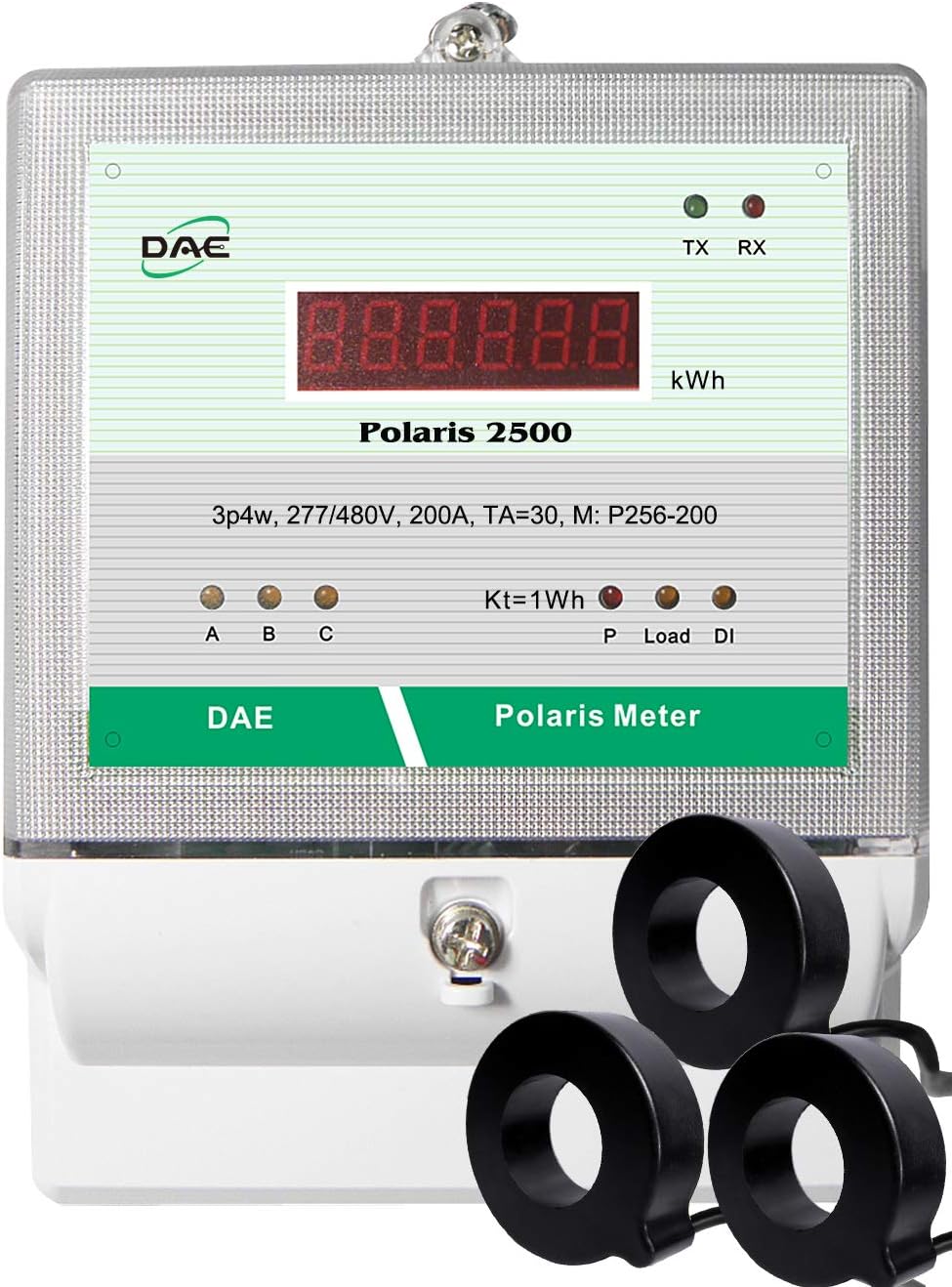
The DAE P252-200-S KIT, 200A, 480v, UL, RS485, kWh Smart Submeter, 3P3W (3 hot Wire, no Neutral), 3 CTs (Inner Dia. 1.02″) is a pre-configured kit aimed at metering three hot-wire, no-neutral panels up to 200 A per phase. You get the meter, three matched CTs, and access to DAE’s cloud ecosystem if you add the CC2030 gateway — everything is focused on giving you accurate readings and useful reports.
What’s in the Box
You’ll typically receive the P254-200 meter (120–480 V) and three CT-200D3 solid-core CTs with a 1.02″ inner diameter, plus the lower cover with two 3/4″ knockouts for conduit connections. If you order a CC2030 KIT, you’ll also get the gateway and instructions to link meters to the DAE Cloud for real-time monitoring and billing.
Key Specifications
Below is a concise breakdown of the meter’s most important specs so you can quickly match it to your site requirements. This table focuses on the electrical, mechanical, and communications attributes you’ll care about during selection and installation.
| Feature | Details |
|---|---|
| Product Name | DAE P252-200-S KIT, 200A, 480v, UL, RS485, kWh Smart Submeter, 3P3W (3 hot Wire, no Neutral), 3 CTs (Inner Dia. 1.02″) |
| Voltage Range | 120–480 V (P254-200 model) |
| Current Rating | 200 A with included CT-200D3 (solid core) |
| CT Inner Diameter | 1.02″ (included CT-200D3) |
| Accuracy | Revenue-grade, 0.5% (ANSI C12.1 / C12.20) |
| Standards & Listing | UL/cUL Listed; conforms to ANSI C12.1 and C12.20 |
| Phasing | 3P3W (three hot wires, no neutral) |
| Communication | RS485 Modbus (standard); Ethernet via CC2030 Gateway to DAE Cloud |
| Cloud Option | DAE Cloud via CC2030 Gateway; optional WSC500A RF converters for wireless linking |
| Installation Knockouts | Lower cover with two 3/4″ knockouts for conduit |
| Environment | Indoor use; optional watertight enclosure B1725 available for outdoor |
| Included Items | P254-200 meter, 3 × CT-200D3 (solid core), lower cover |
| Optional Accessories | Split-core CTs, additional CT sizes, CC2030 Gateway, WSC500A RF Converters, SMB350 multi-panel kit |
| Calibration | Factory calibration certificates available |
| Minority Supplier | DAE Controls LLC holds NMSDC Minority Supplier certification |
Accuracy and Standards
You’ll appreciate the meter’s revenue-grade accuracy when you need billing-quality measurements. DAE designed this meter to meet ANSI C12.1 and C12.20 standards, which means the readings are valid for commercial billing and contract metering scenarios.
Revenue-Grade Accuracy
The 0.5% accuracy rating gives you reliable kWh data for tenant billing and energy audits, so you won’t be second-guessing the numbers during month-end reconciliation. That level of precision is typical for meters used in revenue applications and is backed by factory calibration options if you want certification documentation.
UL and ANSI Compliance
The UL/cUL listing indicates that the product has been evaluated for safety and performance in North American installations. You can lean on the meter’s compliance to ANSI national accuracy standards when presenting the device to building owners, tenants, or auditors who require verified, recognized metering standards.

Purchase DAE P252-200-S KIT On Amazon
Installation and Wiring
The meter is designed to be fairly installer-friendly, with a lower cover that provides conduit knockouts and a clear set of wiring terminals. You’ll still need standard electrical safety practices, but the product documentation emphasizes straightforward wiring without requiring a separate fuse when connecting to a circuit breaker.
Physical Installation
Physically mounting the meter is uncomplicated: it’s intended for indoor panel mounting near the electrical panel you want to monitor, and the lower cover includes two 3/4″ knockouts to route conduit. If you need outdoor installation, plan on adding the B1725 watertight enclosure to maintain the meter’s safety and performance.
CT Selection and Placement
The kit ships with three CT-200D3 solid-core CTs sized for 200 A circuits and an inner diameter of roughly 1.02″, which fits typical 200 A bus bars or conductors. If your conductors are thicker or you need different ratios, DAE offers a long list of split-core and solid-core CTs in higher capacities; pick the CT that matches the conductor size and maximum expected current for accurate readings.
Wiring to Breaker Panel and Fuse Note
DAE confirms that a fuse is not required when you connect the meter to a breaker of the electric panel, assuming you follow their wiring instructions and UL’s guidance. Make sure you follow the wiring diagram precisely, especially for RS485 communications and CT polarity, to avoid misreads or communication problems.
Communication and Remote Monitoring
You’ll get RS485 Modbus out of the meter by default, which is a robust and widely used fieldbus for energy devices. If you want cloud-based dashboards, real-time graphs, and billing reports without managing complicated IT, the CC2030 Gateway simplifies connecting meters to the DAE Cloud.
DAE CC2030 Gateway and Cloud
The CC2030 will collect energy data from DAE meters and forward it to DAE’s Cloud Server over Ethernet, so you can access data with a PC, phone, or tablet. You’ll be able to pull real-time data, monthly kWh totals, and generate TOU (Time-of-Use) billing reports — all without needing specialized IT skills.
RF Option with WSC500A for Hard-to-Run Wires
If you can’t run a reliable RS485 or Ethernet cable between the meter and the gateway due to distance or building layout, you can choose a CC2030 KIT plus two WSC500A RF Converters to wirelessly bridge the meter to the gateway. This wireless option is especially handy for retrofit projects where running conduit or pulling long cables would be expensive or impractical.
Software, Reports, and TOU Billing
DAE’s cloud setup offers billing reports suitable for landlords and property managers who charge tenants based on usage. You’ll find TOU billing features for rate differentiation by time period, and you can export monthly reports for tenant invoicing or internal accounting — an essential feature if you’re splitting utility costs.
Use Cases and Who It’s For
This meter kit fits many scenarios where you need per-panel metering for accurate billing and energy management. You’ll find it particularly useful for multi-tenant buildings, small commercial sites, tenant submetering, and retrofit jobs where accuracy and minimal IT overhead are priorities.
Landlords and Property Managers
If you manage rental units or commercial suites, you’ll appreciate the ability to produce fair, verifiable bills based on actual usage. The cloud reporting and TOU billing make it easy for you to present tenant statements, manage disputes, and track consumption trends.
Commercial and Industrial Monitoring
You can use the meter in small to medium commercial or light industrial settings where the panel configuration is 3P3W and neutral monitoring is not required. The revenue-grade accuracy and UL listing make it appropriate for contract monitoring where measurements might be audited or used for chargebacks.
Multi-panel Monitoring (SMB350 KIT)
If you want to monitor up to 8 panels remotely, you can scale the solution with the SMB350-UL-8-B KIT plus one CC2030 KIT, which centralizes readings for multiple meters. That approach saves you from juggling multiple cloud accounts and simplifies consolidated billing and analytics across several panels.

Accessories and Extra Options
DAE supplies a range of CT choices, enclosure options, and wireless accessories so you can configure the installation to your exact site needs. You’ll pick split-core CTs for easier retrofits or solid-core CTs for new panels where you can thread conductors through.
CT Options (Split core and Solid core)
You can choose from various CT models: split-core CTs like CT-5000SB down to CT-100S, and solid-core CTs like CT-600D9 and CT-200D3. You should select CTs based on conductor size, max current rating, and whether you prefer the convenience of split-core devices during retrofit installs.
Enclosures and Outdoor Use
For indoor meters the standard kit is fine, but if you plan to mount the meter outdoors, order the DAE B1725 watertight enclosure to protect it from weather and humidity. The enclosure ensures the installation remains code-compliant and reduces the risk of moisture-related failure.
Calibration Certificates and Minority Supplier
Factory calibration certificates are available if you need official documentation for audits or regulatory compliance, and DAE Controls LLC is a Minority Business with NMSDC Minority Supplier certification if you need supplier diversity documentation for projects.
Pros and Cons
You’ll want a quick list of benefits and trade-offs to decide whether this meter fits your situation. Below are the main strengths and potential drawbacks as seen in practical installations.
Pros:
- Revenue-grade accuracy (0.5%) suitable for billing.
- UL/cUL listed and ANSI-compliant for credibility and safety.
- Easy cloud connectivity via CC2030 without requiring advanced IT.
- Included CTs make it plug-and-play for 200 A panels.
- Wireless RF converters available for challenging wiring scenarios.
Cons:
- Indoor-only by default; requires extra enclosure for outdoor use.
- Limited to 200 A with included CTs — higher capacities need separate CTs.
- RS485 requires some familiarity with Modbus if you integrate into third-party systems.
- No neutral monitoring since it’s designed for 3P3W systems.
Installation Tips and Best Practices
You’ll get more reliable operation if you prepare ahead and follow a few practical tips. These suggestions will help ensure safe installation and accurate readings from day one.
Pre-install Preparation
Before you touch the meter, confirm the panel configuration, conductor sizes, and available conduit entries so the included CTs and meter match the installation. Also verify network access for the CC2030 gateway if you plan to use cloud features, since you’ll need an Ethernet drop nearby or a plan to use RF converters.
Physical Mounting Tips
Mount the meter close enough to the panel so CTs can comfortably reach conductors without straining, and orient the CT polarity marks consistently to avoid reverse readings. Use the lower cover knockouts for neat conduit entry and strain relief — keeping wiring tidy reduces troubleshooting later.
Wiring and Safety Tips
Always de-energize the panel and follow lockout/tagout procedures before installing CTs and meter connections, and double-check CT polarity and RS485 termination. If in doubt about local code or breaker/fuse coordination, consult a licensed electrician to ensure compliance.
Network and Cloud Setup Tips
When connecting to the CC2030, follow DAE’s step-by-step wiring picture or video to avoid common pitfalls, and ensure the CC2030 has a stable Ethernet connection to reach DAE Cloud. If you use RF converters (WSC500A), test the radio link and placement before finalizing cable runs to eliminate interference or signal dropout issues.
Troubleshooting Common Issues
If you run into problems, there are predictable areas to check that usually resolve most issues quickly. You’ll save time by verifying a few key items before escalating to support.
Communication Failures
If the meter doesn’t show up in the CC2030 cloud, check RS485 wiring, baud rate and Modbus address, and ensure proper termination and biasing on the bus. Also confirm the CC2030’s network connectivity and firewall settings so it can reach the cloud.
Meter Read Errors
If readings look off, verify CT orientation and that the correct CT ratio is entered or selected in the meter configuration. Confirm that conductors pass through the intended CT window and that no additional conductors or neutrals are accidentally inside the CT, which can skew measurements.
Pricing, Ordering, and SKUs
You’ll want to plan for additional accessory purchases depending on your site specifics. The base kit includes the meter and CTs, but options like the CC2030 gateway, RF converters, or larger CTs will add to the overall project cost.
What You’ll Get When Ordering
Ordering the DAE P252-200-S KIT typically includes the P254-200 meter and three CT-200D3 CTs; other items like CC2030 or enclosures are separate SKUs. Confirm the kit contents and whether factory calibration certificates or minority supplier documentation are required for your procurement process.
Choosing CT Sizes and Gateways
Select CTs that match the max load and conductor size — if you anticipate loads above 200 A, order larger CTs. If the meter is far from your router or gateway, consider the CC2030 plus WSC500A RF Converters to create a wireless bridge that avoids pulling long cables.
Final Recommendation
If you’re managing properties, billing tenants, or need accurate submetering with cloud reporting and minimal fuss, this DAE kit is a compelling option. You’ll get revenue-grade accuracy, UL listing, and cloud readiness with a fairly straightforward installation, especially when you pair it with the CC2030 gateway.
FAQ
Q: Can this meter be used for single-phase systems?
Yes, you can use similar DAE meters for single-phase applications, but this specific product is configured for 3P3W systems without a neutral. If you need single-phase metering, check DAE’s product line for models specifically designed for single-phase or consult a DAE rep for recommendations.
Q: Do I need a fuse when connecting to a breaker?
DAE states that a fuse is not required when you connect the meter to the breaker of the electric panel, provided you follow the installation instructions and UL guidance. Still, always verify local code and coordinate with a licensed electrician to ensure compliance with regional electrical rules.
Q: How do I connect this meter to the cloud?
You’ll connect the meter to the CC2030 Gateway via RS485; the CC2030 then forwards readings over Ethernet to DAE Cloud. DAE’s documentation and setup videos walk you through the wiring and cloud registration so you can manage data from phone, tablet, or PC.
Q: What if conductors won’t fit the included CTs?
If your conductors are too large for the 1.02″ CT inner diameter, order a larger CT size from DAE’s split-core or solid-core CT offerings. Split-core CTs simplify retrofits because you can clamp them around conductors without disconnecting anything.
Q: Is the meter suitable for outdoor mounting?
Not by itself — the meter is intended for indoor use. If you need outdoor installation, buy the DAE B1725 watertight enclosure to ensure the meter stays protected from weather and meets safety expectations for outdoor gear.
Q: How scalable is the system for multiple panels?
Very scalable — you can monitor multiple panels and centralize their data using the SMB350-UL-8-B KIT plus a CC2030 KIT to manage up to 8 panels remotely. That makes it practical for multi-tenant buildings, campuses, or properties with several distribution panels.
Q: What support and documentation are available?
DAE provides manuals, wiring pictures, video guides, and factory calibration certificates on request to assist with both installation and verification. If you need supplier diversity documentation, DAE also offers NMSDC Minority Supplier certification details on their website.
Closing Notes
You’ll find that this DAE kit balances accuracy, certification, and the convenience of cloud reporting in a compact package geared toward landlords, property managers, and small commercial users. By selecting the right CTs, adding the CC2030 gateway for cloud services, and following a few installation best practices, you’ll be able to turn on reliable, billable energy metering with minimal headache and strong documentation.
Get The DAE P252-200-S Smart Submeter (Amazon)
Disclosure: As an Amazon Associate, I earn from qualifying purchases.