
Looking for a robot vacuum that actually reaches under your low furniture and handles pet hair without constant attention?


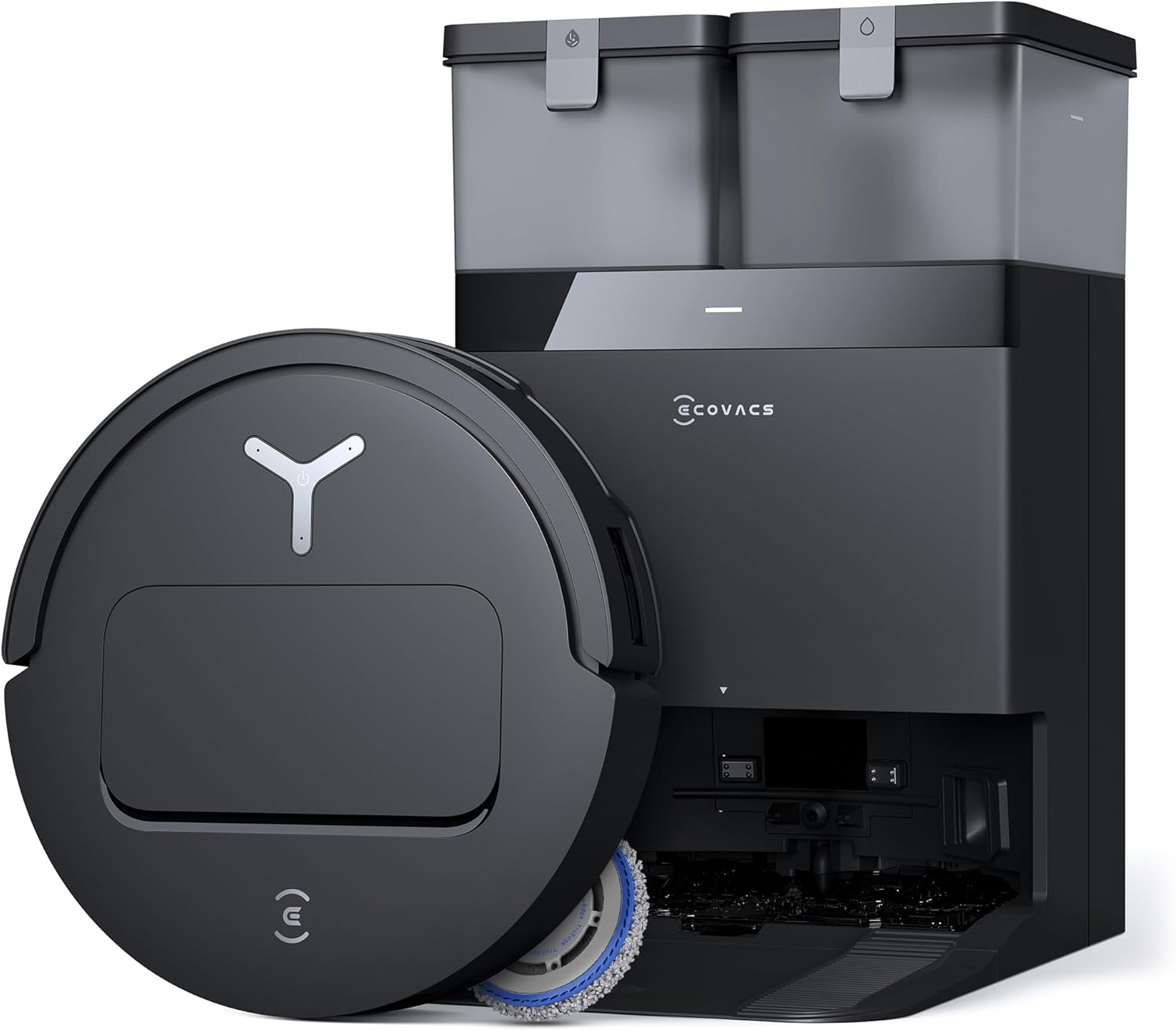
Overview of the ECOVACS DEEBOT T50 PRO Omni Robot Vacuum and Mop, 3.19” Ultra-Slim, 15,000Pa Suction, ZeroTangle 2.0, TruEdge Edge Cleaning, AIVI 3D Obstacle Avoidance, Auto Mop Wash & Dry, Self-Emptying
You’ll appreciate how this model combines slim design with powerful suction and an automated base station for a mostly hands-free routine. The DEEBOT T50 PRO promises ultra-slim access, advanced obstacle avoidance, and a full-service OMNI Station that washes and dries the mop while handling dust and water management.
You should expect it to be a fit for busy households and pet owners because it focuses on reducing maintenance and improving coverage. The specs are aimed at giving you edge-to-edge cleaning, strong suction, and minimal hair wrap, while the OMNI Station takes care of many chores you normally do manually.
What this review covers
You’ll get a detailed look at design, performance on different surfaces, navigation, OMNI Station capabilities, the YIKO-GPT AI assistant, setup and daily use, maintenance, and who benefits most from this robot. Each section gives practical notes on what you can expect in real-life use and how to get the most from the T50 PRO.
You’ll also find a clear specification table and comparisons so you can decide whether this robot matches your priorities for cleaning coverage, hands-free features, and pet-care needs.
ECOVACS DEEBOT T50 PRO Omni Robot Vacuum and Mop, 3.19” Ultra-Slim, 15,000Pa Suction, ZeroTangle 2.0, TruEdge Edge Cleaning, AIVI 3D Obstacle Avoidance, Auto Mop Wash & Dry, Self-Emptying
$398.99 In Stock
Key specifications
These details help you quickly understand the technical strengths of the T50 PRO. The table below breaks down the core features so you can compare at a glance.
| Feature | Detail |
|---|---|
| Model | ECOVACS DEEBOT T50 PRO Omni Robot Vacuum and Mop |
| Height | 3.19 inches (81 mm) ultra-slim |
| Suction | 15,000 Pa |
| Brush tech | ZeroTangle 2.0 (anti-hair wrap) |
| Edge cleaning | TruEdge 2.0 (extendable side brushes and mop) |
| Navigation | AIVI 3D 3.0 obstacle recognition and avoidance |
| OMNI Station functions | Auto dustbin emptying, mop washing (up to 167°F), hot air drying (113°F), water refilling, auto dispensing cleaning solution, dirt detection |
| Smart assistant | YIKO-GPT AI Assistant (voice/text) |
| Wi-Fi | 2.4 GHz only |
| Supported surfaces | Hard floors, low to medium-pile carpets |
| Battery & runtime | Typical high-tier runtime (varies by mode) |
| Pet-friendliness | Optimized for reduced hair tangles |
You can use the specification table as a quick checklist to confirm this robot meets your practical needs. The OMNI Station details are especially useful if you’re aiming for a mostly hands-off system.
Design and build
You’ll notice the first thing about the DEEBOT T50 PRO is how slim it is. At 3.19 inches tall, it’s designed to fit under sofas, beds, and low cabinets where dust tends to accumulate.
The build quality balances lightweight mobility with durable materials, and the extended side brushes and mop components feel sturdy enough for daily work. You’ll also appreciate that the extendable elements are designed to reach corners without sacrificing the robot’s slim profile.
Ultra-slim profile: why height matters
You’ll get into more of the places that standard robots miss because the T50 PRO clears low-clearance furniture. That means less manual intervention with a broom or handheld vacuum for hard-to-reach dust bunnies.
You’ll still want to check the clearance of your lowest furniture—3.19 inches is slim, but not all furniture with skirts or irregular bases will be accessible.
Materials and durability
You’ll find a combination of robust plastics and reinforced components where you interact most—dustbin, brushes, and OMNI Station connection points. These parts are designed for frequent use without feeling flimsy.
You should handle the robot gently during transport and maintenance, but everyday use should not cause early wear if you follow routine cleaning recommendations.

Cleaning performance
You’ll see strong performance across many floor types thanks to the 15,000 Pa suction. That level of power gives the T50 PRO confidence on hard floors and a good lift on low- to medium-pile carpets.
Edge cleaning is an area where this model stands out, thanks to TruEdge 2.0 extending both side brushes and the mop for better corner coverage. You’re likely to notice fewer missed strips along baseboards and corners compared with standard robots.
Suction power and debris pickup
You’ll appreciate the 15,000 Pa capability when dealing with crumbs, cereal, and even embedded dirt in lower pile rugs. It handles daily debris efficiently and is strong enough to pick up heavier particles that lighter robots struggle with.
You should expect somewhat reduced runtime in the highest power settings, but the trade-off is more thorough pick-up when you need it.
Edge and corner cleaning with TruEdge 2.0
You’ll see improved edge-to-edge cleaning because TruEdge extends the brushes and mop to reach the wall junctions more reliably. This reduces the need for manual spot-cleaning along skirting boards and corners.
You’ll still want to monitor particularly tight crevices, but the TruEdge system does a noticeably better job than robots that only rely on a single static side brush.
ZeroTangle 2.0 and pet hair handling
You’ll find that ZeroTangle 2.0 dramatically reduces hair wrapping around the main brush, which is a major benefit if you have pets. Less hair wrap means you’ll spend less time manually cleaning the brush bar.
You should be aware that extremely long or very dense fur can still collect on parts of the robot, but overall maintenance frequency will be lower compared to non-antitangling designs.
Navigation and obstacle avoidance
You’ll experience intelligent navigation thanks to AIVI 3D 3.0, which recognizes objects with very fine precision. The system aims to minimize stops and manual intervention by identifying and avoiding common household obstacles.
The navigation maps your home methodically, so you can expect efficient coverage without repeated passes over the same areas unless needed.
AIVI 3D 3.0: how precise is it?
You’ll notice that AIVI 3D detects objects with up to 1mm precision, helping the robot steer around cables, small toys, and furniture legs. This reduces interruptions and gives you fewer frustrating “got stuck” moments.
You should still pick up very small hazards or easily entangling items proactively, but the robot’s recognition library covers over 100 common household objects for smoother operation.
Mapping and route planning
You’ll get structured cleaning maps that allow for scheduled cleaning, no-go zones, and room-based commands. This makes it easy to direct the robot to high-traffic rooms or keep it away from sensitive areas.
You’ll find the mapping is reliable over repeated runs, with the robot refining maps and learning the layout to operate more efficiently over time.
OMNI Station — hands-free maintenance
You’ll enjoy what the OMNI Station brings if you aim to reduce chores. It empties the dustbin, washes and dries the mop, refills water, and dispenses cleaning solution automatically.
This station is the centerpiece of the hands-off promise because it reduces how often you touch dirty water, mop cloths, or dust. It’s designed to be a heavy-duty assistant for a near-automated cleaning cycle.
Washing and drying capabilities
You’ll appreciate that the OMNI Station can wash the mop with hot water up to 167°F, then dry it using hot air around 113°F. This process reduces odors and bacterial growth, leaving the mop in better condition between uses.
You should flush and check the station periodically for residue buildup and follow manufacturer guidance to keep the washing cycle effective.
Auto dustbin emptying and water management
You’ll find the dustbin empties into a sealed compartment on the OMNI Station, which reduces airborne dust during disposal. The station also handles a water refill tank and can auto-dispense cleaning solution so you don’t have to manually refill the robot each time.
You’ll need to empty the OMNI Station’s waste and refill solution periodically, but these intervals are much longer than emptying the robot’s onboard dustbin and hand-washing the mop.

Smart control and YIKO-GPT AI Assistant
You’ll be able to control the robot with both voice and text commands using YIKO-GPT. This AI assistant is designed to interpret natural language so you can issue simple prompts or more detailed instructions.
The assistant aims to simplify scheduling, spot cleaning, and mode switching so you can spend less time navigating menus and more time enjoying a clean home.
Voice and text commands: convenience in action
You’ll find that speaking simple phrases like “clean the living room” or messaging the assistant can trigger precise cleaning routines. YIKO-GPT is built to understand context, so you can often use conversational phrasing.
You should note that voice controls depend on your network and device setup, and the assistant’s capability to interpret complex scenarios will continue to improve with updates.
Smart home integration and limitations
You’ll be able to use the app and assistant for most routine tasks, but you should remember the robot supports 2.4GHz Wi-Fi only. This means you’ll need to ensure your router or network has a compatible band active for setup and control.
You’ll want to check compatibility if you rely on 5GHz-only networks or require advanced integrations with certain smart home systems.
Setup and first-time use
You’ll find the initial setup guided and straightforward through the app and OMNI Station prompts. The robot connects to the OMNI Station and your 2.4GHz Wi-Fi, creates an initial map, and calibrates its obstacle recognition.
You’ll want to clear large obstacles for the first run so the robot can get an accurate baseline map of your home and learn typical paths.
Step-by-step setup tips
You’ll start by placing the OMNI Station on a level surface with clearance, powering it on, and connecting the robot. The app walks you through network setup, and initial mapping creates your first cleaning plan.
You should also place temporary boundary markers or set no-go zones in the app if you have areas you don’t want the robot to attempt to access during its early learning runs.
Troubleshooting common setup issues
You’ll sometimes run into connectivity issues if the router signal is weak or if you accidentally try to connect via 5GHz. Ensuring 2.4GHz is enabled and you’re near the router during setup usually resolves these problems.
You’ll also want to verify that firmware updates are applied early to get the latest obstacle recognition improvements and stability enhancements.
Daily use and routine
You’ll likely run the T50 PRO on a daily or multi-day schedule to keep dust and pet hair managed. The robot is designed to be left to its routines, returning to the OMNI Station between cycles for maintenance tasks.
You’ll find that setting room schedules and automatic mop cycles makes the whole process feel effortless, with periodic checks for debris or tangled items.
Cleaning modes and customization
You’ll choose from cleaning modes like Eco, Standard, and Max suction depending on the soil level. The app also lets you prioritize rooms, set virtual boundaries, and adjust mop water levels for different floorings.
You should tailor the modes to balance runtime versus power; Max mode cleans deeper but shortens battery life.
What to expect day-to-day
You’ll notice consistent results across typical households, with effective debris pickup and fewer interruptions due to improved obstacle recognition. The OMNI Station’s auto-wash and drying keep the mop ready for repeated use.
You’ll still need to empty OMNI Station waste occasionally and check the robot for small tangles or obstructions after rough sessions.

Battery life and charging
You’ll get respectable battery life that depends on cleaning mode and the area covered. In lower power modes you can expect extended runtimes that cover average homes, while Max suction reduces runtime but increases cleaning effectiveness.
The robot will return to the OMNI Station to recharge and continues its tasks as needed, making multi-room cleaning less of a concern for you.
Runtime expectations and recharge behavior
You’ll typically see runtime that matches mid-range to high-range robot vacuums depending on settings, and automatic return-to-base allows the robot to recharge then resume incomplete jobs. This makes it suitable for larger homes when scheduled correctly.
You should plan heavier cleanings in shorter, more intense segments or let the robot work in standard mode for routine maintenance to avoid excessive battery drain.
Practical advice on charging station placement
You’ll want to place the OMNI Station in a low-traffic area with some clearance and near a power outlet, as the station is the central hub for docking and maintenance. Avoid corners or cramped spaces that could obstruct the robot’s docking approach.
You’ll also ensure the station is in a spot with reliable Wi-Fi signal for voice and app commands to work consistently.
Noise level and living with the robot
You’ll notice noise that varies by suction power and when the OMNI Station runs washing/drying cycles. In regular modes, the robot is reasonably quiet; Max suction and OMNI Station operations are louder.
You’ll want to schedule louder operations during times you’re not on calls or sleeping to reduce disruption.
During cleaning
You’ll find day-to-day cleaning fairly unobtrusive in Standard or Eco modes, but Max mode is noticeably louder. If you work from home, consider timing Max runs during breaks or when you step out.
You should also remember that OMNI Station wash/dry cycles produce more noise, so place it where that noise is less likely to bother you.
OMNI Station noise
You’ll hear the OMNI Station during mop washing and drying, and it’s louder than the robot alone. Many users place the station in a garage, utility room, or a less-used corner to keep the noise away from living spaces.
You’ll weigh this against the convenience of not handling messy mop maintenance yourself.
Maintenance and consumables
You’ll have fewer hands-on chores thanks to ZeroTangle and the OMNI Station, but routine maintenance still matters for longevity. You should check brushes, filters, and the mop pad regularly and replace consumables as recommended.
You’ll also need to empty the OMNI Station’s waste container and refill cleaning solution and water periodically.
Filters, brushes, and mop pads
You’ll replace HEPA-style filters and brush components on a schedule depending on usage and home environment. Brushes have reduced hair tangling but still require periodic attention to remove trapped debris.
You should wash or replace mop pads according to manufacturer guidance to maintain cleaning efficacy and hygiene.
OMNI Station care
You’ll clean the OMNI Station’s internal reservoirs and waste compartment according to the manual to avoid buildup and odors. Keeping the station clean ensures the washing and drying cycles remain effective and reduces microbial growth.
You should also use the recommended cleaning solutions and follow temperature and refill instructions for optimal results.
Pros and cons
You’ll want a clear summary to weigh whether the T50 PRO suits your lifestyle, so here are concise pros and cons based on real-world use.
Pros
You’ll get a slim design that cleans under low furniture, strong 15,000 Pa suction, and excellent edge coverage with TruEdge 2.0. The OMNI Station dramatically reduces hands-on maintenance by washing, drying, and emptying, and ZeroTangle 2.0 helps keep brush cleaning low.
You’ll also enjoy smart navigation with AIVI 3D 3.0 and convenient AI control through YIKO-GPT for natural voice and text commands.
Cons
You’ll need to ensure a 2.4GHz Wi-Fi network for setup and daily use, which can be a limitation if your home uses 5GHz-only configurations. The OMNI Station produces notable noise during wash/dry cycles and requires its own periodic maintenance.
You’ll also find that extremely long-haired pets or very dense rugs may still require occasional manual brush cleanup and spot-cleaning.
Who should buy this robot
You’ll find this model particularly attractive if you live in a home with low furniture, have pets with short to medium hair, or want to minimize the routine chores associated with mopping and dust disposal. The hands-free aspects make it great for busy households.
You should be prepared to maintain the OMNI Station and ensure you have a compatible Wi-Fi network. If you need advanced 5GHz-only connectivity, this model may not fit your current setup.
Best-fit scenarios
You’ll benefit most if you want regular automatic mop washing and drying, frequent edge cleaning, and reliable obstacle avoidance for homes with kids and pets. The slim profile is ideal if under-furniture dust is your main complaint.
You should consider alternatives if noise during station cycles or the 2.4GHz Wi-Fi limitation are deal breakers.
Not ideal if…
You’ll probably look elsewhere if your home relies exclusively on 5GHz Wi-Fi or if you prefer a quieter station that never runs hot-water cycles in your living area. Those with very long-haired pets may also prefer a model specifically designed for long-fur maintenance.
You should also keep in mind that very thick, high-pile carpets are outside the sweet spot for slim robots like this one.
Comparison with similar models
You’ll likely compare this DEEBOT with other OMNI Station-enabled or high-suction robots. The unique selling points here are the ultra-slim height, the TruEdge extendable cleaning, and the hot-water washing/drying OMNI Station.
You’ll find other models may offer stronger carpet performance or different station noise profiles, but few match the combination of edge reach and automated mop sanitation.
How it stacks up on features
You’ll see that the DEEBOT T50 PRO competes well on suction and edge coverage, and excels in hands-off mop hygiene. Other robots might have slightly better carpet deep-cleaning heads or quieter stations but may lack the extendable edge cleaning and ZeroTangle technology.
You should prioritize which features matter most—if mop hygiene and slim clearance top your list, this robot is a strong candidate.
Price versus value
You’ll evaluate the T50 PRO as offering high value if you factor in the OMNI Station’s time savings and the robot’s reduced maintenance needs. The initial cost may be higher than basic robots, but you’ll likely save time and mental overhead.
You should consider long-term consumable costs for replacement pads, filters, and station supplies as part of the value calculation.
Practical tips to get the most from the DEEBOT T50 PRO
You’ll get the best results by preparing your space and optimizing settings. Clear small objects and cords when possible, schedule routine runs, and use room-based cleaning to maintain high-traffic areas.
You’ll also maintain the OMNI Station regularly and use genuine ECOVACS consumables where recommended to preserve performance and longevity.
Setup and operation tips
You’ll place the OMNI Station in a stable location with clearance and ensure your 2.4GHz Wi-Fi is enabled. Run an initial mapping cycle during a low-traffic window so the robot can learn your layout.
You should label rooms in the app for easy commands, schedule off-peak cleaning for Max mode runs, and use the YIKO-GPT assistant to quickly dispatch cleaning jobs.
Maintenance schedule suggestions
You’ll inspect brushes weekly if you have pets, replace filters monthly or per the manual, and empty OMNI Station waste every few weeks depending on usage. Clean the mop pads after heavy mopping cycles and follow manufacturer guidance for station rinsing.
You should keep a small toolkit and spare parts on hand (filters, mop pads) to avoid downtime.
Final verdict
You’ll likely be very pleased if you want a robot that reduces the usual hands-on chores while reaching those hard-to-access areas. The DEEBOT T50 PRO combines serious suction, effective edge cleaning, and an OMNI Station that automates wet cleaning maintenance.
You’ll weigh the convenience of the station and the anti-tangle and AIVI tech against the noise of the station and the 2.4GHz Wi-Fi limitation. If those trade-offs fit your home, this robot offers a practical, time-saving solution.
Bottom line
You’ll get an advanced robot designed for busy, pet-friendly homes that need thorough edge cleaning and low-maintenance mopping. With regular upkeep of the OMNI Station and consumables, it delivers consistent, mostly hands-free performance.
You should consider it a strong option if edge-to-edge coverage, mop hygiene, and reduced brush maintenance rank high on your priorities.
Frequently asked questions
You’ll likely have questions about setup, compatibility, and maintenance. Below are answers to the most common items prospective buyers ask about.
Does it work with 5GHz Wi-Fi?
You’ll need a 2.4GHz Wi-Fi network because the robot does not support 5GHz. Ensure your router broadcasts a 2.4GHz network or enable one for setup and ongoing control.
You should check dual-band settings or create a guest network if your main network is 5GHz-only.
How often do I need to empty the OMNI Station?
You’ll empty the OMNI Station’s waste compartment less frequently than the robot’s onboard bin, but exact intervals depend on home size and debris levels. Expect multi-week intervals for typical households.
You should monitor the station’s indicator and follow the app prompts to avoid overflow or reduced suction performance.
Can it handle high-pile carpets?
You’ll find it best suited to hard floors and low- to medium-pile carpets because of its slim profile. Very high-pile rugs or thick shag carpets may reduce performance and mobility.
You should remove very thick rugs from scheduled cleaning zones or use the robot in manual spot-clean mode on those areas.
Is the OMNI Station noisy?
You’ll hear significant noise during wash and dry cycles, and the OMNI Station is louder than the robot running alone. Consider placing the station away from main living areas if noise is a concern.
You should schedule wash/dry operations at times when noise will be least disruptive.
How effective is AIVI 3D at avoiding small objects?
You’ll find AIVI 3D to be highly effective at avoiding common household items with millimeter-level precision. It reduces frequent stops and rescues by recognizing more than 100 object types.
You should still tidy very small or easily entangling items before cleaning to maximize efficiency.
Closing tips for buying and setup
You’ll want to confirm your Wi-Fi compatibility and consider where to place the OMNI Station before buying. Evaluate your home’s floor types and pet hair levels to ensure the T50 PRO aligns with your needs.
You’ll also budget for replacement pads, filters, and occasional station maintenance, and enjoy the time savings once the system is in regular use.

Disclosure: As an Amazon Associate, I earn from qualifying purchases.