
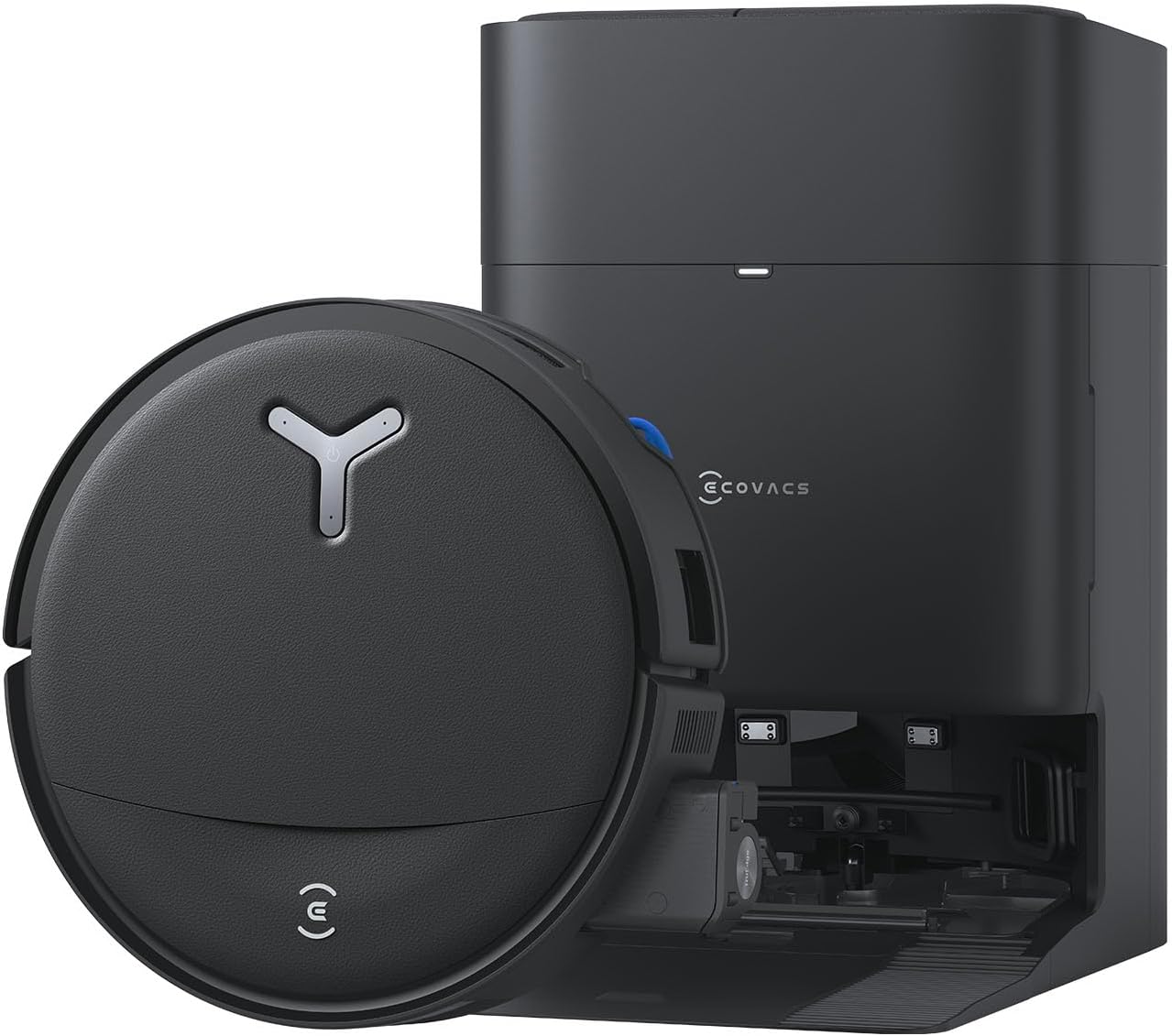
?Want a robot that actually scrubs, vacuums, and takes care of itself so you can spend less time cleaning and more time doing what you enjoy?
Buy The ECOVACS DEEBOT T80 Omni On Amazon
First Impressions of the ECOVACS DEEBOT T80 Omni Robot Vacuum and Mop, 18,000Pa Suction, OZMO Roller Mop with TruEdge, Zero-Tangle Brush, AI Navigation, All-in-One Station
You’ll notice the T80 OMNI feels built to do serious cleaning the moment you unbox it. The design balances a modern, slim profile with a large all-in-one station that promises a lot of automation, so you get a high-end vibe without a premium price tag.

ECOVACS DEEBOT T80 Omni Robot Vacuum and Mop, 18,000Pa Suction, OZMO Roller Mop with TruEdge, Zero-Tangle Brush, AI Navigation, All-in-One Station
$549 In Stock
Key Specifications at a Glance
This section gives you the essential numbers and features so you can quickly compare the T80 OMNI to other robots. Having these details together makes it easier to decide whether this model fits your needs.
| Feature | Specification |
|---|---|
| Suction | 18,000 Pa |
| Mopping System | OZMO Roller Mop (220 RPM, 16× pressure) + TruEdge |
| Anti-tangle | ZeroTangle 3.0 with removable comb |
| OMNI Station Functions | Self-emptying, rinse with 167°F hot water, hot air drying at 113°F, refilling, re-mopping |
| Navigation | AIVI 3D 3.0 + LiDAR (1mm precision), recognizes 100+ objects |
| Body Height | Ultra-slim frame (fits under beds and low furniture) |
| Connectivity | 2.4GHz WiFi only, Alexa, Google, Matter |
| Voltage | 110V (confirm local version) |
| Ideal For | Pet hair, multi-surface cleaning, homes needing automated mopping |
Design and Build Quality
The T80 OMNI looks like something you’d expect from ECOVACS’ higher-tier models but at a friendlier price. You’ll appreciate the slim chassis that lets the robot go under furniture and the LED headlight that helps it reach darker corners.
The OMNI station is larger than typical charging docks because it handles multiple tasks—emptying, washing, drying, and refilling—so you should plan for some extra space when placing it. The materials and finishing feel durable and easy to keep clean.
Compact Robot Body and LED Headlight
Your unit’s low profile means fewer blind spots under beds and low cabinets, and the LED headlight is genuinely helpful for dark areas. You’ll find it easier to trust the robot to work in places that used to hide dust and crumbs.
The T80’s footprint is typical for round robots, but its slim height is the real advantage when you want thorough edge-to-edge cleaning without constantly moving furniture.
OMNI Station: Size and Practicality
The OMNI Station takes up more floor space than a basic charging base, but it’s doing much more behind the scenes. If you value true automation—no-handling dirty mop water or regular manual drying—this station is a game-changer.
You should place the station in a location with good ventilation and easy access to a power outlet, since it uses hot water and drying functions that produce heat and moisture during operation.
Vacuuming Performance
The star metric here is 18,000Pa suction, which isn’t just for marketing—this level of suction makes a visible difference, especially on carpets and high-traffic zones. You’ll see less embedded dirt and more lifted debris compared to entry-level models.
Suction alone won’t solve everything, but combined with the ZeroTangle roller and strong airflow, the T80 gives you consistent pickup of pet hair, crumbs, and dust across different floor types.
Suction Strength in Real Rooms
When you set the T80 on carpets and rugs, you’ll notice significantly stronger pickup compared to weaker machines. The higher suction helps pull out deeper dust and kibble bits that lighter vacuums often leave behind.
Hard floors appear visibly cleaner as well, with fewer streaks and fewer missed specks, especially in corners where the TruEdge function helps reach.
Edge and Corner Cleaning with TruEdge
TruEdge extends the roller and cleaning capability right to baseboards and corners, so you won’t be constantly sweeping edges afterward. You’ll appreciate how the roller design keeps consistent contact with walls and corners, minimizing leftover streaks.
It’s not perfect for awkward crevices that require a crevice tool, but for everyday edge-to-edge cleaning you’ll see much better results than with spinning mop pads.
Shop ECOVACS DEEBOT T80 Omni Robot Vacuum & Mop
Mopping System: OZMO Roller Mop Performance
If you’ve had bad experiences with spinning mops that leave lines and streaks, the OZMO Roller is a major shift. It scrubs at 220 RPM with 16× pressure and rinses in real time, which means the mop heads stay cleaner and the floor gets an actual scrub rather than a light swipe.
You’ll appreciate the difference on stuck-on grime and kitchen messes—this setup tends to remove spots that previous robots would smear or leave behind.
Real Scrubbing, Real Results
The roller’s mechanical scrubbing action gives you a deeper clean than passive damp mops. You’ll see fewer streaks and less residue, especially on tile and sealed hardwood where a mechanical action is helpful.
On lighter spills, the robot still performs efficiently, and for sticky areas the concentrated pressure combined with hot-water rinsing from the station boosts effectiveness even more.
Rinsing and Re-mopping Behavior
Because the OMNI Station rinses the roller in real time and can reapply clean water, you won’t be dragging around the same dirty mop water. You’ll notice noticeably fresher mop passes, which is important for hygiene and for keeping your floors smelling clean.
The station’s re-mopping function is handy when the robot needs to re-treat stubborn spots without you having to intervene.
OMNI Station: What Automation Really Means
The OMNI Station is where the T80 OMNI shines in convenience. It handles the dirty work—literally—by emptying the dustbin, rinsing and washing the roller with 167°F water, drying at 113°F, refilling cleaning solution, and enabling re-mopping cycles.
If you’re trying to minimize direct contact with dust, hair, and dirty water, the station delivers. You’ll only need occasional maintenance on the station itself.
Self-Emptying and Refill Functions
You’ll love the self-emptying feature for its convenience: fewer trips to a trash can and less frequent manual emptying. The station’s refilling action means the robot is ready for mopping cycles without you having to top up water every time.
The self-emptying bag or container still requires periodic replacement or emptying, but your hands-on maintenance workload drops significantly.
Hot Water Washing and Hot Air Drying
Using 167°F water to rinse the roller is effective at loosening grease and grime, and the 113°F hot air drying helps prevent mildew and longer-term odors. You’ll notice the cleaned roller feels fresher and dries quicker, which is great if you’re scheduling regular mopping sessions.
There’s some energy use and heat production to consider, so position the station where heat won’t be an issue.
Pet Hair and ZeroTangle 3.0
If you have pets, this model was designed with you in mind. ZeroTangle 3.0 reduces wrap-ups by 90% thanks to anti-tangle side brushes and a removable comb for the main roller. You’ll spend much less time cutting hair off the brush and more time enjoying a hair-free floor.
The combination of high suction and an anti-tangle design makes this one of the better robot picks for pet owners who want minimal fuss.
Routine Hair Maintenance and Results
For homes with long-haired pets, you’ll still periodically remove the roller to clear large clumps, but frequency drops a lot compared to older robots. You’ll find that the removable comb makes quick work of any stubborn strands.
The vacuum’s suction is strong enough to pick up loose hair before it becomes a problem for the roller, so overall hair management is much easier.
Fur on Furniture and Carpets
The T80 OMNI handles low- and medium-pile carpets well and picks up fur stuck to fabric surfaces at floor level. If you’re mainly concerned about upholstery or stairs, you’ll still need a handheld or upright for deep furniture cleaning, but for everyday fur control the robot does an excellent job.
Navigation, Mapping, and Obstacle Handling
Navigation is reliable thanks to AIVI 3D 3.0 combined with LiDAR scanning with 1mm precision. You’ll find the robot maps your home quickly, avoids most obstacles, and recognizes over 100 objects to reduce collisions and entrapment.
The mapping interface in the app is intuitive and allows you to set no-go zones, virtual walls, and multi-floor maps, giving you control over where and when the robot cleans.
AIVI 3D 3.0 + LiDAR Accuracy
The LiDAR’s accuracy helps the robot create detailed maps and take efficient cleaning paths, so tasks finish faster with fewer missed spots. You’ll get dependable repeatable mapping that remembers furniture changes and keeps your cleaning schedule efficient.
Obstacle recognition means fewer faceplants into shoes, cords, and small clutter, which you’ll appreciate if your home tends to accumulate items on the floor.
Handling Dark or Under-Furniture Areas
Thanks to the LED headlight and slim profile, the T80 OMNI is better at navigating under low furniture and in dim corners. You’ll see fewer “stuck under the bed” incidents because the unit actually senses and lights the way.
That said, extremely reflective floors can still interfere with sensors occasionally, so clearing large reflective objects from main paths is still recommended.

App, Voice, and Smart Home Integration
The ECOVACS Home app provides mapping tools, scheduling, and customization for cleaning modes and area targeting. You’ll be able to set cleaning routines, name rooms, and schedule mopping sessions that fit your life.
Voice integration with Alexa, Google, and Matter devices means you can start or stop the robot with simple commands, which adds an extra layer of convenience when you want a quick clean.
App Usability and Mapping Controls
The app’s mapping controls are straightforward: draw no-go lines, split maps into rooms, and set specific cleaning orders. You’ll find spot cleaning, edge cleaning, and mop-specific commands useful for everyday maintenance.
Some advanced settings are tucked into submenus, but overall the app is polished and approachable even if you don’t like fiddly tech.
Voice Commands and Matter Support
You’ll appreciate the ability to call the robot by voice for instant cleaning or docking. Matter support means better interoperability with modern smart home setups, simplifying voice control across devices.
Remember the WiFi limitation: the robot only supports 2.4GHz networks. You’ll need to confirm your home network operates on that band for remote features and voice integration to work.
Battery Life, Runtime, and Charging
Battery performance varies by mode and use, but you’ll get a solid session for typical homes. The robot will usually return to the OMNI Station to recharge and continue cleaning if a job runs longer than the battery allows.
You should expect shorter runtimes in max-suction or intensive mopping combined modes, but the ability to resume means large homes don’t become a problem.
Typical Runtime Expectations
In standard cleaning mode you can expect several hours of cleaning on a full charge depending on your home’s layout and surface types. You’ll see shorter times at 18,000Pa suction or when frequent mopping cycles engage.
The automatic recharge-and-resume means the robot will finish large jobs over multiple charges, which is a big help for multi-room cleaning without manual intervention.
Charging Speed and Convenience
Charging docks are speedy enough to get the robot back to work within a few hours, and the OMNI Station handles charging alongside its other functions. You’ll rarely need to babysit the unit, which is exactly the point of this level of automation.
Noise Levels and Daily Use
At full suction and during OMNI Station operations like drying and rinsing, you will notice audible noise, but it’s comparable to other premium robot systems. You’ll still be able to carry on conversations or work in another part of the home while it runs.
If you prefer near-silent cleaning, choose lower suction modes for routine jobs and reserve max modes for deep cleans.
Noise During Cleaning vs. Station Use
Cleaning noise during active suction is generally acceptable — louder on carpets and in max mode. The OMNI Station’s hot water and drying cycles generate additional noise that’s similar to a small appliance, so place it where the sound won’t bother you.
Nighttime use is possible in quieter modes, but you’ll probably want to avoid station drying at night because of the heat/noise cycle.
Maintenance and Consumables
The T80 OMNI reduces some maintenance tasks with ZeroTangle and the self-cleaning station, but you’ll still have routine jobs like filter changes, emptying the station’s main waste container periodically, and replacing mop rollers over time.
You’ll find maintenance mostly straightforward: parts are generally accessible, and many components are removable and washable.
What You’ll Need to Replace Regularly
Expect to replace filters and certain expendables like mop rollers and possibly station bags at intervals depending on use. You’ll also clean sensors and brushes periodically to maintain peak performance.
Keeping spare consumables on hand is a good idea if you like to keep the robot running continuously with minimal interruption.
Cleaning the Roller and Brushes
The roller is designed to be easy to remove and clean, and the removable comb makes hair removal efficient. You’ll spend less time battling wrap-ups than with older robots, and washing the roller in the OMNI Station reduces the time you spend handling grime.

Setup Experience and First Run
Setting up the robot should be simple: place the OMNI Station in a suitable spot, plug it in, connect to 2.4GHz WiFi, and follow the app’s mapping process. Your first mapping run will give the robot a sense of your home’s layout and let you configure rooms and no-go zones.
You’ll appreciate how quickly it maps and starts cleaning reliably after the first calibration session.
Connecting and Mapping Tips
Make sure your mobile device is on the 2.4GHz network during setup; many connection problems come from accidentally using 5GHz. You’ll want to start with a clear floor so the initial map is accurate and the robot can learn obstacle locations.
Label rooms in the app early so scheduled cleaning and targeted tasks work smoothly.
First Cleanup Routine Advice
For the first few runs, monitor the robot to see how it handles thresholds and transitions. You’ll be able to adjust settings or move small obstacles to improve daily performance during these early sessions.
After that, the robot adapts to your home and becomes more autonomous, which is the main appeal of the T80 OMNI.
Safety and Limitations
While the T80 OMNI is smart, it’s not infallible. You’ll need to remove small cords, keep small objects off floors, and watch for extremely reflective surfaces that can confuse sensors occasionally.
Also note the WiFi limitation and voltage specification: it supports 2.4GHz WiFi only and ships in a 110V variant—confirm the version matches your region before purchasing.
Avoiding Common Issues
Secure loose cords and small items that could tangle or obstruct the robot, and place the OMNI Station where heat from drying won’t be a problem. You’ll get the best results when the environment supports autonomous operation.
If you have lots of stairs, be sure safety sensors are active and mapping boundaries are set to prevent falls.
Power and Connectivity Warnings
Confirm the voltage of the unit and station match your region’s standard (110V noted in the product details). You’ll also want to ensure your router broadcasts a 2.4GHz network; without it, remote features and voice integration won’t work.
Accessories and What’s in the Box
You’ll typically receive the robot, the OMNI Station, roller mop, extra filters or mop pads, charging accessory, and user documentation. Having spare consumables increases convenience and reduces trips to order replacements.
Check the box contents at unboxing to confirm you have filters, cleaning tools, and any starter supplies required for the OMNI Station.
Useful Optional Add-Ons
Consider stocking extra rollers, filters, and station bags if you prefer uninterrupted automation for weeks at a time. You’ll also find compatible cleaning solutions recommended by the manufacturer to maintain performance and avoid damage.
Spare parts are convenient if you want to minimize downtime between maintenance cycles.
Comparison with Competing Models
Compared to entry-level robot vacuums, the T80 OMNI is a major step up in suction, mopping technology, and automation. You’ll trade a bit more footprint and price for substantially more convenience and cleaning power.
Against higher-end ECOVACS models and competing brands, the T80 OMNI holds up well for most homes, especially if you want a strong balance between vacuuming and real mopping without human intervention.
Value vs. Premium Options
If you want the absolute top-tier features—like even more granular AI, quieter operations, or different station options—you might find ultra-premium models that differ in subtle ways. You’ll often pay a premium for those refinements, whereas the T80 OMNI gives many flagship capabilities at a more accessible price point.
For most households, it hits the sweet spot between performance and cost.
Pros and Cons Summary
This short list helps you see the main strengths and trade-offs so you can decide quickly whether the T80 OMNI fits your needs.
Pros:
- Powerful 18,000Pa suction for deep cleaning.
- OZMO Roller + TruEdge delivers actual scrubbing and edge cleaning.
- OMNI Station provides automated washing, drying, emptying, and refilling.
- ZeroTangle 3.0 reduces hair wrap-ups by ~90%.
- Advanced AIVI 3D + LiDAR mapping with object recognition.
- Smart home compatibility (Alexa, Google, Matter).
Cons:
- OMNI Station is large and needs space.
- Noise during max suction and station cycles.
- Only supports 2.4GHz WiFi.
- Check voltage compatibility (110V versions noted).
Who Should Buy the T80 OMNI?
You should consider the T80 OMNI if you want real automation for both vacuuming and mopping, especially if you have pets, multi-surface floors, or limited time for chores. It’s also great for people who prefer minimal hands-on maintenance.
If you live in a small studio, have strict noise constraints, or need 5GHz WiFi compatibility, you might consider other options.
Final Verdict
You’ll find the ECOVACS DEEBOT T80 Omni Robot Vacuum and Mop to be a strong contender for anyone seeking powerful suction, advanced mopping, and a high level of automation. It brings flagship-style scrubbing and an impressively automated station to a price point that makes sense for many households.
For pet owners and busy households that value hands-off cleaning, the T80 OMNI offers a compelling mix of deep cleaning and low-maintenance operation.
Practical Tips to Get the Most from Your T80 OMNI
- Place the OMNI Station with a little clearance and ventilation to handle drying and hot water use safely. You’ll extend the life of the station by avoiding cramped spots.
- Keep small items and cords off the floor and use the app’s no-go zones for problem areas. You’ll reduce stalls and interruptions.
- Schedule regular maintenance checks (filters, roller, brushes) and keep spare consumables on hand for uninterrupted cleaning cycles. You’ll avoid unexpected downtime.
- Use lower suction modes for daily maintenance and reserve max suction for weekly deep cleans. You’ll balance noise, runtime, and cleaning effectiveness.
Frequently Asked Questions (FAQ)
You’ll likely have questions about compatibility, maintenance, and performance. These answers cover the most common topics buyers ask before and after purchase.
Q: Does it support 5GHz WiFi?
A: No, it supports 2.4GHz WiFi only. Make sure your network has a 2.4GHz band for setup and remote features.
Q: Can it handle long-haired pet hair without manual intervention?
A: It dramatically reduces hair wrap-ups with ZeroTangle 3.0, but occasional manual removal of large clumps may still be needed for heavy shedding.
Q: Is the OMNI Station noisy?
A: It’s louder during washing and drying cycles, comparable to a small household appliance. Place it where noise won’t be intrusive.
Q: Will it damage hardwood floors?
A: The OZMO Roller uses mechanical scrubbing with clean water and is safe for sealed hardwood—but avoid harsh cleaning solutions and verify floor sealing before frequent aggressive scrubbing.
Q: Is the hot water function safe to use regularly?
A: Yes, the station uses controlled high temperatures (167°F for washing, 113°F for drying) designed to boost cleaning and prevent mildew. Ensure adequate ventilation and follow the manufacturer’s placement instructions.
If you want more hands-on guidance with settings, tips for pet-heavy homes, or help comparing this model to a specific competing robot, tell me which features are most important to you and I’ll tailor the comparison.
Get The DEEBOT T80 Omni Now — Amazon
Disclosure: As an Amazon Associate, I earn from qualifying purchases.