
Have you ever imagined a smart lock that recognizes your palm like a fingerprint and gives you keyless access in under a second?


Product Overview: eufy FamiLock S3 Max Smart Lock with Palm Vein Recognition – Keyless Entry Door Lock for Front Door, 3-in-1 Wi-Fi Keypad Deadbolt+ 2K HDR Camera+ Doorbell, ANSI/BHMA Grade 1, Rear Lock Video Screen
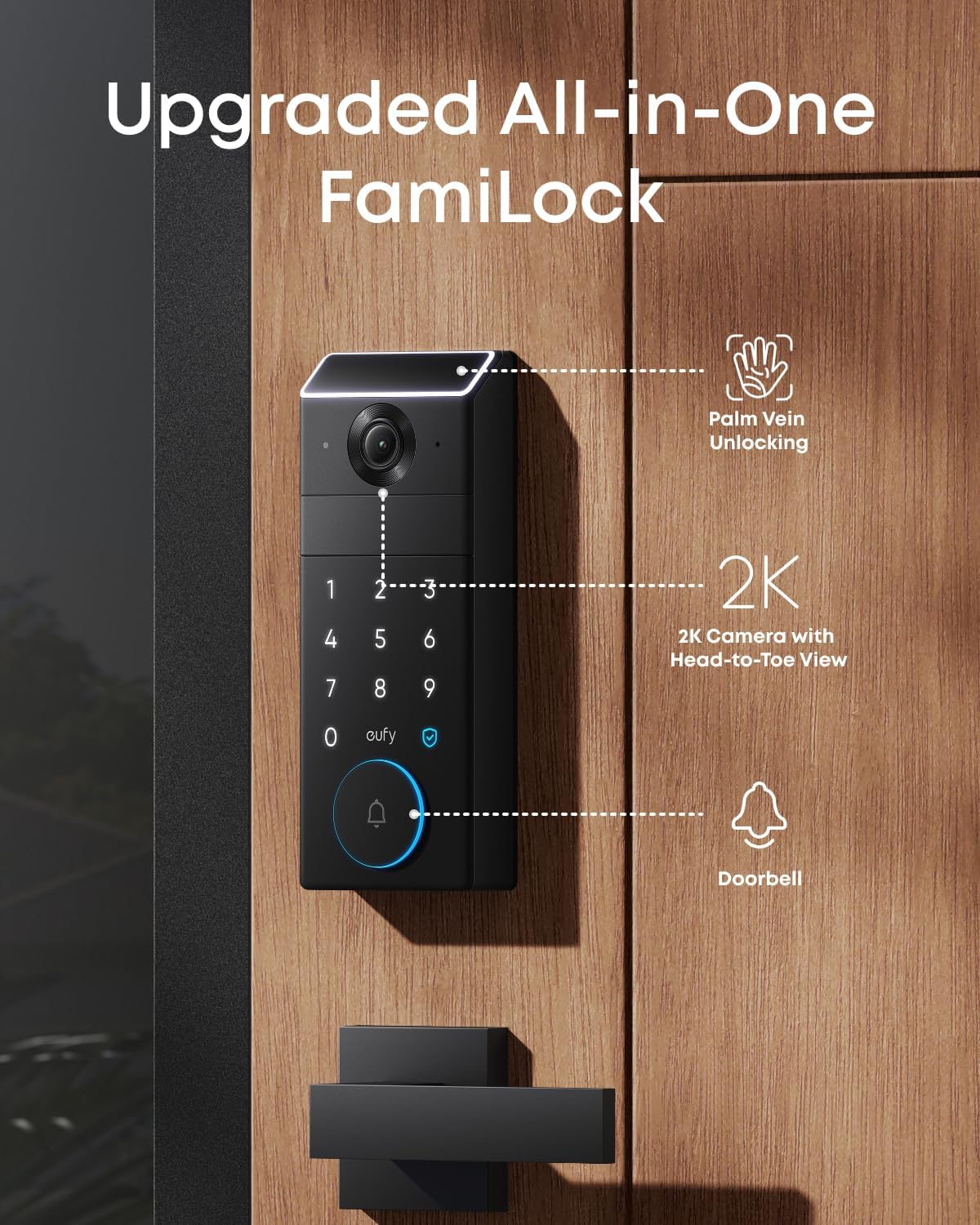
You’re looking at a feature-packed front door solution that combines biometric access, a high-resolution camera, and a doorbell into a single device. The eufy FamiLock S3 Max Smart Lock with Palm Vein Recognition is designed to replace keys, improve front-door visibility, and simplify day-to-day access for families, older adults, and busy households. It couples a 99.9% accurate palm vein scanner with a 2K HDR camera and a head-to-toe video doorbell, plus an intuitive rear lock video screen so you can check visitors without needing a phone.
eufy FamiLock S3 Max Smart Lock with Palm Vein Recognition - Keyless Entry Door Lock for Front Door, 3-in-1 Wi-Fi Keypad Deadbolt+ 2K HDR Camera+ Doorbell, ANSI/BHMA Grade 1, Rear Lock Video Screen
Quick Specs and Key Features
You’ll find below a compact breakdown so you can scan the essentials quickly and compare them at a glance.
| Feature | Detail |
|---|---|
| Biometric method | Palm vein recognition |
| Recognition accuracy | 99.9% |
| Recognition speed | ~0.6 seconds |
| Camera | 2K HD, f/1.6 lens, HDR |
| Doorbell FOV | 150° Head-to-Toe wide-angle |
| Lock type | 3-in-1 Wi‑Fi keypad deadbolt (keyless entry) |
| Grade rating | ANSI/BHMA Grade 1 |
| Rear feature | Rear Lock Video Screen (app-free viewing) |
| Power | Rechargeable battery (up to 4 months) + 4x AAA emergency backup (≈1 month) |
| Smart home integration | Matter, Apple Home, Google Home, Alexa, SmartThings (via HomeBase 3) |
| App recommended | eufy Security App (for full features) |
| Compatibility notes | Camera streams not supported via Matter; requires HomeBase 3 for full features; not compatible with HomeBase 2 |
Palm Vein Recognition — How It Works
You’ll get biometric access based on the unique vein patterns in your palm rather than fingerprints, which feel more secure and harder to spoof. The system shines infrared light onto your palm to map vein geometry and matches that to stored templates.
This approach stores your palm vein data locally on the device, so you don’t need to worry about cloud-hosted biometric records. For everyday use, you’ll experience a quick and largely hands-free unlock in about 0.6 seconds.
Accuracy and Speed
You’ll appreciate the claim of 99.9% accuracy, which keeps false accepts extremely rare and minimizes failed attempts. With recognition happening in roughly 0.6 seconds, the lock reacts fast enough that you won’t be standing at the door waiting.
In practical terms, that speed means you can walk up, place your palm, and be through the door in time you’d normally fumble for a key. The device also reduces the risk of spoofing because vein patterns are internal and cannot be easily copied.
Security and Privacy of Biometric Data
You’ll want reassurance that your biometric data stays secure, and eufy addresses this by storing palm vein templates locally on the device rather than sending them to cloud servers. This reduces the attack surface and aligns with a privacy-first approach.
Still, you should secure the device with a strong admin PIN and keep firmware updated. Local storage helps, but you’ll also want to control physical access to the lock hardware and the eufy account settings to maximize security.

Camera and Doorbell Capabilities
You’ll get a built-in 2K HDR camera with an f/1.6 lens that captures crisp images even in low-light conditions. The integrated video doorbell offers a 150° head-to-toe field of view so you can see packages at the step and visitors from head to toe.
Besides capturing clear video, the system can send real-time visitor alerts and integrate with your eufy Ecosystem & HomeBase 3 for AI security features. Remember that for the richest experience, eufy recommends using the eufy App.
Video Quality and Low-Light Performance
You’ll notice sharp daytime footage thanks to the 2K sensor and HDR processing, which balances bright and dark areas. The f/1.6 lens helps gather more light when it’s dim, so night-time recordings are more usable than many standard doorbell cameras.
If you expect to rely on video evidence for deliveries or security incidents, the 2K resolution and HDR will increase the likelihood of identifying faces and package labels compared to lower-resolution alternatives.
Field of View and Blind Spots
You’ll benefit from the 150° head-to-toe angle that reduces blind spots around the doorstep—this is especially useful for monitoring packages or seeing someone’s footwear. The wide field of view helps you capture more context without needing multiple cameras.
Be mindful of placement height and doorframe obstructions; while the FamiLock S3 Max has a wide angle, nearby walls or overhangs can still create blind zones if not installed thoughtfully.
Rear Lock Video Screen — App-Free Convenience
You’ll appreciate the Rear Lock Video Screen if you want quick, app-free visibility of the front door. This makes it particularly friendly for older adults and children who may not have or want to use a smartphone.
Because the display is built into the rear lock, you can check the camera feed and door status instantly without relying on a phone or waiting for an app to load. It’s a small usability detail that can make a big difference for multi-generational households.
Practical Use Cases
You’ll find the rear screen handy when you’re carrying groceries, when kids are home alone, or when an elderly family member wants to check who’s at the door quickly. It reduces friction and speeds up the simple task of verifying visitors.
For households that prefer minimal smartphone dependency, this feature stands out as a thoughtful accessibility and convenience option.
Build, Lock Hardware, and Certification
You’ll get an ANSI/BHMA Grade 1 rated deadbolt, which is the top commercial residential grade. This rating means the lock is designed to meet high standards for strength, durability, and security.
The hardware includes a Wi‑Fi keypad deadbolt and multiple unlocking methods: palm vein biometric, keypad codes, and app or smart home integration for remote unlocking. This mix of options makes it flexible whether you prefer biometric convenience or traditional PIN codes.
Durability and Materials
You’ll see a solid feel when interacting with the deadbolt because it’s built to meet Grade 1 standards. The mechanical components are engineered for heavy use and to resist forced entry attempts compared with lower-grade residential locks.
Regular maintenance and proper installation are still important; a Grade 1 rating provides a high baseline but won’t substitute for correct door alignment, sturdy strike plates, or secure frame reinforcement.

Power and Battery: Dual Power Supply System
You’ll rely on a rechargeable battery that supports up to four months of full functionality under typical usage patterns. When the main battery runs low or in long outages, you can quickly insert four AAA batteries as an emergency power source for about an additional month of essential functionality.
This dual approach reduces the chance of being locked out during extended power loss or if you forget to recharge. You’ll also get low-battery alerts so you can prepare and recharge proactively.
Charging, Alerts, and Emergency Measures
You’ll get notifications via the eufy App about battery status, and the lock will warn you before power gets critical. If you ever forget to charge, the AAA backup is a reliable short-term fix that most households already have on hand.
For peace of mind, consider scheduling a reminder or routine to top up the rechargeable battery every few months, especially if your usage is higher due to frequent guest access or constant video monitoring.
Smart Home Integration and Compatibility
You’ll be able to integrate the FamiLock S3 Max into a broader smart home setup through Matter and Apple Home, and it also supports Google Home, Alexa, and SmartThings when properly connected. For the best AI security features and full camera access, connecting the lock to the eufy Ecosystem and HomeBase 3 is recommended.
Keep in mind that camera streams are not currently supported via Matter due to platform limitations. For full camera functionality and the richest feature set, you’ll want to use the eufy App and HomeBase 3.
Important Compatibility Notes
You’ll need HomeBase 3 for advanced features and Matter compatibility; this device is incompatible with HomeBase 2. If you intend to use Matter, note that streams won’t pass through Matter yet, so rely on the eufy App for live video and recorded footage.
If you already use other smart-home platforms, double-check how you plan to integrate the lock so you don’t miss any important capabilities. The combination of Matter and HomeBase 3 provides a future-forward approach while maintaining privacy protections.
Installation and Setup
You’ll find the FamiLock S3 Max suitable for most standard front doors, but plan to confirm door thickness and prep before buying. The installation process is typical of smart deadbolts: remove the existing deadbolt, mount the new hardware, connect the keypad and interior unit, and finalize setup through the eufy App.
Setting up a palm vein template is straightforward: follow on-screen instructions to scan your palm from several angles. Then add PIN codes, link to HomeBase 3 if you have it, and test all access methods before relying on the device full-time.
Steps to a Smooth Setup
You’ll want to:
- Measure your door thickness and backset first.
- Ensure strong Wi‑Fi coverage at the door, or install HomeBase 3 nearby for reliable connections.
- Fully charge the rechargeable battery before starting.
- Enroll palm templates for each user and test recognition under different lighting and hand positions.
- Configure permissions, guest codes, and automation rules in the eufy App or via your chosen smart home platform.
Taking these preparatory steps will reduce friction and avoid repeat installations or adjustments.

Daily Performance and Real-World Use
You’ll likely experience fast and reliable biometric unlocks in normal conditions. The palm vein tech is less affected by surface dirt, sweat, or small cuts than fingerprint readers, making it a robust choice for active households.
Video alerts and live view functionality provide timely updates when someone approaches, while the rear video screen provides immediate visual confirmation without needing your phone. The combination should simplify daily access and monitoring for most users.
Reliability Factors
You’ll find the system highly reliable, but environmental factors like direct sunlight on the sensor or very wet palms could occasionally affect recognition speed. Ensuring a consistent scanning posture and keeping the sensor and camera lenses clean will maintain top performance.
If you rely on remote notifications frequently, ensure your HomeBase and Wi‑Fi network are stable to avoid missed alerts or delayed video clips.
Privacy and Data Handling
You’ll be reassured that palm vein templates are kept on-device, which reduces exposure to cloud-based attacks. Video and event storage behavior will depend on whether you use HomeBase 3 and local storage or opt for cloud services via the eufy App.
Always use a strong account password, enable multi-factor authentication if available, and keep firmware updated to maintain privacy protections.
What You Should Check
You’ll want to confirm how and where video clips are stored — locally on HomeBase 3 or in cloud backups — and whether you want automatic backup enabled. You’ll also want to limit admin accounts and review any shared access to keep control over who can unlock the door and view footage.
Pros and Cons
You’ll find the highlights and potential trade-offs below so you can weigh the overall value.
Pros:
- Palm vein recognition provides high accuracy (99.9%) and rapid unlock (~0.6s).
- 2K HDR camera with f/1.6 lens delivers clear, low-light video.
- 150° head-to-toe field of view minimizes blind spots at the doorstep.
- Rear Lock Video Screen offers app-free visibility for elderly or non-smartphone users.
- ANSI/BHMA Grade 1 security for strong mechanical protection.
- Dual power system (rechargeable + AAA backup) reduces lockout risk.
- Matter and major smart-home platform support via HomeBase 3.
- Local biometric storage improves privacy.
Cons:
- Camera streams are not supported via Matter currently, limiting some cross-platform functionality.
- Requires HomeBase 3 for full AI and integration features; not compatible with HomeBase 2.
- Biometric performance could be affected by extreme environmental conditions if not positioned or used properly.
- Initial cost may be higher than basic smart locks without a built-in camera and doorbell.
How It Compares to Other Smart Locks
You’ll find traditional fingerprint-based smart locks and popular brands like August, Schlage, and Yale often focus on Wi‑Fi, Bluetooth, or keypad entry. The FamiLock S3 Max differentiates itself with palm vein biometrics, integrated high-res camera, and a rear video screen.
Compared to fingerprint readers, palm vein recognition is harder to spoof and generally more reliable for people whose fingerprints are worn or damaged. Compared to separate devices (lock + camera + doorbell), the all-in-one design reduces the number of components to maintain and can simplify installation.
Maintenance Tips
You’ll want to maintain both the biometric sensor and the camera lens for consistent performance. Clean the palm reader and camera with a soft, lint-free cloth and avoid abrasive cleaners. Keep firmware current and check battery level frequently.
If you live in harsh weather, inspect seals and protective housing for moisture or debris buildup. Replace the AAA backup batteries periodically if kept in the lock to avoid leakage risk.
Troubleshooting Common Issues
You’ll encounter a few common scenarios—and quick fixes—to keep things running smoothly:
- Recognition failures: Re-scan palm templates and ensure the sensor is clean; try different hand positions and lighting.
- Camera offline: Check HomeBase 3 and Wi‑Fi connectivity; reboot HomeBase or router if needed.
- Low battery warnings: Charge the internal battery and insert AAA backup batteries when necessary.
- Missed alerts: Verify push notifications are enabled in the eufy App and that the phone has internet access.
If problems persist, eufy support and community forums can provide model-specific guidance and firmware updates.
Who Is This Best For?
You’ll find this lock particularly appealing if:
- You have family members who struggle with keys or smartphones (children, elderly).
- You want a privacy-first biometric solution that doesn’t store palm data in the cloud.
- You prefer a single integrated device for lock, camera, and doorbell instead of multiple products.
- You want top-tier mechanical security (ANSI/BHMA Grade 1) and modern smart home compatibility.
If you only want a simple, low-cost smart lock without camera or biometric features, this model might be more than you need. But if convenience, privacy, and robust video surveillance matter, it’s a strong option.
Final Verdict
You’ll find the eufy FamiLock S3 Max to be a compelling mix of advanced biometric access, high-quality video, and practical design touches like the Rear Lock Video Screen. Its palm vein recognition offers fast and secure entry that’s hard to spoof, while the 2K HDR camera and wide field of view improve doorstep visibility.
The need for HomeBase 3 to unlock the full feature set and the current Matter limitation for camera streams are important considerations, but the privacy-oriented storage of biometric data and the ANSI/BHMA Grade 1 hardware make this a confident choice for households prioritizing both security and convenience.
If you want a future-ready, privacy-conscious smart lock that replaces keys, gives clear video coverage, and is friendly to family members without smartphones, you’ll likely be very satisfied with the FamiLock S3 Max.
FAQ
Q: Can multiple people register their palms?
A: Yes. You’ll be able to register multiple palm templates so family members and caregivers can unlock the door without keys.
Q: What happens during a power outage?
A: You’ll use the recharge battery for normal operation and insert 4 AAA batteries as an emergency power source, typically giving about an extra month of essential function.
Q: Do you need the eufy App to use the lock?
A: You’ll get basic features with the physical lock and rear video screen, but the eufy App provides full functionality, including live video, recorded clips, notifications, and advanced AI features via HomeBase 3.
Q: Is palm vein data stored in the cloud?
A: No. You’ll be reassured to know that palm vein templates are stored locally on the device to enhance privacy.
Q: Will this work with my existing smart home setup?
A: You’ll be able to integrate with Matter and common platforms like Apple Home, Google Home, Alexa, and SmartThings, but for full camera functionality and advanced features you should use HomeBase 3 and the eufy App. Camera streams are not supported via Matter at this time.
Q: Is it weatherproof?
A: You’ll want to verify specific IP ratings for outdoor exposure; the device is designed for front-door use but proper installation and sheltering from extreme elements are recommended.
If you want, you can tell me what door type you have and which smart-home platform you use, and I’ll offer tailored installation tips and compatibility advice.

Disclosure: As an Amazon Associate, I earn from qualifying purchases.