
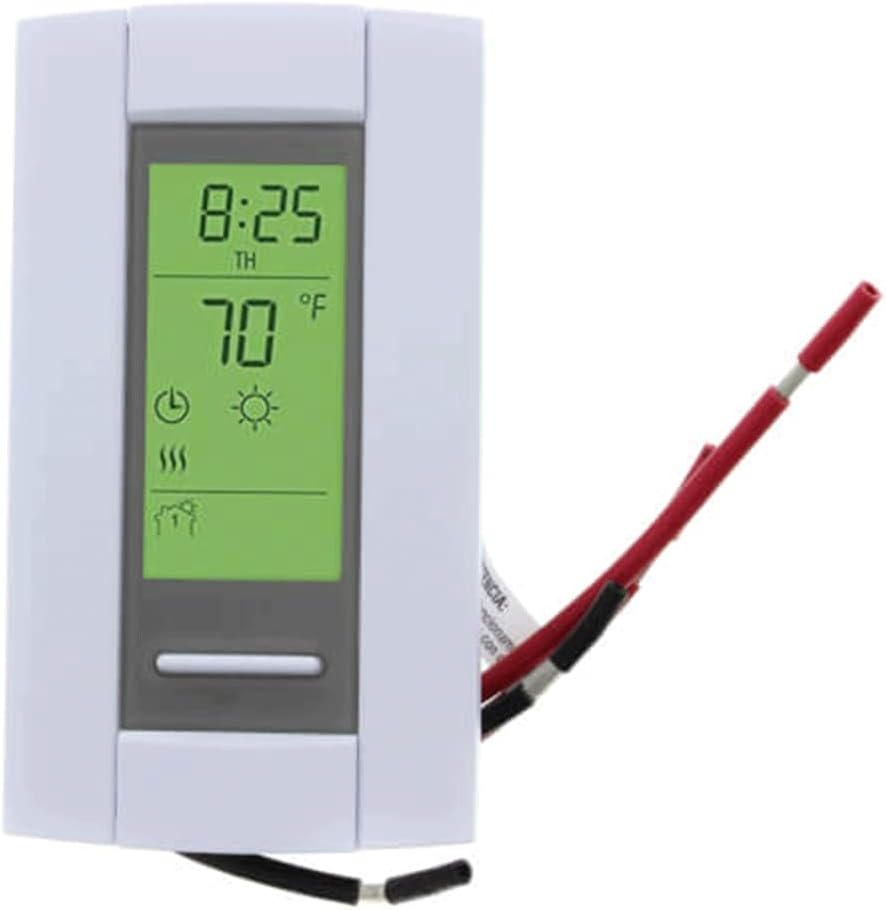
?Are you trying to decide if the “Honeywell TH115-AF-GA/U Radiant Heating 120/240V Programmable Thermostat with Floor Sensor and GFCI” is the right thermostat for your radiant floor system?

Buy Honeywell TH115-AF-GA/U Thermostat On Amazon
Overview
This Honeywell model is a 7-day programmable line-voltage thermostat built for electric radiant floor heating. You get three temperature control modes, an included floor sensor, and a built-in GFCI for added safety. The thermostat is designed to give you precise control of floor temperatures while protecting circuits in areas where moisture could be a concern.
Honeywell TH115-AF-GA/U Radiant Heating 120/240V Programmable Thermostat with Floor Sensor and GFCI
What this thermostat is designed for
You’ll find this thermostat most useful for electric in-floor (radiant) heating installations where line-voltage control is required. It’s not intended for low-voltage HVAC systems or hydronic boilers, so make sure your system is line-voltage (120/240V) before purchasing. The inclusion of a floor sensor helps prevent overheating of floor coverings while the GFCI protects users from electrical faults.
Key features
This section highlights the main selling points you’ll want to know about. Each feature affects how you’ll install, program, and use the thermostat, so take note of how they fit your needs.
- 7-day programmable scheduling: lets you set different temperature patterns for each day of the week.
- Three temperature control modes: Ambient (air), Floor (sensor-based), or Ambient with Floor temperature limits.
- Line-voltage compatibility: 120/240V for electric radiant floor systems.
- Built-in floor sensor: monitors actual floor temperature for safer and more accurate control.
- Integrated GFCI: provides ground-fault protection for locations where moisture may be present.
Programmability and scheduling
The 7-day programming capability allows flexible schedules for weekdays and weekends or unique day-by-day programming. You can use this feature to lower consumption when you’re away and raise comfort when you’re home. This reduces energy use and keeps floors comfortable on your terms.
Temperature control modes explained
You can select between Ambient control, Floor control, or Ambient with Floor limits. Ambient control uses the thermostat’s internal air sensor, Floor control uses the external floor sensor to regulate the floor temperature directly, and Ambient with Floor limits lets you control room temperature while preventing the floor from exceeding a maximum temperature. This menu of options gives you flexibility depending on floor covering and comfort priorities.
Floor sensor and GFCI specifics
The floor sensor measures the floor surface temperature, which is essential for tile, stone, and other hard surfaces that can overheat. The built-in GFCI helps prevent electrical shocks if water contacts the wiring or sensor area, which is important for bathrooms, kitchens, or laundry rooms. The combined feature set targets safety and precise control.
Check Price On Amazon — Honeywell TH115-AF-GA/U
Specifications breakdown
Below is a quick reference table summarizing the core specifications and product details so you can compare at a glance. Use this to confirm compatibility with your system and installation preferences.
| Attribute | Details |
|---|---|
| Product name | Honeywell TH115-AF-GA/U Radiant Heating 120/240V Programmable Thermostat with Floor Sensor and GFCI |
| Model/Part number | TH115-AF-GA |
| Voltage | Line voltage: 120/240V |
| Programmable | 7-day programmable |
| Control modes | Ambient, Floor, Ambient with Floor temperature limits |
| Sensor | External floor sensor included |
| Safety | Integrated GFCI |
| Application | Electric radiant floor heating |
| Brand | Honeywell |
| Package type | Plastic housing, imported |
Installation — what to expect
Installing a line-voltage thermostat is more involved than swapping a low-voltage unit, so you should be prepared. You’ll be dealing with 120/240V wiring and a floor sensor that must be placed correctly. If you’re not experienced with electrical work, you should hire a licensed electrician.
You’ll mount the thermostat in a standard wall box, connect line and load wires, hook up the floor sensor, and ensure the GFCI is wired correctly. You’ll also need to test for proper function and GFCI trip/reset operation before finishing the installation. Plan time for safe, careful work rather than rushing through.
Wiring and electrical considerations
Because this is a line-voltage device, you’ll be handling live wires that can be dangerous. Turn off power at the breaker and confirm with a tester. Common installations involve connecting two hot feeds for 240V or one hot for 120V, along with load wires to the heating circuit and the sensor wiring. The built-in GFCI must be wired according to the manufacturer’s instructions so the protected load is downstream of the device.
If your home has multi-conductor cables or conduit runs, plan for routing and securing the floor sensor. Also make sure your circuit breaker and wire gauge match the load requirements for your heating mats or cables. Consult the wiring diagram in the product manual and local electrical codes.
Sensor placement and floor types
You’ll want to position the floor sensor in a location that accurately reflects the floor temperature where people will walk or where heat output is most critical. For tile or stone, place the sensor between heating cables or under a heating mat, not directly on top of a cable. Avoid locating the sensor under heavy fixtures or cabinets that don’t represent the general floor temperature.
Different floor coverings respond differently: tile/stone heat quickly and often benefit from floor sensor control, while some engineered or glued wood floors may require strict floor temperature limits. Use the Ambient with Floor limits mode if your floor material manufacturer specifies a maximum floor temperature.
Tools and time required
You’ll need basic electrical tools: voltage tester, wire stripper, screwdriver set, pliers, and possibly fish tape for routing the sensor. Expect installation to take 1–2 hours for a straightforward swap if you’re comfortable with electrical work, longer if you need to cut in a new wall box or route sensor conduit. Factor in additional time for testing and configuring schedules.
Programming and daily use
Programming the TH115-AF-GA/U is intended to be straightforward, but line-voltage thermostats can have slightly different button layouts than typical low-voltage units. Spend time learning the interface and setting up a sensible schedule that matches your daily routines.
You’ll typically set four periods per day (wake, leave, return, sleep) across the seven-day week, though interfaces can vary. Setting conservative setbacks for times when you’re away or asleep will save energy while keeping the floors comfortable when you need them.
Typical programming example
A practical schedule might look like this:
- Wake: 6:30 AM — comfortable floor temp for morning routines.
- Leave: 8:30 AM — setback temp for daytime.
- Return: 5:30 PM — raise temps before you arrive home.
- Sleep: 10:30 PM — lower temps overnight.
You can adjust each day independently, so if you have weekend habits that differ from weekdays, set custom weekend schedules. The thermostat will run these programs automatically, minimizing daily adjustments.
Using floor sensor versus ambient control
If you primarily care about preventing floor overheating or optimizing floor surface comfort, use Floor control. If you want the overall room air temperature to dictate heating, choose Ambient control. Ambient with Floor limits is a safe middle ground: the thermostat primarily controls air temperature but halts heating if the floor approaches the limit you set. This is particularly helpful for delicate flooring materials.
Performance and accuracy
You should expect reliable, stable performance when the thermostat is properly installed. The floor sensor will typically offer good accuracy on surface temperature, giving better protection for floor coverings than air-only sensors. Programmable schedules keep floors warm when needed and save energy when not.
Line-voltage thermostats can have a feel of on/off cycling rather than continuous modulation; because many radiant systems are resistive, this is normal. The thermostat’s sensor responsiveness and placement determine how quickly it reacts, so correct sensor location improves both comfort and accuracy.
Pros and cons
You’ll want to weigh the advantages and limitations of this unit before deciding.
Pros:
- Three control modes give flexible options for different flooring and comfort priorities.
- Integrated GFCI provides important safety in moist spaces.
- 7-day programmability helps reduce energy costs by matching heating to your routine.
- Floor sensor included — you don’t need to buy a separate sensor for floor temperature control.
- Line-voltage compatibility removes the need for a separate relay in many installations.
Cons:
- Installation involves line-voltage wiring and may require a licensed electrician.
- Interface and programming might be less intuitive for users familiar only with modern smart thermostats.
- No Wi-Fi or remote control capabilities, so you must program and adjust on the device.
- Not suitable for low-voltage HVAC systems or hydronic heating systems.
Quick comparison table: Pros vs Cons
| Pros | Cons |
|---|---|
| Integrated GFCI for safety | Requires line-voltage wiring and installation knowledge |
| Floor sensor included for accurate surface control | No Wi-Fi or remote access |
| Three control modes for flexibility | Programming may feel old-school to some users |
| 7-day programmable schedule | Not compatible with low-voltage systems |

Troubleshooting common issues
You’ll likely encounter a few predictable issues during setup and use; here’s how to approach them.
- Thermostat won’t power on: Confirm breaker is on, check wiring connections, and verify incoming voltage at the box with a tester. Reset the GFCI if it has tripped.
- Floor not reaching set temperature: Check sensor placement, confirm heating cable/mat continuity, and ensure load wires are correctly connected.
- GFCI keeps tripping: Inspect the sensor cable for moisture or damage, check connections for condensation or exposed conductors, and verify the heating element is not compromised.
- Erratic temperature readings: Ensure the thermostat is not installed near heat sources or cold drafts; confirm the floor sensor is not under fixed objects or heavy fixtures.
If you can’t resolve electrical issues, call a licensed electrician or a radiant heating specialist.
Compatibility and appropriate use cases
This thermostat is best for:
- Electric radiant floor heating systems that run at line voltage (120V or 240V).
- Rooms where you need floor protection like bathrooms, kitchens, mudrooms, and basements.
- Installations that require both floor sensing and GFCI protection for safety.
Avoid using this thermostat for:
- Low-voltage HVAC systems (24V thermostats).
- Hydronic in-floor systems that use a boiler and manifold valves (these often interface with low-voltage controls).
- Systems that require smart home integration unless you plan separate smart controls.
Safety notes and code compliance
You should always follow local electrical codes when installing line-voltage devices. The built-in GFCI does add protection, but it does not replace proper grounding or code-compliant circuit wiring. Label the breaker for the heating circuit and test the GFCI regularly. If your municipality or builder codes require a licensed electrician to perform or inspect the work, comply to avoid safety risks or insurance problems.
Maintenance and care
You won’t need much regular maintenance, but periodic checks help. Test the GFCI monthly using the test/reset button, and visually inspect wiring and the wall plate for any discoloration or signs of heat. If you ever plan to replace flooring or relocate heating elements, coordinate thermostat sensor placement changes with the new layout.
If the thermostat ever fails, don’t attempt to repair internal electronics yourself. Replace it or seek professional repair to maintain the GFCI safety function.
Comparison with other Honeywell options and alternatives
Compared with non-programmable line-voltage thermostats, you’ll gain scheduling and more precise floor control. Versus smart Wi-Fi thermostats, this unit lacks remote control and app-based programming but is purpose-built for radiant floors and includes GFCI — features many smart thermostats do not offer.
If you want wireless control, you’d need a different product or an auxiliary smart relay that is compatible with line-voltage heating, but be cautious: adding third-party relays can complicate GFCI protection and code compliance. If your priority is simple manual control, a non-programmable floor thermostat might be cheaper and easier. For precise energy management and remote access, choose a smart system designed for line-voltage electric floors.
Cost considerations
You’ll pay more for a thermostat that includes a floor sensor and GFCI than for a basic line-voltage device without these features. However, you’ll save on not buying a separate GFCI device or sensor, and you’ll likely benefit from energy savings through programmability. Factor in potential electrician costs for installation — these can be a significant portion of total expense if a new circuit or wall box is required.
Frequently asked questions (FAQs)
You’ll probably have questions; here are practical answers to common ones.
-
Can this thermostat control 240V systems?
- Yes, it supports line-voltage 120/240V radiant heating systems. Confirm wiring and load capacity before connecting.
-
Do you need the floor sensor?
- For most tile or stone floors, yes — the floor sensor prevents overheating and provides more precise surface control. You can use ambient control for air temperature, but floor sensor control is safer for many floor types.
-
Is GFCI integrated or separate?
- The GFCI is integrated into the unit, offering protection for the connected heating circuit.
-
Can it be used with hydronic (hot water) systems?
- No. Hydronic systems typically require low-voltage controls and thermostats compatible with valves and circulators.
-
Does it work with smart home systems?
- No built-in smart features are provided. If you need remote control, consider other products or consult a professional about safe integration options.
Practical tips for getting the most from your thermostat
- Use the Floor mode or Ambient with Floor limits for tile/stone to prevent damage from excessive floor temperatures.
- Program realistic setbacks — large temperature swings take more energy to recover from.
- Test the GFCI monthly to ensure the protective feature is functioning.
- Keep the thermostat out of direct sunlight, away from drafts, and not near heat-producing appliances to avoid false readings.
- Record your manufacturer-recommended maximum floor temperature for the specific flooring material and set the floor limit accordingly.
Real-world scenarios and recommendations
If you’re installing electric floor heating in a bathroom with tile, you’ll benefit most from using the floor sensor with a strict floor temperature limit to protect the tiles and adhesives. In a living room with carpet, you might prefer ambient control for overall room comfort. For laundry rooms or mudrooms that may get wet occasionally, the integrated GFCI adds a layer of safety that keeps you compliant with many building codes.
If you rent out property or need simple automated comfort with minimal daily changes, the 7-day programmability makes it easy to set-and-forget. If, however, you want app-based control or integration with other home automation systems, this model won’t provide that natively.
Final verdict
You’ll find the Honeywell TH115-AF-GA/U to be a sensible, safety-focused choice for line-voltage electric radiant floor systems. It brings the key features you likely want — floor sensor control, programming, and integrated GFCI — into a single unit. If you prioritize safety for wet areas and accurate floor temperature control over smart connectivity, this thermostat is an effective, pragmatic solution. Ensure compatibility with your floor type and plan for professional installation if you’re not comfortable working with line-voltage wiring.
If you’d like, I can help you compare this model directly with another thermostat or walk through a step-by-step installation checklist tailored to your floor type and electrical setup. Which room or flooring type are you planning to control with this thermostat?
See Honeywell TH115-AF-GA/U Thermostat On Amazon
Disclosure: As an Amazon Associate, I earn from qualifying purchases.