
Are you trying to decide whether the Hunter Hydrawise Pro-HC 24-Station Indoor Wi-Fi Irrigation Controller (PHC-2400i) will make managing your irrigation easier and more reliable?

Buy Hunter Hydrawise Pro-HC Controller (PHC-2400i) On Amazon
Overview of the Hunter Hydrawise Pro-HC 24-Station Indoor Wi-Fi Irrigation Controller (PHC-2400i)
You’re looking at a commercial-grade indoor controller that’s built for landscape professionals and serious homeowners who need robust scheduling and remote control. The PHC-2400i combines a full-color touchscreen for local programming with Wi‑Fi connectivity that links to Hunter’s Hydrawise irrigation management software for remote configuration and monitoring.
What you get in the box
You’ll typically receive the controller, mounting hardware, and quick-start guides to get you going. If you’re installing for the first time, you should also plan to have basic tools, the irrigation schematic for your site, and any sensors or flow meters you intend to use.
Key specifications at a glance
You should find these specs helpful when comparing controllers or planning equipment and wire runs. They define station capacity, programming capability, sensor inputs, and physical interface that you’ll be using day to day.
| Specification | Details |
|---|---|
| Model | Hunter Hydrawise Pro-HC 24-Station Indoor Wi-Fi Irrigation Controller (PHC-2400i) |
| Number of stations | 24 |
| Wi‑Fi | Built-in for quick connection to Hydrawise software |
| Programming options | Standard: 6 independent programs, 6 start times per program; Advanced: station-based programming with up to 6 total start times |
| Sensor inputs | 2 sensor inputs compatible with Clik sensors and HC Flow Meter |
| Pump/master valve output | 1 P/MV output for pump start relay and master valve activation |
| Display | 2 3/4″ full-color touchscreen for panel programming |
| Wire fault detection | Built-in milliamp sensor for fault detection and alerts |
| Intended location | Indoor installation |
| Typical users | Landscape professionals, commercial properties, advanced residential users |
Wi‑Fi and Hydrawise integration
You’ll appreciate the Wi‑Fi connectivity if you want remote control and monitoring. Once connected to your network, the controller communicates with Hydrawise software so you can manage schedules, view alerts, and adjust settings from a phone, tablet, or desktop.
The Hydrawise platform adds weather-based adjustments, notifications, and usage tracking. This helps you automate seasonal changes and respond to issues without having to be physically at the controller.
How remote scheduling helps you
You’ll save time with the ability to change run times or pause watering from anywhere. If you’re managing multiple properties, it’s easier to keep everything synchronized and optimized without repeated site visits.
Hydrawise also stores your controller settings and historical data, which can help you spot trends and fine-tune irrigation for plant health and water savings.
Purchase Hunter Hydrawise Pro-HC Controller On Amazon
Programming flexibility
You have two main programming modes: standard program-based and advanced station-based. In standard mode you get up to 6 independent programs with up to 6 start times each; in advanced mode you can program individual stations with up to 6 start times total, which gives you fine-grained control.
This flexibility means you can tailor irrigation to mixed landscapes—turf, shrubs, and planted beds—without forcing compromises. If you need to stagger runtimes or prevent excessive load on a pump, you’ll find the available start times and program options helpful.
Scenario: turf vs. drip lines
When you’re managing turf and drip simultaneously, you’ll likely set a program for turf with multiple shorter cycles and another for drip with infrequent, longer cycles. The advanced programming option lets you do that per station so irrigation is precise and efficient.
Inputs and outputs — sensors, flow meter, pump start
You get two sensor inputs compatible with Hunter Clik sensors and the HC Flow Meter. These inputs let you add rain, freeze, or soil moisture cutoffs, and monitor flow to detect leaks or broken lines.
The P/MV output supports a pump start relay or master valve to control the water supply. This is especially important if you rely on a pump system or need to isolate the irrigation supply for maintenance or emergency shutdown.
Why the HC Flow Meter matters to you
With the HC Flow Meter connected, the controller can monitor water flow in real time and trigger alerts if flow exceeds expected levels. That means quick detection of ruptured pipes or stuck valves, which can prevent major water damage and waste.
Display and local programming
You’ll interact with the controller via a 2 3/4″ full-color touchscreen located on the panel. It’s designed to be intuitive so you can make quick adjustments at the controller without digging into a manual.
Local programming is useful when you’re on site and want instant changes or need to troubleshoot without remote access. The touchscreen simplifies navigation through programs, schedules, and sensor status.
Accessibility and user experience
Whether you’re a pro or a DIY enthusiast, the touchscreen reduces the learning curve compared to older dial or keypad controllers. You’ll find menus and icons that are logical and responsive, so basic tasks shouldn’t take long.
Built-in wire fault detection and alerts
A built-in milliamp sensor helps detect wire faults and sends alerts through Hydrawise if you’ve connected the controller to Wi‑Fi. This feature is valuable because it lets you catch issues like shorts, opens, or ground faults before they become bigger problems.
You’ll get notifications that point you to the affected station or circuit, helping you prioritize repairs and reduce unplanned downtime.
Examples of faults the system catches
The milliamps sensor can identify a sudden drop in current that might indicate a wire break, or a rise that could signal a shorted solenoid. These diagnostics save you time during troubleshooting and reduce the guesswork.
Installation and setup
If you’re comfortable with basic electrical and irrigation wiring, you can install this controller yourself; otherwise, you should hire a licensed technician or irrigation professional. Indoor mounting means you’ll need a suitable location with a stable Wi‑Fi signal and access to 110/120V power if your region uses that standard.
Plan wire runs carefully: 24 stations means a fair number of field wires and potential for longer runs. Use proper wire gauge and consider the distance to the valves to ensure reliable operation.
Power and placement tips
Mount the controller where it’s dry, accessible, and not subject to extreme temperatures or steam. Position it so the Wi‑Fi signal from your router reaches it; otherwise, plan an access point or Wi‑Fi range extender.
Programming tips and best practices
You should first map your irrigation zones, plant types, and watering needs before setting up programs. Assign each station a clear name and label field wires so you can quickly identify them later.
Use the Hydrawise weather-based adjustments to reduce runtime automatically on rainy or cool days, and set up soil moisture or rain sensors for redundant protection. If you use the HC Flow Meter, configure sensible flow thresholds for each main line to avoid nuisance alerts.
Staggering start times for pump capacity
If you’re using a pump or have limited water pressure, stagger start times across stations or create valve sequencing to avoid simultaneous valve operation that exceeds available flow. The controller’s start time options and P/MV control help you manage water demand dynamically.
Hydrawise app experience (mobile and web)
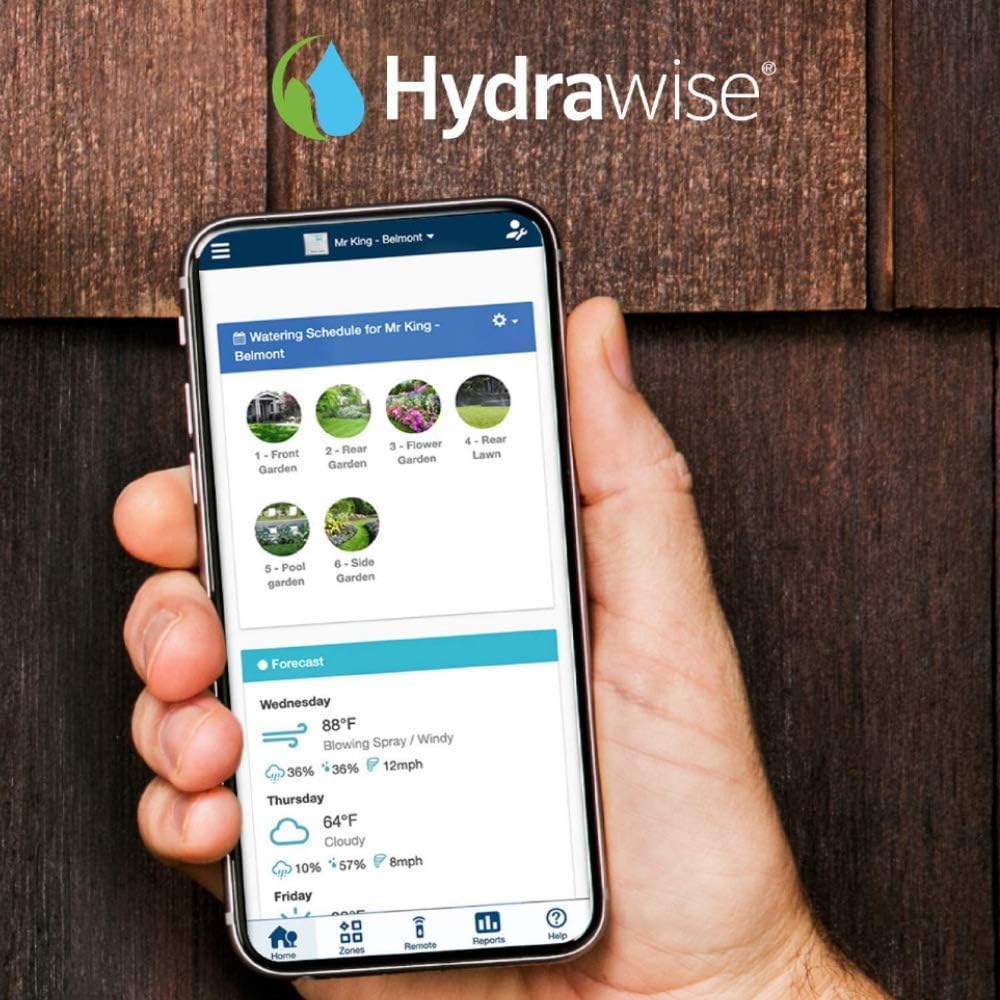
When you connect to Hydrawise, you’ll manage the system from an app or web portal that’s built for efficiency. The interface shows current controller status, upcoming runtimes, and allows you to run manual operations or adjust schedules in real time.
Hydrawise includes weather forecasts and evapotranspiration (ET) adjustments, which help you water less while keeping plants healthy. Notifications and logs give you visibility into system performance and water use.
What you can do in the app
You’ll be able to start or stop zones, set manual watering, edit schedules, see sensor readings, and receive alerts for wiring faults or flow anomalies. For multi-site managers, Hydrawise consolidates data across controllers into one dashboard.
Real-world performance and reliability
In practical use, you’ll notice the Hydrawise Pro-HC performs reliably for medium to large irrigation systems. The controller’s hardware is solid and the software is mature, so you’re less likely to see unexpected reboots or connectivity problems compared to lower-end units.
For critical installations, consider redundancy: a good Wi‑Fi network, a properly installed flow meter and sensors, and backup power options where needed to maintain automated control during brief outages.
Common user feedback highlights
Users often praise the remote control and weather adjustment features, and the milliamps fault detection is regarded as a real time-saver. Some users may need time to get used to advanced programming if they’re unfamiliar with station-based settings.

Troubleshooting basics
If the controller won’t connect to your Wi‑Fi, verify credentials, router compatibility (2.4 GHz vs 5 GHz), and distance. Check for obvious wiring errors if a station won’t operate—loose connections, incorrect terminal placements, or damaged solenoids are common causes.
For flow alerts, confirm the HC Flow Meter is installed correctly and calibrated. If you get false wire fault alerts, inspect wire splices and grounding; the milliamp sensor is sensitive to poor connections.
When to call a pro
If you encounter persistent or ambiguous faults—intermittent station activation, unexplained high flow without a clear break, or complex pump control wiring—engage a licensed irrigation technician who can test voltages, current, and hydraulic flow on site.
Maintenance recommendations
You’ll want to check the wiring and valve boxes seasonally, clean the controller’s touchscreen occasionally, and verify sensor operation before peak watering season. Keep firmware updated through Hydrawise so you benefit from improvements and bug fixes.
If you live in a freezing climate and the controller is indoors, make sure the exterior valves and backflow devices are winterized properly. For indoor installations, maintain a dry, clean environment to maximize equipment life.
Spare parts and accessories to consider
Keep a spare valve solenoid or two, extra terminal screws, and a small kit for wire splices. If you’re remote-managing multiple sites, having replacement flow meters or Clik sensors available can reduce downtime.
Security and privacy considerations
You’ll be sending controller data to the Hydrawise cloud, so ensure you use strong, unique passwords and consider enabling any available two-factor authentication for your Hydrawise account. Keep your home or facility network secure to prevent unauthorized access.
Hydrawise stores logs and settings to improve service, but you should review privacy settings and confirm what data is collected if that’s a concern for your operation.
How to secure the controller
Segmenting your network with a guest VLAN for IoT devices and controllers can limit exposure of other systems. Regularly review user access on Hydrawise and remove or limit accounts that no longer need controller access.
Comparing the PHC-2400i to similar controllers
You’ll find that dual advantages of local touchscreen control and Hydrawise cloud integration place this controller in a higher tier than basic standalone units. Compared to simpler models, you get more stations, milliamps fault detection, and native flow monitoring support.
If you compare to other smart controllers, check the number of sensor inputs, support for flow meters, and quality of mobile/web apps. The PHC-2400i is competitive for professionals who need 24 stations and dependable diagnostics.
When a simpler controller might suffice
If you only need a handful of zones and you don’t want remote management or advanced alerts, a basic timer might be cheaper and simpler. However, if you want prevention of failures, water savings, and professional-level diagnostics, the PHC-2400i has clear advantages.
Pros and cons table
You’ll find this concise comparison useful when deciding whether the controller meets your needs.
| Pros | Cons |
|---|---|
| 24-station capacity fits large landscapes | Indoor only — requires protected mounting location |
| Built-in Wi‑Fi with Hydrawise remote management | Might be over-featured for small residential systems |
| Full-color touchscreen for easy local programming | Advanced programming may have a learning curve |
| Two sensor inputs and HC Flow Meter support | Requires reliable Wi‑Fi for full remote functionality |
| Built-in milliamp wire fault detection | Initial setup and wiring for 24 stations can be time-consuming |
| P/MV output for pump start/master valve | Additional hardware (flow meter, sensors) adds cost |
Who should buy the Hunter Hydrawise Pro-HC PHC-2400i
If you manage multiple large irrigation zones, commercial landscapes, or a complex residential setup, you’ll benefit from this controller. It’s also a strong choice if you value remote management, fault detection, and the ability to integrate flow monitoring.
If you’re an irrigation professional, you’ll likely appreciate the diagnostics and the Hydrawise platform for customer remote access. For a small lawn with a few zones, the controller may be more capacity and complexity than necessary.
Considerations for installers and contractors
You’ll save time in diagnosis and offer higher-value service to clients by installing a controller with flow monitoring and milliamp sensing. If you manage a portfolio of properties, the Hydrawise software reduces travel for routine schedule adjustments.
Cost and value
You’ll pay more upfront for a feature-packed controller like the PHC-2400i than a simple mechanical or basic digital timer. However, the potential savings from reduced water waste, fewer site visits for diagnostics, and prevention of burst-line damage can justify the investment over time.
Factor in optional accessories—HC Flow Meter, Clik sensors, and possibly network hardware if Wi‑Fi signal is weak—when budgeting for installation.
Return on investment timeline
If you’re in a water-sensitive area or manage irrigation at scale, you may see ROI within a year or two through reduced water bills and less emergency repair. For smaller, low-use systems, ROI may take longer, but the convenience and prevention of failures still add value.
Final verdict
You’ll find the Hunter Hydrawise Pro-HC 24-Station Indoor Wi-Fi Irrigation Controller (PHC-2400i) to be a very capable and well-rounded controller for medium to large installations. It provides advanced features, solid diagnostics, and reliable remote management that suits both professionals and serious residential users.
If you prioritize control, serviceability, and water efficiency—and you’re ready to invest in a professional-grade system—this controller is worth strong consideration. If your needs are minimal, a simpler model may be more economical, but you’ll forgo the diagnostics and remote functionality that make this unit stand out.
Quick checklist before you buy
You should confirm these points to ensure a smooth purchase and installation:
- Do you need a 24-station capacity, or could a smaller unit be enough?
- Is an indoor mounting location with good Wi‑Fi available?
- Will you add an HC Flow Meter and Clik sensors for complete monitoring?
- Are you comfortable with advanced programming or will you hire an installer?
- Does your irrigation pump or master valve need P/MV control?
If you can answer yes to most of these, the PHC-2400i fits well with professional installations and comprehensive residential systems.
Final setup tips for first-time users
When you set up the controller, label every wire and station, back up settings in Hydrawise after configuration, and run a full test of each valve and sensor. Configure flow thresholds conservatively at first, then tighten thresholds based on observed normal usage to avoid false alarms.
You’ll be happier if you schedule a follow-up check after a few weeks to verify that weather adjustments and ET settings are producing the expected water savings and plant health outcomes.
If you want, I can help you create a step-by-step wiring checklist, suggest typical flow thresholds for your system size, or walk through programming a sample schedule based on your landscape types. Which would you prefer to do next?
Get The PHC-2400i Hunter Hydrawise Pro-HC On Amazon
Disclosure: As an Amazon Associate, I earn from qualifying purchases.