
Are you ready to upgrade your irrigation system with a smart, reliable controller that saves water and gives you remote control from your phone?
Buy The Hunter Hydrawise X2-800 8-Station Controller On Amazon
Quick verdict
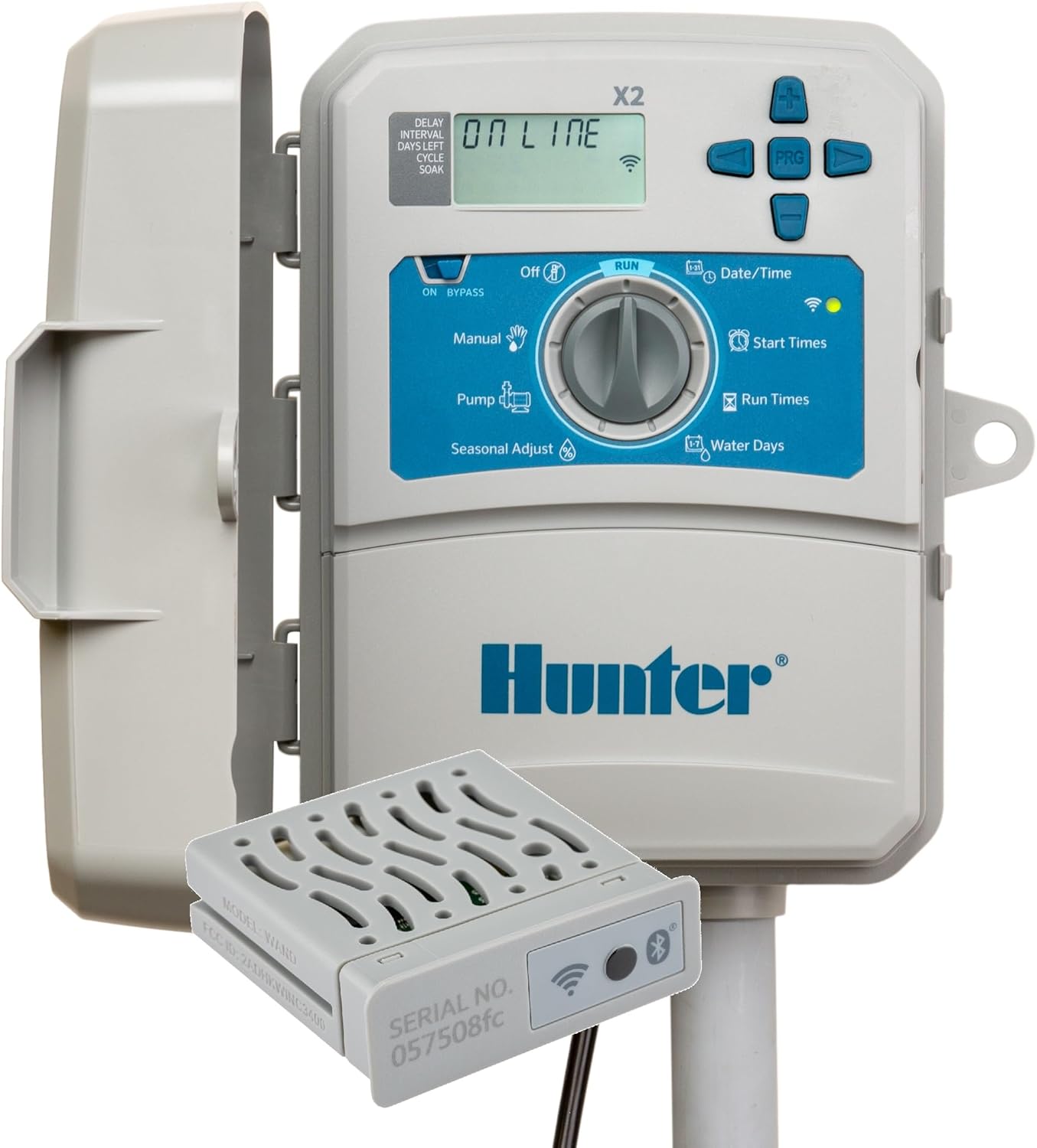
You’ll find the Hunter Hydrawise X2-800 8 Station Hydrawise Controller Bundled with Wand WiFi Module X2 8 Zone Outdoor or Indoor Smart Internet X2800 Irrigation Timer to be a well-rounded choice if you want a balance of local control and cloud features. It packs practical smart features, straightforward installation, and an included Wi‑Fi Wand that gets you connected without buying extras.

Hunter Hydrawise X2-800 8 Station Hydrawise Controller Bundeled with Wand WiFi Module X2 8 Zone Outdoor or Indoor Smart Internet X2800 Irrigation Timer
Product overview: Hunter Hydrawise X2-800 (WAND included)
This product is an 8-station irrigation controller that ships with the X2-WAND Wi‑Fi module, letting you manage irrigation schedules remotely via the Hydrawise cloud platform. The controller supports indoor or outdoor mounting, has a backlit display for easy local use, and includes Bluetooth pairing to simplify initial Wi‑Fi setup.
What’s included in the package
You’ll receive the X2-800 controller and the X2-WAND Wi‑Fi module, plus basic installation hardware and documentation. The Wand module is the key item here, because it provides online management, predictive watering features, and alerts for wiring faults and other issues.
Key features you should know
You get 8 irrigation stations, Bluetooth-assisted Wi‑Fi setup, a backlit LCD for easy viewing, and the ability to use your smartphone as a manual remote when Wi‑Fi isn’t available. Hydrawise predictive watering uses weather data to adjust runtimes automatically, and QuickCheck wiring diagnostics help you find field wiring problems quickly.
Specification at a glance
| Item | Detail |
|---|---|
| Model | Hunter Hydrawise X2-800 (X2800) |
| Stations | 8 stations / zones |
| Wi‑Fi module | X2‑WAND included |
| Installation | Indoor or outdoor |
| Display | Backlit LCD |
| Bluetooth | Yes (for pairing/setup) |
| Manual remote | Use smartphone as manual remote without Wi‑Fi |
| Programs | 3 programs (ABC standard) |
| Start times | Product notes list 4 start times in one place and up to 6 starts in another; check the device UI for exact limits |
| Max run times | Marketing lists up to 6-hour runs in one section and up to 24 hours in another; runtime maximum may depend on program settings |
| Diagnostics | QuickCheck for wiring faults |
| Predictive watering | Hydrawise weather adjustments to save water |
| Integrations | Amazon Alexa, Control4 (via Hydrawise cloud) |
| Other | Indoor/outdoor-rated enclosure, smartphone and web control |
This table gives you quick access to the main specs so you can compare at a glance. If you have specific needs—like an exact maximum run time or start time count—double-check the unit’s settings after you power it up.
Purchase The Hunter Hydrawise X2-800 On Amazon
Installation and setup
Setting up the X2-800 is straightforward if you’re comfortable with basic electrical wiring and mounting. You’ll mount the cabinet, connect the transformer and valve wires to the labeled terminals, and attach the WAND module into the controller’s accessory port.
Once wired and powered, use Bluetooth pairing to link the X2-WAND to your smartphone and then point it to your Wi‑Fi network. The Bluetooth setup is designed to make connecting the Wand faster and easier than manually entering Wi‑Fi credentials at the controller. After the Wand is online, register or sign in to the Hydrawise web app to complete setup and let predictive watering kick in.
Wiring tips and safety reminders
Turn off power at the transformer or breaker before you touch any wires, and follow the color-coding and labeling for common, zone, and master valve outputs to avoid mistakes. If you’re unsure about mains connections or transformer wiring, have a licensed electrician or irrigation professional perform or inspect the installation.
Mounting and environmental considerations
You can install the X2-800 indoors or outdoors, but if you choose an exposed location make sure it’s mounted under some protection or positioned to minimize direct weather exposure. The cabinet is weather rated, but long-term sun and rain exposure can affect seals and wiring entry points over years, so plan for protection where possible.
Using the Hydrawise app and web interface
You’ll use the Hydrawise smartphone app or the web dashboard to configure schedules, view run history, receive alerts, and adjust settings remotely. The interface is generally user-friendly, letting you set program runtimes, start times, and specialty options without standing at the controller.
From the app you can also manually run individual zones, pause watering for a set time, and get notifications for wiring faults or offline conditions. If you want to track water usage and see how changes in settings affect consumption, the cloud dashboard offers basic reporting and logs to help you make smarter decisions.
Manual remote and offline control
If your home Wi‑Fi goes down or the controller is hard to reach, Bluetooth pairing allows your smartphone to act as a manual remote when in range. This is particularly useful if you need to trigger a quick cycle or make an urgent change while a technician works on network equipment.
Predictive Watering and weather adjustments
Predictive Watering is one of the main reasons to pick a Hydrawise-enabled controller: it uses local weather forecasts and historical climate data to adjust your irrigation runtime and schedule automatically. This means lower run times during rainy or cool periods and slightly higher runtimes during hot, dry spells—saving you water and maintaining healthier turf and plants.
The system factors in temperature, rainfall, wind, humidity, and evapotranspiration (ET) where available, but you should still monitor plant response and fine-tune zone-specific settings. Predictive adjustments are a great baseline, but you’ll get the best results when you combine them with correct zone setup and occasional manual checks.
Programming and scheduling options
The X2-800 uses the familiar ABC program structure with multiple programs and start times to accommodate complex landscapes. You’ll assign zones to Program A, B, or C, set run times and start times, and use additional options to refine watering frequency.
Note that product text references both “3 programs with 4 start times each” and “3 programs with 6 start times,” and marketing language also disagrees on maximum run time (6 hours vs 24 hours). These differences are typically a result of different firmware versions or mixed product literature, so verify the limits on your unit’s setup screen after powering up. In everyday use you’ll likely find ample flexibility for most residential landscapes.
Cycle and soak and seasonal adjustments
Hydrawise controllers commonly support cycle-and-soak options to break long run times into shorter cycles to prevent runoff on slopes and compacted soils. You can also set seasonal adjustments to scale run times globally when quick changes are needed, such as during heat waves or seasonal transitions.
Diagnostics and troubleshooting
QuickCheck wiring diagnostics help you pinpoint issues like shorted or open solenoid wires, making troubleshooting far faster than manually testing each valve. The controller will flag faulty wiring and report it through the Hydrawise app, which saves time when diagnosing a non-working zone.
For Wi‑Fi issues, start with the Wand’s Bluetooth pairing LED and check signal strength at the controller’s mounting location. If the Wand won’t connect to your network, verify your router’s 2.4 GHz band is enabled (the Wand uses 2.4 GHz), and temporarily lower security features like MAC filtering while you configure it. If problems persist, a factory reset of the Wand and re-pairing often clears stubborn connection errors.
Common fixes you can try
- Check transformer voltage and wiring if no power is present.
- Inspect valve solenoid wires and use the QuickCheck diagnostics to identify shorts.
- Move the controller or add a Wi‑Fi extender if you have weak signal issues.
- Verify Hydrawise account and controller registration if the unit won’t show online.
Performance in the field
You’ll notice the controller responds quickly to web commands in most residential setups; when the Wand is online, start/stop commands and schedule changes propagate within seconds to minutes. Predictive Watering produces measurable water savings in many climates, particularly where evaporation and rainfall vary seasonally.
The included Wand makes the package a great value because you don’t have to buy a separate network accessory. Longevity tends to be good for Hunter products when mounted properly and protected from extreme exposure, and the backlit display gives you dependable local control when you want it.

Integrations and smart-home compatibility
If you use voice assistants or home automation systems, the Hydrawise cloud service integrates with Amazon Alexa and Control4, allowing basic voice commands and status checks. This can simplify common tasks like pausing watering or starting a quick zone test without going to the controller or opening the app.
For larger home automation platforms, you may be able to integrate via Control4 or third-party bridges, but check the Hydrawise documentation for available API endpoints and the exact nature of commands supported. Hydrawise typically focuses on irrigation-specific controls, so you’ll get solid functionality for water management rather than full home automation parity.
Comparing the X2-800 to other controllers
Compared to basic mechanical or non-smart timers, the X2-800 offers clear advantages: remote control, weather-based adjustments, wired diagnostics, and cloud alerts. When compared to higher-end Hunter models with integrated Wi‑Fi or flow sensors, the X2-800 is positioned as a mid-range smart controller that balances price and capability.
If you only need a simple timer without cloud features, a basic controller will cost less and be simpler to use. But if you want water savings, remote control, or wiring diagnostics, the X2-800 with the Wand included is competitive and economical.
Pros and cons
You’ll appreciate a number of strengths as well as a few limitations with this model.
Pros:
- Comes with the X2-WAND Wi‑Fi module included, so no extra purchase is required to use cloud features.
- Bluetooth pairing simplifies initial Wi‑Fi setup.
- Predictive Watering can reduce water usage and provide smarter schedules.
- QuickCheck wiring diagnostics save troubleshooting time.
- Indoor or outdoor installation options increase flexibility.
Cons:
- Marketing materials show inconsistent numbers for start times and maximum run times, so you should confirm your unit’s limits after setup.
- Reliance on the Wand means Wi‑Fi performance depends on placement and router configuration; you may need a Wi‑Fi extender in large properties.
- If you want ultra-advanced features like built-in flow sensing or enterprise-grade telemetry, you may need higher-tier controllers or add-on accessories.
Maintenance and longevity
You should periodically inspect the cabinet, wiring entries, and the condition of the transformer to keep the controller working well for years. If installed outdoors, check seals and mounting hardware annually and keep the cabinet clear of debris and vegetation.
Hydrawise firmware updates and cloud-side improvements can add features over time, so make sure your controller stays online to receive updates. If you’re concerned about long-term reliability, plan for occasional professional checkups of valves, solenoids, and the transformer.
Who should buy this controller?
You should consider this controller if you have a medium-size residential landscape with up to eight zones and you want smart weather-based adjustments without buying a separate Wi‑Fi module. It’s a particularly good fit if you value remote control, wiring diagnostics, and a straightforward smartphone setup.
If you have a very large property, need built-in flow monitoring, or want dozens of zones, you’ll likely need a bigger or more feature-rich controller. For simpler properties that just need on/off scheduling, a basic timer may be adequate and less expensive.
Tips and best practices for getting the most from your X2-800
- Position the Wand for best Wi‑Fi reception: mount the controller in a location with strong 2.4 GHz signal or use a Wi‑Fi extender. Make sure you test signal strength before final mounting.
- Run a QuickCheck after wiring: perform the controller’s wiring diagnostic to confirm each zone reads correctly before burying wires or finishing landscaping.
- Assign zones carefully: group plants with similar water needs on the same zone to make predictive watering and scheduling more effective.
- Use cycle and soak for slopes and compacted soils: prevent runoff and improve infiltration by breaking long run times into shorter cycles.
- Monitor Hydrawise suggestions: the platform may give you smart start time and runtime recommendations—use them as a baseline and fine-tune for local conditions.
- Keep firmware up to date: stay connected so the controller receives feature updates and bug fixes from Hydrawise.
- Label wires and valves: clear labeling saves headache when diagnosing wiring faults months or years later.
- Test the master valve and rain sensor: integrate a rain sensor if you prefer hardware backups to cloud weather adjustments.
- Use seasonal adjustment for quick changes: scale all run times up or down during unusual weather with a single entry.
- Back up your settings: note your zone run times and settings somewhere in case you need to reset the controller or transfer settings later.
Follow these steps and you’ll have an irrigation system that’s more water-efficient and easier to manage.
Troubleshooting checklist for common issues
You’ll find much of your troubleshooting can be done quickly if you follow a checklist and make methodical changes. For Wi‑Fi problems, confirm router settings and try Bluetooth pairing again. For valve issues, use QuickCheck to find shorts or opens, then physically inspect valve solenoids and wiring terminals.
If the controller shows zones as active but valves don’t respond, confirm transformer voltage and valve solenoid continuity with a multimeter. If the Hydrawise app shows the controller offline after a firmware update or network change, remove and re-add the controller in your Hydrawise account, or re-pair the Wand via Bluetooth.
Security and privacy considerations
You’ll be authenticating the controller to your Hydrawise cloud account, so use a strong password and enable any available account protections. The Wand communicates over your local Wi‑Fi and the Hydrawise cloud, so make sure your home router is secure and firmware up to date.
If multiple people in your household will access the app, check account access levels and permissions so you don’t inadvertently grant full control to someone who should only monitor.
Accessories and expandability
You can expand functionality by adding accessories compatible with Hunter and Hydrawise—such as master valves, flow sensors, or rain sensors—depending on what the Hydrawise platform supports for your specific model. These accessories can provide additional protection, better water monitoring, and hardware-level shut-offs that complement cloud-based predictive watering.
Before buying accessories, confirm compatibility with the X2-800 and Hydrawise firmware to make sure the features you want are supported.
Final thoughts
If you want a smart, practical irrigation controller for an 8-zone residential setup, the Hunter Hydrawise X2-800 bundled with the X2-WAND Wi‑Fi module gives you a strong feature set at a reasonable price. You’ll get remote control, predictive watering, useful diagnostics, and simple Bluetooth-assisted setup, making it a sensible upgrade from basic timers.
Be mindful of small discrepancies in published start time and run time limits by confirming the actual limits on your installed unit, and plan your mounting location to get good Wi‑Fi signal for the Wand. With correct installation and sensible zone configuration, this controller can help you save water, reduce manual adjustments, and keep your landscape healthier with less hassle.
Shop Hunter Hydrawise X2-800 — Amazon
Disclosure: As an Amazon Associate, I earn from qualifying purchases.