
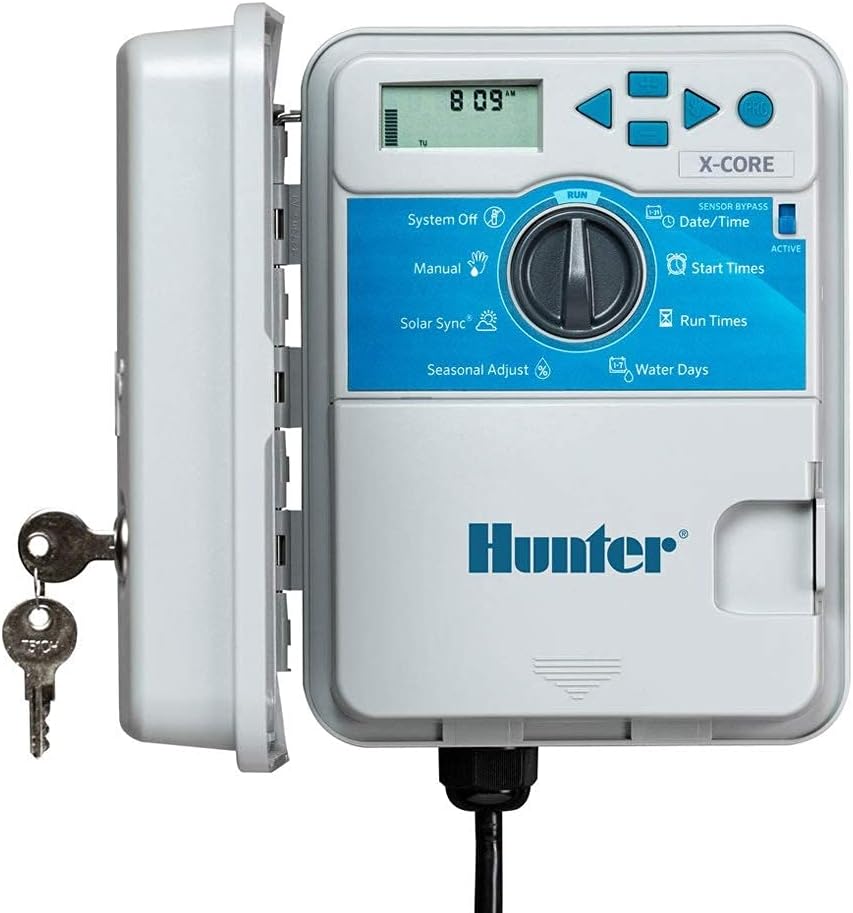
Are you trying to find an outdoor sprinkler timer that’s simple to use, reliable in the field, and handles an 8-station layout?
Buy Hunter Sprinkler XC800 X-Core 8-Station Timer On Amazon
Hunter Sprinkler XC800 X-Core 8-Station Outdoor Only Sprinkler Timer — Quick Look
You’ll find this controller designed for straightforward, dependable irrigation scheduling. It’s an outdoor-only unit built to manage up to eight stations, and it emphasizes easy installation, basic remote capability through an optional SmartPort accessory, and helpful on-board diagnostics.
What this product is best for
This timer is best for homeowners and small property managers who want a robust, weatherproof controller for an 8-zone irrigation system. You’ll appreciate its simple programming layout and features that reduce the usual headaches of wiring checks and schedule adjustments.

Key Specifications
You should be able to glance at the most important specs and immediately understand whether this unit fits your system. Below is a compact table that breaks down the details so you can compare them with your current or planned setup.
| Specification | Detail |
|---|---|
| Product Name | Hunter Sprinkler XC800 X-Core 8-Station Outdoor Only Sprinkler Timer |
| Stations | Up to 8 stations (zones) |
| Programs | 3 independent programs (A, B, C) |
| Start Times per Program | Up to 4 start times each |
| Mounting | Outdoor-mounted weatherproof cabinet |
| Remote Capability | Optional SmartPort (remote accessories sold separately) |
| Diagnostics | Hunter Quick Check wiring diagnostics |
| Sensor Input | Compatible with common rain sensors and Hunter sensors |
| Outputs | Standard low-voltage solenoid valve outputs (typical 24 VAC) |
| Special Features | Simple programming interface, seasonal adjustment, rain delay |
| Intended Use | Outdoor-only residential or light commercial irrigation |
What’s included and what you’ll need
You’ll get the outdoor controller itself, a user manual, mounting hardware, and internal transformer typical for low-voltage irrigation systems. You’ll need to supply your valve wiring, common wire, and any optional remote accessories or sensors if you want extended capabilities.
You should check what’s in the box when you receive it, and plan to have basic tools and wiring materials on hand. If you want remote operation or smartphone control, you’ll buy an optional SmartPort accessory to enable that functionality.
Design and build
You’ll notice the unit’s weatherproof housing and user-friendly control dial that’s meant for outdoor installation. The cabinet is designed to be mounted on a wall or fence, and the controls are protected from rain and sun exposure.
The physical control layout keeps the programming steps straightforward, which helps you set schedules quickly even if you’re not experienced with irrigation controllers. The enclosure should handle typical outdoor conditions but, as with any outdoor electronics, placement where it’s sheltered from severe exposure is wise.
Installation overview
You’ll find installation is intentionally simple, and Hunter markets this timer as user-friendly for contractors and DIYers alike. The unit mounts to a wall, wires to your valves, and plugs into a standard household outlet for power.
Make sure you turn off power while connecting wires and follow local electrical codes. The unit typically provides labeled terminal screws for station wires, a common terminal, and sensor terminals, which makes wiring logical and straightforward.
Wiring tips
Run one common conductor to all valve commons so your system has consistent grounding for the solenoids. Label your wires and use color coding so you can identify zones easily when programming and troubleshooting.
If you route wires underground, use rated irrigation cable and protect splices in waterproof connectors. You’ll save time later when making program adjustments or diagnosing issues.
Programming and scheduling
You’ll program the XC800 using its front-panel dial and buttons. The 3 programs (A, B, C) give you flexibility to water different areas with different needs; each program can have up to 4 start times to manage multiple cycles per day.
Typical schedule options you’ll use include setting run times per station, selecting the days of week or interval schedules, enabling odd/even or custom watering day patterns, and using rain delay to pause watering for a set number of days.
Program examples you can use
You might set Program A for turf with start times early in the morning, Program B for ornamental beds with mid-morning cycles, and Program C for a drip zone that runs less frequently. With 4 start times, you can stagger multiple cycles to avoid water pressure problems.
This flexibility helps you match irrigation to plant types, sun exposure, and local watering restrictions.
Purchase Hunter XC800 X-Core Sprinkler Timer
Hunter Quick Check diagnostics
You’ll get benefit from the Quick Check feature that helps identify wiring problems at the controller without needing a meter on each wire. The Quick Check system provides immediate visual indicators to help you find shorts, opens, or miswired circuits.
Using Quick Check reduces guesswork during troubleshooting and can save you a visit from a technician. You’ll still want a multimeter for more in-depth electrical diagnostics, but this built-in diagnostic tool is very convenient for field checks.
SmartPort remote capability
You can expand the XC800’s functionality by adding Hunter’s SmartPort accessory modules. These optional modules enable wireless remote control or other enhanced features without replacing the core controller.
If you want to manage the controller remotely, buy the compatible SmartPort remote module that pairs with your controller. Once installed, you’ll be able to start or skip programs from a remote transmitter or a smartphone accessory, depending on the module you choose.
Which remote options are typical
Hunter offers several SmartPort modules (sold separately) such as wireless remotes and certain Wi-Fi or wired communication modules. Check the product documentation or Hunter’s website to confirm which SmartPort device best fits your desired remote features.
If you’re planning on remote control from a phone, verify compatibility and any subscription or app requirements before purchase.
Performance and reliability
You’ll find the XC800 designed for consistent, dependable control of irrigation systems in residential and light commercial settings. With the ability to run multiple programs and start times, it’s capable of handling common landscape needs.
Field reports often praise the X-Core family for durability and stable operation. As long as you perform basic maintenance and protect connections from moisture, you can expect solid performance over several seasons.
Typical issues and how to avoid them
If you encounter stuck valves, check wiring integrity with Quick Check and ensure solenoid voltage is stable. Use proper wire gauge for longer runs and avoid running irrigation cable alongside high-voltage lines to reduce interference.
Seasonal changes may require reprogramming — set a seasonal adjustment or a rain delay rather than manually changing every station each week.
Power and electrical considerations
This controller operates standard low-voltage outputs compatible with irrigation solenoid valves. You’ll connect it to a household outlet for power, and the internal transformer steps down voltage for valve operation.
Always ensure you have a properly grounded outlet and use a protected, weather-rated outlet where the controller is installed. Surge protection and grounding practices are good ideas to protect the controller against unexpected electrical events.
Outdoor-only designation
Because this model is labeled “outdoor only,” you’ll mount it outdoors rather than inside a garage or shed. The housing provides protection against rain and sun, but it’s not intended for indoor or embedded installations.
Make sure the mounting location offers some shelter from direct extreme weather if possible, and avoid locations where flooding or prolonged water pooling may occur.
Rain sensors and water-saving options
You’ll be able to add a rain sensor to prevent unnecessary watering when it’s wet. The controller supports standard rain sensor inputs so you can wire in a sensor that interrupts automatic schedules when rain is detected.
Use rain delay and seasonal adjust to conserve water during cooler months or periods of high moisture. The controller’s basic conservation tools are effective for reducing waste and complying with local water restrictions.
Maintenance and care
You’ll want to perform seasonal checks to ensure the cabinet seals and buttons remain functional. Inspect wiring connections and look for corrosion on terminal screws; tighten as necessary and replace damaged wire insulation or connectors.
Keep the controller’s vent and any moving parts free of debris, and check the manual for manufacturer-recommended maintenance steps. Using an outdoor cover or locating the controller where it’s shielded from direct exposure to tree droppings and sun will help extend life.
Troubleshooting common problems
When schedules don’t run, start with power — ensure the outlet is live and the controller’s display is active. Next, use Quick Check to scan for wiring faults. If a single station won’t run, swap the valve connector to a different station to determine if the issue is the controller output or the valve wiring.
If you see corrosion or loose terminals, clean and re-secure wiring. For recurring or intermittent issues, inspect the transformer output voltage and consider replacing degraded solenoids.
When to call a professional
If you’re uncomfortable with electrical troubleshooting, or if Quick Check indicates complex wiring damage that you can’t resolve, call an irrigation professional. A licensed technician can safely inspect and repair transformers, buried wiring faults, and valve manifolds.
Pros and cons
You’ll want to weigh strengths and limitations to decide if this controller meets your needs. Below are the main advantages and potential drawbacks you should consider.
-
Pros:
- Easy-to-use programming with three programs and four start times each.
- Outdoor-rated cabinet for wall mounting.
- SmartPort capability for optional remote add-ons.
- Quick Check diagnostics for field wiring troubleshooting.
- Supports common conservation features like rain sensor input and seasonal adjustment.
-
Cons:
- Remote features require purchasing an optional SmartPort module.
- Outdoor-only design means you must mount it outside; not a good choice if you need an indoor controller.
- Basic controller compared with high-end Wi-Fi smart controllers that include built-in cloud connectivity.
How it compares to smart Wi-Fi controllers
You’ll find this model focuses on reliability and simplicity rather than built-in smart features. High-end Wi-Fi controllers include integrated smartphone apps, weather-based adjustments, and more sophisticated zone control, but they often cost more and can be more complex to set up.
If you want the convenience of smartphone scheduling and weather-based adjustments without add-ons, a native Wi-Fi controller might be a better fit. If you prefer a sturdy, simple controller with the option to add remote modules later, the XC800 gives you that balance.
Ideal use cases
You should consider this controller if you have an established sprinkler system with up to eight zones and want a proven, weatherproof controller with optional remote capability. It’s perfect for:
- Residential yards with turf and planting beds.
- Small commercial properties that need straightforward scheduling.
- DIY installers who want an easy installation and reliable diagnostics.
If you run an orchard, a large commercial site, or need central control across many controllers, this single 8-station unit will likely be too small or too basic for your needs.
Compatibility and expansion
You’ll be able to expand functionality by adding Hunter SmartPort accessories. While the XC800 itself doesn’t natively support Wi-Fi, you can pair it with Hunter’s remote modules that provide various remote-control options.
If you need more than eight stations, you’ll either need to use a different Hunter model with more stations or install multiple controllers. For many homeowners, the 8-station capacity will be plenty, but plan ahead if you anticipate future zone additions.
Cost and value
You’ll typically find the XC800 positioned in the mid-range price segment for controllers. It offers a strong combination of durability, essential features, and optional remote upgrades which can represent good value if you prefer incremental upgrades.
Compare price vs. features: if you need advanced cloud features, you may pay more for fully integrated smart controllers. If you want reliability and easy programming, this unit gives you the essentials without a steep price for features you might not use.
Installation timeline and difficulty
You’ll usually be able to install and wire a single controller like this in an afternoon if you have basic tools and some wiring experience. If you need to run new running cables from a valve manifold to the controller, allow extra time for trenching or conduit.
For first-time installers, follow the manual’s step-by-step wiring diagrams and validate connections with Quick Check. If anything seems unclear, consult Hunter’s support resources or a local irrigation pro.
Safety and regulatory considerations
You’ll want to ensure your installation follows local electrical and plumbing codes. Use proper conduit and cable ratings for outdoor use, and secure the controller to a suitable mounting surface. If you’re unsure about electrical connections, hire a licensed electrician.
Some municipalities have water management ordinances or require backflow prevention devices; confirm local rules before making changes to an irrigation system.
Frequently asked questions
You’ll likely have a few common questions; here are answers to the most frequent ones.
-
Can the XC800 handle a pump or master valve?
- Yes, the controller typically provides a pump/mv (master valve) output to activate a pump start relay or master valve when a station runs. Check the manual to confirm wiring and load limits.
-
Does it keep programming during a power outage?
- The controller is designed to retain schedules, but always verify with the product manual for specifics on memory retention and what to do after prolonged outages.
-
Can you add weather-based adjustments?
- Basic seasonal adjustment and rain delay features exist. For automated weather-based watering, you’ll need an optional SmartPort accessory or a separate weather-based controller.
-
Is the SmartPort module included?
- No. SmartPort accessories are optional and sold separately, so budget for that if remote control is important to you.
Final recommendation
If you want a dependable, straightforward outdoor 8-station controller with easy programming, helpful built-in wiring diagnostics, and optional remote capability, the Hunter Sprinkler XC800 X-Core 8-Station Outdoor Only Sprinkler Timer is a solid choice. You’ll appreciate the practical feature set and the option to add remote modules later, making it a flexible and pragmatic solution for most residential irrigation systems.
You should evaluate whether built-in Wi-Fi or a larger station count is necessary for your property. If not, this controller offers a reliable balance of simplicity, durability, and expandability that will handle the needs of the majority of homeowners and small property managers.
Shop The Hunter X-Core 8-Station Outdoor Timer
Disclosure: As an Amazon Associate, I earn from qualifying purchases.