
Are you weighing whether the Lennox S40 (22V24) Smart Thermostat is the right upgrade for your home comfort and energy control?

Overview
You’ll find the Lennox S40 (22V24) Smart Thermostat positioned as a high-end, communicating thermostat designed to centralize control over modern HVAC systems. It offers a large 7-inch high-resolution touchscreen, Wi-Fi connectivity, Alexa compatibility, geofencing features, and integration with Lennox’s iHarmony and PureAir systems to help you manage temperature, air quality, and system diagnostics from a single interface or your phone.

Lennox S40 (22V24) Smart Thermostat, Touchscreen, WiFi, Communicating System Control, Programmable, High Efficiency, Geo-Fencing, Remote Access, Wi-Fi and Alexa Enabled, Easy Installation
EUR583.41
Quick Specs and Warranty (at a glance)
This table breaks down the most important specs and the warranty rules so you can quickly understand what matters before purchase.
| Item | Detail |
|---|---|
| Product name | Lennox S40 (22V24) Smart Thermostat, Touchscreen, WiFi, Communicating System Control |
| Display | 7-inch high-resolution color touchscreen |
| Connectivity | Wi‑Fi, Alexa-enabled, remote access via Lennox Smart app |
| System compatibility | Most 24VAC furnaces, air conditioners, air handlers, and heat pumps (up to 3-stage heat, 2-stage cooling); communicates with Lennox iHarmony systems; optional Equipment Interface Module (EIM) for traditional systems |
| Wiring | Compatible with 4‑wire standard thermostat cables; recommended protected cable to prevent noise interference |
| Smart features | Geo-fencing, One-Touch Away Mode, Smart Away, On-Demand Weather, Service Panel monitoring |
| Installation | Installer setup displays, quick configuration via Lennox Smart app |
| Accessories | Smart Room Sensor, Smart Air Quality Monitor, Wireless Expander, PureAir S Air Purification integration |
| Warranty | 10-year warranty against manufacturing defects; registration instructions included in box |
| Warranty requirement | Must be professionally installed by a certified HVAC installer/technician; failure to use a certified installer may void warranty and prevent returns |
What’s in the box and initial steps
You’ll typically find the thermostat, mounting hardware, wiring documentation, a quick-start guide, and warranty/registration instructions in the box. The registration instructions are important — follow them to activate your 10-year warranty. The documentation also highlights that a certified HVAC installer should handle the installation to keep the warranty valid.
Display and Touchscreen Experience
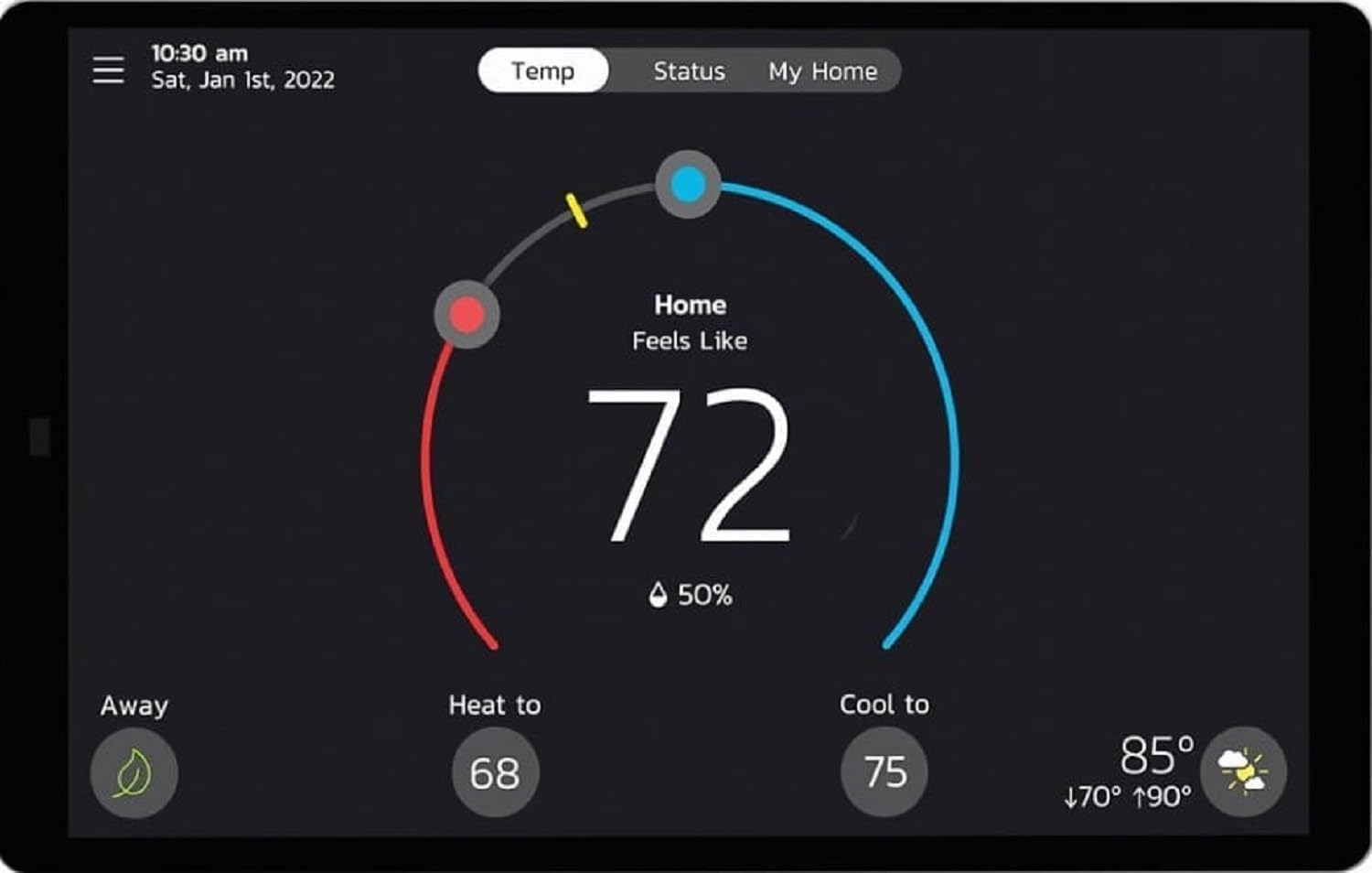
The 7-inch high-resolution color screen gives you an easy-to-read interface for day-to-day control. You’ll be able to swipe through menus and access settings without squinting or toggling through tiny icons. The touchscreen is designed to give you a modern smartphone-like interaction, which simplifies configuration and routine adjustments.
Interface and usability
You’ll appreciate the responsive touchscreen and the installer-friendly setup displays that let a technician configure system type and test components without digging through a dense manual. System menus are straightforward so you can quickly find energy reports, schedules, and system alerts.
Connectivity and Remote Access
This thermostat connects to your home Wi‑Fi network and pairs with the Lennox Smart app so you can control your HVAC system from anywhere. You can check and change temperature settings, view alerts, and monitor system performance using your smartphone.
Alexa and voice control
If you use Amazon Alexa, you can integrate the thermostat for simple voice commands to adjust temperature or switch modes. Voice control adds convenience if you prefer hands-free adjustments or want a quick temperature check while doing other tasks.

Geo-fencing and Smart Away features
You’ll get geofencing technology that senses when you leave or approach home to automatically switch into away or home modes. One-Touch Away Mode and Smart Away use your phone’s location to save energy when nobody’s home and quickly restore comfort when you return.
Practical benefits
This feature reduces manual schedule changes and helps you realize energy savings by ensuring you’re not conditioning an empty home. It’s especially useful if your daily routine varies or you want automated comfort without constant adjustments.
Compatibility and Wiring
The S40 is compatible with standard 4‑wire thermostat cables and recommends using protected cable to reduce noise interference. It works with most 24VAC systems including furnaces, air conditioners, air handlers, and heat pumps up to 3 stages of heat and 2 stages of cooling. If you have older or non-communicating equipment, Lennox provides an optional Equipment Interface Module (EIM) to bridge legacy systems.
Communication vs. non-communicating systems
If your HVAC equipment supports Lennox communication protocols, the S40 can fully integrate and provide deeper control and diagnostics. For traditional, non-communicating systems, the EIM allows control but may not provide the full communicating-system diagnostic detail.
iHarmony (Smart Zoom System) and whole-home control
Lennox’s iHarmony Smart Zoom System aims to let you manage multiple zones and equipment from the S40 screen. You’ll be able to integrate additional Lennox accessories and sensors to get more granular control of temperature and air quality throughout different rooms.
When the iHarmony system is beneficial
If you have a multi-zone setup or plan to add sensors (like room sensors or air quality monitors), iHarmony helps you maintain consistent comfort and address problem areas without wrestling with multiple thermostats.
On-Demand Weather and local forecasts
You’ll have access to live local weather data and a seven-day forecast directly on the thermostat and in the app. This helps you make smarter decisions about preconditioning your home or adjusting schedules when extreme temperatures are expected.
How it helps daily comfort
Seeing tomorrow’s forecast can prompt you to pre-cool or pre-heat your home to avoid sudden load changes and can influence energy-saving decisions like delaying conditioning during mild weather.
Lennox Smart App and installer setup displays
The app supports quick setup and ongoing management. Installer setup displays on the thermostat facilitate initial configuration without having to reference dense manuals. You’ll benefit from guided prompts for wiring verification, system staging setup, and component testing.
What you’ll do in the app
You’ll register the thermostat, name zones, set schedules, enable geofencing, and receive system alerts. The app also provides troubleshooting steps and access to system performance metrics.

Service Panel and maintenance alerts
The S40 includes a Service Panel that lets you monitor your installed smart systems in real-time, including system alerts and maintenance reminders. This helps you spot problems early and decide whether you need to call a technician before issues escalate.
Using the Service Panel effectively
You’ll use the Service Panel to review component tests performed by the installer, check refrigerant-related alerts, and follow maintenance reminders that help keep your system operating efficiently.
Compatibility table — System types and support
This table clarifies common system types and how well the S40 supports each one.
| HVAC System Type | Supported? | Notes |
|---|---|---|
| 24VAC furnaces | Yes | Works with standard 24VAC furnaces; protected cable recommended |
| Central air conditioners | Yes | Up to 2 cooling stages supported |
| Heat pumps | Yes | Up to 3 heating stages, 2 cooling stages supported |
| Communicating Lennox systems (iHarmony) | Yes | Full communicating integration and diagnostics |
| Non-communicating legacy systems | Conditional | Use optional Equipment Interface Module (EIM) for control; may limit diagnostics |
| Multi-zone systems | Yes (with accessories) | Use Smart Room Sensors and iHarmony for improved zone control |
Accessories and smart add-ons
You can expand the S40’s capability with a range of Lennox accessories. Smart Room Sensors improve comfort in specific zones and help with temperature averaging; the Smart Air Quality Monitor tracks pollutants and humidity; the Wireless Expander increases sensor reach; and the PureAir S system integrates to improve indoor air quality.
When to add accessories
If your home has hotspots, inconsistent humidity, or air quality concerns, sensors and air purification integration will make the thermostat much more effective. They also boost the value of the iHarmony system for whole-home comfort management.
Energy savings and programmability
The S40 is programmable and designed to improve efficiency through scheduling, geofencing, and Smart Away. With the right setup, you can reduce runtime during empty periods and optimize comfort during occupied times.
Tips to maximize savings
You’ll see the best savings when you:
- Use geofencing and Smart Away to avoid conditioning an empty home.
- Set reasonable setbacks when you’re asleep or away.
- Combine smart scheduling with the Smart Room Sensor to avoid over-conditioning rarely used spaces.
- Monitor seasonal settings and use weather forecasts to precondition strategically.
Installation — what to expect and common steps
Professional installation is required to keep the warranty valid, and most homeowners have a certified HVAC technician perform the setup. Here’s a typical workflow you’ll see during installation:
- Technician inspects existing wiring and system compatibility.
- They mount the thermostat and connect the 4‑wire cable (or install EIM if needed).
- Installer uses the setup displays to identify system type, staging, and accessories.
- The full system or individual components are tested via built-in tests.
- Technician registers the installation (you may need to complete final product registration in-app or via included instructions).
Why professional installation matters
Because the warranty explicitly requires professional installation, having a certified technician not only ensures proper wiring and configuration but also protects your warranty coverage and return eligibility. If you attempt DIY installation, you risk voiding the warranty and losing return rights.

Warranty specifics and registration
The thermostat includes a 10-year warranty against manufacturing defects, but the warranty has a strict condition: installation must be performed by a certified HVAC technician. The registration process is included in the box and should be completed promptly to activate warranty coverage.
Important warranty caveats
If the thermostat is not installed professionally, the warranty may be void and the item may not be eligible for return. Make sure the technician documents the installation if warranty proof is required.
Testing, troubleshooting, and diagnostics
The S40 offers built-in testing tools for whole-system diagnostics or individual component checks, which your installer can run during setup or when troubleshooting. The Service Panel provides real-time alerts and guidance on maintenance.
Common issues and simple fixes
- No Wi‑Fi connection: Verify home network credentials, check router proximity, and reboot the thermostat. If the thermostat is far from the router, consider a Wi‑Fi range extender.
- Incorrect staging or system behavior: Ask your technician to re-run installer setup and check staging and EIM wiring.
- No Alexa response: Confirm Alexa skill is enabled in the Lennox Smart app and that voice permissions are granted.
- Inconsistent sensor readings: Ensure Smart Room Sensors are placed away from heat sources, direct sunlight, and drafts.
Setup and configuration tips you’ll appreciate
- Prepare a wiring photo: Take a clear photo of your old thermostat wiring before the technician starts; this speeds up diagnosis if adjustments are needed.
- Use protected thermostat cable: If possible, request shielded/protected cable during replacement to reduce electrical noise.
- Register early: Complete product registration as shown in the box instructions to secure your warranty.
- Position sensors carefully: When adding Smart Room Sensors, place them at typical living height in the rooms you care about most for accurate readings.
Integration with smart home ecosystems
You’ll be able to connect the S40 to Alexa for voice control; the Lennox Smart app provides remote access for other mobile control scenarios. If you run other smart home platforms, check for compatibility or bridging options through the Lennox app or third-party services.
Practical voice commands
Try simple commands like asking Alexa to set the thermostat to a specific temperature or switch modes. Remember that some advanced features (geo-fencing, scheduling) still require use of the Lennox app.
Maintenance and long-term care
Regular maintenance of your HVAC system helps the thermostat deliver consistent performance. The S40’s maintenance alerts and system monitoring guide your service needs so you can schedule proactive repairs rather than reacting to failures.
What you should do annually
Have your HVAC system inspected at least once a year by a certified technician, replace filters as recommended, and review the S40’s maintenance alerts to ensure optimal system longevity and efficiency.
Pros — what you’ll like
- Large, easy-to-read 7-inch touchscreen that’s user-friendly.
- Robust connectivity with Wi‑Fi and Alexa compatibility for remote and voice control.
- Geofencing and Smart Away features that automate savings.
- Deep integration with Lennox systems (iHarmony and PureAir) for whole-home comfort and air quality control.
- Installer setup displays and built-in testing simplify professional configuration and troubleshooting.
- Service Panel provides proactive monitoring and alerts.
Cons — things to consider
- Warranty requires professional installation; DIY fans will be excluded and may void warranty/return rights.
- Integration is optimized for Lennox communicating equipment; non-Lennox communicating systems may have limited features.
- Initial cost could be higher than basic smart thermostats, especially when you add accessories like sensors and EIMs.
- If you have legacy, non-communicating equipment, you may need an EIM and professional configuration that adds complexity and cost.
Who this thermostat is best for
You’ll get the most value if you:
- Own Lennox communicating HVAC equipment or plan to upgrade to it.
- Want a large touchscreen with advanced local control and diagnostics.
- Value professional installation and are willing to follow warranty rules.
- Want integrated air quality controls and the ability to expand the system with sensors and purification systems.
Who might want to wait or choose alternatives
If you:
- Prefer DIY installations and don’t want to hire a technician (due to warranty restrictions).
- Have very basic HVAC needs and don’t need communicating-system diagnostics or whole-home air quality integration.
- Want a lower-cost smart thermostat with simpler setup and fewer specialized features.
Price and value considerations
The S40 sits at the higher end of thermostat offerings because it’s built for communicating systems and broader integration into Lennox smart ecosystems. You’ll pay more upfront, but the features and expanded control can deliver long-term comfort improvements and energy savings if you use geofencing, scheduling, and sensors effectively.
Final recommendation
If you want a feature-rich thermostat that serves as a central control for modern Lennox HVAC systems and you’re willing to have it professionally installed, the Lennox S40 (22V24) Smart Thermostat is a strong choice. You’ll benefit from a large, intuitive touchscreen, robust connectivity, geo-fencing and energy-saving modes, and the ability to integrate air quality monitoring and purification. Just be sure to use a certified HVAC installer to protect your 10-year warranty and confirm compatibility with your existing equipment.
If you decide to move forward, prepare by photographing your current wiring, budgeting for a certified installation, registering the product right away, and considering which sensors or accessories you may want to add for the best whole-home comfort and air quality control.

Disclosure: As an Amazon Associate, I earn from qualifying purchases.