
Are you tired of bulky smart locks that announce their presence and clutter your door hardware?

Quick overview
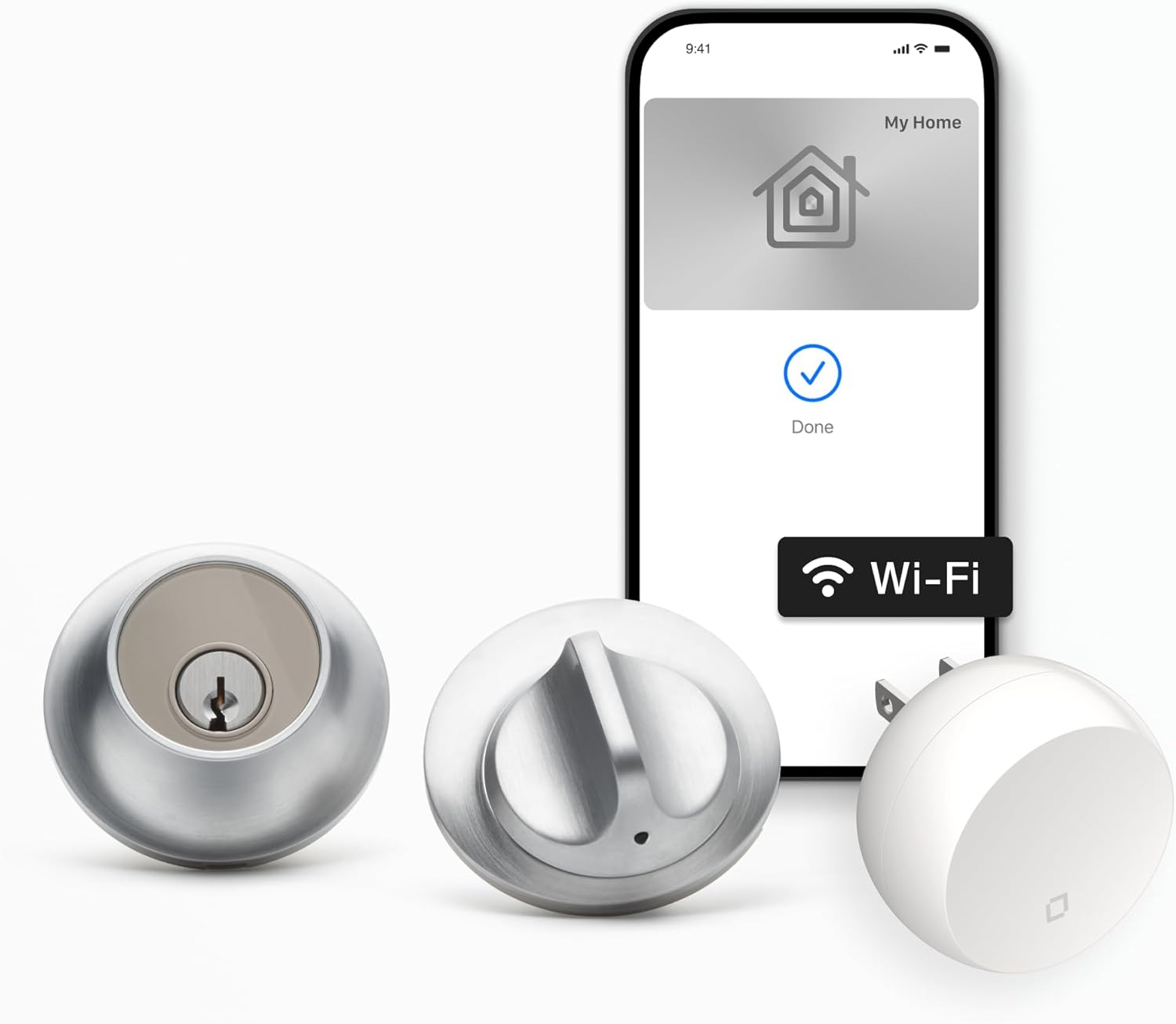
You’re looking at the Level Smart Lock+ WiFi Deadbolt – World’s Smallest Smart Lock – Apple Home Key & Voice Control – Matte Black, a compact, minimalist smart deadbolt that aims to disappear into your door while adding modern convenience. It’s designed to work behind the scenes with no visible technology on the inside or outside of your door, and it includes a Level Connect Wi‑Fi bridge so you can control the lock remotely right away.

Level Smart Lock+ WiFi Deadbolt - World's Smallest Smart Lock - Apple Home Key & Voice Control - Matte Black
$345.99 In Stock
Product specifications at a glance
Here’s a quick breakdown so you can see important specs and features in one place. This table makes it easy for you to compare core details without hunting through long paragraphs.
| Feature | Details |
|---|---|
| Product name | Level Smart Lock+ WiFi Deadbolt – World’s Smallest Smart Lock – Apple Home Key & Voice Control – Matte Black |
| Finishes available | Matte Black (plus other finishes from the manufacturer) |
| Integration | Apple Home Key (Wallet tap), Apple HomeKit, Google Home, Amazon Alexa |
| Remote access | Level Connect Wi‑Fi bridge included (2.4 GHz) |
| Entry methods | Apple Home Key tap, Level Home app, Level Keypad codes, key fob |
| Build materials | 440C stainless steel + strengthened metal alloys |
| Security rating | Top AAA rating by BHMA |
| Installation | DIY, fits most American standard exterior doors |
| App support | Level Home (iOS & Android) |
| Battery | Internal batteries (user-replaceable) — app reports battery status |
| Special notes | No visible tech on inside/outside; designed to pair with Level Connect within ~20 ft |
Design and build
You’ll notice right away that Level’s primary design choice is subtlety — the lock aims to be as unobtrusive as possible. The smart mechanism integrates with your existing deadbolt hardware so the look of your door remains familiar and elegant.
Physical appearance and finishes
The Matte Black finish on this model gives a modern, understated look that fits minimalist and contemporary doors nicely. Because the lock hides the tech components, you won’t see an obvious gadget on the door face, which is great if you prefer a classic aesthetic.
Materials and durability
Level uses 440C stainless steel and strengthened metal alloys in the Lock+, which gives you robust corrosion resistance and mechanical strength. With a top AAA BHMA rating, the unit is built to meet industry standards for security and durability, so you’re not sacrificing toughness for looks.

Installation
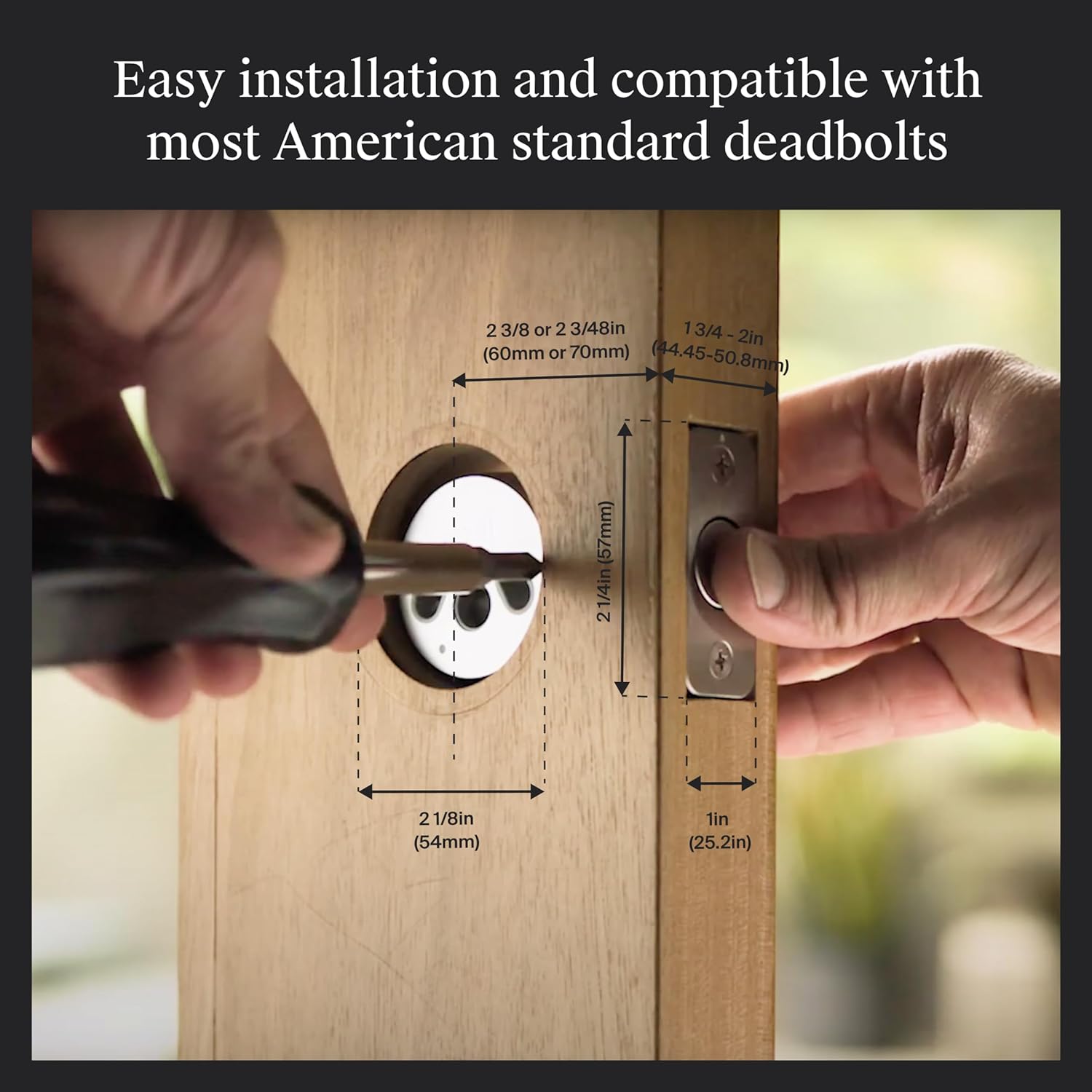
The lock is designed for DIY-friendly installation and to fit most American standard exterior doors, so you can typically get it set up without a pro. Level also provides in-box instructions and how-to videos that guide you through the process step by step.
What’s in the box
You’ll find the Level Smart Lock+ deadbolt assembly, the Level Connect Wi‑Fi bridge, a key fob, mounting hardware, and printed instructions. Having the Wi‑Fi bridge included saves you an extra purchase and gets you remote control from day one.
DIY installation process
You’ll replace your existing deadbolt’s interior hardware with the Level mechanism while keeping the exterior-facing hardware unchanged. The process usually involves removing the interior thumb-turn, installing the Lock+ adapter and motor, and securing it — most people complete the job in under an hour. If you follow the videos and guide, you won’t have to be an expert to get it right.
Compatibility with doors
Level is tailored for standard American exterior doors and works with most deadbolt configurations, but you should still measure your current setup before buying. If your door or existing deadbolt has unusual dimensions, check the compatibility guidance in the manual to avoid surprises.
Setup and app experience
The Level Home app is your central control hub, and it’s available for both iOS and Android. The app helps you manage access, view activity, and configure automations, and it’s where you’ll pair the Wi‑Fi bridge for remote control.
Level Home app interface
You’ll find the app fairly straightforward and user-friendly, with clear options to lock/unlock, share keys, and view activity logs. The app also includes settings for auto-lock/unlock, battery notifications, and integration configuration with Apple HomeKit, Google, and Alexa.
Pairing the Level Connect Wi‑Fi bridge
Pairing the included Wi‑Fi bridge is an important step to enable remote access; you’ll want to plug it in within about 20 feet of the installed lock and follow the in-app pairing flow. Once connected, you can control the lock from anywhere and receive live activity updates in the app.
Apple Home Key and Wallet integration
If you use an iPhone or Apple Watch, you can store your Level key in Apple Wallet to unlock by tapping your device to the lock. That means you can leave your physical keys behind intentionally and rely on a secure tap to enter, just like using Apple Pay for a purchase.
Keyless entry and access options
You get several ways to open your door without a traditional key, and that flexibility helps you adapt the lock to how you actually live. Whether you prefer a physical fob, an app, or a tap with your phone or watch, Level supports multiple modes of entry.
Apple Home Key tap
This is a standout feature: you tap your iPhone or Apple Watch to access the door when the key is in your Apple Wallet. It’s quick and convenient, and particularly useful when your hands are full or you don’t want to fumble for a phone app.
Level Home app and key fob
If you prefer the app, you can lock and unlock your door from your device, share temporary or permanent digital keys with friends, and monitor access history. The included key fob offers a tangible, offline option that many users appreciate for guests or family members who don’t use the app.
Level Keypad and codes
The lock supports key code entry via the optional Level Keypad, which lets you set and manage numeric codes for household members or service providers. Managing codes in the app is straightforward, and you can restrict times or revoke access as needed.

Remote access and automation
With the Level Connect Wi‑Fi bridge, remote control and automations are enabled, allowing you to manage the lock even when you’re away from home. That’s handy for letting in guests, confirming deliveries, or setting more advanced routines.
Remote lock/unlock and activity history
You can lock or unlock your door remotely and view recent activity logs in the app, giving you visibility into who entered and when. Activity history helps you confirm arrivals, troubleshoot access issues, and maintain a secure household routine.
Voice assistants and automations
Level works with Apple HomeKit, Google Home, and Amazon Alexa, so you can lock or unlock the door using voice commands and incorporate the lock into broader home automations. You might set a bedtime routine that locks doors, turns off lights, and adjusts thermostats in a single sequence.
Security and privacy
Security is a major focus for Level, combining strong materials with thoughtful software design so your access control remains private and reliable. You should still follow best practices for digital security, like enabling two-factor authentication where available.
Physical security and BHMA rating
The lock’s 440C stainless steel construction and strengthened alloys contribute to its mechanical resilience, and the AAA BHMA rating indicates top-tier security performance. These attributes mean the lock is designed to withstand significant physical stress and meet industry benchmarks.
Encryption and data protection
Level uses secure communication protocols and app-level protections to manage keys and remote commands. When you store a key in Apple Wallet, Apple handles the credential protection, and the Level Home app uses secure channels to talk to the Wi‑Fi bridge and cloud services.
Performance and reliability
When it comes to everyday use, you care about speed, consistency, and minimal maintenance. Level’s small motorized mechanism is engineered to operate smoothly and quietly, and the system’s remote features are dependent on stable Wi‑Fi connectivity.
Lock/unlock speed and noise
The Lock+ operates quickly and with less mechanical drama than many larger smart locks because its mechanism integrates with your existing deadbolt. Noise levels are generally low, and you’ll likely appreciate how unobtrusive the action is compared with heavier, bulkier devices.
Reliability and connectivity
In normal home Wi‑Fi environments, the included bridge helps maintain a consistent connection between your phone, voice assistant, and the lock. If your Wi‑Fi is spotty, you may see occasional delays in remote commands, but on a typical setup the lock responds reliably.
Battery life and maintenance
Battery life varies with usage, but the app provides battery status so you won’t be caught off guard. You’ll replace batteries periodically, and because the design is compact, battery access and replacement are straightforward tasks.
Compatibility and ecosystem
You’ll want assurance that the lock will play nicely with your existing devices and smart home setup, and Level covers the major ecosystems most people use today. That flexibility makes the lock a fit whether you’re primarily an Apple user or you mix platforms.
Apple ecosystem
If you use Apple devices, Level’s Apple Home Key in Wallet and HomeKit support are particularly compelling. Tap-to-enter convenience and tight HomeKit integration give you secure, native control from your iPhone and Apple Watch.
Google and Amazon voice assistants
Level supports Google Home and Amazon Alexa, so you can use voice commands to lock, unlock, or trigger routines. If you already use Google Assistant or Alexa in your home, adding Level into those automations is straightforward.
Cross-platform app support
The Level Home app is available on both iOS and Android, so you can manage access regardless of your mobile platform. Sharing access with friends or family who use a different platform is supported, though certain features like Apple Home Key are of course iOS-specific.
Practical daily use
Putting the lock into your daily routine should feel natural, and the variety of entry methods helps you accommodate different household members and scenarios. Whether you prefer minimalist taps, app control, or a physical code, Level gives you options.
For commuters and frequent travelers
You can lock or unlock remotely to let in cleaners, family members, or guests while you’re away, and the activity log gives you peace of mind about entries. Temporary keys or time-limited codes make handing access to service providers simple and secure.
For families with kids or elderly relatives
You can set up reliable routines with auto-lock and manage multiple access methods to match individual needs — a keypad for kids, a fob for an elderly relative, and app control for parents. Managing permissions through the app keeps everything organized and auditable.
Pros and cons
You’ll want to weigh the practical benefits against potential trade-offs before buying. Level Smart Lock+ offers a strong mix of subtle design, Apple Wallet convenience, and reliable integration, balanced against compatibility checks and battery maintenance responsibilities.
Pros
- Extremely discreet design with no visible tech on the door face.
- Apple Home Key tap-in-wallet convenience for fast, contactless entry.
- Includes Level Connect Wi‑Fi bridge for immediate remote access.
- Works with HomeKit, Google Home, and Alexa for broad ecosystem support.
- Strong materials and AAA BHMA rating for security and durability.
Cons
- Apple Home Key feature is iOS-specific, so Android users don’t benefit from tap-to-enter.
- Remote features depend on home Wi‑Fi health and proper placement of the bridge.
- Some unusual door configurations may require additional checks or adapters.
- Batteries must be monitored and replaced periodically.
How it compares to other smart locks
When you compare Level to other smart locks on the market, its design philosophy often stands out more than raw feature lists. If you value a lock that retains your door’s original look and offers modern smart features, Level is especially compelling.
Versus traditional smart locks
Traditional smart deadbolts often add a visible bulk of electronics and a touchscreen or thumb-turn on the inside, while Level focuses on invisibility and integration. You’ll get similar smart features without changing the door’s outward appearance, which many people prefer.
Versus other popular smart lock brands
Compared with some competitors, Level’s Apple Wallet tap functionality and understated hardware are differentiators. Other brands may focus on larger app ecosystems, built-in keypads, or different installation styles — Level’s strengths are concealment, materials, and native Apple integrations.
Troubleshooting and tips
You’ll likely have a smooth experience, but a few practical tips can help you avoid common pitfalls and resolve issues quickly if they arise. Most problems are connectivity or configuration related and can be fixed with a few steps.
Connectivity problems
If your lock isn’t responding remotely, check that the Level Connect bridge is powered and within 20 feet of the lock, and confirm that your home’s 2.4 GHz network is working. Rebooting the bridge and re-checking the app pairing often resolves intermittent issues.
Battery issues and alerts
Keep an eye on the battery indicator in the app, and replace batteries as recommended to avoid getting locked out unexpectedly. Level sends low-battery alerts, so setting up notification permissions on your phone is helpful.
Troubleshooting Apple Home Key
If your Apple Home Key isn’t recognized, verify that the key is properly added to Apple Wallet and that NFC is functioning on your iPhone or Apple Watch. Re-adding the key via the Level Home app or checking HomeKit permissions can often correct handshake issues.
Frequently asked questions (FAQ)
You probably have specific questions before you commit to a smart lock; here are answers to common concerns gleaned from typical user scenarios.
Can I still use my physical key?
Yes — the Level Smart Lock+ integrates with your existing deadbolt hardware, so you can continue to use your physical key in the event you prefer it or want a backup.
Do I need the Level Connect bridge?
The Level Connect Wi‑Fi bridge is included and essential if you want remote control and live activity updates. Without it, you still have local access methods like Apple Home Key and Bluetooth via the app, but remote features won’t be available.
Will it work with my smart home system?
Level supports Apple HomeKit, Google Home, and Amazon Alexa, so it’s compatible with the most common smart home ecosystems. Verify any home automation specifics in the app to ensure it fits your routines.
How secure is the Apple Home Key?
Apple Home Key uses device-level security and Wallet protections, which are considered secure for access control. Pairing the lock with Apple Wallet means you benefit from Apple’s secure credential management.
What if I move to a different house?
Because Level replaces the interior portion of the deadbolt and leaves the exterior hardware intact, you can transfer the lock to another compatible door if the dimensions and deadbolt type match — you’ll need to reinstall and reconfigure, but it’s possible.
Buying considerations
Before you purchase, consider your door type, which mobile ecosystem you primarily use, and how often you’ll be away and need remote access. These factors will help you determine whether Level is the right fit for your home.
Check door compatibility
Measure your current deadbolt and check the Level compatibility guidance to ensure a smooth installation. If your hardware or door dimensions are nonstandard, you may need an alternative model or adapter.
Consider your primary ecosystem
If you’re heavily invested in Apple devices, the Apple Home Key feature is a major convenience. Android users will still enjoy app control and voice assistant compatibility, but won’t get the tap-to-enter Wallet experience.
Installation and support
If you prefer DIY, Level’s instructions and videos make installation manageable; if you’d rather not handle it yourself, check local professional installers who are familiar with smart locks. Also consider warranty coverage and support responsiveness when purchasing.
Final verdict
If you want a smart lock that prioritizes discretion, top-tier materials, and modern conveniences like Apple Home Key and voice assistant integrations, the Level Smart Lock+ WiFi Deadbolt is a compelling choice. You get a secure, low-profile lock that maintains your door’s look, offers flexible access options, and includes the Wi‑Fi bridge for immediate remote functionality.
You’ll need to pay attention to door compatibility and battery maintenance, and Android users should note the Apple Wallet tap feature is iOS-specific. Overall, this lock suits anyone who values appearance as much as functionality and wants a smart lock that blends in rather than stands out.
Final tips for getting the most from your Level Smart Lock+
You’ll get the best experience by placing the Level Connect bridge within the recommended range, keeping your app and firmware up to date, and setting up clear access rules for family and guests. Regularly check activity logs and battery status so your lock stays reliable and secure.
If you want a modern entry system that respects your door’s aesthetic while giving you everyday smart functionality, Level Smart Lock+ is a strong option worth considering.

Disclosure: As an Amazon Associate, I earn from qualifying purchases.