
?Are you looking for a reliable, feature-rich access control kit that lets you manage entry and exit with cards, PINs, and a smartphone app?

Buy The MENGQI-CONTROL Access Control Door System On Amazon
Product overview
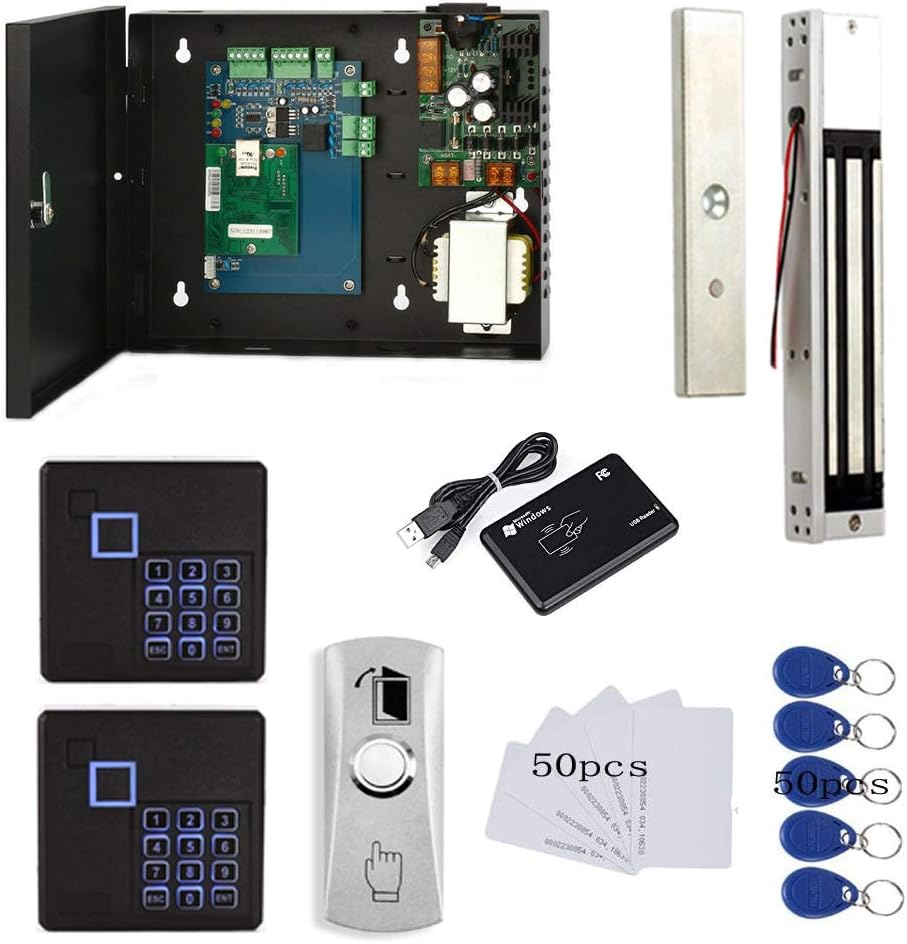
You get a complete entry-and-exit solution with the MENGQI-CONTROL Both Entry & Exit Access Control Door Security System 2pcs RFID Keypad Reader 600LB Magnetic Lock Metal Power Supply Box Phone APP Remote Open Door Have History in/Out Open Records. This system is designed to let you control one door while tracking both ingress and egress, offering a blend of hardware and software features that aim to make access management straightforward.
What’s included in the box
The package typically contains two RFID keypad readers, a 600LB magnetic lock, a metal power supply box, cabling and connectors, an exit push button (with base), and user documentation including wiring diagrams and a detailed video guide. You’ll also get a USB desktop reader for easy card enrollment and the option to set up software on a PC for history download and report generation.
Key specifications
Below is a concise breakdown of the most important specs so you can quickly see what the system offers and whether it matches your needs. These details help you compare it against other kits at a glance and decide how it will fit into your location and workflows.
| Feature | Specification |
|---|---|
| Door control | 1 door (entry and exit) |
| Readers | 2 RFID keypad readers (EM-ID card support) |
| Lock type | 600LB (approx. 600 lbs holding force) electromagnetic lock |
| Power supply | Metal power supply box included |
| Exit method | Push button or card/PIN swipe |
| User capacity | Up to 20,000 users |
| Log capacity | Up to 100,000 logs |
| Response speed | < 0.2 second |
| Remote open | Smartphone app (iOS & Android) |
| Communication | TCP/IP network support |
| Software | Supports Access & SQL Server databases; Win7–Win11 (32/64-bit) |
| Extras | Desktop USB reader for programming; video guide and wiring diagram |
MENGQI-CONTROL Both Entry & Exit Access Control Door Security System 2pcs RFID Keypad Reader 600LB Magnetic Lock Metal Power Supply Box Phone APP Remote Open Door Have History in/Out Open Records
Hardware components
The system is a hardware-first kit and most of the reliability is tied to how these components are installed and powered. You’ll find the physical parts sturdy and geared toward small business, office, or secured-home installations.
RFID keypad readers
You have two keypad readers that support EM-ID cards and PIN entry, so you can authenticate with a card, a code, or both. The readers are designed to register both “in” and “out” swipes, which is useful if you want definite records of who entered and who exited.
600LB magnetic lock
The magnetic lock provides about 600 pounds of holding force, which is appropriate for interior doors and many external doors when installed correctly. If you’re securing heavy or outward-swinging doors, you’ll want to confirm the mounting hardware and strike configuration are suitable for your door type.
Power supply box
A metal power supply box is included to power the lock and readers; this helps centralize power and protect components. The box typically includes distribution outputs, backup battery terminals, and fuses—meaning you can add a battery backup if you want fail-safe operation during a power outage.
Exit button and accessories
The exit button comes with a base for easy installation and is designed so people can leave by pushing the button or using the card/PIN as well. The package also includes wiring accessories, mounting screws, and sometimes a simple door position switch depending on the bundle, so you won’t be surprised by missing small parts.
Installation and setup
You’ll appreciate the video guide and wiring diagrams that are included, which make the initial setup less intimidating if you’re doing this yourself. The system is oriented toward DIY installation but having basic wiring skills will save time and reduce the risk of configuration errors.
Wiring and diagrams
Wiring uses standard low-voltage access control connections between the readers, power supply, magnetic lock, and exit button, with TCP/IP for network connectivity if you choose to use the management software. The included wiring diagram shows how to connect the desktop USB reader for card import and how to route power safely through the metal power supply box.
DIY friendliness and video guide
The product includes a step-by-step video guide and a readable manual that walks you through mounting, wiring, and initial software setup, so you’ll follow along and avoid common mistakes. If you’re comfortable with basic electrical tools and drilling, you’ll likely be able to complete the job in a few hours; otherwise, you can hire a local installer to handle door-specific mounting.
Mounting and physical security
You must pay attention to how the magnetic lock is mounted so it cannot be pried or bypassed; correct alignment between the armature plate and the lock body is critical. You should also ensure the power supply box is located in a locked or secure area to prevent tampering with the system’s electrical supply.

Purchase MENGQI-CONTROL Access Control Door System – Shop On Amazon
Software and app
The system’s software and mobile app give you remote and local control, user management, and reporting. You’ll manage schedules, check who accessed the door, and remotely release the lock using your smartphone.
Management software features
The desktop software supports user management for up to 20,000 users and stores up to 100,000 access logs. You can generate printable reports, filter logs by user or time, and assign access rights (who can enter which door and at what times), which is particularly helpful for shift-based organizations.
Mobile app remote opening
The smartphone app (available for iOS and Android) lets you release the lock remotely, which is great when you need to grant access from anywhere. You’ll appreciate this for letting delivery people in or opening the door for late arrivals without having to be physically present at the entrance.
Compatibility and database support
The software supports Microsoft Access and SQL Server databases and is compatible with all modern Windows versions (Win7 through Win11, both 32- and 64-bit). If you’re integrating into an existing IT environment, the TCP/IP connectivity and standard database support make it easier to connect to your infrastructure.
Performance and reliability
You’ll find the system responsive and capable of handling the needs of small to medium-sized installations. The hardware and software specifications indicate good capacity and a fast response time for everyday access control.
Response speed and access control logic
The system reports a response speed of under 0.2 second, which means users won’t be stuck waiting at the door. The access control logic supports scheduled access and authorization groups, so you can define exactly who gains entry at specific times.
Log capacity and reporting
With capacity for up to 100,000 logs, you’ll rarely need to purge records in a small business or residential scenario. The reporting tools allow you to export or print lists of entries and exits, and the system’s ability to track “in” vs. “out” swipes helps you maintain accurate attendance or security records.
Network and communication (TCP/IP)
Network communication via TCP/IP gives you the flexibility to control the system over your LAN or integrate it into broader security suites. You’ll want to ensure your network is secure and segmented from public-facing networks to reduce risk.
Security considerations
Using this system requires you to think about both physical and electronic security. Proper setup, secure passwords, and thoughtful user management will keep your access control robust.
Card type (EM-ID) and risks
The readers use EM-ID cards, which are common and inexpensive, but are less secure compared to modern encrypted card technologies like MIFARE DESFire. If you need high-level anti-cloning security, you may want to consider upgrading to more advanced card technologies or layering access with strong PIN policies.
Physical security and lock strength
The 600LB magnetic lock is strong enough for many standard doors but is not a substitute for reinforced frames or deadbolts on high-risk exterior doors. You should pair the magnetic lock with appropriate door hardware, proper frame reinforcement, and tamper-resistant mounting.
Electronic and cybersecurity tips
Place the power and network cabling in protected conduits, change default passwords, apply network segmentation, and limit who can access the management software. Regularly back up the database and logs and apply updates on the PC that runs the access control software.

Use cases and suitability
This kit is versatile and works well for many entry-control scenarios, especially where you want simple badge-and-PIN control with logging and remote access.
Small business and offices
You’ll find it ideal for small offices, clinics, or retail stores where you need to log staff entry/exit and control a single door. The scheduling and reporting features are especially useful for managing employee access during business hours and shifts.
Residential use
If you want a more secure home entrance with audit trails and remote opening, this system can be adapted for residential settings. Keep in mind you may want to hide the power box and ensure network security if you’re connecting the system to your home network.
Multi-door and scale limitations
The system is designed to control one door out of the box; if you need multi-door control, you’ll either need multiple kits or a larger centralized system. If you expect to scale to many doors, consider a system built for more extensive installations or speak with the vendor about multi-door expansion options.
Pros and cons
You’ll get a good mix of convenience, reporting, and remote control, but there are trade-offs to be aware of. Below are the strengths and weaknesses that should guide your purchase decision.
Pros
You can manage up to 20,000 users and 100,000 logs, which is considerable for a single-door system. The included app, TCP/IP support, USB reader for easy card enrollment, and included power box give you everything you need for a polished installation.
You’ll also like the fast response speed and the ability to set authorized access by time and person, which helps keep your security policies flexible. The detailed wiring diagrams and video guide make it practical to install without professional help if you’re comfortable with basic electrical tasks.
Cons
The system uses EM-ID cards, which are not as secure as modern encrypted card standards and are vulnerable to cloning if not paired with strong PINs. If your use case demands high-security authentication, you’ll want a system with encrypted card technologies or biometric options.
You may also need professional help for complex door types or to ensure the 600LB mag lock is mounted correctly on heavy or outward-swinging doors. Finally, the single-door control nature means any multi-door expansion will require additional purchases or a different system.
Troubleshooting and common issues
When you install access control, common problems tend to be wiring errors, database setup issues, or alignment problems with the lock. Knowing typical fixes will help you get the system running smoothly.
Common wiring mistakes
You should double-check voltage polarity and ground connections, and verify that the lock’s power leads are on the correct outputs from the power supply box. Incorrect wiring can cause the lock to remain engaged, fail to release, or cause damage to the power supply.
Software sync problems
If logs don’t appear or users aren’t being updated in the system, verify TCP/IP settings, firewall rules, and database connections. Importing card numbers via the USB reader should be done carefully; confirm that card formats match the readers’ EM-ID expectations.
Lock not securing properly
If the magnetic lock doesn’t hold, check alignment, ensure the armature plate is clean and flush with the lock body, and confirm that the mounting hardware is secure. Also verify that the power supply is delivering stable voltage under load—sometimes a weak supply or missing battery backup can create intermittent holding issues.
Tips to get the most out of the system
A few practical tips will help you maximize convenience and safety with this kit. Implement these to keep the system reliable and easy to manage.
Best practices for user management
Group users based on roles and set time-based permissions to limit access only when necessary; this reduces exposure and simplifies audit trails. Use strong PIN policies and require a combination of card + PIN for high-risk users or areas.
Scheduling and auto open/close
Take advantage of the auto open/close schedule to lock and unlock doors automatically during business hours or shifts. This reduces manual intervention and ensures consistent behavior even if staff forget to lock up.
Backup and redundancy
Install a battery backup in the power supply box so the magnetic lock keeps functioning during power outages. Regularly back up your user database and logs to an external location so you can recover quickly after hardware or software issues.
Comparison with alternatives
It’s useful to know where this system fits in the broader market so you can choose with confidence. Here’s how it stacks up against simpler kits and higher-end solutions.
Simpler single-reader kits
Compared to single-reader kits without app control or logging, this MENGQI-CONTROL system offers more flexibility and better recordkeeping. If you only need a basic lock-and-exit button, a simpler kit might be cheaper, but you’ll lose out on reporting and remote control.
Higher-end biometric systems
Biometric systems provide stronger authentication and eliminate card cloning risks, but they cost more and can be more complex to manage. This MENGQI kit is more affordable and easier to deploy, making it a good compromise for offices that don’t require biometric-level security.
Purchasing and value
When you evaluate total cost of ownership, consider not only the purchase price but installation time, maintenance, and potential upgrades. This system aims to be a balanced solution for many standard access control needs.
What you pay for and what you get
You’re paying for a package that includes readers, a strong mag lock, a metal power supply box, a management app, and support for large user and log capacities. That makes it a good value if you need logging, remote access, and some professional-grade features without moving to enterprise pricing.
Warranty and support expectations
Check the vendor’s warranty and support policy before you buy; typical kits come with limited hardware warranty and some technical support for setup. If you anticipate a critical business need, make sure you have a plan for service and possible professional installation.
Final verdict
If you need a single-door access control system that combines card and PIN entry, comprehensive logging, smartphone remote access, and robust power hardware, the MENGQI-CONTROL kit is a strong contender. You’ll gain good reporting and flexibility for small to medium installations, but if you require the highest-level card security or multi-door support out of the box, plan for upgrades or a different system.
Frequently asked questions
Can this system control more than one door?
Out of the box, the system controls one door with two readers for entry and exit tracking. If you require multi-door control, you’ll need additional kits or a more scalable control panel designed for multiple doors.
Are the EM-ID cards secure?
EM-ID cards are common and affordable, but they’re not as secure as newer encrypted card types like MIFARE DESFire. You can improve security by enforcing strong PINs and limiting who has card issuance permissions.
Will the magnetic lock work on my existing door?
A 600LB magnetic lock is suitable for many interior and standard exterior doors, but you must verify the door type, frame, and swing direction before installation. For heavy or special doors, consult a professional to confirm mounting compatibility.
Can you open the door remotely with the phone app?
Yes, the included smartphone app for iOS and Android enables remote unlocking, which is convenient for remote access control. Make sure your device and network are secured and that you configure user permissions properly.
How do I enroll cards and users?
You can enroll users using the desktop USB reader included, which reads card numbers directly into the software for fast programming. The software also allows manual entry, group creation, and schedule assignment for each user.
Is the software compatible with modern Windows?
The management software supports Windows 7, 8, 10, and 11 in both 32- and 64-bit versions, and can work with Microsoft Access or SQL Server databases. Confirm any required drivers or preconditions during installation, especially for the USB reader.
What if the power fails?
The metal power supply box typically supports battery backup terminals so you can install a battery for continued operation during outages. Without a backup, the magnetic lock will lose power and either lock or unlock depending on your chosen fail-safe or fail-secure configuration—confirm your wiring and desired behavior.
Do you get in/out records for both readers?
Yes, the system is designed to register both entry and exit swipes so you can maintain accurate records of who came and who left. This is useful for attendance, security audits, and incident investigations.
Is the TCP/IP network secure?
TCP/IP adds flexibility for remote management, but you should secure the network, use strong passwords, and consider network segmentation. Use firewalls and restrict access to the control software to keep your system safe from unauthorized remote access.
Should you hire a professional for installation?
If you’re unsure about wiring, door hardware compatibility, or network setup, hiring a professional installer is recommended. For standard doors and basic installations, the supplied video guide and diagrams make a DIY approach feasible if you have basic skills.
If you want, I can summarize the main pros and cons in a short checklist or provide a step-by-step wiring checklist tailored to your door type and environment. Which would be more helpful right now?
Get The MENGQI-CONTROL Access Control Door System Now
Disclosure: As an Amazon Associate, I earn from qualifying purchases.