
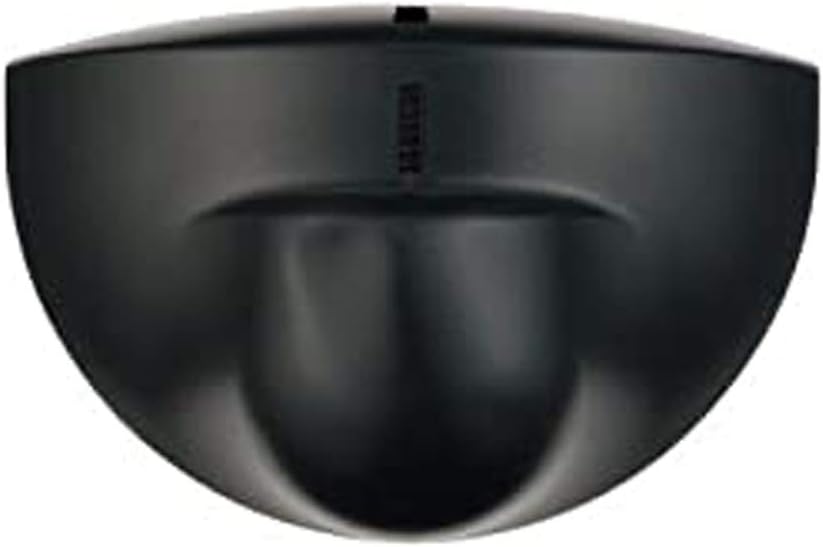
Looking for a dependable two-door access control solution that combines magnetic locking, motion-sensor exit, RFID card enrollment, and remote phone operation?

Overview of MENGQI-CONTROL Magnetic Lock Exit Motion Sensor 2 Doors TCP/IP Access Control System Keypad Reader Control Board 110V Power Supply Box USB Enroll Reader RFID Card/Key Fob(Phone APP Remote Open Door)
You’re looking at a full-featured package that targets small to medium sized installations where you need reliable entry control, exit convenience, and centralized logging. The MENGQI-CONTROL system bundles a control board for two doors, a 600 lb magnetic lock, motion-sensor exit, keypad/reader options, a 110V power supply box, and software/hardware that enables both local USB enrollment and TCP/IP network management.
This product is positioned to let you manage access by card or PIN for entry, and by exit motion sensor for egress, while offering smartphone remote open, scheduled auto open/close, and standard database compatibility for reporting and user administration.
What the system promises for you
The system promises fast response time (under 0.2s), support for up to 20,000 users and up to 100,000 logs, and the flexibility to authorize who may open which door at what times. You also get features like swipe-4-times to force a keep-open state, desktop USB reader for easy enrollment, and phone app control on iOS and Android for remote unlocking.
Those features make it suitable if you want a single, integrated kit that covers hardware, basic-installed electronics, and management software together.
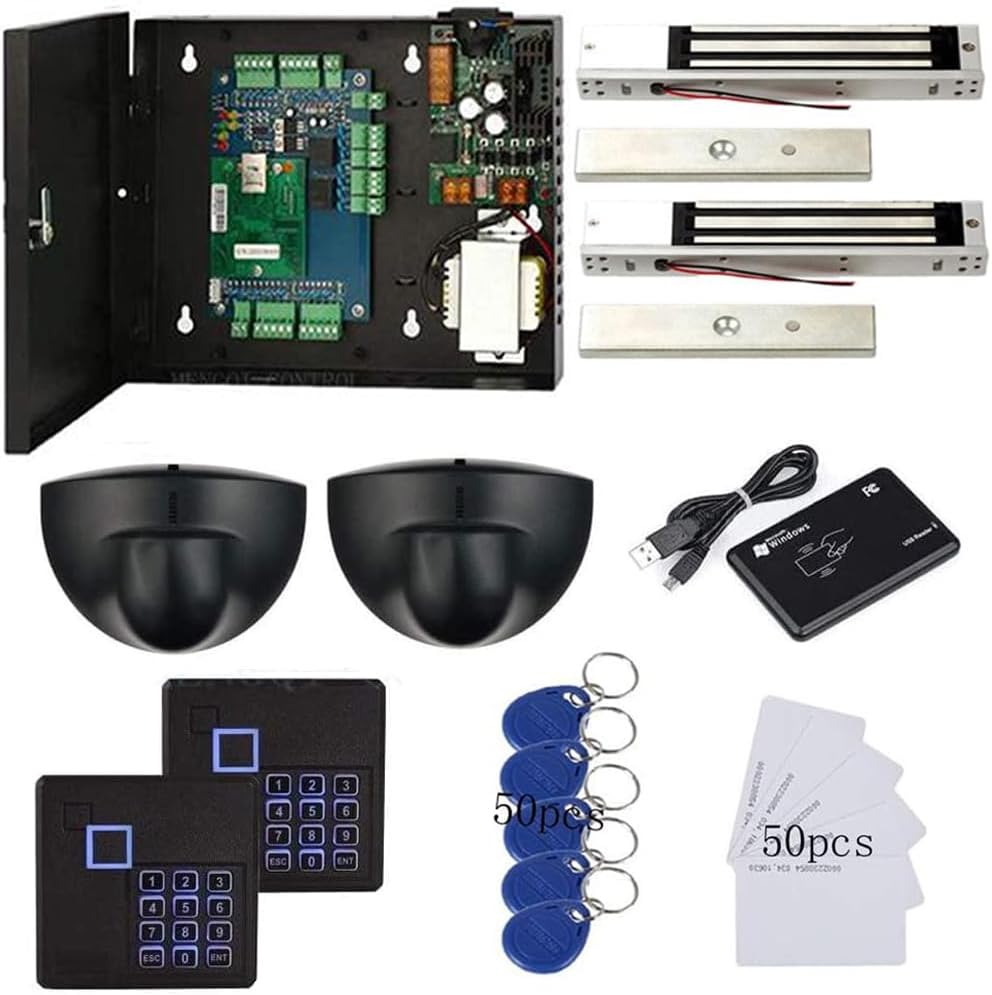
MENGQI-CONTROL Magnetic Lock Exit Motion Sensor 2 Doors TCP/IP Access Control System Keypad Reader Control Board 110V Power Supply Box USB Enroll Reader RFID Card/Key Fob(Phone APP Remote Open Door)
What’s included in the package
You’ll get the control board that handles two doors, the motion-type exit sensor for egress, a keypad/reader for credential input, a 110V power supply box, a 600 lb (280 kg) electric magnetic lock, a desktop USB reader, and wiring/installation guides with a video.
In practice, that means you can wire up the system, enroll cards via the USB reader, configure schedules and user rights in the management software, and use the phone app to open doors remotely without adding third-party components.
Extra items and installation aids
The package includes an exit button with a base to ease installation and a detailed wiring diagram and video to walk you through setup step by step. This kind of documentation is useful if you plan to DIY, because it shortens the learning curve and reduces calls for technical support.
If you prefer professional install, the guides still help you verify wiring and confirm correct control board connections to locks, sensors, and the power supply.

Key specifications at a glance
Below is a compact specification table so you can scan the technical highlights quickly and compare them to your requirements. The table concentrates on the core features you’ll care about when assessing suitability for an office, small apartment block, clinic, or retail backroom.
| Feature | Specification |
|---|---|
| Doors Controlled | 2 doors (dual-channel control) |
| Entry Methods | EM-ID card; PIN code via keypad |
| Exit Method | Motion sensor (walk close to door) + exit button |
| User Capacity | Up to 20,000 users |
| Log Capacity | Up to 100,000 logs |
| Response Speed | < 0.2 second |
| Lock Strength | 600 lbs (280 kg) electric magnetic lock |
| Network | TCP/IP network communication |
| Enrollment | Desktop USB reader (reads card numbers into software) |
| Power | 110V power supply box included |
| App Control | iOS & Android smartphone app for remote open |
| Software DB | Access & SQL Server support |
| OS Support | Windows 7/8/10/11, 32 & 64 bit |
| Additional Features | Auto open/close schedule, swipe-4-times keep door open, detailed wiring/video guide |
How these specs translate to real use
Those technical numbers mean you can deploy the system to handle a fairly sizeable user base for a small-to-medium site and create robust audit trails. The TCP/IP connection lets you integrate the unit into a networked environment for centralized administration, while the 600 lb lock ensures the physical security is respectable for most applications.
If you need to scale beyond a couple doors, you’ll have to plan for additional control boards or a different architecture, but for many sites two-door control is exactly what you need.
Installation and setup: what to expect
You’ll need to plan for some wiring, physical mounting, and software configuration. The included wiring diagrams and detail videos will be helpful if you take on the job yourself, but it’s also straightforward to hire a local electrician or security installer to get you going.
Expect to mount the maglock and sensor hardware, run power from the 110V supply box, connect the control board to your local network (TCP/IP), and install the management software on a Windows PC for enrollment and log management.
Wiring and physical installation tips
Wire runs should be planned so that power, lock, sensor, and reader cables are separated where possible to reduce electrical interference, and you should use proper-rated cable for the maglock to handle continuous DC current. Grounding the power supply and maintaining clean, solid connections at screw terminals will reduce intermittent faults and false triggers.
If your doors are metal or you’re using doors with narrow frames, validate magnet and armature plate alignment before finalizing mounting so you don’t have to re-drill or re-position later. The exit button base simplifies placement of the exit switch at the correct height.
Software installation and database setup
The software supports Access and SQL Server databases, and runs on Windows 7/8/10/11 (32/64 bit). Install the management application on a Windows machine that will be your primary controller for user enrollment, schedule creation, and log review; if you choose SQL Server you’ll get more scalability and robustness for large log volumes.
You’ll need to configure TCP/IP settings on the control board so the PC can communicate; the wiring guide and included video walk through the network setup and how to link the hardware to the Windows software.
Enrolling users: card, PIN, key fob, and app
Enrollments are performed via the desktop USB reader that reads card numbers into the software, or you can manually add users and assign PIN codes through the management interface. The process is straightforward: connect the USB reader to your PC, read cards or key fobs, assign access privileges by door and time schedule, and optionally assign PINs for keypad entry.
For smartphone users, the app option provides remote unlocking capability and convenience for administrators; configuration instructions are included to link app credentials to the system so you can remotely grant door access when needed.

Performance and reliability in everyday use
You’ll notice quick response when a credential is presented, thanks to the under-0.2s response time. That means hands-on badge swipes or keypad entries will trigger the lock with minimal hesitation, which contributes to a natural flow of people through controlled points.
Reliability will depend on proper installation, a stable network connection, and quality power. The included 110V supply box and clear wiring instructions help reduce setup errors that often cause hiccups in operation.
Response time and door operation
When configured correctly, the control board processes card or PIN input and activates the maglock nearly instantly, which reduces tailgating opportunities and user frustration. That snappy response is particularly important in busy entry points where delays create queues or cause people to force doors.
If you notice lag, check network latency for TCP/IP setups and inspect the USB reader connection for local enrollments; both can introduce delays if misconfigured.
Motion sensor and exit behavior
The exit motion sensor is designed to trigger when someone walks close to the door, offering a hands-free exit experience that’s useful in high-turnover areas or where you want contactless egress. You also have the exit button as a backup manual exit control for people who prefer a physical switch.
Fine-tuning sensor placement is important: too close may cause false triggers, while too far may not detect a slow-moving person. The included guides help you position the sensor for reliable performance.
Lock strength and durability
The 600 lb magnetic lock provides a robust holding force suitable for standard office doors and many commercial settings. It’s a common strength rating that balances security and hardware cost while being compatible with most door frames and mounting configurations.
Longevity of the lock comes down to continuous power considerations and mechanical alignment; ensuring a steady DC supply and correct armature plate contact will prevent premature wear or intermittent release.
Connectivity and remote access
You get TCP/IP network capability and a smartphone app that together provide options for remote monitoring and remote unlocking. That’s helpful if you manage multiple doors across a facility or need to grant temporary access while offsite.
The desktop USB reader gives you a simple offline enrollment path if you prefer to register users locally and then update the control board.
TCP/IP network features
Using TCP/IP lets you centralize user management, push configuration changes over the network, and pull logs to your database without physically connecting to the control board. If you have a managed network with static IPs or DHCP reservations, configure the control board’s IP address to integrate with your backend server for reliable communication.
Be mindful of network security: place the device on a trusted VLAN or behind firewalls if you’re integrating it into a larger corporate infrastructure to prevent unauthorized access to the device control interface.
Smartphone app (iOS & Android)
The included app supports remote door opening from both iOS and Android devices, which gives you quick access control if you need to let someone in from anywhere. You’ll need to configure user-level permissions and app credentials through the management software so phone-based open commands are recognized and authenticated by the system.
App reliability will depend on network availability and the control board’s reachability via TCP/IP; if either side is offline, remote open will fail, so it’s useful to have fallback methods like PIN or local card access.
USB reader and local enrollment
The desktop USB reader reads EM-ID card numbers directly into the management software, making enrollment fast and foolproof for administrators. This local enrollment method is ideal for initial setup, visitor provisioning, or batch-importing users without needing network access.
Because the USB reader works directly with your PC, ensure that the PC remains physically secure and that the enrollment logs are backed up if you rely on a local Access database.

Software and management features
The management software offers user rights assignment, schedule-based access control, reporting and logging, and compatibility with Access and SQL Server databases for your choice of backend. Those features let you define who can access which door, at what times, and create reports for audits and investigations.
If you’re managing many users and need robust historical data retention, choosing SQL Server will be advantageous; Access can work for smaller deployments but has limits for concurrent access and volume.
Logging, reports and user management
You can store up to 100,000 logs and generate attendance or entry records and reports from the software to track usage, detect anomalies, and keep compliance records. User management allows you to assign multiple credentials per person, set expiration for temporary access, and review logs filtered by user, door, or time window.
Reports can be exported for HR or security audits, and the ability to filter and sort logs helps you quickly find relevant events without sifting through raw data manually.
Scheduling and access rules
The system supports time-based access, letting you configure which users can enter a door during defined time windows and days. That functionality is crucial for businesses that need differential access for employees, contractors, or after-hours visitors.
You can also set doors to auto open/close at pre-set times each day, which helps you automate opening for business hours and keep doors locked overnight with no manual intervention.
Database compatibility and backup
Support for Access and SQL Server gives you options depending on your expected user/log volumes and IT capabilities. SQL Server is better for multi-user environments, higher concurrency, and large log retention, while Access is simpler to deploy for smaller sites where a full database server isn’t necessary.
Whatever you choose, implement a backup schedule for the database so that you can restore user data and logs in case of PC failure or corruption; backups are particularly important if you rely on the system for compliance or billing.
Security considerations
Any access control system is only as secure as the weakest link in the chain—credential handling, network configuration, power reliability, and lock fail modes. Make sure you use secure procedural controls for issuing cards, managing admin passwords, and maintaining network segmentation to keep the system resistant to tampering.
Physical security of the control board enclosure is important too; if the board is easily accessible, attackers could short wires or manipulate relays. Mount it in a locked cabinet or server room when possible.
Card type and credential security
This system uses EM-ID cards, which are widely used and inexpensive, but they are less secure than modern encrypted smart cards like MIFARE DESFire. If you’re deploying in a high-security environment, consider additional layers such as PIN+card, or use a more secure technology for future upgrades.
For many office and retail applications, EM-ID provides adequate convenience and low cost, but be mindful of cloning risks and control card issuance procedures to limit unauthorized copies.
Fail-safe vs fail-secure configurations
Decide whether you want fail-safe (unlock on power loss) or fail-secure (stay locked on power loss) behavior based on safety and security priorities. For example, doors on fire escape routes often must be fail-safe for egress in case of emergency, while secure storage rooms may be configured fail-secure.
Know your local building codes and fire safety requirements before finalizing the lock wiring mode, because incorrect configuration could violate regulations for emergency egress.
Power and backup options
The included 110V power supply provides continuous power to the magnetic lock and control board, but you should plan for battery backup or an uninterruptible power supply (UPS) if power outages are a concern. A UPS will keep the system online for remote management and controlled access during short outages, and can also allow fail-safe doors to operate correctly for emergency egress.
If you implement a backup battery, ensure it’s housed and wired safely, and periodically test battery performance as part of your maintenance routine.
Usability and daily operation
You’ll find day-to-day use straightforward for users who swipe cards or enter PINs, while administrators will appreciate the scheduling and reporting features. The motion-sensor exit keeps flow moving without people needing to touch hardware, which is a plus in hygiene-conscious settings.
Training staff on basic troubleshooting—like re-enrolling a card or checking network status—will reduce downtime and keep operations smooth.
User experience for employees and visitors
Employees will benefit from the quick response and simple swipe/PIN options, and visitors can be given temporary cards or PINs for short-term access without paperwork. If you use the smartphone app, you can also provide remote temporary access or let managers open doors for guests without being onsite.
Clear signage and guidance at entry points can reduce confusion for occasional users and ensure people know where to present credentials or use the exit sensor.
Admin experience for managers
As an admin, you’ll manage users, schedules, and review logs from the Windows software; the interface supports exporting and generating reports which is handy for audits or HR tasks. The ability to read cards via USB reader makes bulk enrollment and visitor management much faster than typing card numbers manually.
If you rely on remote work, the TCP/IP connectivity and smartphone app will let you respond quickly to access issues without being physically present.
Pros and cons
You’ll appreciate the integrated approach that packs hardware, power, enrollment, and software into a single kit that’s relatively easy to install and administer. That said, the use of EM-ID cards and basic security design might not meet the needs of very high-security facilities that require modern encrypted credential systems.
Pros
The package is feature-rich for its price point, offering two-door control, motion-sensor exit, 600 lb maglock, smartphone remote open, and large user/log capacity. The bundled desktop USB reader, detailed guides, and Windows-compatible software make enrollment and management approachable for small IT teams or DIY installers.
TCP/IP networking and SQL support give you room to scale logging and centralize control, while the ability to schedule access and create reports handles many common business scenarios without extra modules.
Cons
EM-ID card technology lacks the advanced encryption found in newer card standards, which could be a limitation for high-security applications; you may want to consider higher-security readers if needed. Installation requires basic electrical and networking knowledge, so if you don’t have any experience you may need professional help to ensure optimal placement and correct wiring.
Finally, the smartphone app and TCP/IP functions mean you need to manage network security and ensure remote access paths are protected to prevent unauthorized control.
Comparison with similar systems
Compared with standalone door locks or single-door kits, this product stands out by handling two doors with centralized software and an included maglock and power supply, saving you the effort of sourcing individual components. Against enterprise-grade systems, it’s more affordable and simpler, but it lacks advanced credential encryption and enterprise-grade integration options.
If you need enterprise-level features like single sign-on, advanced encryption, or integration with large building management systems, you’ll likely look at more costly controllers. For small and medium deployments where budget and straightforward features are priorities, this unit offers strong value.
When this system is a good fit
Choose this solution if you run a small office, clinic, retail backroom, or residential complex with up to two primary controlled doors and you value quick installation, basic smartphone remote control, and robust logging on an affordable platform. It’s also appropriate when you want a single vendor kit including lock, power, readers, and software to reduce purchase complexity.
If you need to automate hours, maintain visitor logs, and have managers occasionally remote-unlock doors, this kit covers those needs well.
When to consider alternatives
If you require encrypted card technologies, biometric integration, integration into an enterprise access platform, or more than two doors with centralized enterprise management, consider stepping up to more professional systems. Also consider alternatives if you have strict regulatory requirements for credential security, or if your environment demands tamper-evident controllers and hardened enclosures.
For sites needing wireless locking across many doors or cloud-based user provisioning at scale, a different architecture may be more efficient.
Troubleshooting common issues
You’ll encounter occasional issues like sensor misplacement, network configuration conflicts, or card read errors, but many problems are solved by checking wiring, power, and software settings. Keep the wiring diagrams handy and follow the video guide to confirm installation steps before troubleshooting deeper problems.
For persistent issues, you may need to verify database connections, test the USB reader on another PC, or check firmware updates if available.
Connectivity and app problems
If the app can’t reach the device, check IP settings on the control board, ensure the board and PC are on the same network segment, and verify firewall rules aren’t blocking the management software. Rebooting the control board and your networking equipment often resolves transient network issues, and checking for IP conflicts or incorrect subnet masks can fix persistent issues.
Document the working IP configuration once you have it, since stormy network environments or DHCP changes can cause intermittent failures that are time-consuming to diagnose later.
Card read errors and sensor misfires
Card read issues are often due to damaged cards, weak card encoding, or a misaligned USB reader; try reading the card on a different reader or enrolling a known-good card to isolate the problem. Sensor misfires are commonly caused by incorrect mounting height, reflective surfaces, or strong drafts; adjust mounting position and check the sensor’s sensitivity settings to reduce false activations.
Keep spare cards and a test card on hand to verify reader health during troubleshooting sessions.
Lock will not release or hold open
If the maglock doesn’t release on valid credential, verify the control board outputs, check the wiring polarity to the lock, and ensure the power supply provides sufficient voltage and current. For a lock that won’t hold, inspect the armature plate alignment and the mounting face; a small misalignment or debris can prevent full contact and reduce holding force significantly.
If you suspect a power supply fault, measure voltage under load and watch for voltage sag that could cause intermittent lock release.
Tips for maintenance and longevity
Regularly inspect lock and armature plate alignment, clean sensor lenses and reader surfaces, and test backup power to ensure the system behaves correctly during power interruptions. Keep firmware and software updated if vendor updates are available, and maintain a secure backup of the database so you can restore user and log data if a PC fails.
Schedule periodic drills for emergency egress and document procedures for lock modes or power failures so staff know how doors will behave in different scenarios.
Final verdict
If you need an affordable, integrated two-door access control kit with remote app opening, TCP/IP management, and large user/log capacity, the MENGQI-CONTROL package is a practical choice that balances features and cost. You’ll get a capable system for offices, clinics, retail spaces, and similar environments where EM-ID cards and scheduled access are acceptable security measures.
For high-security facilities or enterprise-scale deployments, you may want to consider systems with encrypted credentials or more scalable control architectures, but for many installations this product hits the sweet spot of usability, functionality, and value.
Frequently asked questions (FAQ)
Q: Can you use this system for more than two doors?
Yes, the included control board handles two doors natively, so to manage more doors you’ll need additional control boards and integration planning. If you plan to expand beyond a small number of doors, consider a system designed for larger multi-door deployments to simplify management and reduce hardware count.
Q: How secure are EM-ID cards?
EM-ID cards are common and cost-effective but offer limited security compared with modern encrypted smart cards like MIFARE DESFire. If you’re concerned about cloning or tampering, consider augmenting the system with PINs, strict issuance policies, or upgrading to encrypted readers when possible.
Q: Is the smartphone app secure for remote unlocks?
The app provides convenient remote unlocks, but security depends on how you configure network access, user permissions, and password policies. Ensure you use strong admin passwords, isolate the device on secure networks, and limit app access to trusted accounts to reduce the attack surface.
Q: What happens to door behavior during a power outage?
Door behavior depends on how you wire the lock (fail-safe vs fail-secure) and whether you have a battery backup or UPS. For life-safety doors you may need fail-safe behavior so doors unlock on power loss; for secure storage you may prefer fail-secure, so doors remain locked until power returns.
Q: Can you export logs to external systems?
Yes, the management software supports exporting logs via standard formats and stores records in an Access or SQL Server database which you can query or connect to external reporting tools. If integration with broader security or HR systems is required, using SQL Server will provide the most flexibility and reliability.
Q: Are installation videos and wiring diagrams sufficient for a DIY install?
The package includes detailed wiring diagrams and a video guide which are very useful for DIY installers with some basic electrical and networking knowledge. If you lack experience with low-voltage wiring, DC locks, or TCP/IP configuration, hiring a professional installer will ensure reliable performance and compliance with local codes.
Q: Will the system work on non-Windows platforms?
The management software is designed for Windows (Win7/8/10/11, 32 & 64 bit) and uses Access or SQL Server databases; you’ll need a Windows machine for full administrative control. You can still use the smartphone app on iOS or Android for remote opening, but enrolling users and managing the database requires the Windows software.
Q: How do you enroll multiple users quickly?
Use the included desktop USB reader to batch read card numbers into the Windows software, which speeds up enrollment compared to manual entry. You can also prepare CSV imports if the software supports it and then assign schedules and permissions in bulk to streamline setup for many users.
Q: Is the 600 lb lock sufficient for exterior doors?
A 600 lb (280 kg) maglock is suitable for many exterior doors but depends on door construction and local security requirements. For very high-security entrances or heavy traffic points, consult a security professional to verify that the maglock and mounting method meet your needs and code obligations.
If you want, I can provide a tailored checklist for your specific door type and site layout to help you plan the install, or walk you through step-by-step network and software configuration based on your current IT setup.

Disclosure: As an Amazon Associate, I earn from qualifying purchases.