
?Are you trying to find an easy, reliable way to control your radiant heated floors with a modern touchscreen thermostat?
Buy NVent Nuheat Home AC0056 On Amazon
Product Overview
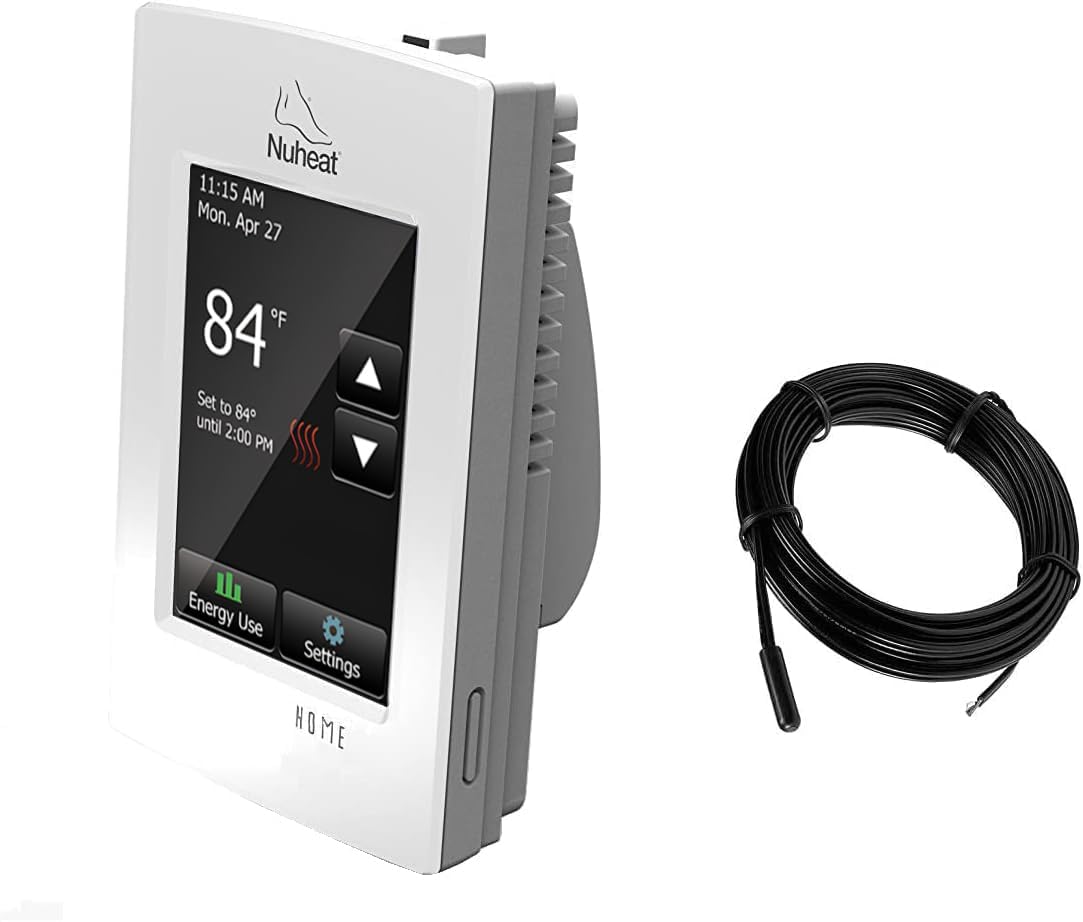
The nVent Nuheat Home AC0056 Programmable Touchscreen Thermostat is designed specifically for electric radiant floor heating systems and puts a 3.5″ high-resolution color touchscreen at your fingertips. You get 7-day programmability, energy usage monitoring, compatibility with both 120V and 240V floor heating cables, an extra OJ Electronics floor sensor, and a built-in Class A GFCI for added safety.
What this product is
This thermostat is a wall-mounted controller made to replace standard thermostats for in-floor electric heating systems. It focuses on simple, local control and programming rather than cloud or app-based connectivity, making it a practical choice if you prefer on-device controls and a straightforward user experience.
Key features at a glance
You get a full-color 3.5″ touchscreen, a physical on/off switch, 7-day programming, diagnostics and setup wizard, an included extra floor temperature sensor from OJ Electronics, energy usage monitoring, and built-in Class A GFCI protection. The unit supports both 120V and 240V floor heating cables and offers diagnostic tests to confirm correct installation and operation.

nVent Nuheat Home AC0056 Programmable Touchscreen Thermostat, for Radiant Heated Floors, 120V/ 240V Cables, with an Extra OJ Electronics Floor Heating Temperature Sensor and Built-in GFCI
Feature Breakdown Table
Below is a concise table summarizing the most important technical and user-facing features to help you quickly assess whether this thermostat fits your needs.
| Feature | Details |
|---|---|
| Screen | 3.5″ high-resolution color touchscreen |
| Programming | 7-day programmable schedule |
| Voltage | Compatible with 120V and 240V floor heating cables |
| Sensor | Includes extra OJ Electronics floor heating temperature sensor |
| GFCI | Built-in Class A Ground Fault Circuit Interrupter |
| Controls | Touchscreen + physical on/off switch |
| Diagnostics | Setup wizard and diagnostic tests on initial power or factory reset |
| Energy | Energy usage monitoring available on-device |
| Use case | Electric radiant floor heating (bathrooms, kitchens, living areas) |
| Connectivity | Local control only — no advertised cloud/app integration |
Design and Build Quality
The Nuheat Home thermostat strikes a balance between modern aesthetics and functional durability, with a clean touchscreen face and necessary physical controls. The housing is designed for wall mounting and to integrate into typical electrical configurations used for electric floor heating, aiming for a neat, finished look once installed.
Touchscreen and user interface
The 3.5″ color touchscreen is bright, responsive, and laid out for accessibility, so you should find programming menus and status screens intuitive. The display shows temperature, schedule settings, and energy usage information in clear text and icons, which reduces guesswork when you adjust settings.
Physical controls and GFCI
Aside from the touchscreen, a physical on/off switch gives you quick manual control over the heating circuit without touching the software menus. The built-in Class A GFCI is a meaningful safety enhancement because it continuously protects the floor heating circuit against ground faults, and it reduces the need for a separate GFCI device in many installations.
Purchase The NVent Nuheat Home AC0056 Programmable Touchscreen Thermostat
Compatibility and Technical Specifications
You need a thermostat that matches your floor heating system’s voltage and sensor type, and the Nuheat Home is built to support the most common AC electric floor systems. Its included extra OJ Electronics floor heating temperature sensor adds flexibility when you’re installing sensor wiring or need a spare.
Voltage and cable compatibility
Because the thermostat supports both 120V and 240V floor heating cables, it should work with the majority of electric radiant cable installations. That said, you still need to confirm wire gauge, breaker sizing, and load calculations with your electrician to ensure safe, code-compliant installation.
Sensors and the extra OJ Electronics sensor
The included extra OJ Electronics floor sensor is intended for floor temperature regulation and to provide more accurate control than ambient sensors alone. Using a dedicated floor sensor helps prevent overheating hard-surface floors and keeps room comfort consistent by responding to the floor’s actual temperature.
Installation and Setup
Correct installation is crucial for safety and optimal performance. You should plan to have a qualified electrician install the thermostat, wire the heating circuit correctly, and verify GFCI function during commissioning.
Installation requirements and best practices
You’ll need access to the heating circuit wiring and a neutral if required by local code, plus appropriate breaker sizing for the total load of your floor heating element. Ensure the thermostat is mounted in a convenient location away from direct sunlight and drafts, and that floor sensor wiring follows the manufacturer’s placement recommendations for accurate readings.
Setup wizard and diagnostics
On first power-up or after a factory reset, the Nuheat Home provides a setup wizard and diagnostic tests that walk you through installation checks and initial configuration. These tools help verify sensor continuity, GFCI operation, and basic wiring integrity, which reduces installation guesswork and helps troubleshoot issues before you finish the job.
Programming and Daily Use
You’ll use the 7-day programming to set different schedules for weekdays and weekends or create unique profiles for each day if you prefer. The touchscreen’s menus guide you through creating time/temperature blocks so you can match heating to your daily routine.
7-day programmability explained
With 7-day programming, you can set multiple heating periods per day for each day of the week, which helps you optimize comfort and energy usage. You might program higher floor temperatures for mornings and evenings when you use the bathroom or kitchen, and lower temperatures during daytime hours or overnight.
Energy usage monitoring
On-device energy usage monitoring helps you understand how much power your floor heating is using across time and which schedules are most economical. While not a substitute for whole-home energy management, this feature helps you make informed adjustments to schedules if you’re trying to cut costs.

Performance and Comfort
When configured properly with the floor sensor in the correct location, the Nuheat Home provides accurate floor temperature control and reduces overshoot that can make floors feel too warm. Its touchscreen and scheduling options let you shape the heating behavior to match how you use each room.
Heating accuracy and the sensor’s role
Floor sensors are critical for accurate control because they measure the actual floor surface temperature rather than the air temperature. By relying on the included OJ Electronics floor sensor, the thermostat can deliver consistent comfort without cyclical temperature swings that sometimes occur with ambient-only sensing.
GFCI protection and safety performance
The built-in Class A GFCI monitors for leakage current and trips quickly in the event of a ground fault, protecting people and property from potential electric shocks associated with floor heating systems. You should still test the GFCI regularly using the required test procedure to ensure ongoing protection, but having this function integrated simplifies the overall safety design.
Troubleshooting and Maintenance
If the thermostat doesn’t behave as expected, there are several common checks you can perform before calling for service. Many issues are related to sensor wiring, incorrect wiring of the heating circuit, or tripped GFCI protection.
Common issues and straightforward fixes
If the thermostat shows an error or the floor isn’t heating, first check the diagnostic screens in the setup menu to see what the unit reports. Confirm that the floor sensor wiring is connected properly, that the breaker is on, and that the built-in GFCI hasn’t tripped — resetting the GFCI according to the manual often restores normal operation.
Regular maintenance and safety checks
You should test the GFCI periodically using the thermostat’s built-in test function or the physical test button as directed in the manual. Also perform seasonal checks on schedule settings, sensor continuity, and display responsiveness to catch issues early and keep the system running efficiently.
Pros and Cons
Making a decision requires balancing the thermostat’s strengths against its limitations so you know what to expect.
Pros
The thermostat offers an intuitive high-res touchscreen, the convenience of 7-day programming, and a built-in Class A GFCI for added safety, which can simplify installation in many homes. Compatibility with both 120V and 240V floor heating cables and an included extra OJ Electronics floor sensor are valuable extras that make installation and sensor replacement easier.
Cons
This model focuses on local control and does not advertise cloud connectivity, so you won’t get remote app control or smart-home integrations out of the box. If you prefer voice assistants or remote scheduling from your phone, you’ll need to consider additional hardware or a different thermostat model that supports those features.

How the Nuheat Home Fits Different Use Cases
Whether you have a bathroom, kitchen, or entire home with electric underfloor heating, this thermostat is suited to spaces where you want reliable, local control of floor temperature. It’s especially appropriate if you prefer tactile controls, an integrated GFCI for safety, and an on-device scheduling interface.
When this thermostat is a great fit
This product is an excellent fit if you want a dedicated floor thermostat with accurate floor sensing and a simple touchscreen interface, especially in wet areas like bathrooms where GFCI protection is required or preferred. You’ll also benefit if you value an included spare sensor and on-device energy monitoring to inform schedule tuning.
When you might look elsewhere
If you need Wi‑Fi connectivity, cloud-based scheduling, voice control, or integration into a broader smart home thermostat ecosystem, you may want to compare models that specifically list those features. Also, large or multi-zone systems might require multiple thermostats or a more advanced control solution.
Installation Checklist
Having a step-by-step checklist makes install day go smoother and reduces callbacks.
Before you start
Confirm compatibility with your floor heating cable voltage and total wattage, gather the manual and wiring diagram, and turn off power at the breaker before you touch any wiring. You should also have the floor sensor and thermostat wiring lengths measured and ready so you can position the thermostat at an appropriate wall height.
On the day of installation
Use the thermostat’s setup wizard and diagnostics once power is applied to verify wiring and sensor connection. Have your electrician verify breaker sizing and confirm that the built-in GFCI tests and trips properly before finalizing wall mounting and finishing.
Programming Best Practices
Programming smart schedules will help you balance comfort and energy savings without constant manual adjustments.
Setting practical schedules
Set comfort periods around when you usually occupy a room — mornings and evenings for bathrooms and kitchens — and lower floor temperatures during long absences or overnight. Use preheat times conservatively: floor heating typically requires lead time to raise surface temperature, so start preheating earlier but not excessively to avoid wasted energy.
Fine-tuning temperature setpoints
Start with modest setpoints and increase them gradually to learn how quickly your floor responds in each location. Because floor sensors read surface temperature, small increases can feel more noticeable than in-room air temperature changes, so take time to find the sweet spot for comfort.
Energy Savings Tips
The thermostat’s energy usage monitor is useful, but you can further reduce consumption with a few behavioral and configuration changes.
Smart scheduling habits
Reduce setpoints when nobody is home and use short comfort windows instead of continuous high temperatures. Program reduced heating during extended absences and set minimal frost protection or a low-maintenance temperature to keep the floor safe while you’re away.
Flooring and insulation considerations
Proper insulation beneath the heating elements and correct floor coverings will make your system more efficient and responsive. Insulated subfloors reduce heat loss downward and let the thermostat achieve desired surface temperatures quicker, so consider adding insulation or verifying that the floor construction matches the heating design.
Safety Notes
Safety should be a priority when installing and operating electric radiant floor heating systems, and the included Class A GFCI gives you a strong baseline of protection. Still, follow local electrical codes and test protective devices regularly.
GFCI testing and compliance
Test the integrated GFCI per the instructions after installation and at routine intervals to ensure it trips and resets correctly. Always adhere to local code for wiring and breaker sizing, and consult a licensed electrician to confirm compliance.
Handling damage and repairs
If the floor cable shows damage or the sensor reads open or short circuit errors, turn off power and contact a qualified installer before continuing. Don’t attempt to repair heating cables embedded in floor materials yourself; these are specialized repairs best handled by professionals.
FAQ
Below are common questions you may have about the Nuheat Home thermostat and concise answers to help clarify typical concerns.
Q: Does this thermostat support Wi‑Fi or smartphone control?
No, this model focuses on local touchscreen control and does not advertise built-in cloud or smartphone integration. If remote control is essential, you’ll need to look for a different model or use a compatible external device if your installer can integrate one safely.
Q: What does Class A GFCI mean for my installation?
Class A GFCI means the device detects ground currents as low as 5 mA and trips quickly to reduce shock risk. It’s designed to offer a high level of protection suitable for wet-area installations like bathrooms and kitchens.
Q: Can I control multiple heating zones with one thermostat?
One Nuheat Home thermostat controls a single heating circuit or zone; to control multiple zones independently you’ll need a thermostat for each zone. Multi-zone projects typically require separate thermostats, wiring, and possibly additional wiring work by your electrician.
Q: What is the included OJ Electronics floor sensor used for?
The included OJ Electronics floor heating temperature sensor measures the floor surface so the thermostat can regulate heating based on actual floor temperature. Having an included extra sensor helps with installation and gives you a spare for later replacement if needed.
Q: How often should I test the GFCI?
You should test the GFCI according to the manufacturer’s recommendations and local electrical code; a common practice is to test monthly at first and then periodically thereafter as recommended. Regular testing keeps you confident that the safety device will perform if a fault occurs.
Q: What should I do if the thermostat shows an error code?
Check the diagnostics menu for details, ensure the breaker and GFCI are reset, and verify sensor wiring continuity. If the error persists, consult the manual and contact a qualified technician or nVent support for guidance.
Comparison to Alternatives
You may be comparing this thermostat to other floor thermostats or smart thermostats that support electric floor heating. The Nuheat Home stands out for its integrated GFCI and included sensor — both are features installers and homeowners often appreciate for simplicity and safety.
How it compares to smart Wi‑Fi thermostats
Unlike Wi‑Fi-enabled thermostats, the Nuheat Home prioritizes on-device usability and built-in safety rather than remote access. If your top priorities are an easy touchscreen interface, an included sensor, and built-in GFCI, this unit is compelling; if remote access and smart home automation matter more, look at models that explicitly list those capabilities.
How it compares to basic floor thermostats
Compared with basic, non-programmable floor thermostats, the Nuheat Home offers modern convenience through a full-color touchscreen, 7-day programming, diagnostics, and energy monitoring. Those features generally improve comfort control and can help you fine-tune energy usage more effectively.
Tips for a Smooth Experience
A few practical tips will keep the thermostat working well and help you get the best performance from your floor heating system.
Before and during installation
Have all wiring labeled, verify breaker sizing, and use the setup wizard to test sensors and GFCI before finishing the wall. Ensure the floor sensor cable is properly routed and secured in the floor system so that sensors don’t move or become compromised during floor finishes.
After installation: daily use and optimization
Spend time refining your 7-day schedule over a few weeks so you learn how quickly your floors respond in each room. Use the energy monitor to identify high-use periods and adjust schedules to trim unnecessary consumption without sacrificing comfort.
Final Verdict
If you want a dependable, well-built programmable thermostat specifically made for electric floor heating, the nVent Nuheat Home AC0056 is a strong choice that emphasizes local control, accurate floor sensing, and built-in safety. The included extra OJ Electronics floor sensor and Class A GFCI set this model up as a practical, installer-friendly solution for bathrooms, kitchens, and living spaces where reliable floor temperature control matters.
If you prefer remote control and smart home integration, this model may not match those needs out of the box; however, if your priorities are simple, safe, and accurate floor heating control with clear on-device programming, this thermostat delivers a solid, user-friendly experience.
Get The NVent Nuheat AC0056 Thermostat On Amazon
Disclosure: As an Amazon Associate, I earn from qualifying purchases.