
Want a smart-home security kit that also makes your lighting smarter and more helpful?
Buy The Philips Hue Secure Starter Kit On Amazon
Product Overview
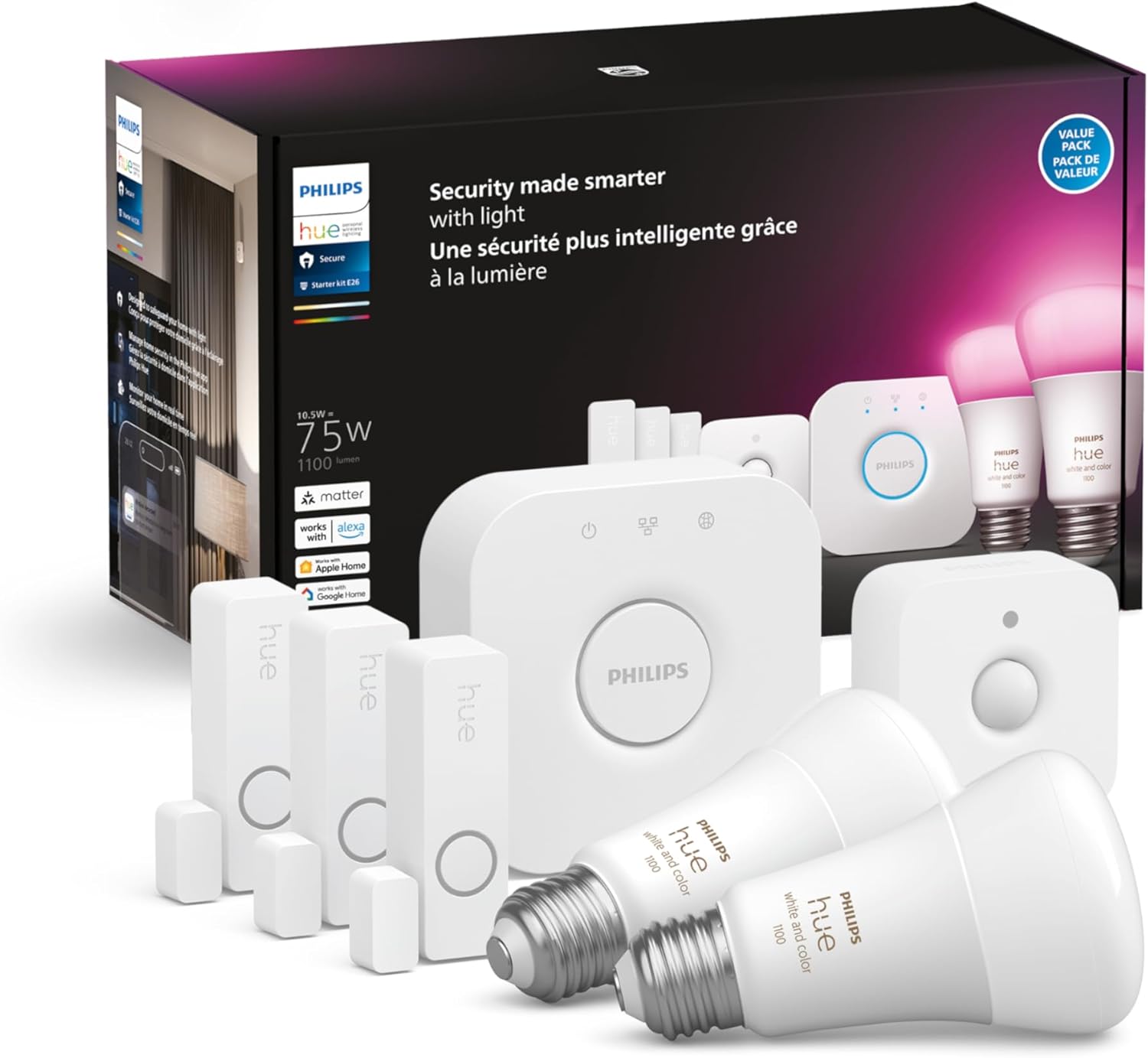
You’re looking at the Philips Hue Secure Starter Kit – 3 Secure Contact Sensors (White), Indoor Motion Sensor, Bridge, 2 White & Color Ambiance Smart Bulbs, Easy to Install, Works with Hue App. This kit combines security sensors with Hue lighting and the Hue Bridge so you can use your lights as part of your security setup while controlling everything from the Hue app.
This review goes through what you’ll get, how it behaves day-to-day, and whether it’s a fit for your home. You’ll get practical setup steps, performance notes, privacy considerations, pros and cons, troubleshooting tips, and a clear final verdict to help you decide.

Philips Hue Secure Starter Kit - 3 Secure Contact Sensors (White), Indoor Motion Sensor, Bridge, 2 White & Color Ambiance Smart Bulbs, Easy to Install, Works with Hue App
What’s included
You’ll receive three secure contact sensors, one indoor motion sensor, the Hue Bridge, and two White & Color Ambiance smart bulbs—everything you need to start linking sensors and lights. The kit is meant to be an all-in-one starter pack: sensors for doors and windows, a motion sensor for a room or hallway, bulbs that offer both white and millions of colors, and a central Bridge to manage devices.
Everything comes from Philips Hue, so the hardware and firmware tend to be well matched and receive ongoing updates. You’ll still need the Hue app and a compatible smartphone to control and configure the system.
Purchase Philips Hue Secure Starter Kit
Key features
The kit ties motion and contact sensors to your lights so your lighting can act as a visible alarm or simply turn on when activity is detected. The Hue app sends real-time motion notifications to your phone and allows you to trigger alarms and manage camera integrations if you add Hue Secure cameras.
You’ll also benefit from Hue’s ecosystem: scheduling, scenes, and color control are all available out of the box with the included White & Color Ambiance bulbs. The Bridge gives local control and better reliability than Bluetooth-only devices.
Design and Build
You’ll notice that Philips Hue devices are designed to be visually unobtrusive and easy to mount. The sensors and contact sensors are compact, white, and blend into most door frames or walls without drawing attention.
The bulbs follow the same clean design language as other Hue bulbs and fit standard E26/E27 sockets. The Bridge is a small hub you’ll connect to your router; it’s lightweight and intended to be placed out of the way but within range of your devices.
Sensors (contact and motion)
The contact sensors are thin, magnetic-style devices designed to mount on a door or window with adhesive or a small screw. You’ll use one piece on the moving part and one on the frame, and the sensor reports open/closed status to the Bridge.
The indoor motion sensor is battery powered and has a wide detection angle, so you’ll place it in a corner or hallway to catch motion. It’s intended for indoor use only and isn’t weatherproof for exterior doors.
Bridge and bulbs
The Hue Bridge connects to your home router via Ethernet and acts as the local controller for bulbs, sensors, and compatible cameras. You’ll appreciate that the Bridge allows faster responses and more reliability than Bluetooth-only setups.
The included White & Color Ambiance bulbs provide warm-to-cool white and millions of colors. You’ll be able to dim and color-shift them through the app, and they respond well to automation triggers from the sensors.
Installation & Setup
You’ll find setup is straightforward if you follow the Hue app prompts and have your Wi-Fi network and phone ready. The Bridge needs an Ethernet connection and power, and then you add bulbs and sensors through the app using pairing steps that are guided and usually quick.
If you’ve used Hue before, this will feel familiar; if you haven’t, the app walks you through each device. You’ll want to place sensors in likely points of entry and bulbs where automatic lighting is most helpful.
Step-by-step setup
First, you’ll plug the Hue Bridge into your router and power it on, waiting for the lights on the Bridge to show it’s connected. The app will prompt you to add the Bridge and pair it to your Hue account.
Next, screw in the bulbs and power them on; the app should detect them and let you name them and put them into rooms. Then you’ll add sensors and contact sensors: follow the app’s pairing routine and place them where you want; the app will test their status and motion detection.
App Experience
You’ll manage everything from the Hue app: lights, sensors, notifications, and camera integration (if you add Hue Secure cameras). The app consolidates control so you won’t need multiple apps to manage routine lighting and security alerts.
The interface is designed for both casual control (tapping scenes, setting colors) and more advanced automations (linking sensors to scenes or alarms). You’ll find it intuitive, but if you’re new to smart-home systems you might spend a little time customizing automation exactly how you like it.
Hue App Interface
You’ll see a list of your rooms and devices, with sliders for individual bulbs and toggles for automations. The app also includes a “Routines” and “Automations” area where you’ll configure sensor triggers and alarm behavior.
Device naming and room grouping in the app are very helpful: you’ll quickly set “Front Door Sensor” or “Hallway Motion” and use those names in rules. Custom scenes and schedules can be created with a few taps, and color pickers make bulb setup fun.
Notifications and alarm controls
You’ll receive immediate push notifications when a sensor detects motion or a contact sensor opens, and you can trigger a sound alarm or make lights flash from the app. The alarm controls are convenient when you’re away, allowing you to sound an alarm, call contacts, or activate a routine remotely.
Notifications can be tuned so you don’t get overloaded with false alerts, and you can set which devices send what kind of notification. You’ll appreciate the granularity if you want motion alerts at night but not during daytime hours when motion is expected.

Performance
You’ll find the kit’s performance generally reliable for typical household use, with quick sensor-to-light responses and stable bulb control through the Bridge. There are occasional caveats to consider—particularly around placement, network stability, and interference—but those affect most wireless smart-home gear.
Latency is normally low because the Bridge is on your local network, and the Hue system’s large installed base means firmware updates and improvements are common. Overall, you’ll get consistent results if you follow best practices for placement and keep firmware updated.
Motion detection reliability
The motion sensor is accurate in most indoor locations and reports motion to the Bridge quickly so lights respond almost immediately. You may need to tweak sensitivity, placement height, and the angle to avoid false positives from pets or drafts.
You’ll find that the sensor’s detection distance is good for hallways and living rooms, but larger open spaces or glass reflections can sometimes reduce consistency. Testing different positions will get you the best coverage for your layout.
Contact sensor responsiveness
Contact sensors respond promptly when a door or window is opened or closed, sending that change to the Bridge and triggering connected automations. They are small and discreet, so you can hide them on frames without sacrificing function.
Adhesive mounting works well for most surfaces, but if you expect heavy use (like a frequently opened exterior door), consider using screws for a more secure installation. Overall, you’ll get reliable open/close status and timely alerts.
Bulb performance (color, dimming, latency)
The White & Color Ambiance bulbs offer excellent color richness and smooth dimming, and you can set them to routine scenes or use them as visible alerts when sensors trigger. Color transitions are seamless and bulbs respond swiftly when commanded from the app.
You’ll notice minimal latency thanks to the Bridge, and bulbs maintain color accuracy even at low brightness. If you use third-party dimmer switches, ensure they’re compatible or hardwired off; Hue bulbs work best when continuously powered.
Security Features
You’ll be using lights as part of a security system: lights can turn on when motion is detected and notifications will alert you of unauthorized entry. The Hue app allows you to trigger alarms, integrate cameras, and control notifications so your lighting becomes a security asset.
You can also set routines to make your home look occupied when you’re away, using randomized schedules or scene stacks that change colors and brightness. Those features make the kit more than just a sensor pack—it becomes a deterrent and an active part of your security plan.
Camera integration and how lights respond
If you add Philips Hue Secure cameras, motion on a camera can trigger your lights to come on and provide visual confirmation alongside video. The app’s integration means sensors and cameras can work together so you’ll receive motion alerts coupled with a camera snapshot or live view where supported.
This integration is useful for quickly assessing an alert: you’ll see video and have lights turn on automatically to improve camera visibility. The combination of motion sensors and camera-triggered lights creates a layered security approach.
Privacy and data
Philips Hue emphasizes local control via the Bridge, which reduces how much of your data goes to cloud services for routine commands. Notifications and camera features may use cloud services for remote viewing and some advanced features, and you’ll control many preferences in the Hue app.
If privacy matters to you, keep on top of firmware updates and review privacy settings in the Hue app. You’ll want to read Hue’s privacy policy and configure camera access and cloud options to match your comfort level.
Integration & Compatibility
You’ll be able to connect the Hue system to Alexa, Google Assistant, and Apple HomeKit, giving you voice control and more widespread automation options. The Bridge makes Hue devices easy to integrate with many ecosystems, expanding how you use sensors and lights beyond the Hue app.
Third-party smart-home hubs and automation platforms may also support Hue via standard protocols, so you’re not locked into one platform. This flexibility is a major advantage if you’ll grow your system over time.
Works with other smart home systems (Alexa, Google, HomeKit)
You’ll ask Alexa or Google to control scenes or enable routines that incorporate Hue devices, and you can use Siri via HomeKit for voice control too. Integration is generally smooth, but some advanced sensor rules or camera features may still be best handled in the Hue app.
You’ll want to authorize Hue in each assistant’s app and name your devices clearly in the Hue app so they appear correctly in voice assistants. Once linked, you’ll be able to use combined routines like “Goodnight” to arm lights and sensors together.
Battery life & Maintenance
You’ll find the battery life for sensors varies with use, but contact sensors and motion sensors typically last months to over a year on standard batteries. Regular firmware updates and periodic checks in the app will help keep devices functioning at peak performance.
Bulbs don’t require battery maintenance but do need occasional firmware updates, which the Hue app handles automatically or prompts you to run. Keeping everything on current firmware reduces bugs and can improve battery efficiency and responsiveness.
Sensor battery
You’ll usually get solid battery life from the contact sensors and motion sensor, depending on how often they trigger and how frequently they report to the Bridge. The app will notify you when batteries are running low so you can replace them before a sensor becomes unreliable.
Use high-quality alkaline or recommended battery types for the best lifespan, and store spare batteries at home to minimize downtime. If you place the motion sensor in a high-traffic location, expect to replace batteries sooner.
Bulb life and firmware updates
You’ll enjoy long bulb life typical of LED devices, often rated for thousands of hours of use, and the Hue app regularly provides firmware updates to add features or security patches. Keeping bulbs up to date ensures compatibility with new sensors or integrative features.
If you notice erratic behavior or slow response, check the app for updates or reboot the Bridge to restore stability. You’ll rarely need to replace bulbs for functional reasons outside of physical damage.
Pros and Cons
You’ll appreciate how this kit consolidates lighting and entry-level security into one cohesive system and lets you control everything from a single app. It’s ideal for someone who wants both smart lighting and basic security without juggling multiple apps.
However, you’ll pay a premium for the Hue brand and might find the system overkill if you only want a simple, cheap sensor or a single smart bulb. Here are the details broken out for quick reference.
Pros
You’ll get a single ecosystem that combines reliable bulbs with sensible sensors and the Hue Bridge for local control. The app’s scheduling, color options, and camera integration make automations simple and meaningful.
You’ll also benefit from easy installation, wide compatibility with voice assistants, and strong color and dimming performance from the White & Color Ambiance bulbs. The system also scales well, so you can add more Hue devices over time.
Cons
You’ll pay more up front than some basic sensor or bulb kits, especially if you only need one or two functions. The motion sensor and contact sensors are indoor-only, so you’ll need additional solutions for exterior detection or weatherproof needs.
You’ll also rely on the Bridge and a stable home network; network issues can impact performance, and some advanced security features may require additional Hue Secure camera purchases.
Table: Feature Breakdown
Below is a quick table to help you compare core features and what the kit provides at a glance. This should make it easier for you to weigh capabilities versus needs.
| Feature | Included in Kit | Notes |
|---|---|---|
| Hue Bridge | Yes | Local control hub; Ethernet required |
| Contact Sensors | 3 | Magnetic, white, adhesive/screw mount, open/close status |
| Motion Sensor | 1 | Indoor, battery-powered, adjustable placement |
| White & Color Bulbs | 2 | Warm-to-cool white + millions of colors, E26/E27 |
| App Control | Yes | Hue app controls lights, sensors, notifications |
| Camera Integration | Supported | Requires Hue Secure cameras for full integration |
| Voice Assistant Compatibility | Yes | Works with Alexa, Google Assistant, HomeKit |
| Alarm/Notifications | Yes | Push notifications and alarm triggers |
| Weatherproofing | No | Sensors are for indoor use only |
| Expandability | High | Add more Hue devices and cameras |
| Average Sensor Battery Life | Varies | Several months to 1+ year depending on usage |
You’ll find that this table highlights the kit’s balance of lighting and security functionality while clarifying where you may need additional components.
Troubleshooting & Tips
You’ll likely have a smooth experience, but networking quirks or placement decisions are the most common sources of trouble. With a few practical tips, you’ll minimize false alarms, improve responsiveness, and keep the system stable.
Before you contact support, try restarting the Bridge and checking that the Bridge has a firm Ethernet connection to your router. Also, keep your Hue app and device firmware up to date to avoid known issues that have already been fixed.
Common issues and fixes
If the app can’t find a sensor, ensure the Bridge is online and within range of the device; try moving the Bridge or the sensor temporarily for pairing. Power cycle the Bridge and the bulb if they appear offline; many connectivity problems resolve with a quick reboot.
False motion triggers often come from poor sensor placement or pets; lower sensitivity or reposition the sensor to reduce ground-level detection. If notifications are delayed, check your phone’s background app and notification settings to ensure the Hue app is allowed to send push alerts.
Optimization tips
You’ll reduce false positives by mounting the motion sensor at the recommended height and aimed where human movement crosses its field of view rather than directly at windows or heat sources. Keep the Bridge in a central location and away from heavy metal obstructions or other wireless interference when possible.
Name devices clearly and group them by room to make voice commands and automations more intuitive. Use routines like “Away” to simulate presence by turning lights on and off on a schedule and combine that with motion-based triggers to create layered security behaviors.
Alternatives to Consider
You’ll find other kits and ecosystems that offer similar functionality if Hue isn’t the right fit or is outside your budget. Alternatives include Ring Alarm + Echo compatibility, Samsung SmartThings with compatible bulbs, and standalone security brands that offer sensor bundles.
If you want a lower-cost entry point, consider Bluetooth-based bulbs or cheaper sensor kits, although you’ll sacrifice the Hub-based reliability and deeper integrations of Hue. If you want outdoor-ready sensors, look at brands that explicitly support weatherproof hardware.
Frequently Asked Questions
You’ll probably have specific questions about compatibility, privacy, and expansion; the entries below cover common concerns with straightforward answers. Each answer will help you anticipate real-world behavior and make setup smoother.
Can you use the kit without the Hue Bridge?
You’ll need the Hue Bridge for the full feature set, reliable automation, and camera integration; while some Hue bulbs support Bluetooth, sensors typically require the Bridge to function in automations. The Bridge centralizes control and is essential for remote access and multi-device automations.
Will the motion sensor trigger lights immediately at night?
You’ll see almost immediate responses when motion is detected if your Bridge and bulbs are on the same local network and firmware is current. If you notice delays, check router throughput and the Bridge’s Ethernet connection.
Are the sensors suitable for exterior use?
You’ll want to avoid placing these sensors outdoors because they are designed for indoor use and are not weatherproof. For exterior doors and windows, consider dedicated outdoor sensors or sheltered placement and recognize the limitations.
How long do the included bulbs last?
You’ll typically get years of light from these LED bulbs under normal residential use, often rated for thousands of hours. Bulb lifespan depends on usage patterns, but LEDs are far longer-lasting than traditional incandescent bulbs.
Does the system work with Apple HomeKit and Siri?
Yes, the Bridge supports Apple HomeKit, allowing you to control bulbs and many automations through Siri and the Home app. Some specific security features and camera integrations may be easier to manage within the Hue app itself.
Can you add more sensors and bulbs later?
You’ll be able to expand your system easily by adding more Hue sensors, cameras, and bulbs. The Bridge supports a large number of devices, so you can scale the system to fit a larger home or more complex automation needs.
Final Verdict
You’ll find the Philips Hue Secure Starter Kit is an excellent option if you want to combine high-quality smart lighting with basic, effective home security automation. The kit makes lights part of your security strategy, provides easy-to-manage notifications, and benefits from the Hue ecosystem’s flexibility and compatibility.
If you already use or plan to grow with Philips Hue, this kit is a smart way to add basic security without bringing in multiple apps or systems. If you only want the cheapest sensors or need outdoor hardware, you may want to consider alternatives, but for integrated lighting and indoor security, this is one of the better all-in-one starter solutions.
Get The Philips Hue Secure Starter Kit (Amazon Link)
Disclosure: As an Amazon Associate, I earn from qualifying purchases.