
Looking for a simple way to control your sprinkler system from your phone and save water while you’re at it?

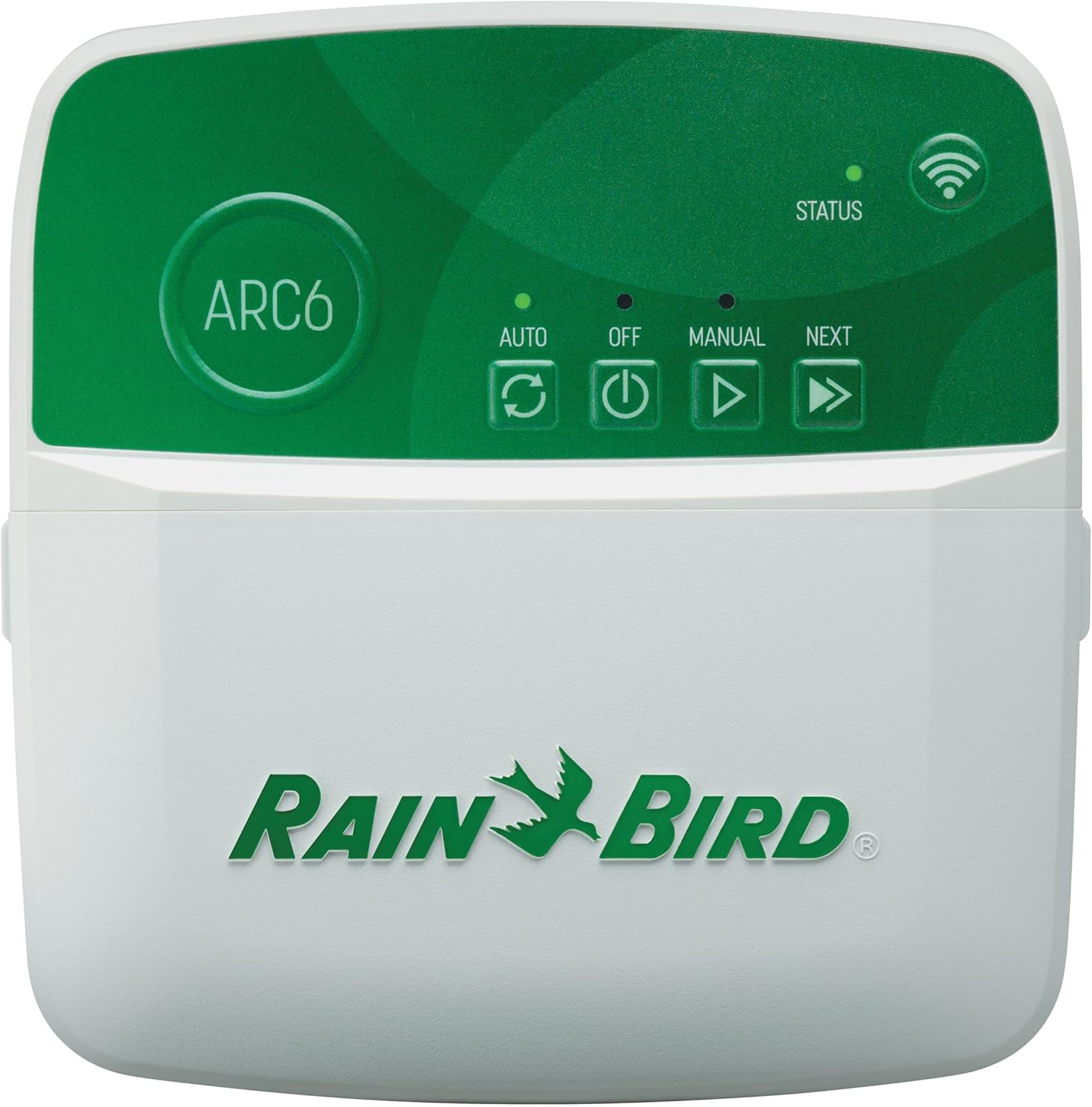
First impressions of the Rain Bird ARC6 App-Based Indoor Smart WiFi Irrigation Sprinkler Timer/Controller, 6-Zone/Station, EPA WaterSense Certified, Compatible with Alexa, Indoor 6-Station
You’ll notice the ARC6 presents itself as a compact, practical indoor controller that replaces older mechanical or basic digital timers. The design is straightforward and clearly aimed at making setup and everyday control fast and approachable for most homeowners.
The unit is built for indoor mounting and feels solid enough for a utility closet, garage, or basement. The emphasis is on app-based control, so the physical controller keeps the interface minimal — most of your interaction happens on your phone.

Rain Bird ARC6 App-Based Indoor Smart WiFi Irrigation Sprinkler Timer/Controller, 6-Zone/Station, EPA WaterSense Certified, Compatible with Alexa, Indoor 6-Station
$104 In Stock
Key features at a glance
This section lays out the main things you’ll use day to day, so you know what matters before you set it up. The ARC6 is designed around mobile control, weather-based adjustments, and smart-home compatibility.
- Mobile app control via the Rain Bird app to set, monitor, and adjust schedules from anywhere in the world.
- Six individual zones/stations, suitable for small to medium yards or segmented landscaping.
- EPA WaterSense Certified for water efficiency, promising up to 30% water savings through weather adjustments.
- Weather intelligence that automatically skips or adjusts daily watering for a postal code using local forecasts and historical averages.
- Compatibility with Amazon Alexa, Google Assistant, iOS (8.0 or greater), and Android (6.0 or later).
- Indoor-only installation, intended to be mounted inside where it’s protected from weather.
How the mobile app changes things
You’ll do most of the heavy lifting from your phone. The Rain Bird app centralizes scheduling, manual watering, delays, zone testing, and sharing control.
You can add family or a landscaper so multiple people can manage the system without having to share your personal account credentials. The app also surfaces upcoming watering events and local forecast data so you can see why a scheduled event was skipped or modified.
Weather intelligence and water savings
If you care about using less water without managing every detail, the ARC6 helps by automatically skipping or adjusting watering based on forecasted rain and historic averages for your postal code. This is one of the key ways it earns the EPA WaterSense badge.
In practice, that means the controller looks at expected conditions and reduces runtime or skips cycles when rain is predicted, helping you get water savings without having to constantly tweak schedules.

Compatibility and smart-home integration
You’ll be able to use voice commands and include irrigation control in routines through Amazon Alexa and Google Assistant. The controller also works with both iOS and Android devices, provided your device meets the OS version requirements.
Keep in mind that voice integration is usually focused on basic actions (start/stop watering, run a zone) rather than complex schedule edits, so you’ll still use the app for detailed programming.
Technical specifications (quick reference)
This table breaks down the most relevant specs so you can scan what matters most before buying or installing.
| Specification | Detail |
|---|---|
| Product name | Rain Bird ARC6 App-Based Indoor Smart WiFi Irrigation Sprinkler Timer/Controller, 6-Zone/Station, EPA WaterSense Certified, Compatible with Alexa, Indoor 6-Station |
| Zones / Stations | 6 |
| Installation location | Indoor only |
| WaterSense certification | EPA WaterSense Certified |
| App control | Rain Bird mobile app (set, monitor, adjust schedules worldwide) |
| Weather-based adjustments | Postal code-based forecast + historic averages; auto skip/adjust |
| Voice compatibility | Amazon Alexa, Google Assistant |
| Mobile OS requirements | Apple iOS 8.0 or greater; Android 6.0 (Marshmallow) or later |
| Power | Requires 24VAC transformer (check product manual for specifications) |
| Typical use cases | Home lawn/landscape irrigation, small to medium properties |
| Share control | Yes — share with family/landscapers |
What’s in the box
Knowing what to expect in the package helps you prepare before you begin installation. Typically, you’ll get the controller, mounting hardware, and basic wiring instructions.
You should see the indoor controller enclosure and mounting screws or template, wiring terminals labeled for zone connections and transformer, and a quick-start guide that points you to the Rain Bird app for registration and WiFi setup. If anything is missing, contact the retailer or Rain Bird support.
Installation: step-by-step for a smooth setup
You’ll want to set aside 30–60 minutes if you’re comfortable with basic wiring and have a steady WiFi signal where the controller will be mounted. If you’re not comfortable with electrical work or irrigation wiring, consider asking a professional.
- Choose the mounting location indoors near your irrigation valves and where the 24VAC transformer can be plugged in. Close proximity to the valve manifold and a stable WiFi signal matter.
- Turn off power to the transformer before disconnecting or connecting wires. Safety first.
- Remove the old controller (if replacing) and label the zone wires so you know which wire corresponds to each valve/zone.
- Mount the ARC6 enclosure on the wall using the provided template or screws.
- Attach zone wires to the corresponding numbered terminals on the ARC6. Connect the common wire to the C (common) terminal.
- Connect the transformer to the controller’s transformer terminals, then plug the transformer into a nearby outlet (after wiring is complete).
- Power the controller and follow the on-device or app prompts to connect to your home WiFi network.
- Open the Rain Bird app, register the device, and follow the app’s setup wizard to configure zones, set time zone and postal code, and run a test cycle for each zone.
You’ll get the best results if you test each zone after wiring to make sure the correct valve opens and that run times meet your expectations.
Wiring tips you’ll want to know
Good wiring will prevent a lot of headaches. Keep wires tidy, label both ends, and verify continuity if something acts odd.
- Use multi-conductor irrigation cable rated for the length run to your valves.
- The common wire is shared by every valve; each zone wire runs to its respective valve solenoid.
- If you have a master valve or pump start relay, check the manual for the specific terminals and wiring instructions before connecting.
Common installation problems and fixes
If you run into trouble, these are frequent issues and how to address them.
- Problem: Controller won’t connect to WiFi. Fix: Move the controller closer to your router for setup, or use a WiFi extender. Ensure you’re using a 2.4 GHz network if the controller doesn’t support 5 GHz (check manual).
- Problem: Zone triggers the wrong valve. Fix: Confirm the labeled wires match the terminals and label the field wires accurately.
- Problem: App can’t find controller after setup. Fix: Verify the controller is powered, connected to the same network as your phone during setup, and that the app has the necessary permissions on your phone.

App setup and daily use
Once the hardware is connected, most of your interaction will be in the Rain Bird app. Setting your account and connecting the controller to WiFi is straightforward, and the app walks you through the important steps.
After registration, you’ll add your sprinkler program, create zones with names and plant types, set run times and watering days, and input your postal code for weather intelligence. You can also share access with others and view upcoming watering events.
Creating schedules that fit your yard
You’ll set start times, run durations per zone, and watering frequency. The app usually lets you program multiple schedules (for example, one schedule for deep-rooted plants and another for turf).
- Zone name and plant type help you remember why each zone runs a certain time.
- Run time is set in minutes per zone.
- Watering days can be set using days of week, odd/even date, or custom intervals depending on your local watering restrictions.
Manual watering and overrides
If you need to run one zone for a quick soak or water the lawn after a dry spell, the app lets you manually start a zone or schedule and shows remaining run time.
You can also delay watering for a set number of days (handy before a big rain event or while doing maintenance) without changing your established schedule.
Water conservation and how it works for you
The ARC6 uses local forecast data plus historical averages by postal code to determine whether watering should be reduced or skipped. This automation reduces the need for you to manually react to rain or changing seasons.
You’ll get water savings because the controller adjusts run times or suspends tasks when rain is predicted or recent conditions indicate reduced need. The advertising claims up to 30% water savings, which depends on how often weather-based adjustments are triggered in your area.
Indoor installation: why that matters
The ARC6 is designed for indoor use, so you’ll mount it inside rather than on an exterior wall. This keeps the electronics protected from elements and temperature extremes.
If your previous controller was outdoors, you’ll need to route the valve wires inside to the new controller location. Also plan for a reliable WiFi signal inside the mounting location since app control and weather updates rely on that connection.
Performance and reliability expectations
You should expect steady performance once installation and setup are correct. The controller relies on WiFi, so most “reliability” issues stem from network problems rather than the controller itself.
When WiFi is stable and wiring is correct, you’ll get reliable scheduling, accurate weather adjustments, and consistent manual control. Keep your controller’s firmware and the Rain Bird app updated to get security and feature improvements over time.
Smart-home integration: voice commands and routines
Connecting the ARC6 to Alexa or Google Assistant lets you use simple voice commands like starting or stopping watering for a zone. This adds convenience but is usually limited to basic actions.
You can also include watering commands in routines — for example, you might create a routine that announces the weather and can start a quick manual run for a specific zone. For advanced scheduling and edits, use the Rain Bird app.
Troubleshooting common issues
You’ll probably be able to resolve most issues yourself with a few checks.
- No power to controller: Verify transformer is plugged in, output voltage is correct, and wiring is secure.
- Valves don’t actuate: Test each valve manually at the valve to confirm the solenoid is working and that wiring continuity exists to the controller.
- Incorrect zone mapping: Re-check wire labeling and terminal assignments.
- App shows wrong time or zone duration: Confirm time zone and daylight-saving settings in the app and that firmware is up to date.
If you can’t resolve a problem, Rain Bird support typically provides clear help resources and can walk you through diagnostics.
Pros and cons — what you should weigh
This section helps you quickly see what you’ll gain and what limitations to consider before purchasing.
Pros:
- Intuitive mobile app for on-the-go control and easy schedule changes.
- Weather-based adjustments can lead to significant water savings without manual intervention.
- Voice assistant compatibility adds convenience for basic commands.
- EPA WaterSense Certification supports efficient water use.
- Indoor mounting keeps electronics protected from the elements.
Cons:
- Indoor-only design requires routing wires inside if replacing an outdoor controller.
- Dependence on WiFi means connectivity issues can interrupt remote access.
- Limited to six zones, so not suitable for larger properties without multiple controllers.
- Advanced irrigation features found on some higher-tier smart controllers may be limited.
Comparison with similar smart controllers (brief)
You’ll find several smart sprinkler controllers on the market. Here is a short comparative snapshot to help you decide if ARC6 is the right fit.
| Feature | Rain Bird ARC6 | Typical Mid-tier Competitor |
|---|---|---|
| Zones | 6 | 4–16 (varies) |
| Weather intelligence | Postal code-based forecast + historic averages | Often similar forecast-based adjustments |
| Voice assistants | Alexa, Google Assistant | Alexa, Google Assistant (varies) |
| Indoor/Outdoor | Indoor only | Indoor and some outdoor-rated models |
| WaterSense certification | Yes | Varies by model |
| Mobile app control | Yes | Yes |
If you have a larger system or need outdoor mounting, compare specs carefully. If your system is within six zones and you prefer an indoor, app-first experience, the ARC6 is an excellent fit.
Maintenance and seasonal care you should plan for
A few simple maintenance tasks will keep your controller and irrigation system reliable year after year.
- Winterize your system according to local needs: drain lines or use compressed air blowouts if freezing is possible.
- Check valve solenoids annually and clean filters/strainers in valve boxes.
- Test each zone at the start of the season to confirm run times and adjust as plant needs change.
- Keep the Rain Bird app and controller firmware updated for security and functionality improvements.
Who this controller is best for
You’ll find the ARC6 a strong match if you:
- Have up to six irrigation zones.
- Want straightforward app control and water-saving features.
- Prefer an indoor-mounted controller for protection from weather.
- Use voice assistants and want integration with Alexa or Google Assistant.
- Want EPA WaterSense certified technology for efficient watering.
If you have a very large property or require outdoor mounting, investigate higher-zone models or outdoor-rated controllers instead.
Frequently asked questions (FAQ)
This section addresses questions you’ll likely have during selection, installation, and everyday use.
Q: Is the ARC6 weatherproof?
A: No — the controller is designed for indoor installation only. Mount it indoors where it’s protected from moisture and extreme temperatures.
Q: How many zones can it handle?
A: It supports 6 zones/stations, suitable for many small to medium residential systems.
Q: Can it save water automatically?
A: Yes — it uses postal code forecast and historical averages to skip or adjust watering, which can lead to up to 30% water savings as advertised.
Q: Which mobile devices are supported?
A: The Rain Bird app requires Apple iOS 8.0 or greater and Android 6.0 (Marshmallow) or later.
Q: Does it work with Alexa or Google Assistant?
A: Yes — it’s compatible with both Amazon Alexa and Google Assistant for voice-controlled actions.
Q: Can multiple people control the system?
A: Yes — you can share control with family members and landscaping/maintenance professionals through the app.
Q: What happens if WiFi goes down?
A: Basic local control should still operate per programmed schedules if the controller remains powered. Remote app access and weather updates will be affected until WiFi is restored.
Q: Does it support a master valve or pump start relay?
A: Many Rain Bird controllers support these features. Check the installation manual or wiring diagram for the ARC6 to confirm terminal availability and wiring instructions.
Tips and best practices for everyday use
These practical suggestions will help you get the most from the ARC6.
- Name your zones clearly in the app (e.g., “Front Lawn,” “Back Beds”) so you don’t run the wrong zone by accident.
- Use shorter test runs when you’re setting up to observe how long it takes for the soil to absorb water and adjust run times accordingly.
- Check the forecast and use the app’s delay feature before outdoor events or long weekends to avoid unnecessary watering.
- Share access with one or two trusted people rather than a long list to reduce accidental changes.
- Periodically review run times as seasons change — automatic adjustments help, but manual tuning can still improve efficiency.
Security and privacy considerations
You’ll want to protect your account and network like any other smart device. Use a strong password for your Rain Bird account and ensure your home WiFi network is secured.
If you use a guest network for IoT devices or a router with network segmentation, ensure the controller has sufficient access to the internet while protecting other devices on your main network.
Final recommendation — is the ARC6 right for you?
If you’re looking for a user-friendly, WaterSense-certified smart irrigation controller for up to six zones and prefer an indoor-mounted unit with robust app control, the Rain Bird ARC6 is a solid choice. You’ll benefit from automated water-saving features, voice compatibility, and the convenience of remote scheduling and manual control via the Rain Bird app.
You should consider other options if you need outdoor mounting, more than six zones, or advanced commercial features. For most homeowners with modest irrigation needs who want to save water and manage schedules from anywhere, the ARC6 delivers a practical, reliable, and easy-to-use solution.
If you want, you can tell me about your property layout and watering needs and I’ll help you confirm whether the six-zone capacity will be enough or suggest how to set up zones and schedules that match your yard.

Disclosure: As an Amazon Associate, I earn from qualifying purchases.