
? Are you trying to find a smart thermostat that gives you precise control over your electric floor heating from anywhere?

Buy The SunTouch SunStat ConnectPlus Thermostat On Amazon
Product overview: SunTouch SunStat ConnectPlus Touchscreen Programmable Smart Voice-Activated Wi-Fi Thermostat for Electric Floor Heating Systems, 4.3″ Screen, Floor and Air Sensing Control, Remote Access
You’ll get a clear picture of what the SunTouch SunStat ConnectPlus offers and why it might be a good fit for your heating needs. This model is built specifically for electric radiant floor systems and aims to blend modern aesthetics with practical, connected features.
What this product is designed for
This thermostat is designed primarily for electric floor heating systems, making it ideal if you want to keep tile, stone, or other floor surfaces comfortably warm. It also supports both floor and air sensing control so you can prioritize floor temperature or ambient air temperature depending on the installation and flooring type.
Key takeaways in plain language
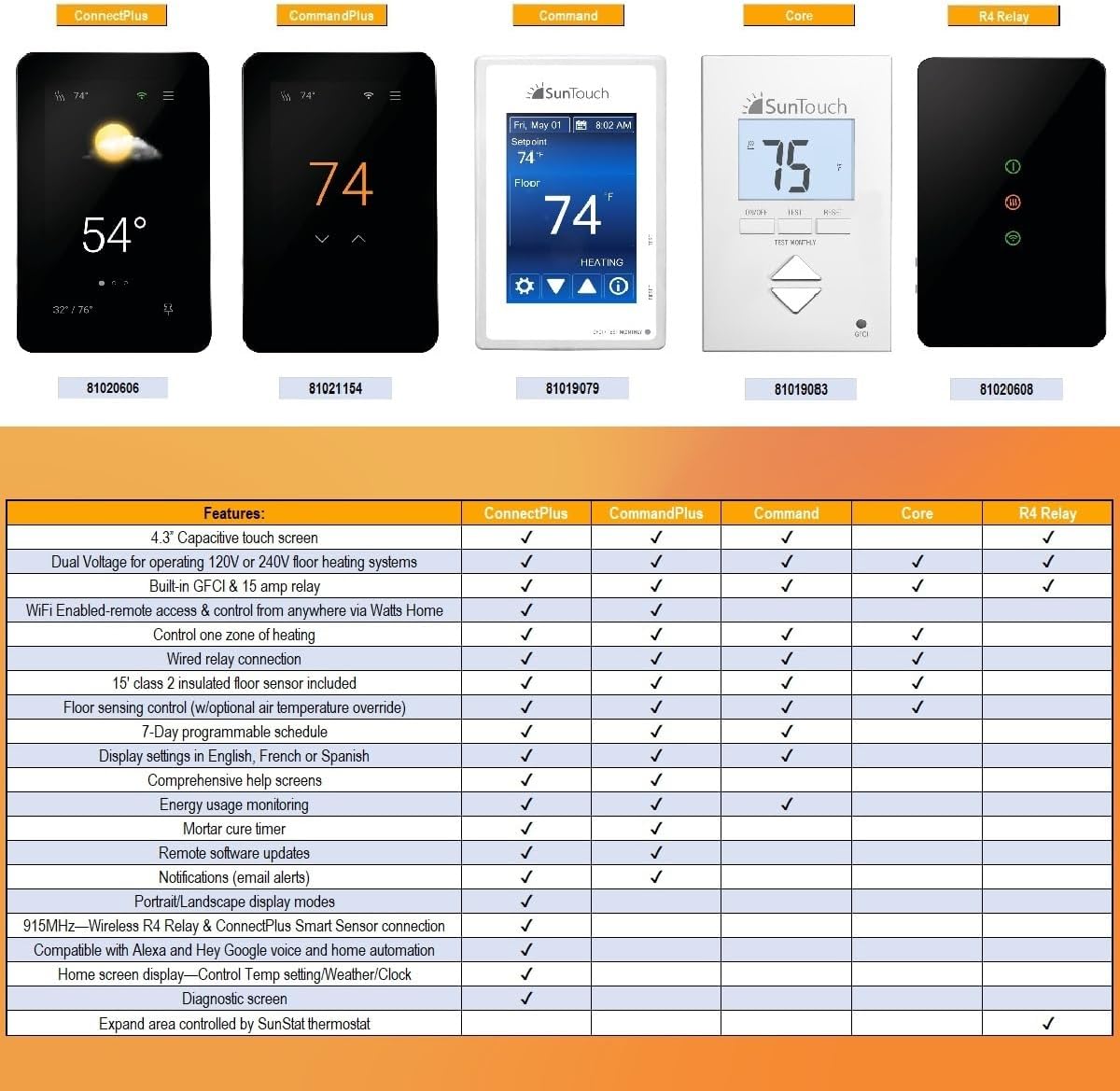
You’ll enjoy features like a 4.3” capacitive touchscreen, SmartStart technology to have your floor warm by a scheduled time, and remote access through a mobile app. The device also supports voice commands via Alexa and Google Assistant, energy monitoring, and safety limits for different flooring materials.
SunTouch SunStat ConnectPlus Touchscreen Programmable Smart Voice-Activated Wi-Fi Thermostat for Electric Floor Heating Systems, 4.3
$232.52 In Stock
Quick specs and feature breakdown
This section gives you a compact, easy-to-read summary of the main specifications and core features so you can compare at a glance. It keeps the technical details digestible and highlights what matters when deciding if this thermostat suits your space.
| Category | Details |
|---|---|
| Screen | 4.3″ capacitive touchscreen, portrait/landscape |
| Connectivity | Wi-Fi; compatible with Alexa and Google Assistant |
| Control types | Floor sensing, air sensing |
| Programming | 7-day programmable schedule |
| Special tech | SmartStart automatic preheat |
| Safety features | Floor max settings, warm weather shutdown, email alerts |
| Remote control | Watts Home app for Android & iOS |
| Use cases | Residential, commercial, institutional electric radiant heating |
| Manufacturer experience | SunTouch — 30+ years in electric radiant heating |
Design and build
The thermostat combines a modern, slim profile with a large, easy-to-read display that looks at home in both contemporary and traditional interiors. You’ll notice its portrait or landscape orientation flexibility, which is useful depending on where you mount it and how you want the display to look.
Display and user interface
The 4.3” capacitive touchscreen makes navigation smooth and responsive so you won’t have to fumble with tiny buttons. The large numbers and simple menus aim to reduce the learning curve, especially if you’re used to basic programmable thermostats.
Physical quality and installation aesthetic
The SunStat ConnectPlus presents a polished finish that feels more premium than many basic thermostats while staying thin and unobtrusive on the wall. You’ll appreciate how it can blend into bathrooms, kitchens, or living rooms without looking bulky.
Purchase SunTouch SunStat ConnectPlus Thermostat — Amazon
Core features explained
Here you’ll find clear descriptions of the thermostat’s major functions and why they matter for your heating comfort and safety. Understanding these features helps you make the most of the thermostat once it’s installed.
SmartStart technology
SmartStart calculates when to start the floor warming system so the floor reaches your scheduled temperature at the desired time. This eliminates guesswork and saves you from needing to manually preheat, especially useful on cold mornings.
Floor and air sensing control
You can choose to regulate by floor temperature for direct control over radiant surfaces or by air temperature if you prefer room-level comfort. This flexibility helps you protect sensitive flooring while maintaining the desired ambient comfort.
7-day programmable schedule and ‘away’ mode
The 7-day programming allows you to customize heating patterns for each day of the week to match your lifestyle and reduce unnecessary energy use. The ‘away’ feature lets you set lower temperatures while you’re gone, then return to normal settings automatically or via remote control.
Energy monitoring and email alerts
You’ll get usage data that helps you understand how your heating affects energy consumption, and email alerts can notify you of issues or when settings change. These tools are handy for proactive maintenance and catching abnormal behaviors early.
Remote access and mobile app
If you’re often away from home or like adjusting settings from your phone, the remote access features give you full control through the free Watts Home app. It’s available on both iOS and Android, letting you program, monitor, and receive alerts whether you’re upstairs or out of town.
Mobile app features and usability
The Watts Home app enables scheduling, temperature changes, and monitoring from anywhere, so you can react to weather changes or last-minute plans. You’ll appreciate that many common tasks are straightforward in-app, though the level of polish can vary depending on your smartphone.
Voice control with Alexa and Google
Voice activation via Alexa and Google Assistant means you can change target temperatures, switch modes, or check status hands-free. This is especially convenient if you’re carrying items, in another room, or prefer voice commands in a smart home setup.
Installation and compatibility
Installing a thermostat for radiant floor heat can be different from a standard HVAC thermostat, so you’ll want to check compatibility and wiring requirements carefully. The SunStat ConnectPlus is intended for electric floor heating systems and will usually require a qualified electrician for safe, code-compliant installation.
Wiring and electrical needs
This thermostat often needs a line-voltage or low-voltage relay depending on your floor heating setup; you’ll want to confirm the specifics with a professional. Proper wiring ensures both safe operation and access to features like floor sensing and SmartStart.
Flooring and sensor compatibility
You’ll find pre-set floor max settings designed to protect common flooring types, like tile and engineered wood, so you can choose limits appropriate to your surfaces. Using the right floor sensor placement is crucial to accurate temperature control and long-term flooring health.

Performance in real-world use
You’ll want reliable performance, predictable preheating, and accurate temperature sensing so your floors feel comfortable when you need them to. This thermostat tends to perform well in those areas thanks to SmartStart and configurable sensing modes.
Heating consistency and SmartStart impact
SmartStart helps maintain consistent timings so the floor reaches your setpoints without overshooting or wasted energy. You’ll notice fewer manually initiated preheat sessions and more predictability, especially on days with consistent outdoor temperatures.
Response time and sensor accuracy
Floor sensors typically provide reliable data, but the thermostat’s responsiveness will depend on sensor placement and floor mass. You should place sensors where they accurately reflect the area you want to control; incorrect placement can lead to underheating or overheating.
Energy savings and cost considerations
You’ll likely see energy benefits by using scheduling, away mode, and more precise sensing, but the exact savings depend on your home’s insulation, flooring, and how you use the system. SmartStart reduces unnecessary runtime while the energy monitoring gives you data to adjust behaviors that save money.
How scheduling and away modes save energy
Setting lower temperatures during times when you don’t need full comfort and preheating only as needed keeps energy use down. Over time, you’ll be able to fine-tune the schedule for peak savings without sacrificing comfort.
Practical cost expectations
Electric floor heating can be more expensive to operate than central forced-air systems, depending on electricity rates, but improving control can reduce waste. The thermostat won’t change energy prices, but it helps you use heat more efficiently by aligning runtime with real needs.
Safety and flooring protection
Protecting your flooring and home is a major priority when using electric radiant systems, and this thermostat provides several features to minimize risk. You’ll get floor max settings and warm weather shutdown to safeguard materials and prevent unnecessary heating.
Floor max settings and how to use them
You can set maximum floor temperatures appropriate for different materials to avoid damaging sensitive floors, which is especially helpful for engineered wood or specialty coverings. These limits act as a hard stop so even if you forget a setting, the device won’t exceed the safe threshold.
Warm weather shutdown and alerts
Warm weather shutdown stops heating automatically during conditions where floor warming isn’t needed, further preventing waste and unnecessary wear. Email alerts also notify you of potential problems or extreme readings so you can take action quickly.

User experience and interface
You’ll interact with the touchscreen, the app, and optionally voice commands, all designed to simplify routine adjustments. The combination of physical and digital controls gives you flexibility for different situations and preferences.
On-device controls and responsiveness
The touchscreen is responsive and intuitive, making on-the-spot adjustments fast without a phone. The layout favors readability and quick access to daily controls so you won’t need to dig through complex menus for common tasks.
App experience and remote control reliability
The Watts Home app is handy for remote scheduling and monitoring, though your experience may vary with Wi-Fi stability and network setup. If you maintain a reliable home network, remote access becomes a true convenience.
Troubleshooting and support
If you run into issues, SunTouch’s experience in electric radiant heating means the company provides documentation and customer support to guide you. You’ll want to reference the manual for wiring diagrams and rely on professional help for electrical work when necessary.
Common issues and quick fixes
Simple issues often involve network connections, firewall settings blocking the app, or sensor placement problems that affect readings. Most problems are resolved by checking wiring, ensuring good Wi-Fi, and verifying sensor installation.
When to call a professional
You should contact a licensed electrician for wiring corrections, relay installations, or if you suspect electrical faults. Professional intervention protects both your safety and the warranty.
Pros and cons
Laying out the advantages and limitations helps you weigh whether this thermostat aligns with what you value in a heating control system. You’ll be able to consider both the technical strengths and the practical trade-offs.
Pros
You’ll benefit from a modern touchscreen, remote and voice control, SmartStart preheat, floor and air sensing flexibility, and safety features tailored to different floor types. The app and email alerts add convenience and assurance.
Cons
You may need professional installation and there’s potential dependency on your Wi-Fi for remote features; energy savings depend on usage and electricity costs. The wide array of settings can be a little much if you prefer a very simple, no-frills thermostat.
Comparison with alternatives
It helps to see how this SunTouch model stacks up against other thermostats for radiant floor heating to determine if it’s the best fit. You’ll notice differences mainly around UI, app quality, and the level of dedicated radiant heating features.
How it compares to basic programmable thermostats
Compared with basic programmable units, this thermostat offers substantially more control, remote access, and safety features customized for floors. If you value connectivity and fine-tuned scheduling, you’ll likely prefer the SunStat ConnectPlus.
How it compares to other smart thermostats
Compared to general smart thermostats that focus on forced-air systems, this unit is specifically tailored for electric floor systems and includes floor sensors and max-floor protection. This specialization makes it more appropriate for radiant installations than many general-purpose smart thermostats.
Who this is best for
If you own or plan to install an electric radiant floor heating system and want connected control, this thermostat is clearly aimed at you. It suits homeowners, installers, and facility managers who need precise floor temperature management with modern conveniences like voice control and remote access.
Ideal scenarios
You’ll benefit most if you have bathroom or kitchen tile floors, a renovation project with radiant heat, or a smart-home setup that leverages voice assistants. It’s also a good fit for commercial or institutional projects that use electric radiant heating and need consistent, programmable control.
When you might look elsewhere
If your heating uses hydronic radiant systems or you want a thermostat purely for central HVAC, other models may be more suitable. Also consider alternatives if you need an extremely simple, non-connected device.
Maintenance and long-term use
Maintaining a thermostat like this is generally low-effort, but you’ll want to keep an eye on software updates, network health, and sensor placement over time. Periodic checks ensure the system remains accurate and safe.
Software and firmware updates
You should install firmware and app updates when available to benefit from improvements and security patches. Keeping both the thermostat and app updated helps prevent connectivity issues and adds features.
Sensor care and periodic checks
You’ll want to verify sensor placement hasn’t shifted and that the wiring remains secure. Simple annual checks can prevent long-term drift in readings and keep the system running smoothly.
Final recommendation
If you want a dedicated, modern thermostat for electric floor heating with full connectivity and floor-specific safety features, this SunTouch SunStat ConnectPlus is a strong contender. You’ll get the practical benefits of SmartStart, flexible sensing modes, remote app control, and voice activation that together provide comfort and convenience without sacrificing safety.
Buying tips
When buying, confirm compatibility with your floor heating type, check local electrical code requirements, and plan for professional installation if you’re not experienced with wiring. Also, verify return policies and warranty terms so you’re covered if the unit doesn’t meet specific needs.
Quick checklist before purchase
You’ll want to ensure the thermostat supports your voltage and relay needs, that you have a suitable sensor location, and that your Wi-Fi and smart assistant platforms are compatible. These checks help you avoid surprises during installation and first use.
Frequently asked questions (FAQ)
This short FAQ addresses the most common concerns so you can move forward with confidence if you decide to buy. You’ll find answers that reflect real-world considerations for installation and daily use.
Can you use this thermostat with non-electric radiant systems?
No, this thermostat is intended for electric floor heating systems; hydronic systems typically use different controllers. For hydronic systems, look for thermostats or controllers designed for boiler or pump control.
Do you need professional installation?
While some homeowners with electrical experience might handle the installation, professional installation by a licensed electrician is recommended for safety and compliance with local codes. Professional help also guarantees correct relay and sensor wiring.
Will it work without Wi-Fi?
Basic on-device control still works without Wi-Fi, but remote access, voice control, and app features will be unavailable. You’ll retain the ability to use its core thermostat functions locally.
Troubleshooting quick guide
If something goes wrong, these quick tips help you resolve common problems without undue stress. You’ll likely fix many issues with simple checks before calling for professional support.
No Wi-Fi or app connection
Check your router, ensure the thermostat is within range, and confirm your network password. Restarting the router and thermostat often resolves connectivity hiccups.
Sensor reads incorrectly
Verify the sensor is correctly placed in the floor groove and that wiring is secure. If the reading still seems off, consult the manual for sensor calibration steps or call support.
System not heating
Check wiring, relay installation, and breaker panels to ensure power is reaching the heating elements. If electrical connections are in doubt, enlist an electrician to diagnose and fix the issue.
Closing thoughts
You’ll find the SunTouch SunStat ConnectPlus thoughtfully designed for people who expect precision, safety, and convenience from a smart thermostat for electric floor heating. If you want modern features like SmartStart, app control, voice commands, and specific floor protection, this thermostat checks most boxes and can enhance both comfort and control in your space.
Check Price On Amazon: SunTouch SunStat ConnectPlus
Disclosure: As an Amazon Associate, I earn from qualifying purchases.