
? Are you ready to upgrade your home network to a future-proof mesh system that supports Wi‑Fi 7?

Quick Verdict: TP-Link Deco 7 BE23 Dual-Band BE3600 WiFi 7 Mesh Wi‑Fi System
You’ll find this TP-Link Deco 7 BE23 3-pack aimed at homes that want more speed, wider coverage, and modern features like Multi-Link Operation (MLO) and AI-driven roaming. If you want a mesh that supports multi-gig wired backhaul, solid security tools, and consistent mesh handoffs for dozens of devices, this unit is built to deliver.
What this product is and who it’s for
The Deco 7 BE23 is a 4-stream dual-band Wi‑Fi 7 mesh system that seeks to combine next-gen wireless tech with easy setup and smart home protections. It’s best for households with many devices, gamers, streamers, remote workers, and anyone who plans to upgrade to Wi‑Fi 7-capable phones or laptops in the near future.

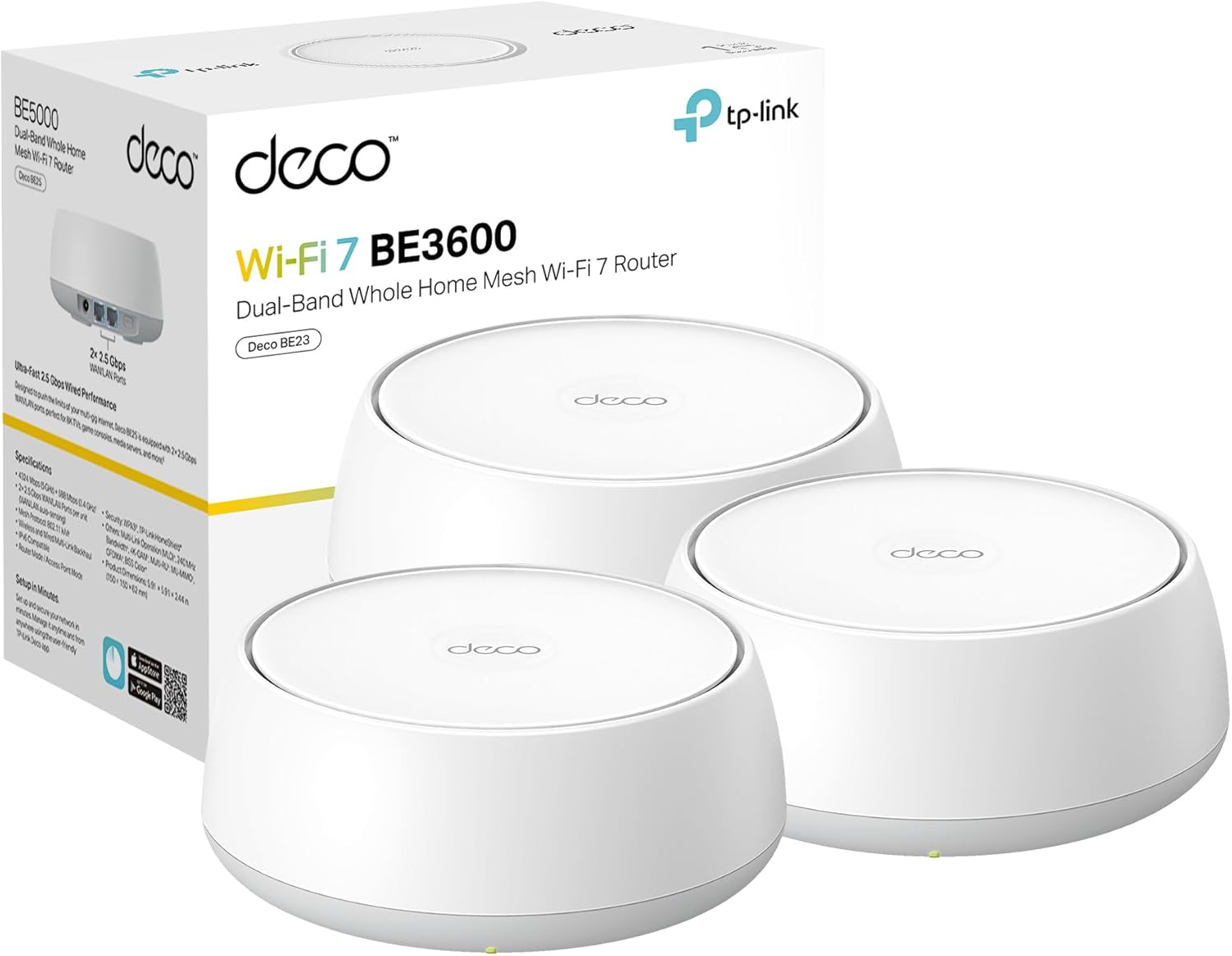
TP-Link Deco 7 BE23 Dual-Band BE3600 WiFi 7 Mesh Wi-Fi System | 4-Stream 3.6 Gbps, 160 Mhz | Covers up to 6,500 Sq.Ft | 2× 2.5G Ports Wired Backhaul | VPN,MLO,AI-Roaming, HomeShield, 3-Pack
$179.99 In Stock
Key Specifications
You’ll appreciate a clear breakdown when you’re comparing features or shopping. The table below gives you a quick look at the most important specs so you can decide if this system fits your needs.
| Category | Specification |
|---|---|
| Product Name | TP-Link Deco 7 BE23 Dual-Band BE3600 WiFi 7 Mesh Wi‑Fi System (3-Pack) |
| Wi‑Fi Standard | Wi‑Fi 7 (802.11be) — Dual-band, 4-stream |
| Theoretical Max Speed | Up to 3.6 Gbps combined (5 GHz: 2882 Mbps, 2.4 GHz: 688 Mbps) |
| Channel Width | Up to 160 MHz |
| Key Technologies | MLO (Multi-Link Operation), Multi-RUs, 4K-QAM, AI-Roaming |
| Coverage | Up to 6,500 sq. ft. (3-pack) |
| Maximum Devices | Up to 150 devices |
| Antennas / FEMs | 4 high-gain antennas per node; 4 high-power FEMs |
| Wired Ports | 2 × 2.5 Gbps WAN/LAN per unit |
| Backhaul | Wired and simultaneous wireless backhaul (MLO-enhanced) |
| Security | TP‑Link HomeShield, WPA3, IoT network isolation, CISA Secure-by-Design pledge |
| VPN | VPN client and server support (simultaneous VPN and regular internet connections supported) |
| Compatibility | Backward compatible with previous Wi‑Fi standards; works with most ISPs (modem required) |
| Package | 3-pack mesh units |
You’ll find that this table covers the essentials at a glance, and you can refer back to it when comparing models or reading the rest of this review.
Design and Hardware
You’ll notice the Deco 7 BE23 sticks to a compact, modern design that fits comfortably in living spaces without drawing attention. The plastic housing and rounded edges give it a neutral look, and the units are small enough to place on a shelf or countertop without dominating the room.
Build quality and physical footprint
Each node uses a lightweight, thermally managed enclosure so it won’t run hot during long usage spans, which matters if you keep the unit inside an entertainment cabinet. You’ll see status LEDs that are subtle and not overly bright, and the unit’s footprint is small enough to tuck into many home setups.

Antennas, Range, and Coverage
Because each Deco 7 BE23 node has 4 high-gain antennas and 4 high-power FEMs, you’ll benefit from stronger signals and better penetration through walls than basic routers. That combination is important when you want consistent coverage across multiple floors or in larger homes.
Real-world coverage expectations
TP‑Link rates the 3-pack at up to 6,500 sq. ft., but your real-world coverage will depend on building materials, apartment layout, and interference sources. You’ll typically see coverage in that ballpark in open-plan homes or multi-level houses if you position the nodes strategically.
Ports and Wired Performance
You’ll appreciate the inclusion of two 2.5 Gbps WAN/LAN ports on each unit, which gives you options for high-speed wiring to switches, NAS devices, or a multi-gig modem. This hardware helps you avoid bottlenecks when you have gig+ ISP plans or wired devices that need multi-gig throughput.
Using the 2.5G ports for wired backhaul
If you wire the nodes with Ethernet, you’ll get markedly improved stability and near-wired speeds for devices connected to node LAN ports or to the wired devices downstream. You’ll also be able to leverage simultaneous wired and wireless backhaul thanks to MLO to keep your mesh resilient.
Wi‑Fi 7, MLO, and Core Wireless Features
Wi‑Fi 7 is the foundation of what makes the Deco 7 BE23 future-ready, and you’ll get tangible benefits from MLO, Multi-RUs, and 4K-QAM when you pair the mesh with compatible devices. These advanced PHY and MAC features help increase throughput, reduce latency, and improve reliability when congestion is high.
How Multi-Link Operation (MLO) helps you
MLO lets the system use multiple channels and bands in parallel so you’ll see faster and more stable links, especially when moving between nodes or when interference hits one band. That means fewer drops, smoother streams, and better gaming performance on devices that can take advantage of MLO.

Performance: Real-World Speeds and Multi-Device Handling
In everyday use, you’ll see that a Wi‑Fi 7 mesh like this focuses on delivering higher aggregate capacity rather than single-client peaks for older devices. With modern Wi‑Fi 7 laptops and phones, you can get closer to the 2,882 Mbps theoretical maximum on the 5 GHz band under ideal conditions, while the 2.4 GHz band remains useful for range and IoT devices.
Throughput under mixed loads
When many devices are active at once, you’ll notice the Deco’s ability to manage multiple streams helps keep latency lower and throughput fairer across devices. You’ll still be limited by your ISP plan for internet speed, but local LAN transfers and streaming between devices benefit from the increased capacity.
Gaming and streaming performance
If you game or stream 4K/8K content, you’ll like the low-latency characteristics and the system’s ability to prioritize traffic through QoS and AI-driven roaming. You’ll get smoother gameplay and fewer rebuffering events, especially if you use wired backhaul for your gaming rigs or consoles.
Mesh Features and Roaming
You’ll rely on the mesh system to make your network feel seamless, and the Deco uses AI-Roaming to keep handoffs between nodes smooth and automatic. That means you can walk around your home with a video call or stream and the network will attempt to keep you on the best node without you needing to manage SSID switches.
How AI-Roaming operates in daily use
AI-Roaming learns traffic patterns and device behavior to make smarter handoff decisions over time, so you’ll see improvements the more you use it. You’ll also benefit from a single SSID for all nodes, which keeps device connections simple and avoids user confusion.
Backhaul Options and Stability
You’ll like that the Deco supports both wired backhaul via 2.5 Gbps ports and wireless backhaul enhanced by MLO. Using wired backhaul will give you the highest stability and throughput, while wireless MLO backhaul improves resiliency and aggregates channels to increase effective capacity.
Simultaneous wired + wireless backhaul
Because the Deco 7 BE23 supports simultaneous backhaul types, you can mix wired and wireless links across nodes without significant performance tradeoffs. You’ll be able to place an occasional node where you can’t run Ethernet and still get strong performance from MLO-enhanced wireless links.

Security: HomeShield, WPA3, and CISA Commitment
Security is front-and-center with this model, as TP‑Link emphasizes HomeShield protections plus modern encryption standards like WPA3. You’ll have parental controls, device isolation for IoT gadgets, and real-time protection features meant to defend your home network.
HomeShield features that protect your home
HomeShield provides you with content filtering, device activity reports, and security scans to block risky devices or unusual traffic patterns. You’ll also be able to set time limits, schedules, and safe browsing for family members through the Deco app.
VPN capabilities for privacy and remote access
You’ll be able to configure VPN clients and servers at the router level so that home devices can access remote VPN servers without installing software on each device. This is useful for secure remote access or for devices that don’t support VPN clients natively.
CISA Secure-by-Design pledge and what it means for you
TP‑Link’s signatory status on the U.S. CISA Secure-by-Design pledge indicates the company maintains security considerations throughout development and lifecycle maintenance. You’ll get a product built with secure defaults and ongoing maintenance commitments, which helps reduce the risk of preventable vulnerabilities.
Setup and Management via the Deco App
You’ll find setup straightforward thanks to the Deco mobile app, which walks you through first-time configuration, firmware updates, and node placement tips. The app’s interface lets you name devices, set priorities, and monitor network health from your phone.
App-driven setup steps you’ll follow
You’ll typically power the primary node, connect it to your modem, pair the other nodes via the app, and then customize SSID and password settings. You’ll also be prompted to update firmware, which is recommended to ensure stability and security improvements.
Advanced settings the app and web UI offer
If you want deeper control, the app exposes port forwarding, VLAN and LAN settings, and QoS options; some advanced features may be available through a web interface or the app’s more advanced menus. You’ll also be able to manage HomeShield subscriptions for extended security and parental control features.
Compatibility and Device Support
You’ll be able to mix Deco units across TP‑Link’s Deco product line, which makes incremental upgrades easier if you already own previous Deco models. The system is also backward compatible with earlier Wi‑Fi standards, so older devices will still connect, albeit at their own maximum rates.
Working with your ISP and existing modem
Most ISPs require a modem, and you’ll simply connect the Deco to your modem the way you would with any router. If you have an ISP-provided gateway, you may prefer to set it into bridge mode or configure double NAT carefully; the Deco app will guide you on basic troubleshooting steps.
Usability: Day-to-Day Operation and Maintenance
You’ll enjoy a low-maintenance experience once the mesh is set up and optimized for placement and channel selection. Firmware updates and security patches are pushed through the app, and the system generally manages radios, channels, and band steering for you.
Scheduling firmware updates and reboots
You’ll be able to schedule reboots and firmware updates at convenient times, which helps keep your network running smoothly without unexpected interruptions. You’ll also be able to set notifications so you’re aware of significant updates or security alerts.
Pros and Cons
You’ll want a balanced perspective before buying, so here are the strengths and shortcomings of the Deco 7 BE23 as they stand today. The pros highlight where it shines and the cons point out the things you might need to consider.
Pros
You’ll get Wi‑Fi 7 capabilities like MLO and 4K‑QAM for futureproofing, plus multi-gig wired ports that support modern internet plans and high-throughput wired devices. The mesh covers large homes, supports many devices, and includes HomeShield security, parental controls, and VPN support for flexible privacy needs.
Cons
You’ll notice that real-world speeds will still depend on device support and environmental factors, so older devices won’t see Wi‑Fi 7 benefits. You’ll also find that some advanced networking users might want a more granular web UI or feature set than what the Deco app exposes, and HomeShield’s more advanced protections may require a subscription.
How the Deco 7 BE23 Compares to Other Mesh Systems
You’ll want to know how this model stacks up against Wi‑Fi 6 and other Wi‑Fi 7 solutions, especially if price and futureproofing are on your mind. Compared to many Wi‑Fi 6 systems, the Deco 7 BE23 provides higher aggregate capacity, lower latency potential, and better multi-link resilience.
Against Wi‑Fi 6 mesh systems
You’ll typically see higher theoretical throughput and better handling of simultaneous traffic with Wi‑Fi 7, which benefits congested home networks. You’ll also benefit from enhanced backhaul flexibility with MLO, though real-world gains depend on having compatible client devices.
Against other Wi‑Fi 7 models
You’ll find differences across Wi‑Fi 7 models in the number of streams, band configurations, and port choices; some tri-band Wi‑Fi 7 models may offer more raw simultaneous bandwidth but at a higher price. You’ll need to weigh whether dual-band 4‑stream performance plus 2.5 Gbps ports meets your needs versus paying more for tri-band variants.
Who Should Buy This Mesh System
If you’re planning to upgrade devices to Wi‑Fi 7 or you already have multiple multi-gig devices and a fast ISP plan, this mesh is an excellent choice. You’ll also find it useful if you want broad coverage, easy app management, and built-in security and parental controls that are simple to administer.
Who should consider alternatives
If you only have a small apartment, minimal device counts, or you’re on a tight budget, you’ll likely get acceptable performance from lower-cost Wi‑Fi 6 or Wi‑Fi 6E systems. You’ll also consider alternatives if you need enterprise-grade advanced routing or VLAN features beyond what the Deco app and firmware provide.
Practical Tips for Getting the Best Performance
You’ll get the best results when you place nodes thoughtfully, update firmware, and use wired backhaul where you can. The following tips will help ensure you see the strongest and most stable performance from your Deco 7 BE23 network.
- Position nodes in open, elevated locations away from large metal objects and microwaves to reduce interference. You’ll find that line-of-sight and elevation matter more than small aesthetic tweaks.
- Use 2.5 Gbps wired backhaul when possible for the most consistent throughput to each node. You’ll see lower latency and improved overall mesh capacity with Ethernet connections between nodes.
- Keep firmware current and enable automatic updates so your network benefits from TP‑Link’s security patches and performance improvements. You’ll be safer and often faster after official updates.
- Separate IoT devices onto a guest or private IoT SSID with WPA3 and IoT isolation. You’ll reduce attack surfaces and keep vulnerable devices from affecting important endpoints.
- Configure QoS or device prioritization for your most important devices. You’ll gain better experience for gaming, video calls, and streaming.
Troubleshooting Common Issues
You’ll run into occasional issues with any mesh system, but most problems are fixable with a few steps. The troubleshooting steps below will help you diagnose common situations quickly.
- If devices fail to roam properly, try re-positioning nodes and ensure AI-Roaming is enabled in the app. You’ll want to test by walking between nodes to confirm the handoff behavior.
- If speeds seem capped, confirm whether your client device supports Wi‑Fi 7 and 160 MHz channels; otherwise, you’ll be constrained by the client hardware. You’ll also check for ISP speed limits and modem configurations that could cause bottlenecks.
- If a node frequently drops off, reboot the node and check for firmware updates; if problems persist, try a factory reset and re-add the node. You’ll want to ensure your wired backhaul is working properly and that cabling or switch ports aren’t faulty.
- If you see double NAT or connectivity issues with an ISP gateway, place the ISP device in bridge mode or enable the Deco in router mode following the app’s guidance. You’ll sometimes need to contact your ISP for help with modem settings.
Frequently Asked Questions (Short Answers)
You’ll likely have a few burning questions before you buy, so here are concise answers to common queries.
- Can older devices connect? Yes — older devices connect normally but won’t benefit from Wi‑Fi 7 features.
- Do you need a modem? Yes — most ISPs require a modem; the Deco replaces your router but typically not the modem.
- Is a subscription required for HomeShield? Basic HomeShield features are included; advanced protections may require a subscription.
- Can you mix Deco models? Yes — Deco devices are designed to be compatible so you can expand an existing Deco mesh.
Final Verdict
You’ll get a strong mix of future-facing wireless tech, practical wired ports, and simple management with the TP‑Link Deco 7 BE23 3-pack, making it a solid pick for large homes and device-heavy households. If you want a mesh system that supports Wi‑Fi 7 features like MLO and multi-gig wired performance without sacrificing usability or security, this model is worth serious consideration.

Disclosure: As an Amazon Associate, I earn from qualifying purchases.