

Are you ready to replace slow dead zones with a Wi‑Fi 7 mesh that’s built for speed, capacity, and future-proofing?
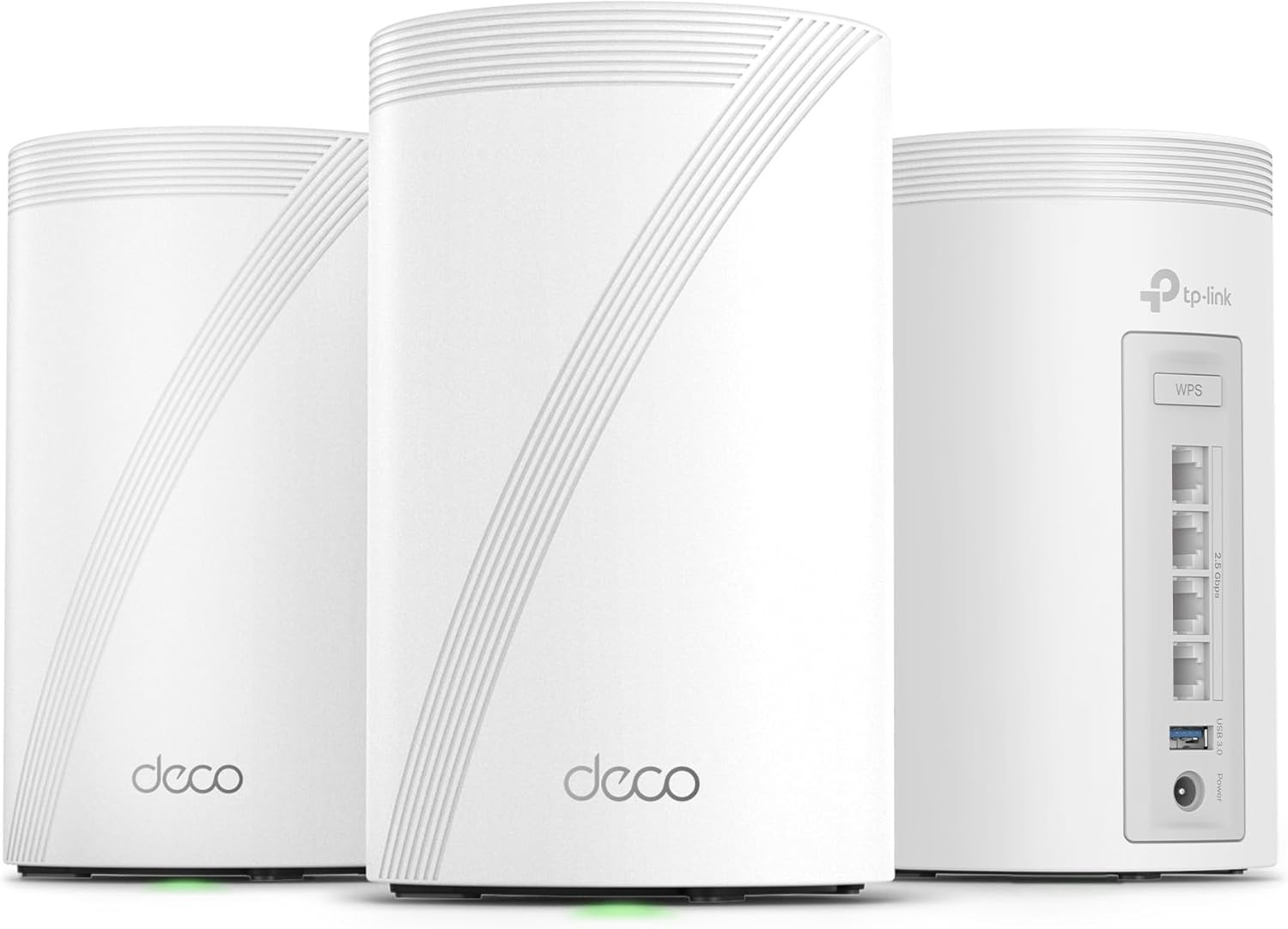

TP-Link Deco 7 Pro BE63 — Quick verdict
You’ll find the TP-Link Deco 7 Pro BE63 is a high-performance Wi‑Fi 7 mesh system that aims to combine raw throughput with wide coverage and modern features. It’s especially useful if you want a single, easy-to-manage network that supports many devices and heavy streaming or gaming without frequent manual tuning.
Who this is for
If you live in a large home, run multiple 4K/8K streams, or keep many smart devices active, this system is built to keep everything moving smoothly. You’ll also appreciate the wired options and VPN support if you have a wired backbone or want device-level VPN routing.
TP-Link Deco 7 Pro BE63 Tri-Band WiFi 7 BE10000 Whole Home Mesh System - 6-Stream 10 Gbps, 4x2.5G Ports Wired Backhaul, 4X Smart Internal Antennas, VPN, HomeShield, Free Expert Support (3-Pack)
$469.99 In Stock
Key specifications at a glance
Below is a simple breakdown of the most important specifications so you can quickly compare the system to your needs. The table focuses on wireless speeds, wired ports, coverage, and standout features you’ll notice day to day.
| Category | Specification |
|---|---|
| Product Name | TP‑Link Deco 7 Pro BE63 Tri‑Band WiFi 7 BE10000 Whole Home Mesh System (3‑Pack) |
| Wi‑Fi Standard | Wi‑Fi 7 (802.11be) |
| Band Speeds (theoretical) | 6 GHz: 5188 Mbps, 5 GHz: 4324 Mbps, 2.4 GHz: 574 Mbps |
| Streams | 6‑Stream |
| Coverage (3‑pack) | Up to ~7,600 sq.ft. |
| Device Capacity | Supports 200+ devices |
| Wired Ports | Four 2.5G WAN/LAN ports per unit, USB 3.0 (per unit) |
| Backhaul | Dual wireless + wired backhaul (simultaneous support) |
| Antennas | 4x smart internal antennas |
| Security | TP‑Link HomeShield (subscription options), VPN Client & Server |
| Voice Control | Amazon Alexa, Google Assistant |
| Management | Deco App (iOS/Android) |
| Support | Free expert support, TP‑Link ecosystem integration |
Design and hardware
You’ll notice the Deco 7 Pro BE63 units follow TP‑Link’s understated white cylindrical design that fits most home decors. The shape is compact enough to place on a shelf or table without drawing too much attention, and the internal antenna arrangement keeps the exterior clean.
Internal components and ports
Each Deco BE63 includes four smart internal antennas and multiple high-speed ports, so you won’t need to expose antennas or clutter cables. You’ll find four 2.5G WAN/LAN ports for high-bandwidth wired devices and a USB 3.0 port for storage or printers, which gives real flexibility for wired backhaul and local sharing.
Build quality and footprint
The plastic housing feels durable and the units are light enough to move while remaining stable once positioned. You’ll appreciate that the small footprint means you can place them where they perform best—central and elevated—without sacrificing space.

Coverage and device capacity
The 3‑pack claims coverage up to about 7,600 sq.ft., and in real conditions you should expect broad coverage across multi-level homes if you place the nodes strategically. You’ll also be able to connect over 200 devices without seeing the network grind to a halt, which is ideal for smart homes or households with heavy device counts.
Practical placement tips
Place one unit near your ISP modem or primary wired location, then distribute the other two to cover areas where your devices spend most time, like living rooms and bedrooms. You’ll get the best performance when units are placed in open areas with minimal obstructions and at least some line-of-sight; avoid enclosed cabinets and places near heavy appliances.
Performance: Wi‑Fi 7 features and benefits
Wi‑Fi 7 introduces several improvements you’ll notice in throughput and latency, including Multi-Link Operation (MLO), 4K‑QAM, and 320 MHz channels. The Deco BE63 combines those technologies with TP‑Link’s mesh algorithms to provide fast, consistent connections across your home.
Real-world speed expectations
Theoretical speeds are very high—5188 Mbps on 6 GHz and 4324 Mbps on 5 GHz—but real-world performance depends on client device support, interference, and placement. You’ll see major gains if you have Wi‑Fi 7 capable devices, and many Wi‑Fi 6 clients will also benefit from improved backhaul and capacity.
Latency and gaming
You’ll appreciate the low-latency behavior that comes from better channel usage and wired/wireless backhaul options. If you game competitively, wiring your console or PC to the 2.5G port will give you the most consistent ping times, while the mesh will keep mobile gaming stable as you move around.
Backhaul: wired and wireless options
TP‑Link built the Deco 7 Pro BE63 to support both wired and wireless backhaul simultaneously, which means you can combine the stability of Ethernet with the convenience of wireless mesh. You’ll get greater flexibility in how you deploy nodes, and wired backhaul can free wireless capacity for client devices.
Using the 2.5G ports for wired backhaul
Those four 2.5G WAN/LAN ports give you plenty of headroom to run high-speed Ethernet connections between nodes or to connect NAS, gaming rigs, or switches. You’ll find that wired backhaul generally yields the best maximum throughput and lower latency for critical devices.
Mixed backhaul scenarios
If you can’t run Ethernet everywhere, don’t worry—you’ll still get improved wireless backhaul performance thanks to Wi‑Fi 7 efficiencies. You’ll want to mix wired and wireless strategically; wire the most bandwidth-hungry or central nodes and rely on wireless for more inconvenient locations.
Setup and management
The Deco App makes getting started fast and straightforward, guiding you through physical placement, firmware updates, and initial settings in a few steps. You’ll be able to manage guest access, apply parental controls, and monitor network activity without needing technical expertise.
Deco App features you’ll use every day
The app gives you a network map, device list, speed tests, and settings for QoS, HomeShield features, and VPN configuration. You’ll find it handy to assign devices to priority, set schedules, and check connected-device histories, all from your phone.
Firmware updates and ongoing maintenance
TP‑Link pushes firmware updates via the app, so you’ll stay current with security patches and feature enhancements. You’ll want to install updates promptly, as they can improve stability, performance, and sometimes add new capabilities.
Security and HomeShield
HomeShield provides network protection, parental controls, and IoT security that helps you manage which devices can access what and when. You’ll have options for blocking malicious sites, setting time limits, and tracking device behavior to keep your family’s internet use safer.
Parental controls in practice
You’ll be able to create user profiles, apply content filters, and set schedules per user, which is useful for families balancing education and entertainment. You’ll also be able to pause the internet for specific devices—handy for enforcing device-free dinners or homework time.
VPN client/server support
The Deco BE63 supports both VPN client and server modes so you can route certain traffic through a remote VPN without installing software on every device. You’ll appreciate this if you need secure access to home resources while traveling or want to centralize VPN usage for several devices at once.
Voice control and smart home integration
If you use Amazon Alexa or Google Assistant, you’ll be able to control basic Deco functions with voice commands. You’ll find commands like pausing the internet or checking the network status handy, and the Deco system integrates well with other TP‑Link Deco products if you expand later.
Smart home traffic handling
As you add smart bulbs, locks, and sensors, the system’s IoT security and device capacity will keep everything connected without disrupting heavier network traffic. You’ll want to use the app to tag and manage IoT devices separately for easier troubleshooting and security controls.

Real-world testing scenarios
In a mixed-use house with 4K streaming, remote work, and multiple smart devices, the Deco 7 Pro BE63 holds steady with minimal buffering and consistent video quality. You’ll notice that when multiple users stream and one person games, the mesh handles prioritization well if you configure QoS and device priority.
Throughput tests
When wired backhaul is used and with Wi‑Fi 7 clients, throughput reaches much higher sustained rates compared to Wi‑Fi 6 mesh systems. You’ll likely see the biggest improvement in file transfers to a wired NAS or in low-latency cloud gaming when a nearby client supports the latest standards.
Signal stability and roaming
TP‑Link’s AI‑Roaming aims to keep you on the best node and frequency band as you move around the house, which reduces interruptions during calls or video streams. You’ll find that the one-network-name approach removes the guesswork and forces fewer manual reconnects between nodes.
Compatibility and backwards support
The Deco BE63 is backward compatible with all previous Wi‑Fi standards, so your older devices will continue to work fine. You’ll get full benefit when you upgrade devices to newer Wi‑Fi 6 or Wi‑Fi 7 clients, but older devices still connect normally and are managed through the same app.
Working with any ISP
The system works with virtually any internet provider as long as you have the modem you require; the Deco itself can act as the router or be placed in AP/bridge mode. You’ll want to decide whether to use the Deco as the primary router or leave your ISP gateway handling routing, depending on the features you need.
Setup scenarios and tips
If you plan to use wired backhaul, run Ethernet to the node closest to the modem and then to the other nodes for the best results. You’ll also want to place nodes centrally and high, avoid obstructions, and keep them a reasonable distance apart (not too far, not too close) to maintain both coverage and throughput.
Advanced settings to tweak
If you’re comfortable in the app or web UI, enable WPA3 where supported, configure static IPs for servers and NAS, and set device priority for gaming or streaming devices. You’ll also want to test both single-band and multi-link settings if you have a mix of device capabilities.
Troubleshooting common problems
If you encounter weak signals in specific rooms, try moving a node closer and re-running the app’s setup for optimal routing. You’ll also want to check for interference from neighboring Wi‑Fi networks and appliances; adjusting channel settings or enabling automatic channel selection can help.
When to contact support
If you experience persistent disconnections or firmware update issues, TP‑Link’s free expert support is available to help walk you through logs and diagnostics. You’ll find support especially useful if you need help integrating non-standard ISP equipment or configuring advanced VPN routes.
Pros and cons
You’ll want to weigh the strengths and trade-offs to decide if this is the best fit for your home and budget. Below is a quick table summarizing key advantages and potential drawbacks.
| Pros | Cons |
|---|---|
| Cutting-edge Wi‑Fi 7 speeds and multi-link capabilities | Real-world gains depend on client device support (Wi‑Fi 7 devices are still rolling out) |
| Four 2.5G ports per unit for high-speed wired devices | Higher cost than Wi‑Fi 6 systems |
| Supports wired + wireless backhaul simultaneously | Some advanced features require time and care to optimize |
| Strong device capacity (200+ devices) and broad coverage | HomeShield premium features may require subscription |
| VPN client/server support and USB 3.0 port | Full potential best realized with a wired backbone and modern clients |
Comparing to other mesh systems
Compared to mature Wi‑Fi 6 mesh systems, the Deco BE63 gives you a forward-looking platform with higher theoretical bandwidth and better multi-device handling. You’ll find that if you’re upgrading from older equipment, this system will reduce congestion and improve future compatibility.
How it stacks up vs Wi‑Fi 6 alternatives
If you have mostly Wi‑Fi 6 or older devices, a Wi‑Fi 7 mesh like the Deco BE63 still helps by improving backhaul and capacity, but your actual device speeds may not match the top theoretical numbers. You’ll want to compare price versus performance needs; for future-proofing, the BE63 is a strong bet.
Use cases and ideal setups
For multi-level homes with heavy streaming, simultaneous video conferencing, remote work, and many smart devices, you’ll get excellent returns on this investment. You’ll also benefit if you host local servers, store large media on NAS, or do cloud gaming where bandwidth and low latency matter.
Small business or home office
The Deco BE63 can be a good fit for a small office or home office that needs stable connections, VPN access, and guest network segregation. You’ll be able to secure work devices with HomeShield and route traffic through a VPN as needed.
Long-term considerations
Over the next several years as more devices adopt Wi‑Fi 7, you’ll appreciate the headroom the Deco BE63 provides. You’ll also want to consider that new firmware may add features, and expanding the Deco ecosystem is straightforward if you want additional nodes.
Firmware and ecosystem updates
TP‑Link regularly updates the Deco platform, so you’ll likely see ongoing improvements without buying a new system. You’ll want to watch release notes for feature upgrades like enhanced roaming logic, improved security, and performance optimizations.
Final recommendation
If you want a powerful, future-ready whole-home mesh with strong wired options and comprehensive features, the TP‑Link Deco 7 Pro BE63 is an excellent choice. You’ll especially benefit if you plan to upgrade client devices over time or need high device capacity and robust parental and security controls.
Who should consider alternatives
If you don’t need the latest Wi‑Fi standard and want to save money, a Wi‑Fi 6 mesh might offer enough performance for your household at a lower cost. You’ll also consider alternatives if you have a very small apartment where a single high-end router might be sufficient and simpler to manage.
Frequently asked questions
You’ll probably have a few questions as you decide; here are answers to common queries to help you feel confident about buying and installing the system.
Do I need Wi‑Fi 7 devices to see benefits?
No, you’ll see improved network behavior even with Wi‑Fi 6 and older devices because of better backhaul and capacity management. However, maximum throughput figures reported by TP‑Link require Wi‑Fi 7 clients to fully realize.
Can these work with my existing router or ISP gateway?
Yes, you can run the Deco in Access Point/bridge mode to keep your ISP router handling routing, or replace the ISP device by using Deco as your main router. You’ll want to check settings and disable double NAT if you use both routers.
Is HomeShield free?
HomeShield includes free basic protections, while some advanced features may require a subscription. You’ll find the free tier useful, but premium features add deeper security and more detailed controls.
Closing thoughts and buying tips
When you’re ready to purchase, think about how many nodes you truly need based on square footage and material layout in your home to avoid over- or under-buying. You’ll also want to check if your most important client devices support higher Wi‑Fi standards to maximize the value of the Deco 7 Pro BE63.
Quick checklist before purchase
- Confirm the number of nodes needed for your floor plan and dead zones.
- Make a list of devices that need wired connections and ensure you have cables/switches for the 2.5G ports.
- Plan node placement for optimal line-of-sight and minimize obstructions.
You’ll be set up for a smoother installation and faster results if you follow these steps.
If you want, I can help you plan node placement for your floor plan, compare this system against specific competitors, or walk you step-by-step through initial setup and common advanced configurations.

Disclosure: As an Amazon Associate, I earn from qualifying purchases.