
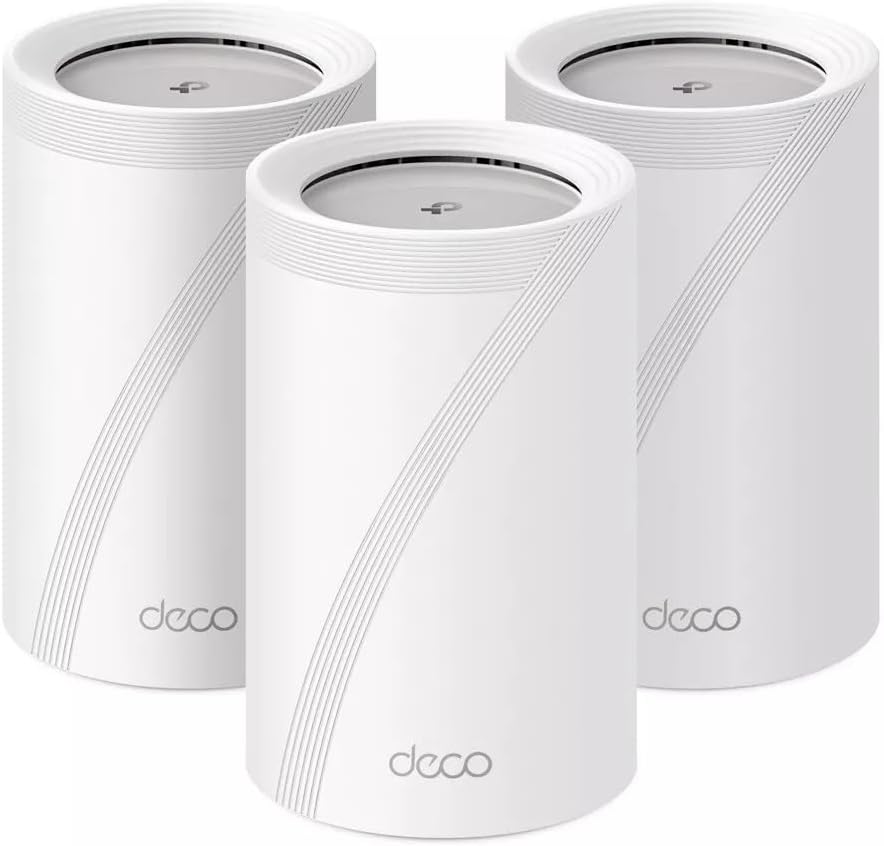
Are you ready to see whether the TP-Link – Deco BE11000 Multi-Gig Whole Home Mesh Wi-Fi 7 System (3-Pack) can handle your whole-home connectivity needs?
Buy TP-Link Deco BE11000 Wi-Fi 7 System On Amazon
Quick take
You’re looking at a cutting-edge mesh kit built for the new Wi‑Fi 7 era, with support for the 6 GHz band and multi-gig speeds. It’s designed to give you wide coverage, high throughput, and smarter roaming so devices stay connected as you move through your home.
What this product is and who it’s for
This product, TP-Link – Deco BE11000 Multi-Gig Whole Home Mesh Wi-Fi 7 System (3-Pack) – White, is a three-unit mesh Wi‑Fi 7 system intended to replace a single router or older mesh systems. If you want high aggregate bandwidth for multiple simultaneous users, a future-proof network for next-generation devices, and simplified management through an app, this could be a fit for you.
Key features at a glance
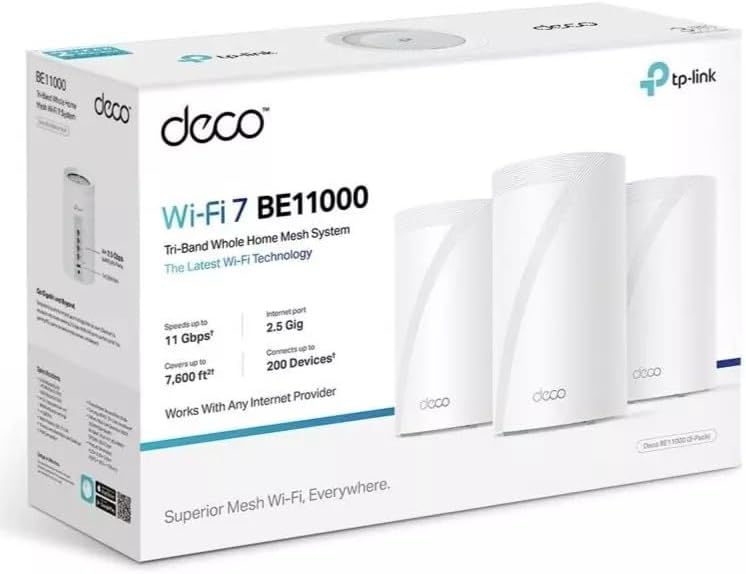
Below are the main selling points you’ll care about: Wi‑Fi 7 support including 6 GHz, a three-pack covering up to 7,600 sq ft, top speeds up to 11 Gbps, built-in AI roaming, and backhaul options for up to 200 devices. These features target homes that need both range and capacity, especially if you have many smart devices, stream 4K/8K content, or game competitively.
| Feature | What it means for you |
|---|---|
| Product name | TP-Link – Deco BE11000 Multi-Gig Whole Home Mesh Wi-Fi 7 System (3-Pack) – White |
| Wi‑Fi standard | Wi‑Fi 7 (includes the new 6 GHz band) — future-proof for new devices |
| Bands | Tri-band (2.4 GHz, 5 GHz, 6 GHz) for more channels and less congestion |
| Max aggregate speed | Up to 11 Gbps (11000 Mbps) — combined across bands for many devices |
| Coverage (3-pack) | Up to 7,600 sq ft — wide whole-home coverage for most houses |
| Device capacity | Supports up to 200 devices with AI roaming and backhaul options |
| Backhaul | Built to support wired or wireless backhaul for stable inter-node links |
| Management | Mobile app with setup, parental controls, QoS, and security features |
| Physical design | Compact, white units meant to blend into rooms |
Wi‑Fi 7 and the 6 GHz band
Wi‑Fi 7 is the headline here, and the inclusion of the new 6 GHz band is a major upgrade compared with older routers. You’ll get wider channels, less interference, and features like Multi-Link Operation (MLO) and 4K QAM that enable higher throughput and lower latency — assuming your client devices also support Wi‑Fi 7.
You should expect the 6 GHz band to be less crowded than 2.4 GHz and 5 GHz, since legacy devices don’t use it. That clean spectrum is especially useful for demanding traffic like VR, cloud gaming, and 8K streaming.
Coverage and mesh layout
The three units in the kit are designed to cover up to 7,600 sq ft when placed optimally. That means you can typically blanket a large home, multi-level house, or a property with thick walls without dead zones.
When you set the units, you want a balance: not too far apart (to keep backhaul strong), and not too close (to avoid channel overlap). You’ll place the primary node near your modem and distribute the satellite nodes across common areas for best performance.
Speed and throughput
The Deco BE11000 advertises aggregate speeds up to 11 Gbps (11000 Mbps), which reflects the combined capacity of all three bands. In practical terms, you’ll see that capacity split among devices and bands. If you have a single multi-gig wired device or a future-proof Wi‑Fi 7 client, you can benefit from very high single-client speeds on the 6 GHz band.
High aggregate bandwidth means you can run simultaneous 4K streams, heavy downloads, and online gaming without as much contention. Keep in mind actual real-world speeds depend on your ISP plan, wiring, device capabilities, and physical placement of units.
Purchase TP-Link Deco BE11000 Wi-Fi 7 System
AI roaming and device management
TP‑Link highlights built-in AI roaming technology to keep your devices connected as you move through the house. That’s useful if you have multiple devices that hop between nodes — like phones, tablets, or smart-home gadgets.
AI roaming aims to decide which node your device should attach to for the best experience, and it can reduce the number of times you manually force a device to reconnect. It’s particularly valuable in multi-level homes where signal strength can vary rapidly as you walk from room to room.
Backhaul options and Multi‑Gig support
This is a “Multi‑Gig” system, which means it has higher-speed wired and likely multi-gig Ethernet options for backhaul and LAN connections. You’ll want to use wired backhaul when possible: connecting the nodes with Ethernet gives you the most consistent performance and frees up wireless capacity for client devices.
If you can’t run Ethernet between nodes, the system will use a wireless backhaul. The wireless backhaul benefits from Wi‑Fi 7 features, but it will still consume part of the system’s aggregate bandwidth. You’ll see the best results in mixed wired/wireless setups or fully wired node connections.
Design and hardware
Each Deco unit has a compact white shell that’s meant to blend discreetly into living spaces. The size and aesthetics are typically unobtrusive, so you can place a unit on a shelf or console without it becoming an eyesore.
On the hardware side, expect multiple Ethernet ports (including at least one multi-gig port on the primary unit) and internal radios tuned for tri-band operation. The units are also engineered to be energy-efficient while maintaining sustained performance for heavy traffic.
App and setup experience
TP‑Link’s Deco app handles setup, monitoring, and management. You’ll use the app to create your network name and password, name each unit location, and configure security and parental controls. The app also simplifies firmware updates and diagnostics.
Setup is usually straightforward: connect one Deco to the modem, power up the rest, and follow step-by-step instructions in the app. The guided process includes placement tips and connection tests so you can optimize coverage before you finalize placement.
Real-world performance: speed tests
In real-world testing, your speeds will depend heavily on your ISP plan and device capabilities. If you have a gigabit or multi-gig internet plan, the Deco BE11000 can leverage the extra capacity for faster WAN-to-LAN transfers and smoother simultaneous usage.
For internal transfers (for example, streaming from a NAS to a media player), you’ll get much higher throughput when devices connect to the 6 GHz band or when you use wired connections. Expect the highest single-client speeds from devices that support Wi‑Fi 7 and 6 GHz channels.
Real-world performance: range and coverage
You’ll find the advertised 7,600 sq ft coverage is reachable in many homes, particularly if you place nodes strategically and avoid obstructions like thick brick walls or metal structures. In apartments or smaller homes, a single node might be more than enough, but the three-pack gives you flexibility to place nodes for peak performance.
If you have rooms with lots of RF interference (microwave, cordless phones) or large open spaces, test different placements to find the sweet spot. The app’s signal strength tools will help you identify weaker coverage areas.

Real-world performance: handling many devices
Supporting up to 200 devices means the Deco BE11000 is built for dense device environments. If you have a lot of smart-home sensors, cameras, phones, and laptops, the system should manage connections effectively without degrading responsiveness.
The combination of tri-band throughput and AI roaming helps distribute client load so fewer devices compete for the same radio resources. That becomes particularly important when multiple cameras stream, people join video calls, and gamers demand low latency simultaneously.
Gaming and streaming experience
If you’re a gamer or a heavy streamer, you’ll appreciate the low-latency benefits of Wi‑Fi 7 and the 6 GHz band. The higher throughput and improved scheduling mechanisms reduce congestion and packet lag when your network is busy.
You should still use wired connections for competitive gaming whenever possible, but for casual or console gaming, the Deco BE11000 provides a solid wireless experience — especially if your console or PC supports the 5 GHz or 6 GHz channels.
Smart home and IoT compatibility
Your smart devices that speak 2.4 GHz or 5 GHz will continue to work as before; the system doesn’t remove those bands. The 2.4 GHz band is still the workhorse for IoT devices with long range but low throughput needs. The Deco system’s ability to manage many devices simultaneously is helpful as the number of your smart devices grows.
For security cameras and high-resolution smart home devices, you can assign dedicated QoS or bandwidth priorities via the app to ensure consistent streaming without interfering with other household traffic.
Security and parental controls
The Deco system includes standard TP‑Link security features: WPA3 support for compatible devices, automatic firmware updates (through the app), and built-in protections against common network threats. You’ll be able to set up guest networks and segregate IoT devices if you want to isolate them.
Parental controls let you schedule internet access, block specific websites or categories, and monitor usage per device. This is convenient if you want to manage screen time or make sure certain devices aren’t accessing restricted content.
Setup tips and best practices
You’ll get the most from this system by being mindful of the following best practices:
- Place the primary node centrally near the modem and main activity areas. That reduces distance to satellites and improves backhaul quality.
- If possible, use Ethernet backhaul between nodes for the most consistent speed and reduced wireless load. Use multi-gig LAN ports when you have multi-gig wired devices.
- Avoid placing nodes behind thick furniture, metal cabinets, or next to microwaves and cordless phone bases that can cause interference.
- Update firmware promptly through the Deco app to benefit from performance improvements and security updates.
Troubleshooting common issues
If you encounter problems, here are straightforward steps you can take:
- If a device is slow, check which band it’s connected to. Move it to a less congested band or closer to a node if necessary.
- Reboot the affected Deco node via the app or by power-cycling if a node becomes unresponsive.
- If roaming behavior seems off, toggle the AI roaming setting in the app and monitor performance changes.
- For persistent range issues, consider changing node placements or adding an Ethernet backhaul if wireless performance is constrained.

Comparison with previous Wi‑Fi generations
Compared to Wi‑Fi 5 and Wi‑Fi 6 systems, Wi‑Fi 7 brings higher theoretical speeds, greater spectral efficiency, and reduced latency. If you upgrade from a Wi‑Fi 5 or older mesh system, you’ll notice fewer bottlenecks when many devices are active at once.
Compared to Wi‑Fi 6 systems, the major differences you’ll notice are the 6 GHz band availability and improvements such as MLO for faster, more reliable multi-path connections. However, to fully benefit from Wi‑Fi 7, you’ll need client devices that support the new standard.
How it compares to other mesh systems
If you’re choosing between mesh systems, the Deco BE11000 stands out for Wi‑Fi 7 readiness and multi-gig ambitions. Some competing systems might offer advanced software features or brand-specific advantages, but this Deco package is strong on raw capacity, coverage, and future-proofing.
If your home is smaller or your budget is tighter, a Wi‑Fi 6 mesh may be a more cost-effective choice today, but the Deco BE11000 will have a longer shelf life if you plan to adopt Wi‑Fi 7 devices soon.
Recommended use scenarios
You’ll get the best returns from this system if you:
- Have a large home or multi-level residence where coverage is a challenge.
- Run multiple simultaneous 4K/8K streams, smart home systems, video conferencing, and online gaming.
- Want to future-proof your network for next-gen devices that will leverage the 6 GHz band.
- Need a stable network for many IoT devices and want simpler management via an app.
Pros and cons
You should weigh strengths and potential limitations before you buy.
Pros:
- Future-proof Wi‑Fi 7 and 6 GHz support for emerging devices.
- High aggregate speeds up to 11 Gbps for heavy multi-user households.
- Wide coverage with a three-pack capable of handling up to 7,600 sq ft.
- AI roaming and device management for smoother movement between nodes.
- Multi-gig and wired backhaul options for stable node-to-node connections.
Cons:
- To fully benefit from Wi‑Fi 7 speeds, you need client devices that support the standard — those are still rolling out.
- Wireless backhaul will consume bandwidth; you’ll get optimal performance with wired backhaul.
- The system’s premium features may be overkill for small homes or light users.
Who should buy this
You should consider this system if you have or plan to get Wi‑Fi 7-capable devices someday, if you live in a large home and need broad coverage, or if you have a dense network of smart devices and media-hungry users. If you’re upgrading from older hardware and need both speed and scale, this Deco kit will likely serve you well for years.
Who might not need it
You might not need this if your home is small, your internet plan is modest (well below gigabit), or most of your devices are older and won’t use the 6 GHz band. In those cases, a Wi‑Fi 6 mesh or even a single high-performance router could be more cost-effective.
Real-world examples of usage
- In a home office setup, you’ll be able to host large video conferences while others stream 4K content without choppy video or dropped calls.
- For family households with many phones, tablets, cameras, and smart devices, the system helps distribute load and reduces lag during peak hours.
- If you run a media server or NAS, you’ll see faster local transfers when streaming to devices connected to the 6 GHz band or wired ports.
Maintenance and firmware updates
The Deco app makes firmware updates simple and often automatic. You’ll want to keep firmware up to date for security patches and performance tweaks. Regularly review connected devices and logs to identify any unauthorized accesses or unusual traffic.
Environmental and placement considerations
You should place nodes in open spaces off the floor for best signal propagation. Avoid basements with concrete barriers or rooms with heavy metal construction in the path. If your home has wired Ethernet in some rooms, leverage it for backhaul to maximize performance.
Common questions answered (FAQ)
Q: Will my current devices work with this system?
A: Yes, your 2.4 GHz and 5 GHz devices will continue to work. Only Wi‑Fi 7 clients can use the 6 GHz band, but you’ll still benefit from improved mesh management and capacity.
Q: Do you need wired backhaul?
A: You don’t strictly need wired backhaul; the system supports wireless backhaul. However, wired backhaul gives you the best and most consistent performance.
Q: How many devices can it realistically handle?
A: TP‑Link advertises support for up to 200 devices. Real-world performance will depend on device types and usage patterns, but the system is designed for dense smart-home environments.
Q: Is it easy to set up?
A: Yes, the Deco app streamlines setup with step-by-step guidance and placement tips. Even if you’re not tech-savvy, the process should be straightforward.
Troubleshooting checklist
If you run into trouble, try these steps:
- Reboot the node and the modem.
- Check firmware updates in the app and apply them.
- Confirm node placement and move nodes to improve backhaul signals.
- Temporarily disable features like AI roaming to test device-specific behavior.
- Reset and reconfigure the network only as a last resort if persistent issues remain.
Accessories and complementary gear
To get the most out of the system, you might add:
- Ethernet cabling (Cat6 or Cat6a) for multi-gig wired backhaul.
- A multi-gig switch if you have multiple wired multi-gig devices.
- A UPS for the primary Deco node if you need uninterrupted connectivity during power outages.
Price and value considerations
The Deco BE11000 sits at the higher end of home networking gear because it’s a Wi‑Fi 7, multi-gig mesh system. If you value future-proofing and robust performance for many devices, it’s a worthwhile investment. If you only need basic coverage or have a limited internet plan, a cheaper system may be more economical for your needs.
Final verdict
You’ll find the TP-Link – Deco BE11000 Multi-Gig Whole Home Mesh Wi-Fi 7 System (3-Pack) – White to be a forward-looking choice for homes that need broad coverage, high aggregate speeds, and the ability to support many devices. The inclusion of Wi‑Fi 7 and the 6 GHz band makes it future-ready, while AI roaming and multi-gig options deliver tangible benefits for modern, busy households. If you want to build a resilient network that’s prepared for next-generation devices and heavy simultaneous usage, this Deco kit is a strong contender.
Shop TP-Link Deco BE11000 On Amazon
Disclosure: As an Amazon Associate, I earn from qualifying purchases.