
?Looking for a single wall-mounted control panel that can handle lights, music, thermostat control and act as a ZigBee gateway for your Tuya devices?
Buy Tuya 8-inch Smart Control Panel On Amazon
First Impressions
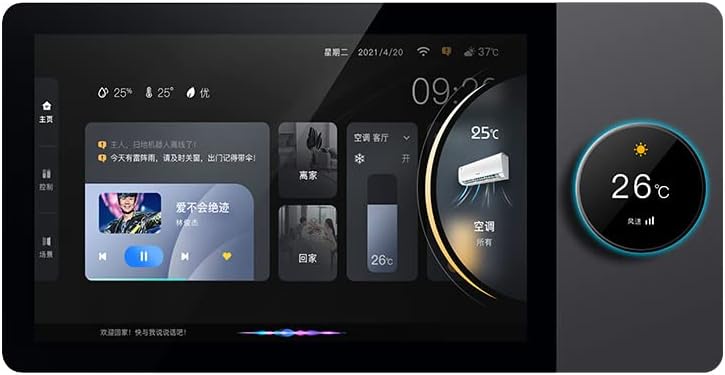
You’ll notice right away that the Tuya Smart Home 8-inch Multifunctional Intelligent Control Touch Screen Background Music Host ZigBee Gateway System in-Wall Central Control Panel for Tuya Devices aims to be an all-in-one hub and local control surface. The eight-inch IPS screen, rotary switch with a secondary 1.2-inch display, and magnetic-suction modular design make it feel more like a premium, integrated control station than a simple smart switch.
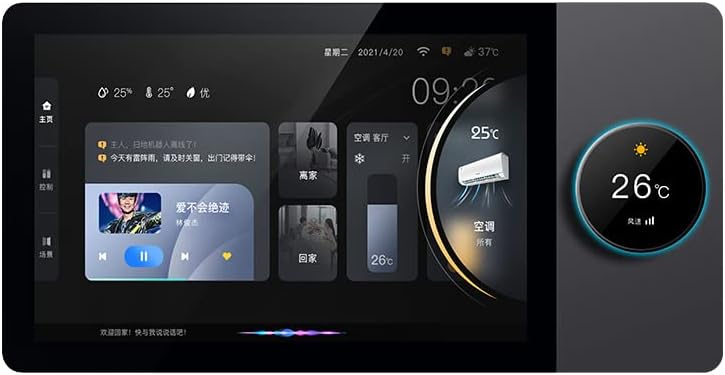
Tuya Smart Home 8-inch Multifunctional Intelligent Control Touch Screen Background Music Host ZigBee Gateway System in-Wall Central Control Panel for Tuya Devices
Product Snapshot
This product combines a central control panel, background music host, and ZigBee gateway in a single in-wall unit intended for Tuya/Smart Life ecosystems. You’ll get a touchscreen interface for scenes and devices, a physical rotary control for quick adjustments, a built-in speaker and amplifier support, and the ability to load apps from the included TF card.
Key Specifications
Below is a breakdown of the main specs so you can quickly see what this unit offers and whether it fits your setup.
| Item | Detail |
|---|---|
| Display | 8-inch IPS HD multi-touch LCD (main) + 1.2-inch LCD on rotary knob |
| Controls | Multi-touch screen + rotary switch with touch display |
| Gateway | ZigBee gateway function for Tuya devices |
| Speaker | Built-in 2W speaker; high-power amplifier supports external 2–25W speakers |
| Storage | 16GB TF card included for installing apps and storing media |
| Connectivity | ZigBee + Wi-Fi (for Tuya/Smart Life app remote control) |
| Sensors | Ambient light sensor (auto-brightness) |
| Installation | In-wall design; magnetic suction detachable front; fits standard wall box |
| Compatibility | Tuya/Smart Life ecosystem; works with lights, curtains, AC, scenes, etc. |
| Audio Options | Local playback, app-driven audio, external speakers or Bluetooth speakers via amp |
| Year/Design | 2023 newest upgrade design with rotary switch integration |
You’ll find these specs cover most of the hardware and ecosystem aspects; they give a quick snapshot of what you’re getting without checking manuals or seller pages.
What’s in the Box
You’ll typically receive the 8-inch central control host, the magnetic suction front panel, the rotary knob assembly, the 16GB TF card, and a mounting frame or bracket for the wall box. There are usually screws and a basic quick-start guide included, but wiring diagrams might be minimal depending on the seller.
You’ll want to verify whether the vendor includes an external power adapter or requires wiring to an existing household AC line; most in-wall solutions need a permanent mains connection and a neutral wire to operate reliably.
Purchase Tuya 8-inch Smart Control Panel
Design and Build Quality
The panel feels modern and purpose-built for in-wall installation, with a glossy front and an IPS screen that gives good viewing angles. The magnetic suction mechanism is a standout for easy removal without tools, and the rotary knob integrates a secondary tiny screen that adds convenience for thermostat or dimmer control.
You’ll find that fit and finish are generally solid for the price point, although the exact feel and longevity will also depend on the manufacturer batch and shipping. The central unit is intended to sit flush with the wall for a clean look.
Display and Touch Experience
The 8-inch IPS multi-touch screen offers enough space to place widgets, scene buttons, and quick controls in a readable layout. The panel supports multi-touch gestures and should be responsive in normal home use.
You’ll appreciate the auto-brightness feature, which adjusts screen intensity based on ambient light so the display isn’t overly bright at night nor faded during the day. The touch surface is smooth and responsive, making daily interactions pleasant.
Rotary Switch and 1.2″ LCD
The rotary control is useful for rapid adjustments like temperature changes and light dimming, and the tiny 1.2-inch display on the knob provides instant feedback without bringing the main screen up. You’ll be able to rotate for fine control and tap for quick actions, which can be faster than navigating the main touchscreen for routine tasks.
You’ll also find scene selection and device switching faster using the rotary knob for common actions, reducing screen time for simple tasks.
Magnetic Suction Installation
The magnetic suction design allows the front panel to clip on and off easily without tools, making access for wiring, maintenance, or cleaning straightforward. You’ll be able to remove the panel in seconds while the mounting frame and internal assembly remain secured in the wall.
You’ll want to be careful with alignment and ensure the magnetic surface is kept clean to preserve secure attachment over time, but the mechanism reduces installation hassle significantly.
In-wall Fit and Wiring
The unit is made to fit standard European/Asian wall boxes (check product specs for dimensions to match your local standard). You’ll generally need a neutral wire and a permanent live connection to power the device and ZigBee radio reliably.
You’ll need basic electrical knowledge or a licensed electrician to wire this safely, especially if replacing a mechanical switch. Always cut power at the breaker before attempting installation.
Features and Functionality
This control panel tries to be a jack-of-all-trades by combining local control, ZigBee hub functionality, multi-room audio options, and the ability to run Android-style apps from the included TF card. You’ll get an integrated experience for scenes, direct device control, and background music.
You’ll also have the advantage of a local interface for immediate control even if your phone is not available, plus remote app management through Tuya/Smart Life when connected to your network.
ZigBee Gateway and Tuya Integration
The unit includes ZigBee gateway functionality that lets you pair ZigBee devices directly to the in-wall host, so it can act as the central coordinator for bulbs, sensors, switches, and other ZigBee endpoints. You’ll be able to manage these devices from the panel or via the Tuya/Smart Life app remotely.
You’ll want to ensure devices are Tuya-compatible or ZigBee-compliant for smooth pairing. The ability to centralize ZigBee devices means fewer extra hubs or bridges and more cohesive automation through the Smart Life ecosystem.
Smart Scenes and App Control
You’ll be able to create and run smart scenes directly from the panel — set “Good Morning” to raise blinds, set thermostat, and start your morning playlist with a single tap. Scenes created in the Tuya/Smart Life app sync with the panel so you can trigger them either locally or remotely.
You’ll appreciate that this avoids the constant need to open your phone app to find and trigger individual devices; frequently used scenes can be displayed prominently on the 8-inch screen.
Music, Speaker, and Audio Options
The unit has a built-in 2W speaker sufficient for basic voice prompts, alarms, and background sound but not powerful stereo music playback on its own. If you want real music in a room, the host includes a high-power amplifier and can drive external 2–25W speakers for fuller sound.
You’ll also be able to add your own player apps on the TF card and route audio via the host to external speakers or Bluetooth devices where supported. This opens up practical setups where the panel serves as both control UI and an audio hub for the room.
Expandability: Apps via 16GB TF Card
The included 16GB TF card allows you to install apps such as music players or other utilities that can run on the device platform supplied by the manufacturer. You’ll be able to store music, use local apps, and customize the panel experience beyond standard Tuya functions.
You’ll want to check compatibility of Android or APK versions with the device’s firmware; not all third-party apps may run perfectly in the device environment, and some may require sideloading or configuration.
Sensors and Automations
You’ll get an ambient light sensor for auto-brightness and, depending on model firmware and regional options, potentially additional sensor integrations via ZigBee (motion sensors, temperature/humidity). The panel can be part of automations that respond to sensor triggers and schedules.
You’ll be able to set screen brightness behavior, timed scenes, and sensor-triggered actions to make the panel both convenient and energy-efficient.

Performance
In real-world use, responsiveness is influenced by network conditions, the number of paired devices, and local firmware optimization. The touchscreen and rotary switch generally respond quickly for typical controls, though complex scenes might feel slower if many devices execute at once.
You’ll notice that pairing multiple ZigBee devices increases the hub’s workload; for most homes, the panel performs well, but very large ZigBee networks might be better served by a dedicated enterprise-grade coordinator.
Responsiveness and Multitouch
The multi-touch screen is responsive for swiping, tapping, and multi-finger gestures used by the UI. You’ll rarely see lag for basic tasks like toggling lights, choosing scenes, or launching local apps.
You’ll see more variability when streaming audio, running background tasks, or when multiple ZigBee commands execute simultaneously — factors that depend on overall network load.
Thermostat and Dimmer Control
The rotary knob’s 1.2-inch display is great for temperature adjustments and dimming, providing tactile control and immediate visual feedback. You’ll find it much faster to adjust brightness or temperature with the knob versus navigating menus.
You’ll want to confirm integration specifics (e.g., HVAC protocols or thermostat compatibility) when using third-party or non-Tuya thermostats; the knob may send controls through Tuya scenes or ZigBee, which rely on the target device’s compatibility.
Reliability as a ZigBee Gateway
As a ZigBee gateway for a home setup of typical size (dozens rather than hundreds of nodes), the device should be reliable for most users. You’ll need to place the panel in a central location and ensure robust Wi-Fi where remote features are required.
You’ll want to watch for firmware updates and follow manufacturer guidance for best stability; firmware quality has a big impact on ZigBee reliability and device interoperability.
Installation Guide (brief)
You’ll want to follow safety steps: cut power at the breaker, verify wiring, and either install in a compatible wall box or use a professional electrician. The magnetic front and modular design make the panel easy to remove and reattach after wiring.
You’ll need to prepare wiring for a permanent live and neutral, connect ground if available, and secure the host unit to the wall box. After physical installation, software pairing and app setup complete the process.
Step-by-step installation tips
You’ll want to: turn off power, remove the old switch, check for neutral wire, mount the back module in the wall box, attach wiring per diagram, close frame, attach front panel magnetically, power on, and configure in Tuya/Smart Life app. Each step should be performed carefully and a licensed electrician consulted if you’re not comfortable.
You’ll also want to keep the TF card ready for any app installs or media copying before finalizing setup to save time.

Software and App Experience
The unit integrates with Tuya/Smart Life app for remote control and cloud-based automations. You’ll use the app for pairing, scene creation, and remote control, but the panel also supports local scene triggers and app-based functionality via the TF card.
You’ll find the app experience familiar if you’ve used other Tuya-compatible devices; the main caveat is to keep firmware and app versions up-to-date.
Compatibility with Smart Life/Tuya App
You’ll get standard Tuya features: device grouping, scene creation, voice assistant linking (Google, Alexa where supported), and remote control via cloud. The panel functions as a node in your Tuya ecosystem and will show up in the Smart Life app for remote scene triggers and settings.
You’ll need a registered Tuya/Smart Life account to use cloud features and to link voice assistants, and you might occasionally need to re-authorize or re-pair devices during major firmware updates.
Using Third-Party Apps on TF Card
You’ll be able to sideload or install compatible music players and utilities to the included 16GB TF card, expanding the panel’s capabilities beyond stock Tuya features. The device’s platform likely supports a subset of Android-style apps, but compatibility isn’t guaranteed for every APK.
You’ll want to test your preferred media player before committing to using the panel as your primary music hub; battery, codecs, and DRM issues can limit functionality for some streaming services.
Use Cases and Room Suggestions
This unit is ideal where you want an elegant wall-mounted control point that also provides audio and acts as the home’s ZigBee coordinator. Consider using it in living rooms, kitchens, bedrooms, or a central hallway for household-wide scene triggers.
You’ll appreciate the panel in spaces where you want touchscreen control plus tactile rotary adjustment for common tasks like volume, brightness, and temperature changes.
Living Room
In the living room, the panel doubles as a smart control center and music host for a single-zone speaker setup. You’ll be able to control lights, blinds, speakers, and TV scenes from one place.
You’ll find it especially handy for guests who want simple controls without needing an app.
Bedroom
Use the panel as a bedside control: one-touch “Good Night” scene, alarm and wake-up music, thermostat adjustments, and dimming without fumbling for a phone. The 1.2-inch rotary display is convenient for quick adjustments in the dark.
You’ll also appreciate the panel’s auto-brightness for nighttime comfort.
Kitchen
In a kitchen, the panel can trigger cooking or cleaning scenes, control vents or exhaust fans (via smart plugs), and play recipe audio or music while you work. You’ll appreciate tactile control when hands are messy.
You’ll want to keep the panel within easy reach but away from direct water exposure.
Home Office
The office benefits from centralized scene controls — set “Focus Mode” for lights, thermostat, and white-noise playback via the external speakers. You’ll find app integration with calendars and automations helpful for work routines.
You’ll also use the panel as a quick media controller during breaks.
Pros and Cons
You’ll get a clear sense of strengths and trade-offs from this concise list.
Pros:
- All-in-one: ZigBee gateway + touchscreen + audio host.
- Rotary knob with 1.2″ display makes common tasks fast.
- Magnetic suction front simplifies maintenance and installation.
- Expandable audio via high-power amplifier and external speakers.
- 16GB TF card enables local apps and media.
- IPS screen with auto-brightness for comfortable viewing.
Cons:
- In-wall installation requires neutral and some electrical skill.
- Built-in 2W speaker is weak for serious music listening.
- App compatibility for third-party apps may be hit-or-miss.
- Firmware and ecosystem stability depend on vendor updates.
- May not replace a full media system without external speakers.
You’ll weigh pros and cons depending on your priorities: if central control plus local UI are key, this panel is compelling; if high-fidelity audio is critical, you’ll plan for external speakers.
Troubleshooting and Tips
If you experience pairing issues, reset both the panel and the device you’re pairing, check ZigBee channel conflicts, and ensure you’re within range of the gateway. If audio problems occur, check TF card content, verify amplifier connections, and test with a simple local file to rule out streaming service issues.
You’ll want to regularly check for firmware updates and keep backups of any custom automation rules to avoid losing configurations after updates.
Practical tips
- Make sure you have a neutral wire before purchase to avoid rewiring.
- Place the panel centrally in the home for best ZigBee coverage.
- Use external speakers for real music playback rather than relying on the onboard 2W speaker.
- Keep the TF card backed up if you install apps or store media.
You’ll find these small preparations help prevent most common issues and make daily use smoother.
Security and Privacy Considerations
As a networked device and ZigBee coordinator, the panel has access to your home device controls and potentially local audio media. You’ll want to use strong, unique passwords for Tuya/Smart Life accounts and enable any available two-factor authentication on cloud accounts.
You’ll also consider where the panel is installed and who has physical access, since the magnetic front makes it easy to remove. Avoid loading apps or APKs from untrusted sources on the TF card to reduce security risks.
Comparison with Alternatives
Compared to a basic Tuya ZigBee USB stick or separate hub, this in-wall solution gives a physical UI and room-specific audio, reducing the need for extra devices. Versus a dedicated smart touch controller from high-end brands, the value is in the multifunction and price point, though enterprise-grade controllers may have tighter integrations and better long-term support.
You’ll find this unit best for users who want consolidation (hub + UI + audio) in a single wall-mounted device. If you only need a hub or only a touchscreen, cheaper dedicated options might fit better.
Final Verdict and Buying Advice
If you want a single, elegant wall-mounted device that centralizes Tuya ZigBee devices, offers local scene control, and provides basic audio features, the Tuya Smart Home 8-inch Multifunctional Intelligent Control Touch Screen Background Music Host ZigBee Gateway System in-Wall Central Control Panel for Tuya Devices is a compelling option. You’ll get a solid touchscreen experience, a useful rotary knob, and flexible audio expansion.
You’ll need to verify wiring compatibility and be comfortable performing or paying for in-wall installation. If your priorities include true high-fidelity audio or guaranteed app compatibility, plan to add external speakers and test app behavior before relying on it as your primary media system.
Quick FAQ
Q: Will this work with Google Assistant or Alexa?
A: Yes, via Tuya/Smart Life cloud integrations you can link voice assistants for remote voice control, assuming those services are available in your region.
Q: Can you play Spotify or other streaming apps?
A: You can install compatible apps to the TF card, but streaming service compatibility depends on the app, the device firmware, and DRM restrictions. Test before relying on it.
Q: Do you need a neutral wire to install?
A: Most in-wall smart hosts require a neutral connection; confirm the wiring requirements and consult an electrician if unsure.
Q: How many ZigBee devices can it handle?
A: For typical homes (a few dozen devices) it should be fine; very large ZigBee networks (100+ devices) may be better served by a dedicated coordinator.
Q: Is the front panel removable?
A: Yes, the magnetic suction design makes removal easy for cleaning or access without tools.
Q: Can it act as a multi-room audio hub?
A: It’s primarily a single-room host. You can use it as one zone in a larger multi-room setup if your system architecture supports multiple hosts, but it’s not a standalone multi-zone server by itself.
You’ll be able to decide if the panel suits your home after checking wiring, evaluating audio needs, and verifying app expectations. If central control, tactile convenience, and integrated ZigBee coordination are what you want, this panel is worth serious consideration.
Check The Tuya 8-inch Smart Control Panel Price On Amazon
Disclosure: As an Amazon Associate, I earn from qualifying purchases.